HPE Virtual Connect 64Gb Fibre Channel Module for Synergy: технические характеристики и документация
|
Have feedback on QuickSpecs? We're listening | |
|
HPE Virtual Connect 64Gb Fibre Channel Module for HPE Synergy QuickSpecs
The HPE Virtual Connect SE 64Gb FC Module for HPE Synergy is a Storage Area Network (SAN) interconnect with a wire-once change-ready technology.
The HPE Virtual Connect 64Gb Fibre Channel (FC) module in conjunction with Synergy composer powered by HPE OneView allows workloads to be moved or managed without modifying the network. HPE OneView provides an intuitive management console for seamless connectivity between virtualized Synergy Compute Modules and 64Gb FC SAN fabrics. It provides breakthrough application performance, operational stability, and simplified manageability to meet the stringent business requirements with 64Gb FC technology for HPE's Composable Infrastructure. |
|
|
HPE Virtual Connect 64Gb Fibre Channel Module for HPE Synergy |
| |
|
The HPE Virtual Connect 64Gb FC Switch for HPE Synergy provides industry-leading performance with <700ns frame latency for fast switching, switching bandwidth up to 1,536 Gbps to enable demanding applications and high-density server virtualization. It is ideal for enterprises planning to deploy 64Gb FC to meet the ever-growing bandwidth demands of high-density virtualization/applications utilizing top-end Storage arrays and for customers looking to deploy scalable private cloud storage networks using HPE Synergy for workloads.
HPE Virtual Connect 64Gb FC Switch Module for HPE Synergy is designed with NVMe in mind and provides next-generation storage connectivity to existing storage networks. It provides scalability with 12 external SFP+ ports each supporting 64Gb, 32Gb, and 16Gb FC speeds that customers can utilize on-demand parallel with their business growth. And since it is an integrated part of the Synergy Frame design, it lowers TCO, frees-up rack space, enables shared power and cooling, and reduces cabling resulting in significant infrastructure savings.
The HPE Virtual Connect 64Gb Fibre Channel Module for HPE Synergy is protected by HPE Services 3-Years Next Business Day 9x5 Hardware Support. |
||
|
|
||
|
|
||
|
The HPE Virtual Connect 64Gb Fibre Channel Module for HPE Synergy Front View
|
| |
|
|
| |
|
Models |
| |
|
HPE Virtual Connect 64Gb Fibre Channel Module for HPE Synergy |
P68134-B21 |
|
|
|
| |

|
Supported Products |
|
Compatibility HPE Virtual Connect 64Gb Fibre Channel Module for HPE Synergy must be deployed within the HPE's Composable Infrastructure solution and is compatible only with HPE Synergy Frames. |
|
HPE Compute Module HPE Compute Modules: - HPE Synergy 480 Gen10 Compute Module - HPE Synergy 660 Gen10 Compute Module - HPE Synergy 480 Gen10Plus Compute Module - HPE Synergy 480 Gen11 Compute Module - HPE Synergy 480 Gen12 Compute Module |
|
Fibre Channel Host Bus Adapters (HBA) 64Gb and 32Gb HPE Fibre Channel Mezzanine cards for HPE Synergy are supported
- HPE Synergy 7330C 64Gb Fibre Channel Host Bus Adapter - HPE Synergy 5331C 32Gb Fibre Channel Host Bus Adapter - HPE Synergy 5330C 32Gb Fibre Channel Host Bus Adapter - HPE Synergy 5830C 32Gb Fibre Channel Host Bus Adapter
- Please refer to the HPE FC Mezzanine HBA Product QuickSpecs for Compute Module support details.
|
| ||||||||||
|
| ||||||||||
|
Supported Configurations |
|
|
|
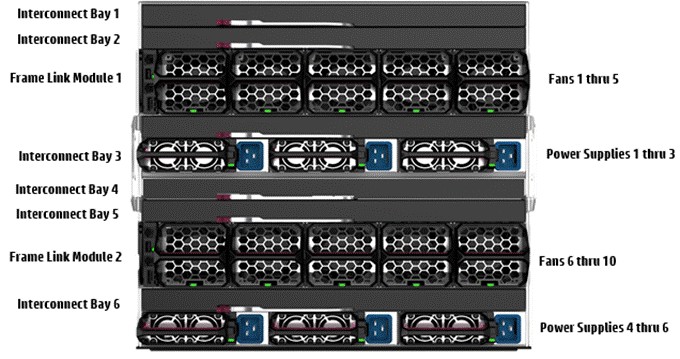
HPE Synergy 12000 Frame - Rear View |
|
|
|
HPE Synergy 12000 Frame |
|
Notes: For ease of representation and understanding paired Interconnect Bay (ICB) are shown adjacent rather than vertically as in the real frame. Interconnect frames are formed between ICB 1 with ICB 4, ICB 2 with ICB 5, and ICB 3 with ICB 6. Therefore, the representation below is used. |
| ||||||||||||||||||||||||||||||||||||||||||||||||||||||||||||||||||||||||||||||||||
|
Stacking Configuration Stacking is only supported on Virtual Connect SE 100Gb F32 Modules via Primary/Satellite stacking or between two Virtual Connects with M-LAG. The Virtual Connect FC modules do not support stacking. |
|
|
|
Product Features Performance - (12) 16/32/64 Auto-negotiating Fibre Channel uplinks connected to external SAN switches - (12) 32/64Gb Fibre Channel downlink ports provide maximum HBA performance - HBA Aggregation on uplink ports using ANSI T11 standards-based N_Port ID Virtualization (NPIV) technology - Allows up to 255 virtual machines running on the same physical compute modules to access separate storage resources - Extremely low-latency throughput provides switch-like performance |
|
Management - Storage management is not constrained to a single physical HBA on a compute module - Managed with composer based HPE OneView - Does not add to SAN switch domains or require traditional SAN management - Appears as a pass-through device to the SAN Manager |
|
Virtual server profiles - Provisioned storage resource is associated directly with a specific virtual machine - even if the virtual server is re-allocated within the Synergy Frame - Ability to pre-configure compute module I/O connections - Ability to move, add, or change compute modules on the fly - Once defined, SAN Administrators don't have to be involved in compute module changes |
|
|
|
|
|
Transceivers |
|
|
HPE B-series 64Gb SFP56 Short Wave 1-pack Secure Transceiver |
R7M15A |
|
HPE B-series 64Gb SFP56 Short Wave 8-pack Secure Transceiver |
R7M16A |
|
HPE B-series 32Gb SFP28 Short Wave 1-pack Secure Transceiver |
R6B12A |
|
HPE B-series 32Gb SFP28 Short Wave 8-pack Secure Transceiver |
R6W26A |
|
HPE B-series 16Gb SFP+ Short Wave 1-pack Secure Transceiver |
R6B10A |
|
HPE B-series 16Gb SFP+ Short Wave 8-pack Secure Transceiver |
R6W28A |
|
| |
|
Cables |
|
|
HPE Premier Flex LC/LC Multi-mode OM4 2 Fiber 1m Cable |
QK732A |
|
HPE Premier Flex LC/LC Multi-mode OM4 2 Fiber 2m Cable |
QK733A |
|
HPE Premier Flex LC/LC Multi-mode OM4 2 Fiber 5m Cable |
QK734A |
|
HPE Premier Flex LC/LC Multi-mode OM4 2 Fiber 15m Cable |
QK735A |
|
HPE Premier Flex LC/LC Multi-mode OM4 2 Fiber 30m Cable |
QK736A |
|
HPE Premier Flex LC/LC Multi-mode OM4 2 Fiber 50m Cable |
QK737A |
|
HPE LC to LC Multi-mode OM3 2-Fiber 0.5m 1-Pack Fiber Optic Cable |
AJ833A |
|
HPE LC to LC Multi-mode OM3 2-Fiber 1.0m 1-Pack Fiber Optic Cable |
AJ834A |
|
HPE LC to LC Multi-mode OM3 2-Fiber 2.0m 1-Pack Fiber Optic Cable |
AJ835A |
|
HPE LC to LC Multi-mode OM3 2-Fiber 5.0m 1-Pack Fiber Optic Cable |
AJ836A |
|
HPE LC to LC Multi-mode OM3 2-Fiber 15.0m 1-Pack Fiber Optic Cable |
AJ837A |
|
HPE LC to LC Multi-mode OM3 2-Fiber 30.0m 1-Pack Fiber Optic Cable |
AJ838A |
|
HPE LC to LC Multi-mode OM3 2-Fiber 50.0m 1-Pack Fiber Optic Cable |
AJ839A |
|
| |
|
HPE Synergy Services |
|
|
Notes: See HPE Support Services Central for additional services at https://ssc.hpe.com/portal/site/ssc/ |
|
|
Deployment/Installation & Start-up Services |
|
|
HPE Factory Express Synergy Initial Frame Package 4 Service |
HA454A1-300 |
|
HPE Factory Express Synergy Add-on Frame Package 4 Service |
HA454A1-301 |
|
HPE Synergy First Frame Startup Service |
U8JM3E |
|
HPE Synergy Additional Frame Startup Service |
U8JM4E |
|
| |
|
HPE Services No matter where you are in your digital transformation journey, you can count on HPE Services to deliver the expertise you need when, where and how you need it. From planning to deployment, ongoing operations and beyond, our experts can help you realize your digital ambitions. https://www.hpe.com/services |
|
|
|
Consulting Services No matter where you are in your journey to hybrid cloud, experts can help you map out your next steps. From determining what workloads should live where, to handling governance and compliance, to managing costs, our experts can help you optimize your operations. https://www.hpe.com/services/consulting |
|
|
|
HPE Managed Services HPE runs your IT operations, providing services that monitor, operate, and optimize your infrastructure and applications, delivered consistently and globally to give you unified control and let you focus on innovation. HPE Managed Services | HPE
|
|
|
|
Operational services Optimize your entire IT environment and drive innovation. Manage day-to-day IT operational tasks while freeing up valuable time and resources. Meet service-level targets and business objectives with features designed to drive better business outcomes. https://www.hpe.com/services/operational |
|
|
|
HPE Complete Care Service HPE Complete Care Service is a modular, edge-to-cloud IT environment service designed to help optimize your entire IT environment and achieve agreed upon IT outcomes and business goals through a personalized experience. All delivered by an assigned team of HPE Services experts. HPE Complete Care Service provides: - A complete coverage approach -- edge to cloud - An assigned HPE team - Modular and fully personalized engagement - Enhanced Incident Management experience with priority access - Digitally enabled and AI driven customer experience https://www.hpe.com/services/completecare |
|
|
|
HPE Tech Care Service HPE Tech Care Service is the operational support service experience for HPE products. The service goes beyond traditional support by providing access to product specific experts, an AI driven digital experience, and general technical guidance to not only reduce risk but constantly search for ways to do things better. HPE Tech Care Service delivers a customer-centric, AI driven, and digitally enabled customer experience to move your business forward. HPE Tech Care Service is available in three response levels. Basic, which provides 9x5 business hour availability and a 2-hour response time. Essential which provides a 15-minute response time 24x7 for most enterprise level customers, and Critical which includes a 6-hour repair commitment where available and outage management response for severity 1 incidents. https://www.hpe.com/services/techcare |
|
|
|
HPE Lifecycle Services HPE Lifecycle Services provide a variety of options to help maintain your HPE systems and solutions at all stages of the product lifecycle. A few popular examples include: - Lifecycle Install and Startup Services: Various levels for physical installation and power on, remote access setup, installation and startup, and enhanced installation services with the operating system. - HPE Firmware Update Analysis Service: Recommendations for firmware revision levels for selected HPE products, taking into account the relevant revision dependencies within your IT environment. - HPE Firmware Update Implementation Service: Implementation of firmware updates for selected HPE server, storage, and solution products, taking into account the relevant revision dependencies within your IT environment. - Implementation assistance services: Highly trained technical service specialists to assist you with a variety of activities, ranging from design, implementation, and platform deployment to consolidation, migration, project management, and onsite technical forums. - HPE Service Credits: Access to prepaid services for flexibility to choose from a variety of specialized service activities, including assessments, performance maintenance reviews, firmware management, professional services, and operational best practices. Notes: To review the list of Lifecycle Services available for your product go to:
For a list of the most frequently purchased services using service credits, see the HPE Service Credits Menu |
|
|
|
Other Related Services from HPE Services: HPE Education Services Training and certification designed for IT and business professionals across all industries. Broad catalogue of course offerings to expand skills and proficiencies in topics ranging from cloud and cybersecurity to AI and DevOps. Create learning paths to expand proficiency in a specific subject. Schedule training in a way that works best for your business with flexible continuous learning options. https://www.hpe.com/services/training |
|
|
|
Defective Media Retention An option available with HPE Complete Care Service and HPE Tech Care Service and applies only to Disk or eligible SSD/Flash Drives replaced by HPE due to malfunction.
Consult your HPE Sales Representative or Authorized Channel Partner of choice for any additional questions and service options. |
|
|
|
Parts and Materials HPE will provide HPE-supported replacement parts and materials necessary to maintain the covered hardware product in operating condition, including parts and materials for available and recommended engineering improvements.
Parts and components that have reached their maximum supported lifetime and/or the maximum usage limitations as set forth in the manufacturer's operating manual, product quick-specs, or the technical product data sheet will not be provided, repaired, or replaced as part of these services. |
|
|
|
How to Purchase Services Services are sold by Hewlett Packard Enterprise and Hewlett Packard Enterprise Authorized Service Partners: - Services for customers purchasing from HPE or an enterprise reseller are quoted using HPE order configuration tools. - Customers purchasing from a commercial reseller can find services at https://ssc.hpe.com/portal/site/ssc/ |
|
|
|
AI Powered and Digitally Enabled Support Experience Achieve faster time to resolution with access to product-specific resources and expertise through a digital and data-driven customer experience
Sign into the HPE Support Center experience, featuring streamlined self-serve case creation and management capabilities with inline knowledge recommendations. You will also find personalized task alerts and powerful troubleshooting support through an intelligent virtual agent with seamless transition when needed to a live support agent. https://support.hpe.com/hpesc/public/home/signin |
|
|
|
GreenLake GreenLake is the cloud to run and manage your entire hybrid landscape-private, public, and edge. It helps you to: - Streamline IT Operations across compute, storage, and networking without the chaos - Unify and secure data, as you move faster - Accelerate AI, from pilot to production The result: greater operational efficiency, lower TCO, and faster AI delivery-all from one unified, intelligent platform built for today's hybrid enterprise. |
|
|
|
Shipping Dimensions | ||
|
Length |
19.45 in (494 mm) | |
|
Width |
15.55 in (395 mm) | |
|
Height |
5.75 in (154 mm) | |
|
Shipping Weight |
1.497 kg (3.18 lbs) | |
|
Product Specifications Hardware | ||
|
Performance |
64 Gb/sec line speed, full duplex | |
|
Bandwidth |
1.536Tbps, Full Duplex @ 64-Gbps | |
|
768Gbps, Full Duplex @ 32-Gbps | ||
|
384Gbps, Full Duplex @ 16-Gbps | ||
|
Fabric Latency (intra-switch) |
700 nSec. Latency increases as input port speed is lower than the output port speed. | |
|
Number of Fibre Channel Ports |
12 external 16/32/64-Gbps ports | |
|
12 internal 32/64 Gbps ports | ||
|
External Port Type |
Configured as Node port s (N_Port), | |
|
Internal Port Type |
Configured as Fabric port (F_Port), | |
|
Classes of Service |
Class 2 and Class 3 Fibre Channel services | |
|
Scalability |
Does not contribute to the total switch limit. See the SAN Design Guide for latest supported configurations. | |
|
Buffer Credits |
8 buffer credits per port, ASIC embedded memory | |
|
Connectors and Cabling |
SFP+ optical hot-pluggable transceiver with LC connector | |
|
Indicators |
Port ID Indicator | |
|
Module Status Indicator | ||
|
Port Link/Activity Indicator | ||
|
Module Locator (UID) | ||
|
Dimensions |
Width |
16.918 in |
|
Depth |
11.051 in | |
|
Height |
1.082 in | |
|
Weight |
Approx 3.18 lbs - without media | |
|
Environmental Ranges |
Specification |
10°C to 35°C (50°F to 95°F) |
|
Temperature Range | ||
|
Operating |
Inlet air temperature up to 43°C (109.4°F) at sea level with an altitude derating of 1.0°C per every 1000 feet of elevation above sea level to a maximum operating altitude. For example, the maximum inlet air temperature requirement at 5000 ft. above Sea level is 38°C. | |
|
Non-operating |
-40°C to 70°C (-40° to 158°F). Maximum rate of change is 20°C/Hr (36°F/Hr). | |
|
Relative humidity (noncondensing) | ||
|
Operating |
5 to 95% relative humidity, 38.7°C maximum wet bulb temperature, and non-condensing. | |
|
Non-Operating |
5 to 95% relative humidity (Rh), 38.7°C (101.7°F) maximum wet bulb temperature, non-condensing. | |
|
Altitude | ||
|
Operating |
3050 m (10,000 ft.). This value may be limited by the type and number of options installed. Maximum allowable altitude change rate is 457 m/min (1500 ft/min). | |
|
Non-operating |
9144 m (30,000 ft.). Maximum allowable altitude change rate is 457 m/min (1500 ft. /min). | |
|
Vibration | ||
|
Operating |
1 G, 10-500 Hz, 60 minutes per axis | |
|
Non-Operating |
9144 m (30,000 ft.). Maximum allowable altitude change rate is 457 m/min (1500 ft. /min). | |
|
Shock | ||
|
Operating |
Half-sine-wave shock, 40 G, 2 ms duration, in each direction of three mutually perpendicular axes. | |
|
Non-Operating |
Half-sine-wave shock, 140 G, 2 ms duration, in each direction of three mutually perpendicular axes; and square-wave shock up to 80 G, 180 inches/s velocity change, in each direction of three mutually perpendicular axes. | |
|
Power Specification |
12V @ 4.65A (56 W) |
|
|
| ||
|
Product Specifications Software |
|
Industry Standard NPIV Support The Virtual Connect Fibre Channel module works by aggregating multiple FC HBA ports over a single N-port uplink through the use of N_port_ID virtualization (NPIV). NPIV allows multiple distinguishable identities (multiple port WWNs and port IDs) over a single N-port connection. Most Fibre Channel SAN switch vendors have support for NPIV in their latest firmware release. By conforming to the NPIV standard, SAN equipment interoperability is simplified. The Virtual Connect Fibre Channel Module Provides basic 4:1, 8:1, or 12:1 NPIV Fibre Channel concentration. |
|
Data Center Connectivity Each Virtual Connect Fibre Channel module supports up to 12 SAN fabrics and is typically connected to a Fibre Channel switch that has been configured to run in NPIV mode. The 12 uplink ports are speed selectable from 16, 32, or 64Gb/s.
The setup allows SAN administrators to name the fabric that servers will connect into and set the oversubscription rate. Fibre Channel boot parameters and WWN administration are configurable options that can be integrated into server profiles.
In an NPIV environment, there is an initial brief login function between the Virtual Connect Fibre Channel Module and the data center switch. Once completed, all HBA connections appear as though they are directly connected between the compute modules and the SAN switch. The Virtual Connect Fibre Channel Module appears as a pass-through device to the SAN, yet cables are reduced as much as 12:1. |
|
Management Features - Simple and intuitive Graphical User Interface (GUI) of composer-based HPE OneView for defining, configuring, and managing all elements of the SAN. - Comprehensive administration, definition, and management of Ethernet Networks, Shared Uplink Sets using VLANs, SAN Fabric management, and Server Profiles. - Management of user accounts, enclosure, Virtual Connect settings, and firmware updates. - WWN Address Administration allows local administration of predefined WWN addresses ranges to allow pre-provisioning of SAN volumes. |
|
|
|
Management and Standards Support Standards - ANSI T11 N_Port ID Virtualization - FC-PH Rev. 4.3 - FC-PH-2 - FC-PH-3 - FC-AL Rev 4.6 - FC-AL-2 Rev 7.0 - FC-FLA - FC-GS - FC-GS-2 - FC-GS-3 - FC-FG - FC-VI - FC Element MIB RFC 2837 - Fibre Alliance MIB Version 4.0 - Fibre Channel Management MIB RFC4044 |
|
|
|
Environment-friendly Products and Approach - End-of-life Management and Recycling Hewlett Packard Enterprise offers end-of-life product return, trade-in, and recycling programs, in many geographic areas, for our products. Products returned to Hewlett Packard Enterprise will be recycled, recovered or disposed of in a responsible manner.
The EU WEEE directive (2002/95/EC) requires manufacturers to provide treatment information for each product type for use by treatment facilities. This information (product disassembly instructions) is posted on the Hewlett Packard Enterprise web site. These instructions may be used by recyclers and other WEEE treatment facilities as well as Hewlett Packard Enterprise OEM customers who integrate and re-sell Hewlett Packard Enterprise equipment. |
|
|
|
Date |
Version History |
Action |
Description of Change |
|
06-Jul-2026 |
Version 1 |
New |
New QuickSpecs |
|
|
|
Have feedback on QuickSpecs? We're listening | |
|
|
|
| |
|
|
|
Chat now | |
|
|
|
© Copyright 2026 Hewlett Packard Enterprise Development LP. The information contained herein is subject to change without notice. The only warranties for Hewlett Packard Enterprise products and services are set forth in the express warranty statements accompanying such products and services. Nothing herein should be construed as constituting an additional warranty. Hewlett Packard Enterprise shall not be liable for technical or editorial errors or omissions contained herein.
| |
|
|
|
HEWLETT PACKARD ENTERPRISE HPE.com |
|