HPE Synergy Frame Link Module: технические характеристики и документация
|
Have feedback on QuickSpecs? We're listening | |
|
HPE Synergy 4-port Frame Link Module (FLM) QuickSpecs
The HPE Synergy 4-port Frame Link Module (FLM) is a 'frame manager' designed for Composable Infrastructure. The FLM efficiently manages the operations of a Synergy Frame in conjunction with HPE Composer, which is powered by HPE OneView.
HPE Synergy 4-port Frame Link Module delivers secure, scalable frame management and automated infrastructure control for composable environments. |
|
|
Key functions of the HPE Synergy Frame Link Module include: - Scaling the environment by linking Synergy Frames together in a management ring (single management domain), - Separation of the data & management networks for management performance and resilience against Denial of Service (DoS) attacks, - Auto-discovery of resources by collecting asset and inventory info of components in linked frames, - Control and monitoring of the thermal and power infrastructure resources in an HPE Synergy Frame, - Provides out-of-band management interface to HPE OneView to configure and manage interconnect modules. - Reporting the health status for each component installed in a frame, and - Hosting the HPE Synergy Console user interface.
The HPE Synergy 4-port FLM provides enhanced security in Synergy systems by implementing: - Secure Start to validate the firmware to prevent tampering, - Hardware Root of Trust tied to the FLM CPU for further firmware validation, and - File Encryption using Trusted Platform Module (TPM) functionality. |
|
|
|
| |||
|
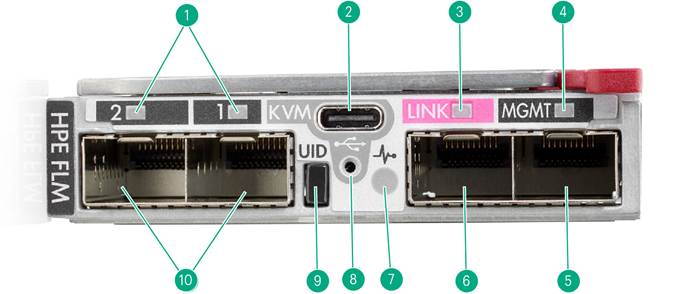
Figure 1: HPE Synergy 4-port Frame Link Module (FLM) | |||
|
| |||
|
Item |
Description |
Item |
Description |
|
1. |
Appliance port connectivity LEDs |
6. |
LINK port [SFP+]4 |
|
2. |
USB-C (KVM connection)1 |
7. |
Health LED |
|
3. |
LINK port activity LED |
8. |
USB adapter thumb screw connection |
|
4. |
MGMT port activity LED |
9. |
UID LED button |
|
5. |
MGMT port [SFP+]5, 6 |
10. |
Appliance ports [SFP+]2, 3 |
|
Notes: - 1Support for USB-C storage devices at the USB 2.0 level. - 2Provides a direct network connection to an appliance in bay 2. Reserved for future use. - 3Provides a direct network connection to an appliance in bay 1. Reserved for future use. - 4Use 10GbE transceivers and cables for LINK port connections. - 510GbE or 1GbE based on the cable or transceiver used. - 6The transceiver or cable used must match the port speed of the switch used for management network connectivity. - HPE Synergy 4-Port FLMs require supported SFP+ DAC cables or SFP+ transceivers for cabling. | |||
|
| |||
|
What's New |
|
The HPE Synergy Frame Link Module (FLM) is a 'frame manager' designed for Composable Infrastructure. The FLM efficiently manages the operations of a Synergy Frame in conjunction with HPE Composer, which is powered by HPE OneView.
HPE Synergy 4-port FLM is a new product version which implements enhancements for Synergy users.
Enhanced security for Synergy systems is implemented in the HPE Synergy 4-port FLM: - Secure Start to validate the firmware to prevent tampering, - Hardware Root of Trust tied to the FLM CPU for further firmware validation, and - File Encryption using Trusted Platform Module (TPM) functionality. Additional capabilities in the HPE Synergy 4-port Frame Link Module (FLM) include: - SFP+ ports to enable optical connections for reaching distant frames or remote subnets in a datacenter, - Two additional direct-to-the-appliance bay ports which are reserved for future use, and - USB-C connector (USB 2.0) for DisplayPort connectivity via a dongle. Notes: HPE Synergy FLMs (both 2-port and 4-port versions) are compatible with existing applications and workloads. |
|
|
|
Product Features
|
|
Performance - Management (MGMT) uplink connections can operate at 10 GbE to support multiple users or administrators and to provide faster downloading of virtual media for firmware/software updates. - Management (MGMT) port connections on the FLM are able to auto-negotiate down to 1 GbE to mate with ToR switches. - Management rings connect multiple Synergy Frames using 10 GbE (LINK) connections. - HPE Synergy 4-port Frame Link Modules have SFP+ ports which enable connections to distant frames and remote subnets.
Management - HPE Synergy FLMs are 'frame managers' which operate under HPE Composer (powered by HPE OneView) management control. - An out-of-band management interface to HPE OneView is provided by HPE Synergy FLMs to configure and manage interconnect modules. - User Interface for the Synergy FLM includes USB-C (supported to the USB 2.0 level), Health LED, User ID (UID), and DisplayPort (via USB Adapter cable). - Firmware for managing the HPE Synergy Frame Link Module is included in every HPE Synergy Custom SPP release, as part of HPE Synergy Software Releases. - HPE Synergy Software Releases provide users with tested sets of firmware, drivers, and related updates to keep systems up-and-running as stable operating environments. For more information, see HPE Synergy Software Releases - Overview.
Security All Synergy Frame Link Modules operate in FIPS (Federal Information Processing Standard) security mode. If HPE Synergy Composer (powered by HPE OneView) is put into CNSA (Commercial National Security Algorithm) mode, then HPE Composer will put the FLM into CNSA mode also.
Security enhancements which are unique to the HPE Synergy 4-Port Frame Link Module include: - Management data stored on the frame link module is encrypted by default. The encryption is rooted in the integrated Trusted Platform Module (TPM) on the hardware device, - Hardware Root of Trust (related to NIST SP800-193) which ensures that only firmware signed by Hewlett Packard Enterprise can be used to boot the frame link module, - Secure Start (related to NIST SP800-193) which provides secure firmware updates, - Firmware Resiliency prevents modification of the current running firmware image which increases reliability and by ensuring a good firmware image is always available, and - Hardware-enforced write protection protects the frame link module from unauthorized changes.
Security features which are common to all HPE Synergy Frame Link Modules include: - Separation of the production ('data') network from the management (or 'control') network, which protects against Denial of Service (DoS) attacks, - Audit logging, - Verification of certificates for Transport Layer Security (TLS), |
|
- Secure protocols and certifications such as:
- Verified boot and Authenticated updates, - Centralized platform security policies with Certificate management, - No clear text passwords, - Scope based access control (SBAC), and - Secure out-of-the-box experience with Secure Erase of user data. |
|
|
|
For the most up-to-date information on HPE Services, please refer to the HPE Services - Supplemental QuickSpecs, which provides a comprehensive and regularly updated overview of available services. |
|
Models | |
|
Notes: - HIGHLY RECOMMENDED: Add a second HPE Synergy FLM into each Synergy Frame for redundancy. - CAUTION: Both FLM units of a redundant pair in a Synergy Frame must be of the same generation. | |
|
Description |
SKU |
|
HPE Synergy 4-port Frame Link Module |
876852-B21 |
|
Notes: This Synergy Frame Link Module has 4 ports (LINK port, MGMT port, two Appliance ports). |
|
|
HPE Synergy 4-port Frame Link Module USB Adapter |
P06458-B21 |
|
Notes: USB Adapter ('dongle') is required for DisplayPort access to the rear of the HPE Synergy Frame (USB-C to DisplayPort). |
|
|
| |
|
Compatibility | |
|
HPE Synergy 4-port Frame Link Module supports the following hardware. | |
|
HPE Synergy Frames | |
|
HPE Synergy 12000 Frame
| |
|
HPE Synergy Interconnects | |
|
- HPE Virtual Connect SE 100GB F32 Module for HPE Synergy - HPE Virtual Connect SE 40GB F8 Module for HPE Synergy - HPE Synergy 40Gb F8 Switch Module
| |
|
HPE Cables and Transceivers | |
|
- See the 'Related Options' section of this document. Notes: - CAUTION: Solution integrity when using distant system connections must be verified - including limiting communication latencies in the system to <5 milliseconds (one way) in the solution. - CAUTION: Cable type and transceivers determine the distance limit of connections.
|
|
|
| |
|
Supported Configurations | |
|
| |
|
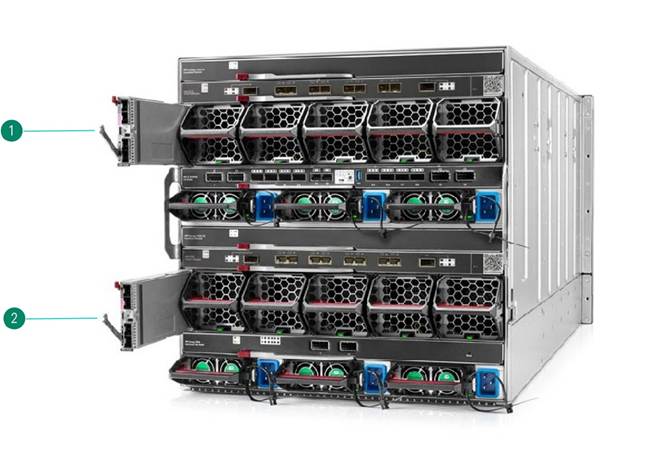
Figure 2: HPE Synergy 12000 Frame - Rear View (Frame Link Modules shown partially extended) | |
|
| |
|
Item |
Description |
|
1. |
Frame Link Module #1 |
|
2. |
Frame Link Module #2 |
|
| |
|
HPE Synergy Frame Link Modules install into one of two frame link module bays in the rear of the frame.
Notes: - HIGHLY RECOMMENDED: Add a second Synergy FLM be added into each Synergy Frame for redundancy. - CAUTION: Both FLM units of a redundant pair in a Synergy Frame must be of the same generation. - CAUTION: Use caution when installing a Synergy FLM into the Synergy Frame to avoid damage to the connector. Installing a Synergy FLM with a damaged connector can result in damage to the Synergy Frame midplane. | |
|
| |
|
DisplayPort USB Adapter
| |
|
DisplayPort connection to rear of HPE Synergy 4-port Frame Link Module | |
|
Description |
SKU |
|
HPE Synergy 4-port Frame Link Module USB Adapter |
P06458-B21 |
|
Notes: USB Adapter ('dongle') is required for DisplayPort access to the rear of the HPE Synergy Frame (USB-C to DisplayPort). |
|
|
| |
|
Copper Cables (DAC)
| |
|
DAC Cables connect SFP+ ports using copper cable with built-in transceivers.
| |
|
Notes: - For use between Synergy 4-port FLMs, and for connecting management uplinks to other SFP+ network connections. - Direct Attach Cables (DAC) use copper cables with built-in transceivers on each end. - CAUTION: Cable type determines the distance limit of connections. - Active DAC cables @ 10Gbps = 15 meters (max). - Passive DAC cables = ~5 meters. | |
|
Description |
SKU |
|
HPE BladeSystem c-Class 10GbE SFP+ to SFP+ 3m Direct Attach Copper Cable |
487655-B21 |
|
HPE BladeSystem c-Class 10GbE SFP+ to SFP+ 5m Direct Attach Copper Cable |
537963-B21 |
|
HPE Networking X240 10G SFP+ SFP+ 0.65m DAC Cable |
JD095C |
|
HPE Networking X240 10G SFP+ SFP+ 1.2m DAC Cable |
JD096C |
|
HPE Networking X240 10G SFP+ SFP+ 3m DAC Cable |
JD097C |
|
HPE Networking X240 10G SFP+ SFP+ 5m DAC Cable |
JG081C |
|
HPE Networking X240 10G SFP+ 7m DAC Cable |
JC784C |
|
Active Optical Cables (AOC) | |
|
AOC Cables connect SFP+ ports using fibre cables with built-in transceivers. | |
|
Notes: - For use connecting between Synergy 4-port FLMs and for connecting management uplinks to other SFP+ network connections. - HPE Synergy 4-port FLMs have SFP+ 10Gbps 2-fibre ports. - CAUTION: AOC cable lengths using SR transceivers = 300m (max). | |
|
| |
|
Transceivers
| |
|
Transceiver use should consider bandwidth, port types, and port counts. | |
|
Notes: - HPE Synergy 4-port FLMs have SFP+ 10Gbps 2-fibre ports. - CAUTION: Solution integrity when using distant system connections must be verified - including limiting communication latencies in the system to <5 milliseconds (one way) in the solution. - CAUTION: Cable type and transceivers determine the distance limit of connections.
|
|
|
| |
|
Transceivers (10 Gbps) for connecting SFP+ ports using AOC fibre cables. | |
|
Description |
SKU |
|
HPE BladeSystem c-Class 10Gb SFP+ SR Transceiver |
455883-B21 |
|
Notes: Typical transceiver for use with single-mode fibre cable (short range). |
|
|
HPE Networking X130 10G SFP+ LC SR Transceiver |
JD092B |
|
HPE BladeSystem c-Class 10Gb SFP+ LR Transceiver |
455886-B21 |
|
Notes: Typical transceiver for use with single-mode fibre cable (long range). |
|
|
HPE Networking X130 10G SFP+ LC LR Transceiver |
JD094B |
|
HPE Networking X130 10G SFP+ LC ER 40km Transceiver |
JG234A |
|
| |
|
Transceivers (10 Gbps) for connecting SFP+ ports to RJ45 ports using CAT6A cables. | |
|
Description |
SKU |
|
HPE 10GBase-T SFP+ Transceiver |
813874-B21 |
|
Notes: - Typical 10GbE transceiver for connecting CAT6A cables to SFP+ ports on the HPE Synergy 4-port FLM.
|
|
|
| |
|
Transceivers (1 Gbps) for connecting SFP+ ports (for use with MGMT ports only). | |
|
Description |
SKU |
|
HPE BladeSystem c-Class Virtual Connect 1G SFP SX Transceiver |
453151-B21 |
|
Notes: Typical 1Gb transceiver for use with fibre cable (<100m). |
|
|
HPE BladeSystem CClass Virtual Connect 1G SFP RJ45 Transceiver |
453154-B21 |
|
Notes: Typical 1Gb transceiver for connecting CAT cables to SFP+ ports on the HPE Synergy 4-port FLM. | |
|
| |
|
Fibre Cables | |
|
Fibre Cables require transceivers to connect SFP+ ports. | |
|
Notes: - HPE Synergy 4-port FLMs have SFP+ 10Gbps 2-fibre ports. - CAUTION: Solution integrity when using distant system connections must be verified - including limiting communication latencies in the system to <5 milliseconds (one way) in the solution. - CAUTION: Cable type and transceivers determine the distance limit of connections.
|
|
|
|
|
|
OM3 Fibre Cables |
|
|
Description |
SKU |
|
HPE LC to LC Multi-mode OM3 2-Fiber 0.5m 1-Pack Fiber Optic Cable |
AJ833A |
|
HPE LC to LC Multi-mode OM3 2-Fiber 1.0m 1-Pack Fiber Optic Cable |
AJ834A |
|
HPE LC to LC Multi-mode OM3 2-Fiber 2.0m 1-Pack Fiber Optic Cable |
AJ835A |
|
HPE LC to LC Multi-mode OM3 2-Fiber 5.0m 1-Pack Fiber Optic Cable |
AJ836A |
|
HPE LC to LC Multi-mode OM3 2-Fiber 15.0m 1-Pack Fiber Optic Cable |
AJ837A |
|
HPE LC to LC Multi-mode OM3 2-Fiber 30.0m 1-Pack Fiber Optic Cable |
AJ838A |
|
HPE LC to LC Multi-mode OM3 2-Fiber 50.0m 1-Pack Fiber Optic Cable |
AJ839A |
|
|
|
|
OM4 Fibre Cables |
|
|
Description |
SKU |
|
HPE Premier Flex LC/LC Multi-mode OM4 2 Fiber 1m Cable |
QK732A |
|
HPE Premier Flex LC/LC Multi-mode OM4 2 Fiber 2m Cable |
QK733A |
|
HPE Premier Flex LC/LC Multi-mode OM4 2 Fiber 5m Cable |
QK734A |
|
HPE Premier Flex LC/LC Multi-mode OM4 2 Fiber 15m Cable |
QK735A |
|
HPE Premier Flex LC/LC Multi-mode OM4 2 Fiber 30m Cable |
QK736A |
|
HPE Premier Flex LC/LC Multi-mode OM4 2 Fiber 50m Cable |
QK737A |
|
| |
|
HPE Synergy Services | |
|
Deployment/Installation & Start-up Services | |
|
Description |
SKU |
|
HPE Factory Express Synergy Initial Frame Package 4 Service |
HA454A1-300 |
|
HPE Factory Express Synergy Add-on Frame Package 4 Service |
HA454A1-301 |
|
HPE Synergy First Frame Onsite Startup Service |
U8JM3E |
|
HPE Synergy Addl Frame Onsite Startup Service |
U8JM4E |
|
| |
|
HPE Synergy Frame Link Module | |||
|
Shipping Dimensions |
Length |
18.50 in (469.9 mm) | |
|
Width |
10.13 in (257.3 mm) | ||
|
Height |
2.00 in (50.8 mm) | ||
|
Shipping Weight |
2.13 lbs (0.97 kg) | ||
|
Product Hardware Specifications |
Indicators |
Health LED | |
|
UID LED | |||
|
MGMT & LINK Port Activity LEDs | |||
|
Appliance Port Connectivity LEDs | |||
|
Environmental Ranges |
Temperature Range | ||
|
Operating |
10°C to 35°C (50° to 95°F) | ||
|
Non-Operating |
-30°C to 60°C (-22°F to 140°F) | ||
|
Relative Humidity (non-condensing) | |||
|
Operating |
10% to 90% relative humidity (Rh), 28°C (82.4°F) maximum wet bulb temperature, non-condensing. | ||
|
Shipping |
5% to 95% relative humidity (Rh), 38.7°C (101.7°F) maximum wet bulb temperature, non-condensing. | ||
|
Notes: - Operating temperature has an altitude derating of 1.8°F (1°C) per 1,000 ft (304.8 m). No direct sunlight allowed. Upper operating limit is 10,000 ft (3,048 m) or 70Kpa/10.1 psia. Upper non-operating limit is 30,000 ft (9,144 m) or 30.3 KPa/4.4 psia. - Storage maximum humidity of 95% is based on a maximum temperature of 113°F (45°C). Altitude maximum for storage is 70 KPa. | |||
|
Power Specification |
12V @ 4.2A (50 W max) | ||
|
| |||
|
Environmentally friendly Products and Approach
|
|
End-of-life Management and Recycling |
|
Hewlett Packard Enterprise offers end-of-life Hewlett Packard Enterprise product return, trade-in, and recycling programs in many geographic areas. For trade-in information, please go to http://www.hpe.com/info/recycle To recycle your product, please go to: http://www.hpe.com/info/recycle or contact your nearest Hewlett Packard Enterprise sales office. Products returned to Hewlett Packard Enterprise will be recycled, recovered or disposed of in a responsible manner. The EU WEEE directive (2002/95/EC) requires manufacturers to provide treatment information for each product type for use by treatment facilities. This information (product disassembly instructions) is posted on the Hewlett Packard Enterprise web site at: http://www.hpe.com/info/recycle. These instructions may be used by recyclers and other WEEE treatment facilities as well as Hewlett Packard Enterprise OEM customers who integrate and re-sell Hewlett Packard Enterprise equipment. |
|
|
|
Date |
Version History |
Action |
Description of Change |
|
20-Jul-2026 |
Version 8 |
Changed |
Service and Support section was updated. |
|
16-Feb-2026 |
Version 7 |
Changed |
HPE Rebranding applied. |
|
19-Feb-2024 |
Version 6 |
Changed |
Networking product names were updated. |
|
04-Dec-2023 |
Version 5 |
Changed |
Service and Support section was updated. |
|
15-Nov-2021 |
Version 4 |
Changed |
Service and Support Pointnext Tech Care and Complete Care information updated. |
|
16-Sep-2019 |
Version 3 |
Changed |
QuickSpecs was updated. |
|
16-Sep-2019 |
Version 2 |
Changed |
Configuration Information, Related Options, and Technical Specifications sections were updated. |
|
Added |
SKUs added in Configuration Information and Related Options. | ||
|
03-Sept-2019 |
Version 1 |
Created |
New QuickSpecs. |
|
|
|
Have feedback on QuickSpecs? We're listening | |
|
|
|
| |
|
|
|
Chat now | |
|
|
|
© Copyright 2026 Hewlett Packard Enterprise Development LP. The information contained herein is subject to change without notice. The only warranties for Hewlett Packard Enterprise products and services are set forth in the express warranty statements accompanying such products and services. Nothing herein should be construed as constituting an additional warranty. Hewlett Packard Enterprise shall not be liable for technical or editorial errors or omissions contained herein.
a00030303enw - 15423 - Worldwide - V8 - 20-July-2026 | |
|
|
|
HEWLETT PACKARD ENTERPRISE HPE.com |
|