




























HPE Virtual Connect SE 40Gb F8 Module for Synergy: технические характеристики и документация
В архивеOverview
|
HPE Virtual Connect SE 40Gb F8 Module for HPE Synergy | ||||
|
The HPE Virtual Connect SE 40Gb F8 Module is designed for Composable Infrastructure. Its disaggregated, rack-scale design uses a primary/satellite architecture to consolidate data center network connections, reduce hardware and scales network bandwidth across multiple HPE Synergy Frames. The primary module contains intelligent networking capabilities that extend connectivity to satellite frames through Interconnect Link Modules. This eliminates top of rack switch need and substantially reduces cost. The reduction in components also simplifies fabric management at scale while consuming fewer ports at the data center aggregation layer. The HPE VC SE 40Gb F8 modules eliminate up to 95% of network sprawl at the compute module edge with one device that converges traffic inside frames and directly connects to external LANs. Each redundant pair of Virtual Connect modules provide 4 adjustable downlinks connections (three Ethernet and one Fibre Channel) on each compute module. A Fibre Channel Upgrade license needs to be purchased separately to enable the Fibre channel functionality. Up to six uplinks using QSFP+ interfaces are available for connection to upstream Ethernet switches. Up to 24 uplinks are available for connection to upstream Ethernet and Fibre Channel are available with splitter cables. The HPE VC SE 40Gb F8 Modules reduce the number of components required compared to traditional and other converged network solutions by eliminating the need for separate Ethernet and Fibre Channel switches and cables. Also, Virtual Connect wire-once connection management is built-in enabling compute modules adds, moves and replacement in minutes instead of days or weeks. The Primary/Satellite disaggregated architecture removes fixed of ratios of interconnects in every frame and allows extending networking resources pool for Virtual Connect to satellite frames. | ||||
|
| ||||
|
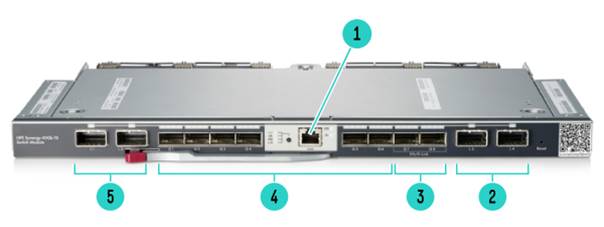
Figure 1 HPE Virtual Connect SE 40GB F8 Module for HPE Synergy Bezel | ||||
|
1. |
For future use |
4. |
40Gb QSFP+ uplink ports | |
|
2. |
Interconnect link ports |
5. |
Interconnect link ports | |
|
3. |
ICM Cluster ports |
|
| |
|
| ||||
|
Models
|
||||
|
Notes: *Obsolete product. No longer available for purchase, informational only | ||||
|
(Trade Agreement Act (TAA) compliant SKU same as above) |
| |||
|
Notes: HPE offers multiple Trade Agreement Act (TAA) compliant configurations to meet the needs of US Federal Government customers. These products are either manufactured or substantially transformed in a designated country. | ||||
|
| ||||
Standard Features
|
Supported Products
|
|
Compatibility |
|
HPE Virtual Connect SE 40Gb F8 Module for HPE Synergy Module support the following hardware. |
|
HPE Compute Modules HPE Synergy Compute Modules
|
|
HPE Interconnect Link Modules
|
|
HPE Network Adapters Converged Network Adapter:
Notes: Consult individual compute module QuickSpecs for specific adapter support. |
|
|
|
Supported Configurations |
|
|
|
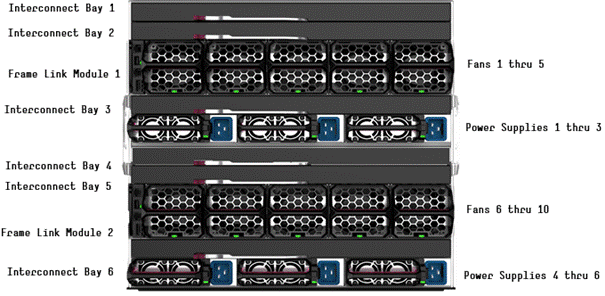
HPE Synergy 12000 Frame - Rear View |
|
|
|
Mezzanines to Interconnect Port Mapping |
|
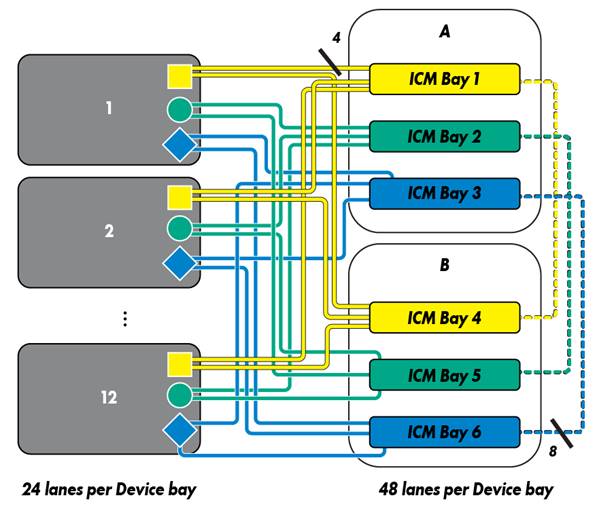
The first interconnect in an ICM bay set is connected to Port 1 of the mezzanine card and the second interconnect in an ICM bay set is connected to Port 2 of that mezzanine card. If the two interconnects in an ICM bay set are of the same type, they provide redundant connectivity to the two mezzanine ports. Notes: Dotted lines in the figure below indicate paired Interconnect Bay (ICB). |
|
|
|
|
|
HPE 12000 Synergy Frame |
|
Notes: - For ease of representation and understanding paired Interconnect Bay (ICB) are shown adjacent rather than vertically as in an actual frame. Interconnect pairs are formed between ICB 1 with ICB 4, ICB 2 with ICB 5, and ICB 3 with ICB 6. - Hence the below representation. Up to 3 Synergy frames can be deployed with the HPE VC SE 40Gb module when paired with the HPE 20Gb ILM. Up to 5 Synergy frames can be deployed with the HPE VC SE 40Gb module when paired with the HPE 10Gb ILM. Shown below is a 2 frame example with different combinations of slot placements. Mixing of 20Gb ILM and 10Gb ILM is supported and the exact number of supported frames would depend on the actual configuration. |
|
| ||||||||||||||||||||||||||||||||||||||||||
|
|
| ||||||||||||||||||||||||||||||||||||||||||
|
| ||||||||||||||||||||||||||||||||||||||||||
|
|
| ||||||||||||||||||||||||||||||||||||||||||
|
| ||||||||||||||||||||||||||||||||||||||||||
|
|
| ||||||||||||||||||||||||||||||||||||||||||
|
| ||||||||||||||||||||||||||||||||||||||||||
|
|
| ||||||||||||||||||||||||||||||||||||||||||
|
| ||||||||||||||||||||||||||||||||||||||||||
|
|
| ||||||||||||||||||||||||||||||||||||||||||
|
| ||||||||||||||||||||||||||||||||||||||||||
|
|
| ||||||||||||||||||||||||||||||||||||||||||
|
| ||||||||||||||||||||||||||||||||||||||||||
| ||||||||||||||||||||||||||||||||||||||||||
|
| ||||||||||||||||||||||||||||||||||||||||||
| ||||||||||||||||||||||||||||||||||||||||||
|
| ||||||||||||||||||||||||||||||||||||||||||
| ||||||||||||||||||||||||||||||||||||||||||
|
| ||||||||||||||||||||||||||||||||||||||||||
| ||||||||||||||||||||||||||||||||||||||||||
|
| ||||||||||||||||||||||||||||||||||||||||||
| ||||||||||||||||||||||||||||||||||||||||||
|
| ||||||||||||||||||||||||||||||||||||||||||
| ||||||||||||||||||||||||||||||||||||||||||
|
| ||||||||||||||||||||||||||||||||||||||||||
| ||||||||||||||||||||||||||||||||||||||||||
|
Product Features
|
|
Performance
|
|
Management
|
|
Options
|
|
|
Service and Support
|
HPE Pointnext - Service and Support Get the most from your HPE Products. Get the expertise you need at every step of your IT journey with HPE Pointnext Services. We help you lower your risks and overall costs using automation and methodologies that have been tested and refined by HPE experts through thousands of deployments globally. HPE Pointnext Advisory Services, focus on your business outcomes and goals, partnering with you to design your transformation and build a roadmap tuned to your unique challenges. Our Professional and Operational Services can be leveraged to speed up time-to-production, boost performance and accelerate your business. HPE Pointnext specializes in flawless and on-time implementation, on-budget execution, and creative configurations that get the most out of software and hardware alike.
Consume IT on your terms HPE GreenLake brings the cloud experience directly to your apps and data wherever they are-the edge, colocations, or your data center. It delivers cloud services for on-premises IT infrastructure specifically tailored to your most demanding workloads. With a pay-per-use, scalable, point-and-click self-service experience that is managed for you, HPE GreenLake accelerates digital transformation in a distributed, edge-to-cloud world..
Managed services to run your IT operations HPE GreenLake Management Services provides services that monitor, operate, and optimize your infrastructure and applications, delivered consistently and globally to give you unified control and let you focus on innovation. |
|
|
|
Free up resources with Operational Services from HPE Pointnext Services HPE delivers services for IT by using proven best practices as well as automation and methodologies that have been tested and refined by HPE experts and artificial intelligence through thousands of deployments globally. Choose from the recommended services for customers purchasing from Hewlett Packard Enterprise or an authorized reseller. Services are quoted using Hewlett Packard Enterprise order configuration tools.
HPE Pointnext Tech Care HPE Pointnext Tech Care is the new operational service experience for HPE products. Tech Care goes beyond traditional support by providing access to product specific experts, an AI driven digital experience, and general technical guidance to not only reduce risk but constantly search for ways to do things better. HPE Pointnext Tech Care has been reimagined from the ground up to support a customer-centric, AI driven, and digitally enabled customer experience to move your business forward. HPE Pointnext Tech Care is available in three response levels. Basic, which provides 9x5 business hour availability and a 2 hour response time. Essential which provides a 15 minute response time 24x7 for most enterprise level customers, and Critical which includes a 6 hour repair commitment where available and outage management response for severity 1 incidents.
https://www.hpe.com/services/techcare
HPE Pointnext Complete Care HPE Pointnext Complete Care is a modular, edge-to-cloud IT environment service that provides a holistic approach to optimizing your entire IT environment and achieving agreed upon IT outcomes and business goals through a personalized and customer-centric experience. All delivered by an assigned team of HPE Pointnext Services experts. HPE Pointnext Complete Care provides:
https://www.hpe.com/services/completecare
|
|
|
|
HPE Support Services and Warranty Information
|
|
Service and Support HPE Technology Services offers you a rich portfolio of consulting and support services designed to add value to our core products and solutions. We have the know-how and experience to put technology to work for you. We work closely with you, as your strategic partner, leveraging our full services portfolio to make sure that everything works to help optimize your enterprise. Choose from services aligned to our product offerings and lifecycle. From proactive onsite services to innovative support when your products are connected to Hewlett Packard Enterprise, you choose the precise level of attention and support your business demands. HPE Technology Services for HPE Synergy HPE Technology Services delivers confidence, reduces risk and helps customers realize agility and stability. Connect to Hewlett Packard Enterprise to help prevent problems and solve issues faster. Our support technology lets you to tap into the knowledge of millions of devices and thousands of experts to stay informed and in control, anywhere, any time. |
|
|
|
Advise, transform, integrate, support, automate, and flex HPE Technology Services helps you get the most out of what you have today and transition to HPE Synergy, a composable infrastructure, at your pace and from wherever you are on the journey. Start with the HPE Transformation Workshop to ensure that your business and IT organizations collaborate, define the topline strategy for composable, software-defined, cloud-ready infrastructure and kick-start your projects confidently. This workshop clarifies your business requirements and the issues that IT and operations teams must resolve in order to meet these requirements. A detailed executive briefing or high-level report summarizes the strategies, high-level plan and functional requirements. HPE Modernization and Migration Services helps you choose the right platform for the right workload at the right cost and evolve your IT infrastructure, processes and organization taking advantage of "on-hybrid infrastructure" innovations such as composable, converged, software-defined, technologies. Hewlett Packard Enterprise experts advise, transform, integrate and implement for platform refresh, datacenter consolidation virtualization, migration and automation projects.
HPE Flexible Capacity is a pay per use model for on premise infrastructure. This offers needed HPE Synergy capacity in the datacenter, plus a buffer of additional capacity. As HPE Synergy will be a dynamic environment, this provides enough room to grow your environment, but only pay for actual metered use. Technology transitions and refresh can be built in, infrastructure and services are billed monthly, enabling you to align costs to business use.
HPE Datacenter Care Infrastructure Automation: Synergy with OneView embedded helps enable infrastructure automation and is integrated with tools such as those from Chef, Puppet, and Docker, to enable rapid bare metal provisioning. With DC-IA, HPE service experts provide advice, support, best practices, for these tools that work with OneView to help create a fast, agile, and reliable automated IT environment. With this approach, customers can deploy faster. DC-IA delivers support to customers to enable infrastructure as code and agile processes as part of the service. Customers schedule quarterly reviews and reports with HPE Center of Expertise, as well as having access to these experts when needed, for automation development and code coaching. |
|
|
|
Deploy and integrate HPE Factory Express Initial Frame Service for Synergy Factory Express allows a customers' configurations to be pre-configured in the HPE Integration center with an implementation project manager to manage the deployment end to end. The project manager will act as a single point of contact to coordinate the build, delivery and onsite installation and commissioning of the solution. In addition to the configuration and deployment activities, your HPE Synergy configuration goes through comprehensive testing and a detailed documentation package on the configuration and settings of the delivered solution will be provided. HPE Factory Express Synergy Additional Frame Service for Synergy Add additional frames to your HPE Synergy Factory Express service or expand your existing HPE Synergy Infrastructure.
HPE Synergy First Frame Installation and Startup - Provides for hardware installation (HPE Synergy compute modules, Storage Modules, Virtual Connect modules, Interconnect Link Modules, Fibre Channel Modules, Frame Link Modules, and HPE Synergy D3940 Storage Modules) and software startup for the first frame of your HPE Synergy deployment. Additional frames can be added using the HPE Synergy Additional Frame Installation and Startup Service.
HPE Synergy Additional Frame Installation and Startup Service - Add additional frames to your HPE Synergy First Frame Startup service or expand your existing HPE Synergy Infrastructure. |
|
|
|
HPE Education Training your IT staff is critical to help drive the value of HPE Synergy with increased efficiencies and better business outcomes. Training is key to the transformation and management of HPE Synergy. |
|
|
|
Parts and Materials Hewlett Packard Enterprise will provide HPE-supported replacement parts and materials necessary to maintain the covered hardware product in operating condition, including parts and materials for available and recommended engineering improvements.
Parts and components that have reached their maximum supported lifetime and/or the maximum usage limitations as set forth in the manufacturer's operating manual, product QuickSpecs, or the technical product data sheet will not be provided, repaired, or replaced as part of these services.
The defective media retention service feature option applies only to Disk or eligible SSD/Flash Drives replaced by Hewlett Packard Enterprise due to malfunction. |
|
|
|
For more information Additional Support Services can be found at HPE Support Services Central: http://ssc.hpe.com/portal/site/ssc/ |
|
|
Related Options
|
Synergy Interconnect |
|
|
HPE Synergy Interconnect Link 2.1m Direct Attach Copper Cable |
804155-B21 |
|
HPE Synergy Interconnect Link 3m Active Optical Cable |
804101-B21 |
|
HPE Synergy Interconnect Link 5m Active Optical Cable |
804104-B21 |
|
HPE Synergy Interconnect Link 15m Active Optical Cable |
804110-B21 |
|
| |
|
Management |
|
|
HPE Synergy 8Gb FC License Upgrade |
N3R43A |
|
| |
|
QSFP+ uplink ports options |
|
|
HPE Synergy 40GbE/4x10GbE/4x8Gb FC QSFP+ Transceiver |
817040-B21 |
|
Notes: Mixing of Ethernet and Fiber Channel port types is not supported with the transceiver above |
|
|
HPE BladeSystem c-Class 40Gb QSFP+ MPO SR4 100m Transceiver |
720187-B21 |
|
HPE Synergy Dual 10GBASE-T QSFP+ 30m RJ45 Transceiver |
838327-B21 |
|
Notes:The transceiver above is only supported with HPE Synergy Image Streamer |
|
|
HPE 40Gb QSFP+ Bidirectional Transceiver |
841716-B21 |
|
HPE X140 40G QSFP+ LC LR4 SM 10km 1310nm Transceiver |
JG661A |
|
HPE X140 40G QSFP+ MPO MM 850nm CSR4 300m Transceiver |
JG709A |
|
HPE X140 40G QSFP+ MPO SR4 Transceiver |
JG325B |
|
HPE Multi Fiber Push On to 4 x Lucent Connector 5m Cable |
K2Q46A |
|
HPE Multi Fiber Push On to 4 x Lucent Connector 15m Cable |
K2Q47A |
|
HPE Premier Flex MPO/MPO Multi-mode OM4 12 Fiber 10m Cable |
QK729A |
|
HPE Premier Flex MPO/MPO Multi-mode OM4 8 Fiber 50m Cable |
QK731A |
|
HPE Premier Flex MPO/MPO OM4 100m Cable |
H6Z30A |
|
HPE BladeSystem c-Class 40G QSFP+ to QSFP+ 15m Active Optical Cable |
720211-B21 |
|
HPE BladeSystem c-Class 40G QSFP+ to QSFP+ 3m Direct Attach Copper Cable |
720199-B21 |
|
HPE BladeSystem c-Class 40G QSFP+ to QSFP+ 5m Direct Attach Copper Cable |
720202-B21 |
|
HPE BladeSystem c-Class QSFP+ to 4x10G SFP+ 15m Active Optical Cable |
721076-B21 |
|
HPE BladeSystem c-Class 40G QSFP+ to 4x10G SFP+ 3m Direct Attach Copper Splitter Cable |
721064-B21 |
|
HPE FlexNetwork X240 40G QSFP+ QSFP+ 1m Direct Attach Copper Cable |
JG326A |
|
HPE FlexNetwork X240 40G QSFP+ QSFP+ 3m Direct Attach Copper Cable |
JG327A |
|
HPE FlexNetwork X240 40G QSFP+ QSFP+ 5m Direct Attach Copper Cable |
JG328A |
|
Notes: In addition to the supported HPE and non-HPE Copper cables above, Virtual Connect provides "allowed" connections using third party cables that meet the following criteria: connector=copper pigtail; transceiver code=active cable or passive cable; speed equal or less than 40Gb; length between 1m and 7m, inclusive. All "allowed" DACs are connected and logged. Prior to requesting support from Hewlett Packard Enterprise, a DAC from the supported list above must be used to verify a cable issue is not involved. | |
|
| |
|
QSFP+ to SFP+ Options |
|
|
HPE BladeSystem c-Class QSFP+ to SFP+ Adapter |
720193-B21 |
|
HPE BladeSystem c-Class Virtual Connect 1G SFP SX Transceiver |
453151-B21 |
|
HPE BladeSystem CClass Virtual Connect 1G SFP RJ45 Transceiver |
453154-B21 |
|
HPE BladeSystem c-Class 10Gb SFP+ SR Transceiver |
455883-B21 |
|
HPE BladeSystem c-Class 10Gb SFP+ LR Transceiver |
455886-B21 |
|
HPE 10GBase-T SFP+ Transceiver |
813874-B21 |
|
HPE X130 10G SFP+ LC SR Transceiver |
JD092B |
|
HPE X130 10G SFP+ LC LR Transceiver |
JD094B |
|
HPE X130 10G SFP+ LC ER 40km Transceiver |
JG234A |
|
HPE C-series 3M Passive Copper SFP+ Cable |
K2Q21A |
|
HPE C-series 5M Passive Copper SFP+ Cable |
K2Q22A |
|
HPE C-series SFP+ to SFP+ Active Copper 7.0m Direct Attach Cable |
QK701A |
|
HPE C-series SFP+ to SFP+ Active Copper 10.0m Direct Attach Cable |
QK702A |
|
HPE LC to LC Multi-mode OM3 2-Fiber 0.5m 1-Pack Fiber Optic Cable |
AJ833A |
|
HPE LC to LC Multi-mode OM3 2-Fiber 1.0m 1-Pack Fiber Optic Cable |
AJ834A |
|
HPE LC to LC Multi-mode OM3 2-Fiber 2.0m 1-Pack Fiber Optic Cable |
AJ835A |
|
HPE LC to LC Multi-mode OM3 2-Fiber 5.0m 1-Pack Fiber Optic Cable |
AJ836A |
|
HPE LC to LC Multi-mode OM3 2-Fiber 15.0m 1-Pack Fiber Optic Cable |
AJ837A |
|
HPE LC to LC Multi-mode OM3 2-Fiber 30.0m 1-Pack Fiber Optic Cable |
AJ838A |
|
HPE LC to LC Multi-mode OM3 2-Fiber 50.0m 1-Pack Fiber Optic Cable |
AJ839A |
|
HPE 8Gb Short Wave Fibre Channel SFP+ 1 Pack Transceiver |
AJ718A |
|
HPE BladeSystem c-Class 10GbE SFP+ to SFP+ 3m Direct Attach Copper Cable |
487655-B21 |
|
HPE BladeSystem c-Class 10GbE SFP+ to SFP+ 5m Direct Attach Copper Cable |
537963-B21 |
|
HPE FlexNetwork X240 10G SFP+ to SFP+ 3m Direct Attach Copper Cable |
JD097C |
|
HPE FlexNetwork X240 10G SFP+ to SFP+ 5m Direct Attach Copper Cable |
JG081C |
|
Notes: For the ICM clustering ports, in addition to the 40G DAC and 40G AOC options above, any of the 40G optical transceivers above can be used with the supported fiber cables. Note that the HPE 40Gb QSFP+ Bidirectional Transceiver cannot be used for ICM clustering but may be used for uplinks. | |
|
| |
|
HPE Synergy Services |
|
|
Notes: See HPE Support Services Central for additional services at http://ssc.hpe.com/portal/site/ssc/ |
|
|
HPE Synergy Proactive Care Services |
|
|
HPE 3 Year Proactive Care 24x7 VC SE 40Gb F8 Module Service |
H0XG0E |
|
HPE 3 Year Proactive Care 24x7 with CDMR VC SE 40Gb F8 Module Service |
H0XG2E |
|
Deployment/Installation & Start-up Services |
|
|
HPE Factory Express Synergy Initial Frame Package 4 Service |
HA454A1-300 |
|
HPE Factory Express Synergy Add-on Frame Package 4 Service |
HA454A1-301 |
|
HPE Synergy First Frame Startup Service |
U8JM3E |
|
HPE Synergy Additional Frame Startup Service |
U8JM4E |
|
| |
Technical Specifications
|
Shipping Dimensions | ||
|
Length |
19.45 in (494 mm) | |
|
Width |
15.55 in (395 mm) | |
|
Height |
5.75 in (145 mm) | |
|
Shipping Weight |
Approximately 5.4Kg (12.0 Lbs) | |
|
Product Specifications Hardware | ||
|
Performance |
Line-rate, full-duplex 2.56 Tbps bridging fabric | |
|
Non-blocking architecture | ||
|
Maximum transmission unit (MTU) of up to 9216 bytes (jumbo frames) | ||
|
Connectors and Cabling |
12 x 20Gb downlinks through the midplane | |
|
6 x 40Gb SR4, LR4 fiber, DAC, AOC and Splitter uplink | ||
|
4x120Gb Interconnect Link ports | ||
|
Indicators |
Interconnect link cable port LED | |
|
QSFP+ port LED | ||
|
Next button | ||
|
Reset pin-hole | ||
|
Health LED | ||
|
Ethernet mode LED | ||
|
PID mode LED | ||
|
Link/Activity mode LED | ||
|
Weight |
4.22Kg (9.3 Lbs) | |
|
Latency |
1.0 µs on Ethernet only port | |
|
Scalability |
Does not contribute to the total switch limit. | |
|
Buffer Credits |
8 buffer credits per port, ASIC embedded memory | |
|
Environmental Ranges |
Temperature Range | |
|
Specification |
10°C to 40°C (50°F to 104°F)* | |
|
Temperature Range | ||
|
Operating |
10°C to 40°C (50°F to 104°F) | |
|
Shipping |
Shipping -40°C to 70°C (-40°F to 158°F) | |
|
Storage |
-30°C to 60°C (-22°F to 140°F) | |
|
Maximum wet bulb temperature |
38.7°C (101.66°F) | |
|
Relative Humidity (noncondensing) | ||
|
Operating |
5% to 95% | |
|
Shipping |
5% to 95% | |
|
Notes: - All temperature ratings shown are for sea level. An altitude derating of 1°C per 304.8 m (1.8°F per 1,000 ft) to 3048 m (10,000 ft) is applicable. No direct sunlight allowed. Upper operating limit is 3,048m (10,000 ft) or 70 Kpa/10.1 psia. Upper non-operating limit is 9,144 m (30,000 ft) or 30.3 KPa/4.4 psia. - Storage maximum humidity of 95% is based on a maximum temperature of 45°C (113°F). Altitude maximum for storage corresponds to a pressure minimum of 70 KPa. | ||
|
Power Specification |
12V @ 20A (240 W max) | |
|
| ||
|
Product Specifications Software
|
|
Trunking, Failover and Other Networking Features
|
|
VLAN Features
|
|
Management Features
|
|
|
|
Management and Standards Support Standards
- Maximum of 48 LAGs
- Maximum of 16 ports per MLAG, (8 ports Active, 8 ports Standby) - Maximum of 24 uplink MLAGs
|
|
|
|
Safety and Compliance Safety Certifications
|
|
|
|
Electromagnetic Emissions Certifications FCC Part 15 Class A
|
|
|
|
Environment-friendly Products and Approach - End-of-life Management and Recycling Hewlett Packard Enterprise offers end-of-life product return, trade-in, and recycling programs, in many geographic areas, for our products. Products returned to Hewlett Packard Enterprise will be recycled, recovered or disposed of in a responsible manner.
The EU WEEE Directive (2012/19/EU) requires manufacturers to provide treatment information for each product type for use by treatment facilities. This information (product disassembly instructions) is posted on the Hewlett Packard Enterprise web site. These instructions may be used by recyclers and other WEEE treatment facilities as well as Hewlett Packard Enterprise OEM customers who integrate and re-sell Hewlett Packard Enterprise equipment. |
|
|
Summary of Changes
|
Date |
Version History |
Action |
Description of Change |
|
15-Sep-2021 |
Version 16 |
Changed |
Related Options section was updated Obsolete SKUs were removed Service and Support Pointnext Tech Care and Complete Care information added |
|
11-Jan-2021 |
Version 15 |
Changed |
Overview section was updated. |
|
24-Aug-2020 |
Version 14 |
Changed |
Related Options section was updated. Rebranding applied to document. |
|
15-Apr-2019 |
Version 13 |
Changed |
Standard Features and Service and Support sections were updated. Obsolete SKUs were deleted: 747698-B21, 720205-B21, 720196-B21, 721070-B21, 487652-B21. |
|
05-Nov-2017 |
Version 12 |
Changed |
Overview, Platform Information, Standard Features, Related Options, and Technical Specifications sections were updated. Obsolete SKUs were deleted: 804095-B21, 804107-B21, J9283B. |
|
05-Mar-2018 |
Version 11 |
Changed |
SKUs added in Related Options Section: JG661A, JG709A , JG325B, 453151-B21, 453154-B21, JD092B, JD094B, JG234A SKUs deleted: 804098-B21, 720190-B21, 720208-B21, 721073-B21, 721067-B21, 487649-B21 Technical Specification section was updated |
|
08-Jan-2018 |
Version 10 |
Removed |
SKU deleted: |
|
11-Jul-2017 |
Version 9 |
Changed |
Standard Features, Platform Information, Related Options and Technical Specifications sections were updated. |
|
12-Jun-2017 |
Version 8 |
Changed |
Supported Products section was updated. |
|
08-May-2017 |
Version 7 |
Changed |
Related Options section was updated. |
|
03-Apr-2017 |
Version 6 |
Changed |
Overview, Standard Features, and Related Options sections were updated. SKUs were added in Related Options sections: SKUs were deleted per not supported in Related Options section: |
|
27-Jan-2017 |
Version 5 |
Changed |
Supported Products, Standard Features, Related Options, and Technical Specifications sections were updated. |
|
18-Nov-2016 |
Version 4 |
Changed |
Models, Related Options and Service and Support sections were updated. |
|
29-Jul-2016 |
Version 3 |
Changed |
QuickSpecs updated. SKU added: |
|
31-Mar-2016 |
Version 2 |
Changed |
Overview, Supported Products, Standard Features, Related Options, Technical Specifications sections were updated. SKUs added in Overview and Related Options Section: 794502-B23, 804095-B21, 804098-B21, 804155-B21, 804101-B21, 804104-B21, 804107-B21, 804110-B21, N3R43A, 817040-B21, 720187-B21, 720190-B21, 747698-B21, 838327-B21, 841716-B21 , K2Q46A, K2Q47A, QK729A, QK731A, H6Z30A, 720205-B21, 720208-B21, 720211-B21, 720196-B21, 720199-B21, 720202-B21, 721070-B21, 721073-B21, 721076-B21, 721064-B21, 721067-B21, JG326A, JG330A, JG331A, 720193-B21, 455883-B21, 455886-B21, 813874-B21, AP818A, AP819A, AP820A, K2Q21A, K2Q22A, QK701A, QK702A, E7Y09A, QK724A, AJ833A, AJ834A, AJ835A, AJ836A, AJ837A, AJ838A, AJ839A, 487649-B21, 487652-B21, 487655-B21, 537963-B21, JD097C, JG081C, JG329A, H0XG0E, H0XG2E, H0XG3E, H0XG5E, HA454A1-300, HA454A1-301, U8JM3E, U8JM4E. |
|
1-Dec-2015 |
Version 1 |
Created |
New QuickSpecs |
Copyright
|
|
| ||||||||||||
|
|
|
© Copyright 2021 Hewlett Packard Enterprise Development LP. The information contained herein is subject to change without notice. The only warranties for Hewlett Packard Enterprise products and services are set forth in the express warranty statements accompanying such products and services. Nothing herein should be construed as constituting an additional warranty. Hewlett Packard Enterprise shall not be liable for technical or editorial errors or omissions contained herein.
c04815258 - 15427 - Worldwide - V16 - 15-September-2021 | ||||||||||||



