




























HPE Synergy Image Streamer: технические характеристики и документация
В архивеOverview
|
HPE Synergy Image Streamer |
|
HPE Synergy is composable bladed infrastructure for any workload in a hybrid cloud environment. One infrastructure for any workload increases your productivity and control across a hybrid cloud environment. HPE Synergy infrastructure supports current- and next-gen apps, across diverse infrastructure requirements and service level objectives. It's designed with extensible management through a unified API -- which enables both today's IT workloads and support for emerging technologies for the next decade. Automating everyday operations eliminate costs, frees up resources, and simplifies IT operations with software-defined intelligence. This includes security features that go beyond perimeter security -- to prevent, detect, and recover from threats. HPE Synergy accelerates application and service delivery time by deploying at cloud-like speed and scale -- and by enabling faster and smarter apps development with a developer-friendly infrastructure.
It delivers...
HPE Synergy Composer provides the enterprise-level management to compose and deploy system resources to your application needs. This management appliance uses software-defined intelligence with embedded HPE OneView to aggregate Compute, Storage and Fabric resources in a manner that scales to your application needs.
HPE Synergy Image Streamer accelerates application and service delivery HPE Synergy Image Streamer works with HPE Synergy Composer to rapidly deploy and update composable infrastructure. The Image Streamer management appliance provides software-defined control over physical compute modules with OS provisioning. By utilizing true stateless computing, Synergy Image Streamer can automate the deployment of similar images onto new servers or quickly change workloads between Linux, VMware ESX, and Microsoft Windows.
HPE Synergy Image Streamer deploys and updates at cloud-like speed and scale. |
|
|
|
What's New |
|
HPE Synergy Image Streamer works with HPE Synergy Composer to rapidly deploy and update infrastructure and to implement rapid workload switching. Recent enhancements for HPE Synergy Image Streamer provide:
- SLES 12 SP3 and SP4 versions, - SLES OS with BTRFS filesystem using artifacts with FAT32 content, - RHEL 7.6 version, and - RHEL OS with XFS filesystem using artifacts with FAT32 content.
|
|
|
Standard Features
|
HPE Synergy Image Streamer is a hardware management appliance that is designed to work with HPE Synergy Composer to rapidly deploy and update infrastructure. Image Streamer units operate in pairs for redundancy and high availability. |
|
Image Streamer "Provision at cloud-like speed" HPE Synergy Image Streamer adds a powerful dimension to 'infrastructure as code'-the ability to manage physical servers like virtual machines. This new approach for composable infrastructure combines true stateless computing with rapid deployment and updates.
In traditional environments, deploying an OS or hypervisor is time consuming because it requires building or copying the software image onto individual servers, possibly with multiple reboot cycles. In HPE Synergy, the tight integration of HPE Image Streamer with HPE Composer enhances server profiles with images and personalities for true stateless operation. True stateless computing combines the following elements using software-defined intelligence:
Notes: If your golden image captures your application stack, then your application stack can also be deployed and/or updated with HPE Image Streamer.
HPE Composer, powered by HPE OneView, captures the physical state of the server in the server profile. HPE Image Streamer enhances this server profile (and its desired configuration) by capturing your golden image as the 'deployed software state' in the form of bootable image volumes. These enhanced server profile and bootable OS images are software structures ('infrastructure as code')-no compute module hardware is required for these operations! The bootable OS images are stored on redundant HPE Image Streamer appliances, and they are available for fast implementation onto multiple compute nodes at any time. This enables bare-metal compute modules to boot directly into a running OS and multiple compute nodes to be quickly updated.
HPE Image Streamer implements 'infrastructure as code' to manage physical servers with flexibility like virtual machines to reduce complexity, provide consistency across infrastructure, and save significant time and resources. |
|
|
|
True Stateless Operation Stateless protocols, like Internet Protocol (IP) and Hypertext Transfer Protocol (HTTP), treat each request as an independent transaction and unrelated to any previous request. Stateless operation does not require a compute module to retain session information or status.
Stateless systems can simplify compute nodes by allowing the removal of local hard disks and RAID controllers. Systems can also be pre-planned, for fast implementation later. And stateless systems can also switch to a different personality quicker than with a local installation. These advantages of stateless systems can result in CAPEX savings on server-local hardware and in highly cost-effective operations when compared to traditional 'boot-from-SAN' or local storage volumes.
HPE Image Streamer provides true 'stateless' operation by combining Profiles (from HPE Composer) with your golden images (OE and I/O driver) and with your personalities (OS and application). The resulting stateless images can be pre-planned for your environment and can remain in your control in a highly-available image repository. These stateless images are then available on-demand for rapid implementation onto hardware when needed - for initial deployment or for fast updates! |
|
|
|
High-Availability
Boot and Run Environment HPE Image Streamer provides a high-availability (HA) configuration of two physical management appliances. These redundant physical appliances install into HPE Synergy frame appliance bays and are automatically set up as a repository to manage and deploy your images on remote storage volumes. Image Streamer pairs are configured in a Network RAID-10 configuration. This provides a highly-available boot and run environment for your compute modules. Image Streamer environments scale by adding additional pairs of Image Streamer units for each additional Logical Enclosure (LE). Primary pairs will failover to secondary pairs to maintain high availability operations. HPE Image Streamer can support up to seven LE's per management ring with either 10Gb or 20Gb fabrics in this release. Full scaling up to 21 frames per management ring can be achieved using multiple LE's. |
|
|
|
Deploy and Update HPE Image Streamer uses similar processes for initial deployments and image updates. This is a new paradigm in how to manage images for compute modules. This paradigm improves administrator control over multiple nodes and multiple virtual machine hosts while improving operating efficiencies and dramatically increasing agility.
Deployments are performed from your golden images, with its operating environments and personalities. Your image content can consist of the compute module's Profile (from HPE Composer), and your Golden Image (operating environment with a bootable OS and application, and the I/O driver version) and your Personality (operating system and application configuration, which includes the hostname, IP config, etc.). If you capture an application stack as part of your image, then that application can also be deployed and updated.
In HPE Composer, the deployment plan and image parameters are specified, which results in a REST API call to the Image Streamer appliance. The Image Streamer appliance then provisions boot/run storage volume and deploys the operating system image to it. It then personalizes the operating system per the deployment plan, and generates iSCSI target for the boot/run volume. HPE Composer automatically configures the compute node with an iSCSI boot target. When the system administrator powers on a compute module, that bare-metal compute module will boot directly into a running operating system.
Updates can likewise be performed by capturing revised images and rapidly re-deploying them. Out-of-compliance images can be quickly replaced with updated images on the specified nodes. HPE Image Streamer works with HPE Composer to provide a simple user experience to accomplish server boot/run storage provisioning and operating system deployment.
Automated deployments for VMware ESX can be performed using the HPE integration for VMware vCenter (HPE OneView for VMware vCenter). Likewise, sample Ansible playbooks for deployments and updates for RHEL Linux are available. See https://github.com/HewlettPackard/
HPE Synergy Image Streamer is most effective when similar images are deployed to multiple compute modules. Its 'infrastructure-as-code' control can provide significant time savings in web-scale environments, where a software image needs to be provisioned across a large number of infrastructure blocks. These capabilities can greatly benefit IT areas needing fast changeovers, security updates, HA image storage, or programmatic access and control over infrastructure.
|
|
|
|
Workload Switching Synergy Image Streamer activates the Synergy "fluid resource pools" by enabling workload switching. Image Streamer achieves this using:
Workload switching can provide you with operations flexibility for maximum utilization and efficiency. |
|
|
|
Tools for Images A variety of tools are provided in HPE Image Streamer to assist you in creating and manipulating images:
HPE Image Streamer supports a variety of operations for flexibility in how you handle your images. For example, you can capture golden images for your use, import images from another location, or to edit some of your 'known good' images for re-use. This flexibility allows you to easily establish your desired images for use. A variety of images can be used on HPE Image Streamer. Sample artifacts are provided for:
You can also enable your own specific images and image types using the tools provided with HPE Image Streamer. HPE will provide support for the artifacts and automation scripts as posted in HPE GitHub. See https://github.com/HewlettPackard/. Consulting services are available for a fee for additional modification to these artifacts. |
|
|
|
Customize Your Environment HPE Synergy Image Streamer allows users to deploy customized boot images containing operating system and application software. The deployment process 'per compute module' allows users to configure the image based on parameters defined in an HPE OneView server profile, as well as on user-defined parameters.
HPE Image Streamer provides a mechanism to capture a golden image from a compute module which has been deployed with operating system and application software. This software is installed onto an empty HPE Image Streamer boot volume. Once captured, HPE Image Streamer clones this "golden image" when creating new boot volumes during HPE Synergy server profile compute module provisioning.
The boot volume creation process also allows the user to configure the OS and application as desired. This is accomplished by HPE Image Streamer executing configuration scripts on the cloned boot volume. HPE Image Streamer provides facilities to create these customization scripts (plan scripts) and a build plan which will properly marshal them during configuration. Attributes for variables in the plan scripts can be sourced from server profile parameters (such as network connection parameters), or parameters captured from the user when creating a server profile. |
|
HPE Image Streamer defines plan scripts, build plans and deployment plans, which associate build plans and golden images, as artifacts. Each HPE Image streamer is pre-loaded with a basic set of artifacts to aid the user in learning the artifact creation process. Sample artifacts for use in different types of environments are provided free-of-charge for users on the HPE GitHub site. (See https://github.com/HewlettPackard/)
Users can easily modify the sample artifacts to customize them for their specific environments. Consulting services are also available to help users create or modify HPE Image Streamer artifacts.
|
|
|
|
User Privacy HPE Image Steamer works as a complement to HPE Composer and leverages its server profile capabilities. User access control is also leveraged from HPE Composer to maintain user privacy. Furthermore, control over the deployment and update processes are contained within the Image Streamer appliance only. These processes utilize the HPE Image Streamer HA image repository volume storage and do not directly involve the compute modules. |
|
|
|
Integration Tight integration of HPE Image Streamer with HPE Composer allows simple setup and use. HPE Image Streamer integration with HPE Composer and with its profiles are set up automatically. Image Streamer also automatically configures the compute module's UEFI to perform an iSCSI boot from the volume.
Unlike traditional boot-from-SAN environments, HPE Image Streamer requires no additional manual setup or configuration (like multipath support, adapter configuration, access control, and SAN array configuration in typical SAN environments). This integration allows HPE Image Streamer to set up and deploy new boot volumes much faster than traditional direct attach boot disks or boot-from-SAN environments. And because HPE Image Streamer functionality is accessed through HPE Composer, it can also be programmatically controlled using the Unified API.
In its initial product release, it is recommended to set up Image Streamer at the same time as the initial Synergy system installation to avoid later reconfiguration work. |
|
|
|
Unified API A Unified API enables access to the full power of HPE Image Streamer, assuming appropriate permissions, via the HPE Composer Representational State Transfer (REST) API and State-Change Message Bus. RESTful APIs are the standard of the modern IT industry because they are widely used, simple, and efficient. You can integrate, automate, and customize your use of HPE Image Streamer to control its activities using the Unified API.
The Unified API, which is also native to HPE OneView, makes 'infrastructure as code' accessible to:
HPE Composer, which embeds HPE OneView, hosts a powerful State-change Message Bus which the REST APIs use to provide automation and a closed-loop method of ensuring compliance. This interface notifies custom scripts and integrations of all changes to managed resources (both logical and physical resources) via asynchronous messaging without having to continuously poll for status. The message bus returns commands in 500 milliseconds to give you fast responses for your custom integration of applications, processes, and devices. |
|
Through HPE OneView, HPE Composer also provides access to an embedded RabbitMQ, a highly-scalable and distributed message bus infrastructure. RabbitMQ supports the industry-standard Advanced Message Queuing Protocol (AMQP), and it offers a variety of enterprise-class management features like reliability, high availability, flexible routing, clustering, federation, guaranteed delivery, multiprotocol, and tracing.
Using
the HPE Unified RESTful APIs, you can obtain certificates to access
the two message buses: the State-Change Message Bus or the Metric Streaming
Message Bus. The message content is sent in JavaScript Object Notation
(JSON) format and includes the resource model. Software developer kits (SDK) for the REST-based Unified API are available for several languages:
Other documents to assist your custom integrations using the REST APIs can be found at:
|
|
|
|
Synergy Software Releases HPE Synergy Software Releases provide users with tested sets of firmware, drivers, and related updates. Combinations within specific software releases are developed and released together.
HPE Synergy Software Releases consist of Synergy Management combinations and Synergy Custom SPP's. Users can select and update this software separately using recommended guidelines.
Synergy
Management combinations deliver versioned pairs of software for HPE
Synergy Composer and HPE Synergy Image Streamer. These versioned
pairs of software assure users of compatible operation. Likewise,
Synergy Custom SPP's deliver firmware, drivers, and updates for Synergy
Frames and Synergy Compute Modules. Links are also provided to software
updates for switches that are not managed by Composer.
For more info see 'HPE Synergy Software Releases-Overview': http://www.hpe.com/downloads/synergy. |
|
|
|
Developers Hub, Sample Artifacts, and Reference Architectures HPE Synergy Image Streamer can be easily integrated with common applications in order to automate, orchestrate, and customize its use in IT environments. The Composable Infrastructure Developers Hub provides a wealth of resources, including sample artifacts which can be used as a starting point for customizations and reference architectures for common applications like Docker and Oracle (as a single database or as a node in an Oracle RAC cluster).
|
|
|
Service and Support
|
HPE Pointnext - Service and Support Get the most from your HPE Products. Get the expertise you need at every step of your IT journey with HPE Pointnext Services. We help you lower your risks and overall costs using automation and methodologies that have been tested and refined by HPE experts through thousands of deployments globally. HPE Pointnext Advisory Services, focus on your business outcomes and goals, partnering with you to design your transformation and build a roadmap tuned to your unique challenges. Our Professional and Operational Services can be leveraged to speed up time-to-production, boost performance and accelerate your business. HPE Pointnext specializes in flawless and on-time implementation, on-budget execution, and creative configurations that get the most out of software and hardware alike.
Consume IT on your terms HPE GreenLake brings the cloud experience directly to your apps and data wherever they are-the edge, colocations, or your data center. It delivers cloud services for on-premises IT infrastructure specifically tailored to your most demanding workloads. With a pay-per-use, scalable, point-and-click self-service experience that is managed for you, HPE GreenLake accelerates digital transformation in a distributed, edge-to-cloud world..
Managed services to run your IT operations HPE GreenLake Management Services provides services that monitor, operate, and optimize your infrastructure and applications, delivered consistently and globally to give you unified control and let you focus on innovation. |
|
|
|
Free up resources with Operational Services from HPE Pointnext Services HPE delivers services for IT by using proven best practices as well as automation and methodologies that have been tested and refined by HPE experts and artificial intelligence through thousands of deployments globally. Choose from the recommended services for customers purchasing from Hewlett Packard Enterprise or an authorized reseller. Services are quoted using Hewlett Packard Enterprise order configuration tools.
HPE Pointnext Tech Care HPE Pointnext Tech Care is the new operational service experience for HPE products. Tech Care goes beyond traditional support by providing access to product specific experts, an AI driven digital experience, and general technical guidance to not only reduce risk but constantly search for ways to do things better. HPE Pointnext Tech Care has been reimagined from the ground up to support a customer-centric, AI driven, and digitally enabled customer experience to move your business forward. HPE Pointnext Tech Care is available in three response levels. Basic, which provides 9x5 business hour availability and a 2 hour response time. Essential which provides a 15 minute response time 24x7 for most enterprise level customers, and Critical which includes a 6 hour repair commitment where available and outage management response for severity 1 incidents.
https://www.hpe.com/services/techcare
HPE Pointnext Complete Care HPE Pointnext Complete Care is a modular, edge-to-cloud IT environment service that provides a holistic approach to optimizing your entire IT environment and achieving agreed upon IT outcomes and business goals through a personalized and customer-centric experience. All delivered by an assigned team of HPE Pointnext Services experts. HPE Pointnext Complete Care provides:
https://www.hpe.com/services/completecare
|
|
|
|
Deploy and integrate
HPE Synergy First Frame Installation and Startup Provides for hardware installation (HPE Synergy compute modules, Storage Modules, Virtual Connect modules, Interconnect Link Modules, Frame Link Modules, HPE Image Streamer, and HPE Synergy D3940 Storage Modules) and basic software startup for the first frame of your HPE Synergy deployment. Additional frames can be added using the HPE Synergy Additional Frame Installation and Startup Service.
HPE Synergy Additional Frame Installation and Startup Service Add additional frames to your HPE Synergy First Frame Startup service or expand your existing HPE Synergy Infrastructure. HPE Factory Express Initial Frame Service for Synergy Factory Express allows a customers' configurations to be pre-configured in the HPE Integration center with an implementation project manager to manage the deployment end to end. The project manager will act as a single point of contact to coordinate the build, delivery and onsite installation and commissioning of the solution. In addition to the configuration and deployment activities, your HPE Synergy configuration goes through comprehensive testing and a detailed documentation package on the configuration and settings of the delivered solution will be provided.
HPE Factory Express Synergy Additional Frame Service for Synergy Add additional frames to your HPE Synergy Factory Express Initial Frame Service.
HPE Add Image Streamer Installation and Startup Service HPE Add Image Streamer Installation and Startup Service provides the installation and basic software configuration for one pair of HPE Synergy Image Streamers into an existing HPE Synergy environment. This service can be purchased to introduce a pair of HPE Synergy Image Streamers to an existing HPE Synergy environment that does not currently have Image Streamer installed or to expand an existing HPE Synergy Image Streamer environment. |
|
|
|
Implementation Service The HPE Synergy Image Streamer Implementation Service is an on-site consulting service. This service configures and demonstrates the Image Streamer system operation with the user's specific application stacks and images. This includes knowledge transfer to the users on the design, best practices, and troubleshooting of the system. The Image Streamer Implementation Service gets users started with multiple working samples. |
|
|
|
HPE Education Services Keep your IT staff trained making sure they have the right skills to deliver on your business outcomes. Book on a class today and learn how to get the most from your technology investment. See http://www.hpe.com/ww/learn. |
|
|
|
HPE Support Center The HPE Support Center is a personalized online support portal with access to information, tools and experts to support HPE business products. Submit support cases online, chat with HPE experts, access support resources or collaborate with peers. Learn more http://www.hpe.com/support/hpesc.
The HPE Support Center Mobile App* allows you to resolve issues yourself or quickly connect to an agent for live support. Now, you can get access to personalized IT support anywhere, anytime.
HPE Insight Remote Support and HPE Support Center are available at no additional cost with a HPE warranty, HPE Support Service or HPE contractual support agreement. |
|
|
|
Parts and Materials Hewlett Packard Enterprise will provide HPE-supported replacement parts and materials necessary to maintain the covered hardware product in operating condition, including parts and materials for available and recommended engineering improvements.
Parts and components that have reached their maximum supported lifetime and/or the maximum usage limitations as set forth in the manufacturer's operating manual, product QuickSpecs, or the technical product data sheet will not be provided, repaired, or replaced as part of these services.
The defective media retention service feature option applies only to Disk or eligible SSD/Flash Drives replaced by Hewlett Packard Enterprise due to malfunction. |
|
|
|
For more information More information on HPE services can be found at http://www.hpe.com/services |
|
|
Platform Information
|
HPE Image Streamer
| |
|
HPE Synergy Image Streamer is a management appliance for use with HPE Composer Notes: - REQUIREMENT: HPE Synergy Image Streamer units are always implemented as redundant pairs in different frames for use in Production environments. - CAUTION: Single-frame configurations may be used in Development and Proof of Concept (POC) environments, but are not supported for use in Production environments. - No direct license is required. Supports any HPE Synergy Compute module and other installed module options.
| |
|
HPE Image Streamer | |
|
HPE Synergy Image Streamer |
804937-B21 |
|
Notes: Single unit per SKU. Two units per solution required for a redundant pair |
|
|
HPE Synergy TAA-compliant Image Streamer |
804937-B22 |
|
Notes: - Single unit per SKU. Two units per solution required for a redundant pair. - HPE offers multiple Trade Agreement Act (TAA) compliant configurations to meet the needs of US Federal Government customers. These products are either manufactured or substantially transformed in a designated country. |
|
|
| |
|
Configuration Rules
| |
|
Configuration rules for Synergy Image Streamer use in Production Environments Rule
#1 Additional Logical Enclosures in the same Frame Link Network need only have two (2) frames. Rule #3 Synergy Frames with Image Streamer management appliances must use HPE Synergy FLM (SKU 804942-B21). Rule #4 Synergy Frames with Composer management appliances (SKU 804353-B21 or -B22) must use HPE Synergy FLM (SKU 804942-B21).
Configuration examples The following figures illustrate various configurations of HPE Synergy Image Streamer.
|
|
|
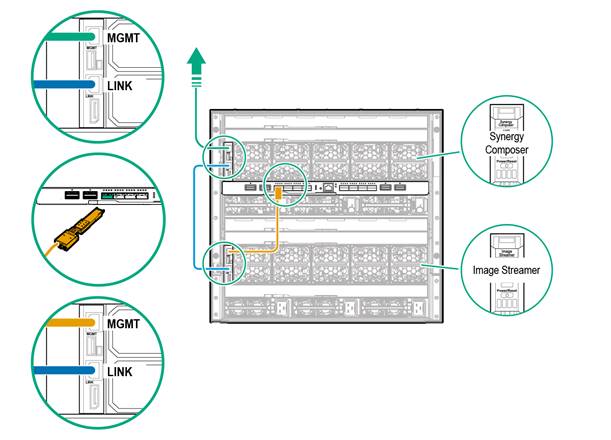
HPE Synergy Image Streamer Single-frame configuration with Synergy VC SE 40Gb F8 Modules -- only for use in Development and Proof-of-Concept environments. |
|
|
|
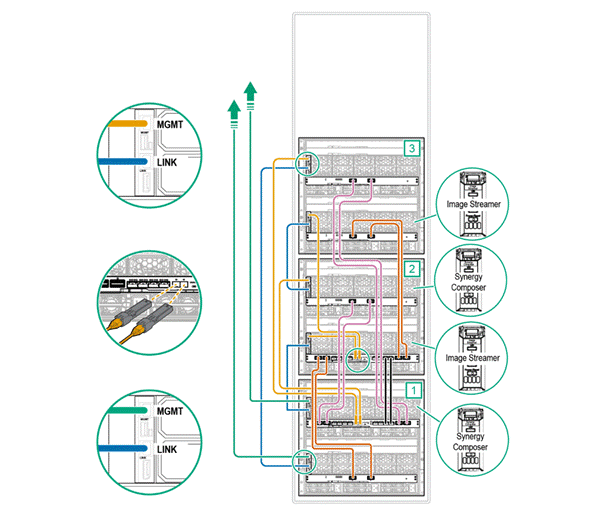
HPE Synergy Image Streamer Three-frame configuration with Synergy VC SE 100Gb F32 Modules - for use in Production environments. Notes: Cabling between interconnect modules is also shown. |
|
|
|
|
|
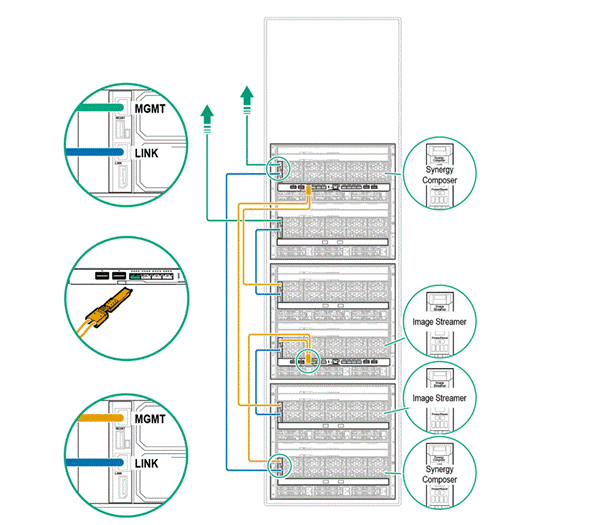
HPE Synergy Image Streamer Three-frame configuration with Synergy VC SE 40Gb F8 Modules -- for use in Production environments. |
|
|
|
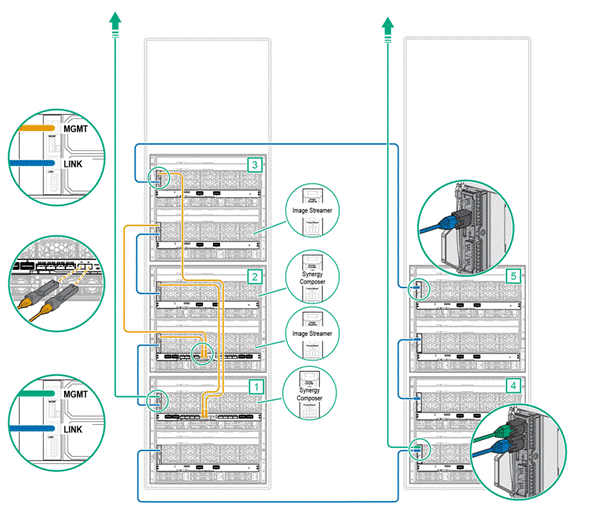
HPE Synergy Image Streamer Example five-frame configuration with Synergy VC SE 100Gb F32 interconnect modules -- for use in Production environments. Notes: - Uses Composer management appliances with frames containing both 2-port FLMs and 4-port FLMs. - Cable for the management ring between the 4-port FLMs from Frame 4 to Frame 5 could use 1) CAT6 cable with transceivers, or 2) DAC cable. |
|
|
|
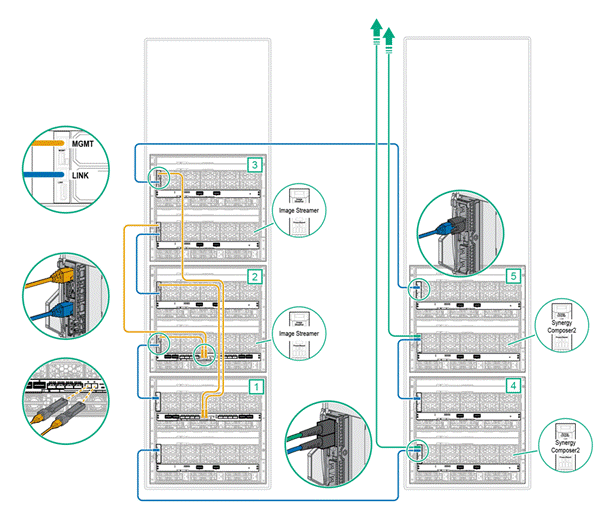
HPE Synergy Image Streamer Example five-frame configuration with Synergy VC SE 100Gb F32 interconnect modules and Synergy Composer2 management appliances -- for use in Production environments. Notes: - Uses Composer2 management appliances with frames containing both 2-port FLMs and 4-port FLMs. - Cable for the management ring between the 4-port FLMs from Frame 4 to Frame 5 could use 1) CAT6 cable with transceivers, or 2) DAC cable. |
|
|
|
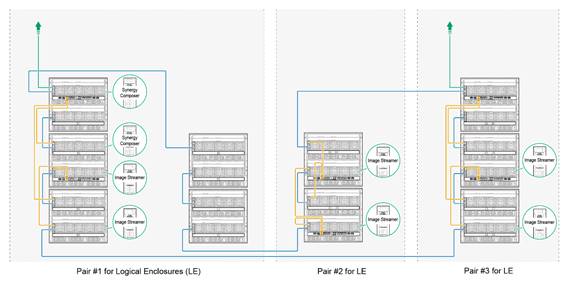
HPE Synergy Image Streamer Example multiple-frame configuration with three Logical Enclosures using Synergy VC SE 40Gb F8 Modules in a single management ring -- for use in Production environments. |
|
|
|
|
|
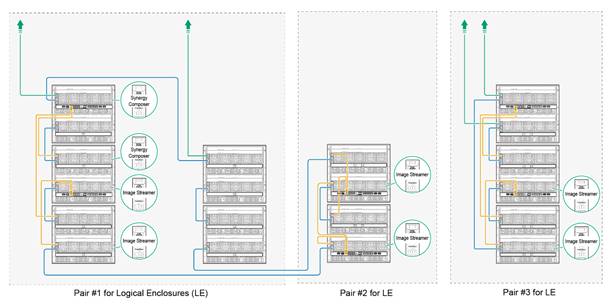
HPE Synergy Image Streamer Example multiple-frame configuration with three Logical Enclosures with Synergy VC SE 40Gb F8 Modules and with a remote management ring -- for use in Production environments. |
|
|
|
|
Related Options
|
Components for HPE Image Streamer Configurations
| |
|
Typical Products for configuring Image Streamer solutions with HPE VC SE 100Gb F32 Modules Notes: - REQUIREMENT: HPE Synergy Image Streamer use in Production environments requires a minimum of three (3) Synergy Frames with two (2) HPE Image Streamers, two (2) HPE Composers, two (2) Interconnect Modules, and appropriate cables/transceivers for operation. - For details, see the Synergy Cabling Guide and Synergy Setup and Installation Guide. | |
|
Interconnect Modules | |
|
HPE Virtual Connect SE 100Gb F32 Module for Synergy |
867796-B21 |
|
Notes: - Single Interconnect Module per SKU. - Two modules of the same type per solution are required for a redundant pair |
|
|
DAC Cables connect SFP+ ports. |
|
|
Notes: - CAUTION: Cable type determines the distance limit of connections. o Active DAC cables @ 10Gbps = 15 meters (max) o Passive DAC cables = ~5 meters |
|
|
HPE BladeSystem c-Class 10GbE SFP+ to SFP+ 3m Direct Attach Copper Cable |
487655-B21 |
|
HPE BladeSystem c-Class 10GbE SFP+ to SFP+ 5m Direct Attach Copper Cable |
537963-B21 |
|
Connectors - Alternate configuration |
|
|
HPE 10GBase-T SFP+ Transceiver Notes: Transceivers (10 Gbps) connect SFP+ ports to RJ45 ports using CAT6A cables.. Notes: Typical 10GbE transceiver for connecting CAT6A cables to SFP+ ports on the HPE Synergy 4-port FLM. |
813874-B21 |
|
HPE CAT6A Cables |
|
|
HPE Synergy Frame Link Module CAT6A 1.2m Cable |
861412-B21 |
|
HPE Synergy Frame Link Module CAT6A 3m Cable |
861413-B21 |
|
Typical Products for configuring Image Streamer solutions with HPE VC SE 40Gb F8 Modules Notes: - REQUIREMENT: HPE Synergy Image Streamer use in Production environments requires a minimum of three (3) Synergy Frames with two (2) HPE Image Streamers, two (2) HPE Composers, and two (2) Interconnect Modules and appropriate cables/transceivers for operations. - For details, see the Synergy Cabling Guide and Synergy Setup and Installation Guide. | |
|
Interconnect Module |
|
|
Notes: - Single Interconnect Module per SKU. - Two modules of the same type per solution are required for a redundant pair |
|
|
Connectors |
|
|
HPE Synergy Dual 10GBASE-T QSFP+ 30m RJ45 Transceiver |
838327-B21 |
|
Notes: Two transceivers required for redundant connection to the Interconnect Module |
|
|
Connectors - Alternate configuration |
|
|
HPE BladeSystem c-Class QSFP+ to SFP+ Adapter |
720193-B21 |
|
HPE 10GBase-T SFP+ Transceiver |
813874-B21 |
|
Notes: Four of each are required for redundant connection to the Interconnect Modules. |
|
|
HPE CAT6A Cables |
|
|
HPE Synergy Frame Link Module CAT6A 1.2m Cable |
861412-B21 |
|
HPE Synergy Frame Link Module CAT6A 3m Cable |
861413-B21 |
|
HPE Synergy Services | |
|
Notes: See HPE Support Services Central for additional services at http://ssc.hpe.com |
|
|
HPE Synergy Proactive Care Services |
|
|
HPE 3 Year Proactive Care 24x7 Synergy Image Streamer Service |
H0YJ1E |
|
HPE 3 Year Proactive Care 24x7 with DMR Synergy Image Streamer Service |
H0YJ2E |
|
HPE Synergy Deployment/Installation & Start-up Services |
|
|
HPE Factory Express Synergy Initial Frame Package 4 Service |
HA454A1-300 |
|
HPE Factory Express Synergy Add-on Frame Package 4 Service |
HA454A1-301 |
|
HPE Synergy First Frame Startup Service |
U8JM3E |
|
HPE Synergy Additional Frame Startup Service |
U8JM4E |
|
HPE Synergy Firmware Update Services |
|
|
HPE Firmware Update Analysis for Synergy Service |
HA9H5E |
|
HPE FW Update Analysis for Synergy SVC |
HF2Z5A1 |
|
HPE Firmware Update Implementation for Synergy SVC |
HA9H6E |
|
HPE FW Update Implement for Synergy SVC |
HF2Z6A1 |
|
HPE Synergy Image Streamer Implementation Service |
|
|
| |
Technical Specifications
|
Environmental-friendly Products and Approach
End-of-life Management and Recycling Hewlett Packard Enterprise offers end-of-life Hewlett Packard Enterprise product return, trade-in, and recycling programs in many geographic areas. Products returned to Hewlett Packard Enterprise will be recycled, recovered or disposed of in a responsible manner. For more information, contact your nearest Hewlett Packard Enterprise sales office or visit the HPE Product Return and Recycling site. The EU WEEE directive (2002/95/EC) requires manufacturers to provide treatment information for each product type for use by treatment facilities. This information (product disassembly instructions) is posted on the above Hewlett Packard Enterprise web site. These instructions may be used by recyclers and other WEEE treatment facilities as well as Hewlett Packard Enterprise OEM customers who integrate and re-sell Hewlett Packard Enterprise equipment. |
|
|
Summary of Changes
|
Date |
Version History |
Action |
Description of Change |
|
15-Sep-2021 |
Version 14 |
Changed |
Obsolete SKUs were removed: 794502-B23, H0YJ4E, H0YJ5E, H5UP9A1, H1RU1E Services and Support Pointnext Tech Care and Complete Care information added |
|
03-Sep-2019 |
Version 13 |
Changed |
Overview, Standard Features, Platform Information, Related Options, and Service and Support sections were updated. SKUs added in Related Options section: 867796-B21, 487655-B21, 537963-B21, 813874-B21, HA9H5E/HF2Z5A1 and HA9H6E / HF2Z6A1 |
|
24-Jan-2019 |
Version 12 |
Changed |
Overview, Standard Features, and Service and Support sections were updated. SKU added in Related Options section: H1RU1E |
|
01-Oct-2018 |
Version 11 |
Changed |
Platform Information section was updated. |
|
06-Aug-2018 |
Version 10 |
Changed |
Overview, Standard Features, and Platform Information sections were updated. Obsolete SKU was deleted: 861414-B21. |
|
04-Jun-2018 |
Version 9 |
Changed |
What's New, Standard Features, Service and Support, Platform Information, Related Options, and Technical Specs sections were updated. |
|
05-Feb-2018 |
Version 8 |
Changed |
Standard Features and Service and Support sections were updated. |
|
04-Dec-2017 |
Version 7 |
Changed |
Overview and Standard Features sections were updated. |
|
11-Jul-2017 |
Version 6 |
Changed |
Overview, Standard Features, Service and Support, Platform Information, and Technical Specifications sections were updated. SKUs added in Platform Information and Related Options sections: |
|
03-Apr-2017 |
Version 5 |
Changed |
Overview and Standard Features sections were updated. |
|
16-Dec-2016 |
Version 4 |
Changed |
Overview, Standard Features, Service and Support, and Related Options sections were updated. |
|
18-Nov-2016 |
Version 3 |
Changed |
Models, Related Options and Service and Support sections were updated. |
|
31-Mar-2016 |
Version 2 |
Changed |
Overview, Standard Features, Service and Support, Models, Related Options, Technical Specifications sections were updated. SKUs added in Models and Related Options sections: |
|
1-Dec-2015 |
Version 1 |
Created |
New QuickSpecs |
Copyright
|
|
| ||||||||||||
|
|
|
© Copyright 2021 Hewlett Packard Enterprise Development LP. The information contained herein is subject to change without notice. The only warranties for Hewlett Packard Enterprise products and services are set forth in the express warranty statements accompanying such products and services. Nothing herein should be construed as constituting an additional warranty. Hewlett Packard Enterprise shall not be liable for technical or editorial errors or omissions contained herein. c04815217 - 15424 - Worldwide - V14 - 15-September-2021 | ||||||||||||



