




























HPE Synergy Graphics Processing Units: технические характеристики и документация
В архивеOverview
|
HPE Synergy Graphics Accelerator Options |
|
|
|
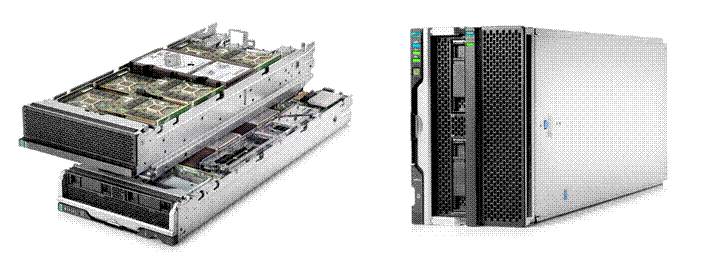
The HPE Synergy 480 Compute and Graphics Expansion Module |
|
|
|
Summary |
|
The HPE Synergy 480 Graphics Accelerator Options deliver data center deployments of graphics workstations to improve the user experience for designers and geophysicists with 3D visualization requirements or high density task and knowledge-worker deployments of VDI and virtualized application supporting over a thousand user sessions per rack. The Graphics Acclerator Options are paird with HPE Synergy 480 Compute Module. To provide a wide variety of deployment options, operating environments and remote access methods. If applications require GPU acceleration, the Synergy platform provides the most-popular options to meet the needs of virtually any environment.
The Graphics Accelerators are supported in three different form factors: Compute Module Mezzanine Adpter, Multi MXM Expansion Module and x16 PCe Expansion Module.
|
|
|
|
What's New |
|
Standard Features
|
The Synergy 480 Graphics Option Modules in Detail | |
|
Graphics Accelerators are supported in three different form factors: Compute Module Mezzanine Adpter, Multi MXM Expansion Module and x16 PCe Expansion Module.
| |
|
| |
|
| |
|
The Mezzanine Graphics Adapter | |
|
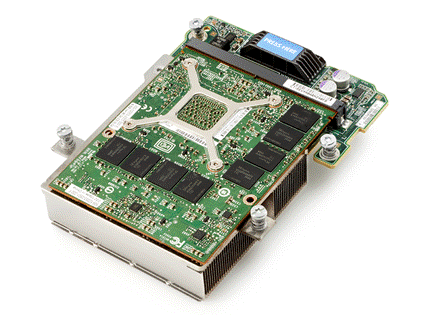
The GPU Mezzanine adapter is installed in the Synergy 480 Compute Module in the Mezz1 slot. Available GPU options include the NVIDIA Tesla M6 - NVIDIA Grid compatible MXM server GPU, NVIDIA Quadro M3000SE GPU or the AMD FirePro S7100X GPU. A maximum of one GPU can be installed in the Compute Module. | |
|
| |
|
The Multi MXM Graphics Expansion Module | |
|
| |
|
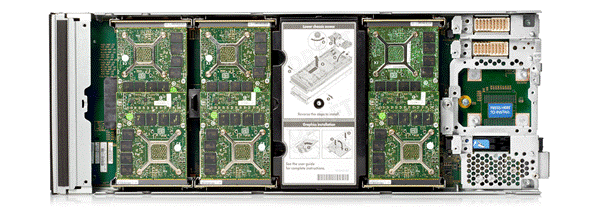
The Synergy 480 Multi MXM Graphics Expansion Module provides high GPU density with up to six - 100 watt MXM form factor GPUs in a single-wide, half height Module that directly attaches to the HPE Synergy 480 Compute Module via the Mezz1 slot forming a double-wide module. GPUs can be added in the field in pairs. So a minimum configuration can be field upgraded to add four or six GPUs. Supported GPUs include the NVIDIA Tesla M6, the NVIDIA Quadro M3000SE or the AMD FirePro S7100X. The MultiMXM module has two pass-through Mezz slots (4 and 5) that allow connection of modules to the Mezz 1 and 2 slots on the Compute Module. | |
|
| |
|
The x16 PCIe Graphics Expansion Module | |
|
| |
|
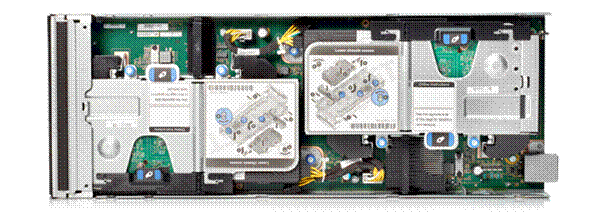
The Synergy 480 x16 PCIe Graphics Expansion Module supports either one or two full length, full-height, double-wide GPUs. Each GPU can be up to 300 wattts each.. Currently, the NVIDIA Quadro M5000 is supported. | |
|
| |
|
About the HPE Synergy Platform | |
|
NOTE: This document covers the HPE Synergy 480 Graphics Options. For information on HPE Synergy Modules and Frames HPE Synergy QuickSpecs:
https://www.hpe.com/h20195/v2/GetPDF.aspx/c04815134.pdf
https://www.hpe.com/h20195/v2/getpdf.aspx/c04815119.pdf?ver=2 https://www.hpe.com/h20195/v2/GetDocument.aspx?docname=c04815127
http://h20566.www2.hpe.com/hpsc/doc/public/display?sp4ts.oid=1008615198&docId=emr_na-c05061206&docLocale=en_US
| |
|
| |
|
Graphics Accelerators | |
|
Mezzanine Graphics Adapters for Compute Module Installation: |
- Workstation class performance for high-end professional 3D graphics - 4 GB GDDR5 memory - Supports bare metal and passthrough - Single Mezzanine adapter - Supports Environments (Refer to “Technical Specification” section at end of document for full listing per graphics adapter) § Bare Metal Client Operating System - Non Virtualized Microsoft ® Windows 7® SP1, Windows 10® RHEL 6.8+/7.2+ § Server / Hypervisor
VMware®
ESXi® version 6.0
- Workstation class performance for high-end professional 3D graphics, or VDI acceleration delivering true PC graphics experience. - 8GB (GDDR5) memory - Supports up to six displays - Supports bare metal and pass-through - Supported environments (Refer to “Technical Specification” section at end of document for full listing per graphics adapter) § Bare Metal Client Operating System - Non Virtualized Microsoft ® Windows 7® SP1, 8.1 § Server / Hypervisor
VMware
ESXi version 6.0
- Workstation class performance for ultra high end professional 3D graphics, or VDI acceleration delivering true PC graphics experience. - 8GB (GDDR5) memory - Supports shared graphics, pass-through and hardware GPU virtualization - Supported Environments (Refer to “Technical Specification” section at end of document for full listing per graphics adapter) § Bare Metal Client Operating System - Non Virtualized Microsoft Windows 7 SP1, 10 § Server / Hypervisor VMware vSphere5.5 or later
Microsoft®
Windows Server 2012 R2 (64-bit) |
|
| |
|
MXM Graphics Card Options for use In the Multi MXM Expansion Module |
NOTE: All MXM graphics card options are sold in pairs of GPUs. If there are GPU slots available in the Module, it can be field upgraded with additional GPUs. Note mixing GPUs is not supported. |
- Workstation class performance for high-end professional 3D graphics - 4 GB GDDR5 memory - Supports passthrough - Supports Environments (Refer to “Technical Specification” section at end of document for full listing per graphics adapter) § Server / Hypervisor VMware® ESXi® version 6.0
Microsoft
Windows Server 2012 R2
- Workstation class performance for high-end professional 3D graphics, or VDI acceleration delivering true PC graphics experience. - 8GB (GDDR5) memory - Supports up to six displays - Supports bare metal and pass-through - Supports Environments (Refer to “Technical Specification” section at end of document for full listing per graphics adapter) § Server / Hypervisor
VMware
ESXi version 6.0
- Workstation class performance for ultra high end professional 3D graphics, or VDI acceleration delivering true PC graphics experience. - 8GB (GDDR5) memory - Supports shared graphics, pass-through and hardware GPU virtualization - Supported Environments (Refer to “Technical Specification” section at end of document for full listing per graphics adapter) § Server / Hypervisor VMware vSphere5.5 or later Microsoft® Windows Server 2012 R2 (64-bit) NOTE:
GRID
license for use with NVIDIA Tesla M6 can be purchased directly from
HPE. |
|
|
PCIe Graphics Card Options for use In the x16 PCIe Expansion Module |
- For professional ultra high-end 3D graphics and VDI acceleration - 8GB (GDDR5) - Supports up to four 4K displays - PCIe Gen3, x16 single-width card (One per Graphics expansion Blade can be supported) - Supported Environments (Refer to “Technical Specification” section at end of document for full listing per graphics adapter) § Bare Metal Client Operating System - Non Virtualized Microsoft ® Windows 7® SP1, 8.1 Red Hat Enterprise Linux (RHEL) 6.5 or later (64-bit only) § Server / Hypervisor VMware vSphere5.5 or later
|
Service and Support
|
Service and Support |
Protect your business beyond warranty with HPE Support Services HPE Technology Services delivers confidence, reduces risk and helps customers realize agility and stability. Connect to HPE to help prevent problems and solve issues faster. HPE Support Services enable you to choose the right service level, length of coverage and response time as you purchase your new server, giving you full entitlement to the support you need for your IT and business.
|
|
Optimized Support recommendation |
HPE Proactive Care Advanced* - 24x7 coverage, three year Support Service This service helps achieve a higher return on your product investment with personalized support from a local assigned Account Support Manager who will share best practice advice and personalized recommendations designed to help improve availability and performance to increase stability and reduce unplanned downtime. Leverage your system’s ability to connect to HPE for pre-failure alerts, automatic call logging and parts dispatch. For business critical incidents, this service offers critical event management to reduce mean time to resolution. This recommendation provides 24x7 coverage with four-hour response for hardware and collaborative support that offers two-hour callback for supported software issues. Collaborative software management is included with independent software vendors unless you have your software support from HPE where we own all cases from start through to resolution. https://www.hpe.com/h20195/v2/getdocument.aspx?docname=4AA5-3259ENW
|
|
Standard Support |
HPE Proactive Care* with 24x7 coverage, three year Support Service HPE Proactive Care gives customers an enhanced call experience. When your products are connected to HPE, Proactive Care helps prevent problems and maintains IT stability by utilizing personalized proactive reports with recommendations and advice This Service combines three years proactive reporting and advice with our 24x7 coverage, four hour hardware response time when there is a problem. This service also includes collaborative software support for Independent Software Vendors (ISVs), (Red Hat, VMWare, Microsoft, etc.) running on your HPE servers. https://www.hpe.com/h20195/v2/GetPDF.aspx/4AA3-8855ENW.pdf
|
|
Deploy and integrate |
HPE Factory Express for Synergy Initial Frame service is an all-inclusive solution deployment service for HPE Synergy that includes configuration, integration, and installation onsite. Factory Express for Synergy is based on Industry best practices and provides an Implementation Project Manager to oversee the solution deployment end to end. Detailed documentation on the solution and the service deliverables will be provided to the customer. HPE Factory Express Synergy Additional Frame Service for Synergy Add additional frames to your HPE Synergy Factory Express service or expand your existing HPE Synergy Infrastructure.
|
|
HPE Education Services |
Keep your IT staff trained making sure they have the right skills to deliver on your business outcomes. Book on a class today and learn how to get the most from your technology investment. http://www.hpe.com/ww/learn |
|
For more information |
Additional Support Services can be found at: http://www.hpe.com/services |
Models
|
Ordering Information | ||
|
Mezzanine GPU Options for Synergy 480 Compute Module |
HPE Synergy 480 NVIDIA Tesla M6 FIO Mezzanine Card |
826042-B21 |
|
HPE Synergy 480 NVIDIA Quadro M3000SE Mezzanine FIO Graphics Kit |
868656-B21 | |
|
HPE Synergy AMD FirePro S7100X FIO Mezzanine Card |
862763-B21 | |
|
HPE Synergy 480 Gen9 Multi MXM FIO Expansion Module |
826041-B21 | |
|
NVIDIA Tesla M6 2X GPU Kit for HPE Synergy 480 with MXM GPU Expansion |
826043-B21 | |
|
HPE Synergy AMD FirePro S7100X Multi MXM Option Kit |
868417-B21 | |
|
HPE Synergy 480 Multi MXM with 2 NVIDIA M3000SE Graphics Kit |
868663-B21 | |
|
HPE Synergy 480 Gen9 PCIe FIO Expansion Module |
826090-B21 | |
|
HP NVIDIA Quadro M5000 Graphics Accelerator |
M9R60A | |
Summary of Changes
|
Date |
Version History |
Action |
Description of Change |
|
08-May-2017 |
From Version 1 to 2 |
Changed |
Overview, Standard Features and Service and Support sections were updated. |
|
27-Mar-2017 |
Version 1 |
Created |
Changes made throughout the QuickSpecs |
| ||||||||||||||||||


