HPE SGI Management Suite: технические характеристики и документация
В архивеOverview
|
HPE SGI Management Suite v3.5 HPE SGI Management Suite efficiently deploys and manages the HPE SGI 8600 system with one comprehensive toolset. The software offers an array of features, including the ability to initiate management actions, monitor essential system health metrics, and improve overall power efficiency. By combining the discovery of nodes with multicast technology, users can significantly shorten the time required to complete provisioning.
|
|
|
|
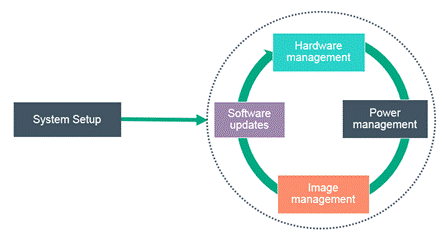
HPE SGI Management Suite address system management tasks starting with provisioning, to the daily tasks of system health monitoring, proactive problem resolution, updating software images and resource management. The software offers the following key features:
|
|
What's New Provisioning
API
Extended Support
|
|
Models and Licensing |
HPE SGI Management Suite 1 Socket 3yr Support LTU |
Q2A47A |
|
NOTE: One license per socket. NOTE: Includes three (3) years of HPE Pointnext support. NOTE: Please contact HPE Pointnext for 4- and 5-year support options. | ||
|
HPE SGI Management Suite Media Kit |
Q2A36A | |
|
NOTE: One media kit per solution. | ||
|
HPE SGI Management Suite FIO |
Q2A41A | |
|
NOTE: For factory installation only; this PN does not include the software license. Please order with PN Q2A47A. NOTE: Order one per node. | ||
|
Distribution Media and Software Documentation |
HPE SGI Management Suite software and documentation is available on a single DVD. Please select HPE SGI Management Suite Media Kit (PN Q2A36A) to order the DVD. HPE SGI Management Suite is also available for download. Upon receiving their order, customers will receive a physical document, which includes the website URL to access the software, as well as additional license information. Software will be available for download via the Software Updates and Licensing Portal. Patches may be required and will be delivered via the Software Download Repository. Release notes will be made available for any patches issued to customers. Factory installation is available for the HPE SGI 8600 and Apollo 40 systems. Additional platforms are not supported at this time. Please select PN Q2A41A for factory installation. Customers may download user guides and other documentation at hpe.com/software/sms.
| ||||||||||||||||||||||||||||||||||||||||||||||||||||||||||||
|
Provisioning
|
HPE SGI Management Suite combines the discovery of cluster nodes and multicast provisioning to reduce the time time required to setup a large scale cluster. HPE SGI 8600 systems are factory installed with a Linux operating system and middleware software. The system configuration file used for hardware discovery is included with the software installed on the system.
The provisioning process uses the system configuration file to locate each server in the clustered system that requires a copy of the operating system. Multicast technology provisions servers in parallel—enabling an operating system image to be installed on several servers in the same amount of time as a single server. Multicast provisioning significantly decreases the amount of downtime during system maintenance periods. Systems can be installed or updated in a matter of minutes instead of days.
| ||||||||||||||||||||||||||||||||||||||||||||||||||||||||||||
|
Version-Controlled Image Management |
Node specific software resides on the admin node within the HPE SGI 8600 system. When a system administrator installs and configures the cluster software, the installer pushes the node-specific software to each node in the cluster. Over time, these software images may require modification. If the images are modified frequently, the image repository will contain several different versions of an image and become difficult to manage.
To solve this problem, HPE SGI Management Suite includes a version control system, which archives, tracks, and manages the various versions of an image.
Images are stored in a RPM format, allowing them to be easily deployed onto different servers within the system. If problems arise after an operating system upgrade, the system can be returned to a known working state. Updates to images and payloads are stored as changes to the originals to significantly save on disk space, while maintaining a full revision history. Changes to the image management archive are tracked by date and by who made the change, enabling accountability for revision activities. | ||||||||||||||||||||||||||||||||||||||||||||||||||||||||||||
|
System Monitoring |
HPE SGI Management Suite includes a hardware event tracker that receives SNMP events from the IPMI management controller on the hardware system. When a non-critical event occurs, the hardware event tracker records the event in a system log. If a system condition becomes too low or too high for its threshold, an email alert is generated detailing the crticial event. The email is then sent to the system administrator. The following are examples of critical system events that cause an alert:
System administrators may also view system metrics via Ganglia, a scalable, distributed monitoring system that displays real-time histograms of system metrics. Each HPE SGI 8600 compute node acts as a single monitoring source that sends its statistics to the leader node. After collecting the data, the leader node forwards aggregated rack statistics (along with its own data) to the admin node. The admin node collects data from all of the leader nodes and presents the cluster-wide metrics. This model enables HPE to scale-out Ganglia to very large cluster deployments.
By default, Ganglia gathers the following metrics. Please review the table below to understand if these metrics are captured at the admin, leader or compute node level.
| ||||||||||||||||||||||||||||||||||||||||||||||||||||||||||||
|
Remote Services |
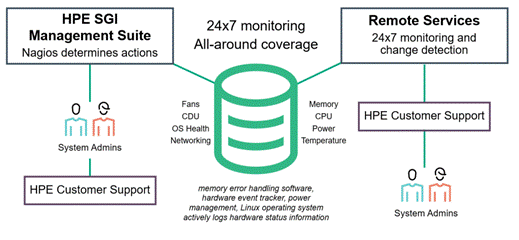
HPE SGI Management Suite also includes an option for Remote Services, which also monitors the system logs for alerts sent directly to HPE Pointnext. In this scenario, HPE Pointnext is responsible for analysis, action and communication with the customer system administrator. This service enhances the HPE support experience by providing 24x7 remote monitoring and data gathering on the customer's system. Remote Services provides a connection to Technical Support from HPE PointNext, which includes secure file transfer and optional remote access to the system.
HPE SGI Management Suite leverages Nagios, a web-based monitoring tool for networks and clusters, to monitor the health of the specified cluster nodes and services, notify a specified audience by email or SMS if a critical event occurs, and gather and display statistics. Nagios plays a key role in the 24x7 monitoring offered to HPE SGI Management Suite users.
The open source Nagios architecture is also extensible so that it is easy to add new plug-ins to support additional reporting mechanisms.
| ||||||||||||||||||||||||||||||||||||||||||||||||||||||||||||
|
Memory Error Handling |
HPE SGI Management Suite includes memory error handling software, which collects memory error information from all memory residing in the hardware system, node or cluster. System performance can be affected by memory errors and this software set detects and logs those errors.
The functionality of the memory error handling software can be divided into the following functionality:
When the software detects a persistent DIMM failure, it passes the memory error address to the kernel's page retirement interface to remove the affected page from use. Data is moved from the failing location to a good memory location without interrupting any running jobs, or requiring a system shutdown. Because 4K memory pages are re-mapped at a logical level, the re-mapping is non-disruptive to running jobs.
| ||||||||||||||||||||||||||||||||||||||||||||||||||||||||||||
|
Power Resource Management |
Power data is collected on a per second basis without any latency impact on the system. Up to three months of power data is stored in a database for power utilization behavior analysis that can drive power resource efficiencies for the data center.
Power can be limited on a per-node basis for all nodes or for a specific set of nodes in a system. This enables finer-grained control over the power usage across the system.
HPE SGI Management Suite supports system-level power management, which allows system administrators to measure and control power and thermals for the entire cluster. Capabilities include the following:
Power limiting at the job level or resource manager level also uses the node manager capabilities. The HPE SGI Management Suite power service performs power limiting for the resource manager. The node manager's design allows for multiple power policies to be deployed at a single time. In addition, the node manager always chooses the most restrictive power limit of all active policies to engage.
| ||||||||||||||||||||||||||||||||||||||||||||||||||||||||||||
|
Operating System Compatibility |
HPE SGI Management Suite is supported on Red Hat® Enterprise Linux® (RHEL) Advanced Server 6, 7 (through release 7.4), SUSE Linux Enterprise Server (SLES) 11, 12 (through SP3) and CentOS 7.4
NOTE: CentOS, Red Hat® or a SUSE Linux® operating system version must be installed on the management server prior to installing HPE SGI Management Suite. This software can be purchased from Hewlett Packard Enterprise and factory installed for the HPE SGI 8600 and Apollo 40 systems. Please contact your Hewlett Packard Enterprise sales representative for more information. | ||||||||||||||||||||||||||||||||||||||||||||||||||||||||||||
|
Hardware Compatibility |
HPE SGI Management Suite is supported on the HPE SGI 8600. Factory installation is available.
HPE SGI Management Suite is also supported on the Apollo 40 system, but only when used in a cluster containing Apollo 40 systems, HPE SGI 8600, or classic SGI Rackable servers. If used in a cluster with DL servers or other HPE Apollo systems, please order the HPE Insight Cluster Management Utility.
Please contact your Hewlett Packard Enterprise sales representative for more information. |

Support and Services
|
Software Licensing Information |
For the Software to be valid on an HPE cluster, each socket in the HPE cluster must have a valid HPE SGI Management Suite license. Subject to the terms and conditions of this Agreement and the payment of any applicable license fee, HPE grants a non-exclusive, non-transferable license to use (as defined below), in object code form, one copy of the Software on one device (socket) at a time for internal business purposes, unless otherwise indicated above or in applicable Transaction Document(s). "Use" means to install, store, load, execute and display the Software in accordance with the Specifications. Use of the Software is subject to these license terms and to the other restrictions specified by Hewlett Packard Enterprise in any other tangible or electronic documentation delivered or otherwise made available with or at the time of purchase of the Software, including license terms, warranty statements, Specifications, and "readme" or other informational files included in the Software itself. Such restrictions are hereby incorporated in this Agreement by reference. Some Software may require license keys or contain other technical protection measures. HPE reserves the right to monitor compliance with Use restrictions remotely or otherwise. Hewlett Packard Enterprise may make a license management program available which records and reports license usage information, If so supplied, customer agrees to install and run such license management program beginning no later than one hundred and eighty (180) days from the date it is made available and continuing for the period that the Software is Used. |
|
Warranty |
Hewlett Packard Enterprise will replace defective delivery media for a period of 90 days from the date of purchase. This warranty applies to all HPE SGI Management Suite products found on the delivery media.
|
|
HPE Software Support |
HPE Pointnext leverages our breadth and depth of technical expertise and innovation to help accelerate digital transformation with Advisory, Professional, and Operational Services. There is a full range of services to complement HPE Performance Software - Message Passing Interface (MPI) software from advisory and design, benchmarking and tuning services, factory pre-installation, configuration, and acceptance as well as training and operational services. Advisory Services includes design, strategy, road map, and other services to help enable the digital transformation journey, tuned to IT and business needs. Advisory Services helps customers on their journey to Hybrid IT, Big Data, and the Intelligent Edge. Professional Services helps integrate the new solution with project management, installation and startup, relocation services, and more. In addition, Factory Express installs the software in the factory when building the system. HPE Education Services helps train staff using and managing the software and other technology. We help mitigate risk to the business, so there is no interruption when new technology is being integrated into the existing IT environment. Operational Services
Join
the Conversation
http://www.hpe.com/go/hpsc
Contact
Support |
Summary of Changes
|
Date |
Version History |
Action |
Description of Change |
|
4-Dec-2017 |
Version 1 |
Created |
Created QuickSpecs for HPE SGI Management Suite |
| ||||||||||||||||||