HPE FlexFabric 10Gb 2-port 556FLR-T Adapter: технические характеристики и документация
В архивеOverview
|
HPE
FlexFabric 10Gb 2-port 556FLR-T Adapter |
||
|
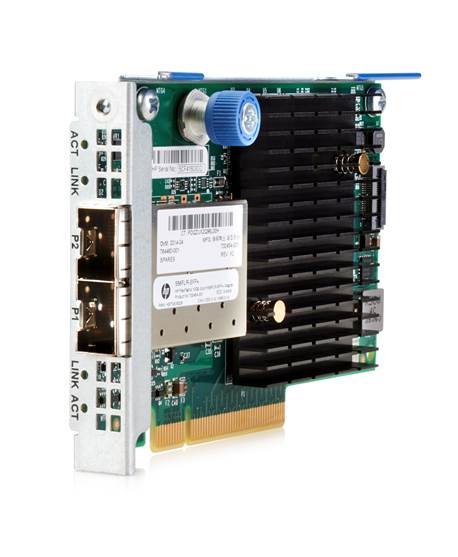
The HPE FlexFabric 10Gb 2-port 556FLR-T adapter is a dual port 10GBASE-T adapter for ProLiant Gen9 rack and Density Optimized servers in a FlexibleLOM form factor that provides full-featured, high performance, converged 10 Gb Ethernet that accelerates IT services and increases data center efficiency across a broad range of I/O intensive enterprise, cloud and Telco workloads. The HPE 556FLR-T Adapter, with two RJ-45 connectors, delivers full line-rate performance across all ports with low power consumption, utilizing CAT 6A UTP (or better) cabling with distances up to 100 meters and is backward compatible to existing 1000BASE-T infrastructure. It offers overlay network tunneling and storage capabilities that increase host efficiency and virtualization performance. The HPE FlexFabric 556FLR-T can provide up to 40 Gb/s of converged bi-directional Ethernet bandwidth, helping to alleviate network bottlenecks. . |
||
|
|
||
|
HPE FlexFabric 10Gb 2-port 556FLR-T Adapter |
||
|
|
||
|
Models |
||
|
HPE FlexFabric 10Gb 2-port 556FLR-T Adapter |
794525-B21 |
|
|
|
||
|
Kit Contents |
HPE
FlexFabric 10Gb 2-port 556FLRT Adapter |
|
|
|
||
|
HPE ProLiant Server Support |
HPE
ProLiant DL580 Gen9 |
|
Platform Information
|
Models |
||
|
HPE FlexFabric 10Gb 2-port 556FLR-T Adapter |
794525-B21 |
|
|
|
||
|
Kit Contents |
HPE
FlexFabric 10Gb 2-port 556FLRT Adapter |
|
|
|
||
|
HPE ProLiant Server Support |
HPE
ProLiant DL580 Gen9 NOTE: This is a list of supported servers. Some may be discontinued. |
|
Standard Features
|
At a Glance Features |
|
|
|
|
|
Throughput-Theoretical Bandwidth |
This adapter delivers 20 Gb/s bi-directional Ethernet transfer rate per port (40 Gb/s per adapter), providing the network performance needed to improve response times and alleviate bottlenecks. |
|
|
|
|
802.1p QoS Tagging |
IEEE quality of service (QoS) 802.1p tagging allows the adapter to mark or tag frames with a priority level across a QoS-aware network for improved traffic flow. |
|
|
|
|
802.1Q VLANs |
IEEE 802.1Q virtual local area network (VLAN) protocol allows each physical port of this adapter to be separated into multiple virtual NICs for added network segmentation and enhanced security and performance. VLANs increase security by isolating traffic between users. Limiting the broadcast traffic to within the same VLAN domain also improves performance. |
|
|
|
|
Configuration Utilities |
This adapter ships with a suite of operating system-tailored configuration utilities that allow the user to enable initial diagnostics and configure adapter teaming. This includes a patented teaming GUI for Microsoft Windows operating systems. Additionally, support for scripted installations of teams in a Microsoft Windows environment allow for unattended OS installations. |
|
|
|
|
Interrupt Coalescing |
Interrupt coalescing (interrupt moderation) groups multiple packets, thereby reducing the number of interrupts sent to the host. This process optimizes host efficiency, leaving the CPU available for other duties. |
|
|
|
|
iSCSI/FCoE |
This adapter supports accelerated iSCSI or iSCSI boot and FCoE. |
|
|
|
|
Jumbo Frames |
This adapter supports Jumbo Frames (also known as extended frames), permitting up to a 9,200 byte (KB) transmission unit (MTU) when running Ethernet I/O traffic. This is over five times the size of a standard 1500-byte Ethernet frame. With Jumbo Frames, networks can achieve higher throughput performance and greater CPU utilization. These attributes are particularly useful for database transfer and tape backup operations. |
|
|
|
|
LED Indicators |
LED indicators show link integrity and network activity for easy troubleshooting. |
|
|
|
|
Management Support |
This adapter ships with agents that can be managed from HPE Systems Insight Manager or other management application that support SNMP. |
|
|
|
|
Message Signaled Interrupt (Extended) (MSI-X) |
Message Signaled Interrupt (Extended) provides performance benefits for multi-core servers by load balancing interrupts between CPUs/cores. |
|
|
|
|
PCI Express Interface |
This adapter is designed with an eight lane (x8) PCI Express bus based on the PCIe 3.0 standard. The adapter is backward compatible with four lane (x4) PCI Express, automatically auto-sensing between x8 and x4 slots. |
|
|
|
|
Preboot eXecution Environment (PXE) |
Support for PXE enables automatic deployment of computing resources remotely from anywhere. It allows a new or existing server to boot over the network and download software, including the operating system, from a management/ deployment server at another location on the network.Additionally, PXE enables decentralized software distribution and remote troubleshooting and repairs. |
|
|
|
|
Server Integration |
This adapter is a validated, tested, and qualified solution that is optimized for HPE ProLiant servers. Hewlett Packard Enterprise validates a wide variety of major operating systems drivers with the full suite of web-based enterprise management utilities including HPE Intelligent Provisioning and HPE Systems Insight Manager that simplify network management. This approach provides a more robust and reliable networking solution than offerings from other vendors and provides users with a single point of contact for both their servers and their network adapters. |
|
|
|
|
TCP/UDP/IP |
For overall improved system response, this adapter supports standard
TCP/IP offloading techniques including: |
|
|
|
|
Tunnel Offload |
Minimize the impact of overlay networking on host performance with tunnel offload support for VXLAN and NVGRE. By offloading packet processing to adapters, customers can use overlay networking to increase VM migration flexibility and virtualized overlay networks with minimal impact to performance. HPE Tunnel Offloading increases I/O throughput, reduces CPU utilization, and lowers power consumption. Tunnel Offload supports VMware's VXLAN and Microsoft's NVGRE solutions. |
|
|
|
|
Wake-on-LAN |
This adapter provides Wake-on-LAN (WoL) support through the PCI Express bus. A system that supports Wake-on-LAN can remain available to the systems administrator during its normal downtime. Once the machine is awakened, the systems administrator can remotely control, audit, debug, or manage the machine. |
|
|
|
|
Warranty |
Maximum:
The remaining warranty of the HPE product in which it is installed (to
a maximum three-year, limited warranty). |
Service and Support
|
Service and Support |
NOTE: This adapter is covered under HPE Support Services/ Service Contract applied to the HPE ProLiant Server or enclosure. No separate HPE Support Services need to be purchased.
|
|
|
|
|
Warranty and Support Services |
Warranty and Support Services will extend to include HPE options configured with your server or storage device. The price of support service is not impacted by configuration details. HPE sourced options that are compatible with your product will be covered under your server support at the same level of coverage allowing you to upgrade freely. Installation for HPE options is available as needed. To keep support costs low for everyone, some high value options will require additional support. Additional support is only required on select high value workload accelerators, fibre switches, InfiniBand and UPS options 12KVA and over. Coverage of the UPS battery is not included under TS support services; standard warranty terms and conditions apply. |
|
|
|
|
Protect your business beyond warranty with HPE Support Services |
HPE Technology Services delivers confidence, reduces risk and helps customers realize agility and stability. Connect to HPE to help prevent problems and solve issues faster. HPE Support Services enable you to choose the right service level, length of coverage and response time as you purchase your new server, giving you full entitlement to the support you need for your IT and business. Protect your product, beyond warranty. . |
|
|
|
|
Parts and Materials |
Hewlett Packard Enterprise will provide HPE-supported replacement parts and materials necessary to maintain the covered hardware product in operating condition, including parts and materials for available and recommended engineering improvements. Parts and components that have reached their maximum supported lifetime and/or the maximum usage limitations as set forth in the manufacturer's operating manual, product quick-specs, or the technical product data sheet will not be provided, repaired, or replaced as part of these services. The defective media retention service feature option applies only to Disk or eligible SSD/Flash Drives replaced by HPE due to malfunction. . |
|
|
|
|
For more information |
Visit the Hewlett Packard Enterprise Service and Support website. |
Related Options
|
Cables - Direct Attach |
HPE BladeSystem c-Class 10GbE SFP+ to SFP+ 0.5m Direct Attach Copper Cable |
487649-B21 |
|
|
HPE BladeSystem c-Class 10GbE SFP+ to SFP+ 1m Direct Attach Copper Cable |
487652-B21 |
||
|
HPE BladeSystem c-Class 10GbE SFP+ to SFP+ 3m Direct Attach Copper Cable |
487655-B21 |
||
|
HPE BladeSystem c-Class 10GbE SFP+ to SFP+ 5m Direct Attach Copper Cable |
537963-B21 |
||
|
HPE FlexNetwork X240 10G SFP+ to SFP+ 0.65m Direct Attach Copper Cable |
JD095C |
||
|
HPE FlexNetwork X240 10G SFP+ to SFP+ 1.2m Direct Attach Copper Cable |
JD096C |
||
|
HPE FlexNetwork X240 10G SFP+ to SFP+ 3m Direct Attach Copper Cable |
JD097C |
||
|
HPE FlexNetwork X240 10G SFP+ to SFP+ 5m Direct Attach Copper Cable |
JG081C |
||
|
HPE FlexNetwork X240 10G SFP+ SFP+ 7m Direct Attach Copper Cable |
JC784C |
||
|
NOTE:
Direct Attach Cable (DAC) must be purchased separately for copper environments. |
|
||
|
|
|||
|
Cables - Fiber Optic |
HPE LC to LC Multi-mode OM3 2-Fiber 0.5m 1-Pack Fiber Optic Cable |
AJ833A |
|
|
HPE LC to LC Multi-mode OM3 2-Fiber 1.0m 1-Pack Fiber Optic Cable |
AJ834A |
||
|
HPE LC to LC Multi-mode OM3 2-Fiber 5.0m 1-Pack Fiber Optic Cable |
AJ836A |
||
|
HPE LC to LC Multi-mode OM3 2-Fiber 15.0m 1-Pack Fiber Optic Cable |
AJ837A |
||
|
HPE LC to LC Multi-mode OM3 2-Fiber 30.0m 1-Pack Fiber Optic Cable |
AJ838A |
||
|
HPE LC to LC Multi-mode OM3 2-Fiber 50.0m 1-Pack Fiber Optic Cable |
AJ839A |
||
|
NOTE:
Fiber transceivers and cables must be purchased separately for fiber-optic
environments.
|
|
||
|
|
|||
|
Transceivers |
HPE BladeSystem c-Class 10Gb SFP+ SR Transceiver NOTE: Fiber transceivers and cables must be purchased separately for fiber-optic environments. |
455883-B21 |
|
Technical Specifications
|
General Specifications |
Network Processor |
Emulex XE-104 |
|
|
Data Rate |
Two ports, each at 20 Gb/s bi-directional; 40 Gb/s aggregate bi-directional theoretical bandwidth. |
||
|
Bus type |
PCI Express 3.0 (Gen 3) x8 |
||
|
Form Factor |
FlexibleLOM |
||
|
IEEE Compliance |
802.3ae, 802.1Q, 802.3x, 802.1p, 802.3ad/LACP, 802.1AB(LLDP), 802.1Qbg, 802.1Qbb, 802.1Qaz, 802.3an |
||
|
|
|||
|
Power and Environmental Specifications |
Power |
8.4W
typical |
|
| Temperature - Operating | 0° to 55°C (32° to 131°F) | ||
| Temperature - Non-Operating | -40° to 70° C (-40° to 158° F) | ||
| Humidity - Operating | 15% to 80% non-condensing | ||
| Humidity - Non-Operating | 10% to 90% non-condensing | ||
|
RoHS Compliance |
6 of 6 |
||
|
Other |
PCIe
3.0 |
||
|
|
|||
|
Operating System and Virtualization Support |
NOTE:
For more operating system support & certification information, please
visit: http://h17007.www1.hpe.com/us/en/enterprise/servers/supportmatrix/ |
||
|
|
|||
|
Environment-friendly Products and Approach - End-of-lie Management and Recyclingh |
Hewlett Packard Enterprise offers end-of-life product return, trade-in, and recycling programs, in many geographic areas, for our products. Products returned to Hewlett Packard Enterprise will be recycled, recovered or disposed of in a responsible manner. The EU WEEE Directive (2012/19/EU) requires manufacturers to provide treatment information for each product type for use by treatment facilities. This information (product disassembly instructions) is posted on the Hewlett Packard Enterprise web site. These instructions may be used by recyclers and other WEEE treatment facilities as well as Hewlett Packard Enterprise OEM customers who integrate and re-sell Hewlett Packard Enterprise equipment. |
||
Summary of Changes
|
Date |
Version History |
Action |
Description of Change |
||||||||||||||||||
|
08-May-2017 |
From Version 2 to 3 |
Changed |
Overview and Standard Features sections were updated.. |
||||||||||||||||||
|
Removed |
RDMA Topic removed from Standard Features section. |
||||||||||||||||||||
|
22-Jul-2016 |
From Version 1 to 2 |
Changed |
QuickSpecs sections were updated. |
||||||||||||||||||
|
31-Mar-2016 |
Version 1 |
Created |
New QuickSpecs |
||||||||||||||||||
|
|||||||||||||||||||||