HPE Moonshot-4QSFP+ Uplink Module: технические характеристики и документация
В архивеOverview
|
HPE Moonshot-4QSFP+ Uplink Module The HPE Moonshot system's modular design dramatically simplifies and future-proofs your datacenter for a variety of workloads. The HPE Moonshot-4QSFP+ Uplink Module, along with the HPE Moonshot-45XGc Switch Module or HPE Moonshot-180XGc Switch Module, provides the Ethernet networking functionality for the HPE Moonshot 1500 Chassis. Each chassis supports up to two Moonshot-4QSFP+ Uplink Modules which can be configured for redundancy or traffic isolation. Each uplink module delivers 160 Gbps of bandwidth to connect the HPE Moonshot system to an external network. | ||||
|
|
| |||
|
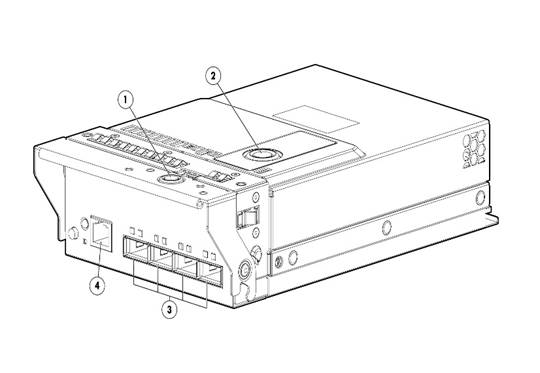
Figure 1 Moonshot-4QSFP+ Uplink Module Components |
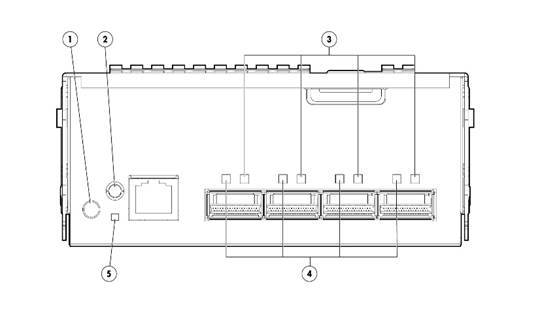
Figure 2 Moonshot-4QSFP+ Uplink Module buttons and LED | |||
|
1. |
Release Button - Chassis |
1. |
UID LED/button | |
|
2. |
Release Button - Top Lid |
2. |
Health LED | |
|
3. |
Four (4) QSFP+ ports |
3. |
Activity LED | |
|
4. |
Serial console port |
4. |
Link LED | |
|
|
|
5. |
Reset button | |
|
| ||||
|
Models | ||||
|
HPE Moonshot-4QSFP+ Uplink Module Kit |
704652-B21 | |||
|
| ||||
Standard Features
|
|
|
|
HPE Interconnect modules Up to two identical pairs of Switch and Uplink modules are supported in the Moonshot 1500 Chassis. Dual switch modules are required for network redundancy, regardless of cartridge configuration. Notes: Check Compatibility matrix below for supported switch and uplink modules Notes: For information HPE Moonshot Cartridges and Switch Modules, please see the following: |
|
|
|
Cartridge
|
|
|
|
Switch
|
|
|
|
|
|
HPE ProLiant Cartridges |
Uplink | ||||
|
Switch |
Speed |
m700p |
m710x |
m510 |
Moonshot-6SFP+ Uplink 704646-B21 |
Moonshot-16SFP+ Uplink 783263-B21 |
Moonshot-4QSFP+ Uplink 704652-B21 |
|
Moonshot 45Gc Switch |
1Gb |
|
X |
X |
X |
|
|
|
Moonshot 45XGc Switch |
10Gb |
|
X |
X |
|
X |
X |
|
Moonshot-180XGc Switch |
1Gb |
X |
X |
X |
|
X |
X |
|
10Gb |
|
X |
X |
|
X |
X | |
|
| |||||||
Service and Support
|
HPE Pointnext - Service and Support Get the most from your HPE Products. Get the expertise you need at every step of your IT journey with HPE Pointnext Services. We help you lower your risks and overall costs using automation and methodologies that have been tested and refined by HPE experts through thousands of deployments globally. HPE Pointnext Advisory Services, focus on your business outcomes and goals, partnering with you to design your transformation and build a roadmap tuned to your unique challenges. Our Professional and Operational Services can be leveraged to speed up time-to-production, boost performance and accelerate your business. HPE Pointnext specializes in flawless and on-time implementation, on-budget execution, and creative configurations that get the most out of software and hardware alike. Consume IT on your terms HPE GreenLake brings the cloud experience directly to your apps and data wherever they are-the edge, colocations, or your data center. It delivers cloud services for on-premises IT infrastructure specifically tailored to your most demanding workloads. With a pay-per-use, scalable, point-and-click self-service experience that is managed for you, HPE GreenLake accelerates digital transformation in a distributed, edge-to-cloud world.
Managed services to run your IT operations HPE GreenLake Management Services provides services that monitor, operate, and optimize your infrastructure and applications, delivered consistently and globally to give you unified control and let you focus on innovation. |
|
|
|
Recommended Services HPE Pointnext Tech Care. HPE Pointnext Tech Care is the new operational service experience for HPE products. Tech Care goes beyond traditional support by providing access to product specific experts, an AI driven digital experience, and general technical guidance to not only reduce risk but constantly search for ways to do things better. HPE Pointnext Tech Care has been reimagined from the ground up to support a customer-centric, AI driven, and digitally enabled customer experience to move your business forward. HPE Pointnext Tech Care is available in three response levels. Basic, which provides 9x5 business hour availability and a 2 hour response time. Essential which provides a 15 minute response time 24x7 for most enterprise level customers, and Critical which includes a 6 hour repair commitment where available and outage management response for severity 1 incidents. https://www.hpe.com/services/techcare
HPE Pointnext Complete Care HPE Pointnext Complete Care is a modular, edge-to-cloud IT environment service that provides a holistic approach to optimizing your entire IT environment and achieving agreed upon IT outcomes and business goals through a personalized and customer-centric experience. All delivered by an assigned team of HPE Pointnext Services experts. HPE Pointnext Complete Care provides:
https://www.hpe.com/services/completecare |
|
|
|
Recommended HPE Pointnext operational services for your HPE product (4 and 5 year Service offerings are also available)
HPE Technology Services HPE Technology Services delivers confidence, reduces risk and helps customers realize agility and stability. Connect to Hewlett Packard Enterprise to help prevent problems and solve issues faster. Our support technology lets you to tap into the knowledge of millions of devices and thousands of experts to stay informed and in control, anywhere, any time. Protect your business beyond warranty with HPE Pointnext operational services HPE Pointnext operational services enable you to order the right service level, length of coverage and response time as you purchase your new server, giving you full entitlement for the selected support. |
|
|
|
Related Services HPE Moonshot Installation & Startup Service HPE Installation and Startup Service for the Moonshot System provides for the installation of one system and its associated Moonshot servers and network switches, as well as operating system deployment and basic configuration of OS network parameters to establish network connectivity |
|
|
|
HPE Self-Service Spares Service answers the question: What do you do when you need parts? We can set it up so that you get spare parts onsite through our automated self-service spares. You simply go to the part of your data center where the parts live, scan them out, scan in the broken one, and you're done. We maintain your inventory of good spares, so that what you need is ready to go when you need it. And we provide monthly service excellence reports illustrating onsite inventory performance. |
|
|
|
Connect your devices to HPE Unlock all of the benefits of your technology investment by connecting your products to Hewlett Packard Enterprise. Achieve up to 77%1 reduction in down time, near 100%2 diagnostic accuracy and a single consolidated view of your environment. By connecting, you will receive 24x7monitoring, pre-failure alerts, automatic call logging, and automatic parts dispatch. HPE Tech Care Service and HPE Complete Care Service customers will also benefit from proactive activities to help prevent issues and increase optimization. All of these benefits are already available to you with your server storage and networking products, securely connected to Hewlett Packard Enterprise support. |
|
|
|
Defective Media Retention (DMR) and Comprehensive Defective Material Retention If your business deals with sensitive or legally protected data, you know that it's not a simple matter to return a defective hardware component, but keeping it conflicts with the terms and conditions of many standard warranty agreements. If you don't return the component, you'll be charged for the replacement part. HPE Tech Care services are available with defective media retention of failed hard drives and comprehensive defective material retention of those other data-retentive components, such as memory, switches, processors and more. This may be purchased as an optional add-on to your HPE Tech Care service purchase. This service is critical for customers who:
For more information on our data privacy services, see: https://www.hpe.com/us/en/services/platform-consulting-services.html. |
|
|
|
HPE Support Center Hewlett Packard Enterprise provides several tools that make it simpler to get help from HPE: HPE Support Center is personalized online support portal with access to information, tools and experts to support Hewlett Packard Enterprise business products. Submit support cases online, chat with Hewlett Packard Enterprise experts, access support resources or collaborate with peers. Learn more: http://h20565.www2.hpe.com/portal/site/hpsc/ The HPE Support Center Mobile App allows you to resolve issues yourself or quickly connect to an agent for live support. Now, you can get access to personalize IT support anywhere, anytime. HPE Support Center are available at no additional cost with a Hewlett Packard Enterprise warranty, HPE Pointnext operational or Hewlett Packard Enterprise contractual support agreement. Notes: HPE Support Center Mobile App is subject to local availability. |
|
|
|
For more information To learn more on HPE Moonshot, please contact your Hewlett Packard Enterprise sales representative |
|
|
|
Parts and Materials Hewlett Packard Enterprise will provide HPE-supported replacement parts and materials necessary to maintain the covered hardware product in operating condition, including parts and materials for available and recommended engineering improvements.
Parts and components that have reached their maximum supported lifetime and/or the maximum usage limitations as set forth in the manufacturer's operating manual, product QuickSpecs, or the technical product data sheet will not be provided, repaired, or replaced as part of these services.
The defective media retention service feature option applies only to Disk or eligible SSD/Flash Drives replaced by Hewlett Packard Enterprise due to malfunction. |
|
|
Configuration Information
|
QSFP+ Options |
|
|
HPE X140 40G QSFP+ MPO SR4 Transceiver |
JG325B |
|
HPE X140 40G QSFP+ LC BiDi 100m MM Transceiver |
JL251A |
|
Direct Attached Cables |
|
|
HPE FlexNetwork X240 40G QSFP+ QSFP+ 1m Direct Attach Copper Cable |
JG326A |
|
HPE FlexNetwork X240 40G QSFP+ QSFP+ 3m Direct Attach Copper Cable |
JG327A |
|
HPE FlexNetwork X240 40G QSFP+ QSFP+ 5m Direct Attach Copper Cable |
JG328A |
|
HPE FlexNetwork X240 40G QSFP+ to 4x10G SFP+ 1m Direct Attach Copper Splitter Cable |
JG329A |
|
HPE FlexNetwork X240 40G QSFP+ to 4x10G SFP+ 3m Direct Attach Copper Splitter Cable |
JG330A |
|
HPE FlexNetwork X240 40G QSFP+ to 4x10G SFP+ 5m Direct Attach Copper Splitter Cable |
JG331A |
|
Active Optical Cables |
|
|
HPE BladeSystem c-Class QSFP+ to 4x10G SFP+ 15m Active Optical Cable |
721076-B21 |
|
HPE BladeSystem c-Class 40G QSFP+ to QSFP+ 15m Active Optical Cable |
720211-B21 |
|
HPE X2A0 40G QSFP+ to QSFP+ 7m Active Optical Cable |
JL287A |
|
HPE X2A0 40G QSFP+ to QSFP+ 10m Active Optical Cable |
JL288A |
|
HPE X2A0 40G QSFP+ to QSFP+ 20m Active Optical Cable |
JL289A |
|
SFP+ Converter |
|
|
HPE QSFP/SFP+ Adapter Kit |
655874-B21 |
|
Notes: This turns one 40Gb QSFP+ port into one 10Gb SFP+ port Notes: Please disregard any compatibility error message while using this adapter Notes: The transceivers and cables listed above have been qualified and certified to work with this product. Transceiver and DAC cables from any manufacturer will be accepted, but they will not be supported by Hewlett Packard Enterprise. |
|
|
HPE BladeSystem c-Class 10GbE SFP+ to SFP+ 5m Direct Attach Copper Cable |
537963-B21 |
|
Serial Console Cable |
|
|
RJ45 to (F) DB-9 serial console port cable |
5188-6699 |
|
| |
Technical Specifications
|
Product Specifications Hardware | ||
|
Ports |
Four (4) 40 Gb QSFP+ uplink ports One (1) RJ-45 Serial Console Port for management | |
|
Indicators/Buttons |
Module health, red/amber/green Module locator (UID), blue (LED & push button switch) Port link indicator, green Port activity indicator, green Recessed push button reset switch | |
|
Physical Characteristics
|
Length |
5.40 in (13.71 cm) |
|
Width |
8.83 in (24.96 cm) | |
|
Height |
2.22 in (5.64 cm) | |
|
Weight |
0.963 kg (2.12 lbs) | |
|
Environmental Ranges |
Temperature Range |
|
|
Operating |
50° to 95° F (10° to 35° C) | |
|
Non-operating |
-22° to 140° F (-30° to 60° C) | |
|
Relative Humidity (non-condensing) |
| |
|
Operating |
10% to 90% | |
|
Non-operating |
5% to 95% | |
|
Altitude |
| |
|
Operating |
10,000 ft. (3048 m) | |
|
Non-operating |
30,000 ft. (9144 m) | |
|
Power Consumption |
Typical |
12.5W |
|
Maximum |
20W | |
|
| ||
|
Safety and Compliance Safety Certifications
|
||
|
| ||
|
Emissions Classifications (EMC) Class A | ||
|
| ||
|
Environment-friendly Products and Approach End-of-life Management and Recycling Hewlett Packard Enterprise offers end-of-life Hewlett Packard Enterprise product return, trade-in, and recycling programs in many geographic areas. https://www.hpe.com/us/en/about/environment/product-recycling.html To recycle your product, please contact your nearest Hewlett Packard Enterprise sales office. Products returned to Hewlett Packard Enterprise will be recycled, recovered or disposed of in a responsible manner.
The EU WEEE directive (2002/95/EC) requires manufacturers to provide treatment information for each product type for use by treatment facilities. This information (product disassembly instructions) is posted on the Hewlett Packard Enterprise web site at:
https://www.hpe.com/us/en/about/environment/product-recycling.html. These instructions may be used by recyclers and other WEEE treatment facilities as well as HPE OEM customers who integrate and re-sell Hewlett Packard Enterprise equipment. | ||
|
| ||
Summary of Changes
|
Date |
Version History |
Action |
Description of Change |
|
15-Nov-2021 |
Version 13 |
Changed |
Service and Support section was updated. |
|
07-Oct-2019 |
Version 12 |
Changed |
Overview and Configuration Information sections were updated. |
|
04-Mar-2019 |
Version 11 |
Changed |
Compatibility and Technical Specifications, sections were updated |
|
07-Jan-2019 |
Version 10 |
Changed |
Overview, Standard Features, Compatibility and Technical Specifications sections were updated |
|
18-Dec-2017 |
Version 9 |
Changed |
Updates made throughout the QuickSpecs |
|
23-Oct-2017 |
Version 8 |
Changed |
Care Pack naming and Service and Support- Parts and Materials updated. |
|
21-Oct-2016 |
Version 7 |
Changed |
Rebranding edition update |
|
28-Sep-2015 |
Version 6 |
Changed |
Update information in the configuration section |
|
17-Aug-2015 |
Version 5 |
Changed |
Updates made throughout the QS |
|
03-Oct-2014 |
Version 4 |
Changed |
Changes made throughout the QS |
|
13-Jun-2014 |
Version 3 |
Changed |
SFP+ Converter was added to Related Options. |
|
03-Oct-2014 |
Version 4 |
Changed |
Changes made throughout the QS |
|
28-Feb-2014 |
Version 2 |
Changed |
A part number was added to the Related Options section. |
|
09-Dec-2013 |
Version 1 |
New |
New QuickSpecs |
|
| |
|
Copyright
|
|
| ||||||||||||
|
|
|
© Copyright 2021 Hewlett Packard Enterprise Development LP. The information contained herein is subject to change without notice. The only warranties for Hewlett Packard Enterprise products and services are set forth in the express warranty statements accompanying such products and services. Nothing herein should be construed as constituting an additional warranty. Hewlett Packard Enterprise shall not be liable for technical or editorial errors or omissions contained herein.
c04111341 - 14733 - Worldwide - V13 - 15-November-2021 | ||||||||||||