HPE Integrity Superdome 2: технические характеристики и документация
В архивеOverview
|
HPE Integrity Superdome 2 | |
|
The Ultimate Mission-Critical Platform | |
|
HPE Superdome 2 (SD2) is an HPE Integrity server that represents a new category of modular, mission-critical systems that scale up, out, and within to consolidate all tiers of critical applications on a common platform. Engineered with trusted Superdome reliability, Superdome 2 includes a modular, bladed design, and common components to other HPE c-Class BladeSystems. This also includes a common server management framework, supported from x86 to Superdome. This latest generation Superdome server extends the resiliency of multiple generations of HPE high-end servers with 100+ mission critical innovations. With breakthrough innovations such as the Superdome 2 Crossbar Fabric and Superdome 2 Analysis Engine coupled with rich virtualization capabilities, Superdome 2 sets the standard for the next decade of mission-critical computing. | |
|
| |
|
Key features and benefits HPE Superdome 2 offers enhanced features to increase scalability, improve memory, and provide better compute power without compromising performance. Green efficiencies from HPE blades are now engineered into Superdome 2. It can scale from 2 to 32 sockets. HPE Superdome 2 offers:
| |
|
| |
|
| |
|
HPE Integrity Superdome 2 | |
|
|
|
|
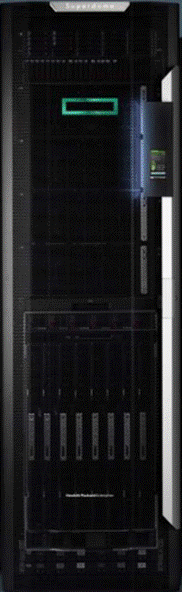
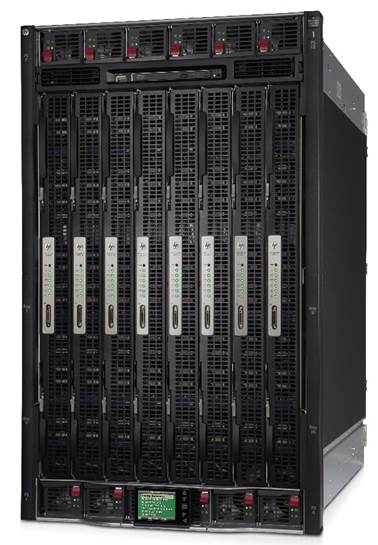
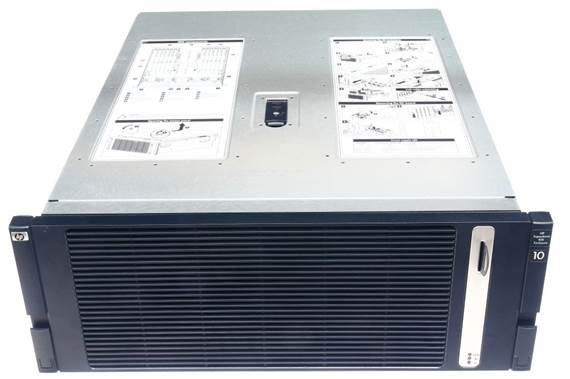
HPE Superdome 2 enclosure front |
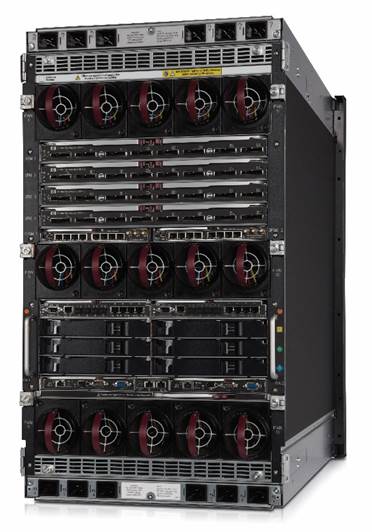
HPE Superdome 2 enclosure back |
|
|
|
|
HPE Superdome 2 IOX |
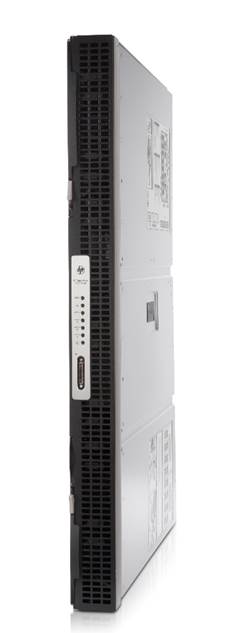
HPE Superdome 2 Server Blade (CB900s i6) |
|
| |
Standard Features
| ||||||||||||||||||||||||||||||||
|
Notes: *w/16 GB DIMMs | ||||||||||||||||||||||||||||||||
|
| ||||||||||||||||||||||||||||||||
|
Intel Itanium processor 9700 series | ||||||||||||||||||||||||||||||||
|
General The Superdome 2 compute enclosure is the building block of the 8s, 16s, and 32s systems. Each Superdome 2 compute enclosure supports 15 fans, 12 power supplies, associated power cords, and four HPE Crossbar Fabric Modules (XFMs). The product names for Superdome 2 are:
| ||||||||||||||||||||||||||||||||
|
Superdome 2 - 8s The SD2-8s system can support up to eight Superdome 2 server blades (CB900s i6). The SD2-8s compute enclosure is physically the same compute enclosure as the SD2-16s, but the SD2-8s system is limited to up to four blades per nPartition. Although the computer enclosure for both systems is the same, the product number for each system (SD2-8s and SD2-16s) is different. The OS licensing is different between the SD2-8s and SD2-16s. A minimum of one and maximum of four Superdome 2 IOX enclosures per SD2-8s system is supported. The IOX enclosures must be physically located in the same rack as the SD2-8s system it is connected to.
The SD2-8s system is different from the SD2-16s system in that the SD2-8s system has a unique product number, a lower hardware price-point, lower HP-UX pricing with tier-3 pricing, does not include the Superdome 2 active status door display (even if factory integrated into a rack), and has restrictions on its partition size (maximum 4 blades/nPartition). | ||||||||||||||||||||||||||||||||
|
Superdome 2 - 16s The SD2-16s system can support up to eight Superdome 2 server blades (CB900s i6). A minimum of one and up to eight Superdome 2 IOX enclosures per SD2-16s system is supported. The Superdome 2 active status door display is included when the SD2-16s is ordered factory integrated into a rack. | ||||||||||||||||||||||||||||||||
|
Superdome 2 - 32s The SD2-32s system is comprised of two compute enclosures. The system supports up to 16 Superdome 2 server blades (CB900s i6 and/or CB900si4) - eight Superdome 2 server blades per compute enclosure. A minimum of one and up to eight Superdome 2 IOX enclosures per SD2-32s system is supported. The Superdome 2 active status door display is included when the SD2-32s is ordered factory integrated into a rack. | ||||||||||||||||||||||||||||||||
|
HP-UX 11iv3 Operating Environments and software |
|
The supported operating environment for HPE Superdome 2 is HP-UX 11iv3. HP-UX 11i v3 comes with a set of features that can provide more value for your investment. HP-UX 11i v3 is designed to simplify and unify IT, and deliver the always-on resiliency, dynamic optimization of resources, and investment protection and stability demanded in mission-critical computing. It integrates proven UNIX® functionality with advances in high availability, security, partitioning, workload management, and instant-capacity-on-demand. This is delivered within the industry's first mission-critical Converged Infrastructure, to drive up flexibility, while reducing risk, and delivering compelling value. For more detail, please see the HP-UX QuickSpecs at: https://www.hpe.com/h20195/v2/GetHTML.aspx?docname=c04111649 |
|
|
|
HPE Superdome 2 Server Blade (CB900s i6) (CB900s i4) |
|
Processors The Superdome 2 CB900s i6 server blade is populated with two processors:
The Superdome 2 CB900s i4 server blade is populated with two processors:
|
|
Chipset
|
|
Upgradability and scalability Superdome 2 is scalable from 8 socket configurations to 32 socket configurations |
|
Cache Memory For Intel® Itanium® Processor 9760/9560 and 9740/9540 8c:
Notes: 8GB and 16GB LV DIMMs are supported in CB900s i6 blades. |
|
Memory type Registered
|
|
Memory protection Error checking and correcting (ECC) on memory and caches; double-chip spare |
|
Operating system
Notes: licensing is on a per-socket basis |
|
I/O slots - External
|
|
Built in Networking
Notes: Ethernet Pass-through, Ethernet Switch interconnect or Cisco Fabric Extender module (stand-alone only) |
|
Partitioning
|
|
Capacity on Demand
|
|
Form factor
- 18U Enclosure - 4U IOX Enclosure - HPE SD2 G2 42U 600x1200 Enterprise Shock Rack with standard rack door
- 18U Enclosure - 4U IOX Enclosure - HPE SD2 G2 42U 600x1200 Enterprise Shock Rack with the Superdome 2 door and active status display
- Two 18U Enclosures in single HPE SD2 G2 42U 600x1200 Enterprise Shock Rack with the Superdome 2 door and active status display - 4U IOX Enclosures in a separate HPE Intelligent Series rack |
|
High availability-standard server features
|
Redundant Fibre Channel paths
|
|
I/O
|
|
Standard Warranty
|
|
|
Service and Support
|
HPE Services No matter where you are in your digital transformation journey, you can count on HPE Services to deliver the expertise you need when, where and how you need it. From planning to deployment, ongoing operations and beyond, our experts can help you realize your digital ambitions. https://www.hpe.com/services
|
|
|
|
Consulting Services No matter where you are in your journey to hybrid cloud, experts can help you map out your next steps. From determining what workloads should live where, to handling governance and compliance, to managing costs, our experts can help you optimize your operations. https://www.hpe.com/services/consulting
|
|
|
|
HPE Managed Services HPE runs your IT operations, providing services that monitor, operate, and optimize your infrastructure and applications, delivered consistently and globally to give you unified control and let you focus on innovation. HPE Managed Services | HPE
|
|
|
|
Operational services Optimize your entire IT environment and drive innovation. Manage day-to-day IT operational tasks while freeing up valuable time and resources. Meet service-level targets and business objectives with features designed to drive better business outcomes. https://www.hpe.com/services/operational
|
|
|
|
HPE Complete Care Service HPE Complete Care Service is a modular, edge-to-cloud IT environment service designed to help optimize your entire IT environment and achieve agreed upon IT outcomes and business goals through a personalized experience. All delivered by an assigned team of HPE Services experts. HPE Complete Care Service provides:
https://www.hpe.com/services/completecare
|
|
|
|
HPE Tech Care Service HPE Tech Care Service is the operational support service experience for HPE products. The service goes beyond traditional support by providing access to product specific experts, an AI driven digital experience, and general technical guidance to not only reduce risk but constantly search for ways to do things better. HPE Tech Care Service delivers a customer-centric, AI driven, and digitally enabled customer experience to move your business forward. HPE Tech Care Service is available in three response levels. Basic, which provides 9x5 business hour availability and a 2-hour response time. Essential which provides a 15-minute response time 24x7 for most enterprise level customers, and Critical which includes a 6-hour repair commitment where available and outage management response for severity 1 incidents. https://www.hpe.com/services/techcare
|
|
|
|
HPE Lifecycle Services HPE Lifecycle Services provide a variety of options to help maintain your HPE systems and solutions at all stages of the product lifecycle. A few popular examples include:
Notes:
To review the list of Lifecycle Services available for your product
go to: For a list of the most frequently purchased services using service credits, see the HPE Service Credits Menu |
|
|
|
Other Related Services from HPE Services: HPE Education Services Training and certification designed for IT and business professionals across all industries. Broad catalogue of course offerings to expand skills and proficiencies in topics ranging from cloud and cybersecurity to AI and DevOps. Create learning paths to expand proficiency in a specific subject. Schedule training in a way that works best for your business with flexible continuous learning options. https://www.hpe.com/services/training |
|
|
|
Defective Media Retention An option available with HPE Complete Care Service and HPE Tech Care Service and applies only to Disk or eligible SSD/Flash Drives replaced by HPE due to malfunction.
Consult your HPE Sales Representative or Authorized Channel Partner of choice for any additional questions and services options. |
|
|
|
Parts and Materials HPE will provide HPE-supported replacement parts and materials necessary to maintain the covered hardware product in operating condition, including parts and materials for available and recommended engineering improvements. Parts and components that have reached their maximum supported lifetime and/or the maximum usage limitations as set forth in the manufacturer's operating manual, product quick-specs, or the technical product data sheet will not be provided, repaired, or replaced as part of these services. |
|
|
|
How to Purchase Services Services are sold by Hewlett Packard Enterprise and Hewlett Packard Enterprise Authorized Service Partners:
|
|
|
|
AI Powered and Digitally Enabled Support Experience Achieve faster time to resolution with access to product-specific resources and expertise through a digital and data driven customer experience Sign into the HPE Support Center experience, featuring streamlined self-serve case creation and management capabilities with inline knowledge recommendations. You will also find personalized task alerts and powerful troubleshooting support through an intelligent virtual agent with seamless transition when needed to a live support agent. https://support.hpe.com/hpesc/public/home/signin |
|
|
|
Consume IT On Your Terms HPE GreenLake edge-to-cloud platform brings the cloud experience directly to your apps and data wherever they are-the edge, colocations, or your data center. It delivers cloud services for on-premises IT infrastructure specifically tailored to your most demanding workloads. With a pay-per-use, scalable, point-and-click self-service experience that is managed for you, HPE GreenLake edge-to-cloud platform accelerates digital transformation in a distributed, edge-to-cloud world.
To learn more about HPE Services, please contact your Hewlett Packard Enterprise sales representative or Hewlett Packard Enterprise Authorized Channel Partner. Contact information for a representative in your area can be found at "Contact HPE" https://www.hpe.com/us/en/contact-hpe.html For more information http://www.hpe.com/services |
|
|
Configuration Information
|
Superdome 2 products are comprised of two main components: HPE Superdome 2 Enclosure and HPE Superdome I/O Expansion Enclosure (IOX). | ||||||||||||||||
|
| ||||||||||||||||
|
HPE Superdome 2 Enclosure | ||||||||||||||||
|
The SD2-8s (AH352A) is an entry level offering of the SD-16s (AH337A) system. The SD2-8s system is limited to up to four blades per nPartition and thus has different OS licensing than larger systems. It supports a maximum of four IOXs which must be in the same rack as the compute enclosure. From a hardware perspective, the SD2-8s enclosure is exactly the same as the SD2-16s. The SD2-8s and SD2-16s systems and IOXs can be field racked. However, it is recommended that customers order the systems racked from the factory. This provides the customer the benefit of extensive system testing and avoids possible premium service charges for field racking service. An important restriction to note about field racked units: field racked units are limited to single blade configurations due to weight limitations. Additional blades must be ordered as separate items and will be shipped along with the enclosure. Field racked units will not have the Superdome 2 active status door display. Field racking the SD2 requires the use of an appropriate material lift capable of lifting 400 lbs. The RONI lift is no longer available for purchase. Suggested replacement is the Genie Material Lift GL8 http://www.genielift.com/. | ||||||||||||||||
| ||||||||||||||||
|
The SD2-32s system consists of two 16 socket compute enclosures in a single rack with one to eight IOXs in an adjacent rack. These two racks must be immediately adjacent to each in order for the side panels to be removed to connect the cables between the compute enclosure and IOX's (i.e. cabling does not go out the bottom of the rack and through the floor). Field racking is not an option for SD2-32s systems due to the extensive effort required. Superdome 2 systems are supported in the HPE SD2 G2 42U 600x1200 Enterprise Shock Rack. Non-Superdome 2 product may be placed in the same rack as Superdome 2 product. Placement of these other products must not result in moving Superdome 2 product. All racks in the same order must be the same height and width. |
| ||||||||||||||||||||||||||||||||||||||||||||||||||||||||||||||||||||||||||||||||||||||||||
|
Notes: The SUV dongle cable is HPE part number 409496. It connects to the SUV port on the front of each blade and brings out USB (2 port) serial (DB9) and VGA (DB15). This is how a crash cart or a direct-attached USB DVD is connected for debugging the system. | ||||||||||||||||||||||||||||||||||||||||||||||||||||||||||||||||||||||||||||||||||||||||||
|
Superdome 2 is supported in the HPE 600mm 42U wide Intelligent Series rack. A SD2-8s system integrated into one of these racks will come with a standard rack door. The door included with the SD2-16 and SD2-32s systems has unique industrial design features: an active LCD status display on the compute enclosure rack and a Superdome 2 splash plate. Although the door with the racked SD2-8s systems does not have the Superdome 2 door with the active LCD status display, the racks will be pre-cabled to easily add the active LCD status display to the standard rack door when upgrading from a SD2-8s to a SD2-16s. Detailed partitioning rules are included in the configuration rules for each system. However, general rules are as follows:
The following configurations are currently supported:
|
|
|
|
HPE Superdome 2 - 8s |
|
8s Configuration Rules SD2-8s uses the same compute enclosure as the SD2-16s Any blade and any IOH bay can be used to create an nPartition.
|
|
8s Racking Choices The SD2-8s enclosure is 18U high and can be racked in a HPE SD2 G2 42U 600x1200 Enterprise Shock Rack. A SD2-8s system can be connected with up to four IOX's. The enclosure is located 2U from the bottom of a 42U rack to allow for PDUs and cables to exit. Notes: - Mixing of SD2-8s and SD2-16s systems in the same rack - either from the factory or as a field installation - is not supported. - The TFT7600 rack mountable display is not supported on SD2.
| |||||||||||||||||||||||||||||||||||||||||||||||||||||||||||||||||||||||||||||||||||||||||||||||||||
|
8s Partitioning Choices A SD2-8s may be partitioned into several partitions. The configurations recommended herein allow the customer to partition their SD2-8s into the maximum number of recommended, useful, and allowed partitions.
The compute enclosure's midplane has been routed such that there is more bandwidth across odd slots and even slots vs. mixed. Therefore, a four blade partition will have better performance when all four of the blades are in odd (1, 3, 5, 7) or even (2, 4, 6, 8) slots vs. mixed (1, 2, 3, 4) slots. Notes: Superdome 2 enforces the maximum of four blades per partition in the SD2-8s system.
Below are the configurations when shipped from the factory.
| |||||||||||||||||||||||||||||||||||||||||||||||||||||||||||||||||||||||||||||||||||||||||||||||||||
| |||||||||||||||||||||||||||||||||||||||||||||||||||||||||||||||||||||||||||||||||||||||||||||||||||
|
Notes: The alternative 2-blade partition with blades in slots 7 & 8 is provided to allow two 3-blade partition and one 2-blade partition to co-exist in the same enclosure. The alternative 2-blade partition in slots 4 & 8 is provided to support a 2-blade partition if two alternative 3-blade partitions are used. | |||||||||||||||||||||||||||||||||||||||||||||||||||||||||||||||||||||||||||||||||||||||||||||||||||
|
| |||||||||||||||||||||||||||||||||||||||||||||||||||||||||||||||||||||||||||||||||||||||||||||||||||
|
Superdome 2 - 16s | |||||||||||||||||||||||||||||||||||||||||||||||||||||||||||||||||||||||||||||||||||||||||||||||||||
|
16s Configuration Rules The SD2-16s enclosure is the basic building block for Superdome 2. Any blade and any IOH can be assigned to any nPartition.
| |||||||||||||||||||||||||||||||||||||||||||||||||||||||||||||||||||||||||||||||||||||||||||||||||||
Up to eight IOXs may be ordered independently to provide additional I/O capability for the SD2-16s |
|
16s Racking Choices The SD2-16s has some basic racking rules as the SD2-8s, and is very configurable. The SD2-16s enclosure is 18U high and can be racked in the HPE SD2 G2 42U 600x1200 Enterprise Shock Rack. The SD2-16s may be ordered field racked, but some disassembly is required. The default assumption is that enclosures are loaded in the rack starting at the bottom. It is recommended that 2U is left at the bottom of the 42U rack to provide PDU and cabling exit space. The default configuration is a single rack for a SD2-16s with up to four IOXs in the same rack and any additional IOX's in an adjacent rack. IOXs can be configured in an adjacent rack. A customer may want to consider this configuration if they want to: 1) order a SD2-16s and upgrade to a SD2-32s in the future or 2) order four or fewer IOXs now but want to add IOXs in the future and ensure they have rack space reserved. This configuration may be ordered by selecting the "adjacent rack" option. The "adjacent rack" option can be used regardless of the number of IOXs are ordered. Two SD2-16s systems may be ordered in the same rack. A customer may want to consider this configuration if they want to have the compute resources in one rack with more directed cooling and all the IOXs in the adjacent rack that has lower cooling demands The HDD bay should either go above the topmost IOX or in an adjacent rack. The HDD cannot be "nested" within the IOXs due to cable length restrictions. Systems that consist of multiple racks (i.e. SD2-16s with IOX in adjacent rack) must be fully adjacent to each other, i.e. no space between the racks. Cabling from the compute enclosure to the IOXs is from the side (not down through the floor). Racks for systems in multiple racks must be the same height, width, and depth.
Notes: - Mixing of SD2-8s and SD2-16s systems in the same rack - either from the factory or as a field installation is not supported. - The TFT7600 rack mountable display is not supported on SD2.
|
|
16s Partitioning Choices A SD2-16s system may be partitioned into many different mixes of partitions. The configurations recommended herein allow the customer to partition their SD2-16s into the maximum number of recommended, useful, and allowed nPartitions. The enclosure's midplane has been routed such there is more bandwidth across odd slots and even slots vs. mixed. Therefore, a four blade partition will have better performance when all four of the blades are in odd (1, 3, 5, 7) or even (2, 4, 6, 8) slots vs. mixed (1, 2, 3, 4) slots. Below are the configurations when shipped from the factory |
| ||||||||||||||||||||||||||||||||||||||||||||||||||||||||||||||||||||||||||||||||||||||||||||||||||||||||||||||||||||||||||||||||||||||||||||||||||||||||||||||||||
|
Notes: The alternative 2-blade partition with blades in slots 7 & 8 is provided to allow two 3-blade partitions and one 2-blade partition to co-exist in the same enclosure. The alternative 2-blade partition in slots 4 & 8 is provided to support a 2-blade partition if two alternative 3-blade partitions are used. The alternative 3-blade partition in slots 4, 6 and 8 allows both a 5-blade and 3-blade partition to co-exist in the same enclosure. | ||||||||||||||||||||||||||||||||||||||||||||||||||||||||||||||||||||||||||||||||||||||||||||||||||||||||||||||||||||||||||||||||||||||||||||||||||||||||||||||||||
|
| ||||||||||||||||||||||||||||||||||||||||||||||||||||||||||||||||||||||||||||||||||||||||||||||||||||||||||||||||||||||||||||||||||||||||||||||||||||||||||||||||||
|
Superdome 2 - 32s | ||||||||||||||||||||||||||||||||||||||||||||||||||||||||||||||||||||||||||||||||||||||||||||||||||||||||||||||||||||||||||||||||||||||||||||||||||||||||||||||||||
|
32s Configuration Rules | ||||||||||||||||||||||||||||||||||||||||||||||||||||||||||||||||||||||||||||||||||||||||||||||||||||||||||||||||||||||||||||||||||||||||||||||||||||||||||||||||||
|
The SD2-32s consists of two 16 socket compute enclosures cabled together. At least one IOX is mandatory. The two compute enclosures must be within the same rack. Any blade and any IOX/IO bay can be assigned to any nPartition.
The OAs in enclosure #1 are the leader and failover OAs for the system.
| ||||||||||||||||||||||||||||||||||||||||||||||||||||||||||||||||||||||||||||||||||||||||||||||||||||||||||||||||||||||||||||||||||||||||||||||||||||||||||||||||||
|
32s Racking Choices |
|
Each compute enclosure is 18U high and can be racked in a HPE SD2 G2 42U 600x1200 Enterprise Shock Rack. The two compute enclosures must be in the same rack. Hewlett Packard Enterprise will not support field racking SD2-32s systems. The assumption is that enclosure loading starts at the bottom of the rack. It is recommended that 2U is left at the bottom of the 42U rack to provide PDU and cabling exit space. Complexes that consist of multiple racks must be fully adjacent to each other, i.e. no space between the two racks. Cabling from the compute enclosure to the IOXs goes through the side (not down through the floor). Going through the floor would require longer cables, which are not supported. Racks for systems in multiple racks must be the same height, width, and depth. |
|
32s Partitioning Choices |
|
A SD2-32s complex may be partitioned into many different mixes of nPartitions. The configurations recommended herein allow the customer to partition their SD2-32s system into the maximum number of recommended, useful, and allowed nPartitions. These are the configurations as they will be shipped from CTO. The partition table should be used as a guideline when creating new partitions. After the creation of two partitions using the table, it is possible that remaining partitions would not appear in the table. Other configurations are legal and supported, but will not have had as extensive testing done on them, may not have the best performance, or may not allow as much flexibility for future upgrades. As an example, it is legal for a two blade partition to be populated in slots 1 & 2 vs. 1 & 3. Extra care should be taken to design partitions such that spanning of enclosures is kept to a minimum. |
| |||||||||||||||||||||||||||||||||||||||||||||||||||||||||||||||||||||||||||||||||||||||||||||||||||||||||||||||||||||||||||||||||||||||||||||||||||||||||||||||||||||||||||||||||||||||||||||||||||||||||||||||||||||||||||||||||||||||||||||||||||||||||||||||||||||||||||||||||||||||||||||||||||||||||||||||||||||||||||||||||||||||||||||||||||||||||||||||||||||||||||||||||||||||||||||||||||||||||||||||||||||||||||||||||||||||||||||||||||||||||||||||||||||||||||||||||||||||||||||||||||||||||||||||||||||||||||||||||||||||||||||||
|
IOX
bays are assigned at a nPartition level. For multi-enclosure systems,
the assignment of IOXs is done such that latency between the nPartition
compute resources and IO resources is minimized. Therefore, IOX configurations
cannot be limited to require that the IOX are always loaded in the same
order: IOX5, IOX6, IOX7, IOX8, IOX9, IOX10, IOX11, and IOX12. It is
very dependent on the number and size of nPartitions ordered. For partitions larger than 8 blades, IOXs would be loaded in the following order:
Notes: The rules are above were constructed to meet "most" conditions and provide future flexibility. They can be overridden if desired. |
|||||||||||||||||||||||||||||||||||||||||||||||||||||||||||||||||||||||||||||||||||||||||||||||||||||||||||||||||||||||||||||||||||||||||||||||||||||||||||||||||||||||||||||||||||||||||||||||||||||||||||||||||||||||||||||||||||||||||||||||||||||||||||||||||||||||||||||||||||||||||||||||||||||||||||||||||||||||||||||||||||||||||||||||||||||||||||||||||||||||||||||||||||||||||||||||||||||||||||||||||||||||||||||||||||||||||||||||||||||||||||||||||||||||||||||||||||||||||||||||||||||||||||||||||||||||||||||||||||||||||||||||
|
| |||||||||||||||||||||||||||||||||||||||||||||||||||||||||||||||||||||||||||||||||||||||||||||||||||||||||||||||||||||||||||||||||||||||||||||||||||||||||||||||||||||||||||||||||||||||||||||||||||||||||||||||||||||||||||||||||||||||||||||||||||||||||||||||||||||||||||||||||||||||||||||||||||||||||||||||||||||||||||||||||||||||||||||||||||||||||||||||||||||||||||||||||||||||||||||||||||||||||||||||||||||||||||||||||||||||||||||||||||||||||||||||||||||||||||||||||||||||||||||||||||||||||||||||||||||||||||||||||||||||||||||||
|
Power Distribution Options The Superdome 2 compute enclosure power supply is an 80 PLUS Platinum Rated 2400W supply. Notes: Mixed power supplies within the same compute enclosure is not supported. The IOX power supply is an 80 PLUS Platinum Rated 750w supply. Superdome 2 is designed to support N+N redundancy of the power supplies. To retain dual source redundancy in conjunction with the power supply redundancy of Superdome 2, it is necessary to connect all six power supplies located left of center (three top and three bottom) to one source and all six power supplies located right of center (three top and three bottom) to the other source. There are nine AC power connection options offered in Superdome 2 enclosures. These can be divided into three main configurations
- Connectors on back of the compute enclosure are IEC60320-C19 - A total of 12 single phase power cords are necessary to power the 12 power supplies in the Superdome 2 compute enclosure. (power option #001) - To limit the number of power cords exiting the rack (decrease from 12 cords to 4 cords) it is possible to use a single phase IEC309 63A Power Distribution Units (PDUs) for power cord aggregation. (power option #006) - Power option #010 is only available in Japan. There are 6 NEMA L6-30P single phase PDU's at the bottom of the rack. Notes: power option #010 is not available with the 36u rack. A manual override is required if ordered with the 32s starter package or the SD2-32s SMP - In the HPE Superdome 2 enclosure back photo you see the rear of a Superdome 2 compute enclosure with the single phase power interface modules installed, they are visible at the extreme top and bottom of the unit.
- The power interface modules used are the single phase units shown above. - PDUs used have: o 4 wire, IEC 309 60A connector, qty. 2 needed. (power option #004) o 5 wire, IEC309 32A connector, qty. 2 needed. (power option #005)
- 4 wire version utilizes NEMA L15-30R connectors: (power option #002) - 5 wire version utilizes IEC309 16A 5 pin connectors: (power option #003) - A total of 4 cords are necessary to power the 12 power supplies in the Superdome 2 compute enclosure. - In the HPE Superdome 2 enclosure back photo you see the rear of a Superdome 2 compute enclosure with the three phase power interface modules installed. All these options are offered for all Superdome 2 products. All PDUs supported in Superdome 2 are half depth such that two can fit in 1U (one in the front and one in the back). Many of the PDUs are offered in both 1U (horizontally mounted) and 0U (side-mounted) options. The three phase PDU's for the SD2 compute enclosure are AF511A or AF518A. The IOX single phase PDU's are either 252663-D74 or 252663-B33. Specifying power option #007 in conjunction with any of the others (#001 - #006) routes the power cords to exit the top of the rack rather than the bottom. The IOX also supports N+N power supply redundancy with 2 power supplies. Dual source capability may be utilized by connecting one power cord to one source and the other to a different source. Power cord connections on the IOX are IEC 60320 C14. | |||||||||||||||||||||||||||||||||||||||||||||||||||||||||||||||||||||||||||||||||||||||||||||||||||||||||||||||||||||||||||||||||||||||||||||||||||||||||||||||||||||||||||||||||||||||||||||||||||||||||||||||||||||||||||||||||||||||||||||||||||||||||||||||||||||||||||||||||||||||||||||||||||||||||||||||||||||||||||||||||||||||||||||||||||||||||||||||||||||||||||||||||||||||||||||||||||||||||||||||||||||||||||||||||||||||||||||||||||||||||||||||||||||||||||||||||||||||||||||||||||||||||||||||||||||||||||||||||||||||||||||||
|
| |||||||||||||||||||||||||||||||||||||||||||||||||||||||||||||||||||||||||||||||||||||||||||||||||||||||||||||||||||||||||||||||||||||||||||||||||||||||||||||||||||||||||||||||||||||||||||||||||||||||||||||||||||||||||||||||||||||||||||||||||||||||||||||||||||||||||||||||||||||||||||||||||||||||||||||||||||||||||||||||||||||||||||||||||||||||||||||||||||||||||||||||||||||||||||||||||||||||||||||||||||||||||||||||||||||||||||||||||||||||||||||||||||||||||||||||||||||||||||||||||||||||||||||||||||||||||||||||||||||||||||||||
|
HPE Power Advisor The HPE power Advisor is a tool provided by Hewlett Packard Enterprise to assist in the estimation of power consumption at a system, rack, and multi-rack level. Available at: https://www.hpe.com/in/en/integrated-systems/rack-power-cooling.html | |||||||||||||||||||||||||||||||||||
|
| |||||||||||||||||||||||||||||||||||
|
HPE Superdome2 Server Blades |
| ||||||||||||||||||||||||||||||||||
|
HPE Superdome 2 CB900s i6 Itanium 9760 (2.67GHz/16-core/32MB/170W) Cell Blade |
AT121B | ||||||||||||||||||||||||||||||||||
|
| |||||||||||||||||||||||||||||||||||
|
HPE Superdome 2 CPU / CPU module Support Superdome 2 CB900s i6 blades include the Intel Itanium Processor 9700 series 8c. See below for supported CPU frequency/cache bins, number of cores and I/O frequencies. Support for the various speed bins is as follows: | |||||||||||||||||||||||||||||||||||
|
| |||||||||||||||||||||||||||||||||||
|
Processor | |||||||||||||||||||||||||||||||||||
|
Superdome 2 supported CPU Matrix | |||||||||||||||||||||||||||||||||||
| |||||||||||||||||||||||||||||||||||
|
| |||||||||||||||||||||||||||||||||||
| |||||||||||||||||||||||||||||||||||
|
| |||||||||||||||||||||||||||||||||||
|
CPU Mixing Support Superdome 2 governing rules for mixing processors are as follows:
| |||||||||||||||||||||||||||||||||||
|
| |||||||||||||||||||||||||||||||||||
|
HPE Superdome 2 Memory Support |
|
|
Superdome 2 systems will use the Intel® Scalable Memory Buffer chip to translate between the Scalable Memory Interconnect (SMI) technology on the memory controller and the DDR3 R-DIMMs. | |
|
The following Memory modules are supported on CB900s i6 and CB900s i4 blades: |
|
|
HPE CB900s 64GB (4x16GB) Dual Rank PC3L-12800 (DDR3-1600) Registered CAS-11 Memory Module
|
AT128A |
|
Only DIMMs that Hewlett Packard Enterprise has qualified on Superdome 2 are supported in Superdome 2 products.
The Superdome 2 blade supports 32 RDIMMs and eight Intel® Scalable Memory Buffer chips. This breaks downs to eight R-DIMMs and two Scalable Memory Buffer chips per memory controller. General memory configuration rules:
| |
|
| |
|
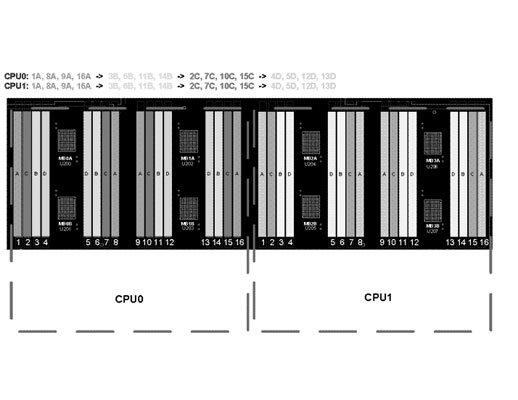
Superdome 2 DDR3 DIMM loading rules and numbering (top-down view of blade) | |
|
The DIMM groups must be loaded in the following order:
|
|
|
| |
|
Superdome 2 blade DIMM Arrangement | |
|
Notes: Per the commonality guidelines, the first DIMMs to be loaded will have white DIMM connectors loaded on the blade. Therefore, "A" and "B" connectors will be white. Connectors in slot positions "C" and "D" will be black. | |
|
The following table shows the supported configurations as shipped from the factory. - Mixing different DIMM sizes (eg. AT127B and AT128A) or densities (eg. AT127A and AT127B) within the same blade is not supported at this time. - However individual Blades may have DIMMs of different sizes or densities (eg. one Blade can have all 8GB DIMMs while another Blade can have all 16GB DIMMs) - 8GB and 16GB LV DIMMs are supported on CB900s i6 blades. | |||||||||||||||||||||||||||||||||||||||||||||||||||||||||||||||||||||||||||||
| |||||||||||||||||||||||||||||||||||||||||||||||||||||||||||||||||||||||||||||
|
Superdome 2 i4 and i6 DIMM configurations shipped from the factory | |||||||||||||||||||||||||||||||||||||||||||||||||||||||||||||||||||||||||||||
|
| |||||||||||||||||||||||||||||||||||||||||||||||||||||||||||||||||||||||||||||
|
HPE Superdome 2 Storage Support For HPE Storage solutions, please see: | |||||||||||||||||||||||||||||||||||||||||||||||||||||||||||||||||||||||||||||
|
| |||||||||||||||||||||||||||||||||||||||||||||||||||||||||||||||||||||||||||||
|
HPE Superdome 2 Interconnect Module Support Superdome 2 will support some of the same interconnect modules as the c-7000 and c-3000 enclosures.
A supported Ethernet interconnect module must be ordered for bay 1 of all enclosures.
The LOMs on the blade are supported running at 10GbE. The interconnect modules supported in the Superdome 2 enclosure are:
| |||||||||||||||||||||||||||||||||||||||||||||||||||||||||||||||||||||||||||||
|
Notes: The HPE Integrity Cisco B22HP Fabric Extender with 16 FET - (PN 657787-B21) is packaged with 16 Cisco Fabric Extender Transceivers. | |||||||||||||||||||||||||||||||||||||||||||||||||||||||||||||||||||||||||||||
|
| |||||||||||||||||||||||||||||||||||||||||||||||||||||||||||||||||||||||||||||
|
HPE Networking Options The following cards are currently supported: | |||||||||||||||||||||||||||||||||||||||||||||||||||||||||||||||||||||||||||||
|
Converged Networking |
| ||||||||||||||||||||||||||||||||||||||||||||||||||||||||||||||||||||||||||||
|
Networking |
|||||||||||||||||||||||||||||||||||||||||||||||||||||||||||||||||||||||||||||
|
HPE PCIe 2-port 1000Base-T LAN Adapter |
AD337A | ||||||||||||||||||||||||||||||||||||||||||||||||||||||||||||||||||||||||||||
|
HPE 1Gb 4p 366T Adptr for Integrity |
R2U70A | ||||||||||||||||||||||||||||||||||||||||||||||||||||||||||||||||||||||||||||
|
| |||||||||||||||||||||||||||||||||||||||||||||||||||||||||||||||||||||||||||||
|
Storage |
|
|
HPE Integrity SN1000Q 2-port 16Gb Fibre Channel Host Bus Adapter |
B9F24A |
|
| |
|
HPE Superdome 2 Boot Support | |
|
Boot From "Local" SAN Notes: Information pertains to boot requirement only. HPE Fibre Channel Switch(s)
Considerations for "Local" SAN
- One P2000 G3 FC would support up to sixteen partitions o Supplies only a single dedicated boot-path for each partition o P2000 G3 FC firmware upgrades require taking down the partition
- Configure redundant boot-paths to separate controllers with each boot path routed by different switch o P2000 G3 FC and SAN switch firmware updates do NOT require taking down the SD2 - One P2000 G3 FC array/ two SAN switches would support up to 16 partitions - Two P2000 G3 FC arrays/ two SAN switches would support up to 32 partitions
| |
|
Boot From External SAN Notes: Information pertains to boot requirement only. SAN Provides essentially unlimited LUNs
Considerations for SAN boot
- Allows online updates of switch and array firmware
- nPar and vPar definition is available and independent of installation of operating system
| |
|
Local Boot From SAS storage - D2x00 Notes: Information pertains to boot requirement only.
- D2x00 can be cascaded to expand storage - Smart Array P411 supports a maximum of 100 drives (25 may be solid state drives in a RAID set separate from mechanical disks) - Smart Array P411 can be used as a RAID controller or can be put into "HBA mode" for use with HP-UX disk mirroring used (utility SAUPDATE)
- Minimum configuration: one D2x00 o One D2x00 can support one partition
o Dual-domain not supported with Smart Array P411 controller o Smart Array P812 not supported in this release o Serviceguard multi-initiator not supported in this release
|
|
Local Boot From SAS storage - MDS600 Notes: Information pertains to boot requirement only.
- MDS600 is a high density storage array - Smart Array P411 can be used as a RAID controller or can be put into "HBA mode" for use with HP-UX disk mirroring used (utility SAUPDATE)
- Minimum configuration: one MDS600 o Dual-domain not supported with Smart Array P411 controller o Zoning not supported with MDS600 direct attach to a Smart Array controller in IOX expansion o Smart Array P812 not supported with SD2 o Serviceguard multi-initiator not supported in this release
|
|
Local Boot From SAS storage - P2000 Notes: Information pertains to boot requirement only.
- P2000 Arrays are expandable storage systems - Smart Array P411 is used in "HBA mode" for use with P2000 arrays - Smart Array P411 supports multi-initiator and Serviceguard with P2000 SAS - Considerations for local boot - Minimum configuration: one P2000 o Dual-domain not supported with Smart Array P411 controller o Smart Array P812 not supported with SD2 o Serviceguard multi-initiator supported mid 2011 for P411, P2000 SAS, and Superdome 2 |
|
|
|
OS & Default Configuration Settings This section describes OS limitations and default configuration settings
HP-UX Settings HP-UX 11iv3 will be supported on Superdome 2. HP-UX 11iv2 or early versions will NOT be supported on Superdome 2. Licensing is on a per-socket basis. HP-UX will support up to 32 sockets, 256 cores and 512 threads up to 8TB of memory per Operation Environment image. Default HP-UX memory configuration: 87.5% socket local memory, 12.5% interleaved memory. Default is hyperthreading is turned on. Hyperthreading with HPVM is not supported. Error messages will be sent if one attempts to set up HPVMs with hyperthreading turned on. Hewlett Packard Enterprise recommends that the same percentage of SLM vs. ILM be configured for every blade within an nPartition. Configurations with different percentages of SLM vs. ILM on blades within an nPartition could experience performance anomalies. | |
|
| |
|
HPE Instant Capacity (iCAP) Some customers require the ability to configure their server environment with instant capacity resources (cores/memory). For a complete description of how to configure Instant Capacity, please refer to the following URL: https://www.hpe.com/h20195/v2/GetHTML.aspx?docname=c04123435 | |
|
| |
|
HPE Superdome2 iCAP Blades (RTA / RTU)
|
|
|
HPE Superdome 2 CB900s i6 Itanium 9760 2.67GHz 32MB iCAP RTU Cell Blade |
AT125B |
|
HPE Superdome 2 CB900s i6 Itanium 9740 2.13GHz 24MB iCAP RTU Cell Blade |
AT126B |
|
HPE Superdome 2 CB900s i4 Itanium 9560 Cell Blade CPU Activation RTU |
AT125A |
|
HPE Superdome 2 CB900s i4 Itanium 9540 Cell Blade CPU Activation RTU
|
AT126A |
|
Configuring HPE Superdome 2 blades (Cores) Blades will be classified as "Active" or "iCAP". The Superdome 2 CB9000s i6 and i4 blades have 16 cores on a single blade (two sockets with eight cores per socket). Ordering an active Blade will result in 16 cores being activated and licensed. Ordering an iCAP blade provides customers the "right to access" (RTA's) for 16 cores. Customers have the option to purchase "right to use" (RTU's) which provide the capability to use eight cores. There is an ordering requirement for each nPartition to have either at least one active blade or, if all iCAP blades, one RTU. During deployment, usage rights can be redistributed among the nPartitions, but at least one core must be active in each nPartition. To determine the number HP-UX License to Use (LTU's) required, multiply the number of active blades by 2 and add the number of iCAP enablements (RTU's). Unique product numbers are used to differentiate the speed and activation level for Superdome 2 blades. | |
|
Configuring HPE Superdome 2 blades (Memory) Blades can be configured with different memory sizes and memory type (iCAP Memory). iCAP memory is only available on an iCAP blade. Memory on an iCAP blade must be all active or all iCAP. A blade with iCAP memory will not be available for a customer to use and is considered "off" until enablements are purchased. A blade can be configured with up to 8 memory product units (active/iCAP). It is possible to mix both active/iCAP memory within an nPartition. All active memory on an iCAP blade is accessible even if none of the cores on the blade are in use. The customer will need to purchase multiple 4GB enablement SKUs to activate each memory product on the blade with iCAP to activate all of the iCAP memory. Consult the ICAP ordering and configuration guide for more details. | |
|
iCAP functionality on HPE Superdome 2 servers Usage of iCAP components will be enforced through codewords. Inventory management will be automatic and this iCAP version will be integrated with gWLM for automated workload management. A separate GiCAP Group Manager will also be made available to manage Superdome 2 groups. iCAP components would be turned "off" at the factory at the time of shipping with the factory release of the new iCAP version. |
|
|
|
Platform and Partition Management Superdome 2 delivers partition administration and control and platform management both in easy-to-use graphical management tools and also in a comprehensive and concise command-line interface. The Superdome 2 Onboard Administrator is a unique OA option specific to the SD2 systems. It is based on HPE BladeSystem OA, but adds more memory, more firmware control, and tools uniquely designed for the SD2 platform. The benefit of using the SD2 OA is lowered administration costs along with improved platform and partition management, all within a familiar graphical or command line interface (CLI).
In a major advancement over prior Superdome systems, Superdome 2 has a built-in and always available platform and partition management system. By integrating the management into the server platform, Hewlett Packard Enterprise ensures that every Superdome 2 comes with the full set of management features, and simplifies the task of integrating Superdome 2 into the data center. At the same time, the rich set of capabilities available through the Onboard Administrator's secure network interface enables data-center-level management tools such as HPE Systems Insight Manager (HPE SIM) and others to add value at the data-center level.
The purpose of the Superdome 2 management system is to:
The new SD2 manageability system provides the most user-friendly Superdome experience yet. The Superdome 2 OA makes managing a Superdome much easier than before by centralizing the control and building the management into the hardware and firmware of the system. It provides the following features:
|
|
|
|
Onboard Firmware Manager This is all-new functionality which can scan a partition and report components with incompatible firmware versions. A firmware mismatch can arise through changes in the field that is parts replacements, or partitions which were not upgraded at the same time and then later reconfigured, moving resources around. Partitions with consistent firmware levels in all components run more reliably. Whole partitions, or the entire Superdome 2 system, can have firmware updated to a consistent level with just a click of a button. |
|
Onboard Partition Manager |
|
The Onboard Partition Manager is a set of commands built into the SD2 OA GUI and command line There are three main aspects of partition management: 1. Partition configuration and re-configuration 2. Partition start/stop 3. Management of the OS running on the partition
The Onboard Partition Manager focuses on the first two aspects, partition configuration and partition start/stop. The partition management architecture has changed on SD2 systems to adapt to the new hardware and firmware architecture. The core of partition management functionality now resides on the built-in Superdome 2 Onboard Administrator (SD2 OA). The new OA-based partition management architecture supports a unified nPar and vPar management model based on the fact that partitioning (both nPars and vPars) is now entirely firmware functionality. There are no longer any dependencies on software tools, no need for an external management station or a special partition to run tools. The result is faster, easier, partition configuration and partition start/stop. Both graphical user interface (GUI) and command line interface (CLI) are supported on the OA to manage partitions. Notes: On servers prior to Superdome 2, partition configuration management software primarily ran on the system processors on the partition side. Hence, in order to ease the transition to the new management model, legacy partition management command interfaces with minor modifications are still supported from the partition side. |
|
There are primarily three ways users can do partition management on SD2 servers.
New with SD2 are "ParSpecs" which are away to save, create, and build partitions from resource definitions. ParSpec definitions allow you to have overlapping resources as long as the partitions booted do not all claim the same resources at the same time. One way to use ParSpecs is to create one set for "end of month" jobs, and another set for "daily work". ParSpec commands are built into the OA CLI at first release. |
|
Technical Whitepapers are available for additional information on the new platform and partition management features of Superdome 2:
|
|
HPE Startup VSE gWLM w/VM SVC |
|
For customers who need help setting up a virtualized environment for HPE Integrity and HPE 9000 servers. HPE Installation and Startup Services Suite for HP-UX Virtualization and infrastructure management will provide you with the help you need to set up a virtualized environment for HPE Integrity and HPE 9000 servers. These services provide all of the deliverables required to install the HP-UX Virtualization and infrastructure management software, and configure physical servers into multiple virtual servers as well as set up the infrastructure management tools that can help you manage this type of virtual environment. Hewlett Packard Enterprise will conduct a pre-delivery planning session with you to review your specific requirements and make recommendations on the best mix of HP-UX Virtualization and infrastructure management services (within this suite) to address your particular goals. Hewlett Packard Enterprise will then install and configure the software, perform verification tests, and conduct a knowledge-transfer session with you. The services within this suite are as follows:
HPE Startup Insight Dynamic Configuration Mgmt SVC - Installation of Insight Dynamics infrastructure orchestration (IO) tool |
|
Scalability is a core part of the Superdome 2 value. Customers can start small and grow their Superdome 2 systems as needed to support changing business needs.
SD2-8s to SD2-16s Upgrade
SD2-16s to SD2-32s Upgrade
|
|
|
Technical Specifications
|
This section describes the physical and environmental information. | ||
|
| ||
|
Physical Information |
Superdome 2 |
IOX |
|
Site planning and installation included |
Yes |
Yes |
|
Maximum Heat dissipation (fully populated system) |
30,076 BTU/hr / 8820W
|
1,790 BTU/hr / 525 W |
|
Depth |
828 mm / 32.6" |
572mm / 22.5" |
|
Width |
447 mm / 17.6" |
437mm / 17.2" |
|
Height |
798 mm / 31.4" (18U) |
173mm / 6.8" (4U) |
|
Weight - Minimum (empty chassis with midplane assembly and rear chassis cage) |
108 kg / 237 lb (empty chassis with midplane assembly and rear chassis cage) |
22.1 kg / 48.7 lb |
|
Weight - Typical (half populated) |
254 kg / 559 lb |
23.6kg / 51.9 lbs |
|
Weight - Maximum (fully populated) |
314 kg / 692 lb |
29.5 kg / 65.0 lb |
|
Electrical Characteristics |
Superdome 2 |
IOX |
|
AC input power: 3-phase |
2N Dual Power input modules with two 5-wire cords each: IEC309 16A or two 4-wire cords each: NEMA L15-30P 30A. 5 wire: 12.26A per cord. 4wire: 23.3A per cord |
N/A |
|
AC input power: Single-Phase |
2N Dual Power input modules with 6 Input Receptacles each: IEC-C19, 16/20A. |
2N Dual power receptacles, IEC-C14, 10A (1 per power supply) |
|
Maximum Input Current: Single Phase (200V) |
13.45A per C19 cord |
3.00A per C14 cord |
|
Maximum Input Power total |
9,000 VA at PF .98 or greater |
535 VA at PF .98 or greater |
|
Cooling airflow |
800 CFM min; 1100 CFM@32 deg. C; 1900 CFM max |
180 CFM min. 230 CFM max |
|
Environmental Characteristics |
Superdome 2 |
IOX |
|
Acoustics |
<= 8.3 bels LwAd (Sound Power) |
< 7.4 bels LwAd (Sound Power) |
|
Temperature - Recommended Operating Range1,2 |
+18°C to +27°C |
+18°C to +27°C |
|
Temperature - Allowable Operating Range1,2 |
+5°C to +40°C |
+5°C to +40°C |
|
Maximum rate of temperature change |
20°C/hr |
20°C/hr |
|
Non operating temperature |
-40°C to +80°C |
-40°C to +80°C |
|
Air quality |
Gaseous contaminants must be at the G1 level or less as defined by ISA Standard ISA-71.04-1985 |
Gaseous contaminants must be at the G1 level or less as defined by ISA Standard ISA-71.04-1985 |
|
Humidity - Recommended Operating Range (non-condensing)1 |
+5.5 °C dew point minimum, 60%RH and +15°C dew point maximum |
+5.5 °C dew point minimum, 60% RH and +15°C dew point maximum |
|
Humidity - Allowable Operating Range (non-condensing)1 |
8%RH and -12°C dew point minimum, 85%RH and +24°C dew point maximum |
8%RH and -12°C dew point minimum, 85%RH and +24°C dew point maximum |
|
Operating relative humidity |
20% to 80% @ 30°C |
20% to 80% @ 30°C |
|
Maximum Operating altitude |
3050m (10,000 ft) |
3050m (10,000 ft) |
|
Maximum Non operating altitude |
4500m (15,000 ft) |
4500m (15,000 ft) |
|
Voltage tolerance range |
200-240 VAC |
200-240 VAC |
|
The Recommended Operating Range is recommended for continuous operation. Operating within the Allowable Operating Range is supported but may result in a decrease in system performance. | ||
|
| ||
|
Environmental Info Regulatory model numbers: |
|
|
|
Additional Power Data The maximum power figures given were developed with the maximum configuration running applications designed to draw the maximum power possible. It is highly unlikely that any real-world application will result in this amount of power use for any significant time period. |
|
|
Summary of Changes
|
Date |
Version History |
Action |
Description of Change |
|
08-Jan-2024 |
Version 34 |
Changed |
Service and Support section was updated |
|
04-Oct-2021 |
Version 33 |
Changed |
Service and Support Pointnext Tech Care and Complete Care information updated Obsolete SKU was removed |
|
02-Aug-2021 |
Version 32 |
Changed |
Standard Features and Configuration Information sections were updated Service and Support Pointnext information added Obsolete SKUs were removed |
|
15-Feb-2021 |
Version 31 |
Changed |
Rebranding applied to QuickSpecs |
|
18-Jan-2021 |
Version 30 |
Changed |
Standard Features sections were updated. |
|
02-Dec-2019 |
Version 29 |
Changed |
Configuration Information sections was updated |
|
03-Jun-2019 |
Version 28 |
Added |
Configuration sections was updated. |
|
01-Oct-2018 |
Version 27 |
Changed |
Configuration section was updated. |
|
Added |
SKUs added in Configuration section: 854194-B21, 538113-B21. | ||
|
02-July-2018 |
Version 26 |
Added |
SKU added in Configuration section: 878038-H21. |
|
05-Mar-2018 |
Version 25 |
Changed |
Changed the note for DIMM size/density compatibility on same Blade. |
|
Removed |
PCIe Workload Accelerator: 803197-B21 and 803195-B21. were removed. | ||
|
04-Dec-2017 |
Version 24 |
Changed |
Overview, Standard Features, and Configuration sections were updated. |
|
23-Oct-2017 |
Version 23 |
Changed |
Care Pack naming and Service and Support- Parts and Materials updated. |
|
25-Sep-2017 |
Version 22 |
Changed |
Configuration section was updated. |
|
Added |
SKUs added in Configuration section: | ||
|
Removed |
SKUs deleted in Configuration section: | ||
|
14-Aug-2017 |
Version 21 |
Added |
SKUs added in Configuration section: 803197-B21, 803195-B21, AT123B, AT124B, AT123A, AT124A, AT125B, AT126B, AT125A, AT126A, AT127B, AT128A. |
|
07-Aug-2017 |
Version 20 |
Added |
SKUs added in Configuration section: |
|
11-Jul-2017 |
Version 19 |
Changed |
Configuration section was updated. |
|
Added |
SKUs added in Configuration section: | ||
|
05-Jun-2017 |
Version 18 |
Changed |
Overview, Standard Features, Configuration, and Physical & Environment Information sections were updated. |
|
Removed |
Obsolete SKUs were deleted: | ||
|
27-Mar-2017 |
Version 17 |
Added |
Overview, Standard Features, and Configuration sections were updated. |
|
26-Oct-2016 |
Version 16 |
Changed |
Rebranding edition. Revisions were made throughout the QuickSpecs. |
|
10-Jul-2015 |
Version 15 |
Added |
SKU added in Ordering and Configuration section: B9F25A |
|
Changed |
Information in Standard Features section was updated. | ||
|
05-Dec-2014 |
Version 14 |
Changed |
Standard Features, Support Services, Configuration Information - Factory Integrated Models, Core Options and Memory sections were updated |
|
Added |
SKU Added on HP Superdome 2 Interconnect Module Support: 711307-B21 | ||
|
13-Mar-2014 |
Version 13 |
Changed |
Power Distribution Options and HP Superdome 2 Interconnect Module Support were revised. |
|
Date |
Version History |
Action |
Description of Change |
|
30-Sep-2013 |
Version 12 |
Added |
HP Integrity SN1000Q 1p 16GB FC HBA was added to Configuration. |
|
19-Aug-2013 |
Version 11 |
Changed |
Updated the Superdome 2 product family image Changes made to the Cache Memory section in the HP Superdome 2 Server Blade section of Standard Features. Changes made to the HP Superdome 2 Memory Support section of Configuration. Changes made to the OS & Default Configuration Settings section. |
|
03-Jul-2013 |
Version 10 |
Changed |
Physical and environmental information: Update made in the Physical Information section. |
|
13-May-2013 |
Version 9 |
Changed |
Standard Features: Update Form factor section-SD2-8s, SD2-16s and SD2-32s. Configuration Information: Updated HP Superdome 2 Enclosure, Superdome 2 Hardware Configuration, 8s Racking Choices, 16s Racking Choices, and 32s Racking Choices sections. Physical and environmental information: Updated temperature information in the Physical Information section. |
|
04-Dec-2012 |
Version 8 |
Changed |
Revisions were made throughout Standard Features, Configuration and Upgrades. |
|
28-Mar-2012 |
Version 7 |
Changed |
Revisions were made throughout Standard Features, Configuration and Upgrades. |
|
18-Nov-2011 |
Version 6 |
Changed |
Revisions were made throughout Standard Features, Configuration and Upgrades. |
|
18-Aug-2011 |
Version 5 |
Changed |
Changes made throughout the QuickSpecs. |
|
06-Apr-2011 |
Version 4 |
Changed |
Superdome 2 Storage Support was revised and AM311A HP Integrity PCIe 2p P411/256 MB SAS Ctlr was added to Superdome 2 IOX Card Support. |
|
09-Feb-2011 |
Version 3 |
Changed |
Changes made throughout the QuickSpecs. |
|
20-Dec-2010 |
Version 2 |
Changed |
Changes made throughout the QuickSpecs. |
|
01-Sep-2010 |
Version 1 |
New |
Initial version.. |
Copyright
|
|
| |||||
|
|
|
© Copyright 2024 Hewlett Packard Enterprise Development LP. The information contained herein is subject to change without notice. The only warranties for Hewlett Packard Enterprise products and services are set forth in the express warranty statements accompanying such products and services. Nothing herein should be construed as constituting an additional warranty. Hewlett Packard Enterprise shall not be liable for technical or editorial errors or omissions contained herein.
Microsoft and Windows Server 2003 are US registered trademarks of Microsoft Corporation. Intel and Itanium are US registered trademarks of Intel Corporation.
c04123326 - 13682 - Worldwide - V34 - 08-January-2024 |