HPE Edgeline EL300 Converged Edge System: технические характеристики и документация
В архивеOverview
|
HPE Edgeline EL300 Converged Edge System The HPE Edgeline EL300 Converged Edge System provides an effective way to connect and manage all your Operational Technology (OT) Systems such as control systems, data acquisition systems and industrial networks with your existing Information Technology (IT) infrastructure. The HPE Edgeline EL300 is a highly flexible, expandable and customizable platform that can grow as your needs evolve over time. Its modular design allows the device to incorporate expansion modules for a multitude of connectivity options. The HPE Edgeline EL300 device supports remote management over both wireless and wired networks. The HPE Edgeline EL300 has a compact, ruggedized, fanless design that will withstand harsh environmental conditions with a wide operational temperature range of 0°C to 70°C and is ideal for embedded customer use cases. Edgeline OTLink Dramatically Simplifies Deployment and Management of Operational Technologies (OT). Edgeline OTLink Platform Software dramatically simplifies deployment and management of operational technology. It provides a library of industrial drivers that the Edgeline EL300 can connect to, hosts edge applications, provides cloud extensibility, and allows quick and efficient deployment of converged OT + IT infrastructure. Increase Uptime with Edge Optimized System Management using HPE Edgeline Integrated System Manager HPE The Edgeline Integrated System Manager (iSM) allows increased uptime and efficiency by allowing system administrators to remotely monitor system health, event logs, and thermal characteristics, as well as perform firmware updates. HPE Edgeline iSM remote management on the EL300 can be utilized over multiple types of networks, including wired Ethernet, Wi-Fi, and cellular, with constant and intermittent connectivity. Remote management over wireless (LTE, etc.) allows the HPE Edgeline EL300 to be deployed nearly anywhere. The Edgeline EL300 with iSM is Redfish® compliant and supports SSH CLI and Web GUI interfaces for greater ease of use. Ruggedized designed for deployment in multiple environmental conditions The Edgeline EL300 is designed to reside in environmentally harsh, space constrained, and/or dusty environments. It has undergone substantial and rigorous testing to withstand increased shock & vibrations to facilitate reliability and dependability which eliminates downtime and TCO. The Edgeline EL300 can be deployed in wide array of environmental conditions including extreme temperatures. The EL300 can tolerate a low operating temperature of 0°C (32°F) to a high operating temperature of up to 70°C (158°F). It is also a Fan-less IP50 design that minimizes dust and debris intrusion in dirty environments such as factories or trucks. While in far-edge locations, the EL300 can be remotely managed using a global wireless LTE module that supports common carrier frequencies worldwide and is certified in numerous countries. The HPE Edgeline EL300 has dual SIM slots to allow easy switching between telecom operators. A combination WiFi+BT wireless option is also available as an add on option. A management Wi-FI capability is standard in every EL300 platform. The EL300 Converged Edge System supports a single Intel Core i5 processor, and the EL300 v2 model supports either an Intel Core i5 or Core i7 processor. |
|
|
|
| |||
|
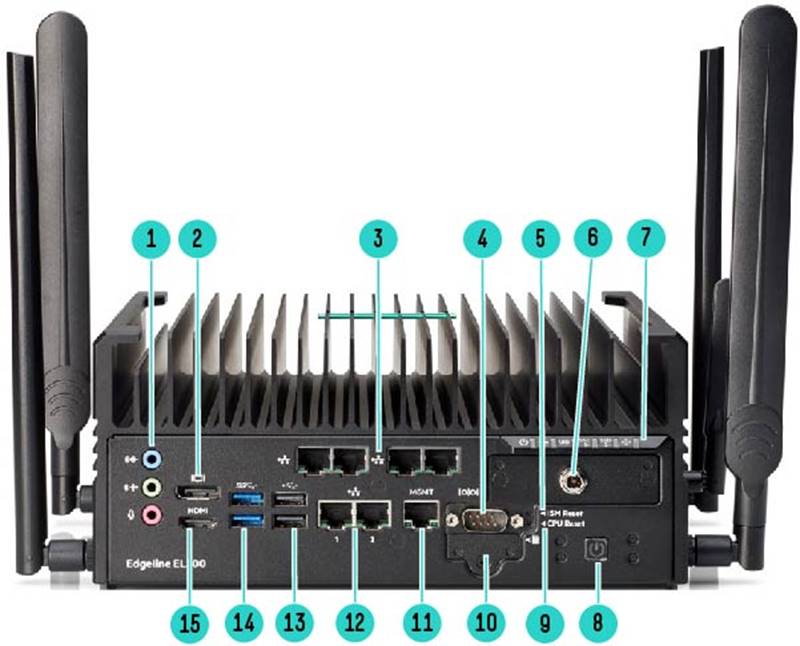
HPE Edgeline EL300 Rear Panel View | |||
|
Item |
Description |
Item |
Description |
|
1. |
Audio Lines. One (1) Mic In, One (1) Line In, One (1) Line out |
9. |
CPU Reset |
|
2 |
One (1) Display Port |
10. |
One (1) SD Card slot |
|
3. |
One (1) Daughter card slot. 4 port Ethernet TSN shown. Additional daughter card options available |
11. |
One (1) 1GbE Management Port |
|
4. |
One (1) Serial RS232 Port |
12. |
Two (2) 1GbE Port |
|
5. |
ISM Reset |
13. |
Two (2) USB 2.0 ports |
|
6. |
Input Power (12VDC as shown) Optional 9-36VDC |
14. |
Two (2) USB 3.0 Ports |
|
7. |
Rear panel LED display |
15. |
One (1) HDMI Port |
|
8. |
Power on/off switch |
|
|
|
| |||
|
| |||
|
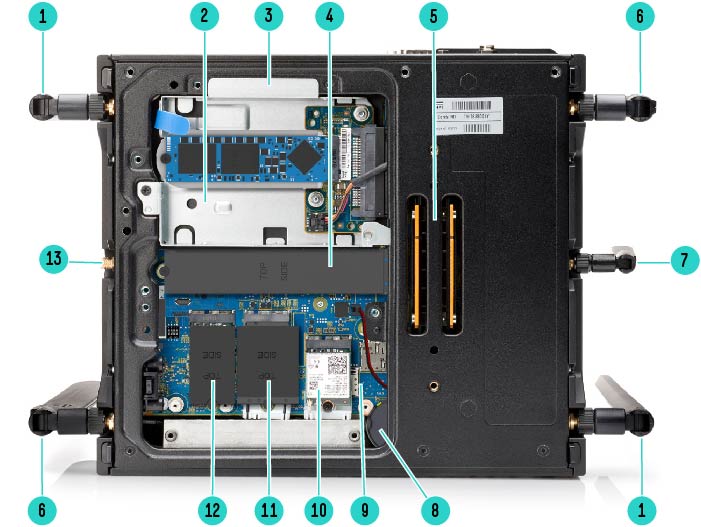
HPE Edgeline EL300 Bottom Panel View | |||
|
Item |
Description |
Item |
Description |
|
1. |
Wi-Fi Antenna port (Optional) |
8. |
Battery |
|
2. |
One (1) M.2 2242/2280 SATA SSD with adapter (as shown) |
9. |
Dual SIM Slots |
|
3. |
Customer Access panel |
10. |
One (1) M.2 2230 Wi-Fi/BT Module |
|
4. |
One (1) M.2 2280/22110 PCIe NVMe SSD |
11. |
One (1) M.2 3042 Cellular 3G/4G Module w/ 2x SIM |
|
5. |
Expansion base connector. (not currently used) |
12. |
One (1) M.2 2242 SATA SSD |
|
6. |
Cellular / WWAN Antenna port (Optional) |
13. |
Future use Antenna port 1 |
|
7. |
Wi-Fi Management Antenna port 1 |
|
|
|
| |||
Standard Features
|
Standard Interfaces The Edgeline EL300 has the following interfaces on the carrier board.
The EL300 also has two reset buttons that are customer accessible.
In addition there is a Power on/off button that will power down or boot up the system. The Rear Panel LED is defined as follows:
|
||||||||||||||||||||||||||||||
| ||||||||||||||||||||||||||||||
|
| ||||||||||||||||||||||||||||||
|
Storage options The EL300 and EL300 v2 models offer the following storage options:
|
||||||||||||||||||||||||||||||
|
|
|
Daughter Card options The EL300 can accept one (1) daughter card to expand the number of interface that is required by the application. A daughter card is not required and is only an option. There are four daughter cards available for use in the EL300.
|
|
|
|
Power Board options The EL300 comes with 1 of 2 standard power board options. The first option is the 9v to 36V DC input option with or without ignition capabilities. This is a 3 or 5 pin phoenix connector (depending on model) on the front face plate of the EL300. This can support up to 190W with proper power supply.
The second power board option is the 12V DC power transfer board with a round pin lockable connector. This board accepts 12V DC input with limited power conditioning for up to 100W. HPE offers an external AC power adapter, but this is intended primarily for initial setup, troubleshooting, and maintenance usage rather than prolonged use in a production environment. |
|
|
|
Remote Management HPE Integrated System Manager (iSM) is a remote management subsystem that is embedded on the system board of the EL300 Converged Edge System. It allows configuration, update, and monitoring of the Edgeline EL300 from remote locations.
The iSM subsystem has its own network connection (wired, and optionally wired) and IP address to which administrators can connect through a dedicated management network that is separated from the main network. iSM provides a remote Web-based GUI, text console or RedFish API, which can be used to administer the Edgeline systems remotely.
iSM Standard includes basic configuration, management and reporting capabilities. Upgrading to an iSM Advanced license adds additional capability such as remote console and virtual media to improve ease of management. The embedded Integrated System Controller (iSC) is the physical processor management module that runs the iSM software. An iSC module is embedded in every EL300 system.
Edgeline Infrastructure Manager (EIM) Standard is a software tool that allows management of multiple Edgeline EL300 Converged Edge Systemsthrough a single interface. Basic features are available via free download. |
|
|
|
Wireless connectivity options The EL300 can support up to 3 independent wireless connectivity options.
|
|
|
|
Components under heat sink The EL300 is a fan less, sealed system. The processor, a power module, DIMM. and a single M.2 SATA 2242/2280 SSD (only for EL300) are located under the heat sink. This heat sink is not accessible by the customer and is installed using a security screw. For any warranty issues or service related concerns related to components under the heat sink, please call HPE support and PointNext. |
|
|
|
Mounting options The EL300 requires a 2 part mounting solution. The mounting solution requires a selection of one pair of side panel brackets that support EL300 and the correct mounting hardware that is meant for DIN rail or Wall mount. Bracket Kits (Select 1)
Mounting Kits (select 1)
|
|
|
|
Warranty This product is covered by a global limited warranty and supported by Hewlett Packard Enterprise Services and a worldwide network of Hewlett Packard Enterprise Authorized Partner Ready Resellers. Hardware diagnostic support and repair is available for three years from date of purchase. Support for initial setup is available for 90 days from date of purchase. Enhancements to the warranty services are available through HPE services or customized service agreements. Hard drives have either a one year or three-year warranty; refer to the specific hard drive QuickSpecs for details. Notes: Chassis Warranty includes 3-Year Parts, 3-Year Labor, 3-Year Onsite support with next business day response. Warranty repairs may be accomplished through the use of Customer Self Repair (CSR) parts. These parts fall into two categories: 1) Optional CSR parts are designed for easy replacement but may involve added complexity. Customers may choose to have Hewlett Packard Enterprise replace Optional CSR parts at no charge. 2) No CSR parts require a Hewlett Packard Enterprise authorized service provider to replace the part. Additional information regarding worldwide limited warranty and technical support is available at: https://techlibrary.hpe.com/us/en/enterprise/servers/warranty/ |
|
|
|
Operating Systems and Virtualization Software
Support for Edgeline Servers Notes: - Only 64-bit versions of these operating systems are supported - For more information on the Hewlett Packard Enterprise Certified and Supported Edgeline systems for OS and Virtualization Software and latest listing of software drivers available for your server, please visit our OS Support Site at: http://www.hpe.com/info/ossupport and our driver download page which can be found from the HPE Support Center: http://www.hpe.com/support/hpesc |
|
|
|
For more information To learn more on HPE Edgeline System, please contact your Hewlett Packard Enterprise sales representative. |
|
|
Service and Support
|
HPE Pointnext - Service and Support Get the most from your HPE Products. Get the expertise you need at every step of your IT journey with HPE Pointnext Services. We help you lower your risks and overall costs using automation and methodologies that have been tested and refined by HPE experts through thousands of deployments globally. HPE Pointnext Advisory Services, focus on your business outcomes and goals, partnering with you to design your transformation and build a roadmap tuned to your unique challenges. Our Professional and Operational Services can be leveraged to speed up time-to-production, boost performance and accelerate your business. HPE Pointnext specializes in flawless and on-time implementation, on-budget execution, and creative configurations that get the most out of software and hardware alike.
Consume IT on your terms HPE GreenLake brings the cloud experience directly to your apps and data wherever they are-the edge, colocations, or your data center. It delivers cloud services for on-premises IT infrastructure specifically tailored to your most demanding workloads. With a pay-per-use, scalable, point-and-click self-service experience that is managed for you, HPE GreenLake accelerates digital transformation in a distributed, edge-to-cloud world..
Managed services to run your IT operations HPE GreenLake Management Services provides services that monitor, operate, and optimize your infrastructure and applications, delivered consistently and globally to give you unified control and let you focus on innovation. |
|
|
|
Free up resources with Operational Services from HPE Pointnext Services HPE delivers services for IT by using proven best practices as well as automation and methodologies that have been tested and refined by HPE experts and artificial intelligence through thousands of deployments globally. Choose from the recommended services for customers purchasing from Hewlett Packard Enterprise or an authorized reseller. Services are quoted using Hewlett Packard Enterprise order configuration tools.
HPE Pointnext Tech Care HPE Pointnext Tech Care is the new operational service experience for HPE products. Tech Care goes beyond traditional support by providing access to product specific experts, an AI driven digital experience, and general technical guidance to not only reduce risk but constantly search for ways to do things better. HPE Pointnext Tech Care has been reimagined from the ground up to support a customer-centric, AI driven, and digitally enabled customer experience to move your business forward. HPE Pointnext Tech Care is available in three response levels. Basic, which provides 9x5 business hour availability and a 2 hour response time. Essential which provides a 15 minute response time 24x7 for most enterprise level customers, and Critical which includes a 6 hour repair commitment where available and outage management response for severity 1 incidents.
https://www.hpe.com/services/techcare
HPE Pointnext Complete Care HPE Pointnext Complete Care is a modular, edge-to-cloud IT environment service that provides a holistic approach to optimizing your entire IT environment and achieving agreed upon IT outcomes and business goals through a personalized and customer-centric experience. All delivered by an assigned team of HPE Pointnext Services experts. HPE Pointnext Complete Care provides:
https://www.hpe.com/services/completecare
|
|
|
|
HPE Edgeline Component Pack The HPE Edgeline Component Pack, is the delivery mechanism for firmware updates on the HPE Edgeline System. Before using your system for the first time, verify that you have the latest drivers, firmware, and system software installed. Update your system with the Edgeline Component Pack..
For more information, see the Edgeline Component Pack Update Guide on the Hewlett Packard Enterprise website: http://www.hpe.com/info/edgeline-docs |
|
|
|
HPE Factory Express for Servers and storage HPE Factory Express offers configuration, customization, integration and deployment services for HPE servers and storage products. Customers can choose how their factory solutions are built, tested, integrated, shipped and deployed.
Factory Express offers service packages for simple configuration, racking, installation, complex configuration and design services as well as individual factory services, such as image loading, asset tagging, and custom packaging. HPE products supported through Factory Express include a wide array of servers and storage: HPE Integrity, HPE ProLiant, HPE Apollo, HPE ProLiant Server Blades, HPE BladeSystem, HPE 9000 servers as well as the MSAxxxx3PAR suite, XP, rackable tape libraries and configurable network switches.
HPE Service Credits offer flexible services and technical skills to meet your changing IT demands. With a menu of service that is tailored to suit your needs, you get additional resources and specialist skills to help you maintain peak performance of your IT. Offered as annual credits, you can plan your budgets while proactively responding to your dynamic business. |
|
|
HPE Support CenterThe HPE Support Center is a personalized online support portal with access to information, tools and experts to support HPE business products. Submit support cases online, chat with HPE experts, access support resources or collaborate with peers. Learn more http://www.hpe.com/support/hpesc
HPE's Support Center Mobile App* allows you to resolve issues yourself or quickly connect to an agent for live support. Now, you can get access to personalize IT support anywhere, anytime. HPE Insight Remote Support and HPE Support Center are available at no additional cost with a HPE warranty, HPE Support Service or HPE contractual support agreement. Notes: *HPE Support Center Mobile App is subject to local availability
For more information: http://www.hpe.com/services |
|
|
|
Options Notes: Options for the EL300 are covered under the HPE Service Contract applied to the HPE EL300. No separate HPE support services need to be purchased. Warranty and Support Services will extend to include HPE options configured with your server or storage device. The price of support service is not impacted by configuration details. HPE sourced options that are compatible with your product will be covered under your server support at the same level of coverage allowing you to upgrade freely. Installation for HPE options is available as needed. To keep support costs low for everyone, some high value options will require additional support. Additional support is only required on select high value workload accelerators, fiber switches, InfiniBand and UPS batteries over 12KVA. |
|
|
|
Connect your devices Unlock all of the benefits of your technology investment by connecting your products to Hewlett Packard Enterprise. Achieve up to 77% (Note) reduction in down time, near 100% diagnostic accuracy and a single consolidated view of your environment. By connecting, you will receive 24x7monitoring, pre-failure alerts, automatic call logging, and automatic parts dispatch. HPE Tech Care Service and HPE Complete Care Service customers will also benefit from proactive activities to help prevent issues and increase optimization. All of these benefits are already available to you with your server storage and networking products, securely connected to HPE support. Notes: DC 2 - HP CSC reports 2014 - 2015
Learn more about getting connected at http://www.hpe.com/services/getconnected |
|
|
|
HPE Server Hardware Installation |
|
|
|
HPE Installation and Startup Service Provides for the installation of your new Edgeline System. This service will assist you in bringing your new HPE Edgeline System into operation and make it remotely accessible in a timely and professional manner. The HPE service delivery technician will connect the product to the network as appropriate and enable remote support to allow for automatic case creation for hardware failures. Installation and start up services also includes the installation of one supported operating system type (Windows® or Linux). https://www.hpe.com/h20195/v2/Getdocument.aspx?docname=a00062211enw |
|
|
|
HPE Service Credits Offers flexible services and technical skills to meet your IT demands as your business evolves. With a menu of services, you can access additional resources and specialist skills to help you maintain peak performance of your IT. HPE Service Credits help you proactively respond to your dynamic IT and business needs. |
|
|
|
HPE Education Services Provides comprehensive training designed to expand the skills of your IT staff and keep them up to speed with the latest technologies.
Consult your HPE Sales Representative or Authorized Channel Partner of choice for any additional questions and support options. |
|
|
|
Parts and Materials Hewlett Packard Enterprise will provide HPE-supported replacement parts and materials necessary to maintain the covered hardware product in operating condition, including parts and materials for available and recommended engineering improvements. Parts and components that have reached their maximum supported lifetime and/or the maximum usage limitations as set forth in the manufacturer's operating manual, product QuickSpecs, or the technical product data sheet will not be provided, repaired, or replaced as part of these services. The defective media retention service feature option applies only to Disk or eligible SSD/Flash Drives replaced by Hewlett Packard Enterprise due to malfunction. |
|
|
|
For more information
To learn more on HPE Storage Services, please contact your Hewlett Packard Enterprise sales representative or Hewlett Packard Enterprise Authorized Channel Partner. Contact information for a representative in your area can be found at "Contact HPE" https://www.hpe.com/us/en/contact-hpe.html HPE Support Services are sold by HPE and Hewlett Packard Enterprise Authorized Service Partners:
|
|
|
Configuration Information
|
This section lists some of the steps required to configure a Factory Integrated Model. To ensure only valid Configurations are ordered, Hewlett Packard Enterprise recommends the use of a Hewlett Packard Enterprise approved configurator. Contact your local sales representative for information on configurable product offerings and requirements. | |
|
| |
|
Step 1: Base Configuration (Choose System) | |
|
EL300 Converged Edge System Model Notes: - The EL300 Mini-ITX model already includes a carrier board. Only the Core i5 CPU is supported with this model. - If an Intel Core i7 CPU is needed, the EL300 v2 model and the v2 FIO carrier board option must be selected. The v2 carrier board option is not required or compatible with the EL300 Mini-ITX model. | |
|
HPE Edgeline EL300 v2 Converged Edge System |
P25828-B21 |
|
HPE EL300 v2 FIO Carrier Board |
P25835-B21 |
|
Notes: The Edgeline EL300 system is pre-installed with the Edgeline OT Link Platform Software and includes a 15 day trial license. Licenses can optionally be purchased to extend OT Link usage or the software can be overwritten with any supported OS. |
|
|
| |
|
Step 2: Choose Factory Integration Options
| |
|
Processor option (Min:1, Max:1) Notes: - The Core i5 processor kit (P04291-B21) is only compatible with EL300 Mini-ITX Chassis. - The Core i7 (P25834-B21) and Core i5 (P25833-B21) processor kits are only compatible with EL300 v2. | |
|
Intel Core i7-8650U (1.9GHz/4-core/15W) FIO Basic Processor Kit for HPE Edgeline EL300 |
P25833-B21 |
|
Intel Core i5-7300U (2.6GHz/2-core/15W) FIO Basic Processor Kit for HPE Edgeline EL300 |
P25834-B21 |
|
Notes: Functional systems require 1 processor to be configured. Operating temperature 0C to 70C. | |
|
Memory option (Min:1, Max:2) | |
|
HPE Edgeline 8GB (1x8GB) Dual Rank x8 DDR4-2666 SODIMM WT CAS-19-19-19 Registered Memory FIO Kit |
P09176-B21 |
|
HPE Edgeline 16GB (1x16GB) Dual Rank x8 DDR4-2666 SODIMM WT CAS-19-19-19 Registered Memory FIO Kit |
P09177-B21 |
|
Notes: DIMMs must be identical and cannot be mixed. |
|
|
Configure Power board option (Min:1, Max:1) | |
|
HPE Edgeline EL300 12VDC FIO Transfer Board |
P08120-B21 |
|
Notes: The 12VDC power board is compatible with all EL300models and uses a round lockable connector. An optional external power adapter will be automatically selected to permit connection to a standard wall AC receptacle. This external power adapter is not intended for prolonged use in an industrial environment. |
|
|
HPE Edgeline EL300 9-36VDC with Ignition FIO Power Board |
P12414-B21 |
|
Notes: - The 9-36VDC (non-ignition) power board is only compatible with the EL300 Mini-ITX model. It uses a 3-pin Phoenix connector that requires direct DC power wiring from the infrastructure. |
|
|
- The 9-36VDC ignition power board is only compatible with the EL300 v2 model. It uses a 5-pin Phoenix connector (different from the EL300 mini-ITX model) that requires direct DC power wiring from the infrastructure. The ignition feature can be disabled in iSM settings. |
|
|
Configure Daughter card option (Min:0, Max:1) | |
|
HPE Edgeline 2x CAN Bus A/B/FD FIO Daughter Card |
P03448-B21 |
|
HPE Edgeline 2x RS232/422/485 FIO Daughter Card |
P03452-B21 |
|
HPE Edgeline 1GbE 4-port TSN FIO Daughter Card |
P03456-B21 |
|
HPE Edgeline 1x8 GPIO DIO FIO Daughter Card |
P04060-B21 |
|
Notes: The daughter cards are factory installed and are not field replaceable | |
|
Storage option (Min:1, Max:2) Notes: - EL300 model (Min: 1, Max: 2) - The first M.2 SSD is installed in the top half of the EL300 which is not customer accessible. Select the SFF 2.5" to M.2 adapter (P04054-B21) to allow installation of a second M.2 SSD. This location is accessible through the bottom customer access panel. - EL300 v2 model (Min: 1, Max: 2) - Both M.2 options are available at the bottom that are customer accessible. First SSD is M.2 2242 SATA (M.2 2280 isn't supported). Second SSD supports M.2 2242 / 2280 SATA that needs SFF 2.5" to M.2 adapter (P04054-B21) to allow installation. | |
|
HPE Edgeline 120GB SATA 6G Read Intensive M.2 2242 Power Loss Protection Multi Vendor SSD |
P44366-B21 |
|
HPE Edgeline 240GB SATA 6G Read Intensive M.2 2242 Power Loss Protection Multi Vendor SSD |
P44368-B21 |
|
HPE Edgeline 480GB SATA 6G Read Intensive M.2 2242 Power Loss Protection Multi Vendor SSD |
P44196-B21 |
|
Notes: Wide temperature M.2 SSDs are limited to the operating temperature of the base EL300 (0C to 70C). | |
|
SFF to M.2 Adapter (Min:0, Max:1) | |
|
HPE Edgeline EL300 SFF to M.2 Enablement Kit |
P04054-B21 |
|
Notes: This adapter is required for second instance of M.2 SSD support on both EL300 and EL300 v2. It is installed from the bottom customer access panel and converts the SFF 2.5" drive cage to a M.2 SATA slot. |
|
|
SD Card storage (Min:0, Max:1) | |
|
HPE Edgeline 8GB Wide Temperature SD Card Kit |
P08589-B21 |
|
Notes: This SD Card is designed to support a 0C to 70C operating temperature and is accessible from the front panel. HPE recommends using M.2 SSDs instead of SD Card for best reliability and performance. |
|
|
Wi-Fi & Wireless (Min:0, Max: 1 each) Notes: The wireless antenna is only required for iSM Wi-Fi management of the EL300 v2. It is included by default on the EL300 Mini-ITX model and does not need to be ordered separately. The wireless options are only available in countries where regulatory certification has been completed. | |
|
Intel Wireless/Bluetooth AC 9260 Adapter for HPE Edgeline |
P06088-B21 |
|
Notes: The Wireless Enablement LTU is a firmware license that enables iSM Wi-Fi capability on the EL300 v2 model. It must be selected when the optional wireless antenna for EL300 v2 models is ordered. |
|
|
HPE Edgeline EL300 Wireless Enablement LTU |
R4X81A |
|
Intel Wireless/Bluetooth AC 9260 Adapter for HPE Edgeline |
P06088-B21 |
|
Notes: - The Wi-Fi option is only orderable in countries where regulatory certification has been completed. - Intel AC9260 M.2 2230 module support Bluetooth 5 and 2x2 802.11ac including wave 2 features with 160MHz channels delivering up to 1.73Gbps and downlink MU-MIMO. It supports 802.11a/b/g/n/ac. - Wi-Fi performance may be reduced if operating above 65°C (149°F) | |
|
HPE Edgeline Wireless WAN 4G LTE EM7565 Wide Temperature Option Kit |
P06091-B21 |
|
Notes: - The 4G/LTE option is only orderable in countries where regulatory certification has been completed. Cellular carrier certification may be required to operate on certain networks. - Sierra Wireless EM7565 M.2 3042 for LTE- Advance global coverage is connected to 2 SIM card slots on the carrier board. It has automatic fallback to 3G networks and integrated GNSS receiver (GPS, GLONASS, Beidou, and Galileo satellite systems supported). - LTE performance may be reduced if operating above 60°C (140°F) | |
|
| |
|
Step 3: Choose Mounting Options | |
|
Notes: The EL300 has a 2 part mounting solution. First a bracket must be selected that secures the EL300, and then a mounting type must be selected depending upon where the unit will be located | |
|
Brackets kit option (Min 0, Max:1) | |
|
HPE Edgeline EL300 Standard Bracket Kit |
P08017-B21 |
|
HPE Edgeline EL300 Low Profile Bracket Kit |
P08018-B21 |
|
Notes: The Low profile (LP) bracket Offers reduced clearance between the EL300 and the mounting surface. | |
|
Mounting kits option (Min 0, Max:1) | |
|
HPE Edgeline EL300 DIN Rail Mount Kit |
P08019-B21 |
|
HPE Edgeline EL300 Wall Mount Kit |
P08020-B21 |
|
Notes: A bracket kit must be ordered with a mounting kit. | |
|
| |
|
Step 4: Choose Power Brick Options
| |
|
Power Brick option (Min 0, Max:1) | |
|
HPE Edgeline EL300 80W 12VDC Power Supply |
P08641-B21 |
|
Notes: - This power brick has a operating temp range of 0C to 40C which is lower than that of the base EL300 system. - The power brick is only intended for initial setup, troubleshooting, and maintenance use. HPE recommends a direct DC (12V or 9-26V depending on power option) input for best reliability and efficiency in an industrial environment. |
|
|
| |
|
Step 5: Choose Additional Options | |
|
| |
Additional Options
|
Some options may not be integrated at the factory. To ensure only valid configurations are ordered, Hewlett Packard Enterprise recommends the use of a Hewlett Packard Enterprise approved configurator. Contact your local sales representative for additional information. Some options are not orderable currently and are listed with a targeted release date for planning purposes only. HPE reserves the right to revise these options prior to release. | |
|
HPE Embedded Management
|
|
|
HPE Integrated System Manager (iSM) Advanced |
|
|
HPE Edgeline EL300 iSM Advanced 3yr 24x7 Support and Updates E-LTU |
R1P49AAE |
|
Notes: One (1) optional iSM Advanced license can be ordered for each EL300 system and unlocks extra capabilities over the default iSM Standard. | |
|
| |
|
HPE Edgeline Systems Management Software
| |
|
HPE Edgeline Infrastructure Manager (EIM) Software Advanced | |
|
HPE Edgeline Infrastructure Manager Advanced 3yr E-LTU |
R1X28AAE |
|
HPE Edgeline Infrastructure Manager Advanced with iSM Advanced 3yr E-LTU |
R1X27AAE |
|
Notes: One (1) optional EIM Advanced license can be ordered for each EL300 Converged Edge System. | |
|
| |
|
HPE Support Services
| |
|
Installation Services |
|
|
HPE Installation Edgeline 300 Service |
HF8N3E |
|
HPE Installation and Startup Edgeline EL300 Service |
H6SV5E |
|
HPE 3 Year Foundation Care 24x7 Edgeline 300 Service |
HM6Z1E |
|
HPE 3 Year Proactive Care 24x7 Edgeline 300 Service |
HM6Z4E |
|
HPE Edgeline OT Link Platform |
|
|
HPE Edgeline Workload Orchestrator |
|
|
| |
Technical Specifications
| ||||||||||||||||||||||
|
|
| ||||||||||||||||||||
|
| ||||||||||||||||||||
|
Trusted Platform Module TPM 2..0 (SPI Interface) or TCM support available | ||||||||||||||||||||
|
| ||||||||||||||||||||
|
System Unit Chassis Dimensions (H x W x D) 200.5mm (7.9") tall, 232mm (9.14") wide by 100mm (3.9") deep - without antennas | ||||||||||||||||||||
|
| ||||||||||||||||||||
|
Weight P06211-B21: HPE Edgeline EL300 Converged Edge System - 4.91 KG (10.83 lbs.) Notes: Configuration used includes One EL300 + 4 port Daughter card + 12v Transfer power board + Intel Core i5 + 8G DIMM + M.2 storage + 5x antenna | ||||||||||||||||||||
|
| ||||||||||||||||||||
|
Power
80W
90W |
||||||||||||||||||||
|
| ||||||||||||||||||||
|
System Inlet Temperature Standard Operating 0° to 70°C at sea level with an altitude derating of 1.0°C per every 305 m (1.8°F per every 1000ft) above sea level to a maximum of 4572m (15,000ft), no direct sustained sunlight. Maximum rate of change is 20°C/hr. (36°F/hr). The upper limit and rate of change may be limited by the type and number of options installed. System performance may be reduced if operating above 60°C (140°F). The max standard operating temperature will be reduced to 65°C when populating M.2 SATA SSD inside SSD cage inside customer access panel. |
|
|
|
Altitude
4572 m (15,000 ft). This value may be limited by the type and number of options installed. Maximum allowable altitude change rate is 457 m/min (1500 ft/min).
9144 m (30,000 ft). Maximum allowable altitude change rate is 457 m/min (1500 ft/min). |
|
|
Summary of Changes
|
Date |
Version History |
Action |
Description of Change |
|
06-Jun-2022 |
Version 15 |
Changed |
Configuration Information section was updated |
|
04-Oct-2021 |
Version 14 |
Changed |
Service and Support Pointnext Tech Care and Complete Care information updated Obsolete SKUs were removed |
|
07-Sep-2021 |
Version 13 |
Changed |
Added 3 new SSDs with PLP options. Removed 4 DISC SSDs. Configuration Information section was updated Service and Support Pointnext Tech Care information added |
|
02-Aug-2021 |
Version 12 |
Changed |
Configuration Information section was updated |
|
06-Apr-2021 |
Version 11 |
Changed |
Corrected 12V power brick operating temperature from 55C to 40C and added usage details. Clarified EL300 mini-ITX vs. EL300 v2 configuration differences. Overview, Standard Features, Configuration Information, Additional Options and Technical Specifications sections were updated |
|
24-Aug-2020 |
Version 10 |
Changed |
Overview and Configuration Information sections were updated. |
|
03-Aug-2020 |
Version 9 |
Changed |
Overview, Standards Features, Configuration Information Service and Support and Additional Options sections were updated. |
|
09-Jun-2020 |
Version 8 |
Changed |
Additional options section was updated. |
|
23-Mar-2020 |
Version 7 |
Changed |
Overview, Standards Features, Configuration Information and Additional Options sections were updated. Obsolete SKUs were removed. |
|
21-Oct-2019 |
Version 6 |
Changed |
Overview, Configuration Information and Technical Specifications sections were updated |
|
01-Jul-2019 |
Version 5 |
Changed |
Standard Features, Additional options and Service and Support sections were updated |
|
03-Jun-2019 |
Version 4 |
Changed |
Standard Features and Configuration Information sections were updated. QS name was updated. |
|
02-Apr-2019 |
Version 3 |
Changed |
Configuration Information section was updated. |
|
04-Feb-2019 |
Version 2 |
Changed |
Overview, Service and Support and Configuration Information sections were updated |
|
03-Dec-2018 |
Version 1 |
New |
New QuickSpecs |
Copyright
|
|
| |||||
|
|
|
© Copyright 2022 Hewlett Packard Enterprise Development LP. The information contained herein is subject to change without notice. The only warranties for Hewlett Packard Enterprise products and services are set forth in the express warranty statements accompanying such products and services. Nothing herein should be construed as constituting an additional warranty. Hewlett Packard Enterprise shall not be liable for technical or editorial errors or omissions contained here in.
Microsoft and Windows NT are US registered trademarks of Microsoft Corporation.
Intel, the Intel logo, Xeon and Xeon Inside are trademarks of Intel Corporation in the U.S. and other countries.
For hard drives, 1GB = 1 billion bytes. Actual formatted capacity is less.
a00056114enw - 16329 - Worldwide - V15 - 06-June-2022 |