




























HP CloudSystem Matrix: технические характеристики и документация
В архивеOverview
|
HP CloudSystem Matrix (Retired) | |||
|
| |||
|
Starter Kit | |||
|
|
| ||
|
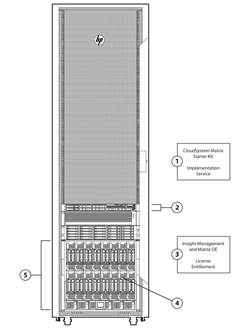
Starter Kit - Front |
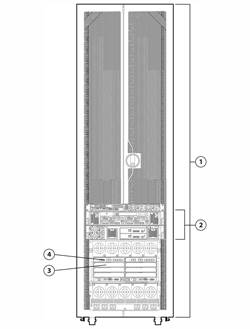
Starter Kit - Rear | ||
|
1. |
Onsite CloudSystem Matrix Starter Kit Implementation |
1. |
HP Intelligent Series rack, and rack and power options |
|
2. |
Central Management Server (CMS) |
2. |
Shown above with HP 3PAR StoreServ 7200 Storage. HP Fibre Channels SAN supported include HP EVA, 3PAR F-Series, T-Series, P10000 and 3PAR StoreServ 7200 , 7400 & 10000 |
|
3. |
Complete Matrix OE (including Insight Control) and Virtual Connect Enterprise Manager. |
3. |
Interconnect bays 3 & 4 available for additional HP Virtual Connect FlexFabric modules (redundant pair) |
|
4. |
16 half-height device bays available for populating with server blades |
4. |
HP Virtual Connect FlexFabric modules (redundant pair) |
|
5. |
HP BladeSystem c7000 enclosure, single phase |
| |
|
| |||
|
Expansion Kit | |||
|
|
| ||
|
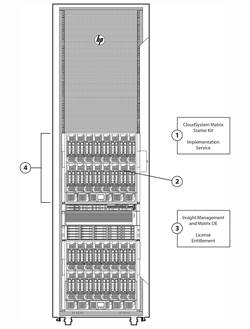
Expansion Kit - Front |
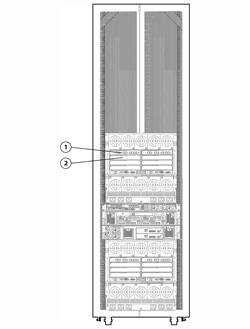
Expansion Kit - Rear | ||
|
1. |
Onsite CloudSystem Matrix Expansion Kit Implementation Service (for Expansion Kit orders purchased after an initial Matrix environment is implemented) |
1. |
HP Virtual Connect FlexFabric modules (redundant pair) |
|
2. |
16 half-height device bays available for populating with server blades |
2. |
Interconnect bays 3 & 4 available for additional HP Virtual Connect FlexFabric modules (redundant pair) |
|
3. |
Complete Matrix OE (including Insight Control) and Virtual Connect Enterprise Manager |
| |
|
4. |
HP BladeSystem c7000 enclosure |
| |
|
NOTE: All HP CloudSystem Matrix infrastructure ships with licensed disaster protection for both physical and virtual servers, in coordination with data replication provided by EVA, XP Continuous Access software, or 3PAR. Disaster recovery protection can be achieved by implementing a secondary infrastructure at a remote location, and enabling storage replication between the two sites. | |||
|
| |||
|
What's New |
|
Updates for version 7.4 include:
|
|
|
Standard Features
|
Product Features |
HP CloudSystem Matrix is Infrastructure-as-a-Service (IaaS) for private and hybrid cloud environments, allowing users to provision infrastructure in minutes for physical and virtual. This offering includes a self-service infrastructure portal for quick auto-provisioning, along with built-in lifecycle management to optimize infrastructure, manage the resource pools, and help ensure uptime. Matrix is integrated by design with broad support of heterogeneous environments including cloud-bursting to a variety of public cloud providers including HP Cloud Services.
HP Cloud Maps accelerate automation of cloud service deployments and ensure consistency and reliability of the implementation of service catalogs. HP CloudSystem Matrix is optimized for HP ProLiant and HP Integrity servers as well as HP storage and HP networking, but also supports 3rd party x86 servers, networking, and storage. Supported operating systems are Windows, Linux and HP-UX. Supported hypervisors include VMware, Microsoft HyperV, Red Hat KVM, and Integrity VMs. For more information above HP CloudSystem Matrix information, see: http://www.hp.com/go/matrix |
HP CloudSystem Matrix
|
How to order HP CloudSystem Matrix |
Ordering HP CloudSystem Matrix NOTE: Additional expansion kits may also be purchased separately. Expansion kits ordered separately will come with the Matrix Expansion Kit Integration Implementation Service.
Factory Express custom configuration services should be added to the order if an EVA configuration is also purchased in the same rack with Matrix kits, or if any other custom factory services are needed. Factory Express uses its standard processes for capturing customer intent and requirements, as well as providing order verification services. |
|
| |
|
HP Matrix Operating Environment |
The HP Matrix Operating Environment is cloud management software for infrastructure as a service (IaaS) that enables you to:
The HP Matrix Operating Environment, which includes HP Insight Control, is at the core of the HP CloudSystem Matrix, an infrastructure as a service (IaaS) solution for private and hybrid cloud deployments, built on proven HP Converged Infrastructure technologies. It is available for both HP ProLiant and HP Integrity servers as well as for provisioning third party x86 virtual machine environments. NOTE: See the HP Matrix Operating Environment for ProLiant QuickSpecs for more details |
|
| |
|
HP CloudSystem Matrix Starter Kit Implementation Service (onsite), plus additional services |
In addition to the CloudSystem Matrix Implementation Service, HP highly recommends HP Education Services (for customer training and education) and additional Technical Services, as well as in-depth installation or implementation services as needed. These recommended services are listed in the "HP Care Pack services" section later in this document. The onsite CloudSystem Matrix Implementation Service for the starter kit consists of these steps:
|
|
| |
|
HP CloudSystem Matrix Expansion Kit Integration Implementation Service (onsite) |
Ordering additional CloudSystem Matrix expansion kits after the initial CloudSystem Matrix kit order or installing more than 5 total kits during the initial installation, includes the CloudSystem Matrix Expansion Kit Integration Implementation Service. Each CloudSystem Matrix Expansion Kit Implementation Service will integrate up to four Matrix expansion kits to an existing Matrix customer environment (single Matrix CMS server). The onsite CloudSystem Matrix Expansion Kit Integration Implementation Service for the Expansion Kits consists of these steps:
|
|
| |
|
HP CloudSystem Matrix Conversion Services |
HP CloudSystem Matrix Conversion Services convert your existing HP BladeSystem equipment into a fully operational CloudSystem Matrix solution. Converting your existing equipment allows you to build on the investment in your BladeSystem infrastructure and benefit from the advantages that a CloudSystem Matrix solution provides. These services apply to both BladeSystem and BladeSystem-based HP VirtualSystem infrastructures. CloudSystem Matrix Conversion Services can be used in different combinations to create and/or expand a CloudSystem Matrix, allowing you to:
NOTE: For additional information, see: |
|
| |
|
Warranty services |
The support provided for CloudSystem Matrix uplifts the standard BladeSystem warranty to include 24x7 4hr onsite response for Matrix hardware and 2 hr response for software. Matrix customers will have a system identifier for CloudSystem Matrix that, when provided to the call center by the customer, routes the call to a specially trained team that can expertly support CloudSystem Matrix specifically as well as the necessary software and firmware revisions to support it.
NOTE: For additional information, see: http://www.hp.com/go/bladesystem and http://www.hp.com/services/insight. |
|
| |
|
HP Matrix Operating Environment Support |
HP Matrix Operating Environment includes three years of 24 x 7 HP Software Technical Support and Update Service. This service provides access to HP technical resources for help in resolving software implementation or operations problems. The service also provides access to software updates and reference manuals either in electronic form or on physical media as they are made available from HP. |
|
| |
|
HP CloudSystem Matrix -- Extended Infrastructure |
HP Matrix Operating Environment extends its software functionality beyond HP CloudSystem Matrix across all HP ProLiant and HP Integrity servers as well as any x86 3rd party servers which are supported by VMware, Microsoft HyperV and Red Hat KVM. CloudSystem Matrix support for this extended infrastructure includes key capabilities of HP Matrix Operating Environment such as designing, self-service portal with auto-provisioning for virtual environments and capacity planning, i.e. physical server deployment is not supported (NOTE: recovery management for virtual only is supported on HP rackmount servers and HP blade servers without Virtual Connect). All capabilities of HP Matrix Operating Environment are supported for HP BladeSystem servers with Virtual Connect. CloudSystem Matrix for supported extended virtual machine managed nodes is listed in the HP Insight Software Support Matrix document for Matrix Operating Environment. |
|
| |
|
HP Financial Services |
To support customers' transition, HP Financial Services (HPFS) can help in a way that you may not have considered. HPFS can help you invest in your business while preserving precious capital. |
|
| |
|
HP ProLiant Instant Capacity Program (U.S. only) |
The ProLiant Instant Capacity program (U.S. only) provides cost-effective "just in time" inventory protection. ProLiant iCAP is designed to provide "ready to run" servers for immediate activation, while avoiding up-front costs.
|
|
| |
|
HP Utility Ready Computing on Matrix |
HP Utility Ready Computing blades (URB) are pay-for-use infrastructure that resides at your site, billed monthly by HP based on metered power-on time, and transfers cost of blade servers and associated infrastructure from CapEx to OpEx in an alternative way from a traditional lease.
With CloudSystem Matrix, customers can add Utility Ready Computing blades to their Matrix enclosures and leverage the benefits offered by utility ready computing. |
|
| |
|
Factory Express Portfolio for Servers and Storage |
For HP CloudSystem Matrix, HP Factory Express services are added if the EVA P6000 SAN or 3PAR is purchased with the CloudSystem Matrix Starter Kit. If other custom requirements or intents are required for a given customer's CloudSystem Matrix order, Factory Express capabilities may also be called upon. HP Factory Express offers configuration, customization, integration and deployment services for HP servers and storage products. Customers can choose how their factory solutions are built, tested, integrated, shipped and deployed. |
|
| |
|
HP Simple Configurator |
SCE is a guided self service tool to help sales and non technical people provide customers with initial configurations in 3 to 5 minutes. You may then send the configuration on for configuration help, or use in your existing ordering processes. If you require "custom" rack configuration or configuration for products not available in SCE, please contact HP's Customer Business Center or an Authorized Partner for assistance. http://www.hp.com/products/configurator |
|
| |
|
Rack Airflow Requirements |
HP rack cabinets NOTE: For operation with the DC Input Module the HP 1200mm deep rack is required to allow DC power cabling to be installed |
|
CAUTION: CloudSystem Matrix infrastructures are best fulfilled with HP racks. However, if a third-party rack is used, observe the following additional requirements to ensure adequate airflow and to prevent damage to the equipment: | |
| |
|
CAUTION: Always use blanking panels to fill all remaining empty front panel U-spaces in the rack. This arrangement ensures proper airflow. Using a rack without blanking panels will result in improper cooling that can lead to thermal damage. |
Ordering CloudSystem Matrix
|
Configuration Information Factory Integrated Models - HP CloudSystem Matrix - Starter Kit |
|
NOTE: This section lists the required steps for ordering a HP CloudSystem Matrix. |
|
|
|
Step 1: Select HP Intelligent Series Rack (Recommended, per notes immediately below) | ||
|
HP Rack Series |
HP Intelligent Series racks |
|
|
HP 642 1075mm Shock Intelligent Series Rack |
BW904A | |
|
HP 642 1075mm Pallet Intelligent Series Rack |
BW903A | |
|
HP 642 1200mm Shock Intelligent Series Rack |
BW908A | |
|
HP 647 1075mm Shock Intelligent Series Rack |
BW912A | |
|
HP 647 1200mm Shock Intelligent Series Rack |
BW914A | |
|
HP 642 1200mm Pallet Intelligent Series Rack |
BW907A | |
|
HP 647 1075mm Pallet Intelligent Series Rack |
BW911A | |
|
HP 647 1200mm Pallet Intelligent Series Rack |
BW913A | |
|
NOTE: Please see the QuickSpecs for Technical Specifications and additional information: |
| |
|
| ||
|
Step 2: Select Required Configurable HP CloudSystem Matrix Starter Kit (Choose one of the following from each list unless otherwise noted) | ||
|
HP CloudSystem Matrix Starter Kit |
NOTE: Starter Kit default components means HP ordering systems will default these selections when any unique HP CloudSystem Matrix part number is entered. The default selections can be changed to meet customer needs. |
|
|
Hardware Components |
| |
|
HP CloudSystem Matrix for ProLiant v2 Kit |
708919-B21 | |
|
NOTE: The configurable starter kit can be defined as either Starter or Expansion Kit with applicable services applied appropriately when configured. HP CloudSystem Matrix Modular Kit (Hardware Components) includes:
HP Virtual Connect Option (required choice of one):
c7000 Power Option (required choice of one):
HP Matrix OE Software (required choice of one)
NOTE: Additional Matrix OE licenses may be purchased separately., |
| |
|
NOTE: Following are the VC FlexFabric transceiver/SFP options. |
| |
|
HP BladeSystem c-Class 10Gb SFP+ SR Transceiver |
455883-B21 | |
|
HP BladeSystem c-Class 10Gb SFP+ LR Transceiver |
455886-B21 | |
|
HP BladeSystem c-Class 10Gb SFP+ LRM Transceiver |
455889-B21 | |
|
HP BladeSystem c-Class Virtual Connect 1G SFP SX Transceiver |
453151-B21 | |
|
HP BladeSystem c-Class Virtual Connect 1G SFP RJ-45 Transceiver |
453154-B21 | |
|
HP 8Gb Shortwave B-series Fibre Channel 1 Pack SFP+ Transceiver |
AJ716B | |
|
HP 8Gb Long Wave B-series 10km Fibre Channel 1 Pack SFP+ Transceiver |
AJ717A | |
|
HP 8Gb Short Wave Fibre Channel SFP+ 1 Pack |
AJ718A | |
|
NOTE: Following are the VC Flex-10 10Gb Ethernet module transceiver/SFP options. |
| |
|
Software Licenses and media |
| |
|
HP Matrix Operating Environment SW for 16 Server and VCEM for c7000 Enclosure with 3yr 24x7 Support |
BD683B | |
|
HP Matrix Operating Environment SW for 8 Server and VCEM for c7000 Enclosure with 3yr 24x7 Support |
BD578B | |
|
NOTE: The management software licenses packaged with HP CloudSystem Matrix provide licensing to manage HP ProLiant c-Class server blades only, except for Virtual Connect Enterprise Manager software (VCEM) as this is licensed to the actual BladeSystem c7000 enclosure. HP Integrity c-Class server blades require separate licensing. HP-UX customers should order licenses for the HP-UX 11i v3 Virtual Server Environment OE (VSE-OE) or HP-UX 11i v3 Data Center OE (DC-OE) (see: http://www.hp.com/go/hpux). |
| |
|
Implementation Service |
| |
|
HP Implementation service for the CloudSystem Matrix Starter Kit |
UK831E | |
|
HP CloudSystem Matrix Starter Kit - Implementation Service, Flexible |
HA115A1-5NL | |
|
NOTE: Includes the installation & configuration of any Matrix Expansion Kit included in the order. |
| |
|
Central Management Server |
HP CloudSystem Central Management Kit (DL360p Gen8 128G 2P Server 3y 24x7 Support |
G6X20A |
|
HP ProLiant DL360p Gen8 CMS server (PN G6X20A) is configured as follows:
NOTE: Considerations for Central Management Server (CMS) - choice of rack-mount or blade server: HP offers a choice of rack-mounted ProLiant server (DL or ML) as central management server host for HP CloudSystem Matrix. HP recommends the rack-mounted ProLiant DL360p Gen8 as the CMS host (see configuration below) for those customers who desire to use all available and licensed enclosure blade bays for managed target blades and workloads. When multiple management server hosts are required for scalability and high availability or hosting partner management software, multiple ProLiant DL/ML servers or server blades (or even a combination of blade or rack-mounted servers) can be installed and configured to work together to manage the CloudSystem Matrix environment. NOTE: This CMS should be implemented on a 64-bit Windows operating system. (see Matrix compatibility chart at http://www.hp.com/go/matrixcompatibility) |
| |
|
Target server blades |
| |
|
NOTE: It is highly recommended that at least four (4) additional HP ProLiant c-Class blades be ordered with each Starter Kit, because the Onsite Implementation Service includes provisioning of up to four (4) HP ProLiant blades, two of which are directly provisioned as physical servers and two of which are virtual machine hosts. See separate section on "CloudSystem Matrix Starter Kit Implementation Service" for details. All shipping HP ProLiant c-Class blades are supported except the HP ProLiant BL2x220c server blades and workstation blades. |
| |
|
HP Integrity Servers |
| |
|
NOTE: All shipping HP Integrity c-Class blades are supported when configured with Integrity software products. For additional server blade information please visit: http://h18004.www1.hp.com/products/quickspecs/division/division.html#12391. |
| |
|
KVM Management Server |
To utilize management of KMV hosts and guests an additional, dedicated management server is required. This KVM management server will be connected to and managed by, via network, the Matrix Central Management Server (listed above). Installation and configuration of the KVM Management Server requires that an additional 3 Implementation days (HK928A1) to be added to the standard CloudSystem Matrix installation offering. NOTE: Specific hardware and software configuration guidelines for the KVM Management Server can be found within the HP Insight Management Support Matrix, which can be located within the document list at http://h18013.www1.hp.com/products/servers/management/unified/infolibrary_ic.html |
|
|
KVM Managed Hosts |
CloudSystem Matrix supports KVM managed hosts on servers that are generally supported by Matrix. Specifically, they can be within Matrix enclosures or ProLiant DL or SL servers. ProLiant blades must be housed in either the Matrix Starter or Expansion Kit. The KVM managed hosts may be contained in the same enclosure as other non-KVM hypervisor hosts, or a separate enclosure. The supported KVM blade host must have the following minimum configuration: NOTE: Specific hardware and software configuration guidelines for the KVM Managed Hosts can be found within the HP Insight Management Support Matrix, which can be located at http://h18013.www1.hp.com/products/servers/management/unified/infolibrary_ic.html |
|
|
Federated Central Management Servers for CloudSystem Matrix |
To scale beyond a single CloudSystem central management server (CMS) server node limits (physical+virtual), a federated CMS model has been developed. For more information on CloudSystem Matrix federated CMS implementations please refer to: http://h20195.www2.hp.com/V2/GetDocument.aspx?docname=4AA3-4721ENW&cc=us&lc=en HP requires the following components when implementing a federated CMS solution:
NOTE: If installation is using KVM managed nodes in a federated CMS configuration, the KVM management server must be managed by the top-level Matrix CMS. |
|
|
HP Interconnect Options |
NOTE: The Virtual Connect interconnect modules that are built in to the Starter and Expansion kits are not removable. Interconnect bays 3 and 4 are available for additional Virtual Connect (VC) FlexFabric modules in HP CloudSystem Matrix with FlexFabric Starter and Expansion kits. Additional supported interconnected options may be added to the remaining available interconnect bays (bays 5/6 and 7/8). |
|
|
| ||
|
Step 3: Select HP CloudSystem Matrix Expansion Kits | ||
|
HP CloudSystem Matrix Expansion Kit |
NOTE: Add additional Expansion Kits as your CloudSystem Matrix environments requires or on an as-needed basis. |
|
|
Hardware plus software licenses |
| |
|
HP CloudSystem Matrix for ProLiant v2 Kit |
708919-B21 | |
|
HP CloudSystem Matrix Modular Kit (Hardware Components) includes:
HP Virtual Connect Option (required choice of one):
c7000 Power Option (required choice of one):
HP Matrix OE Software (required choice of one)
NOTE: Additional Matrix OE licenses may be purchased separately. , |
| |
|
NOTE: Following are the VC FlexFabric transceiver/SFP options. |
| |
|
HP BladeSystem c-Class 10Gb SFP+ SR Transceiver |
455883-B21 | |
|
HP BladeSystem c-Class 10Gb SFP+ LR Transceiver |
455886-B21 | |
|
HP BladeSystem c-Class 10Gb SFP+ LRM Transceiver |
455889-B21 | |
|
HP BladeSystem c-Class Virtual Connect 1G SFP SX Transceiver |
453151-B21 | |
|
HP BladeSystem c-Class Virtual Connect 1G SFP RJ-45 Transceiver |
453154-B21 | |
|
HP 8Gb Shortwave B-series Fibre Channel 1 Pack SFP+ Transceiver |
AJ716B | |
|
HP 8Gb Long Wave B-series 10km Fibre Channel 1 Pack SFP+ Transceiver |
AJ717A | |
|
| ||
|
NOTE: Following are the VC Flex-10 10Gb Ethernet module transceiver/SFP options. |
| |
|
HP BladeSystem c-Class 10Gb SFP+ SR Transceiver |
455883-B21 | |
|
HP BladeSystem c-Class 10Gb SFP+ LR Transceiver |
455886-B21 | |
|
HP BladeSystem c-Class 10Gb SFP+ LRM Transceiver |
455889-B21 | |
|
HP BladeSystem c-Class Virtual Connect 1G SFP SX Transceiver |
453151-B21 | |
|
HP BladeSystem c-Class Virtual Connect 1G SFP RJ-45 Transceiver |
453154-B21 | |
|
Implementation Service |
| |
|
HP Implementation service for the CloudSystem Matrix Expansion Kit |
UU959E | |
|
HP CloudSystem Expansion Kit - Implementation Service, Flexible |
HA115A1-5P9 | |
|
NOTE: The Matrix Expansion Kit Integration Implementation Service is required for any purchased Expansion Kit being added to an existing Matrix environment. The Matrix Expansion Kit Integration Service supports the integration of up to four Matrix Expansion Kits into the existing Matrix environment. |
| |
|
| ||
|
Step 4: Select Recommended options for HP CloudSystem Matrix Kits |
|
NOTE: Supported options may be added to the Starter or Expansion Kit as desired. |
|
BladeSystem c-Class target server blades |
HP ProLiant server blades |
|
|
NOTE: It is highly recommended that at least four (4) additional HP ProLiant c-Class blades be ordered with each Starter Kit, because the Onsite Implementation Service includes provisioning of up to four (4) HP ProLiant blades, two of which are directly provisioned as physical servers and two of which are virtual machine hosts. See separate section on "CloudSystem Matrix Starter Kit Implementation Service" for details. |
| |
|
HP Integrity Servers |
| |
|
NOTE: All shipping HP Integrity c-Class blades are supported when configured with Integrity software products. For additional server blade information please visit: http://h18004.www1.hp.com/products/quickspecs/division/division.html#12391. |
| |
|
Interconnect options |
NOTE: The Virtual Connect interconnect modules that are built in to the Starter and Expansion kits are not removable. Interconnect bays 3 and 4 are available for additional Virtual Connect (VC) FlexFabric modules in HP CloudSystem Matrix with FlexFabric Starter and Expansion kits. Additional supported interconnected options may be added to the remaining available interconnect bays (bays 5/6 and 7/8). |
|
|
HP Networking |
NOTE: For servers that require one FlexibleLOM to be installed in the FlexibleLOM connector. All FlexibleLOMs are dual port: One port is routed to interconnect module bay 1 and the other to bay 2. For supported CloudSystem Matrix FlexibleLOM options, see the Compatibility chart at: http://www.hp.com/go/matrixcompatibility. |
|
|
10Gb FlexibleLOM Adapters |
| |
|
HP FlexFabric 10Gb 2-port 554FLB FIO Adapter |
684212-B21 | |
|
HP Flex-10 10Gb 2-port 530FLB FIO Adapter |
684211-B21 | |
|
NOTE: Flex-10 adapters are compatible with FlexFabric, but are limited to Flex-10 functionality only. Do not configure Flex-10 adapters into c-Class server blades in any CloudSystem Matrix FlexFabric kit. |
| |
|
Mezzanine Options |
NOTE: For supported CloudSystem Matrix mezzanine options, see the Compatibility chart at: http://www.hp.com/go/matrixcompatibility. |
|
|
8Gb Fibre Channel Mezzanines |
| |
|
HP LPe1205A 8Gb Fibre Channel Host Bus Adapter for BladeSystem c-Class |
659818-B21 | |
|
HP QMH2572 8Gb Fibre Channel Host Bus Adapter for BladeSystem c-Class |
651281-B21 | |
|
Emulex LPe1205 8Gb Fibre Channel Host Bus Adapter for c-Class BladeSystem |
456972-B21 | |
|
QLogic QMH2562 8Gb Fibre Channel Host Bus Adapter for c-Class BladeSystem |
451871-B21 | |
|
NOTE: A Fibre Channel host bus adapter card is required for each server blade connecting to a HP Virtual Connect 8Gb 24-Port Fibre Channel Module for c-Class BladeSystem in bays 3-4 (i.e. for all blades in a Matrix with Flex-10 Starter or Expansion kit). |
| |
|
10Gb Ethernet Converged Network Adapter Mezzanines |
| |
|
HP FlexFabric 10Gb 2-port 554M Adapter |
647590-B21 | |
|
HP NC553m 10Gb 2-port FlexFabric Adapter |
613431-B21 | |
|
HP BLc NC551m Dual Port FlexFabric 10Gb Converged Network Adapter |
580151-B21 | |
|
NOTE: Required for each server blade connecting to a VC FlexFabric module in bays 3-4 (i.e. when a Matrix with FlexFabric Starter or Expansion kit is purchased with additional FlexFabric modules). |
| |
|
Support Plus 24 options for CloudSystem Matrix Starter Kit |
NOTE: 3-year Support Plus 24 for the entire CloudSystem Matrix Starter Kit hardware and software (default selection). This Support Plus 24 raises the support levels of all the Matrix components uniformly up to 3 years for easier tracking of warranty support. |
|
|
Proactive Select - 3 year 24x7 30 credits per year, Flexible |
HG921A3#12L | |
|
4 year 24x7 BL Matrix Software Support, Flexible |
HA107A4#9K2 | |
|
5 year 24x7 BL Matrix Software Support, Flexible |
HA107A5#9K2 | |
|
Support Plus 24 - 4 year Support Plus 24 BLc Matrix Software Support, Flexible |
HA110A4#9K2 | |
|
Support Plus 24 - 5 year Support Plus 24 BLc Matrix Software Support, Flexible |
HA110A5#9K2 | |
|
Proactive 24 - 4 year Support Plus 24 BLc Matrix Software Support, Flexible |
HA111A4#9K2 | |
|
Proactive 24 - 5 year Support Plus 24 BLc Matrix Software Support, Flexible |
HA111A5#9K2 | |
|
Critical Service - 3 year Support Plus 24 BLc Matrix Software Support, Flexible |
HA112A3#9K2 | |
|
Critical Service - 4 year Support Plus 24 BLc Matrix Software Support, Flexible |
HA112A4#9K2 | |
|
Critical Service - 5 year Support Plus 24 BLc Matrix Software Support, Flexible |
HA112A5#9K2 | |
|
Critical Service - 4 year Support Plus 24 BLc Matrix Software Support, Flexible |
HA112A4#9K2 | |
|
Critical Service - 5 year Support Plus 24 BLc Matrix Software Support, Flexible |
HA112A5#9K2 | |
|
Support Plus 24 options for CloudSystem Matrix Expansion Kit |
NOTE: 3-, 4-, and 5-year Support Plus 24 Care Pack uplifts are available for the entire CloudSystem Matrix Starter Kit hardware and software. Support Plus 24 raises the support levels of all the Matrix components uniformly up to 3-5 years for easier tracking of warranty support. |
|
|
HP 4 year Support Plus24 BLc7000 Matrix Expansion Service |
UM860E | |
|
HP 5 year Support Plus24 BLc7000 Matrix Expansion Service |
UM861E | |
|
4 year Support Plus 24 BLc Matrix Expansion Kit Support, Flexible |
HA110A4#9K1 | |
|
5 year Support Plus 24 BLc Matrix Expansion Kit Support, Flexible |
HA110A5#9K1 | |
|
Proactive 24 - 4 year Support Plus 24 BLc Matrix Expansion Kit Support, Flexible |
HA111A4#9K1 | |
|
Proactive 24 - 5 year Support Plus 24 BLc Matrix Expansion Kit Support, Flexible |
HA111A5#9K1 | |
|
Critical Service - 3 year Support Plus 24 BLc Matrix Expansion Kit Support, Flexible |
HA112A3#9K1 | |
|
Critical Service - 4 year Support Plus 24 BLc Matrix Expansion Kit Support, Flexible |
HA112A4#9K1 | |
|
Critical Service - 5 year Support Plus 24 BLc Matrix Expansion Kit Support, Flexible |
HA112A5#9K1 | |
|
24x7 4hr HW Support - 4 year Support Plus 24 BLc Matrix Expansion Kit Support, Flexible |
HA104A4#9K1 | |
|
24x7 4hr HW Support - 5 year Support Plus 24 BLc Matrix Expansion Kit Support, Flexible |
HA104A5#9K1 | |
|
24x7 SW Support - 4 year Support Plus 24 BLc Matrix Expansion Kit Support, Flexible |
HA107A4#9K1 | |
|
24x7 SW Support - 4 year Support Plus 24 BLc Matrix Expansion Kit Support, Flexible |
HA107A5#9K1 | |
|
Hypervisor |
VMware vSphere Enterprise Plus licenses for CloudSystem Matrix |
|
|
VMware vSphere Enterprise Plus 32P 3yr 24x7 No Media License |
TC290A | |
|
VMware vSphere Installation & Startup Enterprise Service, Flexible |
HA124A1#5NS | |
|
HP Installation and Startup of Vmware Vsphere Enterprise or Enterprise Plus |
UK837E | |
|
VMware vCenter Server Standard for vSphere |
| |
|
VMware vCenter Standard for vSphere 1yr No Media License |
571780-B21 | |
|
VMware vSphere Enterprise Plus individual licenses, per processor socket |
| |
|
VMware vSphere Enterprise Plus 1P 1yr 9x5 No Media License |
571774-B21 | |
|
Microsoft Windows Server 2008 with Hyper-V licenses |
| |
|
Microsoft Windows 2008 Server Standard Edition 5CAL Factory Integrated Not Pre-installed Software |
468721-B21 | |
|
Windows Server 2008 Enterprise Edition OS Not Pre-Installed, FIO (includes 4 Hyper-V licenses) |
468723-B21 | |
|
HP P6300 EVA |
P6300 EVA Factory Integrated Starter Kit with (8) 600GB 10K SFF drives |
|
|
AP891A | |
|
HP P6300 EVA |
Additional Components |
|
|
HP 8/40 Power Pack+ (24) Full Fabric Ports Enabled SAN Switch |
AM870A | |
|
HP 8/40 Base (24) Full Fabric Ports Enabled SAN Switch |
AM869A | |
|
HP 8/24 Base (16) Full Fabric Ports Enabled SAN Switch |
AM868A | |
|
NOTE: Required to connect the blade enclosure to the EVA, if customer needs a top of rack B-series SAN switch. |
| |
|
HP 8/20q Fibre Channel 8-ports Active Switch |
AQ233A | |
|
HP 8/20q Fibre Channel Switch |
AK242A | |
|
HP SN6000 Stackable 8Gb 24-port Single Power Fibre Channel Switch |
AW575A | |
|
HP SN6000 Stackable 8Gb 24-port Dual Power Fibre Channel Switch |
AW576A | |
|
HP SN6000 Stackable 12-port Single Power FC Switch |
BK780A | |
|
Optional Components |
| |
|
HP CP 3Y Support Plus 24 |
HA110A3 | |
|
HP CP Installation & Startup |
HA114A1 | |
|
HP CP Tech Installation and Startup |
HA124A1 | |
|
HP EVA Loopback Connector |
AJ706A | |
|
HP P6000 SmartStart V3.4 E-Media Kit |
T5505HAE | |
|
HP LC to LC Multi-mode OM3 2-Fiber 5.0m 1-Pack Fiber Optic Cable |
AJ836A | |
|
HP Virtualized SAN |
NOTE: Optional iSCSI storage solutions, including the following. |
|
|
HP P4300 G2 7.2TB SAS Starter SAN Solution |
BK716A | |
|
HP P4500 G2 14.4TB SAS Virtualization SAN Solution |
BQ888A | |
|
Factory Express |
HP Rack Signal Cable Interconnect Service |
HA865A1 |
|
| ||
|
Step 5: Choose Additional Options for Factory Integration | ||
|
Power Distribution Units |
NOTE: PDUs must be ordered in pairs for AC Feed redundancy. |
|
|
HP Monitored Power Distribution Units |
| |
|
HP 17.3kVA 48A Single Input Three Phase NA/JP Monitored Power Distribution Unit |
AF916A | |
|
HP 7.3kVA 32A Single Input Three Phase INTL Intelligent Modular Power Distribution Unit |
AF536A | |
|
HP 22kVA 32A Single Input Three Phase INTL Monitored Power Distribution Unit |
AF917A | |
|
Modular PDUs 1U/0U (Up to 28 outlets) |
| |
|
HP 17.3kVA 48A Three Phase NA/JP Modular Power Distribution Unit |
AF511A | |
|
HP 22kVA 32A Three Phase INTL Core Modular Power Distribution Unit |
AF518A | |
|
HP 8.6kVA 24A Three Phase NA/JP Modular Power Distribution Unit |
AF512A | |
|
HP 11kVA 16A Three Phase INTL Modular Power Distribution Unit |
AF513A | |
|
HP 8.3kVA 40A High Voltage NA/JP Core Modular Power Distribution Unit |
252663-D75 | |
|
HP 9.2kVA 40A High Voltage INTL Core Modular Power Distribution Unit |
252663-B34 | |
|
HP 7.3kVA 32A High Voltage INTL Core Modular Power Distribution Unit |
252663-B33 | |
|
HP 4.9kVA 24A High Voltage NA/JP Core Modular Power Distribution Unit |
252663-D74 | |
|
NOTE: The Core Only Modular Power Distribution Unit Kits excludes the extension bars as they are not required with the HP BladeSystem. |
| |
|
HP Two C13 PDU Extension Bar |
AF500A | |
|
NOTE: Each extension bar has a C19 input and 7 C13 receptacles. The option is ideal for model S348, and, model S332, which both have only C19 outlets (12) and for all Core Only Modular PDUs. |
| |
|
HP PCI expansion blades |
HP BLc PCI Expansion Blade |
448018-B21 |
|
NOTE: Please see the QuickSpecs for Technical Specifications and additional information: http://h18000.www1.hp.com/products/quickspecs/12753_div/12753_div.html |
| |
|
HP BL c-Class PCI Express Mezzanine Pass Thru Option Kit |
431643-B21 | |
|
Signal Cables |
Optical Cables |
|
|
HP LC to LC Multi-mode OM3 2-Fiber 0.5m 1-Pack Fiber Optic Cable |
AJ833A | |
|
HP LC to LC Multi-mode OM3 2-Fiber 1.0m 1-Pack Fiber Optic Cable |
AJ834A | |
|
HP LC to LC Multi-mode OM3 2-Fiber 2.0m 1-Pack Fiber Optic Cable |
AJ835A | |
|
HP LC to LC Multi-mode OM3 2-Fiber 5.0m 1-Pack Fiber Optic Cable |
AJ836A | |
|
HP LC to LC Multi-mode OM3 2-Fiber 15.0m 1-Pack Fiber Optic Cable |
AJ837A | |
|
HP LC to LC Multi-mode OM3 2-Fiber 30.0m 1-Pack Fiber Optic Cable |
AJ838A | |
|
HP LC to LC Multi-mode OM3 2-Fiber 50.0m 1-Pack Fiber Optic Cable |
AJ839A | |
|
NOTE: For VC Ethernet 10Gb uplinks |
| |
|
HP 10Gb SFP+ Copper cables |
| |
|
HP BladeSystem c-Class 10GbE SFP+ to SFP+ 0.5m Direct Attach Copper Cable |
487649-B21 | |
|
HP BladeSystem c-Class 10GbE SFP+ to SFP+ 1m Direct Attach Copper Cable |
487652-B21 | |
|
HP BladeSystem c-Class 10GbE SFP+ to SFP+ 3m Direct Attach Copper Cable |
487655-B21 | |
|
HP BladeSystem c-Class 10GbE SFP+ to SFP+ 5m Direct Attach Copper Cable |
537963-B21 | |
|
HP BladeSystem c-Class 10GbE SFP+ to SFP+ 7m Direct Attach Copper Cable |
487658-B21 | |
|
NOTE: For VC stacking between enclosures. 2 short links per Expansion kit, and 2 long links per Matrix rack (i.e. VC domain) is recommended. |
| |
|
1Gb Ethernet (CAT5e) cables |
| |
|
HP 1.2m/4ft CAT5 RJ45 M/M Ethernet Cable |
C7533A | |
|
HP RJ45 to RJ45 Cat5e Black M/M 7.6m 1-pack Data Cable |
C7535A | |
|
HP 4.3m/14ft CAT5 RJ45 M/M Ethernet Cable |
C7536A | |
|
HP 7.6m/25ft CAT5 RJ45 M/M Ethernet Cable |
C7537A | |
|
HP 15.2m/50ft CAT5 RJ45 M/M Ethernet Cable |
C7542A | |
|
NOTE: For OA enclosure linking (1 short link per Expansion Kit recommended). |
| |
|
Power cords |
HP C19 - C20 Jumper Cords |
|
|
HP C19 - C20 WW 250V 16Amp Flint Gray 1.20m Jumper Cord |
AF575A | |
|
HP C19 - C20 WW 250V 16Amp Flint Gray 2.0m Jumper Cord |
AF574A | |
|
HP C19 - C20 WW 250V 16Amp 2.5m Jumper Cord |
295633-B22 | |
|
HP C19 - C20 WW 250V 16Amp 4.5m Jumper Cord |
E7804A | |
|
HP HV Power Cords 200 - 240V AC |
| |
|
HP C19 -Nema L6-30P US/CA 250V 16Amp 4.5m Power Cord |
E7805A | |
|
HP C19 - Nema L6-20P NA/JP 250V 20Amp High Voltage 3.6m Power Cord |
AF593A | |
|
HP C19 - NBR-14136 BR 250V 16Amp 2.5m Power Cord |
AF592A | |
|
HP C19 - BS-1363/A UK/HK/SG 250V 13Amp 3.6m Power Cord |
359615-031 | |
|
HP C19 - CEE-VII EU 250V 16Amp 3.6m Power Cord |
AF576A | |
|
HP C19 - AS3112-3 AU/NZ 250V 15Amp 3.6m Power Cord |
AF577A | |
|
HP C19 - SABS-164 ZA 250V 16Amp 3.6m Power Cord |
AF579A | |
|
HP C19 - CEI-23-50 IT/CL 250V 16Amp 3.6m Power Cord |
AF580A | |
|
HP C19 - IEC-309 DK/SE/AR 250V 16Amp 3.6m Power Cord |
AF581A | |
|
HP C19 - IS-1293 IN/PK/BD 250V 16Amp 2.5m Power Cord |
AF582A | |
|
HP C19 - ISI-32 IL 250V 16Amp 2.5m Power Cord |
AF583A | |
|
HP C19 - GB-1002 CN 250V 16Amp 2.5m Power Cord |
AF584A | |
|
HP C19 - CNS-690 TW 250V 16Amp 2.5m Power Cord |
AF585A | |
|
HP 240 VAC 4.5M Unterminated End NA Power Cord |
E7806A | |
|
Uninterruptible Power Systems |
HP Rack Mounted R5500 UPS (single-phase) |
|
|
HP R5500 6000VA INTL 3U Rackmount Uninterruptible Power System |
AF416A | |
|
HP R5500 5000kVA NA/JP 3U Rackmount Uninterruptible Power System |
AF426A | |
|
NOTE: For more information on the R5500 please consult the QuickSpecs at: http://h18000.www1.hp.com/products/quickspecs/11871_div/11871_div.html |
| |
|
HP Rack Mounted R8000 UPS (3-phase UPS) |
| |
|
HP R8000/3 8000kVA Three Phase NA 6U Rackmount Uninterruptible Power System |
AF431A | |
|
HP R8000/3 8000kVA Three Phase INTL 6U Rackmount Uninterruptible Power System |
AF432A | |
|
HP Rack Mounted R12000 UPS (3-phase UPS) |
| |
|
HP R12000/3 12000VA Three Phase NA 6U Rackmount Uninterruptible Power System |
AF429A | |
|
HP R12000/3 12000VA Three Phase INTL 6U Rackmount Uninterruptible Power System |
AF430A | |
|
NOTE: For more information on the HP 3-Phase UPS products please consult the QuickSpecs at: http://h18004.www1.hp.com/products/quickspecs/12857_div/12857_div.html |
| |
Additional Options
|
HP Rack Series |
HP Intelligent Series Rack |
|
|
HP 642 1075mm Shock Intelligent Series Rack |
BW904A | |
|
HP 642 1075mm Pallet Intelligent Series Rack |
BW903A | |
|
HP 642 1200mm Shock Intelligent Series Rack |
BW908A | |
|
HP 647 1075mm Shock Intelligent Series Rack |
BW912A | |
|
HP 647 1200mm Shock Intelligent Series Rack |
BW914A | |
|
HP 642 1200mm Pallet Intelligent Series Rack |
BW907A | |
|
HP 647 1075mm Pallet Intelligent Series Rack |
BW911A | |
|
HP 647 1200mm Pallet Intelligent Series Rack |
BW913A | |
|
NOTE: Please see the QuickSpecs for Technical Specifications and additional information: |
||
|
| ||
|
HP Rack Options |
Keyboards and Monitors |
|
|
HP TFT7600 Rackmount Keyboard 17in US Monitor |
AG052A | |
|
HP TFT7600 Rackmount Keyboard 17in UK Monitor |
AG053A | |
|
HP TFT7600 Rackmount Keyboard 17in FR Monitor |
AG055A | |
|
HP TFT7600 Rackmount Keyboard 17in ES Monitor |
AG057A | |
|
HP TFT7600 Rackmount Keyboard 17in DK Monitor |
AG058A | |
|
HP TFT7600 Rackmount Keyboard 17in NO Monitor |
AG059A | |
|
HP TFT7600 Rackmount Keyboard 17in CH Monitor |
AG061A | |
|
HP TFT7600 Rackmount Keyboard 17in BE Monitor |
AG063A | |
|
HP TFT7600 Rackmount Keyboard 17in RU Monitor |
AG065A | |
|
HP TFT7600 Rackmount Keyboard 17in Intl Monitor |
AG066A | |
|
HP 1U US Rackmount Keyboard with USB |
AG072A | |
|
HP 1U UK Rackmount Keyboard with USB |
AG073A | |
|
HP 1U DE Rackmount Keyboard with USB |
AG074A | |
|
HP 1U FR Rackmount Keyboard with USB |
AG075A | |
|
HP 1U IT Rackmount Keyboard with USB |
AG076A | |
|
HP 1U ES Rackmount Keyboard with USB |
AG077A | |
|
HP 1U DK Rackmount Keyboard with USB |
AG078A | |
|
HP 1U NO Rackmount Keyboard with USB |
AG079A | |
|
HP 1U SE/FI Rackmount Keyboard with USB |
AG080A | |
|
HP 1U Rackmount Keyboard with USB |
AG081A | |
|
HP 1U PT Rackmount Keyboard with USB |
AG082A | |
|
HP 1U BE Rackmount Keyboard with USB |
AG083A | |
|
HP 1U JP Rackmount Keyboard with USB |
AG084A | |
|
HP 1U RU Rackmount Keyboard with USB |
AG085A | |
|
HP 1U INT Rackmount Keyboard with USB |
AG086A | |
|
NOTE: For additional information regarding Rack Options, please see the following URL: http://www.hp.com/go/rackandpower |
||
|
HP KVM Switch Options |
| |
|
HP 1-pack PS/2 Virtual Media Interface Adapter |
AF604A | |
|
HP BladeSystem c-Class KVM Interface Adapter |
AF605A | |
|
HP Server Console 0x2x8 Port Analog Switch |
AF616A | |
|
HP Server Console 0x2x16 Port Analog Switch |
AF617A | |
|
HP KVM CAT5 1-pack PS/2 Interface Adapter |
262588-B21 | |
|
HP KVM CAT5 8-pack PS/2 Interface Adapter |
262587-B21 | |
|
NOTE: Cat5e cables are required to connect Interface Adapters to Consoles Switches. Cat52 cables can be found at the following URL: http://www.hp.com/go/kvm |
| |
|
HP 1x4 USB/PS2 KVM Console Switch |
AF611A | |
|
HP 1x4 KVM Console 6ft PS2 Cable |
AF612A | |
|
HP 1x4 KVM Console 6ft USB Cable |
AF613A | |
|
NOTE: For additional information regarding KVM switches, Serial Console servers, rack mount monitors, keyboards and all related options please see the following URL: http://www.hp.com/go/kvm |
| |
|
NOTE: Cat5e cables are required to connect Serial Adapters to Serial Console Servers. Additional Serial Adapters and Cat5e cables can be found at the following URL: http://www.hp.com/go/kvm. |
| |
|
NOTE: For additional information regarding KVM switches, Serial Console servers, rack mount monitors, keyboards and all related options please see the following URL: http://www.hp.com/go/kvm. |
| |
|
Rack options for HP 10000 G2 Series racks |
| |
|
HP Universal 10636 G2 Front Door |
AF019A | |
|
HP 10K G2 600W Graphite Stabilizer Kit |
AF062A | |
|
HP 10K G2 600W Heavy Duty Graphite Stabilizer Kit |
AF064A | |
|
Rack options for HP Intelligent Series racks |
| |
|
HP Rack Grounding Kit |
BW891A | |
|
HP Rack Baying Kit |
BW902A | |
|
HP 42U 1075mm Side Panel Kit |
BW906A | |
|
HP 600m Rack Tie Down Kit |
BW926A | |
|
HP 600mm Rack Stabilizer Kit |
BW932A | |
|
HP 42U Front Door Kit |
BW934A | |
|
HP Quarter Turn Hook and Loop 10 Pack Kit |
BW963A | |
|
HP Quarter Turn Hook and Loop 100 Pack Kit |
BW964A | |
|
Rack options for HP Intelligent Series racks |
| |
|
HP Rack Grounding Kit |
BW891A | |
|
HP Rack Baying Kit |
BW902A | |
|
HP 600m Rack Tie Down Kit |
BW926A | |
|
HP 600mm Rack Stabilizer Kit |
BW932A | |
|
HP 42U Front Door Kit |
BW934A | |
|
HP Quarter Turn Hook and Loop 10 Pack Kit |
BW963A | |
|
HP Quarter Turn Hook and Loop 100 Pack Kit |
BW964A | |
|
NOTE: For additional information regarding Rack Options, please see the following URL: http://www.hp.com/go/rackandpower. |
||
|
HP Airflow Optimization |
| |
|
HP Rack Airflow Optimization Kit |
AF090A | |
|
NOTE: The Airflow Optimization kit is designed to prevent hot and cold air from mixing thus optimizing the temperature at which the chilled air enters the racked servers. |
| |
|
| ||
|
HP Matrix OE Public Cloud Managed Instance License |
HP Matrix Operating Environment Public Cloud Managed Instance 1 year 24x7 Support License |
BD580A |
|
HP Matrix Operating Environment Public Cloud Managed Instance 1 year 24x7 Support E-LTU |
BD580AAE | |
|
HP Matrix Operating Environment Public Cloud Managed Instance 1 year 24x7 Support Flexible License |
BD581A | |
|
NOTE: Each traditional (node-based) Matrix OE license includes rights to also manage one public cloud instance. For example, a purchase of 16 Matrix OE server licenses entitles the buyer to also manage up to 16 instances concurrently across all public clouds. This built-in public cloud licensing may be sufficient to cover all bursting needs of some CloudSystem users. If more extensive bursting is required, a Matrix OE public cloud managed instance license (BD580A, BD580AAE, and BD581A) is required for each additional VM that will be managed concurrently on public cloud infrastructure. |
| |
|
| ||
|
HP Care Pack services |
NOTE: HP Care Pack services for the BladeSystem c7000 enclosure cover the enclosure, power supplies and fans. HP qualified rack options are covered by these services when installed within the same rack. HP supported BladeSystem c-Class enclosure devices including pass thru, Ethernet interconnect and virtual connect modules are also covered by the BladeSystem c7000 enclosure Care Pack services. |
|
|
NOTE: SAN/Fabric switches for the HP BladeSystem c-Class enclosure are not covered under the BladeSystem c7000 enclosure Care Packs, SAN/Fabric switches carry separate Care Packs. SAN/Fabric Switch Care Pack service level support should always be uplifted to match existing storage or server service level. |
| |
|
Hardware Services On-site Service |
| |
|
HP 3 year Next business day c7000 Enclosure Hardware Support |
UE477E | |
|
HP 3 year 4 hour 13x5 c7000 Enclosure Hardware Support |
UE478E | |
|
HP 3 year 4 hour 24x7 c7000 Enclosure Hardware Support |
UE479E | |
|
HP 3 year 6 hour 24x7 Call to Repair c7000 Enclosure Hardware Support |
UE480E | |
|
Hardware Services On-site Service |
| |
|
HP 3 Years Next business day c-Class SAN Switch Hardware Support |
UE436E | |
|
HP 3 Years 4 hour 13x5 c-Class SAN Switch Hardware Support |
UE437E | |
|
HP 3 Years 4 Hour 24 hours |
UE438E | |
|
HP 3 Years 6 Hour 24x7 Call-To-Repair c-Class SAN Switch Hardware Support |
UE439E | |
|
HP Installation Storage Switches Service |
U5988E | |
|
Software Operating Environment Care Packs |
||
|
HP 1 year Software Technical Support 10 incidents 24x7 Microsoft Software Support |
U9269E | |
|
HP 1 year 24x7 25 incident Red Hat High Performance Computing Software Technical Support |
U3408E | |
|
HP 1 year 24x7 10 incidents SuSE IA32 Software Technical Support |
U9936E | |
|
NOTE: For more information, customer/resellers can contact: http://www.hp.com/go/carepack |
||
|
NOTE: SAN/Fabric switches for the HP BladeSystem c-Class enclosure are not covered under the BladeSystem c7000 enclosure Care Packs, SAN/Fabric switches carry separate Care Packs. SAN/Fabric Switch Care Pack service level support should always be uplifted to match existing storage or server service level. |
| |
|
Hardware Services On-site Service |
||
|
Next Business Day On-site Service, 5-Day x 9-Hour Coverage, 3 Years, Electronic |
HA101A3#6Q6 | |
|
4-Hour On-site Service, 5-Day x 13-Hour Coverage, 3 Years, Electronic |
HA103A3#6Q6 | |
|
4-Hour On-site Service, 7-Day x 24-Hour Coverage, 3 Years, Electronic |
HA104A3#6Q6 | |
|
6-Hour Call to Repair, On-site Service, 7-Day x 24-Hour Coverage, 3 Years, Electronic |
HA105A3#6Q6 | |
|
Support Plus |
| |
|
Support Plus Service, 5-Day x 13-Hour Coverage |
HA109A3#6Q6 | |
|
Support Plus 24 |
||
|
Support Plus 24 Service |
HA110A3#6Q6 | |
|
Proactive 24 Service - Mission Critical proactive environment 24x7 4hr onsite HW support |
HA111A3#6Q6 | |
|
Critical Service - Mission Critical proactive environment 6-Hour Call-to-Repair onsite HW support |
HA112A3#6Q6 | |
|
Hardware Installation, Electronic |
HA113A1#5D2 | |
|
Infrastructure Software On-site Services |
| |
|
HP Startup Insight Dynamics Recovery Management Service |
UK830E | |
|
HP Matrix Operating Environment Recovery Management Installation & Startup Service, Flexible |
HA124A1#5FX | |
|
HP CloudSystem Upgrade (same CMS) Implementation Service |
HA115A1#5PA | |
|
NOTE: This is a required Service to upgrade your Matrix environment to a later version. |
| |
|
NOTE: This service performs an upgrade to the Matrix environment using the existing Matrix HP SIM Central Management Server. |
| |
|
HP Implementation service for the CloudSystem Matrix Upgrade |
UU960E | |
|
HP CloudSystem Upgrade (different CMS) Implementation Service |
HA115A1#5PB | |
|
NOTE: This is a required Service to upgrade your Matrix environment to a later version. |
| |
|
NOTE: This service performs an upgrade to the Matrix environment using requiring a different Matrix HP SIM Central Management Server (includes migrating data from the existing CMS to the new CMS). |
| |
|
HP Implementation service for the CloudSystem Matrix Upgrade with Migration |
UU961E | |
|
HP CloudSystem Expansion Kit Integration Implementation Service |
HA115A1#5P9 | |
|
NOTE: This is a required Service to expand your existing Matrix environment by adding Matrix Expansion Kits. |
| |
|
HP Hardware Install c-Class Enclosure and Server Blade Service |
UE494E | |
|
HP Install c7000 Enclosure and Server Build Service, Flexible |
HA113A1#5FY | |
|
HP Additional Technical Assistance |
HA334A1 | |
|
NOTE: HP recommends the client purchase the optional 13 education credits (SKU# HF385E or HF385A1) found on every Matrix quote. Specific training recommendations for a given client will vary depending on the customer's existing knowledge and experience. |
| |
|
c-class BladeSystem administration (For customers new to ProLiant blades) |
HE646S | |
|
HP Insight Control: Management Fundamentals |
HK756S | |
|
HP Virtual Connect |
HK758S | |
|
HP Matrix OE: Infrastructure Administration |
HK920S | |
|
HP Insight Control: Management Master |
HK757S | |
|
HP Integrity Virtual Machines (Integrity Installations) |
HB506S | |
|
Managing 3PAR Disk Arrays (3 PAR installations) |
HK902S | |
|
HP Care Pack Service for ProLiant Training |
HF385E |
Power Specifications
|
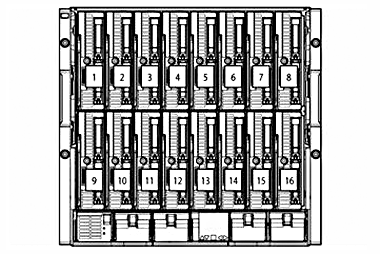
Half-height server blade bay numbering | |
|
| |
|
1. Device Bay 1 |
9. Device Bay 9 |
|
2. Device Bay 2 |
10. Device Bay 10 |
|
3. Device Bay 3 |
11. Device Bay 11 |
|
4. Device Bay 4 |
12. Device Bay 12 |
|
5. Device Bay 5 |
13. Device Bay 13 |
|
6. Device Bay 6 |
14. Device Bay 14 |
|
7. Device Bay 7 |
15. Device Bay 15 |
|
8. Device Bay 8 |
16. Device Bay 16 |
|
NOTE: Half-height servers should be populated from top and bottom from left to right (looking at the front of the enclosure). So the first two half-height servers would be placed in bays 1 & 9 the second two half-height servers would be placed in bays 2 & 10 and so on until the enclosure is full. | |
|
| |
|
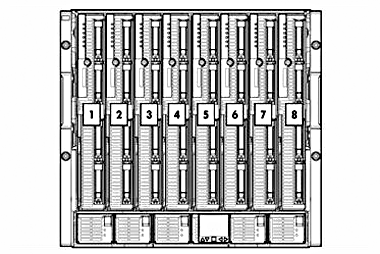
Full-height server blade bay numbering | |
|
| |
|
1. Device Bay 1 |
5. Device Bay 5 |
|
2. Device Bay 2 |
6. Device Bay 6 |
|
3. Device Bay 3 |
7. Device Bay 7 |
|
4. Device Bay 4 |
8. Device Bay 8 |
|
NOTE: Full-height servers should be populated from left to right. | |
|
| |
|
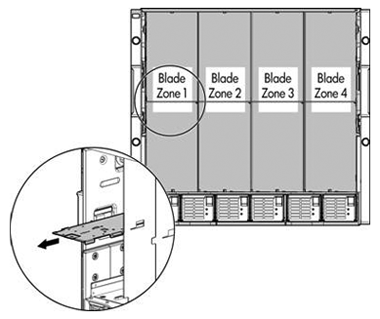
Mixed Configuration - Full Height and Half-Height Population rules |
|
|
|
The BladeSystem c7000 enclosure is divided into 4 zones by the vertical support metalwork. Within each zone a removable divider is used to support half height devices. To install a full-height blade in any zone this divider must be removed. As a consequence a zone can only contain either full-height server blades or half-height server blades. |
|
|
|
HP BladeSystem |
Dimensions |
Height |
17.4 in (442 mm) |
|
Width |
17.6 in (447.04 mm) | ||
|
Depth |
32 in (813 mm) | ||
|
Shipping dimensions |
Height |
29.88 in (759 mm) | |
|
Width |
23.88 in (607 mm) | ||
|
Depth |
39.88 in (1013 mm) | ||
|
Single-phase enclosure weight |
Unboxed |
192 lb (87 kg) | |
|
Shipping |
235 lb (106.6 kg) | ||
|
Three -phase enclosure NA/JPN weight |
Unboxed |
222 lb (100.7 kg) | |
|
Shipping |
265 lb (120.2 kg) | ||
|
Three-phase enclosure international weight |
Unboxed |
222 lb (100.7 kg) | |
|
Shipping |
265 lb (120.2 kg) | ||
|
DC input enclosure weight |
Unboxed |
151 lb (68.5 kg) | |
|
Shipping |
194 lb (88 kg) | ||
|
Maximum enclosure weight (approximate) |
Unboxed |
450 lb (204 kg) | |
|
Shipping |
493 lb (223.6 kg) | ||
|
Temperature range |
Operating |
50° to 95° F (10° to 35° C) | |
|
Non-Operating |
-22° to 140° F (-30° to 60° C) | ||
|
Relative humidity |
Operating |
10 to 90% relative humidity (Rh), 28°C (82.4°F) maximum wet bulb temperature, non-condensing. | |
|
Non-Operating |
5 to 95% relative humidity (Rh), 38.7°C (101.7°F)maximum wet bulb temperature, non-condensing. | ||
|
NOTE: Operating temperature has an altitude derating of 1.8° F (1° C) per 1,000 ft (304.8 m). No direct sunlight. Upper operating limit is 10,000 ft (3,048 m) or 70Kpa/10.1 psia. Upper non-operating limit is 30,000 ft (9,144 m) or 30.3 KPa/4.4 psia. Storage maximum humidity of 95% is based on a maximum temperature of 113° F (45° C). Altitude maximum for storage is 70 KPa. | |||
|
| |||
|
Power |
Input requirements - single-phase model |
Rated input frequency |
50 to 60 Hz | |
|
2250W PSU |
Rated input voltage |
100 to 120 VAC | ||
|
Rated input current |
12.3A at 100 - 120 VAC | |||
|
Rated input power |
2612 VA Max | |||
|
2400W PSU |
Rated input voltage |
200 to 240 VAC | ||
|
Rated input current |
13.9 A at 200 VAC | |||
|
Rated input power |
2780 VA | |||
|
Power cords |
Single-Phase |
IEC-320 C19-C20 1.22m (6 ft) | ||
|
3-Phase NA/JPN |
2 x NEMA L15-30p 2.44m (10 ft) | |||
|
3-Phase International |
2 x IEC-309 200/346 V - 240/415 V, 5-Pin, 6h 16A 2.44m (10 ft) | |||
|
-48V DC Power |
Terminal lug: 45DG 4AWG 1/4 2H | |||
|
Output |
HP 2250W Hot-Plug Power Supply |
200 - 240 VAC 2250 W | ||
|
HP 2400W High Efficiency Hot-Plug Power Supply |
200 - 240 VAC 2400 W | |||
|
HP 2250W -48V DC Hot-Plug Power Supply |
2250W | |||
|
Acoustic noise |
Listed are the declared A-Weighted sound power levels (LWAd) and declared average bystander position A-Weighted sound pressure levels (LpAm) when the product is operating in a 23°C ambient environment. Noise emissions were measured in accordance with ISO 7779 (ECMA 74) and declared in accordance with ISO 9296 (ECMA 109). | |||
|
Idle |
| |||
|
LWAd |
7.5 Bels | |||
|
LpAm |
57 dB | |||
|
Idle |
| |||
|
LWAd |
7.5 Bels | |||
|
LpAm |
57 dB | |||
|
| ||||
|
Environmental-friendly products and approach |
End-of-life management and recycling |
Hewlett-Packard offers end-of-life HP product return, trade-in, and recycling programs in many geographic areas. For trade-in information, please go to: http://www.hp.com/go/green. To recycle your product, please go to: http://www.hp.com/go/green or contact your nearest HP sales office. Products returned to HP will be recycled, recovered or disposed of in a responsible manner. |
|
NOTE: To review maximum system power ratings for facilities planning purposes use the Active Answers Power Calculator which is available via the online tool located at URL: http://www.hp.com/go/bladesystem/powercalculator |
|
|
Summary of Changes
|
|
|
|
|
|
|
|
|
|
|
|
|
|
|
|
Date |
Version History |
Action |
Description of Change: |
|
24-Jun-2016 |
From Version 35 to 36 |
Retire |
Document Retired |
|
06-Mar-2015 |
From Version 34 to 35 |
Added |
Added the new CMS |
|
13-Oct-2014 |
From Version 33 to 34 |
Changed |
Changed the What´s New Section and Update some SKU Descriptions. |
|
16-May-2014 |
From Version 32 to 33 |
Changed |
Product descriptions were revised throughout Ordering CloudSystem Matrix |
|
20-Dec-2013 |
From Version 31 to 32 |
Changed |
Changes made to What's New and in the Additional Options section. |
|
28-Jun-2013 |
From Version 30 to 31 |
Changed |
Two part numbers were changed in Step 2. |
|
25-Mar-2013 |
From Version 29 to 30 |
Changed |
Overview: Completely updated What's new section. Ordering CloudSystem Matrix: Updated KVM Management Sever and KVM Managed Host sections. |
|
09-Nov-2012 |
From Version 27 to 28 |
Changed |
Changes were made in Ordering CloudSystem Matrix section. |
|
14-Sep-2012 |
From Version 26 to 27 |
Changed |
Changes were made in Cloud System Matrix and Additional Options sections. |
|
17-Aug-2012 |
From Version 25 to 26 |
Changed |
Changes made in the Ordering CloudSystem Matrix and Additional Options sections. |
|
13-Aug-2012 |
From Version 24 to 25 |
Changed |
Changes made throughout the QuickSpec. |
|
12-Jun-2012 |
From Version 23 to 24 |
Removed |
Removed a bullet from the What's New section. |
|
08-Jun-2012 |
From Version 22 to 23 |
Changed |
Changes made within the Overview and Ordering CloudSystem Matrix sections. |
|
04-Jun-2012 |
From Version 21 to 22 |
Changed |
Changes made throughout the QuickSpec. |
|
20-Apr-2012 |
From Version 20 to 21 |
Changed |
Changes made in the CloudSystem System Matrix, Configuration Information and Additional Options sections. |
|
06-Apr-2012 |
From Version 18 to 20 |
Changed |
BladeSystem was changed to CloudSystem. |
|
06-Mar-2012 |
From Version 17 to 18 |
Changed |
Changes were made throughout the QuickSpec. |
|
30-Aug-2011 |
From Version 16 to 17 |
Changed |
Changes were made throughout Ordering Information and to HP Rack Options and HP Care Pack services in Additional Options Mentions of Cloud Service Automation for Matrix were added |
|
20-Jun-2011 |
From Version 15 to 16 |
Changed |
Revisions were made throughout changing BladeSystem to CloudSystem. |
|
05-Apr-2011 |
From Version 14 to 15 |
Added |
HP BladeSystem Matrix Conversion Services, HP BladeSystem Matrix - Extended Infrastructure and HP Utility Ready Computing on Matrix were added to HP BladeSystem Matrix HP NC553m 10Gb 2-port FlexFabric Adapter was added to HP Ethernet Mezzanine Options |
|
|
|
Changed |
Updated to version 6.3 HP Uninterruptible Power Systems product descriptions were revised |
|
14-Jan-2011 |
From Version 13 to 14 |
Changed |
Changes made within the Ordering BladeSystem Matrix. |
|
16-Nov-2010 |
From Version 12 to 13 |
Changed |
Edits were made within Ordering BladeSystem Matrix including revising product descriptions and updating HP Interconnects notes HP Rack Series was completely revised |
|
05-Oct-2010 |
From Version 11 to 12 |
Changed |
How to order HP BladeSystem Matrix and Warranty Services were revised in HP BladeSystem Matrix Virtual to physical was added to Availability and proactive support and Storage LUN configuration and presentation/zoning (with purchase of EVA4400) was removed from Orchestrated provisioning of services in HP BladeSystem Matrix Infrastructure Operating Environment Ordering BladeSystem Matrix and HP Care Pack Services were completely revised Part numbers were modified in HP Rack Series Matrix Starter Kit and Matrix Expansion Kits (included in the Starter Kit order) was added to HP BladeSystem Matrix Starter Kit Implementation Service HP BladeSystem Matrix Expansion Kit Integration Implementation Service was added to HP BladeSystem Matrix Tape Storage was removed from Additional Options |
|
12-Jul-2010 |
From Version 10 to 11 |
Removed |
Removed duplicate text. |
|
09-Jul-2010 |
From Version 9 to 10 |
Changed |
Descriptions for part numbers 500662-B21 and 418367-B21 were revised for BladeSystem c-Class server blades chart in Ordering BladeSystem Matrix HP BladeSystem c7000 enclosure descriptions were revised in Technical Specifications |
|
|
|
Removed |
HP 16A 250V IRAM 2073/IEC320-C19 2.5m/8ft was removed from Power Cords 2x1x16 and 4x1x16 IP Console Switches with Virtual Media and 2x16 Server Console Switch with Virtual Media were removed from HP Rack Options HP StorageWorks Virtual Library Systems were removed from Tape Storage |
|
30-Apr-2010 |
From Version 8 to 9 |
Changed |
Revisions were made throughout Ordering BladeSystem Matrix. |
|
29-Mar-2010 |
From Version 7 to 8 |
Changed |
Part number for HP BladeSystem Matrix Starter Kit - HP Insight Software was changed in Step 2 Central management server (CMS), recommended default SKU was completely revised and Part number was added in Step 2 Microsoft Windows Server 2008 with Hyper-V licenses were revised in Step 3 NOTE was added to callout 6 for the Starter Kit Overview image |
|
12-Feb-2010 |
From Version 6 to 7 |
Changed |
Changes made throughout the QuickSpec. |
|
04-Dec-2009 |
From Version 5 to 6 |
Changed |
Changes made throughout the QuickSpec. |
|
04-Sep-2009 |
From Version 4 to 5 |
Changed |
Changes made throughout the entire QuickSpec except for the Technical Specifications section. |
|
12-Jun-2009 |
From Version 3 to 4 |
Added |
HP BladeSystem Matrix Orchestration throughout the HP BladeSystem Matrix section NOTEs and VC Flex-10 10Gb Ethernet module transceiver/SFP options to HP BladeSystem Matrix Starter Kit and Expansion Kit in the Ordering BladeSystem Matrix section |
|
|
|
Changed |
Updated BladeSystem c-Class server blades and HP StorageWorks EVA4400 in the Ordering BladeSystem Matrix section |
|
29-May-2009 |
From Version 2 to 3 |
Added |
What's New to the Overview section HP BladeSystem Matrix Starter Kit - Implementation Service, Fixed and Flexible to HP BladeSystem Matrix Starter Kit in the Ordering BladeSystem Matrix section 4 year and 5 year, 24x7 4hr BladeSystem Matrix Starter Hardware Support, Fixed and Flexible to Support Plus 24 options for BladeSystem Matrix Starter Kit in the Ordering BladeSystem Matrix section 4 year and 5 year 24x7 BL Matrix Software Support, Fixed and Flexible to Support Plus 24 options for BladeSystem Matrix Starter Kit in the Ordering BladeSystem Matrix section 4 year and 5 year Support Plus 24 BLc Matrix Expansion Kit Support, Fixed and Flexible to Support Plus 24 options for the entire BladeSystem Matrix Expansion Kit in the Ordering BladeSystem Matrix section HP Insight Recovery Installation & Startup Service, Flexible to Service and Support offerings in the Additional Options section |
|
01-May-2009 |
From Version 1 to 2 |
Changed |
Other changes made throughout the QuickSpec including a complete revision of the Ordering BladeSystem Matrix section. |
|
|
|
|
|
|
©
Copyright 2016 Hewlett-Packard Development Company, L.P. |