HPE Edgeline EL8000 Converged Edge System: технические характеристики и документация
|
Shape the Future of QuickSpecs - Your Input Matters | |
|
HPE Edgeline EL8000 Converged Edge System QuickSpecs
The HPE Edgeline EL8000 Converged Edge System brings high-performance computing to the edge of networks, where large volumes of data are being generated but compute capability to get quick insights has traditionally been very limited.
The rugged size, weight, and power (SWaP) optimized design of the HPE Edgeline EL8000 delivers new efficiency and creates new business models in domains such as telecommunications, manufacturing, defense, automotive or energy. |
|
|
The Edgeline EL8000 System with ProLiant e910 and e920 Series Server Blades expands the reach of Machine Learning, Video Analytics, and Multi-Access Edge Compute. The compute capacity previously limited to traditional data centers or the cloud is now available at the Edge, close to where the data is generated.
The HPE Edgeline EL8000 Converged Edge System is designed to help communication service providers (CSP) capitalize on data-intensive, low-latency services for media delivery, connected mobility, and smart cities. The new system enables CSPs to process vast amounts of data in real time directly at the edge, based on open standards to boost flexibility and reduce costs.
Compliant with industry standards, such as NEBS, M, IL-STD-810G, and ASHRAE class 3 and 4, the system is resistant against hazardous environmental influences like heat, shock and vibration, as well as failover, supporting continuous operation between 0°C to 55°C.
The HPE proven HPE iLO 5 technology and the Edgeline Chassis Manager enable remote provisioning, ongoing system health monitoring, updates, management and security of HPE Edgeline EL8000 Converged Edge Systems from cell towers to oil rigs, without needing IT expertise on site. | |||
|
| |||
|
| |||
|
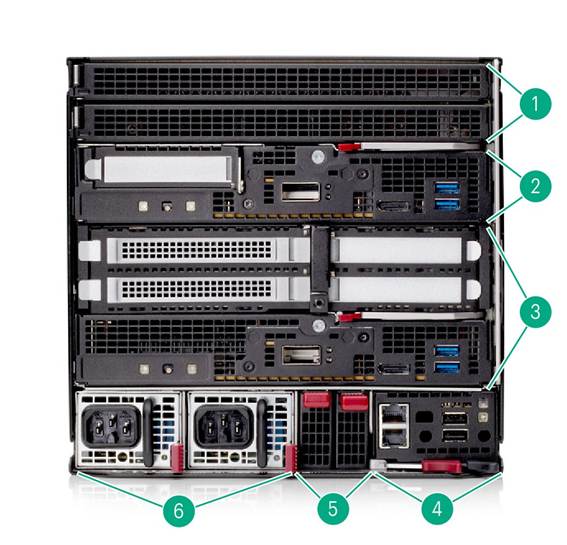
HPE Edgeline EL8000 5U Front Cabling Chassis View | |||
|
Item |
Description |
Item |
Description |
|
1. |
1U Blank (if no blade is installed) |
4 |
Edgeline Chassis Manager (ECM) Module |
|
2 |
ProLiant e910 1U Server Blade (example position) |
5 |
Two (2) EL8000 Switch Module Bays (blanks shown) |
|
3 |
ProLiant e910 2U Server Blade (example position) |
6 |
Two (2) Edgeline EL8000 Power Supplies |
|
|
|
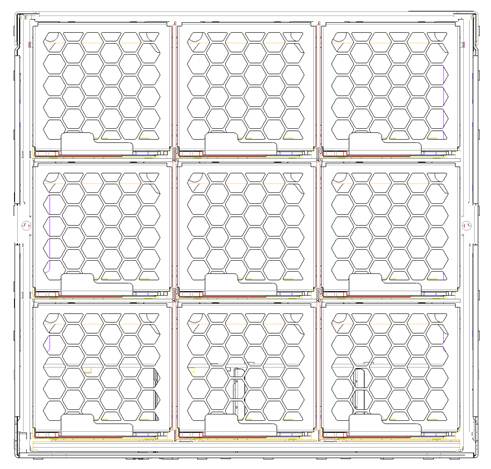
HPE Edgeline EL8000 Rear View 9 System Fans |
|
|
|
|
|
EL8000 Unmanaged 10G SFP+ Switch
|
|
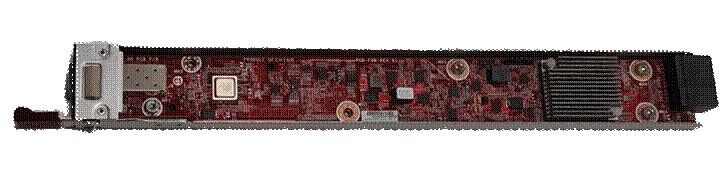
One or two optional 10GbE unmanaged switches can be installed for in-chassis aggregation of network traffic from the compute blades.
One 10GbE port from each e910 compute blade can be routed to the switch and terminates in a single external SFP+ uplink (see diagram below). Each e910 compute blade in the chassis must be configured with the correct network riser (RJ-45 or SFP+), so one 10GbE ports are routed to each switch bay. If a QSFP+ network riser is configured on any e910 blade, there will be no network connection from that blade to either switch. |
|
The switch design is based on Broadcom's BCM53406 ASIC. (ASIC specs)
Currently, the only default features supported are: - Uplink supports 10G/1G SFP transceivers (fiber and copper) - IGMP snooping: listening to Internet Group Management Protocol (IGMP) network traffic to control delivery of IP multicasts
|
|
Notes: ProLiant e910 blades configured with the QSFP+ network riser option are not connected to the switch bays. Appropriate selection of RJ45 or SFP+ network risers on all e910 blades is required to use the chassis switching capability. |
|
|
|
Enclosure
EL8000 5U Front Cabling Chassis | |||||||||||||||||||||||||||||||||||||||||||||
|
The HPE Edgeline EL8000 Chassis supports the following ProLiant Server Blade configuration
Server Blade Configurations - ProLiant e910 1U Blade Server (Min: 1, Max: 4) - ProLiant e910 2U Blade Server (Min: 1, Max: 2) - ProLiant e920 Blade Server (Min: 1, Max: 4) - ProLiant e920d Blade Server (Min: 1, Max: 2) Notes: - Mixing of ProLiant e910 1U and 2U blades within the same EL8000 Chassis is allowed (i.e. 2 e910 1U blades and 1 e910 2U blade) - Mixing of ProLiant e920 and e920d blades within the same EL8000 Chassis is allowed (i.e. 2 e920 blades and 1 e920d blade) - Please visit the e910 QuickSpecs at the following URL for detailed information and configuration possibilities - Please visit the e920 QuickSpecs at the following URL for detailed information and configuration possibilities - Please visit the e920d QuickSpecs at the following URL for detailed information and configuration possibilities - Blades supported on the Edgeline EL1000 and EL4000 systems will not fit in an Edgeline EL8000, and vice versa.
Acoustic Noise Specs Listed are the sound power levels and average bystander position sound pressure levels when the product is operating in a 23°C ambient environment. Noise emissions were measured in accordance with ISO 7779 (ECMA 74) and declared in accordance with ISO 9296 (ECMA 109). - EL8000 has the following sound power levels: 62 dBA at low speeds of 10%-20% PWM, and 95 dBA at full speed. - It has the following averaged bystander sound pressure levels (office environment): 58 dBA at 30%, and 89 dBA at full speed.
| |||||||||||||||||||||||||||||||||||||||||||||
| |||||||||||||||||||||||||||||||||||||||||||||
|
HPE EL8000 Systems Power Supply The HPE Edgeline EL8000 Systems supports redundant hot-plug power supplies
| |||||||||||||||||||||||||||||||||||||||||||||
|
EL8000 5U Front Cabling Chassis - HPE Edgeline EL8000 Front Cabling Chassis 1500W 264VAC Power Supply Kit - HPE Edgeline EL8000 Front Cabling Chassis 1500W -48VDC Power Supply Kit
Notes: - Min: 1, Max: 2 - Mixing of AC and DC power supply options in a chassis is allowed | |||||||||||||||||||||||||||||||||||||||||||||
|
| |||||||||||||||||||||||||||||||||||||||||||||
|
Embedded Management
The HPE ProLiant e910 and e920 Series Blade Servers plugged into an HPE Edgeline EL8000 has its own iLO 5 management processor, which can be accessed directly through the management network port on the Edgeline Chassis Manager module.
The HPE Edgeline EL8000 System has an Edgeline Chassis Controller to monitor and control common chassis elements. The iLO 5 on the server blade communicates with the Edgeline Chassis Controller to gather and report status information on the chassis itself.
Monitor your servers for ongoing management, service alerting, reporting and remote management with HPE iLO. Learn more at http://www.hpe.com/info/ilo. | |||||||||||||||||||||||||||||||||||||||||||||
|
| |||||||||||||||||||||||||||||||||||||||||||||
|
HPE NEBS Enablement Kit
Telecom equipment is frequently deployed in tough environments, and must be able to continuously sustain operating temperatures up to 55 degrees Celsius without performance degradation or downtime. The Edgeline EL8000 system accomplishes this through a unique thermal design, curated components and intelligent software-controlled fans. In addition, it is designed to meet specifications such as NEBS Level 3 that require tolerance of power feed outages (e.g. 10ms main power drop-out before backup power can be restored), and seismic conditions (e.g. continuing to remain operational after it is subject to equivalent of a 7 to 8 Richter scale earthquake).
The NEBS enablement kit is a factory option that configures system to operate up to 63C ambient temperature to meet NEBS requirements. If this option is ordered, switches are configured within the blade and chassis to select temperature thresholds and fan parameters that deliver optimal cooling for NEBS environments. Additional fan speed options can also be selected using the BIOS ROM based setup utility: - Optimal Cooling - default - Increased Cooling - fans operate at a higher minimum speed, and cooling thresholds are 5C lower than typical - Enhanced CPU Cooling - CPU cooling thresholds are 8C lower than typical - Max Cooling - fans always operate at maximum speed | |||||||||||||||||||||||||||||||||||||||||||||
|
| |||||||||||||||||||||||||||||||||||||||||||||
|
HPE Service Pack for Edgeline
The HPE Service Pack for Edgeline is the delivery mechanism for firmware updates on the HPE Edgeline System. Before using your system for the first time, verify that you have the latest drivers, firmware, and system software installed. Update your system with the HPE Service Pack for Edgeline.
For more information, see the HPE Service Pack for Edgelineon the Hewlett Packard Enterprise website: https://support.hpe.com/connect/s/softwaredetails?language=en_US&collectionId=MTX-14e4e074402c43cf | |||||||||||||||||||||||||||||||||||||||||||||
|
| |||||||||||||||||||||||||||||||||||||||||||||
|
HPE Services
No matter where you are in your digital transformation journey, you can count on HPE Services to deliver the expertise you need when, where and how you need it. From planning to deployment, ongoing operations and beyond, our experts can help you realize your digital ambitions. https://www.hpe.com/services | |||||||||||||||||||||||||||||||||||||||||||||
|
| |||||||||||||||||||||||||||||||||||||||||||||
|
Consulting Services
No matter where you are in your journey to hybrid cloud, experts can help you map out your next steps. From determining what workloads should live where, to handling governance and compliance, to managing costs, our experts can help you optimize your operations. https://www.hpe.com/services/consulting | |||||||||||||||||||||||||||||||||||||||||||||
|
| |||||||||||||||||||||||||||||||||||||||||||||
|
HPE Managed Services
HPE runs your IT operations, providing services that monitor, operate, and optimize your infrastructure and applications, delivered consistently and globally to give you unified control and let you focus on innovation. HPE Managed Services | HPE | |||||||||||||||||||||||||||||||||||||||||||||
|
| |||||||||||||||||||||||||||||||||||||||||||||
|
Operational services
Optimize your entire IT environment and drive innovation. Manage day-to-day IT operational tasks while freeing up valuable time and resources. Meet service-level targets and business objectives with features designed to drive better business outcomes. https://www.hpe.com/services/operational | |||||||||||||||||||||||||||||||||||||||||||||
|
| |||||||||||||||||||||||||||||||||||||||||||||
|
HPE Complete Care Service
HPE Complete Care Service is a modular, edge-to-cloud IT environment service designed to help optimize your entire IT environment and achieve agreed upon IT outcomes and business goals through a personalized experience. All delivered by an assigned team of HPE Services experts. HPE Complete Care Service provides: - A complete coverage approach -- edge to cloud - An assigned HPE team - Modular and fully personalized engagement - Enhanced Incident Management experience with priority access - Digitally enabled and AI driven customer experience https://www.hpe.com/services/completecare | |||||||||||||||||||||||||||||||||||||||||||||
|
| |||||||||||||||||||||||||||||||||||||||||||||
|
HPE Tech Care Service
HPE Tech Care Service is the operational support service experience for HPE products. The service goes beyond traditional support by providing access to product specific experts, an AI driven digital experience, and general technical guidance to not only reduce risk but constantly search for ways to do things better. HPE Tech Care Service delivers a customer-centric, AI driven, and digitally enabled customer experience to move your business forward. HPE Tech Care Service is available in three response levels. Basic, which provides 9x5 business hour availability and a 2-hour response time. Essential which provides a 15-minute response time 24x7 for most enterprise level customers, and Critical which includes a 6-hour repair commitment where available and outage management response for severity 1 incidents. https://www.hpe.com/services/techcare
| |||||||||||||||||||||||||||||||||||||||||||||
|
| |||||||||||||||||||||||||||||||||||||||||||||
|
HPE Lifecycle Services
HPE Lifecycle Services provide a variety of options to help maintain your HPE systems and solutions at all stages of the product lifecycle. A few popular examples include: - Lifecycle Install and Startup Services: Various levels for physical installation and power on, remote access setup, installation and startup, and enhanced installation services with the operating system. - HPE Firmware Update Analysis Service: Recommendations for firmware revision levels for selected HPE products, taking into account the relevant revision dependencies within your IT environment. - HPE Firmware Update Implementation Service: Implementation of firmware updates for selected HPE server, storage, and solution products, taking into account the relevant revision dependencies within your IT environment. - Implementation assistance services: Highly trained technical service specialists to assist you with a variety of activities, ranging from design, implementation, and platform deployment to consolidation, migration, project management, and onsite technical forums. - HPE Service Credits: Access to prepaid services for flexibility to choose from a variety of specialized service activities, including assessments, performance maintenance reviews, firmware management, professional services, and operational best practices. Notes: To review the list of Lifecycle Services available for your product go to:
For a list of the most frequently purchased services using service credits, see the HPE Service Credits Menu |
|
|
|
Other Related Services from HPE Services:
HPE Education Services Training and certification designed for IT and business professionals across all industries. Broad catalogue of course offerings to expand skills and proficiencies in topics ranging from cloud and cybersecurity to AI and DevOps. Create learning paths to expand proficiency in a specific subject. Schedule training in a way that works best for your business with flexible continuous learning options. https://www.hpe.com/services/training |
|
|
|
Defective Media Retention An option available with HPE Complete Care Service and HPE Tech Care Service and applies only to Disk or eligible SSD/Flash Drives replaced by HPE due to malfunction.
Consult your HPE Sales Representative or Authorized Channel Partner of choice for any additional questions and services options. |
|
|
|
Parts and Materials HPE will provide HPE-supported replacement parts and materials necessary to maintain the covered hardware product in operating condition, including parts and materials for available and recommended engineering improvements.
Parts and components that have reached their maximum supported lifetime and/or the maximum usage limitations as set forth in the manufacturer's operating manual, product quick-specs, or the technical product data sheet will not be provided, repaired, or replaced as part of these services. |
|
|
|
How to Purchase Services Services are sold by Hewlett Packard Enterprise and Hewlett Packard Enterprise Authorized Service Partners: - Services for customers purchasing from HPE or an enterprise reseller are quoted using HPE order configuration tools. - Customers purchasing from a commercial reseller can find services at https://ssc.hpe.com/portal/site/ssc/ |
|
|
|
AI Powered and Digitally Enabled Support Experience Achieve faster time to resolution with access to product-specific resources and expertise through a digital and data driven customer experience
Sign into the HPE Support Center experience, featuring streamlined self-serve case creation and management capabilities with inline knowledge recommendations. You will also find personalized task alerts and powerful troubleshooting support through an intelligent virtual agent with seamless transition when needed to a live support agent. https://support.hpe.com/hpesc/public/home/signin |
|
|
|
Consume IT On Your Terms
HPE GreenLake edge-to-cloud platform brings the cloud experience directly to your apps and data wherever they are-the edge, colocations, or your data center. It delivers cloud services for on-premises IT infrastructure specifically tailored to your most demanding workloads. With a pay-per-use, scalable, point-and-click self-service experience that is managed for you, HPE GreenLake edge-to-cloud platform accelerates digital transformation in a distributed, edge-to-cloud world. - Get faster time to market - Save on TCO, align costs to business - Scale quickly, meet unpredictable demand - Simplify IT operations across your data centers and clouds To learn more about HPE Services, please contact your Hewlett Packard Enterprise sales representative or Hewlett Packard Enterprise Authorized Channel Partner. Contact information for a representative in your area can be found at "Contact HPE" https://www.hpe.com/us/en/contact-hpe.html
For more information http://www.hpe.com/services |
|
|
|
Connect your devices
Unlock all of the benefits of your technology investment by connecting your products to Hewlett Packard Enterprise. Reduce down time, increase diagnostic accuracy and have a single consolidated view of your environment. By connecting, you will receive 24x7monitoring, pre-failure alerts, automatic call logging, and automatic parts dispatch. HPE Tech Care Service and HPE Complete Care Service customers will also benefit from proactive activities to help prevent issues and increase optimization. All of these benefits are already available to you with your server storage and networking products, securely connected to HPE support. Learn more about getting connected at http://www.hpe.com/services/getconnected |
|
|
|
Other related services from HPE Services
HPE Server Hardware Installation Provides for the basic hardware installation of your new Edgeline System. It is part of a suite of HPE deployment services that are designed to give you the peace of mind that comes from knowing your HPE products have been installed by an Hewlett Packard Enterprise authorized service specialist in accordance with the product's documentation. https://www.hpe.com/h20195/v2/Getdocument.aspx?docname=a00062322enw
HPE Installation and Startup Service Provides for the installation of your new Edgeline System. This service will assist you in bringing your new HPE Edgeline System into operation and make it remotely accessible in a timely and professional manner. The HPE service delivery technician will connect the product to the network as appropriate and enable remote support to allow for automatic case creation for hardware failures. Installation and start up services also includes the installation of one supported operating system type (Windows® or Linux). https://www.hpe.com/h20195/v2/Getdocument.aspx?docname=a00062211enw
HPE Service Credits Offers flexible services and technical skills to meet your IT demands as your business evolves. With a menu of services, you can access additional resources and specialist skills to help you maintain peak performance of your IT. HPE Service Credits help you proactively respond to your dynamic IT and business needs.
HPE Education Services Provides comprehensive training designed to expand the skills of your IT staff and keep them up to speed with the latest technologies.
Consult your HPE Sales Representative or Authorized Channel Partner of choice for any additional questions and support options. |
|
|
|
Warranty
This product is covered by a global limited warranty and supported by Hewlett Packard Enterprise Services and a worldwide network of Hewlett Packard Enterprise Authorized Partner Ready Resellers. Hardware diagnostic support and repair is available for three years from date of purchase. Support for initial setup is available for 90 days from date of purchase. Enhancements to the warranty services are available through HPE services or customized service agreements. Hard drives have either a one year or three-year warranty; refer to the specific hard drive QuickSpecs for details.
Notes: Chassis Warranty includes 3-Year Parts, 3-Year Labor, 3-Year Onsite support with next business day response. Warranty, repairs may be accomplished through the use of Customer Self Repair (CSR) parts. These parts fall into two categories: 1) Optional CSR parts are designed for easy replacement but may involve added complexity. Customers may choose to have Hewlett Packard Enterprise replace Optional CSR parts at no charge. 2) No CSR parts require a Hewlett Packard Enterprise authorized service provider to replace the part. Additional information regarding worldwide limited warranty and technical support is available at: https://support.hpe.com/hpesc/public/docDisplay?docId=sd00004309en_us |
|
|
|
Parts and Materials
Hewlett Packard Enterprise will provide HPE-supported replacement parts and materials necessary to maintain the covered hardware product in operating condition, including parts and materials for available and recommended engineering improvements.
Parts and components that have reached their maximum supported lifetime and/or the maximum usage limitations as set forth in the manufacturer's operating manual, product QuickSpecs, or the technical product data sheet will not be provided, repaired, or replaced as part of these services.
The defective media retention service feature option applies only to Disk or eligible SSD/Flash Drives replaced by Hewlett Packard Enterprise due to malfunction. |
|
|
|
For more information - www.hpe.com/services - https://www.hpe.com/us/en/services/operational.html To learn more on HPE Storage Services, please contact your Hewlett Packard Enterprise sales representative or Hewlett Packard Enterprise Authorized Channel Partner. Contact information for a representative in your area can be found at "Contact HPE" https://www.hpe.com/us/en/contact-hpe.html
HPE Support Services are sold by HPE and Hewlett Packard Enterprise Authorized Service Partners: - Services for customers purchasing from HPE or an enterprise reseller are quoted using HPE order configuration tools. - Customers purchasing from a commercial reseller can find HPE Support Services at https://ssc.hpe.com/portal/site/ssc/ |
|
|
|
This section lists some of the steps required to configure a Factory Integrated Model. To ensure only valid configurations are ordered, Hewlett Packard Enterprise recommends the use of a Hewlett Packard Enterprise approved configurator. Contact your local sales representative for information on configurable product offerings and requirements.
Factory Integrated Models must start with an HPE Edgeline EL8000 System with the following minimum configuration: - One (1) HPE ProLiant e910 or e920 Series Server Blade. One (1) HPE Edgeline EL8000 Power Supply
| |
|
Step 1: Base Configuration (Choose System) |
|
|
HPE Edgeline System |
|
|
HPE Edgeline EL8000 5U Configure-to-order Front Cabling Chassis |
P12379-B21 |
|
Notes: The Edgeline EL8000 chassis includes the Edgeline Chassis Manager (ECM) module. Wireless communication capability on the ECM has been disabled and the 2 antenna ports on the bezel are currently non-functional. |
|
|
|
|
|
Power Supplies |
|
|
HPE Flex Slot Power Supplies (Min: 1, Max: 2) |
|
|
HPE Edgeline EL8000 1500W 264VAC Front Cabling Power Supply Kit |
P11290-B21 |
|
HPE Edgeline EL8000 1500W -48VDC Front Cabling Power Supply Kit |
P11291-B21 |
|
HPE Edgeline 1500W 264VAC Titanium Power Supply Kit |
P42206-B21 |
|
Notes: - The Titanium Power Supply Kit (P42206-B21) is available in the EMEA region only and does not support the Ultralife Carry On Enclosure. - Functional systems require at least 1 power supply to be configured, with 2 power supplies recommended for redundancy - Mixing of AC (P11290-B21) and DC (P11291-B21) power supplies in a chassis is allowed. - The AC power supply (P11290-B21) supports a nominal input of 100-240Vac. Refer to the appendix for technical details. - European Union ErP Lot 9 Regulation: Beginning on January 1st, 2024, the EU's Lot 9 eco-design regulations for supservers and storage products will enforce minimum efficiency for AC power supplies: 94% for multi-output and 96% for single-output. HPE Edgeline power supplies that meet Lot 9 requirements is: Titanium Power Supply Kit (P42206-B21). HPE configurators are already informing users about the mandate for units going to the European Union (EU), European Economic Area (EEA), the United Kingdom, Ireland, Switzerland, or Turkey to comply with Lot 9 minimum efficiencies that begin on January 1st, 2024. HPE will start enforcing Lot 9 minimum efficiency for AC power supplies on November 6th, 2023; purchase orders placed on or after this date that include AC power supplies that aren't Lot 9 compatible will need rework to replace them. | |
|
| |
|
| |
|
Step 2: Configure Chassis Storage Option |
|
|
HPE Edgeline EL8000 Storage Bay Option (Min: 0, Max: 1) | |
|
HPE Edgeline EL8000 8SFF SAS/SATA Drive Bay |
P17293-B21 |
|
HPE Edgeline EL8000 Storage FIO Enablement Kit |
P22510-B21 |
|
Notes: - The Storage FIO enablement kit is required for EL8000 chassis to fit the Drive Bay option. This enablement kit is only available as a factory option and cannot be ordered standalone. - The Drive Bay can be ordered as a standalone option to fit into an existing "storage enabled" EL8000 chassis. But if the EL8000 was NOT originally ordered with the storage enablement from the factory, it will NOT fit the Drive Bay option. - Selecting the Drive Bay option will restrict choice of servers in the chassis to One (1) e910 2U or e920d blade. The Drive Bay contains a Smart Array controller that is directly attached to this e910 2U or e920d blade. |
|
|
HPE Edgeline EL8000 Smart Array P408i-p SR SAS FIO Cable Kit |
P22493-B21 |
|
Notes: The Smart Array controller option must be selected if the Storage Bay (P17293-B21) is selected. |
|
|
|
|
|
HPE Edgeline EL8000 Storage Bay Drives (Min: 0, Max: 8) |
|
|
HPE 960GB SAS 12G Read Intensive SFF SC Multi Vendor SSD |
P49028-B21 |
|
HPE 1.92TB SAS 12G Read Intensive SFF SC Multi Vendor SSD |
P49030-B21 |
|
HPE 3.84TB SAS 12G Read Intensive SFF SC Multi Vendor SSD |
P49034-B21 |
|
HPE 7.68TB SAS 12G Read Intensive SFF SC Multi Vendor SSD |
P49039-B21 |
|
HPE 15.36TB SAS 12G Read Intensive SFF SC Multi Vendor SSD |
P49044-B21 |
|
Notes: - Selection of SFF drives requires the configuration of the Drive Bay option in the chassis. - Maximum Storage Bay capacity is 122.4TB when configured with Eight (8) 15.36TB SSDs. | |
|
| |
|
| |
|
Step 3: Configure Chassis Networking Options |
|
|
HPE 10GbE Unmanaged Switch (Min: 0, Max: 2) |
|
HPE Edgeline EL8000 10GbE SFP+ Switch |
P17297-B21 |
|
Notes: - Unmanaged Ethernet switch that takes one 10GbE port from each compute blade (i.e. from 4 1U bays) and switches it to one external 10GbE SFP+ uplink. Adding a second switch to the chassis provides a connection to the second 10GbE port from each compute blade. - The e910 blades in the chassis must be configured with either the SFP+ or RJ45 network riser option. If the QSFP+ network riser is used, the blade will NOT connect its 10GbE ports to the switch bays Please refer to the e910 QuickSpecs for details. | |
|
| |
|
| |
|
Step 4: Configure ProLiant Server Blade |
|
|
Notes: - Refer to the e910 and e920 Series Server Blades QuickSpecs for blade configuration details: - Please visit the e910 QuickSpecs at the following URL for detailed information and configuration possibilities - Please visit the e920 QuickSpecs at the following URL for detailed information and configuration possibilities - Please visit the e920d QuickSpecs at the following URL for detailed information and configuration possibilities
|
|
|
HPE ProLiant Server Blade (Min: 1, Max: 4) |
|
|
HPE Edgeline e920 Configure-to-order Blade Server |
P40891-B21 |
|
HPE Edgeline e920d Configure-to-order Blade Server |
P40892-B21 |
|
Notes: - If the Drive Bay option (P17293-B21) is selected, only One (1) e910 2U blade or e920d blade can be ordered. No e910 1U or e920 blades are supported in this configuration. - Maximum of Four (4) e910 1U or e920 blades, or Two (2) e910 2U or e920d blades, or a combination adding to 4U total height is allowed. Each blade operates independently. - Mixing of 1U and 2U Blade Servers is allowed (e.g. 2 e910 1U with 1 e910 2U in a chassis or 2 e920 with 1 e920d in a chassis) | |
|
| |
|
| |
|
Step 5: Configure Additional Options | |
|
Choose additional options for Factory Integration from sections below | |
|
| |
|
| |
|
Rail Kit |
|
|
HPE Edgeline EL8000 4-post Rack Rail and Tray Kit |
P12773-B21 |
|
Notes: The Rack Rail and Tray Kit is designed to support Two (2) EL8000 Chassis' side-by-side within a standard 5U rack height |
|
|
|
|
|
| |
|
HPE NEBS Enablement FIO Kit |
|
|
Notes: The NEBS FIO enablement kit configures the blade thermal behavior to meet Network Equipment Building System (NEBS) environmental specification. It is only available as a factory option. |
|
|
|
|
|
| |
|
HPE Power Cords |
|
|
HPE C15 EU 250V 10Amp 2.5m Black Power Cord |
Q7F45A |
|
HPE C15 UK 250V 10Amp 2.5m Black Power Cord |
Q7F46A |
|
HPE Edgeline C15 125V 15Amp Black 2.5m US Power Cord |
P41626-B21 |
|
HPE C15 US 250V 10Amp 2.5m Black Jumper Cord |
Q7F57A |
|
HPE C15 EU 250V 10Amp 0.76m Black Jumper Cord |
Q7F60A |
|
HPE C15 US 250V 10Amp 1m Black Jumper Cord |
Q7F61A |
|
HPE C15 EU 250V 10Amp 1m Black Jumper Cord |
Q7F62A |
|
HPE Edgeline 300V 3m DC Power Cable Kit |
P27698-B21 |
|
|
|
|
| |
|
HPE Security |
|
|
HPE Edgeline EL8000 Trusted Supply Chain FIO Configuration |
P45076-B21 |
|
Notes: HPE Trusted Supply Chain (P45076-B21) is an optional security upgrade intended for agencies and regulated industries needing enhanced security and compliance needs. Applying this option to an e920 or e920d CTO server blade ensures it is built in the USA in a secured facility by vetted HPE personnel assigned to the manufacturing processes. A multitude of checkpoints/inspections for malicious microcode and counterfeit parts are performed throughout the server build, and additional safeguards are put in place against cyber-exploits throughout the server lifecycle. The e920 and e920d server blades are currently supported in the USA, exclusively, and is Trade Agreement Act (TAA) compliant. | |
|
HPE iLO Common Password FIO Setting |
P08040-B21 |
|
Notes: Replaces iLO default randomized password by an HPE defined common password. HPE highly recommends changing this password immediately after the initial onboarding process. Customers who want to choose their own custom iLO default password should use the HPE Factory Express Integration Services. Learn more at: http://www.hpe.com/security | |
|
| |
|
HPE Support Services
|
|
|
Tech Care |
|
|
Installation & Startup Services |
|
|
HPE Installation Edgeline 8000 Chassis Service |
HF8S4E |
|
HPE Installation and Startup Edgeline Edgeline 8000 Service |
U8JA4E |
|
Notes: For a full listing of support services available for this server, please visit https://ssc.hpe.com/ |
|
|
|
|
|
| |
|
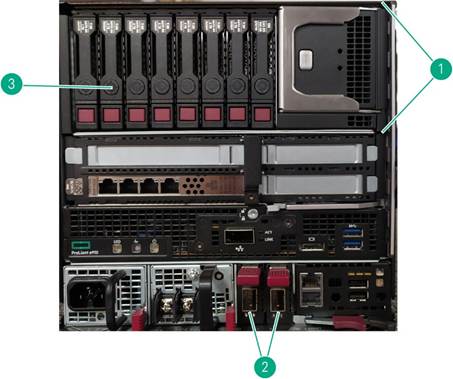
HPE EL8000 Storage Bay The optional Storage Bay can be configured in the EL8000 chassis and requires the following components to be ordered: -
Drive
Bay kit -
Storage
Enablement FIO option -
Smart
Array option kit -
ProLiant
e910 2U and e920d blades Notes: - Prior to removing the Storage Bay from the chassis, ensure that the adjoining ProLiant e910 2U or e920d blade has been powered down. - The Storage Bay and its Smart Array controller are dedicated to the adjoining ProLiant e910 2U or e920d blade. If a ProLiant e910 1U or e920 blade is installed, the Storage Bay will not be accessible. | |||
|
| |||
|
Item |
Description |
Item |
Description |
|
1. |
Storage Bay |
3. |
SFF Drives |
|
2. |
10Gb SFP+ Switches |
|
|
|
| |||
|
Power Supply Specifications
| ||||||||||||||||||||||||||||||||||||||||||||||||||||||||||||
| ||||||||||||||||||||||||||||||||||||||||||||||||||||||||||||
|
| ||||||||||||||||||||||||||||||||||||||||||||||||||||||||||||
| ||||||||||||||||||||||||||||||||||||||||||||||||||||||||||||
|
| ||||||||||||||||||||||||||||||||||||||||||||||||||||||||||||
|
| ||||||||||||||||||||||||||||||||||||||||||||||||||||||||||||
|
Physical Dimensions - Chassis Dimensions (H x W x D): Height
8.442"
(5U) (21.442
cm), Width 8.442"
(22.3
cm), Depth 18.173"
(46.16
cm). - Storage Bay Dimensions (H x W x D) Height 3.3" (8.3 cm) x Width 8.4" (21.3 cm) x Depth 13.4" (33.9 cm) - Weight 50
lbs to 58 lbs (22.7 kg- 26.3 kg) - Power
|
||||||||||||||||||||||||||||||||||||||||||||||||||||||||||||
|
| ||||||||||||||||||||||||||||||||||||||||||||||||||||||||||||
|
System Inlet Temperature -
Extended
Operating -
Standard
Operating -
Non-Operating
| ||||||||||||||||||||||||||||||||||||||||||||||||||||||||||||
|
| ||||||||||||||||||||||||||||||||||||||||||||||||||||||||||||
|
Relative Humidity -
Operating -
Non-Operating | ||||||||||||||||||||||||||||||||||||||||||||||||||||||||||||
|
| ||||||||||||||||||||||||||||||||||||||||||||||||||||||||||||
|
Altitude -
Operating -
Non-Operating | ||||||||||||||||||||||||||||||||||||||||||||||||||||||||||||
|
| ||||||||||||||||||||||||||||||||||||||||||||||||||||||||||||
|
Emissions Classification (EMC) -
FCC
Rating -
Normative
Standards | ||||||||||||||||||||||||||||||||||||||||||||||||||||||||||||
|
| ||||||||||||||||||||||||||||||||||||||||||||||||||||||||||||
|
Hewlett Packard Enterprise Extended Ambient Operating Temperature Support
The American Society of Heating Refrigeration and Air-Conditioning Engineers set standards for building systems, energy efficiency, indoor air quality, refrigeration and sustainability. The ASHRAE A3 and A4 classes are the latest classes that have been defined in an effort to support the Fresh Air Data cooling initiative. Hewlett Packard Enterprise Extended Ambient Operating Support is defined below as comparable to an ASHRAE class. For selected system configurations the Hewlett Packard Enterprise Edgeline Extended Ambient Operating Support allows operation even beyond ASHRAE class. Notes: Actual allowable system operating temperature will be determined by the options (I/O cards, drives etc.) selected. Details are provided in the Edgeline system configuration tables for the desired operating environment shown below.
The following table provides a summary of environmental ranges supported, with altitude de-ratings, by Hewlett Packard Enterprise ProLiant servers. Items in bold are ProLiant features that exceed the ASHRAE comparable class feature set.
|
| ||||||||||||||||||||||||||||||||||||
|
Notes: - *Altitude de-rating assumes no direct sustained sunlight - The maximum rate of change for Inlet Ambient Temperature is 20°C/hr (36°F/hr). The upper limit and rate of change can be limited by the type and number of options selected. |
|
|
| |||||||||||||||||||||||||||||||||||||||||||||
|
Notes: - 1Near 55°C inlet ambient AND when the CPU is stressed at 100%. - 2Upon fan failure the servers in the system may reduce performance - 3Only HPE PCIe options cards were used in this testing | ||||||||||||||||||||||||||||||||||||||||
|
| ||||||||||||||||||||||||||||||||||||||||
|
MIL-STD-810G The Edgeline EL8000 complies to these environmental specifications.
| ||||||||||||||||||||||||||||||||||||||||
|
| ||||||||||||||||||||||||||||||||||||||||
|
|
Date |
Version History |
Action |
Description of Change |
|
01-Dec-2025 |
Version 29 |
Changed |
New branding applied to document. |
|
02-Sep-2025 |
Version 28 |
Changed |
QS Survey link added |
|
28-Apr-2025 |
Version 27 |
Changed |
Configuration Information section was updated. |
|
21-Jan-2025 |
Version 26 |
Changed |
Configuration Information section was updated. Updated the Titanium Power Supply Kit. Obsolete SKUs were updated |
|
16-Sep-2024 |
Version 25 |
Changed |
URL updated. |
|
19-Aug-2024 |
Version 24 |
Changed |
Service and Support section was updated. |
|
06-May-2024 |
Version 23 |
Changed |
Configuration Information and Technical Specifications sections were updated. |
|
04-Dec-2023 |
Version 22 |
Changed |
Service and Support section was updated. |
|
20-Nov-2023 |
Version 21 |
Changed |
Service and Support and Additional Options (HPE Security) sections were updated. |
|
07-Aug-2023 |
Version 20 |
Changed |
Configuration Information section was updated (Power Supplies) |
|
10-Jul-2023 |
Version 19 |
Changed |
Technical Specifications section was updated (MIL-STD-810G) |
|
17-Apr-2023 |
Version 18 |
Changed |
Overview, Configuration Information, Technical Specifications sections were updated. Extended Ambient Operating Temperature Support added. |
|
07-Nov-2022 |
Version 17 |
Changed |
Configuration Information section was updated |
|
05-Jul-2022 |
Version 16 |
Changed |
Configuration Information section was updated Storage Bay Drives were updated Obsolete SKUs were removed |
|
07-Mar-2022 |
Version 15 |
Changed |
Overview, Standard Features, Configuration Information, Storage and Technical Specifications sections were updated EL8000 Chassis storage bay enablement updated Updated e910, e920, and e920d server blade options Update the Storage Bay Drives |
|
01-Nov-2021 |
Version 14 |
Changed |
Configuration Information section was updated. Added e920 and e920d server blade options |
|
15-Sep-2021 |
Version 13 |
Changed |
Obsolete SKU was removed. Services and Support Pointnext Tech Care and Complete Care information added |
|
07-Jun-2021 |
Version 12 |
Changed |
Additional Options section was updated |
|
15-Mar-2021 |
Version 11 |
Changed |
Added MIL-STD-810G tests. Clarified storage bay ordering. Overview, Standard Features, Configuration Information and Technical Specifications sections were updated |
|
07-Dec-2020 |
Version 10 |
Changed |
Standard Features, Configuration Information, and Additional Options sections were updated. |
|
01-Jun-2020 |
Version 9 |
Changed |
Rebranding applied to QuickSpecs |
|
04-May-2020 |
Version 8 |
Changed |
Overview, Standard Features, Configuration Information, and Additional Options sections were updated. |
|
17-Feb-2020 |
Version 7 |
Changed |
Overview, Standard Features, Configuration Information, and Additional Options sections were updated. |
|
03-Feb-2020 |
Version 6 |
Changed |
Standard Features, Configuration Information, and Additional Options sections were updated. |
|
06-Jan-2020 |
Version 5 |
Changed |
Overview and Configuration Information sections were updated. |
|
02-Dec-2019 |
Version 4 |
Changed |
Standard Features section was updated. |
|
07-Oct-2019 |
Version 3 |
Changed |
Technical Specifications section was updated. |
|
19-Aug-2019 |
Version 2 |
Changed |
Name changed and sections were updated. |
|
05-Aug-2019 |
Version 1 |
New |
New QuickSpecs |
|
|
|
Shape the Future of QuickSpecs - Your Input Matters | |
|
|
|
| |
|
|
|
Chat now | |
|
|
|
© Copyright 2025 Hewlett Packard Enterprise Development LP. The information contained herein is subject to change without notice. The only warranties for Hewlett Packard Enterprise products and services are set forth in the express warranty statements accompanying such products and services. Nothing herein should be construed as constituting an additional warranty. Hewlett Packard Enterprise shall not be liable for technical or editorial errors or omissions contained herein.
a00067727enw - 16419 - WorldWide - V29 - 15-December-2025 | |
|
|
|
HEWLETT PACKARD ENTERPRISE HPE.com |
|