HPE Apollo k6000 Chassis: технические характеристики и документация
В архивеOverview
|
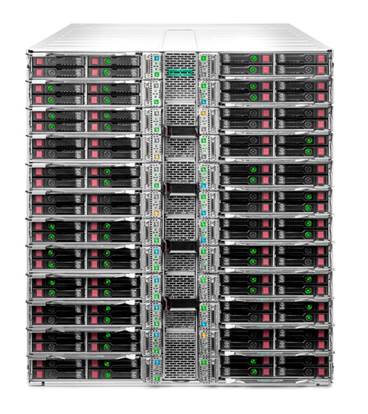
HPE Apollo k6000 Chassis Is it time for a real workhorse server solution to take your business to the next level? The HPE Apollo k6000 Chassis is designed with density optimization and HPC solution integration in mind to help you manage and scale to your HPC computing demands. The new modular HPE Apollo k6000 Chassis is designed to hold the next generation of compute servers to fit your specific HPC workloads. The new modular, fully integrated, and highly flexible HPE Apollo k6000 Chassis accommodates up to 24 XL230k server trays, redundant power and cooling, ethernet and high speed fabric switches to address various HPC workload needs. The Apollo k6000 System is a performance optimized, air-cooled solution that fits in customer's space limitations. This solution offers outstanding configuration flexibility, simplified administration and rack-scale efficiency that lowers the total cost of ownership needed for mass scale HPC deployments. Cooling concerns are reduced by 12 hot-pluggable dual rotor fans while the chassis power can be managed by either HPE Chassis Controller or enhanced (simplified) with optional HPE Apollo Platform Manager (APM) which allows granular power control at rack level. |
|
|
|
|
|
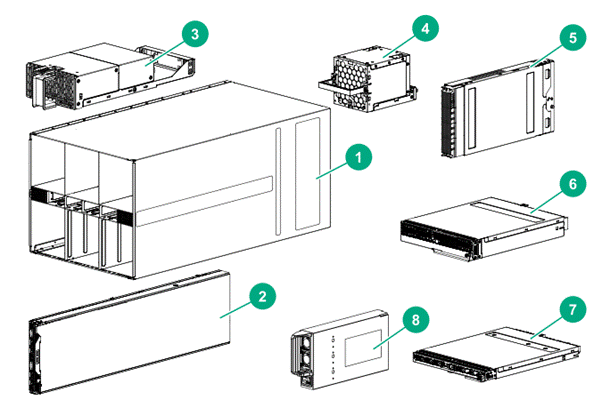
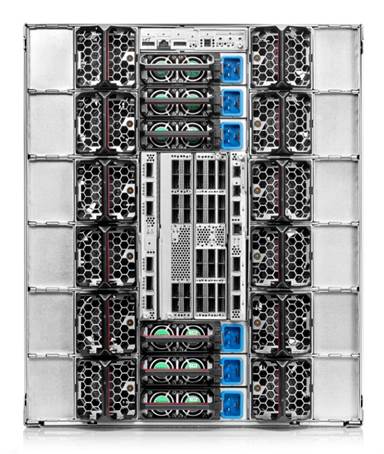
1. HPE Apollo k6000 Chassis Front chassis components: 2. Server trays (qty. depends on configuration ordered) 3. Front chassis fan modules (4) Rear chassis components: 4. HPE Apollo 6000 dual-rotor fan modules (12) (fan type depends on the configuration ordered) Rear chassis components continued: 5. Chassis controller or HPE Platform Manager
6. High-speed fabric switches 7. Data switches 8. Power supplies (6) Cables (per chassis) - (Not shown)
|
|
|
|
|
|
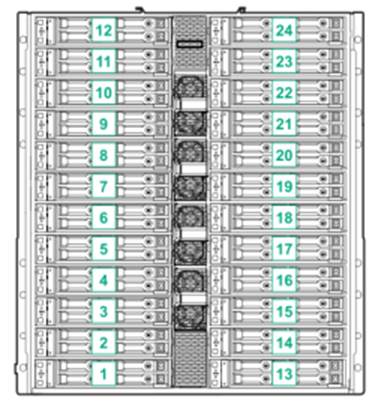
Front View with server bay numbering |
|
|
|
|
|
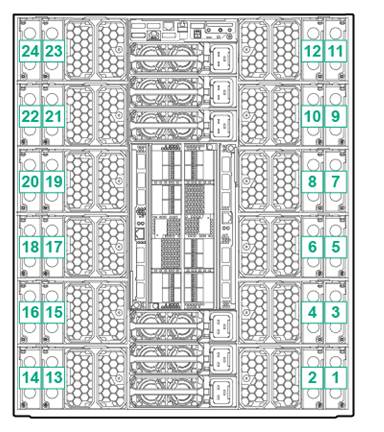
Rear View with I/O module bay numbering |
|
|
Standard Features
|
Chassis Each HPE Apollo k6000 Chassis can be fully configured with the following:
|
|
|
|
System Fans The Chassis supports 12 dual rotor fan modules and 4 hot pluggable front fans to direct air to switch bays. |
|
|
|
Server Blank Kit HPE Apollo 6000 Server Tray Blank Kit Notes: Use this Server Blank tray kit in the absence of a server tray in one of the assigned server slots to maintain the airflow in the chassis to meet thermal requirements during operation or servicing. |
|
|
|
Service Kit HPE Apollo 6000 Chassis Service Kit Notes: Chassis Service kit can be used during service events. This kit includes 4 handles necessary to remove the chassis from the rack. |
|
|
|
Rack Airflow Requirements HPE Apollo k6000 Chassis The increasing power of new high-performance processor technology requires increased cooling efficiency for rack-mounted servers. For maximum cooling, HPE racks are recommended to allow these racks to be fully loaded with servers using the latest processors. Notes: If a third-party rack is used, observe the following additional requirements to ensure adequate airflow and to prevent damage to the equipment. Notes: Always use blanking panels to fill all remaining empty front panel U-spaces in the rack. This arrangement ensures proper airflow. Using a rack without blanking panels will result in improper cooling that can lead to thermal damage. |
|
|
|
|
|
|
|
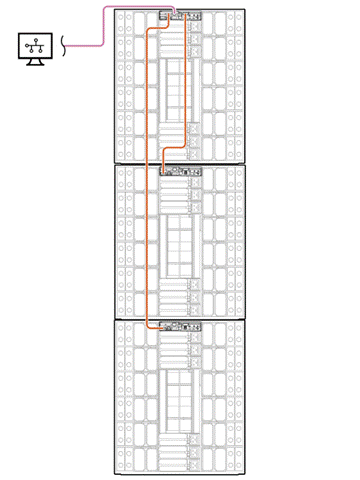
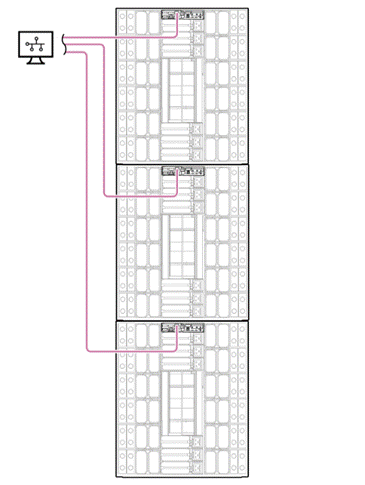
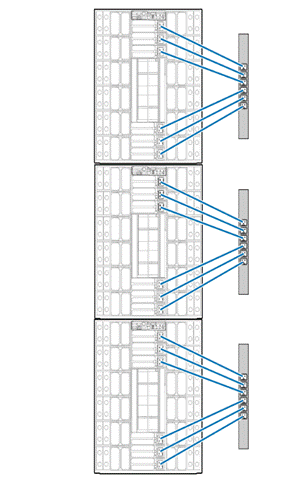
APM, Chassis controller/iLO, and PDU configurations Notes: HPE APM needs to be installed on the top chassis. The chassis controllers of chassis 2 and 3 will attach to the HPE APM using the consolidated management cable. |
|
|
Service and Support
|
HPE Pointnext - Service and Support Get the most from your HPE Products. Get the expertise you need at every step of your IT journey with HPE Pointnext Services. We help you lower your risks and overall costs using automation and methodologies that have been tested and refined by HPE experts through thousands of deployments globally. HPE Pointnext Advisory Services, focus on your business outcomes and goals, partnering with you to design your transformation and build a roadmap tuned to your unique challenges. Our Professional and Operational Services can be leveraged to speed up time-to-production, boost performance and accelerate your business. HPE Pointnext specializes in flawless and on-time implementation, on-budget execution, and creative configurations that get the most out of software and hardware alike.
Consume IT on your terms HPE GreenLake brings the cloud experience directly to your apps and data wherever they are-the edge, colocations, or your data center. It delivers cloud services for on-premises IT infrastructure specifically tailored to your most demanding workloads. With a pay-per-use, scalable, point-and-click self-service experience that is managed for you, HPE GreenLake accelerates digital transformation in a distributed, edge-to-cloud world.
Managed services to run your IT operations HPE GreenLake Management Services provides services that monitor, operate, and optimize your infrastructure and applications, delivered consistently and globally to give you unified control and let you focus on innovation. |
|
|
|
Recommended Services HPE Pointnext Tech Care. HPE Pointnext Tech Care is the new operational service experience for HPE products. Tech Care goes beyond traditional support by providing access to product specific experts, an AI driven digital experience, and general technical guidance to not only reduce risk but constantly search for ways to do things better. HPE Pointnext Tech Care has been reimagined from the ground up to support a customer-centric, AI driven, and digitally enabled customer experience to move your business forward. HPE Pointnext Tech Care is available in three response levels. Basic, which provides 9x5 business hour availability and a 2 hour response time. Essential which provides a 15 minute response time 24x7 for most enterprise level customers, and Critical which includes a 6 hour repair commitment where available and outage management response for severity 1 incidents. https://www.hpe.com/services/techcare
HPE Pointnext Complete Care HPE Pointnext Complete Care is a modular, edge-to-cloud IT environment service that provides a holistic approach to optimizing your entire IT environment and achieving agreed upon IT outcomes and business goals through a personalized and customer-centric experience. All delivered by an assigned team of HPE Pointnext Services experts. HPE Pointnext Complete Care provides:
https://www.hpe.com/services/completecare |
|
|
|
Warranty This product is covered by a global limited warranty and supported by Hewlett Packard Enterprise Services and a worldwide network of Hewlett Packard Enterprise Authorized Channel Partners (may vary by region). Hardware diagnostic support and repair is available for three years from date of purchase. Support for software and initial setup is available for 90 days from date of purchase. Enhancements to warranty services are available through HPE Pointnext operational services or customized service agreements. Hard drives have either a one year or three year warranty. Notes: Server Warranty includes 3 year Parts, 3 year Labor, 3-year on-site support with next business day response. Warranty repairs may be accomplished through the use of Customer Self Repair (CSR) parts. These parts fall into two categories: 1) Mandatory CSR parts are designed for easy replacement. A travel and labor charge will result when customers decline to replace a Mandatory CSR part; 2) Optional CSR parts are also designed for easy replacement but may involve added complexity. Customers may choose to have Hewlett Packard Enterprise replace Optional CSR parts at no charge. Additional information regarding worldwide limited warranty and technical support is available at: http://www.hpe.com/support/ProLiantServers-warranties |
|
|
|
Warranty - Options Warranty and Support Services will extend to include HPE options configured with your server or storage device. The price of support service is not impacted by configuration details. HPE sourced options that are compatible with your product will be covered under your server support at the same level of coverage allowing you to upgrade freely. Installation for HPE options is available as needed. To keep support costs low for everyone, some high value options will require additional support. Additional support is only required on select high value workload accelerators, fibre switches, InfiniBand and UPS batteries over 12KVA. See the specific high value options that require additional support at: www.hpe.com/services/excludedoptions |
|
|
|
HPE Flexible Capacity With Flexible Capacity, you get the speed, scalability, and economics of the public cloud in the privacy of your data center. Gain the advantages of the public cloud-consumption-based payment, rapid scalability without worrying about capacity constraints. Reduce the "heavy lifting" needed to operate a data center. And retain the advantages that IT provides the business (i.e., control, security). Deliver the right user experience, choose the right technology for the business, manage privacy and compliance, and manage the cost of IT. And, you have the option to use the public cloud when needed. |
|
|
|
HPE ProLiant Server Hardware Installation Provides for the basic hardware installation of Hewlett Packard Enterprise branded servers, storage devices and networking options to assist you in bringing your new hardware into operation in a timely and professional manner. https://www.hpe.com/h20195/V2/GetPDF.aspx/5981-9356EN.pdf |
|
|
|
Factory Express for servers and storage HPE Factory Express offers configuration, customization, integration and deployment services for Hewlett Packard Enterprise servers and storage products. Customers can choose how their factory solutions are built, tested, integrated, shipped and deployed.
Factory Express offers service packages for simple configuration, racking, installation, complex configuration and design services as well as individual factory services, such as image loading, asset tagging, and custom packaging. HPE products supported through Factory Express include a wide array of servers and storage: HPE Integrity, HPE ProLiant, HPE Apollo, HPE ProLiant Server Blades, HPE BladeSystem, HPE 9000 servers as well as the MSAxxxx3PAR suite, XP, rackable tape libraries and configurable network switches. For more information on Factory Express services for your specific server model please contact your sales representative. |
|
|
|
Data Privacy Services Protect your data through better media management. HPE Data privacy services help manage and protect sensitive data to reduce the risk of unauthorized access to private information and help meet compliance requirements. Our retention services allow you to keep drives and other devices upon failure, our removal services provide convenient data sanitization and our recovery services allow you to safely retire IT assets and capture any remaining value from the hardware. hpe.com/services/lifecycleevent Additional can be found at: http://www.hpe.com/services |
|
|
|
HPE Education Services Keep your IT staff trained making sure they have the right skills to deliver on your business outcomes. Book on a class today and learn how to get the most from your technology investment. http://www.hpe.com/ww/learn |
|
|
|
Connect your devices Unlock all of the benefits of your technology investment by connecting your products to Hewlett Packard Enterprise. Reduce down time and improve diagnostic accuracy with a single consolidated view of your environment. By connecting, you will receive 24x7monitoring, pre-failure alerts, automatic call logging, and automatic parts dispatch. HPE Tech Care Service and HPE Complete Care Service customers will also benefit from proactive activities to help prevent issues and increase optimization. All of these benefits are already available to you with your server storage and networking products, securely connected to HPE support. Learn more about getting connected at http://www.hpe.com/services/getconnected |
|
|
|
Parts and Materials Hewlett Packard Enterprise will provide HPE-supported replacement parts and materials necessary to maintain the covered hardware product in operating condition, including parts and materials for available and recommended engineering improvements.
Parts and components that have reached their maximum supported lifetime and/or the maximum usage limitations as set forth in the manufacturer's operating manual, product QuickSpecs, or the technical product data sheet will not be provided, repaired, or replaced as part of these services.
The defective media retention service feature option applies only to Disk or eligible SSD/Flash Drives replaced by Hewlett Packard Enterprise due to malfunction. |
|
|
|
HPE Support Center The HPE Support Center is a personalized online support portal with access to information, tools, and experts to support HPE business products. Submit support cases online, chat with Hewlett Packard Enterprise experts, access support resources or collaborate with peers. Learn more http://www.hpe.com/support/hpesc
HPE's Support Center Mobile App* allows you to resolve issues yourself or quickly connect to an agent for live support. Now, you can get access to personalized IT support anywhere, anytime. HPE Insight Remote Support and HPE Support Center are available at no additional cost with a HPE warranty, HPE Support Service or HPE contractual support agreement.
Notes:*HPE Support Center Mobile App is subject to local availability
To learn more on services for Hewlett Packard Enterprise Apollo please contact your Hewlett Packard Enterprise sales representative or Hewlett Packard Enterprise Authorized Channel Partner. Or visit: http://www.hpe.com/services |
|
|
Configuraiton Information
|
Notes: This section lists some of the steps required to configure a Factory Integrated Model. To ensure only valid configurations are ordered, Hewlett Packard Enterprise recommends the use of an Hewlett Packard Enterprise approved configurator. Contact your local sales representative for information on configurable product offerings and requirements. | |
|
Step 1: Choose a Chassis Configuration | |
|
HPE Chassis |
|
|
HPE Apollo k6000 1.2m Chassis |
847077-B21 |
|
Notes: This Chassis requires 1.2m Racks and comes with rack rail kit. Notes: The rack rail kit only supports HPE racks and 3rd Party racks with square holes. Notes: Hewlett Packard Enterprise recommends that a minimum of four people are required for all rack installations. Please refer to your installation instructions for proper tools and number of people to use for any installation. |
|
|
HPE Chassis Service Kit |
|
|
HPE Apollo 6000 Chassis Service Kit |
859501-B21 |
|
Notes: Chassis handles are not included as part of the chassis. It is highly recommended to have handles if the Chassis is not being installed in a rack or for servicing Chassis. |
|
|
HPE Additional Options |
|
|
HPE Apollo k6000 2-slot I/O Module |
851666-B21 |
|
Notes: This module is required for external/rear PCIe cards |
|
|
HPE Cooling Options |
|
|
HPE Apollo 6000 Server Tray Blank Kit |
870868-B21 |
|
Notes: Required for any non-populated slots in the chassis to prevent thermal related issues. |
|
|
HPE Apollo 6000 Dual Rotor Hot Plug Fan |
851664-B21 |
|
Notes: QTY 12 Required for sufficient air flow and can be combined with IO blanks or PCIe IO option. |
|
|
HPE Apollo k6000 Rear I/O Blank Module Kit |
851669-B21 |
|
Notes: Rear IO Blank Kit is required to prevent thermal issues if Dual Rotor Fans and no external PCIe slots are required in the chassis. |
|
|
| |
|
Step 2: Choose Power | |
|
Power Supplies |
|
|
HPE 6x 2650W Performance Hot Plug Titanium Plus FIO Power Supply Kit |
798096-B21 |
|
Notes: The above SKU comes with six 2650W power supplies. |
|
|
HPE 2650W Performance Hot Plug Titanium Plus Power Supply Kit |
798095-B21 |
|
Notes: The above SKU comes with 1 2650W power supply. |
|
|
HPE 3400W 12V Hot Plug Power Supply Kit |
876929-B2 |
|
Notes: The above SKU comes with 1 3400W power supplies |
|
|
HPE 6x 2900-3400W Hot Plug Platinum FIO Power Supply Kit |
876930-B21 |
|
Notes: The above SKU comes with six 3400W power supplies. |
|
|
G2 Basic PDUs |
|
|
HPE G2 Basic Modular 3Ph 17.3kVA/60309 60A 4-wire 48A/208V Outlets (6) C19/1U Horizontal NA/JP PDU |
P9Q60A |
|
HPE G2 Basic 3Ph 17.3kVA/60309 60A 4-wire 48A/208V Outlets (18) C13 (6) C19/Vertical NA/JP PDU |
P9Q61A |
|
HPE G2 Basic Modular 3Ph 22kVA/60309 5-wire 32A/230V Outlets (6) C19/1U Horizontal INTL PDU |
P9Q63A |
|
| |
|
G2 Metered PDUs |
| ||
|
HPE G2 Metered Modular 3Ph 17.3kVA/60309 60A 4-wire 48A/208V Outlets (6) C19/1U Horizontal NA/JP PDU |
P9R80A | ||
|
HPE G2 Metered Modular 3Ph 22kVA/60309 5-wire 32A/230V Outlets (6) C19/1U Horizontal INTL PDU |
P9R81A | ||
|
CAUTION: To avoid loss of data or damage to the PDU, each power supply must be plugged into a dedicated Circuit Breaker. Do not connect multiple power supplies to a single breaker. Connecting 2 or more power supplies to a single breaker will cause the breakers to trip.Minimum recommended PDU Capacity 17.28 kVA Minimum number of six breakers required Maximum of one 2650W Power Supply per breaker |
| ||
|
| |||
|
Step 3: Choose a Compute Server Tray | |||
|
Server Trays |
| ||
|
Notes: For full server configuration options and details, please see HPE ProLiant XL230k QuickSpecs. |
| ||
|
HPE ProLiant XL230k Gen10 Single-wide 2P 1.2m Compute Tray |
865404-B21 | ||
|
Notes: This is single slot server tray which contains 2P server. Each HPE Apollo k6000 Chassis can fit up to 24 XL230k compute server trays. For additional information on configuration of server tray refer to HPE ProLiant XL230k Server QuickSpecs998 https://www.hpe.com/h20195/v2/gethtml.aspx?docname=a00016634enw |
| ||
|
| |||
|
Step 4: Choose Additional Options - Choose one of the following two options: | |||
|
Chassis Management |
| ||
|
HPE Apollo 6000 Chassis Controller |
859362-B21 | ||
|
Notes: The Chassis Controller is required to manage the power and thermals of the chassis. |
| ||
|
HPE Apollo 6000 Platform Manager |
859364-B21 | ||
|
Notes: One Apollo Platform Manager per rack can be installed in place of the Chassis Controller that can connect up to 3 Chassis Controllers for full rack level control. Notes: One HPE Network to Serial port (SKU: 859365-B21) is included with HPE Apollo Platform Manager. Notes: For additional information on APM, please refer to HPE Apollo Platform Manager QuickSpecs: |
| ||
|
HPE Apollo 2.5m 20-pin Consolidated Management with Latch Cable |
872890-B21 | ||
|
Notes: This cable is required for connectivity HPE APM to Chassis Controller |
| ||
|
| |||
|
Step 5: Choose network and high speed fabric backplane and switches | |||
|
Backplane |
| ||
|
HPE Apollo 6000 Fabric FIO Backplane |
859368-B21 | ||
|
Notes: The Fabric Backplane is required if high speed EDR InfiniBand or OmniPath Architechture is desired. |
| ||
|
Network Switches |
|
| |
|
HPE Apollo Ethernet 10Gb Pass Thru Module |
851928-B21 |
| |
|
Notes: The HPE Apollo 10GbE Pass Thru Module allows customers to connect to their desired top of rack switches. Quantity of 1 or 2 modules can be installed into the Apollo k6000 Chassis. |
|
| |
|
HPE Apollo Ethernet 10/40Gb Switch |
846633-B21 |
| |
|
Notes: The HPE Apollo 10/40GbE Ethernet Switch is an integrated switch to be placed in switch Bay 1, 2 or both depending on the desired configuration |
|
| |
|
HPE Apollo Ethernet 10/40/100Gb Switch Notes: The HPE Apollo 10/40GbE Ethernet Switch is an integrated switch to be placed in switch Bay 1, 2 or both depending on the desired configuration |
874061-B21 |
| |
|
High-Speed Fabric Switches |
|
|
HPE Apollo A10 InfiniBand EDR 100 Gb 36-port Unmanaged Switch |
843407-B21 |
|
Notes: The HPE Apollo InfiniBand EDR Switch can be installed in High Speed Switch Bay 3, 4 or both depending on switch radix alignment. 1 installed switch represents 2:1 radix alignment while 2 switches allow 1:1 radix alignment. |
|
|
HPE Apollo 100Gb 48-port Intel Omni-Path Architecture Unmanaged Switch |
851341-B21 |
|
Notes: The Apollo 100Gb 48-port Intel Omni-Path Architecture (OPA) Switch can be installed in Switch Bay 3, 4 or both depending on single or dual rail. Notes: This switch requires either OPA mezzanine card or Intel -F processor installed in the HPE ProLiant XL230k Server tray. |
|
|
HPE InfiniBand HDR100/Ethernet 100Gb 1-port QSFP56 PCIe3 x16 MCX653105A-ECAT Adapter |
P06250-H21 |
|
Notes: HPE HDR100 InfiniBand 100Gb 1-port Adapter is based on Mellanox ConnectX®-6 VPI technology. It supports InfiniBand for HPE ProLiant XL and DL Servers. The single ported card can function as a single port HDR100 InfiniBand card |
|
|
| |
|
HPE Pointnext Support Services | |
|
Installation and start-up services |
|
|
HPE Installation Apollo 6000 Gen10 Chassis Service |
H2GA8E |
|
HPE Apollo 6000 Generation 10 Installation and Startup Service |
H6SV1E |
|
Support Services |
|
|
HPE 3 Year Proactive Care 24x7 Apollo 6000 Gen10 Chassis Service |
H2FP5E |
|
HPE 3 Year Foundation Care 24x7 Apollo 6000 Gen10 Chassis Service |
H2FP4E |
|
HPE 3 Year Foundation Care Next Business Day Apollo 6000 Gen10 Chassis Service |
H2FP1E |
|
| |
Technical Specifications
|
HPE Apollo k6000 Chassis | |||||||||||||||||||||||||||||
|
Dimensions |
Height |
53.14 cm (20.92 in) | |||||||||||||||||||||||||||
|
Width |
44.816 cm (17.64 in) | ||||||||||||||||||||||||||||
|
Depth |
102.59 cm (40.39 in) | ||||||||||||||||||||||||||||
|
Shipping Dimensions |
Height |
95.50 cm (37.6 in) | |||||||||||||||||||||||||||
|
Width |
62.48 cm (24.6 in) | ||||||||||||||||||||||||||||
|
Depth |
124.97 cm (49.2 in) | ||||||||||||||||||||||||||||
|
Chassis Weight |
Empty |
66.68 kg (147 lb) | |||||||||||||||||||||||||||
|
Max Enclosure Weight |
Approx. |
301.64 kg (665 lb) | |||||||||||||||||||||||||||
|
Temperature Range |
Operating |
10° to 35° C (50° to 95° F) at sea level with an altitude derating of 1.0°C per every 305 m (1.8°F per every 1000 ft) above sea level to a maximum of 3050 m (10,000 ft), no direct sustained sunlight. Maximum rate of change is 20°C/hr (36°F/hr). The upper limit and rate of change may be limited by the type and number of options installed. System performance during standard operating support may be reduced if operating with a fan fault or above 30°C (86°F). Notes: Operating temperature has an altitude derating of 1.8° F (1° C) per 1,000 ft (304.8 m). No direct sunlight. Upper operating limit is 10,000 ft (3,048 m) or 70Kpa/10.1 psia. Upper non-operating limit is 30,000 ft (9,144 m) or 30.3 KPa/4.4 psia. Storage maximum humidity of 95% is based on a maximum temperature of 113° F (45° C). Altitude maximum for storage is 70 KPa. | |||||||||||||||||||||||||||
|
Temperature Range |
Extended Ambient Operating Support |
For approved hardware configurations, the supported system inlet range is extended to be: 10° to 5°C (50° to 41°F) and 35° to 40°C (95° to 104°F) at sea level with an altitude derating of 1.0°C per every 175 m (1.8°F per every 574 ft) above 900 m (2953 ft) to a maximum of 3050 m (10,000 ft). The approved hardware configurations for this system are listed at the URL: http://www.hpe.com/servers/ASHRAE | |||||||||||||||||||||||||||
|
Temperature Range |
Non-Operating |
-30° to 60° C (-22° to 140° F) - System performance may be reduced if operating in the extended ambient operating range or with a fan fault. | |||||||||||||||||||||||||||
|
Relative Humidity |
Operating |
10 to 90% relative humidity (Rh), 28°C (82.4°F) maximum wet bulb temperature, non-condensing. | |||||||||||||||||||||||||||
|
Non-Operating |
5 to 95% relative humidity (Rh), 38.7°C (101.7°F) maximum wet bulb temperature, non-condensing. | ||||||||||||||||||||||||||||
|
Acoustic Noise |
Listed are the declared A-Weighted sound power levels (LWAd) and declared average bystander position A-Weighted sound pressure levels (LpAm) when the product is operating in a 23°C ambient environment. Noise emissions were measured in accordance with ISO 7779 (ECMA 74) and declared in accordance with ISO 9296 (ECMA 109). | ||||||||||||||||||||||||||||
| |||||||||||||||||||||||||||||
|
Environmental-friendly Products and Approach - End-of-life Management and Recycling Hewlett Packard Enterprise offers end-of-life product return, trade-in, and recycling programs, in many geographic areas, for our products. Products returned to Hewlett Packard Enterprise will be recycled, recovered or disposed of in a responsible manner. The EU WEEE Directive (2012/19/EU) requires manufacturers to provide treatment information for each product type for use by treatment facilities. This information (product disassembly instructions) is posted on the Hewlett Packard Enterprise web site: http://www.hpe.com/RECYCLE. These instructions may be used by recyclers and other WEEE treatment facilities as well as Hewlett Packard Enterprise OEM customers who integrate and re-sell Hewlett Packard Enterprise equipment. |
|
|
Summary of Changes
|
Date |
Version History |
Action |
Description of Change |
|
15-Nov-2021 |
Version 9 |
Changed |
Service and Support section was updated. |
|
02-Dec-2019 |
Version 8 |
Changed |
SKUs were updated in Configuration Information section. Obsolete SKUs were removed. |
|
12-Aug-2019 |
Version 7 |
Changed |
Configuration Information section was updated. |
|
15-Apr-2019 |
Version 6 |
Changed |
Configuration Information section was updated. |
|
05-Feb-2018 |
Version 5 |
Changed |
Update configuration information section |
|
23-Oct-2017 |
Version 4 |
Changed |
Care Pack naming and Service and Support- Parts and Materials updated |
|
25-Sep-2017 |
Version 3 |
Changed |
Updates made throughout the QuickSpecs |
|
11-Aug-2017 |
Version 2 |
Changed |
Update headers in the QuickSpecs |
|
11-Jul-2017 |
Version 1 |
New |
New QuickSpecs |
Copyright
|
|
| ||||||||||||
|
|
|
© Copyright 2021Hewlett Packard Enterprise Development LP. The information contained herein is subject to change without notice. The only warranties for Hewlett Packard Enterprise products and services are set forth in the express warranty statements accompanying such products and services. Nothing herein should be construed as constituting an additional warranty. Hewlett Packard Enterprise shall not be liable for technical or editorial errors or omissions contained herein.
a00016641enw - 15963 - Worldwide - V9 - 15-November-2021 | ||||||||||||