




























HPE Apollo 6500: технические характеристики и документация
В архивеOverview
|
HPE Apollo 6500
|
|
The HPE Apollo 6500 System provides the tools and the confidence to deliver high performance computing (HPC) innovation. The system consists of three key elements: The HPE ProLiant XL270 Gen9 Accelerator tray, the HPE Apollo 6500 Chassis, and the HPE Apollo 6000 Power Shelf. The HPE Apollo 6500 chassis can accommodate two 2U, full-width HPE ProLiant XL270d Accelerator Trays, each individually front serviceable. With full HPE Advanced Power Manager support to automatically discover hardware components and enable bay level power on and off, server metering, aggregate dynamic power capping, configurable power-up dependencies and sequencing, consolidated Ethernet access to all resident iLOs, and asset management capabilities. The HPE ProLiant XL270d Gen9 Accelerator Tray provides up to 37.6 Tflops of double precision performance and up to 74.4 Tflops of single precision performance with the NVIDIA® Tesla P100 GPUs and two Intel® Xeon® E5-2600 v4 processors in a 2U server. With a configurable internal PCIe Gen3 fabric, choose to optimize the GPU topology to match your specific needs. High-bandwidth, low-latency networking is tightly coupled to the accelerators allowing you to take full advantage of your network. Two x16 PCIe Gen3 slots for your choice of high speed fabrics. The HPE Apollo 6000 Power Shelf offers pooled power for rack level efficiency as well as provides N+N redundancy to support your datacenter needs. Depending on the power configurations of the trays within a chassis, the power shelf can support 2 to 4 fully populated HPE Apollo a6000 Chassis with max DC power up to 15.9 kW. The HPE Apollo 6000 Power Shelf with its redundant hot-plug power supplies can also be configured for single- or three-phase input. The Apollo 6500 System: Your next accelerated computing solution. |
|
|
|
| |||
|
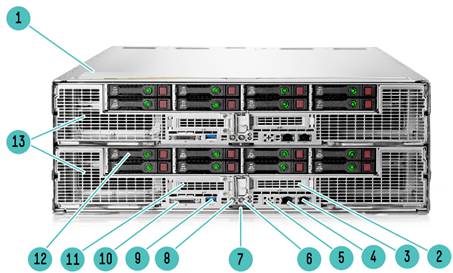
Chassis and Accelerator Trays | |||
|
Item |
Description |
Item |
Description |
|
1 |
HPE Apollo 6500 Chassis (4U) |
8 |
Power Button |
|
2 |
Low profile PCIe Gen3 x16 slot |
9 |
USB 3.0 Connector |
|
3 |
Embedded 1Gb NIC 2 |
10 |
SUV(Serial/USB/Video) Connector |
|
4 |
Embedded 1Gb NIC 1 |
11 |
Low profile PCIe Gen3 x16 slot |
|
5 |
Dedicated iLO Port (Optional) Low profile PCIe Gen3 x16 slot |
12 |
8 SFF SAS/SATA Drive Bays |
|
6 |
Unit Identification (UID) LED/button |
13 |
HPE ProLiant XL270d Accelerator Trays (2U/tray) |
|
7 |
Server serial label pull tab |
|
|
|
| |||
|
| |||
|
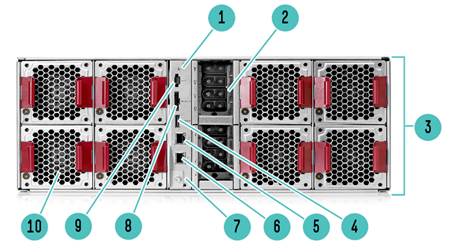
Back of the Chassis | |||
|
Item |
Description |
Item |
Description |
|
1 |
Unit Identification (UID) LED |
6 |
ILO connector |
|
2 |
Pass through power connections to Accelerator Tray |
7 |
HPE Advanced Power Module ILO connector |
|
3 |
HPE Apollo 6500 Chassis |
8 |
HPE APMI 1.0 connector |
|
4 |
Power Shelf Data Connection |
9 |
Power Shelf Data Connection |
|
5 |
ILO connector |
10 |
Fan- 4 per Accelerator tray (required), 8 total per 6500 chassis with two Accelerator Trays |
|
| |||
|
| |||
|
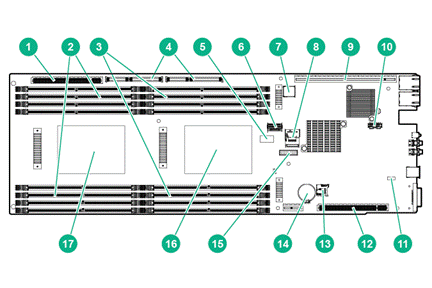
Front View | |||
|
Item |
Description |
Item |
Description |
|
1 |
Power riser connector |
10 |
Dedicated iLO port connector |
|
2 |
DIMMs for processor 2 |
11 |
NMI header |
|
3 |
DIMMs for processor 1 |
12 |
Left PCI riser module connector (PCIex16) |
|
4 |
Right PCIriser module connector (PCIex40) |
13 |
microSD slot |
|
5 |
System maintenance switch |
14 |
System battery |
|
6 |
Mini-SAS connector 1 (SATA x4) |
15 |
TPM Connector |
|
7 |
Internal USB 3.0 connector |
16 |
Processor 1 |
|
8 |
Mini-SAS connector 2 (SATA x4) |
17 |
Processor 2 |
|
9 |
Right PCIriser module connector (PCIex24) |
|
|
|
| |||
Standard Features
|
Processor One of the following depending on Model | |||||||||||||||||||||||||||||||||||||||||||||||||||||||||||||||||||||||
|
E5-2600 v4 series Processors (Please follow product offering to fill out processor SKU) NOTE: For more information regarding Intel Xeon processors, please refer to http://www.intel.com/xeon
| |||||||||||||||||||||||||||||||||||||||||||||||||||||||||||||||||||||||
|
| |||||||||||||||||||||||||||||||||||||||||||||||||||||||||||||||||||||||
|
Chipset Intel® C610 Series Chipset NOTE: For more information regarding Intel® chipsets, please see the following URL: On System Management Processor HPE iLO (Firmware: HPE iLO 4) NOTE: For more information, visit: https://www.hpe.com/us/en/servers/integrated-lights-out-ilo.html | |||||||||||||||||||||||||||||||||||||||||||||||||||||||||||||||||||||||
|
| |||||||||||||||||||||||||||||||||||||||||||||||||||||||||||||||||||||||
|
Memory Protection Advanced ECC (multi-bit error protection) Memory Online Spare Mode (Rank Spare Mode) | |||||||||||||||||||||||||||||||||||||||||||||||||||||||||||||||||||||||
|
| |||||||||||||||||||||||||||||||||||||||||||||||||||||||||||||||||||||||
|
Memory |
| ||||||||||||||||||||||||||||||||||||||||||||||||||||||||||||||||||||||
|
Type |
HPE SmartMemory | ||||||||||||||||||||||||||||||||||||||||||||||||||||||||||||||||||||||
|
DDR4 Load Reduced (LRDIMM), or Registered (RDIMM) | |||||||||||||||||||||||||||||||||||||||||||||||||||||||||||||||||||||||
|
DIMM Slots Available |
16 DIMM Slots available | ||||||||||||||||||||||||||||||||||||||||||||||||||||||||||||||||||||||
|
Maximum (LRDIMM) (per server tray) |
1024GB (16 x 64GB) | ||||||||||||||||||||||||||||||||||||||||||||||||||||||||||||||||||||||
|
NOTE: HPE memory from previous generation servers are not fully compatible with the HPE ProLiant XL270d Gen9 Server. NOTE: To realize the performance memory capabilities listed in this document, HPE SmartMemory is required. For additional information, please see the HPE SmartMemory QuickSpecs at: https://www.hpe.com/h20195/v2/gethtml.aspx?docname=c04111535 NOTE: LRDIMM and RDIMM are distinct memory technologies and cannot be mixed within a server. NOTE: Depending on the memory configuration and processor model, the memory speed may run at 2133MHz, or 2400MHz. Please see Memory Population Table or the Online Memory Configuration Tool at: http://h22195.www2.hpe.com/MemoryTool/Home/Legal | |||||||||||||||||||||||||||||||||||||||||||||||||||||||||||||||||||||||
|
| |||||||||||||||||||||||||||||||||||||||||||||||||||||||||||||||||||||||
|
Network Controller Ethernet Options HPE Ethernet 10Gb 2P 530SFP+ Adptr HPE Ethernet 10Gb 2P 560SFP+ Adptr HPE Ethernet 10Gb 2-port 562SFP+ Adptr HPE Ethernet 1Gb 4-port 366T Adapter HPE Ethernet 1Gb 4-port 331T Adapter HPE Ethernet 10Gb 2P 530T Adptr HPE Ethernet 1Gb 2P 361T Adptr HPE Ethernet 1Gb 2P 332T Adptr InfiniBand Options HPE IB FDR/EN 40Gb 2P 544+QSFP Adptr HPE IB EDR/EN 100Gb 1P 840QSFP28 Adptr HPE IB EDR/EN 100Gb 2P 840QSFP28 Adptr HPE IB EDR 100Gb 1p 841QSFP28 Adptr HPE IB EDR/EN 100Gb 2p 841QSFP28 Adptr HPE Intel Omni-Path Adapters HPE 100Gb 1p OP101 QSFP28 x16 OPA Adapter | ||||||||||||||||||||||||
|
| ||||||||||||||||||||||||
|
Expansion Slots (EE)
| ||||||||||||||||||||||||
|
| ||||||||||||||||||||||||
|
GPGPU Slots
NOTE:*Indicates the number of physical electrical lanes running to the connector. | ||||||||||||||||||||||||
|
|
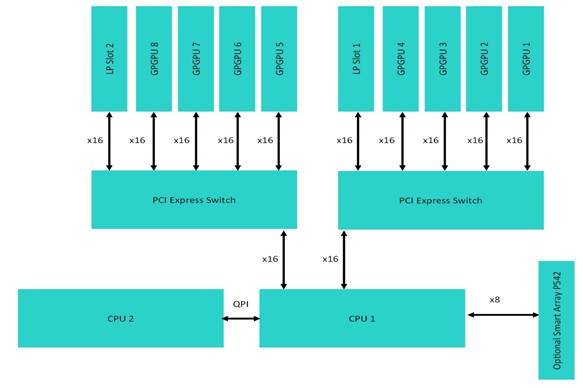
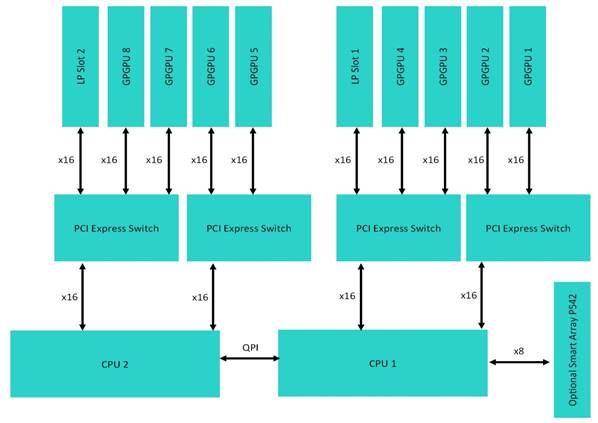
NOTE:*Indicates the number of physical electrical lanes running to the connector. NOTE: The XL270d supports two different GPGPU riser options. The first option HPE XL270d Gen9 8:1 Module Riser Kit (850500-B21) supports all GPGPUs and both low profile PCI slots on CPU1. The second option HPE XL270d Gen9 4:1 Module Riser Kit (850508-B21) supports the connection of GPGPU slot 5-8 and low profile slot 2 to CPU 2. HPE XL270d Gen9 8:1 Module Riser Kit (850500-B21) Topology | ||||||||||||||||||||
|
| ||||||||||||||||||||
|
HPE XL270d Gen9 8:1 Module Riser Kit (850500-B21) Topology | ||||||||||||||||||||
|
| ||||||||||||||||||||
|
|
|
HPE XL270d Gen9 4:1 Module Riser Kit (850508-B21) Topology |
|
|
|
|
|
HPE Server ROM HPE ROM (Read Only Memory) is now digitally signed using the Hewlett Packard Enterprise Corporate Signing Service. This signature is verified before the flash process starts, reducing accidental programming and preventing malicious efforts to corrupt system ROM. HPE ROM provides for essential initialization and validation of hardware components before control is passed to the customer-installed operating system. The ROM also provides the capability of booting from various fixed media (HDD, CD-ROM) and removable media (USB), to continue operation to the operating system. HPE ROM performs very early configuration of the video controller, to allow monitoring of initialization progress via an attached monitor. If configuration or hardware errors are discovered during this early phase of hardware initialization, suitable messages are now displayed on the connected monitor. Additionally, these configuration or hardware errors are logged to the Integrated Management Log (IML) to assist in diagnosis. The HPE ProLiant ROM is used to configure the following:
NOTE: For further information, please refer to the HPE RBSU (ROM based setup utility) user guide: http://www.hpe.com/support/rbsu. |
|
|
|
HPE Server Unified Extensible Firmware Interface (UEFI) or Legacy Mode The HPE ProLiant System BIOS is an EDK2 UEFI solution, and adheres to the latest revisions of UEFI Class 2 specifications which supports both legacy boot and UEFI boot operation. The HPE ProLiant XL270d Gen9 defaults to UEFI boot operation and can be factory or field configured for Legacy boot operation. NOTE: For UEFI boot operation, boot environment and OS image installations should be configured properly to support UEFI. NOTE: HPE Legacy FIO Mode Setting (758959-B22) can be selected to configure the system in UEFI mode in the factory. To modify the server configuration ROM default settings, press F9 in the HPE ProLiant POST screen to enter the UEFI System Utilities screen. By default, the System Utilities menus are in the English language. UEFI enables numerous new capabilities, including both industry standard functionality and features specific to HPE ProLiant servers. Following are some of the features that UEFI enables and that the HPE ProLiant XL270d Gen9 can support when configured for UEFI boot operation:
NOTE: When the server is configured for UEFI Boot Mode, PXE servers must be configured with a UEFI boot image. When the server boots in UEFI mode, it does not boot media with a legacy OS installation. This includes DOS targets and Windows or Linux systems installed in Legacy mode. The reverse is also true for servers that boot in Legacy mode. If Microsoft Windows 2008 or Windows 2008 R2 is used in UEFI Boot Mode, UEFI Optimized Mode must be disabled (this option is enabled by default). This is required to work around an issue in Windows 2008 / 2008 R2 that requires legacy BIOS components necessary for video operations in Windows. |
|
|
|
Storage Controller |
|
NOTE: For optional array, the HPE Smart Array P542D- XL270d Gen9 Svr is the primary solution. A unique PCIe connection has been designed into the XL270d for this RAID controller. Use of any other RAID controllers will use one of the Low Profile PCIe slots that are typically used for fabric interconnects |
|
Embedded Software RAID HPE Dynamic Smart Array B140i Controller (SATA Only) |
|
|
|
RAID Controller HPE Smart Array P542D - XL270d Gen9 Svr (SAS/SATA) NOTE: This is the recommended RAID controller choice. HPE Smart Array P440/4G Controller (SAS/SATA) HPE Smart Array P441/4G Controller (SAS/SATA) |
|
|
|
Host Bus Adapter HPE H240 Smart Host Bus Adapter (SAS/SATA) |
|
|
|
Converged Network Adapter HPE StoreFabric CN1100R Dual Port Converged Network Adapter | |||
|
| |||
|
Storage Controller Cable Kits HPE XL270D B140i Cbl FIO Kit HPE XL270D Gen9 Mini-SAS H240 Cbl Kit HPE XL270D Gen9 Mini-SAS P440 Cbl Kit NOTE: The embedded B140i will operate in UEFI mode only. For legacy support, AHCI mode is required. | |||
|
| |||
|
Internal Storage Devices Internal MicroSD slot | |||
|
| |||
|
Maximum Internal Storage |
|
| |
|
Hot Plug SFF SAS 7.2k |
8TB |
8x 1.0TB | |
|
Hot Plug SFF SAS 10k |
14.4TB |
8x1.8TB | |
|
Hot Plug SFF SAS 15k |
4.8TB |
8x600GB | |
|
Hot Plug SFF SATA |
8TB |
8x1TB | |
|
Hot Plug SFF SATA SSD |
30.7TB |
8x3.84TB | |
|
Hot Plug SFF SAS SSD |
15.4TB |
8x1.92TB | |
|
| |||
|
Interfaces |
| ||
|
KVM |
Serial USB Video Port (SUV) | ||
|
MicroSD |
1 (internal) | ||
|
USB Ports |
2 (external via SUV); 1 USB 3.0 (external); 1 (USB 3.0 internal) | ||
|
HPE iLO Remote Management Network Port |
Aggregated via HPE Apollo 6500d Chassis; Option for dedicated NIC IM Board Kit | ||
|
Health LED |
1 | ||
|
Power |
1 | ||
|
UID |
1 | ||
|
Do not remove LED |
1 | ||
|
| |||
|
Industry Standard Compliance | |||
|
ACPI 2.0b Compliant | |||
|
PCIe 3.0 Compliant | |||
|
WOL Support | |||
|
Microsoft® Logo certifications | |||
|
PXE Support | |||
|
USB 1.1,2.0 and 3.0 Compliant | |||
|
SMBIOS 2.6.1 | |||
|
| |||
|
Power Specifications To review typical system power ratings use the HPE Power Advisor which is available via the online tool located at URL: https://paonline56.itcs.hpe.com/?Page=Index NOTE: Power Specification and Technical Content for supported power supplies can be found at https://www.hpe.com/h20195/v2/gethtml.aspx?docname=c04111541 |
|
|
|
|
|
Operating Systems and Virtualization Software Support for ProLiant Servers Microsoft Windows Server 2012, 2012 R2, 2016 Red Hat Enterprise Linux (RHEL) 6.7, 6.8, 7 SUSE Linux Enterprise Server (SLES) 11 SP4, 12, 12 SP1 NOTE: Only 64-bit versions of these operating systems are supported. NOTE: For more information on the Hewlett Packard Enterprise Certified and Supported ProLiant Servers for OS and Virtualization Software and latest listing of software drivers available for your server including how to purchase from Hewlett Packard Enterprise , please visit our OS Support Site at: http://h17007.www1.hpe.com/us/en/enterprise/servers/supportmatrix/windows.aspx#.Wd5xR1tSyK and our driver download page: https://www.hpe.com/us/en/support.html | |
|
| |
|
Graphics Integrated Matrox G200 video standard
|
|
|
| |
|
Form Factor The ProLiant XL270d Gen9 Server is a single-slot tray for the HPE Apollo 6500d Chassis. | |
|
| |
Optional Features
|
Embedded Management
|
|
HPE Integrated Lights Out Monitor your servers for ongoing management, service alerting, reporting and remote management with iLO. Learn more at https://www.hpe.com/us/en/servers/integrated-lights-out-ilo.html |
|
|
|
UEFI Configure and boot your servers securely with industry standard Unified Extensible Firmware Interface (UEFI). Learn more at https://www.hpe.com/us/en/product-catalog/detail/pip.6935826.html |
|
|
|
HPE RESTful API RESTful API is an application programming interface. RESTful Web Service API served by iLO’s web server https://www.hpe.com/us/en/servers/restful-api.html |
|
|
|
Intelligent Provisioning Provision servers by discovering and deploying 1 to few servers with Intelligent Provisioning. Learn more at https://www.hpe.com/us/en/product-catalog/detail/pip.5219984.html. |
|
|
|
Server Utilities
|
|
HPE Smart Update Optimize firmware and driver updates with HPE Smart Update solutions. Learn more at https://www.hpe.com/us/en/product-catalog/detail/pip.5182020.html. |
|
|
|
HPE Systems Insight Manager (HPE SIM) HPE SIM allows you to monitor the health of your HPE ProLiant Servers and HPE Integrity Servers, and also provides you with basic support for non-Hewlett Packard Enterprise servers. HPE SIM also integrates with HPE SUM to provide quick and seamless firmware updates. Learn more at https://www.hpe.com/us/en/product-catalog/detail/pip.489496.html |
|
|
|
Scripting Tool Kit and Windows PowerShell Provision 1 to many servers using your own scripts to discover and deploy them with HPE Scripting Tool Kit for Windows and Linux or HPE Scripting Tools for Windows PowerShell. Learn more at https://www.hpe.com/us/en/product-catalog/detail/pip.5219389.html |
|
|
|
HPE RESTful Interface Tool HPE RESTful API tool is a scripting tool to provision servers using RESTful API Interface to discover and deploy servers at scale. Learn more at https://www.hpe.com/us/en/servers/restful-api.html |
|
|
|
HPE iLO Mobile Application Enables the ability to access, deploy, and manage your server anytime from anywhere from select smartphones and mobile devices. |
|
|
|
HPE Insight Online HPE Insight Online, available at no additional cost as part of your Hewlett Packard Enterprise warranty, Care Pack or contractual support agreement with Hewlett Packard Enterprise, is a personalized dashboard for simplified tracking of IT operations and support information from anywhere, anytime. Learn more at https://www.hpe.com/us/en/servers/management.html. |
|
HPE Insight management software
HPE Service Pack for ProLiant (SPP) and HPE Smart Update Manager (HPE SUM) provide a comprehensive approach to firmware and system software maintenance. Together they provide better operating stability and ensure maximum uptime. The SPP will be updated at a predictable cadence, typically coinciding with new Hewlett Packard Enterprise server hardware launches. By enabling firmware to be updated online and integrating firmware and system software updates in one operation, HPE SUM and the SPP offer faster updates of individual servers and dramatically faster updates of entire HPE Apollo 6500 Chassis. Further improving system uptime and stability is the fact that Hewlett Packard Enterprise provides 12 months of support for each Service Pack for ProLiant release (may vary by region). The user experience around HPE SUM and the SPP has been improved in several ways, starting with the web download. A single web page provides access to a single download containing both the latest version of HPE SUM and the latest SPP. Optional smaller subsets with only specific types of servers or specific operating systems are offered to save on download time. The HPE SUM application provides a straightforward, intuitive user interface that guides the user through the steps of discovery, analyses and update, providing comprehensive information on available updates, criticality and interdependencies. This information is also available in reports. By providing the option of multiple local or shared repositories which can be easily updated from HPE.com, HPE SUM provides the tools to optimize stability and consistency throughout the company. While HPE SUM and the SPP recommend the combinations of firmware and system software that Hewlett Packard Enterprise has found to be the best practice, the application gives customers the flexibility to set their own specific baseline. The Service Pack for ProLiant has been rigorously tested with specific attention for interaction between firmware, drivers and agents both within the server as well as in interaction with the HPE Apollo 6500 chassis. This testing ensures the highest quality as well as providing the input for HPE SUM to deploy updates taking into account all interdependencies, when determining the correct updates and order of update deployment. NOTE: The Service Pack for ProLiant (which includes HPE SUM) can be downloaded from http://h17007.www1.hpe.com/us/en/enterprise/servers/products/service_pack/spp/index.aspx More information can be found: https://www.hpe.com/us/en/product-catalog/detail/pip.5182020.html http://h17007.www1.hpe.com/us/en/enterprise/servers/products/service_pack/spp/index.aspx and https://www.hpe.com/us/en/product-catalog/detail/pip.5182020.html |
|
|
|
Security Power-on password Keyboard password Serial interface control Administrator's password iLO 4 (Integrated Lights-Out 4) has 12 customizable user accounts and SSL encryption iLO 4 can be disabled via a Global Setting iLO Advanced supports directory services integration TPM (Trusted Platform Module) 2.0 option |
|
|
|
Chassis Each HPE Apollo 6500 Chassis is built with the following:
|
|
|
|
Server Tray Blank Kit A chassis requires that the two (2) server tray slots be populated with either an HPE ProLiant XL270d, server or an HPE Apollo 6500 Server Node Blank Kit (850887-B21). |
|
|
|
Rack Airflow Requirements HPE Apollo 6500 Chassis The increasing power of new high-performance processor technology requires increased cooling efficiency for rack-mounted servers. For maximum cooling, HPE racks are recommended to allow these racks to be fully loaded with servers using the latest processors. CAUTION: Always use blanking panels to fill all remaining empty front panel U-spaces in the rack. This arrangement ensures proper airflow. Using a rack without blanking panels will result in improper cooling that can lead to thermal damage |
|
|
|
HPE Insight Management software Insight Management Managing the growing number of servers can be complex and expensive for your organization. IT managers need to address changing business needs with tools that meet the challenges of managing today's complex Datacenters.
Insight Management software media is available for free download (not including license entitlement certificates) at this website: https://www.hpe.com/us/en/servers/management.html
Software media available for download includes:
Customers will receive an Insight Control or Insight Dynamics license entitlement certificate via physical shipment or email. The license entitlement certificate must be redeemed online or via fax in order to obtain the license activation key(s). One year of 24x7 Software Technical Support and Updates are included with your purchased licenses.. Hewlett Packard Enterprise provides a complete range of installation and support services to ensure the successful deployment and operations of your server infrastructure. For more information about support services and licensing options, see the following website: https://www.hpe.com/us/en/servers/management.html Insight Software Media Kit (DVDs) Physical media (DVDs) are also available for purchase from Hewlett Packard Enterprise or from your authorized reseller |
|
|
|
Service Pack for ProLiant Customers should use the HPE Service Pack for ProLiant (SPP) to perform firmware, driver, and related software updates.
|
|
|
|
HPE Integrated Lights-Out (iLO) HPE Integrated Lights-Out (iLO) simplifies server setup, health monitoring, power and thermal control, and lights-out remote administration of ProLiant SL, XL, ML, DL, and BL servers. HPE iLO functions without additional software and can be accessed from any location via a web browser. HPE iLO works hand-in-hand with HPE Systems Insight Manager, Insight Control and Insight Dynamics for ProLiant, helping customers unleash the value of the ProLiant platform and deliver the highest possible quality of IT service. For more information, visit: https://www.hpe.com/us/en/servers/integrated-lights-out-ilo.html. |
|
|
|
HPE Insight Control HPE Insight Control, a product option, delivers essential infrastructure management that can help save time and money by making it easy to deploy, monitor, remote control, and optimize your IT infrastructure through a single, simple management console. For more information, see https://www.hpe.com/us/en/servers/management.html HPE Insight Control includes one year of 24 x 7 HPE Software Technical Support and Update Service ensuring rapid access to Hewlett Packard Enterprise support staff and proactive delivery of software updates. For more information about this service, please visit: http://www.hpe.com/services/insight. |
|
|
|
HPE Advanced Power Manager The HPE Advanced Power Manager (HPE APM) is an optional rack level solution. HPE APM will automatically discover hardware components and enable server level power on and off, server metering, aggregate dynamic power capping, configurable power-up dependencies and sequencing, consolidated Ethernet access to all resident iLOs, and asset management capabilities. HPE APM features rack level event logging, RADIUS authentication, integrated serial concentrator, up to 11 local user accounts, read only service port, and supports SNMP, SSH, Syslogd, telnet. NOTE: use either the HPE APM port or an iLO port to connect to a network. |
|
|
Warranty
|
Warranty This product is covered by a global limited warranty and supported by HPE Services and a worldwide network of HPE Authorized Channel Partners resellers. Hardware diagnostic support and repair is available for three years from date of purchase. Support for software and initial setup is available for 90 days from date of purchase. Enhancements to warranty services are available through HPE Pointnext operational services or customized service agreements. Hard drives have either a one year or three year warranty; refer to the specific hard drive QuickSpecs for details. NOTE: Server Warranty includes 3 year Parts, 3 year Labor, 3-year on-site support with next business day response. Warranty repairs may be accomplished through the use of Customer Self Repair (CSR) parts. These parts fall into two categories: 1) Mandatory CSR parts are designed for easy replacement. A travel and labor charge will result when customers decline to replace a Mandatory CSR part; 2) Optional CSR parts are also designed for easy replacement but may involve added complexity. Customers may choose to have Hewlett Packard Enterprise replace Optional CSR parts at no charge. Additional information regarding worldwide limited warranty and technical support is available at: http://h17007.www1.hpe.com/us/en/enterprise/servers/warranty/index.aspx#.V-wJOWb2ZPZ NOTE: In Asia Pacific, Japan and China, Server Warranty includes 3 years Parts, 3 year Labor, 3-year Onsite support with next business day response |
|
|
Service and Support
|
Protect your business beyond warranty with HPE Support Services HPE Technology Services delivers confidence, reduces risk and helps customers realize agility and stability. Connect to Hewlett Packard Enterprise to help prevent problems and solve issues faster. HPE Support Services enable you to choose the right service level, length of coverage and response time as you purchase your new server, giving you full entitlement to the support for need for your IT and business. Protect your product, beyond warranty. Connect your devices: Unlock all of the benefits of your technology investment by connecting your products to Hewlett Packard Enterprise. Achieve up to 77%1 reduction in down time, near 100%2 diagnostic accuracy and a single consolidated view of your environment. By connecting, you will receive 24x7monitoring, pre-failure alerts, automatic call logging, and automatic parts dispatch. HPE Proactive Care Service and HPE Datacenter Care Service customers will also benefit from proactive activities to help prevent issues and increase optimization. All of these benefits are already available to you with your server storage and networking products, securely connected to Hewlett Packard Enterprise support. 1-IDC 2015 2-HPE CSC reports 2014 - 2015 Learn more about getting connected at http://www.hpe.com/services/getconnected |
|
|
|
HPE 3 Year Proactive Care 24x7 Apollo 6500 Service (H2DW0E) HPE Proactive Care gives customers an enhanced call experience. When your products are connected to Hewlett Packard Enterprise, Proactive Care helps prevent problems and maintains IT stability by utilizing personalized proactive reports with recommendations and advice This Service combines three years proactive reporting and advice with our 24x7 coverage, four hour hardware response time when there is a problem. This service also includes collaborative software support for Independent Software Vendors (ISVs), (Red Hat, VMWare, Microsoft, etc.) running on your Hewlett Packard Enterprise servers. https://www.hpe.com/h20195/v2/GetPDF.aspx/4AA3-8855ENW.pdf |
|
|
|
HPE 3 Year Foundation Care 24x7 Apollo 6500 Service (H2DV7E) HPE Foundation Care 24x7 gives you access to Hewlett Packard Enterprise 24 hours a day, seven days a week for assistance on resolving issues. This service includes need based Hardware onsite response within four hours. In addition, collaborative software support is included in this service that provides troubleshooting assistance on industry leading software running on your HPE server. Simplify your support experience and make Hewlett Packard Enterprise your first call to help resolve hardware or software problems. https://www.hpe.com/h20195/V2/GetDocument.aspx?docname=4AA4-8876ENW&cc=us&lc=en |
|
|
|
HPE 3 Year Foundation Care Next Business Day Apollo 6500 Service (H2DU8E) HPE Foundation Care Next Business Day connects you to Hewlett Packard Enterprise during business hours for assistance on resolving issues - This service features need based next business day hardware onsite response and software call back within two hours. In addition, Collaborative software support and provides troubleshooting assistance on industry leading software running on your HPE server. Simplify your support experience and make Hewlett Packard Enterprise your first call to help resolve hardware or software problems. https://www.hpe.com/h20195/V2/GetDocument.aspx?docname=4AA4-8876ENW&cc=us&lc=en |
|
|
|
Parts and Materials Hewlett Packard Enterprise will provide HPE-supported replacement parts and materials necessary to maintain the covered hardware product in operating condition, including parts and materials for available and recommended engineering improvements. Parts and components that have reached their maximum supported lifetime and/or the maximum usage limitations as set forth in the manufacturer's operating manual, product quick-specs, or the technical product data sheet will not be provided, repaired, or replaced as part of these services. The defective media retention service feature option applies only to Disk or eligible SSD/Flash Drives replaced by Hewlett Packard Enterprise due to malfunction. |
|
|
|
HPE Server Hardware Installation (U5V60E Installation, U5V62E Installation and Startup) Provides for the basic hardware installation of Hewlett Packard Enterprise branded servers, storage devices and networking options to assist you in bringing your new hardware into operation in a timely and professional manner. https://www.hpe.com/h20195/V2/GetPDF.aspx/5981-9356EN.pdf |
|
|
|
HPE Factory Express for Servers and storage HPE Factory Express offers configuration, customization, integration and deployment services for Hewlett Packard Enterprise servers and storage products. Customers can choose how their factory solutions are built, tested, integrated, shipped and deployed. Factory Express offers service packages for simple configuration, racking, installation, complex configuration and design services as well as individual factory services, such as image loading, asset tagging, and custom packaging. Hewlett Packard Enterprise products supported through Factory Express include a wide array of servers and storage: HPE Integrity, HPE ProLiant, HPE Apollo, HPE ProLiant Server Blades, HPE BladeSystem, HPE 9000 servers as well as the MSAxxxx3PAR suite, XP, rackable tape libraries and configurable network switches. HPE Technology Services Support Credits offer flexible services and technical skills to meet your changing IT demands. With a menu of service that is tailored to suit your needs, you get additional resources and specialist skills to help you maintain peak performance of your IT. Offered as annual credits, you can plan your budgets while proactively responding to your dynamic business. |
|
|
|
HPE Datacenter Care service HPE Datacenter Care helps improve IT stability and security, increase the value of IT, and enable agility and innovation. It is a structured framework of repeatable, tested, and globally available services “building blocks.” You can deploy, operate, and evolve your datacenter wherever you are on your IT journey. With HPE Datacenter Care, you benefit from a personalized relationship with Hewlett Packard Enterprise via a single point of accountability for Hewlett Packard Enterprise and others’ products. For more information, visit http://www.hpe.com/services/datacentercare HPE Flexibly Capacity, a building block of HPE Datacenter Care is a pay per use model for on premise infrastructure, giving you the technology you want, the ability to manage capacity when you need it, with no upfront payment. Flexible Capacity provides the needed room to grow your environment, but only pay for actual metered use. Technology transitions with refresh can be built in, and infrastructure and services are billed monthly, enabling you to align costs to business use. |
|
|
Configuration Information
|
NOTE: This section lists some of the steps required to configure a Factory Integrated Model. To ensure only valid configurations are ordered, Hewlett Packard Enterprise recommends the use of a Hewlett Packard Enterprise approved configurator. Contact your local sales representative for information on configurable product offerings and requirements NOTE: FIO indicates that this option is only available as a factory installable option. NOTE: The HPE Apollo 6500 Chassis is required to support the server. Step 1: Choose a Chassis |
| |||||
|
HPE Chassis |
HPE Apollo d6500 4U Configure-to-order Chassis |
845627-B21 |
| |||
|
| ||||||
|
Step 2: Choose cooling options | ||||||
|
HPE Cooling Options |
HPE Apollo d6500 Server Node Blank Kit |
850887-B21 | ||||
|
NOTE: Required for any non-populated slots in the chassis to prevent thermal related issues and required for Advanced Power Manager (APM) 1.2 or APM 2.0 | ||||||
|
HPE Apollo d6500 Fan Module Kit |
852155-B21 | |||||
|
NOTE: One fan kit required per Accelerator Tray |
| |||||
|
| ||||||
|
Step 3: Choose the following rail kit and handles per chassis | ||||||
|
HPE Rail Kits and Chassis Handle |
HPE s6500 4U Rail Kit |
599109-B21 | ||||
|
HPE s6500 Chassis Handles Kit |
608477 B21 | |||||
|
HPE s6500 4U 3rd Party Rail Kit |
601946‑B21 | |||||
|
NOTE: Hewlett Packard Enterprise recommends that a minimum of two people are required for all rack installations. Please refer to your installation instructions for proper tools and number of people to use for any installation. | ||||||
|
| ||||||
|
Step 4: Choose Base Accelerator Tray configuration | ||||||
|
Server Tray |
HPE ProLiant XL270d Gen9 Accelerator Tray 2U Configure-to-order Server |
845628-B21 | ||||
|
NOTE: Up to 2 full width server trays (XL270d Gen9) can be added to the HPE Apollo 6500 Chassis. | ||||||
|
| ||||||
|
Step 5: Choose Accelerator or Coprocessor Options | ||||
|
Accelerator options |
HPE NVIDIA Tesla P100 PCIe 16GB Computational Accelerator |
Q0E21A | ||
|
HPE NVIDIA Tesla P40 24GB Computational Accelerator |
Q0V80A | |||
|
HPE NVIDIA Tesla V100 PCIe 32GB Computational Accelerator |
Q9U36A | |||
|
HPE NVIDIA Tesla V100 PCIe 16GB Computational Accelerator |
Q2N68A | |||
|
HPE AMD FirePro S9150 Accelerator Kit |
J0H11A | |||
|
HPE AMD Radeon Instinct MI25 Graphics Accelerator |
Q1K38A | |||
|
NOTE: Appropriate enablement kit must be purchased to support accelerator choices. Each enablement kit supports up to eight (8) GPU. | ||||
|
HPE XL270d Gen9 1-8 NVIDIA GPU w/o K40 Enablement Kit |
852162-B21 | |||
|
HPE XL270d Gen9 1-8 K40 GPU Enablement Kit |
853651-B21 | |||
|
HPE XL270d Gen9 1-8 S9150 GPU Enablement Kit |
852164-B21 | |||
|
NOTE: The two HPE part numbers above for the NPE NVIDIA Tesla P4 GPU must both be chosen to enable the P4. |
| |||
|
HPE ProLiant SL6500 Peer to Peer GPU Mode FIO Kit |
782400-B21 | |||
|
HPE ProLiant SL6500 High Performance Computing GPU Mode FIO Kit |
782402-B21 | |||
|
NOTE: The two HPE part numbers above allow customers to order card counts QTY (2, 4 & 6) with the correct slot population to optimize performance and thermals for their workloads. Both can be chosen with either the 4:1 or 8:1 topologies. For workloads that have a great deal of GPU to GPU communications, such as Deep Learning, the “HPE Peer to Peer GPU Mode FIO Kit” is recommended. Most traditional HPC workloads have little GPU to GPU communications and the “HPE High Performance GPU Mode FIO Kit” configuration will optimize bandwidth back to the CPU and system main memory | ||||
|
| ||||
|
Step 6: Choose Appropriate Riser Topology | ||||
|
Topology options |
NOTE: Solid black lines in diagrams below represent PCIe Gen3 NOTE: Only one riser kit per server. Riser kits can be ordered and installed by customers to allow testing alternative configurations. Please see Administrator and User Guide for installation instructions. NOTE: For NVIDIA Tesla K80, the HPE XL270d Gen9 4:1 Module Riser Kit is recommended. GPUDirect is not supported for more than 8 logical GPU per CPU, and as the K80 contains two logical GPU per card, the 8:1 configuration will not support GPUDirect. | |||
|
HPE XL270d Gen9 8:1 Module Riser Kit |
850500-B21 | |||
|
HPE XL270d Gen9 4:1 Module Riser Kit |
850508-B21 | |||
|
| ||||
|
Step 7: Choose E5-2600v4 series Processors | ||
|
Topology options |
NOTE: If two processors are desired, select one xxxxxx-L21 and one xxxxxx-B2 | |
|
NOTE: in the 8:1 GPU to CPU topology CPU 2 (xxxxxx-B21) is optional | ||
|
HPE XL270d Gen9 Intel Xeon E5-2643 v4 (3.4GHz/6-core/20MB/135W) Processor Kit |
853926-B21 | |
|
HPE XL270d Gen9 Intel Xeon E5-2643 v4 (3.4GHz/6-core/20MB/135W) FIO Processor Kit |
853926-L21 | |
|
HPE XL270d Gen9 Intel Xeon E5-2650 v4 (2.2GHz/12-core/30MB/105W) Processor Kit |
853930-B21 | |
|
HPE XL270d Gen9 Intel Xeon E5-2650 v4 (2.2GHz/12-core/30MB/105W) FIO Processor Kit |
853930-L21 | |
|
HPE XL270d Gen9 Intel Xeon E5-2660 v4 (2.0GHz/14-core/35MB/105W) Processor Kit |
853932-B21 | |
|
HPE XL270d Gen9 Intel Xeon E5-2660 v4 (2.0GHz/14-core/35MB/105W) FIO Processor Kit |
853932-L21 | |
|
HPE XL270d Gen9 Intel Xeon E5-2667 v4 (3.2GHz/8-core/25MB/135W) Processor Kit |
853934-B21 | |
|
HPE XL270d Gen9 Intel Xeon E5-2667 v4 (3.2GHz/8-core/25MB/135W) FIO Processor Kit |
853934-L21 | |
|
HPE XL270d Gen9 Intel Xeon E5-2680 v4 (2.4GHz/14-core/35MB/120W) Processor Kit |
853938-B21 | |
|
HPE XL270d Gen9 Intel Xeon E5-2680 v4 (2.4GHz/14-core/35MB/120W) FIO Processor Kit |
853938-L21 | |
|
HPE XL270d Gen9 Intel Xeon E5-2683 v4 (2.1GHz/16-core/40MB/120W) Processor Kit |
853940-B21 | |
|
HPE XL270d Gen9 Intel Xeon E5-2683 v4 (2.1GHz/16-core/40MB/120W) FIO Processor Kit |
853940-L21 | |
|
HPE XL270d Gen9 Intel Xeon E5-2690 v4 (2.6GHz/14-core/35MB/135W) Processor Kit |
853942-B21 | |
|
HPE XL270d Gen9 Intel Xeon E5-2690 v4 (2.6GHz/14-core/35MB/135W) FIO Processor Kit |
853942-L21 | |
|
HPE XL270d Gen9 Intel Xeon E5-2695 v4 (2.1GHz/18-core/45MB/120W) Processor Kit |
853944-B21 | |
|
HPE XL270d Gen9 Intel Xeon E5-2695 v4 (2.1GHz/18-core/45MB/120W) FIO Processor Kit |
853944-L21 | |
|
HPE XL270d Gen9 Intel Xeon E5-2698 v4 (2.2GHz/20-core/50MB/135W) Processor Kit |
853948-B21 | |
|
HPE XL270d Gen9 Intel Xeon E5-2698 v4 (2.2GHz/20-core/50MB/135W) FIO Processor Kit |
853948-L21 | |
|
| ||
|
Step 8: Choose HPE Memory | |||
|
DDR4 SmartMemory |
Registered DIMMs (RDIMMs) for E5-2600v4 Series |
||
|
HPE 8GB (1x8GB) Single Rank x8 DDR4-2400 CAS-17-17-17 Registered Memory Kit |
805347-B21 | ||
|
HPE 16GB (1x16GB) Single Rank x4 DDR4-2400 CAS-17-17-17 Registered Memory Kit |
805349-B21 | ||
|
HPE 32GB (1x32GB) Dual Rank x4 DDR4-2400 CAS-17-17-17 Registered Memory Kit |
805351-B21 | ||
|
HPE 128GB (1x128GB) Octal Rank x4 DDR4-2400 CAS-20-18-18 Load Reduced Memory Kit |
809208-B21 | ||
|
Load Reduced DIMMs (LRDIMMs) for E5-2600v4 Series |
| ||
|
HPE 32GB (1x32GB) Dual Rank x4 DDR4-2400 CAS-17-17-17 Load Reduced Memory Kit |
805353-B21 | ||
|
HPE 64GB (1x64GB) Quad Rank x4 DDR4-2400 CAS-17-17-17 Load Reduced Memory Kit |
805358-B21 | ||
|
HPE 16GB (1x16GB) Dual Rank x4 DDR4-2400 CAS-17-17-17 Registered Memory Kit |
836220-B21 | ||
|
| |||
|
Step 9: Choose Storage Controller options | |||
|
NOTE: HPE Smart Array P542D - XL270d Gen9 Svr is the primary storage controller solution. A unique PCIe connection has been designed into the XL270d for this RAID controller. Use of any other controllers will use one of the Low Profile PCIe slots that are typically used for fabric interconnects. NOTE: Each controller requires a matching cable kit. | |||
|
NOTE: The P542D is the recommended array choice. |
| ||
|
RAID Controller Choices |
| ||
|
HPE Smart Array P542D/2GB Controller for ProLiant XL270d Gen9 Server |
851508-B21 | ||
|
HPE Smart Array P440/4GB FBWC 12Gb 1-port Int SAS Controller |
726821-B21 | ||
|
HPE Smart Array P441/4GB FBWC 12Gb 2-ports Ext SAS Controller |
726825-B21 | ||
|
HPE Smart Array Controller Batteries |
782961-B21 | ||
|
NOTE: HPE Smart Array controller kits do not include the HPE XL2xx 12W w/plg Smart Storage Battery, the backup power source necessary to protect the data on the Flash-backed Write Cache and should be purchased separately. | |||
|
Embedded Software RAID |
| ||
|
HPE H240 12Gb 2-ports Int Smart Host Bus Adapter |
726907-B21 | ||
|
Host Bus Adapter |
| ||
|
HPE XL270d Gen9 Mini SAS B140 Cable Kit |
852066-B21 | ||
|
HPE H240 12Gb 2-ports Int Smart Host Bus Adapter |
726907-B21 | ||
|
Storage Controller Cable Kits |
| ||
|
HPE XL270d Gen9 Mini SAS H240 Cable Kit |
852063-B21 | ||
|
HPE XL270d Gen9 Mini SAS P440 Cable Kit |
852060-B21 | ||
|
NOTE: The embedded B140i will operate in UEFI mode only. For legacy support, AHCI mode is required. | |||
|
|
| ||
|
Step 10: Choose Hard drives or SSD options | |||
|
NOTE: Each HPE ProLiant XL270d Gen9 Accelerator Tray supports up to eight (8) 2.5” drives. Add Hard drive blank kit to fill drive bays not used for storage. | |||
|
HPE Small Form Factor Hard Drive Blank Kit |
666987-B21 | ||
|
SAS Hot Plug SFF (2.5-inch) Enterprise (ENT) Drives |
| ||
|
HPE 2.4TB SAS 12G Enterprise 10K SFF (2.5in) SC 3yr Wty 512e Digitally Signed Firmware HDD |
881457-B21
| ||
|
HPE 1.8TB SAS 12G Enterprise 10K SFF (2.5in) SC 3yr Wty 512e Digitally Signed Firmware HDD |
872481-B21 | ||
|
HPE 1.2TB SAS 12G Enterprise 10K SFF (2.5in) SC 3yr Wty Digitally Signed Firmware HDD |
872479-B21 | ||
|
HPE 600GB SAS 12G Enterprise 10K SFF (2.5in) SC 3yr Wty Digitally Signed Firmware HDD |
872477-B21 | ||
|
HPE 300GB SAS 12G Enterprise 10K SFF (2.5in) SC 3yr Wty Digitally Signed Firmware HDD |
872475-B21 | ||
|
HPE 900GB SAS 12G Enterprise 15K SFF (2.5in) SC 3yr Wty Digitally Signed Firmware HDD |
870759-B21 | ||
|
HPE 600GB SAS 12G Enterprise 15K SFF (2.5in) SC 3yr Wty Digitally Signed Firmware HDD |
870757-B21 | ||
|
HPE 300GB SAS 12G Enterprise 15K SFF (2.5in) SC 3yr Wty Digitally Signed Firmware HDD |
870753-B21 | ||
|
SAS 12G SFF (2.5-inch) Read intensive Solid State Drives |
| ||
|
HPE 7.68TB SAS 12G Read Intensive SFF (2.5in) SC 3yr Wty Digitally Signed Firmware SSD |
870144-B21 | ||
|
HPE 3.84TB SAS 12G Read Intensive SFF (2.5in) SC 3yr Wty Digitally Signed Firmware SSD |
872394-B21 | ||
|
HPE 1.92TB SAS 12G Read Intensive SFF (2.5in) SC 3yr Wty Digitally Signed Firmware SSD |
872392-B21 | ||
|
HPE 960GB SAS 12G Read Intensive SFF (2.5in) SC 3yr Wty Digitally Signed Firmware SSD |
872390-B21 | ||
|
HPE 3.84TB SAS 12G Read Intensive SFF (2.5in) SC 3yr Wty Digitally Signed Firmware SSD |
875330-B21 | ||
|
HPE 1.92TB SAS 12G Read Intensive SFF (2.5in) SC 3yr Wty Digitally Signed Firmware SSD |
875326-B21 | ||
|
HPE 960GB SAS 12G Read Intensive SFF (2.5in) SC 3yr Wty Digitally Signed Firmware SSD |
875313-B21 | ||
|
HPE 480GB SAS 12G Read Intensive SFF (2.5in) SC 3yr Wty Digitally Signed Firmware SSD |
875311-B21 | ||
|
SAS Hot Plug SFF (2.5-inch) Midline (MDL) Drives |
| ||
|
HPE 1TB SAS 12G Midline 7.2K SFF (2.5in) SC 1yr Wty Digitally Signed Firmware HDD |
832514-B21 | ||
|
HPE 2TB SAS 12G Midline 7.2K SFF (2.5in) SC 1yr Wty 512e HDD |
765466-B21 | ||
|
HPE 1TB SAS 12G Midline 7.2K SFF (2.5in) SC 1yr Wty 512e Digitally Signed Firmware HDD |
765464-B21 | ||
|
NOTE: Each HPE ProLiant XL270d Gen9 Accelerator Tray supports up to eight (8) 2.5” drives. Add Hard drive blank kit to fill drive bays not used for storage. | |||
|
12G SAS Mixed Use Hot Plug SFF (2.5-inch) Solid State Drives |
| ||
|
HPE 3.2TB SAS 12G Mixed Use SFF (2.5in) SC 3yr Wty Digitally Signed Firmware SSD |
872386-B21 | ||
|
HPE 3.2TB SAS 12G Mixed Use SFF (2.5in) SC 3yr Wty Digitally Signed Firmware SSD |
873367-B21 | ||
|
HPE 1.6TB SAS 12G Mixed Use SFF (2.5in) SC 3yr Wty Digitally Signed Firmware SSD |
872382-B21 | ||
|
HPE 1.6TB SAS 12G Mixed Use SFF (2.5in) SC 3yr Wty Digitally Signed Firmware SSD |
873365-B21 | ||
|
HPE 800GB SAS 12G Mixed Use SFF (2.5in) SC 3yr Wty Digitally Signed Firmware SSD |
872376-B21 | ||
|
HPE 800GB SAS 12G Mixed Use SFF (2.5in) SC 3yr Wty Digitally Signed Firmware SSD |
873363-B21 | ||
|
HPE 400GB SAS 12G Mixed Use SFF (2.5in) SC 3yr Wty Digitally Signed Firmware SSD |
872374-B21 | ||
|
HPE 400GB SAS 12G Mixed Use SFF (2.5in) SC 3yr Wty Digitally Signed Firmware SSD |
873359-B21 | ||
|
12G SAS Write Intensive SFF (2.5-Inch) Solid State Drives |
| ||
|
HPE 1.6TB SAS 12G Write Intensive SFF (2.5in) SC 3yr Wty Digitally Signed Firmware SSD |
873357-B21 | ||
|
HPE 800GB SAS 12G Write Intensive SFF (2.5in) SC 3yr Wty Digitally Signed Firmware SSD |
873355-B21 | ||
|
HPE 400GB SAS 12G Write Intensive SFF (2.5in) SC 3yr Wty Digitally Signed Firmware SSD |
873351-B21 | ||
|
SATA Hot Plug SFF (2.5-inch) SC Read Intensive Solid State Drives |
| ||
|
HPE 1.92TB SATA 6G Read Intensive SFF (2.5in) SC 3yr Wty Digitally Signed Firmware SSD |
875513-B21 | ||
|
HPE 960GB SATA 6G Read Intensive SFF (2.5in) SC 3yr Wty Digitally Signed Firmware SSD |
875511-B21 | ||
|
HPE 480GB SATA 6G Read Intensive SFF (2.5in) SC 3yr Wty Digitally Signed Firmware SSD |
875509-B21 | ||
|
6G SATA Hot Plug SFF (2.5-inch) SC Read Intensive Solid State Drives |
| ||
|
HPE 240GB SATA 6G Read Intensive SFF (2.5in) SC 3yr Wty Digitally Signed Firmware SSD |
P04556-B21 | ||
|
HPE 480GB SATA 6G Read Intensive SFF (2.5in) SC 3yr Wty Digitally Signed Firmware SSD |
P04560-B21 | ||
|
HPE 480GB SATA 6G Read Intensive SFF (2.5in) SC 3yr Wty Digitally Signed Firmware SSD |
P06194-B21 | ||
|
HPE 960GB SATA 6G Read Intensive SFF (2.5in) SC 3yr Wty Digitally Signed Firmware SSD |
P04564-B21 | ||
|
HPE 960GB SATA 6G Read Intensive SFF (2.5in) SC 3yr Wty Digitally Signed Firmware SSD |
P06196-B21 | ||
|
HPE 1.92TB SATA 6G Read Intensive SFF (2.5in) SC 3yr Wty Digitally Signed Firmware SSD |
P04566-B21 | ||
|
HPE 1.92TB SATA 6G Read Intensive SFF (2.5in) SC 3yr Wty Digitally Signed Firmware SSD |
P06198-B21 | ||
|
HPE 3.84TB SATA 6G Read Intensive SFF (2.5in) SC 3yr Wty Digitally Signed Firmware SSD |
P04570-B21 | ||
|
HPE 3.84TB SATA 6G Read Intensive SFF (2.5in) SC 3yr Wty Digitally Signed Firmware SSD |
P06200-B21 | ||
|
HPE 240GB SATA 6G Read Intensive SFF (2.5in) SC 3yr Wty Digitally Signed Firmware SSD |
875503-B21 | ||
|
|
6G SATA Hot Plug SFF (2.5-inch) SC Mixed Use Solid State Drives |
| |
|
HPE 3.84TB SATA 6G Mixed Use SFF (2.5in) SC 3yr Wty Digitally Signed Firmware SSD |
P00896-B21 | ||
|
HPE 1.92TB SATA 6G Mixed Use SFF (2.5in) SC 3yr Wty Digitally Signed Firmware SSD |
872352-B21 | ||
|
HPE 960GB SATA 6G Mixed Use SFF (2.5in) SC 3yr Wty Digitally Signed Firmware SSD |
872348-B21 | ||
|
HPE 480GB SATA 6G Mixed Use SFF (2.5in) SC 3yr Wty Digitally Signed Firmware SSD |
872344-B21 | ||
|
HPE 1.92TB SATA 6G Mixed Use SFF (2.5in) SC 3yr Wty Digitally Signed Firmware SSD |
875478-B21 | ||
|
HPE 960GB SATA 6G Mixed Use SFF (2.5in) SC 3yr Wty Digitally Signed Firmware SSD |
875474-B21 | ||
|
HPE 480GB SATA 6G Mixed Use SFF (2.5in) SC 3yr Wty Digitally Signed Firmware SSD |
875470-B21 | ||
|
HPE 240GB SATA 6G Mixed Use SFF (2.5in) SC 3yr Wty Digitally Signed Firmware SSD |
875483-B21 | ||
|
HPE 240GB SATA 6G Mixed Use SFF (2.5in) SC 3yr Wty Digitally Signed Firmware SSD |
880295-B21 | ||
|
| |||
|
Step 11: Fabric and Networking options | ||
|
InfiniBand Options |
NOTE: The HPE ProLiant XL270d Gen9 Accelerator Tray supports three total PCIe Gen3 options. Two low profile slots primary intended for the networking, and a third dedicated connection designed to support the HPE Smart Array P542D - XL270d Gen9 Svr (SAS/SATA). NOTE: Use of the HPE Smart Array P542D controller will leave two low profile PCIe for the fabric. Any other RAID controller or HBA choice leaves only one remaining low profile PCIe slot for fabric. | |
|
HPE InfiniBand FDR/Ethernet 10Gb/40Gb 2-port 544+QSFP Adapter |
764284-B21 | |
|
HPE InfiniBand EDR 100Gb 1-port 841QSFP28 Adapter |
872725-B21 | |
|
HPE InfiniBand EDR/Ethernet 100Gb 2-port 841QSFP28 Adapter |
872726-B21 | |
|
HPE InfiniBand EDR/Ethernet 100Gb 1-port 840QSFP28 Adapter |
825110-B21 | |
|
HPE InfiniBand EDR/Ethernet 100Gb 2-port 840QSFP28 Adapter |
825111-B21 | |
|
Intel Omni-Path Adapters |
HPE 100Gb 1-port OP101 QSFP28 x16 PCIe Gen3 with Intel Omni-Path Architecture Adapter |
829335-B21 |
|
Ethernet Options |
HPE Ethernet 10Gb 2-port 530SFP Adapter |
652503-B21 |
|
HPE Ethernet 10Gb 2-port 560SFP+ Adapter |
665249-B21 | |
|
HPE Ethernet 10Gb 2-port 561T Adapter |
716591-B21 | |
|
HPE Ethernet 10Gb 2-port 562SFP+ Adapter |
727055-B21 | |
|
HPE Ethernet 1Gb 4-port 366T Adapter |
811546-B21 | |
|
HPE Ethernet 10Gb 2-port 546SFP+ Adapter |
779793-B21 | |
|
HPE XL170r/190r Dedicated NIC IM Board Kit |
798192-B21 | |
|
HPE Ethernet 1Gb 4-port 331T Adapter |
647594-B21 | |
|
HPE Ethernet 10Gb 2-port 530T Adapter |
656596-B21 | |
|
HPE Ethernet 1Gb 2-port 361T Adapter |
652497-B21 | |
|
HPE Ethernet 1Gb 2-port 332T Adapter |
615732-B21 | |
|
HPE Ethernet 10/25Gb 2-port 640SFP28 Adapter |
817753-B21 | |
|
| ||
|
Step 12: Other supported options | ||||
|
HPE Trusted Platform Module 2.0 Kit |
745823-B21 | |||
|
NOTE: HPE Trusted Platform Module 2.0 Option works with Gen9 servers with UEFI Mode not Legacy Mode. |
| |||
|
NOTE: HPE server systems can have a TPM module (of any type) installed only once. It cannot be replaced with any other TPM module. |
| |||
|
HPE 36pin Serial/USB/VGA Dongle Cord Kit |
676277-B21 | |||
|
HPE 8GB Dual microSD Flash USB Drive |
741279-B21 | |||
|
HPE 32GB microSD Flash Memory Card |
700139-B21 | |||
|
HPE 8GB microSD Flash USB Drive |
737953-B21 | |||
|
HPE 8GB microSD Flash Memory Card |
726116-B21 | |||
|
|
| |||
|
|
Step 13: Choose HPE Apollo 6000 Power Shelf configuration | |||
|
|
HPE Apollo 6000 Power Shelf |
HPE Apollo 6000 Standard Power Shelf |
735131-B21 | |
|
|
NOTE: To determine how many power shelves are needed at a rack level (based on server and chassis configuration, please use the HPE Power Advisor as a guidance (power values may vary up to 15%). NOTE: Power shelf supports N, N+1 and N+N power redundancy with hot-plug power supplies.. | |||
|
|
NOTE: Do not power one chassis from two power shelves (Power one tray from one shelf, the other tray from a second shelf.) The trays in any given chassis can only be powered from a single power shelf. | |||
|
|
Power Shelf Rails |
HPE Apollo 6000 Power Shelf Rail Kit |
765439-B21 | |
|
|
NOTE: This kit only supports HPE racks. |
| ||
|
|
AC Input Power Module |
NOTE: If Three Phase Power Module is selected, a minimum of 3 Power Supply Option Kits are needed. For full redundancy 6 Power Supply Option Kits are required | ||
|
|
HPE BLc7000 1 PH FIO Power Module Option |
413379-B21 | ||
|
|
NOTE: This power module is for single phase, high-line 200-240VAC applications and has six IEC-320 C20 power connectors that accept IEC C19-C20 power cables. One WW 250W C19-C20 2.0m (non-iPDU) cable is included per supported power supply. Supported power supplies are listed here. | |||
|
|
HPE BLc7000 3 PH Intl FIO Power Module Option |
413381-B21 | ||
|
|
NOTE: This power module is for three phase, high-line 200-240VAC international applications and has two 3.05m (10 ft) power cables with IEC-309 200/346 V - 240/415 V, 5-Pin, 6h, 16A connectors. | |||
|
|
HPE BLc7000 3 PH NA/JP FIO Power Module Option |
413380-B21 | ||
|
|
NOTE: This power module is for three phase, high-line 200-208VAC North America and Japan applications and has two 3.05m (10 ft) power cables with NEMA L15-30p connectors. | |||
|
|
HPE HVDC 1PH AC Power Module BLc FIO Option |
753623-B21 | ||
|
|
Choose Power Supplies
|
NOTE: Mixing of Power Supplies is not supported on HPE Apollo 6000 Power Shelf. NOTE: If Three-Phase Power is selected, a minimum of 3 Power Supply Option Kits are needed. For full redundancy, 6 Power Supply Option Kits are required. | ||
|
|
HPE 2650W Performance Platinum Hot Plug Power Supply Kit |
733459-B21 | ||
|
|
HPE 2650W Performance Universal Hot Plug Power Supply Kit |
753618-B21 | ||
|
|
NOTE: The HPE power supplies meet multiple Energy Efficiency Initiatives: 94% Climate Savers Computing, PLATINUM and ECOS Consulting 80 Plus Platinum. | |||
Additional Options
|
Choose Output Power Cables
|
NOTE: Each power shelf can support up to twelve 12V DC cables | |
|
NOTE: Depending on the number of chassis to be supported, the cable length varies. | ||
|
NOTE: For 300W GPU (ex: NVIDIA Tesla K80), use four (4) cables per power tray. | ||
|
NOTE: For 200-275W GPU (ex: NVIDIA Tesla M40, K40, AMD S9150,) use three (3) cables per accelerator tray | ||
|
HPE Apollo d6500 Power Shelf 863.3mm Power Cable Kit |
857488-B21 | |
|
HPE Apollo d6500 Power Shelf 984mm Power Cable Kit |
857492-B21 | |
|
HPE Apollo d6500 Power Shelf 1168mm Power Cable Kit |
857495-B21 | |
|
Choose HPE Power Cords |
HPE 2.0m 250V 16A C19-C20 WW Single IPD Enabled Jumper Cord |
TK738A |
|
HPE SAFDGRID-SAFDGRID 277V 15Amp DC 0.76m Jumper Cord |
J6W98A | |
|
HPE SAFDGRID-SAFDGRID 277V 15Amp DC 1.37m Jumper Cord |
J6W99A | |
|
HPE SAFDGRID-SAFDGRID 277V 15Amp DC 2.0m Jumper Cord |
J6X00A | |
|
HPE SAFDGRID-LS-25 277V 15Amp AC 0.76m Jumper Cord |
J6X01A | |
|
HPE SAFDGRID-LS-25 277V 15Amp AC 1.37m Jumper Cord |
J6X02A | |
|
HPE SAFDGRID-LS-25 277V 15Amp AC 2.0m Jumper Cord |
J6X03A | |
|
HPE C19 - C20 WW 250V 16Amp Flint Gray 2.0m Jumper Cord |
AF574A | |
|
HPE C19 - C20 WW 250V 16Amp Flint Gray 1.20m Jumper Cord |
AF575A | |
|
HPE C19 - CEE-VII EU 250V 16Amp 3.6m Power Cord |
AF576A | |
|
HPE C19 - CEI-23-50 IT/CL 250V 16Amp 3.6m Power Cord |
AF580A | |
|
HPE C19 - GB-1002 CN 250V 16Amp 2.5m Power Cord |
AF584A | |
|
HPE C19 - Nema L6-20P NA/JP 250V 20Amp High Voltage 3.6m Power Cord |
AF593A | |
|
Security Hardware |
HPE 2U Security Bezel Kit |
666988-B21 |
|
Converged Infrastructure Management |
HPE OneView w/o iLO including 3yr 24x7 Support 1-server LTU |
P8B24A |
|
HPE OneView w/o iLO including 3yr 24x7 Support Track 1-server LTU |
P8B25A | |
|
HPE OneView w/o iLO including 3yr 24x7 Support Flexible Quantity E-LTU |
P8B26AAE | |
|
HPE OneView w/o iLO including 3yr 24x7 Support 1-server FIO LTU |
P8B31A | |
|
HPE OneView including 3yr 24x7 Support Flexible Quantity E-LTU |
E5Y35AAE | |
|
HPE OneView including 3yr 24x7 Support Physical 1-server LTU |
E5Y34A | |
|
HPE OneView Physical Media Kit LTU |
E5Y37A | |
|
HPE OneView for ProLiant DL Server including 3yr 24x7 Support FIO Bundle Physical 1-server LTU |
E5Y43A | |
|
HPE Advanced Power Manager |
HPE Advanced Power Manager Kit |
741192-B21 |
|
NOTE: Each HPE APM can connect up to 10 chassis via consolidated chassis management cable. | ||
|
HPE 4M 20 Pin Consolidated Management Cable |
762048-B21 | |
|
NOTE: 1 cable per chassis. |
||
|
| ||
Memory
|
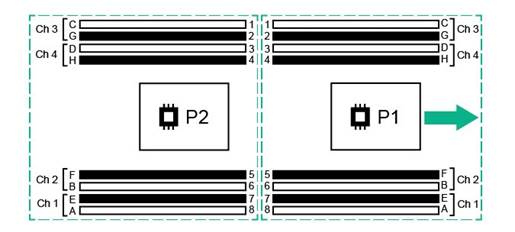
Memory Population Guidelines |
|
For memory population rules and additional memory guidelines, please see the HPE ProLiant XL230 Gen9 user guide at http://www.hpe.com/support. | |
|
| |
Technical Specifications
|
HPE Apollo 6500 / HPE Apollo 6500 Chassis and two HPE ProLiant XL270d Accelerator trays
| |||||||||||||||||
|
Dimensions |
Height |
6.97 in(17.70cm) | |||||||||||||||
|
Width |
17.64in(44.81cm) | ||||||||||||||||
|
Depth |
37.79in(96.00cm) | ||||||||||||||||
|
Shipping Dimensions |
Height |
11.72in (29.7cm) | |||||||||||||||
|
Width |
23.51in (59.7cm) | ||||||||||||||||
|
Depth |
42.80in (108.7cm) | ||||||||||||||||
|
Chassis Weight |
Empty |
32.89 lb (14.92 kg) | |||||||||||||||
|
Max Chassis Weight |
Approximate |
Approximate 161.42 lb (73.22 kg) | |||||||||||||||
|
Temperature Range |
Operating |
50° to 95° F (10° to 35° C) | |||||||||||||||
|
Non-Operating |
-22° to 140° F (-30° to 60° C) | ||||||||||||||||
|
Relative Humidity |
Operating |
10 to 90% relative humidity (Rh), 28°C (82.4°F) maximum wet bulb temperature, non-condensing. | |||||||||||||||
|
Non-Operating |
5 to 95% relative humidity (Rh), 38.7°C (101.7°F) maximum wet bulb temperature, non-condensing. | ||||||||||||||||
|
NOTE: Operating temperature has an altitude derating of 1.8° F (1° C) per 1,000 ft (304.8 m). No direct sunlight. Upper operating limit is 10,000 ft (3,048 m) or 70Kpa/10.1 psia. Upper non-operating limit is 30,000 ft (9,144 m) or 30.3 KPa/4.4 psia. Storage maximum humidity of 95% is based on a maximum temperature of 113° F (45° C). Altitude maximum for storage is 70 KPa. | |||||||||||||||||
|
| |||||||||||||||||
|
Acoustic Noise |
Listed are the declared A-Weighted sound power levels (LWAd) and declared average bystander position A-Weighted sound pressure levels (LpAm) when the product is operating in a 23°C ambient environment. Noise emissions were measured in accordance with ISO 7779 (ECMA 74) and declared in accordance with ISO 9296 (ECMA 109).
| ||||||||||||||||
|
| |||||||||||||||||
|
Environmental-friendly Products and Approach End-of-life Management and Recycling |
Hewlett Packard Enterprise offers end-of-life
product return, trade-in, and recycling programs,
in many geographic areas, for our products. Products returned to Hewlett
Packard Enterprise will be recycled, recovered or disposed of in a responsible
manner. The EU WEEE directive (2002/95/EC) requires manufacturers to provide treatment information for each product type for use by treatment facilities. This information (product disassembly instructions) is posted on the Hewlett Packard Enterprise web site. These instructions may be used by recyclers and other WEEE treatment facilities as well as Hewlett Packard Enterprise OEM customers who integrate and re-sell Hewlett Packard Enterprise equipment. | ||||||||||||||||
|
| |||||||||||||||||
Summary of Changes
|
Date |
Version History |
Action |
Description of Change |
|
15-Oct-2018 |
Version 9 |
Changed |
SKU descriptions were updated. |
|
01-Oct-2018 |
Version 8 |
Changed |
Overview, Standard Features, Configuration Information and Additional Options sections were updated. Obsolete SKUs were deleted. |
|
04-Dec-2017 |
Version 7 |
Updated |
Updates throughout the sections |
|
04-Dec-2017 |
Version 6 |
Updated |
Updates throughout the sections |
|
25-Sep-2017 |
Version 5 |
Updated |
Update the configuration Information Section |
|
16-Jul-2017 |
Version 4 |
Changed |
Correct information and description in diagrams |
|
13-Jan-2017 |
Version 3 |
Updated |
Update information in the Overview section and in the Configuration Information - Factory Integrated Models |
|
04-Nov-2016 |
Version 2 |
Updated |
Remove some HDD SKUs |
|
15-Aug-2016 |
Version 1 |
Created |
Create QuickSpecs for HPE Apollo 6500 |
| ||||||||||||||||||


