




























HPE Apollo 6000 Chassis: технические характеристики и документация
В архивеOverview
|
HPE Apollo 6000 Chassis Is it time for a real workhorse server solution to take your business to the next level?
| |||||||||||||
|
| |||||||||||||
|
HPE Apollo a6000 Chassis | |||||||||||||
|
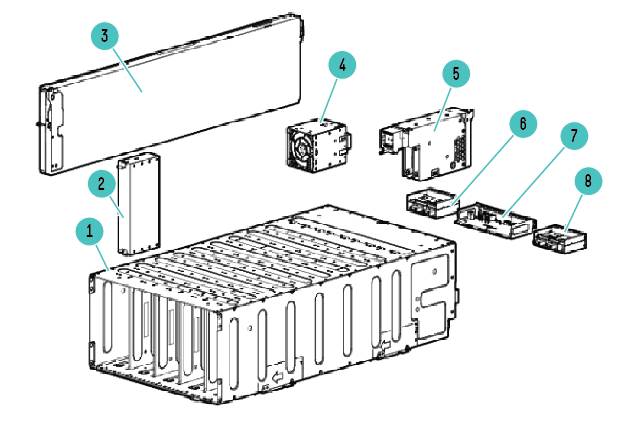
1. |
HPE Apollo a6000 Chassis |
5. |
I/O module | ||||||||||
|
2. |
Server tray blank |
6. |
Power cage 2 | ||||||||||
|
3. |
Server tray |
7. |
Management module | ||||||||||
|
4. |
Dual Rotor Fan Assembly |
8. |
Power cage 1 | ||||||||||
|
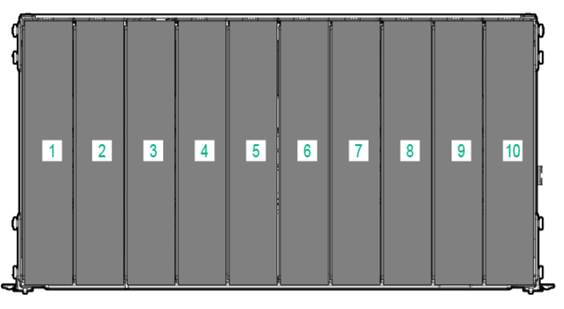
Server tray bay numbering (1-10) - Front View Populate trays from right (Bay 10)-> left (Bay 1)
| |||||||||||||
|
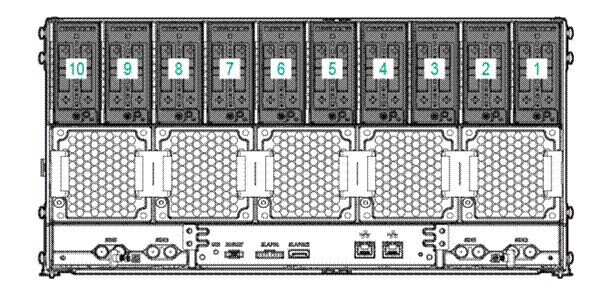
Server tray bay- Rear View (mirror image)
| |||||||||||||
|
| |||||||||||||
|
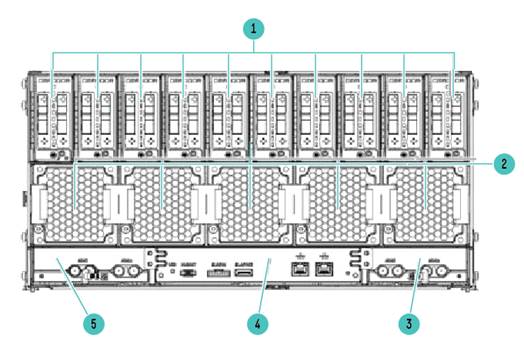
Rear panel components | |||||||||||||
| |||||||||||||
Standard Features
|
Chassis |
Each HPE Apollo a6000 Chassis is built with the following: Up to 10 single slot server trays per chassis. Up to 10 network I/0 module slots per chassis Up to four (4) 12V DC input cables providing up to 5760 W of power for the chassis (depending on power supplies). HPE Thermal Logic technology for lower power consumption and airflow. Five (5) dual rotor fan assemblies as standard for redundancy and improved power consumption and acoustics. |
|
| |
|
System Fans |
The Chassis includes 5 dual rotor fan modules as standard |
|
| |
|
Server Blank Kit |
HPE Apollo a6000 Server Blank Kit Use this Server Blank tray kit in the absence of a server tray in one of the assigned server slots to maintain the airflow in the chassis to meet thermal requirements during operation. |
766779-B21
|
|
Service Tray Kit |
HPE Apollo a6000 Service Tray Kit Service events may disrupt tray population order and best practices. Correct tray population order is required to maintain recommended thermals. This full length service tray can be used during service events to prevent improper thermals caused by removal of server trays. |
823271-B21 |
|
Rack Airflow Requirements |
HPE Apollo a6000 Chassis |
|
CAUTION: If a third-party rack is used, observe the following additional requirements to ensure adequate airflow and to prevent damage to the equipment: | |
|
CAUTION: Always use blanking panels to fill all remaining empty front panel U-spaces in the rack. This arrangement ensures proper airflow. Using a rack without blanking panels will result in improper cooling that can lead to thermal damage. | |
|
CAUTION: To prevent improper cooling and thermal damage, operate servers only when the open side of the server is enclosed by either another server, a divider, or the chassis wall. Populate the servers from right to left in all instances. | |
|
CAUTION: To prevent improper cooling and thermal damage, do not operate the chassis unless all bays are populated with a component or a blank. Install the component as indicated. Installing a server |
|
CAUTION: To prevent improper cooling and thermal damage, operate servers only when the open side of the server is enclosed by either another server, a divider, or the chassis wall. When installing servers in the chassis, observe the following guidelines to ensure proper air flow: • Always populate the enclosure from right to left, beginning with bay 10. • Operate servers only when the open side of the server is enclosed by either another server, a divider, or the chassis wall. |
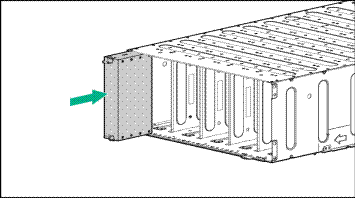
Optional Features
|
HPE Insight Management software |
Insight Management |
Managing the growing number of servers can be complex and expensive for your organization. IT managers need to address changing business needs with tools that meet the challenges of managing today's complex Datacenters. HPE Insight Control HPE Insight Control for Microsoft® System Center HPE Insight Control for VMware vCenter Server HPE Virtual Connect Enterprise Manager (VCEM) HPE Insight Dynamics / Matrix Operating Environment Customers will receive an Insight Control or Insight Dynamics license |
|
Service Pack for ProLiant |
Customers should use the HPE Service Pack for ProLiant (SPP) to perform firmware, driver, and related software updates. SPP main webpage: http://www.hp.com/go/spp SPP downloads webpage: http://www.hp.com/go/spp/download | |
|
HPE Integrated Lights-Out (iLO) |
HPE Integrated Lights-Out (iLO) simplifies server setup, health monitoring, power and thermal control, and lights-out remote administration of ProLiant SL, XL, ML, DL, and BL servers. HPE iLO functions without additional software and can be accessed from any location via a web browser. HPE iLO works hand-in-hand with HPE Systems Insight Manager, Insight Control and Insight Dynamics for ProLiant, helping customers unleash the value of the ProLiant platform and deliver the highest possible quality of IT service. For more information, visit: http://www.hp.com/go/iLO. | |
|
HPE Insight Control |
HPE Insight Control, a product option, delivers essential infrastructure management that can help save time and money by making it easy to deploy, monitor, remote control, and optimize your IT infrastructure through a single, simple management console. For more information, see http://www.hp.com/go/insightcontrol. | |
|
HPE Matrix Operating Environment |
The HPE Matrix Operating Environment (Matrix OE) for ProLiant and Integrity servers is an integrated command center that helps you instantly adjust to dynamic business demands. This advanced infrastructure management software lets you reduce the cost of common data center tasks by up to 40 percent while keeping pace with your changing business. | |
|
HPE Advanced Power Manager |
The HPE Advanced Power Manager (HPE APM) is an optional rack level solution. HPE APM will automatically discover hardware components and enable server level power on and off, server metering, aggregate dynamic power capping, configurable power-up dependencies and sequencing, consolidated Ethernet access to all resident iLOs, and asset management capabilities. | |
Warranty
|
Warranty |
This product is covered by a global limited warranty and supported by Hewlett Packard Enterprise Services and a worldwide network of Hewlett Packard Enterprise Authorized Channel Partners. Hardware diagnostic support and repair is available for one year from date of purchase. Support for software and initial setup is available for 90 days from date of purchase. Enhancements to warranty services are available through HPE Pointnext operational services or customized service agreements. Hard drives have either a one year or three year warranty. |
Service and Support
|
Service and Support |
The support of HPE Apollo 6000 is at a chassis level. Support purchased for the chassis covers trays, power shelf and any other option part of this system HPE Technology Services for Industry Standard Servers HPE Technology Services delivers confidence, reduces risk and helps customers realize agility and stability. Connect to Hewlett Packard Enterprise to help prevent problems and solve issues faster. Our support technology lets you to tap into the knowledge of millions of devices and thousands of experts to stay informed and in control, anywhere, any time. Protect your business beyond warranty with HPE Pointnext operational services HPE Pointnext operational services enable you to order the right service level, length of coverage and response time as you purchase your new server, giving you full entitlement for the term you select |
|
Recommended HPE Pointnext operational services for your HPE Apollo 6000 | |
|
Optimized recommendation |
Foundation Care 24x7, three-year Care Pack Service Supports maintaining servers at optimum performance availability HPE Foundation Care 24x7 connects you to Hewlett Packard Enterprise 24 hours a day, seven days a week for assistance on resolving issues. Hardware onsite response within four hours if needed; collaborative software included in this Care Pack service provides troubleshooting assistance on industry leading software running on your Hewlett Packard Enterprise server. Simplify your support experience and make Hewlett Packard Enterprise your first call for hardware or software questions. https://www.hpe.com/h20195/V2/GetDocument.aspx?docname=4AA4-8876ENW&cc=us&lc=en |
|
Basic recommendation |
Foundation Care NBD, three-year Care Pack Service HPE Foundation Care Next Business Day connects you to Hewlett Packard Enterprise during business hours for assistance on resolving issues - features next business day hardware onsite response if needed and software call back within two hours. Collaborative software support is included and provides troubleshooting assistance on industry leading software running on your server. Simplify your support experience and make Hewlett Packard Enterprise your first call for hardware or software questions. https://www.hpe.com/h20195/V2/GetDocument.aspx?docname=4AA4-8876ENW&cc=us&lc=en |
|
Related Services |
HPE Datacenter Care service HPE Datacenter Care helps you improve IT stability and security, increase the value of IT, and enable agility and innovation. It is a structured framework of repeatable, tested, and globally available services “building blocks.” You can deploy, operate, and evolve your datacenter wherever you are on your IT journey. With HPE Datacenter Care, you benefit from a personalized relationship with Hewlett Packard Enterprise via a single point of accountability for Hewlett Packard Enterprise and others’ products. For more information, visit http://www.hp.com/services/datacentercare HPE ProLiant Server Hardware Installation Factory Express for Servers and storage HPE Factory Express offers configuration, customization, integration and deployment services for Hewlett Packard Enterprise servers and storage products. Customers can choose how their factory solutions are built, tested, integrated, shipped and deployed. For more information on Factory Express services for your specific server model please contact your sales representative or go to: http://www.hp.com/go/factory-express Data Privacy Services Protect your data through better media management. HPE Data privacy services help manage and protect sensitive data to reduce the risk of unauthorized access to private information and help meet compliance requirements. Our retention services allow you to keep drives and other devices upon failure, our removal services provide convenient data sanitization and our recovery services allow you to safely retire IT assets and capture any remaining value from the hardware. http://www.hp.com/services/dataprivacy Additional HPE Pointnext operational services can be found at: http://www.hp.com/go/cpc |
|
Get connected to Hewlett Packard Enterprise to improve your support experience |
Prevent problems with innovative, automated monitoring tools and proactive services. Combining Proactive Care Services with our remote support technology such as Insight Online provides you with expert advice and personalized, cloud-based automated IT support, helping to prevent unplanned down time and solve problems quickly. For more information, visit: http://www.hp.com/go/proactiveinsightexperience |
|
HPE Support Center |
Personalized online support portal with access to information, tools and experts to support Hewlett Packard Enterprise business products. Submit support cases online, chat with Hewlett Packard Enterprise experts, access support resources or collaborate with peers. Learn more http://www.hp.com/go/hpsc. |
|
Parts and Materials |
Hewlett Packard Enterprise will provide HPE-supported replacement parts and materials necessary to maintain the covered hardware product in operating condition, including parts and materials for available and recommended engineering improvements.
Parts and components that have reached their maximum supported lifetime and/or the maximum usage limitations as set forth in the manufacturer's operating manual, product quick-specs, or the technical product data sheet will not be provided, repaired, or replaced as part of these services.
The defective media retention service feature option applies only to Disk or eligible SSD/Flash Drives replaced by Hewlett Packard Enterprise due to malfunction. |
|
Data Privacy |
Let HPE Data Privacy Services help you control access to data and maintain compliance. We offer retention services called Defective Media Retention (DMR) and Comprehensive Defective Material Retention (CDMR) as part of Foundation Care and Proactive Care that allow you to keep failed drives or other memory-retentive components to protect data that may reside. Our sanitization services should be used as part of tech refresh to help ensure no data lingers once the systems are taken out of service or repurposed. Our asset recovery service helps you responsibly retire IT assets. The defective media retention service feature option applies only to Disk or eligible SSD/Flash Drives replaced by Hewlett Packard Enterprise due to malfunction. |
|
For more information |
To learn more on services for Hewlett Packard Enterprise Apollo please contact your Hewlett Packard Enterprise sales representative or Hewlett Packard Enterprise Authorized Channel Partner. Or visit: http://www.hp.com/services/bladesystem. |
Core Options
|
NOTE: This section lists some of the steps required to configure a Factory Integrated Model. To ensure only valid configurations are ordered, Hewlett Packard Enterprise recommends the use of an Hewlett Packard Enterprise approved configurator. Contact your local sales representative for information on configurable product offerings and requirements. | ||
|
Step 1: Choose a Chassis Configuration | ||
|
HPE Chassis |
HP Apollo a6000 1.0m Chassis |
736428-B21 |
|
NOTE: Each chassis comes with 5 double rotor fans as standard | ||
|
| ||
|
HPE Rail Kits |
HP Apollo a6000 Chassis Rail Kit
|
757400-B21 |
|
NOTE: This kit only supports HPE racks. | ||
|
HP Apollo a6000 Third Party Option Chassis Rail Kit
|
766749-B21 | |
|
NOTE: This kit supports some HPE Pods and some 3rd Party racks. NOTE: Hewlett Packard Enterprise recommends that a minimum of two people are require for all rack installations. Please refer to your installation instructions for proper tools and number of people to use for any installation. | ||
|
HPE Chassis Handles |
HP s6500 Chassis Handles Kit |
608477-B21 |
|
NOTE: Chassis handles are not included as part of the chassis. It is highly recommended to have handles if the Chassis is not being installed in a Rack. | ||
|
HPE Cooling Options |
HPE Apollo a6000 Server Tray Blank Kit |
766779-B21 |
|
NOTE: Required for any non-populated slots in the chassis to prevent thermal related issues. | ||
|
HPE Apollo a6000 Service Tray Kit |
823271-B21 | |
|
Step 2: Choose a Power Shelf Configuration | ||
|
Power Shelf |
NOTE: For full power shelf configuration options and details, please see HPE Apollo 6000 Power Shelf QuikSpec. NOTE: A Power Shelf is required for all HPE Apollo 6000 configurations. Depending on which trays are populated in the HPE Apollo a6000 chassis, the ratio of power shelf to chassis varies. | |
|
HP Apollo 6000 Standard Power Shelf |
735131-B21 | |
|
NOTE: To determine how many power shelves are needed at a rack level (based on server and chassis configuration, please use the HPE Power Advisor as a guidance (power values may vary up to 15%). | ||
|
Step 3: Choose a Compute Server or Accelerator Tray | ||
|
Server Trays |
NOTE: For full server configuration options and details, please see HPE ProLiant XL230a and HPE ProLiant XL250a QuickSpecs. | |
|
HP ProLiant XL220a Gen8 v2 Single-wide 2x1P 1.0m Rear-cabled Compute Tray
|
753173-B21 | |
|
NOTE: This is single slot server tray which contains two independent 1P servers. Each HPE Apollo a6000 Chassis can fit up to 10 trays or 20 single socket servers | ||
|
HPE ProLiant XL230a Gen9 Single-width 2P 1.0m Rear-cabled Hot Plug Drives 12G Compute Tray |
789917-B21 | |
|
NOTE: This is a single slot 2P server tray which supports 12G Hot Plug drives. | ||
|
HP ProLiant XL230a Gen9 Single-wide 2P 1.0m Rear-cabled Non-hot Plug Drives Compute Tray
|
785695-B21 | |
|
NOTE: This is a single slot 2P server tray which supports 12G Hot Plug drives. |
| |
|
HP ProLiant XL250a Gen9 Double-width 2P 1.0m Rear-cabled Hot Plug Drives 12G Accelerator Tray
|
768535-B21 | |
|
NOTE: This is a single slot 2P server tray which supports 12G Hot Plug drives. | ||
|
Step 4: Choose Additional Options | ||
|
HPE Advanced Power Manager |
HP Advanced Power Manager Kit |
741192-B21 |
|
NOTE: Each HPE APM can connect up to 10 chassis via consolidated chassis management cable. | ||
|
HP 4M 20 Pin Consolidated Management Cable |
762048-B21 | |
|
NOTE: 1 cable per chassis | ||
|
HP 3M MicroDB9 to MicroDB9 Cable |
762049-B21 | |
|
NOTE: This cable is required for connectivity to DC Power shelf. | ||
|
| ||
|
HPE Pointnext operational services |
Foundation Care | |
|
HPE 3 year Foundation Care 24x7 Apollo a6000 Service |
U6UR3E | |
|
HPE 3 year Foundation Care 24x7 wDMR Apollo a6000 Service |
U6UR4E | |
|
HPE 3 year Foundation Care 24x7 wCDMR Apollo a6000 Service |
U6UR5E | |
|
Installation Services |
NOTE: Reduce the time required to get your system up and running and help minimize disruptions to your business. |
|
|
HPE Installation Apollo a6000 Service |
U5V60E | |
|
HPE Installation Non Standard Hours Apollo a6000 Service
|
U5V61E | |
|
HPE Installation and Startup Apollo a6000 Service |
U5V62E | |
|
HPE Installation and Startup Non Standard Hours Apollo a6000 Service
|
U5V63E | |
Technical Specifications
|
HPE Apollo a6000 Chassis |
Dimensions |
Height |
8.67 in (22.02 cm) |
|
Width |
17.64 in (44.81 cm) | ||
|
Depth |
33.95 in (86.23 cm) | ||
|
Shipping Dimensions |
Height |
18 in (45.7 cm) | |
|
Width |
23.6 in (60.0 cm) | ||
|
Depth |
42.8 in (108.7 cm) | ||
|
Chassis Weight |
Empty |
57 lb (25.85 kg) | |
|
Max Enclosure Weight |
Approximate |
216 lb (97.98 kg) | |
|
Temperature Range |
Operating |
50° to 95° F (10° to 35° C) | |
|
Non-Operating |
-22° to 140° F (-30° to 60° C) | ||
|
Relative Humidity |
Operating |
10 to 90% relative humidity (Rh), 28°C (82.4°F) maximum wet bulb temperature, non-condensing. | |
|
Non-Operating |
5 to 95% relative humidity (Rh), 38.7°C (101.7°F) maximum wet bulb temperature, non-condensing. | ||
|
NOTE: Operating temperature has an altitude derating of 1.8° F (1° C) per 1,000 ft (304.8 m). No direct sunlight. Upper operating limit is 10,000 ft (3,048 m) or 70Kpa/10.1 psia. Upper non-operating limit is 30,000 ft (9,144 m) or 30.3 KPa/4.4 psia. Storage maximum humidity of 95% is based on a maximum temperature of 113° F (45° C). Altitude maximum for storage is 70 KPa. | |||
|
Acoustic Noise |
Listed are the declared A-Weighted sound power levels (LWAd) and declared average bystander position A-Weighted sound pressure levels (LpAm) when the product is operating in a 23°C ambient environment. Noise emissions were measured in accordance with ISO 7779 (ECMA 74) and declared in accordance with ISO 9296 (ECMA 109). | ||
|
Idle | |||
|
LWAd |
7.1 Bels | ||
|
LpAm |
54 dBA | ||
|
Operating | |||
|
LWAd |
7.2 Bels | ||
|
LpAm |
54 dBA | ||
|
Environmental-friendly Products and Approach |
End-of-life Management and Recycling |
Hewlett Packard Enterprise offers end-of-life Hewlett Packard Enterprise product return, trade-in, and recycling programs in many geographic areas. For trade-in information, please go to: http://www.hp.com/go/green. To recycle your product, please go to: http://www.hp.com/go/green or contact your nearest Hewlett Packard Enterprise sales office. Products returned to Hewlett Packard Enterprise will be recycled, recovered or disposed of in a responsible manner. | |
|
| |||
Summary of Changes
|
Date |
Version History |
Action |
Description of Change |
|
23-Oct-2017 |
Version 12 |
Changed |
Care Pack naming and Service and Support- Parts and Materials updated. |
|
5-Jun-2017 |
From version 10 to 11 |
Updated |
Update the configuration section |
|
27-Mar-2016 |
From version 9 to 10 |
Updated |
Updates made troughout the document |
|
15-Aug-2016 |
From version 8 to 9 |
Updated |
Update the information of core features |
|
22-Jan-2016 |
From version 7 to 8 |
Changed |
Change the Sever tray arrangement to correct an error. |
|
11-Dec-2015 |
From version 6 to 7 |
Updated |
Remove obsolete SKU and update throughout the QS |
|
17-Aug-2015 |
From version 5 to 6 |
Updated |
Update the server tray SKU |
|
29-Apr-2015 |
From version 4 to 5 |
Changed |
Update overall QuickSpecs |
|
03-Dec-2014 |
From version 3 to 4 |
Changed |
Update Care Packs and support info. |
|
1-Aug-2014 |
From version 2 to 3 |
Changed |
Update the configuration section |
|
13-Jun-2014 |
From Version 1 to 2 |
Changed |
Service and Support were revised. |
| ||||||||||||||||||


