HPE GreenLake for File Storage MP: технические характеристики и документация
|
Shape the Future of QuickSpecs - Your Input Matters | |
|
HPE GreenLake for File Storage MP QuickSpecs
Enterprise file storage at scale Data is the life-force of the modern enterprise-it powers the insights, innovation, and competitive advantage that move your business forward, faster. But to accelerate your data-first modernization and be AI ready, you need to eliminate the storage silos, tiered data pipelines, scale-out limitations, and management complexity-across edge-to-cloud-that slow you down. HPE GreenLake for File Storage provides a single, flexible solution to achieve faster time to AI insights for competitive advantage. It offers enterprise performance at scale to accelerate AI and other data-intensive applications with a resilient, shared-everything architecture designed to scale to exabyte capacities; a simpler, intuitive cloud operational experience with streamlined setup and file data management, a global namespace for collaboration, and rich data services; enhanced efficiency at scale that meets the demands of AI workloads with higher ROI. |
|
|
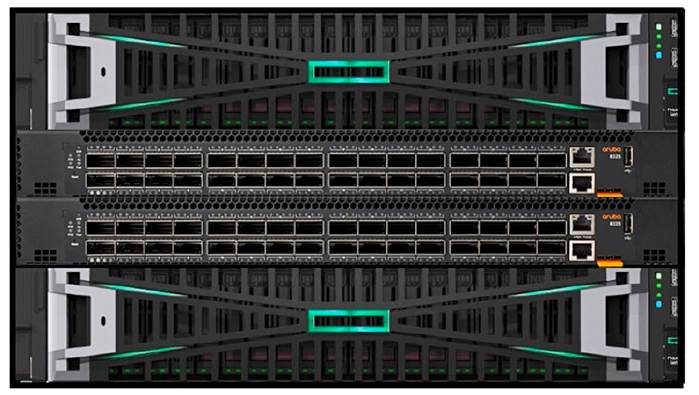
HPE GreenLake for File Storage solution consists of three major components, - Disaggregated storage based on HPE Alletra Storage MP Common Storage Architecture offered in either standard or high-density models - Compute, JBOF, and Switches - Scale-out file services software running on HPE Alletra Storage MP - HPE GreenLake Cloud Platform that allows the file service to be managed from a managed public cloud and services that provide call-home, remote support, and telemetry data collection services | |||
|
| |||
|
What's new - Ultra-efficient all-NVME with inline similarity data reduction (de-deduplication and compression) even for previously compacted data - Acceleration of Artificial Intelligence (AI), Machine Learning (ML) and Deep Learning (DL) training and inferencing in - End-to-end HPE GreenLake experience for unstructured file data management | |||
|
| |||
|
|
Enterprise performance at scale - HPE GreenLake for File Storage is a next generation scale-out file storage system that is fast enough to meet the needs of the most demanding legacy and modern applications using a disaggregated-shared-everything (DASE) architecture. - The solution can scale to 100's of petabytes of effective capacity, without interrupting customer applications attached to the system. This eliminates the need to coordinate expansion around expensive maintenance windows. - The performance, and capacity can be scaled by adding modular compute, data, and storage fabric building blocks. - Highly resilient architecture designed for exabyte scale without degrading performance. |
|
|
|
Built for Cloud - HPE GreenLake for File Storage provides a superior cloud resident management for file share vending and lifecycle management via HPE GreenLake Cloud Platform - 100% cloud-managed infrastructure means you can globally monitor and manage your entire fleet of file storage from a single SaaS-based cloud console that's accessible from any location, on any device - so managing hundreds of systems across geographies is as simple as managing one. - A simplified common experience providing a single pane of glass across all HPE infrastructure. - Rich & granular metrics to monitor the Capacity usage & Performance at File share and File Server level. - Seamless upgrade experience through cloud-based software catalog - Remote telemetry and call home data management providing great pro-active support experience. - New data services instantly become available to you. Data plane software upgrades are non-disruptive and intelligently matched to a given system. |
|
|
|
Productivity with faster time to insights - HPE GreenLake for File Storage provides more granular insights across all the data in a single global namespace in real time providing competitive advantage to make business decisions faster. - Faster times to insights and discovery unlock more value from all your data for competitive advantage. - Increased productivity of data scientists and Line of Business (LOB) application owners with simple setup - Superior file data infrastructure delivers high ROI from capital investments by providing SMB and NFS multiprotocol support without performance penalties. In addition, new native SQL query language interface to the File system provides accelerated access to file meta-data which are an order of magnitude faster than a traditional NAS server. |
|
|
|
Absolute Resiliency - Consume HPE GreenLake for File Storage your way with a choice of capex/subscription or pay-per-use models. - N+4 erasure encoding allows for 4 simultaneous drive failures plus additional protection through intra-drive parity. - FIPS-certified encryption provides data at rest and over-the-wire protection. Secure data shredding is built in. - Native application-consistent snapshots and replication - Redundant, hot-swap components including controllers, power supplies, SSDs, and IO cards, that together deliver enterprise grade high-availability with 99.9999% (6-nines) of uptime. |
|
|
|
Key Specifications
| |||||||||||||||||||||||||||||||||
|
|
|
Host Client Connectivity - NFS, SMB clients Microsoft® Windows® Server and Microsoft® Hyper-VTM | VMware ESX and ESXi | Red Hat® Enterprise Linux® | SUSE® Linux Enterprise Server (SLES)
For the latest information refer to Single Point of Connectivity Knowledge for HPE Storage Products (SPOCK): http://www.hpe.com/storage/spock |
|
|
|
Warranty
HPE GreenLake for File Storage has 1 year, parts only warranty. The warranty on all HPE GreenLake for File Storage Solid State Drives (SSD) is 1 year, parts only, and offers unconditional replacement in case of drive failure, media wear-out, or both. Hewlett Packard Enterprise warrants only that the software media will be free of physical defects for a period of ninety (90) days from delivery. For more information about Hewlett Packard Enterprise's Global Limited Warranty and Technical Support, visit: http://www.hpe.com/storage/warranty
Notes: - For hardware warranty claims, defective part must be received before replacement parts are shipped - Warranty is provided by HPE GreenLake for File Storage - Link to HPE Global Limited Warranty and Technical Support |
|
|
|
Supportability HPE GreenLake for File Storage is an OEM of the VAST operating system that supports the primary features of DataStore and DataSpace. By default, HPE GreenLake for File Storage does not support the following: - DataEngine - InsightEngine - SyncEngine - DataBase - Block storage protocol - S3 |
|
|
|
Service and Support Support is required for all HPE GreenLake for File Storage. Support SKUs provide up to five years of 24x7 telephone support for the arrays and hardware components (Including SSDs reaching the write wear limit).
HPE Services Tech Care is the operational service experience that goes beyond traditional support by providing access to product specific experts, an AI driven digital experience, and general technical guidance. HPE Services Tech Care has been reimagined from the ground up to support a customer-centric, AI-driven, and digitally enabled customer experience to move your business forward.
Additional recommended HPE Services to help you accelerate your business outcomes: - HPE Edge-to-Cloud Transformation Maturity (workshop) - HPE Service Credits - HPE Storage Networking - HPE Accelerated Migration - HPE Asset Upcycling - HPE Data Migration Services - HPE Data Sanitization Service - HPE Security Risk and Compliance
Notes: Support contract is mandatory for all HPE GreenLake for File Storage products |
|
Data Services Support with HPE GreenLake for File Storage MP
A valid subscription enables the following enterprise-level support: - 24x7 telephone support for all entitled services available through HPE Data Services - Direct connection to expert-level support within minutes - Guidance through troubleshooting and configuration of available services and interoperability within your cloud and/or on-premises environment.
For a summary of HPE GreenLake for File Storage service and support features, see the following Tech Care addendum: https://www.hpe.com/psnow/doc/a50003571enw |
|
|
|
Proactive Support Manager Services For any organization with a sizeable deployment of HPE GreenLake for File Storage or business-critical use cases, the assigned HPE Proactive Support Manager (HPE PSM) Service can be enlisted to provide management and support services that are tailored to fit the exact needs of the organization. The world-class HPE PSM team includes some of the most experienced and reliable storage experts in the industry.
HPE PSM services are strongly recommended for your HPE GreenLake for File Storage product and experience. For a summary of the PSM benefits, see the following data sheet: https://www.hpe.com/psnow/doc/a00030176enw |
|
|
|
HPE Services Tech Care HPE Tech Care Service is the operational support service experience for HPE products. The service goes beyond traditional support by providing access to product specific experts, an AI driven digital experience, and general technical guidance to not only reduce risk but constantly search for ways to do things better. HPE Tech Care Service delivers a customer-centric, AI driven, and digitally enabled customer experience to move your business forward.
HPE Services Tech Care is available with the following service level options for HPE GreenLake for File Storage MP: - Essential, which provides 24x7 onsite parts exchange
Regardless of the service level, customers have direct access to Level 3 HPE GreenLake for File Storage support engineers by telephone 24x7. https://www.hpe.com/us/en/services/tech-care.html |
|
|
|
HPE Lifecycle Services HPE Lifecycle Services provide a variety of options to help maintain your HPE systems and solutions at all stages of the product lifecycle. A few popular examples include: - Lifecycle Install and Startup Services: Various levels for physical installation and power on, remote access setup, installation and startup, and enhanced installation services with the operating system. - HPE Firmware Update Analysis Service: Recommendations for firmware revision levels for selected HPE products, taking into account the relevant revision dependencies within your IT environment. - HPE Firmware Update Implementation Service: Implementation of firmware updates for selected HPE server, storage, and solution products, taking into account the relevant revision dependencies within your IT environment. |
|
- Implementation assistance services: Highly trained technical service specialists to assist you with a variety of activities, ranging from design, implementation, and platform deployment to consolidation, migration, project management, and onsite technical forums. - HPE Service Credits: Access to prepaid services for flexibility to choose from a variety of specialized service activities, including assessments, performance maintenance reviews, firmware management, professional services, and operational best practices. Notes: To review the list of Lifecycle Services available for your product go to:
For a list of the most frequently purchased services using service credits, see the HPE Service Credits Menu |
|
|
|
Installation Services Installation Services are intended to guide you from start to finish and to help make your installation a success. This installation service is mandatory and the installation engagement includes: - Inventory and verify HPE GreenLake for File Storage equipment against the sales order and site preparation survey conducted by the pre-sales team. - Physically rack and cable all HPE GreenLake for File Storage equipment, including connecting network cables provided by the customer. - Conduct power-on tests and verify the operation. - Add the storage and compute to an existing HPE GreenLake for File Storage - Configure basic management, monitoring, & reporting capabilities - Configure for additional data networks / SAN connectivity as needed - Installation services are required for all components of HPE GreenLake for File Storage products. |
|
|
|
Standard-Density Modules |
|
HPE Alletra Storage MP Compute Chassis HW install svc - HA124A1#V1E Provides hardware installation of a new HPE Alletra Storage MP Compute chassis. Quote this service when you want onsite assistance in setting up a new HPE Alletra Storage MP compute chassis for hardware racking into an approved rack.
|
|
HPE Alletra Storage MP JBOF HW install svc HA124A1#V1F Provides on-site hardware installation only of a new HPE Alletra Storage MP JBOF shelf. This service should be quoted for customers who want assistance with the heavy lifting and hardware racking.
|
|
HPE Aruba Networking CX 8325 Install and startup svc - HA124A1#V1C On-site installation and configuration of a HPE Aruba Networking CX 8325 switch. This service is designed specifically for the racking, cabling, and configuration of the HPE Aruba Networking switch when used as part of the HPE GreenLake File Storage MP solution.
HPE GreenLake for File Storage SW install svc - HA124A1#V1D Provides the on-site software installation of the HPE GreenLake File Storage MP software stack and will deploy the software onto a HPE Alletra Storage MP Compute Chassis containing two IOMs or HPE Alletra Storage MP JBOF chassis. |
|
|
|
High-density Modules |
|
HPE Alletra Storage MP Compute Chassis HW install svc - HA124A1#5V7 Provides hardware installation of a new HPE Alletra Storage MP high density Compute chassis. Quote this service when you want onsite assistance in setting up a new HPE Alletra Storage MP high density compute chassis for hardware racking into an approved rack.
HPE Alletra Storage MP JBOF HW install svc HA124A1#5T2 Provides on-site hardware installation only of a new high density HPE Alletra Storage MP JBOF shelf. This service should be quoted for customers who want assistance with the heavy lifting and hardware racking.
HPE Alletra Storage MP P2C with NVIDIA I&S svc - HA124A1#5UU On-site installation and configuration of a HPE NVIDIA SN4600cM switch. This service is designed specifically for the racking, cabling, and configuration of the HPE SN4600cM Networking switch when used as part of the HPE GreenLake File Storage MP solution.
HPE GreenLake for File Storage SW install svc - HA124A1#V1D Provides the on-site software installation of the HPE GreenLake File Storage MP software stack and will deploy the software onto a HPE Alletra Storage MP Compute Chassis containing two IOMs or HPE Alletra Storage MP JBOF chassis.
Notes: All Installation services are required for all HPE GreenLake for File Storage MP products. |
|
|
|
Other Related Services from HPE Services:
HPE Education Services Training and certification designed for IT and business professionals across all industries. Broad catalogue of course offerings to expand skills and proficiencies in topics ranging from cloud and cybersecurity to AI and DevOps. Create learning paths to expand proficiency in a specific subject. Schedule training in a way that works best for your business with flexible continuous learning options. https://www.hpe.com/services/training |
|
|
|
Defective Media Retention An option available with HPE Complete Care Service and HPE Tech Care Service and applies only to Disk or eligible SSD/Flash Drives replaced by HPE due to malfunction.
Consult your HPE Sales Representative or Authorized Channel Partner of choice for any additional questions and services options. |
|
|
|
Parts and Materials HPE will provide HPE-supported replacement parts and materials necessary to maintain the covered hardware product in operating condition, including parts and materials for available and recommended engineering improvements. |
|
Parts and components that have reached their maximum supported lifetime and/or the maximum usage limitations as set forth in the manufacturer's operating manual, product QuickSpecs, or the technical product data sheet will not be provided, repaired, or replaced as part of these services. |
|
|
|
How to Purchase Services Services are sold by Hewlett Packard Enterprise and Hewlett Packard Enterprise Authorized Service Partners: - Services for customers purchasing from HPE or an enterprise reseller are quoted using HPE order configuration tools. - Customers purchasing from a commercial reseller can find services at https://ssc.hpe.com/portal/site/ssc/ |
|
|
|
AI Powered and Digitally Enabled Support Experience Achieve faster time to resolution with access to product-specific resources and expertise through a digital and data driven customer experience
Sign into the HPE Support Center experience, featuring streamlined self-serve case creation and management capabilities with inline knowledge recommendations. You will also find personalized task alerts and powerful troubleshooting support through an intelligent virtual agent with seamless escalation to a live support agent when required. https://support.hpe.com/hpesc/public/home/signin |
|
|
|
Consume IT On Your Terms
HPE GreenLake edge-to-cloud platform brings the cloud experience directly to your apps and data wherever they are-the edge, colocations, or your data center. It delivers cloud services for on-premises IT infrastructure specifically tailored to your most demanding workloads. With a pay-per-use, scalable, point-and-click self-service experience that is managed for you, HPE GreenLake edge-to-cloud platform accelerates digital transformation in a distributed, edge-to-cloud world. - Get faster time to market - Save on TCO, align costs to business - Scale quickly, meet unpredictable demand - Simplify IT operations across your data centers and clouds
To learn more about HPE Services, please contact your Hewlett Packard Enterprise sales representative or Hewlett Packard Enterprise Authorized Channel Partner. Contact information for a representative in your area can be found at "Contact HPE" https://www.hpe.com/us/en/contact-hpe.html
For more information http://www.hpe.com/services |
|
|
|
Configuration for standard-density modules | |
|
Step 1 - Choose a Base/Upgrade configuration | |
|
HPE GreenLake for File Storage MP comes in a cluster configuration comprising of - HPE Alletra Storage MP 2U Compute Chassis (2 or more) - HPE Alletra Storage MP JBOF (1 or more) - HPE Aruba Networking Switch (QTY: 2, R9F67A)
Only ONE of the following options can be selected: | |
|
Description |
SKU |
|
HPE GreenLake for File Storage MP Base Configuration |
S1F24A |
|
HPE GreenLake for File Storage MP Upgrade Configuration |
S1F25A |
|
| |
|
Step 2 - Choose number of Cboxes (Compute chassis) |
|
|
Description |
SKU |
|
HPE Alletra Storage MP 10000 2U Chassis |
R7C75A |
|
Following compute nodes will be dynamically added based on above chassis quantity selection. | |
|
HPE GreenLake for File Storage MP 32c 256GB Compute Node |
S1F26A |
|
DC Power is also available. To select DC power, click on Storage Preferences, and then review the Power Watt Options, and select DC Power |
|
|
HPE Alletra Storage MP 1600W -48VDC Power Supply |
R7C78A |
|
Notes: - By default, 2x compute nodes are included with QTY 1 x HPE Alletra Storage MP 2U Chassis (R7C75A) - QTY 2 x power supplies are included for each chassis - QTY 2 x 100GbE 2-port Host bus adapters (S2A68A) per Node (4 per chassis) are included. - Change to InfiniBand Adapter (S2H33A) if one wants to use InfiniBand Connectivity at host side. - Make sure the ratio of Cboxes to Dboxes does not exceed 5 Dboxes for every Cbox. - For the base SKU S1F24A a minimum of 2 Cboxes (R7C75A) are required. | |
|
| |
|
Step 3 - Choose number of Dboxes (Drive Enclosures) | |
|
Description |
SKU |
|
HPE Alletra Storage MP NVMe Configure-to-order File Expansion Shelf |
S1R27A |
|
Two IOM nodes will be dynamically added based on above expansion shelf quantity selection. | |
|
HPE Alletra Storage MP NVMe Expansion Shelf Node |
R7C79A |
|
Notes: QTY 2 x power supplies are included for each enclosure |
|
|
| |
|
Step 4 - Choose number of NVMe Drives | ||
|
Choose one of the following, | ||
|
Description |
SKU | |
|
HPE Alletra Storage MP 7.68TB NVMe SFF Self-encrypting SSD |
R9H68A | |
|
HPE Alletra Storage MP 15.36TB NVMe SFF Self-encrypting SSD |
R9H69A | |
|
HPE Alletra Storage MP 30.72TB NVMe SFF Self-encrypting SSD |
S1Z68A | |
|
The following persistent SCM drives are dynamically added based on above NVMe SFF type selection. | ||
|
HPE Alletra Storage MP 800GB NVMe SFF Storage Class Memory SSD |
S1E89A | |
|
HPE Alletra Storage MP 1.6TB NVMe SFF Storage Class Memory SSD |
S1E90A | |
|
Notes: - Proper number of drives for the drive enclosure is automatically populated - Proper type and number of persistent SCM drives are automatically populated (4 for 7.68, 15.36 TB and 6 for 30.72TB drives) | ||
|
| ||
|
Step 5 - Add number of backend switch and switching Cables The length of the cables should be selected based on how the system is racked at the customer site. The default cables are based on best practices and large systems deployed in adjacent racks. | ||
|
Description |
SKU | |
|
HPE Alletra Storage MP 32-port 100GbE Switch Bundle |
S1R08A | |
|
HPE Aruba Networking 100G QSFP28 to QSFP28 2m Active Optical Cable |
R9F76A | |
|
HPE Aruba Networking 100G QSFP28 to QSFP28 1m Direct Attach Copper Cable |
R9F77A | |
|
HPE Aruba Networking 100G QSFP28 to QSFP28 7m Active Optical Cable |
R9F79A | |
|
HPE Aruba Networking 100G QSFP28 to QSFP28 15m Active Optical Cable |
R9F80A | |
|
HPE Aruba Networking 100G QSFP28 to QSFP28 30m Active Optical Cable |
R9F81A | |
|
Notes: - Be default, QTY 2 of the switch is included - Required switch cables are defaulted, users can select between 2m (default), 7m, 15m and 30m AOC cables - QTY 1 of Switch rail kit (S0A95A) is included | ||
|
| ||
|
Step 6 -Verify Software Subscription | ||
|
Software license for file comes with 3, 4 or 5 yr terms and can be renewed annually post the stipulated time. By default, 5-yrs is added and one can change this to 3-yrs or 4-yrs subscription. | ||
|
Description |
SKU | |
|
HPE GreenLake for File Storage MP per TB Software and Support 3-year SaaS |
S1F47AAE | |
|
HPE GreenLake for File Storage MP per TB Software and Support 4-year SaaS |
S2S65AAE | |
|
HPE GreenLake for File Storage MP per TB Software and Support 5-year SaaS |
S1F48AAE | |
|
HPE GreenLake for File Storage MP Upgrade 3-year per TB Software and Support SaaS |
S1P08AAE | |
|
HPE GreenLake for File Storage MP Upgrade per TB Software and Support 4-year SaaS |
S2S68AAE | |
|
HPE GreenLake for File Storage MP Upgrade 5-year per TB Software and Support SaaS |
S1P09AAE | |
|
Notes: 1, 6, 7-year terms are available on need basis | ||
|
Step 7 - Add/Remove Premium PSM Support | |
|
By default, a 1-yr Premium PSM subscription is included by the OCA Configurator which is optional and can be removed. This service provides the customer with a named service account manager. | |
|
Description |
SKU |
|
HPE Tier 1 Storage Arr 1Y PSM Tier A SVC |
HT6Z6A1 |
|
| |
|
Step 8 - Adjust Support |
|
|
Support is required and will default to a 5-year subscription. This value can be overridden with a 3 year subscription. Currently the only options for support are 3 and 5 years any other selections will generate Unbuildable errors and cannot be quoted. A 1year subscription can be applied for renewals. Options exist for data media retention services (DMR) or comprehensive data media retention services (CDMR) that allow the customer to retain failed media drives. | |
|
Description |
SKU |
|
HPE Tech Care Essential SVC |
HU4A6A3/5 |
|
HPE Tech Care Essential w/DMR SVC |
HU4A7A3/5 |
|
HPE Tech Care Essential w/CDMR SVC |
HU4A8A3/5 |
|
HPE Complete Care Addon Essential SVC |
HU4D5A3/5 |
|
HPE Complete Care Addon Essential wDMR SVC |
HU4D6A3/5 |
|
HPE Complete Care Addon Essential wCDMR SV |
HU4D7A3/5 |
|
Notes: Minimum support required 3-year HPE Tech Care Essentials |
|
|
| |
|
Step 9- Add Installation Service (Mandatory) The HPE GreenLake for File Storage requires Profession Installation Services. Removing these services will result in unbuildable errors. The quantity of each service is calculated automatically based on your configuration. | |
|
Description |
SKU |
|
HPE Alletra Storage MP Compute Chassis HW install svc |
HA124A1#V1E |
|
HPE Alletra Storage MP JBOF HW install svc |
HA124A1#V1F |
|
HPE Aruba 8325 Install and startup svc |
HA124A1#V1C |
|
HPE Greenlake for File Storage SW install svc |
HA124A1#V1D |
|
| |
|
Configuration for high-density modules
| |
|
Step 1 - Choose an Upgrade configuration. | |
|
HPE GreenLake for File Storage MP high density comes in a cluster configuration comprising of - Cbox (Compute) - Dbox (Storage) - HPE NVIDIA Spectrum Switch Only upgrades to existing configurations can be selected: | |
|
Description |
SKU |
|
HPE GreenLake for File Storage MP High Density Upgrade Configuration |
S3N99A |
|
Step 2 - Choose number of Cboxes (Compute) | |
|
Description |
SKU |
|
HPE Alletra Storage MP 2U High Density Compute Chassis |
S3P01A |
|
Notes: This includes 4x compute nodes, 2 x power supplies, 8 x 100GbE 2-port Ethernet/InfiniBand Adapters are included | |
|
| |
|
Step 3 - Choose number of Dboxes (Storage) | |
|
Choose one of the drive types, | |
|
Description |
SKU |
|
HPE Alletra Storage MP 1U 338TB NVMe High Density File JBOF |
S3P02A |
|
HPE Alletra Storage MP 1U 1352TB NVMe High Density File JBOF |
S3P04A |
|
Notes: - QTY 2 x power supplies, 4x NVIDIA Bluefield-1 DPUs each with 2x100GbE Ethernet/InfiniBand ports are included - NVMe and SCM drives are fully populated (22/8 drives) |
|
|
| |
|
Step 4 - Add number of backend switches and cables | |
|
Description |
SKU |
|
HPE Alletra Storage MP 2U 100GbE 64xQSFP28 Power to Connector Airflow Switch SN4600cM with NVIDIA |
S3P06A |
|
HPE 100Gb QSFP28 to QSFP28 0.5m Direct Attach Copper Cable |
R8M59A |
|
HPE Aruba Networking 100G QSFP28 to QSFP28 2m Active Optical Cable |
R9F76A |
|
HPE Aruba Networking 100G QSFP28 to QSFP28 7m Active Optical Cable |
R9F79A |
|
HPE Aruba Networking 100G QSFP28 to QSFP28 15m Active Optical Cable |
R9F80A |
|
Notes: - Be default, QTY 2 of the switch is included. - Required switch cables are defaulted, users should confirm selection of different cables based on site survey. - QTY 1 of Switch rail kit is included. - These cables are only to connect Cboxes and Dboxes to the internal NVME Storage Fabric (Back_end Switches). | |
|
|
|
|
Step 5 -Verify Software Subscription |
|
|
Software licenses for high density are available for upgrades with 3 yr terms. | |
|
Description |
SKU |
|
HPE GreenLake for File Storage MP Upgrade 3-year per TB Software and Support SaaS |
S1P08AAE |
|
| |
|
Step 6 - Add/Remove Premium PSM Support | |
|
By default, a 3-yr Premium PSM subscription is included by the OCA Configurator which is optional and can be removed. This service provides the customer with a named service account manager. | |
|
Description |
SKU |
|
HPE Tier 1 Storage Arr 3Y PSM Tier A SVC |
HT6Z6A3 |
|
Step 7 - Adjust Support |
|
|
Support is required and the only option will be a 3 year subscription. Additional year terms are available on a need basis. Options exist for data media retention services (DMR) or comprehensive data media retention services (CDMR) that allow the customer to retain failed media drives. | |
|
Description |
SKU |
|
HPE 3Y Tech Care Essential Service |
HU4A6A3 |
|
HPE 3Y Tech Care Essential with Defective Media Retention Service |
HU4A7A3 |
|
HPE 3Y Tech Care Essential with Comprehensive Defective Material Retention Service |
HU4A8A3 |
|
HPE 3Y Complete Care Addon Essential Service |
HU4D5A3 |
|
HPE 3Y Complete Care Addon Essential with Defective Media Retention Service |
HU4D6A3 |
|
HPE 3Y Complete Care Addon Essential with Comprehensive Defective Material Retention Service |
HU4D7A3 |
|
Notes: Minimum support required 3-year HPE Tech Care Essentials |
|
|
| |
|
Step 8- Add Installation Service (Mandatory)
| |
|
The HPE GreenLake for File Storage requires Profession Installation Services. Removing these services will result in unbuildable errors. The quantity of each service is calculated automatically based on your configuration. | |
|
Description |
SKU |
|
HPE Alletra Storage MP Compute Chassis HW install svc |
HA124A1#5V7 |
|
HPE Alletra Storage MP JBOF HW install svc |
HA124A1#5T2 |
|
HPE Alletra Storage MP P2C with NVIDIA I&S SVC |
HA124A1#5UU |
|
HPE Greenlake for File Storage SW install svc |
HA124A1#V1D |
|
| |
|
Host Connectivity for standard-density and high-density configurations | |
|
Host Connectivity can now be added directly in OCA under the "Front End Cables and Transceivers" menu for both the high density and standard-density configurations.
Host (Front-End) Data Network Switches for standard and high-density configurations Generally, the Customer specifies the Host Network and should specify the type of switch as part of the site survey. In situations where the customer requires help on deploying a host network or top-of-rack switches to connect into the customers host network then professional services contract to design this solution is recommended. The following table enumerates HPE branded solutions that are compatible. A strong recommendation is made to use 100G switches to achieve the maximum performance from your File Storage Solution. | |
|
| |
|
Description |
SKU |
|
HPE Aruba Networking CX 8325-48Y8C Power-to-Port Airflow 6 Fans 2 Power Supply Units Bundle |
R9F65A |
|
HPE Aruba Networking CX 8325-32C Port-to-Power Airflow 6 Fans 2 Power Supply Units Bundle |
R9F66A |
|
HPE Aruba Networking CX 8325-32C Power-to-Port Airflow 6 Fans 2 Power Supply Units Bundle |
R9F67A |
|
Mellanox InfiniBand HDR 40-port QSFP56 Managed Back to Front Airflow Switch |
P06249-B21 |
|
NVIDIA InfiniBand NDR 64-port OSFP Managed Power to Connector Airflow Switch |
P45692-B21 |
|
NVIDIA InfiniBand NDR 64-port OSFP Power to Connector Airflow Switch |
P45691-B21 |
|
Notes: - Each Compute Chassis has 4 ports for host network connectivity, generally these should be 100G links, but they can negotiate to 10/25/40G/50G. - Performance information is based on 4-100G connections. Using less ports or lower bandwidth connections may impact availability during host network failures and/or maximum performance. The performance can be balanced by adding more Compute Chassis'. A 100G TOR Aggregation Switch is recommended over connecting to 10/25/40/50G host networks. | |
|
| |
|
Host (Front-end) Management Switches (Optional) for standard and high-density configurations | |
|
List the Host Data Network the customer often specifies the management network, If necessary, HPE Aruba Networking 2930F is an ideal switch for TOR connectivity. Additionally, CAT5 RJ45 cables can be quoted.
| |
|
Description |
SKU |
|
HPE Aruba Networking 2930F 48G PoE+ 4SFP+ Switch |
JL256A |
|
HPE RJ45 to RJ45 Cat5e Black M/M 7.6ft 1-pack Data Cable |
C7535A |
|
HPE 4.3m/14ft CAT5 RJ45 M/M Ethernet Cable |
C7536A |
|
HPE 7.6m/25ft CAT5 RJ45 M/M Ethernet Cable |
C7537A |
|
HPE 15.2m/50ft CAT5 RJ45 M/M Ethernet Cable |
C7542A |
|
Notes: - Each Cbox (Enclosure) has 4-1Gb Management Ports (2-ILO ports) - Each Dbox (JBOF) has 4-1Gb Management Ports (2-ILO Ports) - Each 8325 Switch has 1-1Gb Management Port - Please use ad-hoc or ad-hoc container options in OCA to configure front-end management switches and cables. Front-end connectivity section will be added in the config sooner. | |
|
| |
|
Host (Front-end) Connectivity Options (Optional) for standard and high-density configurations | |
|
Your GreenLake File Storage server always connects to the Host Data Network via 1-4 data ports exposed on each compute chassis via a pair of Ethernet Adapters or InfiniBand Adapters. The standard-density configurations uses either S2A68A(Ethernet Adapter) or S2H33A (InfiniBand Adapter) for front end connectivity.
Ethernet: There are three ways to connect Ethernet adapter to host side ethernet connectivity,
1. Optical transceivers w/ LC OM4 cables 2. Direct Attach Copper (DAC) cables 3. Active Optical cables (AOC) If connecting at 10Gb (SFP+) or 25Gb (SFP28) you will require QSFP adapter (845970-B21). This adapter is required whether you are connecting fiber optics or DAC or AOC cables. | |
|
QSFP to SFP Adapter for standard and high-density configurations | |||
|
Description |
SKU | ||
|
HPE QSFP28 to SFP28 Adapter |
845970-B21 | ||
|
Notes: QSF28 to SFP28 adapters are required for connecting 10Gb SFP+ or 25Gb SFP28 transceivers to the CX6-DX HBA Adapter. | |||
|
1. Optical Transceivers and Fiber Cables: Short Range Transceivers with the combination of LC/LC or MPO/MPO or SMF cables can be used to connect the CX6-DX adapter to the host network. Additionally, QSFP28 to SF28 adapter (845970-B21) is required for connecting 10G/25G SFP (+, 28) to CX6-DX HBA adapter. Long Range Transceivers are used to connect to host networks that live in a remote data center. This is impractical due to number of these cables required. | |||
|
|
| ||
|
Short Range Transceivers for standard and high-density configurations |
| ||
|
Description |
SKU | ||
|
HPE 10GbE SFP+ SR Multi-mode 300m Transceiver |
Q6M30A | ||
|
HPE Aruba Networking 25G SFP28 LC SR 100m MMF Transceiver |
JL484A | ||
|
HPE Networking X140 40G QSFP+ MPO SR4 Transceiver |
JG325B | ||
|
HPE 100GbE QSFP28 SR4 100m Transceiver |
Q2F19A | ||
|
HPE 25Gb SFP28 Short Wave Extended Temperature 1-pack Pull Tab Optical Transceiver |
Q2P64B | ||
|
| |||
|
OM4 Cables |
| ||
|
LC/LC cables are required for connecting 10Gb/25Gb transceivers, additionally QSFP28 to SF28 adapter (845970-B21) is required for connecting 10G/25G SFP (+, 28) to CX6-DX HBA adapter. | |||
|
Description |
SKU | ||
|
HPE Premier Flex LC/LC Multi-mode OM4 2 Fiber 1m Cable |
QK732A | ||
|
HPE Premier Flex LC/LC Multi-mode OM4 2 Fiber 2m Cable |
QK733A | ||
|
HPE Premier Flex LC/LC Multi-mode OM4 2 Fiber 5m Cable |
QK734A | ||
|
HPE Premier Flex LC/LC Multi-mode OM4 2 Fiber 15m Cable |
QK735A | ||
|
HPE Premier Flex LC/LC Multi-mode OM4 2 Fiber 30m Cable |
QK736A | ||
|
HPE Premier Flex LC/LC Multi-mode OM4 2 Fiber 50m Cable |
QK737A | ||
|
|
| ||
|
MPO Cables |
| ||
|
MPO/MPO cables are required for connecting 40Gb/100Gb transceivers | |||
|
Description |
SKU | ||
|
HPE Premier Flex MPO12/MPO12 Multi-mode OM4 100m Fiber Cable |
H6Z30A | ||
|
HPE Premier Flex MPO12/MPO12 Multi-mode OM4 1m Fiber Cable |
Q1H63A | ||
|
HPE Premier Flex MPO12/MPO12 Multi-mode OM4 2m Fiber Cable |
Q1H64A | ||
|
HPE Premier Flex MPO12/MPO12 Multi-mode OM4 5m Fiber Cable |
Q1H65A | ||
|
HPE Premier Flex MPO12/MPO12 Multi-mode OM4 15m Fiber Cable |
Q1H66A | ||
|
HPE Premier Flex MPO12/MPO12 Multi-mode OM4 30m Fiber Cable |
Q1H67A | ||
|
Long Range Transceivers |
| |
|
Description |
SKU | |
|
HPE Aruba Networking 10G SFP+ LC LR 10km SMF Transceiver |
J9151E | |
|
HPE Aruba Networking 25G SFP28 LC LR 10km SMF Transceiver |
JL486A | |
|
HPE Networking X142 40G QSFP+ LC LR4 SM Transceiver |
JH232A | |
|
HPE Aruba Networking 100G QSFP28 LC LR4 10km SMF 2-strand Transceiver |
JL310A | |
|
|
| |
SMF Cables |
| |
|
Single Mode cables are required for Long Range SMF transceivers
|
| |
|
Description |
SKU | |
|
HPE 5m Single-Mode LC/LC Fibre Channel Cable |
AK346A | |
|
|
| |
|
2. DAC Cables |
| |
|
Description |
SKU | |
|
HPE Networking X240 10G SFP+ SFP+ 3m DAC Cable |
JD097C | |
|
HPE Networking X240 10G SFP+ SFP+ 5m DAC Cable |
JG081C | |
|
HPE Aruba Networking 10G SFP+ to SFP+ 3m Direct Attach Copper Cable |
J9283D | |
|
HPE Aruba Networking 10G SFP+ to SFP+ 7m Direct Attach Copper Cable |
J9285D | |
|
HPE 25Gb SFP28 to SFP28 3m Direct Attach Copper Cable |
844477-B21 | |
|
HPE 25Gb SFP28 to SFP28 5m Direct Attach Copper Cable |
844480-B21 | |
|
HPE Aruba Networking 40G QSFP+ to QSFP+ 3m Direct Attach Copper Cable |
R9G00A | |
|
HPE Aruba Networking 40G QSFP+ to QSFP+ 5m Direct Attach Copper Cable |
R9G01A | |
|
HPE Networking X240 100G QSFP28 3m DAC Cable |
JL272A | |
|
HPE Networking X240 100G QSFP28 5m DAC Cable |
JL273A | |
|
Notes: QSF28 to SFP28 (845970-B21) adapters are required for connecting DAC cables to the CX6-DX HBA Adapter. | ||
|
|
| |
|
3. AOC Cables |
| |
|
Description |
SKU | |
|
HPE Networking X2A0 10G SFP+ to SFP+ 7m Active Optical Cable |
JL290A | |
|
HPE Networking X2A0 10G SFP+ to SFP+ 10m Active Optical Cable |
JL291A | |
|
Description |
SKU | |
|
HPE Aruba Networking 25G SFP28 to SFP28 3m Active Optical Cable |
R9F94A | |
|
HPE Aruba Networking 25G SFP28 to SFP28 7m Active Optical Cable |
R9F95A | |
|
HPE Aruba Networking 25G SFP28 to SFP28 15m Active Optical Cable |
R9F96A | |
|
HPE Aruba Networking 40G QSFP+ to QSFP+ 7m Active Optical Cable |
R9G03A | |
|
HPE Aruba Networking 40G QSFP+ to QSFP+ 15m Active Optical Cable |
R9G04A | |
|
Description |
SKU | |
|
HPE Aruba Networking 40G QSFP+ to QSFP+ 30m Active Optical Cable |
R9G05A | |
|
HPE Aruba Networking 100G QSFP28 to QSFP28 2m Active Optical Cable |
R9F76A | |
|
HPE Aruba Networking 100G QSFP28 to QSFP28 7m Active Optical Cable |
R9F79A | |
|
HPE Aruba Networking 100G QSFP28 to QSFP28 15m Active Optical Cable |
R9F80A | |
|
HPE Aruba Networking 100G QSFP28 to QSFP28 30m Active Optical Cable |
R9F81A | |
|
|
| |
|
InfiniBand for standard and high-density configurations |
| |
|
There are some differences between the standard and high-density configurations for InfiniBand cable connectivity. Please pay close attention to the type of front-end switches that is being used, and validate that the adapter, cables and switch will achieve the end results required. | ||
|
|
| |
|
HDR for standard-density configurations and high-density configurations |
| |
|
Description |
SKU | |
|
HPE InfiniBand HDR/Ethernet 200Gb QSFP56 to QSFP56 3m Active Optical Cable |
P06153-B21 | |
|
HPE InfiniBand HDR/Ethernet 200Gb QSFP56 to QSFP56 2m Direct Attach Copper Cable |
P06149-B24 | |
|
|
| |
|
NDR for standard-density configurations | ||
|
Description |
SKU | |
|
HPE InfiniBand HDR/Ethernet OSFP to 2xQSFP56 10m Splitter Active Optical Cable |
P45733-B21 | |
|
Notes: - QSF28 to SFP28 (845970-B21) adapters are required for connecting AOC cables to the CX6-DX HBA Adapter. - Final selection for host connectivity options is downstream via formal site surveys between the solution architects and customers. - Break-out cables are not supported by HBA adapters included with the solution - Adapters included can autosense to 10, 25, 40, and 100G based on the transceivers and/or DAC and/or AOC cables that are connected - All QSFP (+,28,56) can plug directly to the front end HBA. All SFP (+,28) will need the QSFP to SFP adapter.To ensure safe and reliable operation there are unique environmental requirements that restrict the maximum ambient inlet temperature to the Cboxes connected to the front-end InfiniBand Switches with optical cables. The maximum ambient restrictions vary depending on the AOC cables selected.
- Performance information is based on 100G connections, if using lower speed connectivity, performance will be limited to port speed and count. - Host Connectivity can now be added directly in OCA under the "Front End Cables and Transceivers" menu for both the high density and standard-density configurations.
|
||
|
| ||
|
HPE Alletra Storage MP (standard-density) Specifications
| ||||||||||||||||||||||||||||||||||||||||||||||||
|
| ||||||||||||||||||||||||||||||||||||||||||||||||
|
| ||||||||||||||||||||||||||||||||||||||||||||||||
|
HPE Alletra Storage MP (high-density) Specifications
| ||||||||||||||||||||||||||||||||||||||||||||||||
|
|
|
Power Requirements | ||||||||||||||||||||||||||
|
Input Voltage - AC Power Supply - HPE Alletra Storage MP Base (standard Density): 200 to 240 VAC (50 to 60 Hz) - HPE Alletra Storage MP Base (High Density): 200 to 240 VAC (50 to 60 Hz)
Notes: Refer to the HPE Power Advisor online tool for power consumption, heat loading, and circuit sizing information: HPE Power Advisor utility | ||||||||||||||||||||||||||
|
| ||||||||||||||||||||||||||
| ||||||||||||||||||||||||||
|
|
|
Electromagnetic Compatibility - CISPR 32:2015/ EN 55032: 2015 +A11:2020 Class A - BS EN 55032:2015 +A11:2020 - CISPR 35:2016/ EN 55035:2017 +A11:2020 - BS EN 55035:2017 +A11:2020 - IEN 61000-3-2: 2019 +A1:2021 - EN 61000-3-3: 2013 +A2:2021 - AS/NZS CISPR 32:2015 +A1:2020 Class A - CNS 13438:2006 Class A - 47 CFR Part 15 Subpart b Class A - ICES-003 Issue 7 Class A - VCCI-CISPR 32: 2016 Class A - RRA Notice No. 2021-3 (2021.02.08) Class A - RRA Notice No. 2021-10 (2021.02.08) |
|
|
|
Safety - IEC 60950-1:2005 (2nd Edition); +A1:2009 +A2:2013 - EN 62479:2010 - IEC 62368-1: 2014/ IEC 62368-1:2018 - EN 62368-1:2014+A11:2017/ EN 62368-1:2020 +A11:2020 - CNS 14336-1 - ANSI/UL 62368-1:2021 - CAN/CSA-C22.2 No. 62368-1:19 Update No. 1-2021 |
|
|
|
Certifications/Markings - BIS (only for standard-density modules) - BSMI (only for standard-density modules) - cCSAus - CE - FCC Class A - IC Class A - KCC - Morocco - RCM - VCCI - WEEE - China RoHS - EU RoHS - UKCA |
|
|
|
|
|
Date |
Version History |
Action |
Description of Change |
|
19-Jan-2026 |
Version 22 |
Changed |
Service and Support section was updated - Supportability information about DataStore and DataSpace supports was added. Configuration Information section was updated - Product configuration information related HPE Alletra Storage MP 2U Compute Chassis was updated. Notes for configuration requirements were updated. |
|
10-Nov-2025 |
Version 21 |
Changed |
Configuration Information section was updated - high-density module options were streamlined to support only upgrade configurations. |
|
Support options for high-density configurations were simplified to 3-year terms. Legacy SKUs for 4- and 5-year subscriptions were removed. | |||
|
"What's new" section was revised to remove references to higher density options for AI and data lake workloads. | |||
|
02-Sep-2025 |
Version 20 |
Changed |
Configuration Information section was updated - DC Power and NVMe Drives information have been updated |
|
Added |
R7C78A, R9H68A, R9H69A | ||
|
Removed |
R9H72A, R9H73A | ||
|
28-Jul-2025 |
Version 19 |
Changed |
Update survey link. |
|
09-Jun-2025 |
Version 18 |
Changed |
Configuration Information section was updated. Obsolete SKU was removed - P06248-B23 |
|
07-Apr-2025 |
Version 17 |
Changed |
Configuration Information section was updated. |
|
03-Feb-2025 |
Version 16 |
Changed |
Configuration Information section was updated. |
|
16-Dec-2024 |
Version 15 |
Changed |
Standard Features section was updated. |
|
02-Dec-2024 |
Version 14 |
Changed |
Configuration Information section was updated. |
|
04-Nov-2024 |
Version 13 |
Changed |
Configuration Information section was updated. |
|
19-Aug-2024 |
Version 12 |
Changed |
Overview, Standard Features, Services and Support, and Configuration Information sections were updated. Host Connectivity updated for clarity |
|
04-Mar-2024 |
Version 11 |
Changed |
Overview, Standard Features, Services and Support, Configuration Information and Technical Specifications sections were updated. High density module information was added |
|
19-Feb-2024 |
Version 10 |
Changed |
Services and Support, Configuration Information and Technical Specifications sections were updated. Added InfiniBand cables and updated environmental specifications. |
|
08-Jan-2024 |
Version 9 |
Changed |
Configuration Information section was updated. Added InfiniBand Adapter and host connectivity options. |
|
13-Nov-2023 |
Version 8 |
Changed |
HPE Services Rebranding. |
|
06-Nov-2023 |
Version 7 |
Changed |
Configuration Information section was updated. |
|
02-Oct-2023 |
Version 6 |
Changed |
Standard Features and Configuration Information sections were updated. |
|
07-Aug-2023 |
Version 5 |
Changed |
Configuration Information and Technical Specifications sections were updated. Updated Switch SKU and certifications. |
|
Date |
Version History |
Action |
Description of Change |
|
19-Jun-2023 |
Version 4 |
Changed |
Configuration Information and Technical Specifications sections were updated. Updated front end connectivity options. |
|
05-Jun-2023 |
Version 3 |
Changed |
Standard Features, Configuration Information and Technical Specifications sections were updated. Added front end connectivity options. |
|
17-Apr-2023 |
Version 2 |
Changed |
Standard Features, Service and Support, Configuration Information and Technical Specifications sections were updated. |
|
04-03-2023 |
Version 1 |
New |
New QuickSpecs. |
|
|
|
Shape the Future of QuickSpecs - Your Input Matters | |
|
|
|
| |
|
|
|
Chat now | |
|
|
|
© Copyright 2026 Hewlett Packard Enterprise Development LP. The information contained herein is subject to change without notice. The only warranties for Hewlett Packard Enterprise products and services are set forth in the express warranty statements accompanying such products and services. Nothing herein should be construed as constituting an additional warranty. Hewlett Packard Enterprise shall not be liable for technical or editorial errors or omissions contained herein.
a50006986enw - 17096 - Worldwide - V22 - 19-January-2026 | |
|
|
|
HEWLETT PACKARD ENTERPRISE Hpe.com |
|