HPE RDX Removable Disk Backup System: технические характеристики и документация
В архивеOverview
|
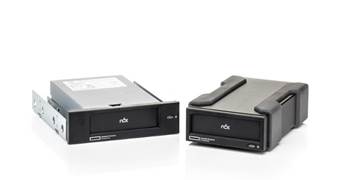
HPE RDX Removable Disk Backup System HPE RDX Removable Disk Backup System is a disk-based back up and recovery solution with unmatched portability, fast recovery and easy integration into a single server or branch office environment. HPE RDX works exceptionally well in harsh work environments where businesses need to protect, manage and transport large amounts of data in less than ideal locations. Complement your cloud backup strategy with a local copy so you can recover quickly and always feel confident your data is never far away. | |||
|
| |||
|
|
| ||
|
Internal & External Dock |
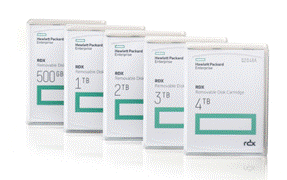
Removable Disk Cartridges | ||
|
|
| ||
|
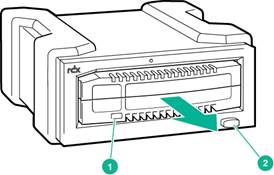
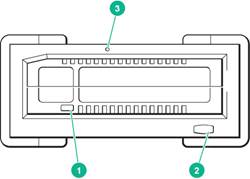
HPE RDX Removable Disk Backup System Front view | |||
|
1 |
Activity LED (located on cartridge)
|
3 |
Emergency eject hole. If the cartridge cannot be ejected with the Eject button, insert the emergency eject pin, included with the product, into the emergency eject hole and gently push to release the cartridge. |
|
2 |
Eject button/power LED
|
|
|
|
| |||
|
|
| ||
|
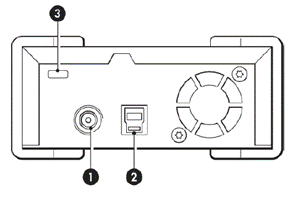
HPE RDX Removable Disk Backup System Rear view | |||
|
1 |
Power socket If two USB 2.0 ports do not provide sufficient power, an external power adapter can be used (power adapter not supplied). For specifications see the RDX User Guide at http://www.hpe.com/support/rdx. |
3 |
Attach point for a Kensington lock located at the rear of the external drive so the unit can be easily secured, if required |
|
2 |
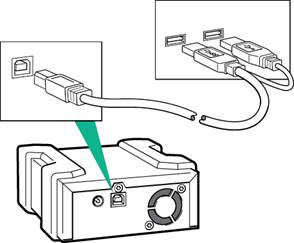
USB 3.0 Port For optimal performance, Hewlett Packard Enterprise recommends connecting the RDX+ drive to a USB 3.0 port. If the host system does not provide enough power from a single USB port, attach both USB connectors to the host computer. |
|
|
|
| |||
|
What's New
|
|||
|
| |||
|
Key Features
|
|||
|
| |||
|
Models | |
|
Description |
SKU |
|
Internal Models |
|
|
HPE RDX Internal Docking Station |
C8S06A |
|
|
|
HPE RDX External |
|
|
HPE RDX External Docking Station |
C8S07B |
|
|
|
| |
Standard Features
|
Compatibility The HPE extensive compatibility testing program assures that your HPE RDX Removable Disk Backup System works with leading servers, operating systems, and backup applications. For the latest list of servers, workstations, operating systems, and backup software that support the HPE RDX Removable Disk Backup System, check the HPE RDX Removable Disk Backup System compatibility pages on our web site at http://www.hpe.com/storage/spock
USB 3.0 is backwards compatible with USB 2.0; however if the host device does not have a USB 3.0 port, the user will not be able to experience the full transfer rate performance that their RDX USB 3.0 system offers. Hewlett Packard Enterprise recommends the following controller for a user who currently only has USB 2.0: Startech 2 port PCI Express SuperSpeed USB 3.0 card. HPE USB 3.0 controllers do not support this product. |
|
|
|
HPE Server/ Storage Compatibility The HPE RDX Removable Disk Backup System is compatible with Hewlett Packard Enterprise servers and storage products. Notes: Please refer to the following web page for further product information: https://www.hpe.com/nz/en/product-catalog/storage/tape-drives-and-enclosures/pip.hpe-storeever-rack-mount-kits.1010748961.html |
|
|
|
ProLiant Servers
DL Series External RDX dock connectivity when USB port is present on server. ML Series
For details and a full list of which HPE RDX Removable Disk Backup System models work with which server and storage systems, including third-party systems, visit: http://www.hpe.com/storage/spock for the latest hardware compatibility information. Notes: Hewlett Packard Enterprise recommends that no more than one HPE RDX Removable Disk Backup System be connected to a system at a time. |
|
|
|
OS Support | |
|
Operating System |
Version |
|
Windows Client & Server Operating Systems |
Windows Server 2016 Standard & Data Center (x86, x64), Windows 10 Home & Pro (x86, x64), Windows Server 2012 R2 (x64), Windows Server 2012 (x64), Windows Small Business Server 2011 (x64), Windows Server 2008 R2 (x64), Windows Server 2008 (x86, x64), Windows Server 2003 R2 (x86, x64), Windows Server 2003 (x86, x64), Windows 8.1 (x86, x64), Windows 8 (x86, x64), Windows 7 (x86, x64) SP1, Windows Vista (x86, x64) SP1 or later, Windows XP (x86) SP2 or later) |
|
Linux Distributions (Kernal ver. 2.6.9 and later) |
RedHat Enterprise Linux |
|
SUSE Linux Enterprise Server | |
|
CentOS Linux | |
|
Fedora Core 5 | |
|
Clear OS | |
|
Apple |
Mac-OS (OS X) 10.3 and up |
|
Virtualization Compatibility |
vSphere 6.5, Windows Server 2012, Hyper-V, KVM, Clear OS, XenServer |
|
Notes: Please visit: http://www.hpe.com/storage/spock for the latest compatibility information. |
|
|
Service and Support
|
Warranty and Services Included with the Product Hewlett Packard Enterprise provides a 3-year, next-day, parts exchange, limited warranty for the HPE RDX/HPE RDX+ Removable Disk Backup System, plus 9x5 phone support for the duration of the warranty.
Hewlett Packard Enterprise warrants only that the Storage software media will be free of physical defects for a period of ninety (90) days from delivery.
For more information about HPE's Global Limited Warranty and Technical Support, visit: http://www.hpe.com/storage/warranty |
|
|
|
Protect your business beyond warranty with HPE Support Services HPE Technology Services delivers confidence, reduces risk and helps customers realize agility and stability. Our integrated portfolio of Services for storage help customers reduce costs, optimize data, streamline storage management, and improve backup and recovery. HPE Support Services enable you to choose the right service level, length of coverage and response time as you purchase your new storage solution, giving you full entitlement for the support for need for your IT and business. |
|
|
|
HPE Services No matter where you are in your digital transformation journey, you can count on HPE Services to deliver the expertise you need when, where and how you need it. From planning to deployment, ongoing operations and beyond, our experts can help you realize your digital ambitions. https://www.hpe.com/services
|
|
|
|
Consulting Services No matter where you are in your journey to hybrid cloud, experts can help you map out your next steps. From determining what workloads should live where, to handling governance and compliance, to managing costs, our experts can help you optimize your operations. https://www.hpe.com/services/consulting
|
|
|
|
HPE Managed Services HPE runs your IT operations, providing services that monitor, operate, and optimize your infrastructure and applications, delivered consistently and globally to give you unified control and let you focus on innovation. HPE Managed Services | HPE
|
|
|
|
Operational services Optimize your entire IT environment and drive innovation. Manage day-to-day IT operational tasks while freeing up valuable time and resources. Meet service-level targets and business objectives with features designed to drive better business outcomes. https://www.hpe.com/services/operational
|
|
|
|
HPE Complete Care Service HPE Complete Care Service is a modular, edge-to-cloud IT environment service designed to help optimize your entire IT environment and achieve agreed upon IT outcomes and business goals through a personalized experience. All delivered by an assigned team of HPE Services experts. HPE Complete Care Service provides:
https://www.hpe.com/services/completecare
|
|
|
|
HPE Tech Care Service HPE Tech Care Service is the operational support service experience for HPE products. The service goes beyond traditional support by providing access to product specific experts, an AI driven digital experience, and general technical guidance to not only reduce risk but constantly search for ways to do things better. HPE Tech Care Service delivers a customer-centric, AI driven, and digitally enabled customer experience to move your business forward. HPE Tech Care Service is available in three response levels. Basic, which provides 9x5 business hour availability and a 2-hour response time. Essential which provides a 15-minute response time 24x7 for most enterprise level customers, and Critical which includes a 6-hour repair commitment where available and outage management response for severity 1 incidents. https://www.hpe.com/services/techcare
|
|
|
|
HPE Lifecycle Services HPE Lifecycle Services provide a variety of options to help maintain your HPE systems and solutions at all stages of the product lifecycle. A few popular examples include:
Notes:
To review the list of Lifecycle Services available for your product
go to:
For a list of the most frequently purchased services using service credits, see the HPE Service Credits Menu |
|
|
|
Other Related Services from HPE Services: HPE Education Services Training and certification designed for IT and business professionals across all industries. Broad catalogue of course offerings to expand skills and proficiencies in topics ranging from cloud and cybersecurity to AI and DevOps. Create learning paths to expand proficiency in a specific subject. Schedule training in a way that works best for your business with flexible continuous learning options. https://www.hpe.com/services/training |
|
|
|
Defective Media Retention An option available with HPE Complete Care Service and HPE Tech Care Service and applies only to Disk or eligible SSD/Flash Drives replaced by HPE due to malfunction. Consult your HPE Sales Representative or Authorized Channel Partner of choice for any additional questions and services options. |
|
|
|
Parts and Materials HPE will provide HPE-supported replacement parts and materials necessary to maintain the covered hardware product in operating condition, including parts and materials for available and recommended engineering improvements. Parts and components that have reached their maximum supported lifetime and/or the maximum usage limitations as set forth in the manufacturer's operating manual, product quick-specs, or the technical product data sheet will not be provided, repaired, or replaced as part of these services. |
|
How to Purchase Services Services are sold by Hewlett Packard Enterprise and Hewlett Packard Enterprise Authorized Service Partners:
|
|
|
|
AI Powered and Digitally Enabled Support Experience Achieve faster time to resolution with access to product-specific resources and expertise through a digital and data driven customer experience Sign into the HPE Support Center experience, featuring streamlined self-serve case creation and management capabilities with inline knowledge recommendations. You will also find personalized task alerts and powerful troubleshooting support through an intelligent virtual agent with seamless transition when needed to a live support agent. https://support.hpe.com/hpesc/public/home/signin |
|
|
|
Consume IT On Your Terms HPE GreenLake edge-to-cloud platform brings the cloud experience directly to your apps and data wherever they are-the edge, colocations, or your data center. It delivers cloud services for on-premises IT infrastructure specifically tailored to your most demanding workloads. With a pay-per-use, scalable, point-and-click self-service experience that is managed for you, HPE GreenLake edge-to-cloud platform accelerates digital transformation in a distributed, edge-to-cloud world.
To learn more about HPE Services, please contact your Hewlett Packard Enterprise sales representative or Hewlett Packard Enterprise Authorized Channel Partner. Contact information for a representative in your area can be found at "Contact HPE" https://www.hpe.com/us/en/contact-hpe.html For more information www.hpe.com/services |
|
|
Configuration Information
|
RDX Models |
|
|
Description |
SKU |
|
Internal Models |
|
|
HPE RDX Internal Docking Station |
C8S06A |
|
|
|
HPE RDX External |
|
|
HPE RDX External Docking Station |
C8S07B |
|
|
|
| |
|
Media |
|
|
HPE RDX 500GB Removable Disk Cartridge |
Q2042A |
|
HPE RDX 1TB Removable Disk Cartridge |
Q2044A |
|
HPE RDX 2TB Removable Disk Cartridge |
Q2046A |
|
HPE RDX 4TB Removable Disk Cartridge |
Q2048A |
|
| |
|
HPE StoreEver 1U Generic Rack Mount Kit |
BC029A |
|
1U USB Rack-Mount Kit holds up to two internal HPE RDX/HPE RDX+ Removable Disk Backup Systems. |
|
|
HPE StoreEver 2m USB 3.0 Type A RDX Drive Cable for 1U Rack Mount Kit |
P03819-B21 |
|
HPE StoreEver 1U Rackmount 2 meter USB 3.0 Type A Cable for one RDX drive. |
|
|
| |
Technical Specifications
|
Performance and Compatibility |
500GB, 1TB, 2TB, 3TB or 4TB
1TB, 2TB, 4TB, 6TB or 8TB Notes: *Assumes 2:1 application based data compression.
Up to 100 MB/s
Up to 200 MB/s Notes: *Assumes 2:1 application based data compression
< 15 ms
NTFS, FAT32, ext2, ext3, ext4 and Mac OS Extended (HFS+)
Windows XP, Windows Vista SP1, Windows 7, Windows 8, Windows Server 2003, Windows Server 2003 R2, Windows Server 2008, Windows Server 2008 R2, Windows Server 2012, Windows Server 2012 R2, Small Business Server 2008, Small Business Server 2011, CentOS Linux, Fedora Core 5, RHEL, SLES, OS X (HPE RDX Compatibility details are available at http://www.hpe.com/storage/spock)
Forward and backward compatible to all RDX drives and systems (Note, a firmware upgrade is required for legacy RDX USB 2.0 drives, for use with 3TB or 4TB cartridges. See http://www.hpe.com/support/rdx). |
|
|
|
Reliability
550,000 hours
1 error per 1014 bits read Load/ Unload Cycles
Minimum of 10,000 Load/Unload cycles
Minimum of 5,000 Load/Unload cycles
1m drop to tile over concrete floor |
|
|
|
Power Specifications and Interface Voltage
+5V or +12V
+5V (USB powered or Power Adaptor) or +12V (Power Adaptor) |
|
|
|
Operating Current during write/read (Typical/Peak)
0.9A / 1. 6A
0.005A
0.9A / 1.6A (powered via USB)
1.2A / 2.4A (powered via Power Adaptor)
0.5A / 1A (powered via Power Adaptor) |
|
|
|
Power Connector
4-Pin Molex
USB 3.0 Y-cable (supplied) or Power Adaptor (not supplied) |
|
|
|
Interface
USB 3.0 SuperSpeed (Type-B connector)
USB 3.0 SuperSpeed (Type-B connector) |
|
|
|
Orientation (Mounting and Operational)
Horizontal or Vertical
Horizontal or Vertical |
|
|
|
Environmental Operating Conditions
+10°C to +40°C (+50°F to +104°F)
0.5G (operating)
20% to 80%, non-condensing
-15 m to 3,048 m (-50 ft to 10,000 ft)
|
|
Non-Operating Conditions
-40°C to +65°C (-40°F to +149°F)
1.0G (non-operating)
8% to 90%, non-condensing
-15 m to 10,660 m (-50 ft to 35,000 ft) |
|
|
|
Archival Conditions
5°C to +26°C (41°F to 78°F)
8% to 90%, non-condensing
25°C (77°F), non-condensing |
|
|
|
Dimensions Product only (no Packaging)
x 5.78 x 6.72 inches (4.14 x 14.60 x 17.07 cm) including bezel
2.04 x 4.32 x 7.00 inches (5.18 x 10.98 x 17.75 cm) including bezel
0.92 x 3.39 x 4.68 inches (2.34 x 8.66 x 11.9 cm) |
|
|
|
Shipping (Product and Packaging)
8.1 x 11.2 x 3.3 inches (20.9 x 28.0 x 8.6 cm)
6.5 x 9.8 x 3.6 inches (16.4 x 25.0 x 9.2 cm)
8.1 x 14.6 x 3.3 inches (20.9 x 37.0 x 8.6 cm)
6.7 x 9.8 x 5.5 inches (17.0 x 25.0 x 14.0 cm)
4.52 x 7.48 x 2.75 inches (11.5 x 19.0 x 7.0 cm) Notes: **System = Drive and Cartridge. |
|
|
|
Weights
1.40 lb (408g)
1.35 lb (615g)
Up to 0.60 lb (272g) HDD dependent |
|
|
|
Shipping (Products and Packaging)
2.38 lb (1080g)
2.28 lb (1036g)
3.08 to 3.37 lb (1395 to 1527g) HDD dependent
3.12 to 3.35 lb (1414 to 1519g) HDD dependent
0.76 lb to 1.04 lb (344g to 470g) HDD dependent Notes: **System = Drive and Cartridge. |
|
|
|
Standards Compliance (all models) | ||
|
SAFETY COMPLIANCE Country |
Regulatory Organization |
Compliant to / mark: |
|
USA |
Underwriters Laboratories (UL) |
UL 60950-1 |
|
EU member nations |
European Committee for Electrotechnical Standardization (CENELEC) |
IEC 60950 / EN60950 |
|
Canada |
Underwriters Laboratories (cUL) |
CAN/CSA C22.2 60950-1 |
|
Germany |
Technischer Überwachungs-Verein (TUV) Rheinland |
IEC 950 / EN60950-01 |
|
Mexico |
Normas Oficiales Mexicanas (NOM), similar to UL |
NOM standards |
|
Singapore |
Productivity and Standards Board (PSB) |
PSB safety certification |
|
South Korea |
JEON |
eK certification |
|
Argentina |
Instituto Argentino de Racionalization de Materiales (IRAM) |
S-Mark safety certification |
|
China |
Chinese Commodity Import Bureau (CCIB) |
CCC safety certification |
|
Member nations of IECEE4 |
IECEE International Electrotechnical Commission on Electrical Equipment (IECEE) for Mutual Recognition of Test Certificates for Electrical Equipment "CB Scheme" |
CB Scheme per IEC 950 / EN60950-01 with details and exceptions for each member country |
|
Russia |
GOSSTANDART (GOST) |
CB Scheme |
|
Malaysia |
JBE SIRIM |
CB Scheme |
|
South Africa |
SABS |
CB Scheme |
|
Israel |
SII |
CB Scheme |
|
Saudi Arabia |
KSA-ICCP |
CB Scheme |
|
Japan |
PSE |
CB Scheme |
|
Taiwan |
Bureau of Commodity Inspection and Quarantine (BSMI) |
BSMI safety certification |
|
Australia / New Zealand |
New South Wales N-mark |
CB Scheme |
|
| ||
Summary of Changes
|
Date |
Version History |
Action |
Description of Change |
|
04-Dec-2023 |
Version 35 |
Changed |
HPE Services Rebranding |
|
01-Nov-2021 |
Version 34 |
Changed |
Service and Support section was updated. |
|
14-Jun-2021 |
Version 33 |
Changed |
Obsolete SKUs were removed. |
|
07-Jun-2021 |
Version 32 |
Changed |
Obsolete SKUs were removed. |
|
06-Jul-2020 |
Version 31 |
Changed |
QuickSpecs layout was updated and Branding Refresh was applied. |
|
06-Apr-2020 |
Version 30 |
Changed |
QuickSpecs layout was updated and Obso SKUs were removed |
|
15-Oct-2018 |
Version 29 |
Changed |
Pre-configured models, Individual models, and Service ans Support were revised. |
|
13-Aug-2018 |
Version 28 |
Changed |
Pre-configured models, Individual models, and Compatibility were revised. |
|
06-Nov-2017 |
Version 27 |
Changed |
Fixed the Tech Specs section. |
|
25-Sept-2017 |
Version 26 |
Changed |
Changes made throughout the QuickSpecs. |
|
08-May-2017 |
Version 25 |
Changed |
Added the Veeam Endpoint, Windows Backup. |
|
27-Mar-2017 |
Version 24 |
Changed |
Changes made throughout the QuickSpecs. |
|
07-Jun-2016 |
Version 23 |
Changed |
Changes made throughout the QuickSpecs. |
|
19-Feb-2016 |
Version 22 |
Changed |
Image on page 1 was updated. |
|
16-Oct-2015 |
Version 21 |
Changed |
Added mention of Yosemite Backup software + Fixed Disk Mode. Added new picture of RDX+ system. Removed DL erver Backup Modules. Removed RDX External Disk Backup Systems. Removed RDX docking Station. Removed mention of CDP software. Removed 320 GB cartridges and systems. Removed mention of any CD's in kit contents. |
|
05-Jun-2015 |
Version 20 |
Changed |
Modified to have RDX+ be a version. Added all previous SKUs that were incorrectly deleted. |
|
01-Jun-2015 |
Version 19 |
Changed |
Added RDX+ SKUs, removed all RDX system and RDX Docking station SKUs. |
|
15-Sep-2014 |
Version 18 |
Changed |
Changed the picture from fist page. |
|
31-Mar-2014 |
Version 17 |
Changed |
Changes made to Overview, What's New, Features and Technical Specifications sections. |
|
25-Mar-2013 |
Version 16 |
Changed |
Changes made to Overview, What's New, Features and Kit Contents sections. |
|
26-Nov-2012 |
Version 15 |
Changed |
Change made to Kit Content titles in Kit Content section. |
|
13-Nov-2012 |
Version 14 |
Changed |
Correction made to the North America and Canada versions only. |
|
12-Oct-2012 |
Version 13 |
Changed |
Change made to the URL in Service and Support, HPE Services operational and Warranty Information section. |
|
21-Sep-2012 |
Version 12 |
Changed |
Change made to the URL in Service and Support, HPE Services operational and Warranty Information section. |
|
14-Sep-2012 |
Version 11 |
Changed |
Changes were made in Compatibility section. |
|
13-Aug-2012 |
Version 10 |
Changed |
Changes made throughout the QuickSpecs. |
|
08-Jun-2011 |
Version 9 |
Removed |
Mentions of StorageWorks were removed. |
|
15-Nov-2010 |
Version 8 |
Changed |
HPE RDX 1TB Removable Disk Backup System was added and HPE RDX 750GB Removable Disk Backup System was removed. HPE ProLiant DL385 G7 Server was added. www.hp.com/storage/spock was added to Compatibility. |
|
27-Sep-2010 |
Version 7 |
Changed |
Kit Contents models were completely revised, Product descriptions were revised in Media and Models were removed from the Overview. |
|
16-Feb-2010 |
Version 6 |
Changed |
Changes made throughout the entire QuickSpecs. |
|
05-Jun-2009 |
Version 5 |
Changed |
Updated the Out of box, Removable Disk Cartridge Weight and Shipping, Removable Disk Cartridge Weight for the HPE RDX 500 and HPE RDX DL380 G6 server module in the Technical Specifications section. |
|
01-Apr-2009 |
Version 4 |
Added |
Added "including the HPE ProLiant DL380 G6 servers" to the Compatibility section. |
|
Date |
Version History |
Action |
Description of Change |
|
30-Mar-2009 |
Version 3 |
Changed |
Revised the Introduction and What's New sections. Other updates made throughout the QuickSpecs. |
|
Added |
Added Model numbers AP724A, AP725A, AP726A. | ||
|
17-Nov-2008 |
Version 2 |
Changed |
Changes made throughout the entire QuickSpecs. |
|
01-Jun-2008 |
Version 1 |
New |
New QuickSpecs. |
Copyright
|
|
| |||||
|
|
|
© Copyright 2023 Hewlett Packard Enterprise Development LP. The information contained herein is subject to change without notice. The only warranties for Hewlett Packard Enterprise products and services are set forth in the express warranty statements accompanying such products and services. Nothing herein should be construed as constituting an additional warranty. Hewlett Packard Enterprise shall not be liable for technical or editorial errors or omissions contained herein.
Microsoft and Windows NT are US registered trademarks of Microsoft Corporation. Intel is a US registered trademark of Intel Corporation. For RDX+ drives and media, 1 GB = 1 billion bytes. Actual formatted capacity is less.
c04111633 - 13036 - Worldwide - V35 - 04-December-2023 |