HPE SimpliVity 380: технические характеристики и документация
|
Shape the Future of QuickSpecs - Your Input Matters | |
|
HPE SimpliVity 380 QuickSpecs
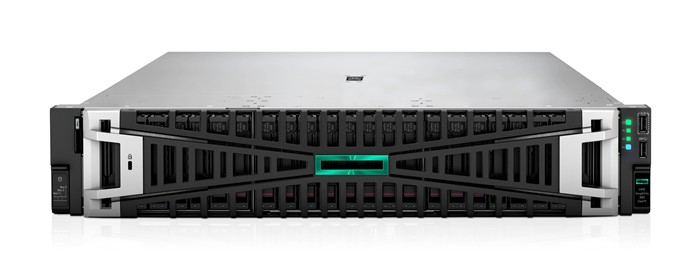
A compact, scalable, 2U rack-mounted building block that delivers integrated server, storage, and storage networking services Adaptable for diverse virtualized workloads, the secure 2U HPE SimpliVity 380 platforms deliver world-class performance with the right balance of expandability and scalability. Delivering advanced efficiency, management, protection, and performance, at a fraction of the cost and complexity of traditional stacks with the HPE SimpliVity 380 - a versatile system now offering a choice of two hypervisors. Customers can select Broadcom VMware or the newly available HPE Morpheus VM Essentials Software, delivering a flexible and cost-effective solution for managing IT infrastructure. |
|
|
| ||||||||
|
HPE SimpliVity 380 Gen11 | ||||||||
|
| ||||||||
|
What's New - HPE SimpliVity 380 Gen11 now supports HPE Morpheus VM Essentials Software - HPE SimpliVity Software 6.0 with HPE Morpheus VM Essentials - HPE SimpliVity Software 5.3.1 with Broadcom VMware - HPE SimpliVity now supports Socket-based Term licensing - Intel 5th Generation Xeon Scalable Processors (Emerald Rapids) - DDR5 Smart Memory - 5600 MT/s - Introducing a new capacity: 7.68 TB SATA SSD PCIe 5.0 support - PCIe - 200 GB NIC adapters - HPE SimpliVity 380 Gen11 now supports HPE Morpheus VM Essential Software
HPE SimpliVity 380 Gen11 supports Broadcom VMware
Section 3: HPE SimpliVity Term Based licensing Every HPE SimpliVity nodes will now have socket-based term licenses which includes HPE SimpliVity Software, HPE VM Essentials Software and Support. Notes: Broadcom VMware licenses must be procured from Broadcom VMware or from an authorized distributor. | ||||||||
|
|
|
Features | ||||||||||||||||||||||||||||||||||||||||||||||||||||||||||||||||||||||||||||||||||||||||
|
HPE SimpliVity 380 Gen11 | ||||||||||||||||||||||||||||||||||||||||||||||||||||||||||||||||||||||||||||||||||||||||
|
Node Size |
2U | |||||||||||||||||||||||||||||||||||||||||||||||||||||||||||||||||||||||||||||||||||||||
|
Processors |
Powered by - | |||||||||||||||||||||||||||||||||||||||||||||||||||||||||||||||||||||||||||||||||||||||
|
Memory |
Up to 8 TB | |||||||||||||||||||||||||||||||||||||||||||||||||||||||||||||||||||||||||||||||||||||||
|
Hypervisor |
HPE Morpheus VM Essentials Software OR | |||||||||||||||||||||||||||||||||||||||||||||||||||||||||||||||||||||||||||||||||||||||
|
Boot Controller |
Choice of Smart Array MR216i-p, MR216i-o or NS204i-p boot controllers | |||||||||||||||||||||||||||||||||||||||||||||||||||||||||||||||||||||||||||||||||||||||
|
Boot Disks |
480 GB SSD Boot disks (Not required with NS204i-p) | |||||||||||||||||||||||||||||||||||||||||||||||||||||||||||||||||||||||||||||||||||||||
|
Storage |
All Flash Storage Options (Read Intensive SSDs) Capacity Options for Broadcom VMware:
Capacity Options for HPE Morpheus VM Essentials
Notes: Currently 9, 12 & 16 Qty of 1.92 TB /3.84/7.68 TB are not supported for HPE Morpheus VM Essentials Currently HPE Morpheus VM Essentials only supports Single Disk Resiliency. Dual Disk Resiliency will be planned for future FTT1 - Fault Tolerance 1, FTT2 - Fault Tolerance 2 Some configurations may require exception approval Usable capacities are approximate based on the disk resiliency chosen *The usable capacities are approximately and rounded to near zero, for actual capacities please refer to SimpliVity sizer
| |||||||||||||||||||||||||||||||||||||||||||||||||||||||||||||||||||||||||||||||||||||||
|
Power Supplies |
HPE 800 W, 1000 W, 1600 W, 1800-2200 W Flex slot power supply Kit | |||||||||||||||||||||||||||||||||||||||||||||||||||||||||||||||||||||||||||||||||||||||
|
Hardware Warranty |
Server Warranty includes 3-Year Parts, 3-Year Labor, 3-Year Onsite support with next business day response | |||||||||||||||||||||||||||||||||||||||||||||||||||||||||||||||||||||||||||||||||||||||
|
Hardware Support |
3-year HPE SimpliVity 380 Gen11 solution support (required) | |||||||||||||||||||||||||||||||||||||||||||||||||||||||||||||||||||||||||||||||||||||||
|
Licenses |
Socket based Term license - 3 Year, 5 Year | |||||||||||||||||||||||||||||||||||||||||||||||||||||||||||||||||||||||||||||||||||||||
|
|
|
Notes: - Warranty for SSDs is subject to maximum usage limitations. Maximum usage limit is the maximum amount of data that can be written to the drive. Drives that have reached this limit will not be eligible for replacement. - Two power supplies per node are required for redundancy. 800 W power supplies are only supported with specific configurations. |
|
|
|
|
|
Benefits HPE InfoSight for HPE SimpliVity enables predictive data analytics For HPE SimpliVity nodes HPE InfoSight is free with no license requirements and provides system details at the federation, cluster, and host level for historic capacity utilization, trends, resource consumption and prediction. Alleviates support issues and reduces operational expenses with automated wellness alerts and case creation. Provides a unified view of HPE SimpliVity assets such as Datastore, VM, Backups, Capacity, and IOPS. It now supports HPE InfoSight for Server Integration for HPE SimpliVity combining the machine learning and predictive analytics of HPE InfoSight with the health and performance monitoring of Active Health System (AHS) and HPE iLO to optimize performance, predict, and prevent problems. This provides automatic collection and analysis of the sensor and telemetry data (for heat fans, DIMMS as examples) from AHS to derive insights from the behaviors of the install base to provide recommendations to resolve problems and improve performance. Fully integrated system Combines x86 resources, storage, and storage networking in a single hyperconverged system. Simplifies management and delivers great cost efficiency and agility with increased visibility and control. Peak and predictable performance The all-flash solution provides predictable and linear performance at near-wire speeds with reduced latency. Inline deduplication, compression, and optimization helps minimize I/O and network traffic, improving performance while delivering great storage and bandwidth efficiency. Scale in and scale out Easily expand or shrink configurations as your needs change. Each node supports a large number of fully protected virtual machines (VMs), with the networked collection of nodes at both local and remote sites managed as a single entity. VM centricity and mobility Enables all actions, policies, and management at the VM level. Global unified management and integration with established administrative systems streamline operations and improve IT agility. TCO reduction Drastically reduce the need to purchase multiple discrete components, optimize storage capacity with guaranteed 10:1 data efficiency, and prevent over-provisioning for performance and capacity with on-demand expansion. Cloud storage HPE SimpliVity with HPE Backup Archive with Cloud Bank Storage allows backing up data to 3rd party cloud services via StoreOnce** Secondary backup HPE SimpliVity with HPE StoreOnce protects data center and distributed edge sites by easily and efficiently replicating applications and data directly to a centralized HPE StoreOnce appliance for compliance and long-term retention requirements. HPE StoreOnce also provides Data Immutability for better protection against ransomware attacks.** Notes: ** Currently not support for HPE Morpheus VM Essentials Software |
|
|
|
Software Overview Pre-integrated Software - HPE SimpliVity Startup Wizard
Virtualization Platform Software and Licenses - HPE SimpliVity 380 Gen11support VMware vSphere ESXi - VMware vSphere installation media is required to complete the installation when ordering HPE SimpliVity 380 Gen11 - Valid licenses for the following VMware software components are required when ordering HPE SimpliVity 380 nodes
|
|
Notes: - HPE SimpliVity 380 supports VMware vSphere & vCenter (Refer to HPE SimpliVity Interop Guide). -
For
VMware and HW compatibility, please visit HPE
Support Center portal
or
|
|
HPE Morpheus VM Essentials Software - Customer registers and activates license key for HPE SimpliVity Software allowing them to install and deploy HPE Morpheus VM Essentails for 5yr or 3yr terms. - HPE Morpheus VM Essentials Software license is embedded as part of the HPE SimpliVity Software license Management for HPE Morpheus VM Essentials Software - HPE InfoSight for HPE SimpliVity - HPE SimpliVity management through VM Essentials Manager Management for Broadcom VMware - HPE InfoSight for HPE SimpliVity - VMware vCenter for Broadcom VMware - HPE SimpliVity management plugin for VMware vCenter - HPE GreenLake Private Cloud Business Edition |
|
|
|
HPE Services No matter where you are in your digital transformation journey, you can count on HPE Services to deliver the expertise you need when, where, and how you need it. From planning to deployment, ongoing operations and beyond, our experts can help you realize your digital ambitions. https://www.HPE.com/services |
|
|
|
Consulting Services No matter where you are in your journey to hybrid cloud, experts can help you map out your next steps. From determining what workloads should live where, to handling governance and compliance, to managing costs, our experts can help you optimize your operations. https://www.HPE.com/services/consulting |
|
|
|
HPE Managed Services HPE runs your IT operations, providing services that monitor, operate, and optimize your infrastructure and applications, delivered consistently and globally to give you unified control and let you focus on innovation. HPE Managed Services | HPE |
|
|
|
Operational services Optimize your entire IT environment and drive innovation. Manage day-to-day IT operational tasks while freeing up valuable time and resources. Meet service-level targets and business objectives with features designed to drive better business outcomes. https://www.HPE.com/services/operational |
|
|
|
HPE Complete Care Service HPE Complete Care Service is a modular, edge-to-cloud IT environment service designed to help optimize your entire IT environment and achieve agreed upon IT outcomes and business goals through a personalized experience. All delivered by an assigned team of HPE Services experts. HPE Complete Care Service provides: - A complete coverage approach -- edge to cloud - An assigned HPE team - Modular and fully personalized engagement - Enhanced Incident Management experience with priority access - Digitally enabled and AI driven customer experience https://www.HPE.com/services/completecare |
|
|
|
HPE Tech Care Service HPE Tech Care Service is the operational support service experience for HPE products. The service goes beyond traditional support by providing access to product specific experts, an AI driven digital experience, and general technical guidance to not only reduce risk but constantly search for ways to do things better. HPE Tech Care Service delivers a customer-centric, AI driven, and digitally enabled customer experience to move your business forward. HPE Tech Care Service is available in three response levels. Basic, which provides 9x5 business hour availability and a 2-hour response time. Essential which provides a 15-minute response time 24x7 for most enterprise level customers, and Critical which includes a 6-hour repair commitment where available and outage management response for severity 1 incidents. https://www.HPE.com/services/techcare |
|
|
|
HPE Lifecycle Services HPE Lifecycle Services provide a variety of options to help maintain your HPE systems and solutions at all stages of the product lifecycle. A few popular examples include: - Lifecycle Install and Startup Services: Various levels for physical installation and power on, remote access setup, installation and startup, and enhanced installation services with the operating system. - HPE Firmware Update Analysis Service: Recommendations for firmware revision levels for selected HPE products, taking into account the relevant revision dependencies within your IT environment. - HPE Firmware Update Implementation Service: Implementation of firmware updates for selected HPE server, storage, and solution products, taking into account the relevant revision dependencies within your IT environment. - Implementation assistance services: Highly trained technical service specialists to assist you with a variety of activities, ranging from design, implementation, and platform deployment to consolidation, migration, project management, and onsite technical forums. - HPE Service Credits: Access to prepaid services for flexibility to choose from a variety of specialized service activities, including assessments, performance maintenance reviews, firmware management, professional services, and operational best practices. Notes: To review the list of Lifecycle Services available for your product go to:
For a list of the most frequently purchased services using service credits, see the HPE Service Credits Menu |
|
|
|
Other Related Services from HPE Services: HPE Education Services Training and certification designed for IT and business professionals across all industries. Broad catalogue of course offerings to expand skills and proficiencies in topics ranging from cloud and cybersecurity to AI and DevOps. Create learning paths to expand proficiency in a specific subject. Schedule training in a way that works best for your business with flexible continuous learning options. https://www.HPE.com/services/training |
|
|
|
Defective Media Retention An option available with HPE Complete Care Service and HPE Tech Care Service and applies only to Disk or eligible SSD/Flash Drives replaced by HPE due to malfunction. Consult your HPE Sales Representative or Authorized Channel Partner of choice for any additional questions and services options. |
|
|
|
Parts and Materials HPE will provide HPE-supported replacement parts and materials necessary to maintain the covered hardware product in operating condition, including parts and materials for available and recommended engineering improvements.
Parts and components that have reached their maximum supported lifetime and/or the maximum usage limitations as set forth in the manufacturer's operating manual, product quick-specs, or the technical product data sheet will not be provided, repaired, or replaced as part of these services. |
|
|
|
How to Purchase Services Services are sold by Hewlett Packard Enterprise and Hewlett Packard Enterprise Authorized Service Partners: - Services for customers purchasing from HPE or an enterprise reseller are quoted using HPE order configuration tools. - Customers purchasing from a commercial reseller can find services at https://ssc.HPE.com/portal/site/ssc/ |
|
|
|
AI Powered and Digitally Enabled Support Experience Achieve faster time to resolution with access to product-specific resources and expertise through a digital and data driven customer experience.
Sign into the HPE Support Center experience, featuring streamlined self-serve case creation and management capabilities with inline knowledge recommendations. You will also find personalized task alerts and powerful troubleshooting support through an intelligent virtual agent with seamless transition when needed to a live support agent. https://support.HPE.com/hpesc/public/home/signin |
|
|
|
Consume IT On Your Terms HPE GreenLake edge-to-cloud platform brings the cloud experience directly to your apps and data wherever they are-the edge, co-locations, or your data center. It delivers cloud services for on-premises IT infrastructure specifically tailored to your most demanding workloads. With a pay-per-use, scalable, point-and-click self-service experience that is managed for you, HPE GreenLake edge-to-cloud platform accelerates digital transformation in a distributed, edge-to-cloud world. - Gain faster time to market - Save on TCO, align costs to business - Scale quickly, meet unpredictable demand - Simplify IT operations across your data centers and clouds To learn more about HPE Services, please contact your Hewlett Packard Enterprise sales representative or Hewlett Packard Enterprise Authorized Channel Partner. Contact information for a representative in your area can be found at "Contact HPE" https://www.HPE.com/us/en/contact-HPE.html
For more information http://www.HPE.com/services |
|
|
|
HPE SimpliVity 380 Gen11: Overview for New System Use the following steps to order a new HPE SimpliVity 380 Gen11 system: processors, memory, storage, networking, power, other optional HW Step 1: Begin with the selection of Node & Hypervisor Step 2: Select the license Term Step 3: Select the hardware options to add to the base node: processors, memory, storage, networking, power, other optional HW Step 4: The software license that corresponds to the node configuration will be automatically added Step 5: Select service and support. | |
|
| |
|
Step 1: Begin with the base node | |
|
Base Node Action: - Select the Node & Hypervisor option
- User selection required for license Term |
|
|
Description |
SKU |
|
HPE SimpliVity 380 Gen11 8SFF Configure-to-order Node |
S2V30C |
|
HPE SimpliVity FIO SW VMware |
S6C61A |
|
HPE SimpliVity FIO SW VM Essentials |
S6C62A |
|
HPE SimpliVity 380 Gen11 Configure-to-order Solution Tracking |
S2V22C |
|
HPE SimpliVity 380 Gen11 1 Processor 3-year E-LTU |
S6C67AAE |
|
HPE SimpliVity 380 Gen11 2 Processors 3-year E-LTU |
S6C68AAE |
|
HPE SimpliVity 380 Gen11 1 Processor 5-year E-LTU |
S6C71AAE |
|
HPE SimpliVity 380 Gen11 2 Processors 5-year E-LTU |
S6C72AAE |
|
Notes: Please note the E-LTU SKUs are not user selectable. Depending on the CPU configured, one of the two E-LTUs will be added by the configurator for the SW licensing. | |
|
Step 2: Select the hardware options to add to the base node Notes: At least 1 Disk resiliency SKU is needed | |
|
| |
|
Disk Resiliency Type |
SKU |
|
HPE SimpliVity Node Tracking with Single Disk Resiliency |
S3B77A |
|
HPE SimpliVity Node Tracking with Dual Disk Resiliency |
S3B78A |
|
Notes: Currently HPE SimpliVity with HPE Morpheus VM essentials only supports Single Disk Resiliency
Processors | |
|
5th Generation Intel® Xeon® Scalable Processors Action: - Select CPUs for the node | |
|
| |
|
Platinum |
SKU | ||
|
Intel Xeon-Platinum 8558 2.1 GHz 48-core 330 W Processor for HPE |
P67097-B21 | ||
|
Intel Xeon-Platinum 8558P 2.7 GHz 48-core 350 W Processor for HPE |
P67108-B21 | ||
|
Intel Xeon-Platinum 8558U 2.0 GHz 48-core 300 W Processor for HPE |
P67102-B21 | ||
|
Intel Xeon-Platinum 8562Y+ 2.8 GHz 32-core 300 W Processor for HPE |
P67085-B21 | ||
|
Intel Xeon-Platinum 8568Y+ 2.3 GHz 48-core 350 W Processor for HPE |
P67086-B21 | ||
|
Intel Xeon-Platinum 8570 2.1 GHz 56-core 350 W Processor for HPE |
P67087-B21 | ||
|
Intel Xeon-Platinum 8580 2.0 GHz 60-core 350 W Processor for HPE |
P67088-B21 | ||
|
Intel Xeon-Platinum 8581 V 2.0 GHz 60-core 270 W Processor for HPE |
P67109-B21 | ||
|
Intel Xeon-Platinum 8592 V 2.0 GHz 64-core 330 W Processor for HPE |
P67107-B21 | ||
|
Intel Xeon-Platinum 8592+ 1.9 GHz 64-core 350 W Processor for HPE |
P67089-B21 | ||
|
Gold |
SKU | ||
|
Intel Xeon-Gold 5515+ 3.2 GHz 8-core 165 W Processor for HPE |
P67079-B21 | ||
|
Intel Xeon-Gold 5520+ 2.2 GHz 28-core 205 W Processor for HPE |
P67094-B21 | ||
|
Intel Xeon-Gold 6526Y 2.8 GHz 16-core 195 W Processor for HPE |
P67080-B21 | ||
|
Intel Xeon-Gold 6530 2.1 GHz 32-core 270 W Processor for HPE |
P67095-B21 | ||
|
Intel Xeon-Gold 6534 3.9 GHz 8-core 195 W Processor for HPE |
P67083-B21 | ||
|
Intel Xeon-Gold 6538Y+ 2.2 GHz 32-core 225 W Processor for HPE |
P67096-B21 | ||
|
Intel Xeon-Gold 6542Y 2.9 GHz 24-core 250 W Processor for HPE |
P67081-B21 | ||
|
Intel Xeon-Gold 6544Y 3.6 GHz 16-core 270 W Processor for HPE |
P67084-B21 | ||
|
Intel Xeon-Gold 6548Y+ 2.5 GHz 32-core 250 W Processor for HPE |
P67082-B21 | ||
|
Intel Xeon-Gold 6554S 2.2 GHz 36-core 270 W Processor for HPE |
P67110-B21 | ||
|
Silver |
SKU | ||
|
Intel Xeon-Silver 4509Y 2.6 GHz 8-core 125 W Processor for HPE |
P67090-B21 | ||
|
Intel Xeon-Silver 4510 2.4 GHz 12-core 150 W Processor for HPE |
P67091-B21 | ||
|
Intel Xeon-Silver 4514Y 2.0 GHz 16-core 150 W Processor for HPE |
P67092-B21 | ||
|
Intel Xeon-Silver 4516Y+ 2.2 GHz 24-core 185 W Processor for HPE |
P67093-B21 | ||
|
Notes: All Intel Xeon 5th Gen processors require PC5-5600B Memory.
| |||
|
Memory | |||
|
Action: Select a memory capacity for the node The appropriate memory and quantity will be included by the configurator 1 Kit required per CPU
| |||
|
DDR5 Registered DIMMs (RDIMMs) → DDR5-5600 for Intel 5th Gen Xeon Processors (Emerald Rapids) |
SKU | ||
|
HPE 16 GB (1x16GB) Single Rank x8 DDR5-5600 CAS-46-45-45 EC8 Registered Smart Memory Kit |
P64705-B21 | ||
|
HPE 32 GB (1x32GB) Dual Rank x8 DDR5-5600 CAS-46-45-45 EC8 Registered Smart Memory Kit |
P64706-B21 | ||
|
HPE 64 GB (1x64GB) Dual Rank x4 DDR5-5600 CAS-46-45-45 EC8 Registered Smart Memory Kit |
P64707-B21 | ||
|
HPE 128 GB (1x128GB) Quad Rank x4 DDR5-5600 CAS-52-45-45 EC8 Registered 3DS Smart Memory Kit |
P64709-B21 | ||
|
HPE 256 GB (1x256GB) Octal Rank x4 DDR5-5600 CAS-52-45-45 EC8 Registered 3DS Smart Memory Kit |
P64710-B21 | ||
|
Notes: Please note Intel 5th Gen Xeon Processor supports DDR-5600 Memory Kits only
| |||
|
Boot SSD Drives |
SKU | ||
|
HPE SimpliVity 480 GB SATA 6G Read Intensive SFF BC Multi Vendor SSD |
S1J86A | ||
|
HPE SimpliVity 960 GB SATA 6G Read Intensive SFF BC Multi Vendor SSD |
S1J87A | ||
|
Notes: - User must select qty2 of the same type of HDD/SSD - If selecting NS204i-u Controller, there is no need to select boot SSDs since NS204i-u it comes with NVMe drives | |||
|
| |||
|
Storage Controllers |
SKU | ||
|
HPE SR932i-p Gen11 x32 Lanes 8 GB Wide Cache PCI SPDM Plug-in Storage Controller |
P47184-B21 | ||
|
Notes: User must select qty1 of the same type of Storage controller from the above options | |||
|
| |||
|
Storage Drives |
SKU | ||
|
HPE SimpliVity 1.92 TB SATA 6G Read Intensive SFF BC Multi Vendor SSD |
S1J88A | ||
|
HPE SimpliVity 3.84 TB SATA 6G Read Intensive SFF BC Multi Vendor SSD |
S1J89A | ||
|
HPE 7.68 TB SATA 6G Read Intensive SFF BC Multi Vendor SSD |
P40501-K21 | ||
|
Notes: User must select qty1 of the same type of Storage controller from the above options | |||
|
| |||
|
1.92 TB SSD Options
- If S2V30C Broadcom VMware Hypervisor is selected - If S2V30CHPE Morpheus VM Essentials Hypervisor is selected Qty 6, 8 of S1J89A is selectable for HPE SimpliVity 380 Gen11
3.84 TB SSD Options
- If S2V30C Broadcom VMware Hypervisor is selected - If S2V30C HPE Morpheus VM Essentials Hypervisor is selected Qty 6, 8 of S1J89A is selectable for HPE SimpliVity 380 Gen11
- If S2V30C Broadcom VMware Hypervisor is selected - If S2V30C HPE Morpheus VM Essentials Hypervisor is selected Qty 6, 8 of S1J89A is selectable for HPE SimpliVity 380 Gen11
Notes: Some configurations may require exception approval | |||
|
| |||
Notes: Usable capacity is the capacity available after RAID and system overheads have been removed, before deduplication and compression is applied. In the case of Dual Disk Resiliency the usable capacity will be different The usable capacities are approximately and rounded to near zero, for actual capacities please refer to SimpliVity Sizer
| ||||||||||||||||||||||||||||||||||||||||||||||||||||||||||||||||||||||||||||||||||||||||||||||
|
Power Supplies |
SKU | |||||||||||||||||||||||||||||||||||||||||||||||||||||||||||||||||||||||||||||||||||||||||||||
|
HPE 800 W Flex Slot Platinum Hot Plug Low Halogen Power Supply Kit |
P38995-B21 | |||||||||||||||||||||||||||||||||||||||||||||||||||||||||||||||||||||||||||||||||||||||||||||
|
HPE 1000 W Flex Slot Titanium Hot Plug Power Supply Kit |
P03178-B21 | |||||||||||||||||||||||||||||||||||||||||||||||||||||||||||||||||||||||||||||||||||||||||||||
|
HPE 1600 W Flex Slot Platinum Hot Plug Low Halogen Power Supply Kit |
P38997-B21 | |||||||||||||||||||||||||||||||||||||||||||||||||||||||||||||||||||||||||||||||||||||||||||||
|
HPE 1600 W Flex Slot -48VDC Hot Plug Power Supply Kit |
P17023-B21 | |||||||||||||||||||||||||||||||||||||||||||||||||||||||||||||||||||||||||||||||||||||||||||||
|
HPE 1800 W -2200 W Flex Slot Titanium Hot Plug Power Supply Kit |
P44712-B21 | |||||||||||||||||||||||||||||||||||||||||||||||||||||||||||||||||||||||||||||||||||||||||||||
|
Notes: - The power supply requirements can vary based on configuration and environment 800" Power Supply is only Supported with specific configurations. Please refer to HPE Power Advisor for proper power sizing. - All configured nodes whip with a standard 6 foot IEC C-13/C-14 jumper cord (A0K02a). This jumper cord is also Included with each standard AC power supply option kit. If a different power cord is required, please check the ProLiant Power Cables web page: https://h20195.www2.HPE.com/v2/getpdf.aspx/4AA6-6836ENW.pdf | |||
|
| |||
|
Networking | |||
|
PCIe NIC Adapters |
SKU | ||
|
Intel E810-XXVDA2 Ethernet 10/25 GB 2-port SFP28 Adapter for HPE |
P08443-B21 | ||
|
Intel E810-XXVDA4 Ethernet 10/25 GB 4-port SFP28 Adapter for HPE |
P08458-B21 | ||
|
Intel I350-T4 Ethernet 1 GB 4-port BASE-T Adapter for HPE |
P21106-B21 | ||
|
Intel E810-CQDA2 Ethernet 100 GB 2-port QSFP28 Adapter for HPE |
P21112-B21 | ||
|
Broadcom BCM57416 Ethernet 10 GB 2-port BASE-T Adapter for HPE |
P26253-B21 | ||
|
Broadcom BCM57412 Ethernet 10 GB 2-port SFP+ Adapter for HPE |
P26259-B21 | ||
|
Broadcom BCM57414 Ethernet 10/25 GB 2-port SFP28 Adapter for HPE |
P26262-B21 | ||
|
Broadcom BCM57504 Ethernet 10/25 GB 4-port SFP28 Adapter for HPE |
P26264-B21 | ||
|
Mellanox MCX631102AS-ADAT Ethernet 10/25 GB 2-port SFP28 Adapter for HPE |
P42044-B21 | ||
|
Mellanox MCX623106AS-CDAT Ethernet 100 GB 2-port QSFP56 Adapter for HPE |
P25960-B21 | ||
|
Broadcom BCM5719 Ethernet 1 GB 4-port BASE-T Adapter for HPE |
P51178-B21 | ||
|
|
OCP Network Adapters |
SKU | |
|
|
Broadcom BCM57416 Ethernet 10 GB 2-port BASE-T OCP3 Adapter for HPE |
P10097-B21 | |
|
|
Intel E810-XXVDA2 Ethernet 10/25 GB 2-port SFP28 OCP3 Adapter for HPE |
P10106-B21 | |
|
|
Broadcom BCM57414 Ethernet 10/25 GB 2-port SFP28 OCP3 Adapter for HPE |
P10115-B21 | |
|
|
Intel E810-CQDA2 Ethernet 100 GB 2-port QSFP28 OCP3 Adapter for HPE |
P22767-B21 | |
|
|
Broadcom BCM57412 Ethernet 10 GB 2-port SFP+ OCP3 Adapter for HPE |
P26256-B21 | |
|
|
Broadcom BCM57504 Ethernet 10/25 GB 4-port SFP28 OCP3 Adapter for HPE |
P26269-B21 | |
|
|
Mellanox MCX631432AS-ADAI Ethernet 10/25 GB 2-port SFP28 OCP3 Adapter for HPE |
P42041-B21 | |
|
|
Intel I350-T4 Ethernet 1 GB 4-port BASE-T OCP3 Adapter for HPE |
P08449-B21 | |
|
|
Broadcom BCM5719 Ethernet 1 GB 4-port BASE-T OCP3 Adapter for HPE |
P51181-B21 | |
|
|
Fiber Channel Host Bus Adapters |
SKU | |
|
|
HPE SN1610Q 32 GB 1-port Fibre Channel Host Bus Adapter |
R2E08A | |
|
|
HPE SN1610Q 32 GB 2-port Fibre Channel Host Bus Adapter |
R2E09A | |
|
|
HPE SN1610E 32 GB 1-port Fibre Channel Host Bus Adapter |
R2J62A | |
|
|
HPE SN1610E 32 GB 2-port Fibre Channel Host Bus Adapter |
R2J63A | |
|
|
HPE SN1700E 64 GB 1-port Fibre Channel Host Bus Adapter |
R7N77A | |
|
|
HPE SN1700E 64 GB 2-port Fibre Channel Host Bus Adapter |
R7N78A | |
|
|
Notes: -
Please
refer to the
ProLiant
Gen11 QuickSpecs
- - All the HBA cards to be managed outside of SimpliVity manageability and orchestration. | ||
|
|
| ||
|
Networking Upgrades |
SKU |
|
HPE ProLiant DL3XX Gen11 OCP1 x16 Enablement Kit |
P48827-B21 |
|
HPE ProLiant DL3XX Gen11 OCP2 x16 Enablement Kit |
P48828-B21 |
|
HPE ProLiant DL3XX Gen11 CPU2 to OCP2 x8 Enablement Kit |
P48830-B21 |
|
HPE ProLiant DL360 Gen11 CPU1 to OCP2 x8 Enablement Kit |
P51911-B21 |
|
Graphics |
SKU |
|
NVIDIA A16 64 GB PCIe Non-CEC Accelerator for HPE |
R8T26C |
|
NVIDIA L4 24 GB PCIe Accelerator for HPE |
S0K89C |
|
NVIDIA L40 48 GB PCIe Accelerator for HPE |
S0K90C |
|
NVIDIA L40S 48 GB PCIe Accelerator |
S2L70C |
|
Intel Data Center GPU Max 1100 48 GB Accelerator for HPE |
S1T66C |
|
Notes: For NVIDIA H100 & L40S support please reach out to HPE representative | |
|
| |
|
Step 3: The software license that corresponds to the node configuration will be automatically added. | |
|
HPE SimpliVity Software Action: Based on the number of CPUs and Qty of drives in the node, the appropriate software will be included by the configurator New SimpliVity license is based on the incremental factor of 1.92 For every 1.92 TB SSD- Qty 1 of license SKU is added For every 3.84 TB SSD- Qty 2 of license SKU is added For every 7.68 TB SSD- Qty 4 of license SKU is added | |
|
Description |
SKU |
Drive Configs |
Qty |
|
HPE SimpliVity 380 Gen11 1 Processor Low 3-year E-LTU |
S6C81AAE |
6x 1.92 TB |
6 |
|
8x 1.92 TB |
8 | ||
|
9x 1.92 TB |
9 | ||
|
12x 1.92 TB |
12 | ||
|
16x 1.92 TB |
16 | ||
|
6x 3.84 TB |
12 | ||
|
8x 3.84 TB |
16 | ||
|
HPE SimpliVity 380 Gen11 1 Processor High 3-year E-LTU |
S6C82AAE |
9x 3.84 TB |
18 |
|
12x 3.84 TB |
24 | ||
|
16x 3.84 TB |
32 | ||
|
6x 7.68 TB |
24 | ||
|
8x 7.68 TB |
32 | ||
|
9x 7.68 TB |
36 | ||
|
12x 7.68 TB |
48 | ||
|
16x 7.68 TB |
64 | ||
|
HPE SimpliVity 380 Gen11 2 Processors Low 3-year E-LTU |
S6C83AAE |
6x 1.92 TB |
6 |
|
8x 1.92 TB |
8 | ||
|
9x 1.92 TB |
9 | ||
|
12x 1.92 TB |
12 | ||
|
16x 1.92 TB |
16 | ||
|
6x 3.84 TB |
12 | ||
|
8x 3.84 TB |
16 | ||
|
HPE SimpliVity 380 Gen11 2 Processors High 3-year E-LTU |
S6C84AAE |
9x 3.84 TB |
18 |
|
12x 3.84 TB |
24 | ||
|
16x 3.84 TB |
32 | ||
|
6x 7.68 TB |
24 | ||
|
8x 7.68 TB |
32 | ||
|
9x 7.68 TB |
36 | ||
|
12x 7.68 TB |
48 | ||
|
16x 7.68 TB |
64 |
|
Description |
SKU |
Drive Configs |
Qty |
|
HPE SimpliVity 380 Gen11 1 Processor Low 5-year E-LTU |
S6C89AAE |
6x 1.92 TB |
6 |
|
8x 1.92 TB |
8 | ||
|
9x 1.92 TB |
9 | ||
|
12x 1.92 TB |
12 | ||
|
16x 1.92 TB |
16 | ||
|
6x 3.84 TB |
12 | ||
|
8x 3.84 TB |
16 | ||
|
HPE SimpliVity 380 Gen11 1 Processor High 5-year E-LTU |
S6C90AAE |
9x 3.84 TB |
18 |
|
12x 3.84 TB |
24 | ||
|
16x 3.84 TB |
32 | ||
|
6x 7.68 TB |
24 | ||
|
8x 7.68 TB |
32 | ||
|
9x 7.68 TB |
36 | ||
|
12x 7.68 TB |
48 | ||
|
16x 7.68 TB |
64 | ||
|
HPE SimpliVity 380 Gen11 2 Processors Low 5-year E-LTU |
S6C91AAE |
6x 1.92 TB |
6 |
|
8x 1.92 TB |
8 | ||
|
9x 1.92 TB |
9 | ||
|
12x 1.92 TB |
12 | ||
|
16x 1.92 TB |
16 | ||
|
6x 3.84 TB |
12 | ||
|
8x 3.84 TB |
16 | ||
|
HPE SimpliVity 380 Gen11 2 Processors High 5-year E-LTU |
S6C92AAE |
9x 3.84 TB |
18 |
|
12x 3.84 TB |
24 | ||
|
16x 3.84 TB |
32 | ||
|
6x 7.68 TB |
24 | ||
|
8x 7.68 TB |
32 | ||
|
9x 7.68 TB |
36 | ||
|
12x 7.68 TB |
48 | ||
|
16x 7.68 TB |
64 |
|
Notes: The License SKU is not user orderable, based on the CPU and Drive Qty selection, HPE configurator adds the corresponding type of license with the required Qty automatically. - Low count refers to calculation factor of 1.92 with Qty less than or equal to 16 - High count refers to calculation factor of 1.92 with Qty more than 16 Examples on how the license SKUs are derived/denoted - |
|
Node Config |
Licenses required |
|
3 Year Term License | |
|
1P | |
|
1P 380 Gen 11 6 SSD 1.92 TB |
1 Qty S6C67AAE & 6 Qty S6C81AAE |
|
1P 380 Gen 11 6 SSD 3.84 TB |
1 Qty S6C67AAE & 12 Qty S6C81AAE |
|
1P 380 Gen 11 9 SSD 3.84 TB |
1 Qty S6C67AAE & 18 Qty S6C82AAE |
|
1P 380 Gen 11 12 SSD 3.84 TB |
1 Qty S6C67AAE & 24 Qty S6C82AAE |
|
1P 380 Gen 11 12 SSD 7.68 TB |
1 Qty S6C67AAE & 48 Qty S6C82AAE |
|
2P | |
|
2P 380 Gen 11 6 SSD 1.92 TB - |
1 Qty S6C68AAE & 6 Qty S6C83AAE |
|
2P 380 Gen 11 6 SSD 3.84 TB |
1 Qty S6C68AAE & 12 Qty S6C83AAE |
|
2P 380 Gen 11 9 SSD 3.84 TB |
1 Qty S6C68AAE & 18 Qty S6C84AAE |
|
2P 380 Gen 11 12 SSD 3.84 TB |
1 Qty S6C68AAE & 24 Qty S6C84AAE |
|
2P 380 Gen 11 12 SSD 7.68 TB |
1 Qty S6C68AAE & 48 Qty S6C84AAE |
|
| |
|
HPE SimpliVity 380 Gen10 Storage Expansion Overview for Broadcom VMware Step 1: Start with the Expansion Kit SKU Action: Select the Expansion SKU. | |
|
Description |
SKU |
|
HPE SimpliVity 380 Gen10 Expansion Kit |
R1F85A |
|
| |
|
| |
|
Step 2: If Storage expansion is needed, add the SW license from below that correlates to the desired expansion configuration Action: Select the appropriate SW license according to the desired storage expansion configuration. | |
|
Description |
SKU |
|
HPE SimpliVity 380 1 Processor Small to Medium Storage Upgrade E-LTU |
R1F86AAE |
|
HPE SimpliVity 380 2 Processors Small to Medium Storage Upgrade E-LTU |
R1F88AAE |
|
HPE SimpliVity 380 1 Processor Medium to Large Storage Upgrade E-LTU |
R1F87AAE |
|
HPE SimpliVity 380 2 Processors Medium to Large Storage Upgrade E-LTU |
R1F89AAE |
|
If a CPU add-on is needed, choose from the SW license below that correlate to the desired configuration for adding a second CPU Action: Select the appropriate SW license if you would like to add a second CPU to an existing 1P SimpliVity 380 node.
| |
|
Description |
SKU |
|
HPE SimpliVity 380 Additional Processor Extra Small Storage Upgrade E-LTU |
R1F90AAE |
|
HPE SimpliVity 380 Additional Processor Small Storage Upgrade E-LTU |
R1F91AAE |
|
HPE SimpliVity 380 Additional Processor Medium Storage Upgrade E-LTU |
R1F92AAE |
|
HPE SimpliVity 380 Additional Processor Large Storage Upgrade E-LTU |
R1F93AAE |
|
HPE SimpliVity 380 Additional Processor Extra Large Storage Upgrade E-LTU |
R1F94AAE |
|
| |
|
Step 3: Select the hardware options to add either the storage drive kits or additional CPU and memory Action: Select the appropriate storage upgrade kits based on the desired storage expansion configuration. | |
|
Description |
SKU |
|
HPE SimpliVity 1.92 TB SATA 6G Read Intensive SFF SC Multi Vendor SSD |
S1J84A |
|
HPE SimpliVity 1.92 TB SATA 6G Read Intensive SFF SC Multi Vendor SSD |
S1J84A |
|
HPE SimpliVity 1.92 TB SATA 6G Mixed Use SFF SC Multi Vendor SSD |
S1J92A |
|
HPE SimpliVity 1.92 TB SATA 6G Mixed Use SFF SC Multi Vendor SSD |
S1J92A |
|
| |
|
Action: Select these storage option if upgrading from a Small to a Medium configuration | |
|
HPE Smart Array P816i-a SR Gen10 (16 Internal Lanes/4 GB Cache/SmartCache) 12G SAS Modular Controller |
804338-B21 |
|
| |
|
Action: Select the appropriate CPU for performing the CPU add-on to your existing 1P SimpliVity 380 nodes (from the list at the top of the QuickSpecs) | |
|
|
|
Step 4: Select service and support to perform the storage upgrade, migration, install and redeployment HPE provides a full range of support offers for these products. Tech Care is the minimum level of support, but Complete Care is also available.
Contact your local sales representative or channel partner for more details.
Installation services are required for these products. HA124A1#5ZD needs to be ordered in a quantity matching the sum of the software SKUs from Step 2. |
|
|
|
HPE SimpliVity 380 G: Storage Expansion/CPU add-on Overview Use the following steps to expand Storage or perform a CPU add-on for your existing SimpliVity 380 G node: Step 1: Start with the Expansion SKU Step 2: Add the SW license that correlates to either a storage expansion or a CPU add-on configuration Step 3: Select the hardware options to add either the storage drive kits or additional CPU and memory Step 4: Select service and support to perform the storage upgrade, migration, install and redeployment |
|
|
|
Step 1: Start with the Expansion Kit SKU Action: Select the Expansion SKU then select ONLY ONE of the Disk Resiliency SKUs | ||
|
Description |
SKU |
|
|
HPE SimpliVity 380 Gen10 G Expansion Kit |
R6U13A |
|
|
HPE SimpliVity Node Tracking with Dual Disk Resiliency |
R9Z79A |
|
|
HPE SimpliVity Node Tracking with Single Disk Resiliency |
R9Z80A |
|
|
| ||
|
Step 2: If Storage expansion is needed, add the SW license from below that correlates to the desired expansion configuration Action: Select the appropriate SW license according to the desired storage expansion configuration.
Choose from one of the following Redeployment Storage Expansion choices - 380G x6 SSD > 380G x8 SSD - 380G x6 SSD > 380G x9 SSD - 380G x6 SSD > 380G x12 SSD - 380G x6 SSD > 380G x16 SSD - 380G x6 SSD > 380G x18 SSD - 380G x8 SSD > 380G x24 SSD - 380G x8 SSD > 380G x9 SSD - 380G x8 SSD > 380G x12 SSD - 380G x8 SSD > 380G x16 SSD - 380G x8 SSD > 380G x18 SSD - 380G x8 SSD > 380G x24 SSD - 380G x9 SSD > 380G x12 SSD - 380G x9 SSD > 380G x18 SSD - 380G x9 SSD > 380G x24 SSD - 380G x12 SSD > 380G x16 SSD - 380G x12 SSD > 380G x18 SSD - 380G x12 SSD > 380G x24 SSD - 380G x16 SSD > 380G x18 SSD - 380G x16 SSD > 380G x24 SSD - 380G x18 SSD > 380G x24 SSD | ||
|
Description |
SKU | ||
|
HPE SimpliVity 380 G 1 Processor 1.92 TB 6-pack to 8-pack Upgrade E-RTU |
S1N25AAE | ||
|
HPE SimpliVity 380 G 1 Processor 1.92 TB 6-pack to 9-pack Upgrade E-RTU |
S1N26AAE | ||
|
HPE SimpliVity 380 G 1 Processor 1.92 TB 6-pack to 12-pack Upgrade E-RTU |
S1N27AAE | ||
|
HPE SimpliVity 380 G 1 Processor 1.92 TB 6-pack to 16-pack Upgrade E-RTU |
S1N28AAE | ||
|
HPE SimpliVity 380 G 1 Processor 1.92 TB 6-pack to 18-pack Upgrade E-RTU |
S1N29AAE | ||
|
HPE SimpliVity 380 G 1 Processor 1.92 TB 6-pack to 24-pack Upgrade E-RTU |
S1N30AAE | ||
|
HPE SimpliVity 380 G 1 Processor 1.92 TB 8-pack to 9-pack Upgrade E-RTU |
S1N31AAE | ||
|
HPE SimpliVity 380 G 1 Processor 1.92 TB 8-pack to 12-pack Upgrade E-RTU |
S1N32AAE | ||
|
HPE SimpliVity 380 G 1 Processor 1.92 TB 8-pack to 16-pack Upgrade E-RTU |
S1N33AAE | ||
|
Description |
SKU | ||
|
HPE SimpliVity 380 G 1 Processor 1.92 TB 8-pack to 18-pack Upgrade E-RTU |
S1N34AAE | ||
|
HPE SimpliVity 380 G 1 Processor 1.92 TB 8-pack to 24-pack Upgrade E-RTU |
S1N35AAE | ||
|
HPE SimpliVity 380 G 1 Processor 1.92 TB 9-pack to 12-pack Upgrade E-RTU |
S1N36AAE | ||
|
HPE SimpliVity 380 G 1 Processor 1.92 TB 9-pack to 16-pack Upgrade E-RTU |
S1N37AAE | ||
|
HPE SimpliVity 380 G 1 Processor 1.92 TB 9-pack to 18-pack Upgrade E-RTU |
S1N38AAE | ||
|
HPE SimpliVity 380 G 1 Processor 1.92 TB 9-pack to 24-pack Upgrade E-RTU |
S1N39AAE | ||
|
HPE SimpliVity 380 G 1 Processor 1.92 TB 12-pack to 16-pack Upgrade E-RTU |
S1N40AAE | ||
|
HPE SimpliVity 380 G 1 Processor 1.92 TB 12-pack to 18-pack Upgrade E-RTU |
S1N41AAE | ||
|
HPE SimpliVity 380 G 1 Processor 1.92 TB 12-pack to 24-pack Upgrade E-RTU |
S1N42AAE | ||
|
HPE SimpliVity 380 G 1 Processor 1.92 TB 16-pack to 18-pack Upgrade E-RTU |
S1N43AAE | ||
|
HPE SimpliVity 380 G 1 Processor 1.92 TB 16-pack to 24-pack Upgrade E-RTU |
S1N44AAE | ||
|
HPE SimpliVity 380 G 1 Processor 1.92 TB 18-pack to 24-pack Upgrade E-RTU |
S1N45AAE | ||
|
HPE SimpliVity 380 G 2 Processors 1.92 TB 6-pack to 8-pack Upgrade E-RTU |
S1N67AAE | ||
|
HPE SimpliVity 380 G 2 Processors 1.92 TB 6-pack to 9-pack Upgrade E-RTU |
S1N68AAE | ||
|
HPE SimpliVity 380 G 2 Processors 1.92 TB 6-pack to 12-pack Upgrade E-RTU |
S1N69AAE | ||
|
HPE SimpliVity 380 G 2 Processors 1.92 TB 6-pack to 16-pack Upgrade E-RTU |
S1N70AAE | ||
|
HPE SimpliVity 380 G 2 Processors 1.92 TB 6-pack to 18-pack Upgrade E-RTU |
S1N71AAE | ||
|
HPE SimpliVity 380 G 2 Processors 1.92 TB 6-pack to 24-pack Upgrade E-RTU |
S1N72AAE | ||
|
HPE SimpliVity 380 G 2 Processors 1.92 TB 8-pack to 9-pack Upgrade E-RTU |
S1N73AAE | ||
|
HPE SimpliVity 380 G 2 Processors 1.92 TB 8-pack to 12-pack Upgrade E-RTU |
S1N74AAE | ||
|
HPE SimpliVity 380 G 2 Processors 1.92 TB 8-pack to 16-pack Upgrade E-RTU |
S1N75AAE | ||
|
HPE SimpliVity 380 G 2 Processors 1.92 TB 8-pack to 18-pack Upgrade E-RTU |
S1N76AAE | ||
|
HPE SimpliVity 380 G 2 Processors 1.92 TB 8-pack to 24-pack Upgrade E-RTU |
S1N77AAE | ||
|
HPE SimpliVity 380 G 2 Processors 1.92 TB 9-pack to 12-pack Upgrade E-RTU |
S1N78AAE | ||
|
HPE SimpliVity 380 G 2 Processors 1.92 TB 9-pack to 16-pack Upgrade E-RTU |
S1N79AAE | ||
|
HPE SimpliVity 380 G 2 Processors 1.92 TB 9-pack to 18-pack Upgrade E-RTU |
S1N80AAE | ||
|
HPE SimpliVity 380 G 2 Processors 1.92 TB 9-pack to 24-pack Upgrade E-RTU |
S1N81AAE | ||
|
HPE SimpliVity 380 G 2 Processors 1.92 TB 12-pack to 16-pack Upgrade E-RTU |
S1N82AAE | ||
|
HPE SimpliVity 380 G 2 Processors 1.92 TB 12-pack to 18-pack Upgrade E-RTU |
S1N83AAE | ||
|
HPE SimpliVity 380 G 2 Processors 1.92 TB 12-pack to 24-pack Upgrade E-RTU |
S1N84AAE | ||
|
HPE SimpliVity 380 G 2 Processors 1.92 TB 16-pack to 18-pack Upgrade E-RTU |
S1N85AAE | ||
|
HPE SimpliVity 380 G 2 Processors 1.92 TB 16-pack to 24-pack Upgrade E-RTU |
S1N86AAE | ||
|
HPE SimpliVity 380 G 2 Processors 1.92 TB 18-pack to 24-pack Upgrade E-RTU |
S1N87AAE | ||
|
HPE SimpliVity 380 G 1 Processor 1.92 TB 6-pack to 8-pack Upgrade E-RTU |
S1N25AAE | ||
|
HPE SimpliVity 380 G 1 Processor 1.92 TB 6-pack to 9-pack Upgrade E-RTU |
S1N26AAE | ||
|
HPE SimpliVity 380 G 1 Processor 1.92 TB 6-pack to 12-pack Upgrade E-RTU |
S1N27AAE | ||
|
HPE SimpliVity 380 G 1 Processor 1.92 TB 6-pack to 16-pack Upgrade E-RTU |
S1N28AAE | ||
|
HPE SimpliVity 380 G 1 Processor 1.92 TB 6-pack to 18-pack Upgrade E-RTU |
S1N29AAE | ||
|
HPE SimpliVity 380 G 1 Processor 1.92 TB 6-pack to 24-pack Upgrade E-RTU |
S1N30AAE | ||
|
HPE SimpliVity 380 G 1 Processor 1.92 TB 8-pack to 9-pack Upgrade E-RTU |
S1N31AAE | ||
|
HPE SimpliVity 380 G 1 Processor 1.92 TB 8-pack to 12-pack Upgrade E-RTU |
S1N32AAE | ||
|
HPE SimpliVity 380 G 1 Processor 1.92 TB 8-pack to 16-pack Upgrade E-RTU |
S1N33AAE | ||
|
HPE SimpliVity 380 G 1 Processor 1.92 TB 8-pack to 18-pack Upgrade E-RTU |
S1N34AAE | ||
|
HPE SimpliVity 380 G 1 Processor 1.92 TB 8-pack to 24-pack Upgrade E-RTU |
S1N35AAE | ||
|
HPE SimpliVity 380 G 1 Processor 1.92 TB 9-pack to 12-pack Upgrade E-RTU |
S1N36AAE | ||
|
HPE SimpliVity 380 G 1 Processor 1.92 TB 9-pack to 16-pack Upgrade E-RTU |
S1N37AAE | ||
|
Description |
SKU | ||
|
HPE SimpliVity 380 G 1 Processor 1.92 TB 9-pack to 18-pack Upgrade E-RTU |
S1N38AAE | ||
|
HPE SimpliVity 380 G 1 Processor 1.92 TB 9-pack to 24-pack Upgrade E-RTU |
S1N39AAE | ||
|
HPE SimpliVity 380 G 1 Processor 1.92 TB 12-pack to 16-pack Upgrade E-RTU |
S1N40AAE | ||
|
HPE SimpliVity 380 G 1 Processor 1.92 TB 12-pack to 18-pack Upgrade E-RTU |
S1N41AAE | ||
|
HPE SimpliVity 380 G 1 Processor 1.92 TB 12-pack to 24-pack Upgrade E-RTU |
S1N42AAE | ||
|
HPE SimpliVity 380 G 1 Processor 1.92 TB 16-pack to 18-pack Upgrade E-RTU |
S1N43AAE | ||
|
Notes: - For x6-x9 reuse x6-x8 Software License SKUs - For x9-x12 reuse x8-x12 Software License SKUs - For x12-x18 reuse x12-x16 Software License SKUs - For x8-x9 no need of new licenses, only 1 extra drive needed - For x16-x18 no need of new licenses, only 2 extra drives needed - For x18-x24 reuse x16-x24 Software Licenses and add 6 drives | |||
|
| |||
|
If a CPU add-on is needed, choose from the SW license below that correlate to the desired configuration for adding a second CPU Action: Select the appropriate SW license if you would like to add a second CPU to an existing 1P SimpliVity 380 G node. | |||
|
| |||
|
Step 3: Select the hardware options to add either the storage drive kits or additional CPU and memory
| |||
|
Action: Select the appropriate SSD quantities based on the desired storage expansion configuration |
SKU |
| |
|
HPE SimpliVity 1.92 TB SATA 6G Read Intensive SFF SC Multi Vendor SSD |
S1J84A |
| |
|
HPE SimpliVity 1.92 TB SATA 6G Mixed Use SFF SC Multi Vendor SSD |
S1J92A |
| |
|
| |||
|
Action: Select the appropriate CPU for performing the CPU add-on to your existing 1P SimpliVity 380 nodes (from the list at the top of the QuickSpecs) |
| ||
|
|
|
Step 4: Select service and support to perform the storage upgrade, migration, install and redeployment HPE provides a full range of support offers for these products. Tech Care is the minimum level of support, but Complete Care is also available.
Contact your local sales representative or channel partner for more details.
Installation services are required for these products. HA124A1#5ZD needs to be ordered in a quantity matching the sum of the software SKUs from Step 2. |
|
|
|
Physical Dimensions 2U form factor: 3.44 x 26.75 x 17.54 in (8.73 x 67.94 x 44.54 cm) |
|
|
|
End-of-life Management and Recycling Hewlett-Packard offers end-of-life Hewlett Packard Enterprise product return, trade-in, and recycling programs in many geographic areas. To recycle your product, please go to: http://www.HPE.com/info/green or contact your nearest Hewlett Packard Enterprise sales office. Products returned to Hewlett Packard Enterprise will be recycled, recovered or disposed of in a responsible manner.
The EU WEEE directive (2002/95/EC) requires manufacturers to provide treatment information for each product type for use by treatment facilities. This information (product disassembly instructions) is posted on the Hewlett Packard Enterprise web site at: http://www.HPE.com/recycle. These instructions may be used by recyclers and other WEEE treatment facilities as well as Hewlett Packard Enterprise OEM customers who integrate and re-sell Hewlett Packard Enterprise equipment. |
|
|
|
Date |
Version History |
Action |
Description of Change | |
|
05-Feb-2026 |
Version 38 |
Added |
Updated End-of-life Management and Recycling section; revised copyright year to 2026; updated footer with new version and date. | |
|
Changed |
Added SKUs for HPE SimpliVity FIO SW VMware (S6C61A) and HPE SimpliVity FIO SW VM Essentials (S6C62A) in Step 1: Begin with the base node; clarified configuration steps for hardware options in Step 2. | |||
|
Removed |
Removed obsolete SKUs (S2V30A, S2V30B) and outdated references to Broadcom VMware support in Step 1; deleted redundant text in hardware options section. | |||
|
25-Aug-2025 |
Version 37 |
Removed |
Bullet removed from Hardware Features notes in Overview section. | |
|
07-Jul-2025 |
Version 36 |
Changed |
Introducing hypervisor integration of HPE SimpliVity with HPE Morpheus VM Essentials, now supported on both SimpliVity 380 and 325 Gen11 platforms. The update also brings new term-based licensing options for HPE SimpliVity and expanded support for 7.68 TB capacity points. | |
|
14-Apr-2025 |
Version 35 |
Changed |
Standard Features, and Configuration Information sections were updated | |
|
04-Nov-2024 |
Version 34 |
Changed |
Overview, Standard Features, and Configuration Information sections were updated | |
|
05-Aug-2024 |
Version 33 |
Changed |
Overview, Standard Features, and Configuration Information sections were updated | |
|
28-Mar-2024 |
Version 32 |
Changed |
Overview, Standard Features and Configuration Information sections were updated. | |
|
19-Jan-2024 |
Version 31 |
Changed |
Configuration Information section was updated. VMware vSphere and vCenter SKUs were removed. | |
|
08-Jan-2024 |
Version 30 |
Changed |
Overview, Standard Features, Service and Support and Configuration Information sections were updated. | |
|
10-Jul-2023 |
Version 29 |
Changed |
Overview, Standard Features, Service and Support, Configuration Information, and Technical Specifications sections were updated | |
|
01-May-2023 |
Version 28 |
Changed |
Overview, Configuration Information and Technical Specifications sections were updated | |
|
23-Jan-2023 |
Version 27 |
Changed |
Format corrections applied Update QS name | |
|
07-Nov-2022 |
Version 26 |
Changed |
Overview, Standard Features and Configuration Information sections were updated Obsolete SKUs were removed | |
|
05-Jul-2022 |
Version 25 |
Changed |
Overview, Service and Support and Configuration Information sections were updated Obsolete SKU - Q0J62A - removed | |
|
06-Dec-2021 |
Version 24 |
Changed |
Overview, Standard Features and Configuration Information sections were updated Storage Expansion Section - SKUs added in Configuration Information for 380 G Expansion Obsolete SKUs were deleted in Configuration Information | |
|
18-Oct-2021 |
Version 23 |
Changed |
Service and Support Pointnext Tech Care and Complete Care information updated | |
|
06-Jul-2021 |
Version 22 |
Changed |
Configuration Information section was updated. Obsolete SKUs were removed from the QuickSpecs. | |
|
01-Mar-2021 |
Version 21 |
Changed |
Overview, Standard Features, Service and Support, and Configuration Information sections were updated. | |
|
08-Sep-2020 |
Version 20 |
Changed |
Configuration Information section was updated. | |
|
03-Aug-2020 |
Version 19 |
Changed |
Overview and Configuration Information sections were updated. New branding applied to document. | |
|
04-May-2020 |
Version 18 |
Changed |
Overview, Standard Features, and Configuration Information sections were updated. | |
|
02-Mar-2020 |
Version 17 |
Changed |
Overview and Configuration Information sections were updated. | |
|
03-Feb-2020 |
Version 16 |
Changed |
Overview, Standard Features and Configuration Information sections were updated. | |
|
04-Nov-2019 |
Version 15 |
Changed |
Overview, Standard Features, and Configuration Information sections were updated. Added HPE SimpliVity 380 Gen10 G Model with 8x SSD drivers, added new 10 TB SW Licenses and features for OmniStack Software v3.7.10 | |
|
24-Oct-2019 |
Version 14 |
Added |
Updated HPE SimpliVity 380 Gen10 sections | |
|
01-Jul-2019 |
Version 13 |
Changed |
Overview and Configuration Information sections were updated | |
|
03-Jun-2019 |
Version 12 |
Changed |
Added HPE SimpliVity 380 Gen10 G Model., Standard Features section was updated., obsolete SKUs were removed from the QuickSpecs. Service and Support section was updated. | |
|
18-Mar-2019 |
Version 11 |
Changed |
Configuration Information section was updated. | |
|
Added |
SKUs added in Configuration Information: Q8A57A, Q8A58A, Q8A59A, Q8A60A, Q8A61A, Q8A62A, Q8A63A, Q8A64A, Q9J86A, Q9J87A. | |||
|
Removed |
SKUs deleted in Configuration Information: Q8A57A, Q8A58A, Q8A59A, Q8A60A, Q8A61A, Q8A62A, Q8A63A, Q8A64A, Q9J86A, Q9J87A, Q8A65A, Q8A66A, Q8A67A, Q8A68A, Q8A69A, Q8A70A, Q8A71A, Q8A72A, Q9J88A, Q9J89A. | |||
|
04-Mar-2019 |
Version 10 |
Changed |
Overview, Standard Features, and Configuration sections were updated. | |
|
Added |
SKUs added in Configuration Information section (additional processors): 871619-L21, 869089-L21, 879423-L21, 871617-L21, 871618-L21, P00756-L21, 879424-L21, 869086-L21, 869088-L21, 871619-B21, 869089-B21, 879423-B21, 871617-B21, 871618-B21, P00756-B21, 879424-B21, 874752-B21, 873645-B21 | |||
|
04-Feb-2019 |
Version 9 |
Changed |
Overview and Configuration Information sections were updated. | |
|
Added |
SKUs added in Configuration Information section: R1F85AAE, R1F86AAE, R1F88AAE, R1F87AAE, R1F89AAE, R1F90AAE, R1F91AAE, R1F92AAE, R1F93AAE, R1F94AAE, R1F81AAE, R1F82AAE, R1F83AAE, R1F84AAE, 804338-B21, 826691-B21, 826846-B21, 826848-B21, 826850-B21, 826852-B21, 826854-B21, 826856-B21, 826862-B21, 826866-B21, 826870-B21, 826878-B21, 826884-B21, 826888-B21, 876562-B21, 826886-B21, 826872-B21, 826860-B21, 826868-B21, 826874-B21, 869090-B21, 826890-B21, 826876-B21, 826882-B21, 826706-B21, R1Q89A, R1Q90A, R1Q91A, R1Q92A, R1Q93A, R1Q94A, R1Q95A, R1Q96A. | |||
|
07-Jan-2019 |
Version 8 |
Changed |
Configuration Information section was updated. | |
|
Removed |
SKUs were deleted: 871619-L21, 869089-L21, 879423-L21, 874762-L21, 871617-L21, 871618-L21. | |||
|
05-Nov-2018 |
Version 7 |
Changed |
Overview, and Configuration Information sections were updated. | |
|
Added |
SKUs added in Configuration Information: 764302-B21, Q0V80A. | |||
|
Removed |
Obsolete SKUs were deleted in Configuration Information: J2R02A, J2R04A | |||
|
07-May-2018 |
Version 6 |
Added |
Standard Features and Configuration Information sections were updated. | |
|
05-Mar-2018 |
Version 5 |
Changed |
Overview, Standard Features and Configuration Information sections were updated. | |
|
Added |
SKUs were added in Configuration Information section: | |||
|
04-Dec-2017 |
Version 4 |
Changed |
Standard Features, Configuration Information, Service and Support, and Technical Specifications sections were updated. | |
|
Added |
SKUs were added in Configuration Information: | |||
|
06-Nov-2017 |
Version 3 |
Changed |
Changes made to the document | |
|
02-Oct-2017 |
Version 2 |
Changed |
Changes made to the entire document | |
|
25-Sep-2017 |
Version 1 |
New |
QuickSpecs created. | |
|
|
|
Shape the Future of QuickSpecs - Your Input Matters | |
|
|
|
| |
|
|
|
Chat now | |
|
|
|
© Copyright 2026 Hewlett Packard Enterprise Development LP. The information contained herein is subject to change without notice. The only warranties for Hewlett Packard Enterprise products and services are set forth in the express warranty statements accompanying such products and services. Nothing herein should be construed as constituting an additional warranty. Hewlett Packard Enterprise shall not be liable for technical or editorial errors or omissions contained herein.
Microsoft and Windows NT are US registered trademarks of Microsoft Corporation. Intel is a US registered trademark of Intel Corporation. Unix is a registered trademark of The Open Group.
a00021989enw - 16060 - Worldwide - V38 - 05-February-2026 | |
|
|
|
HEWLETT PACKARD ENTERPRISE HPE.com |
|