HPE Superdome Flex: технические характеристики и документация
|
Shape the Future of QuickSpecs - Your Input Matters | |
|
HPE Superdome Flex QuickSpecs
Superdome Flex: The Ultimate x86 based Mission-critical Platform
The HPE Superdome Flex Server is a compute breakthrough to power critical applications, accelerate data analytics and tackle AI and HPC workloads holistically. It delivers an unmatched combination of flexibility, performance and reliability for critical environments of any size. Its unique modular architecture and unparalleled scale allows you to start small and grow at your own pace. Leveraging its in-memory design and groundbreaking performance, you can process and analyze the growing amount of data moving through your business at extreme speed. With superior RAS and end-to-end security, the HPE Superdome Flex Server safeguards your vital workloads. The HPE Services portfolio, partner ecosystem, and HPE's mission-critical expertise complements the platform value to ensure your move to HPE Superdome Flex is a success. |
|
|
Key features and benefits | |
|
HPE Superdome Flex offers an unmatched combination of flexibility, reliability and performance for critical environments of any size. In summary - Support for 4 to 32-sockets of Intel Xeon Scalable processors in a single system with up to 28-cores per socket for a maximum of 896 cores - 48 DIMM slots of DDR4 memory per chassis. - 768Gb - 48TB of shared memory - Choice of high performance DRAM only, or with 2nd Generation 62XX and 82XX processors, a combination of DRAM and HPE Persistent Memory available in 128, 256 and 512GB kits featuring Intel® OptaneTM DC Persistent Memory to meet individual workload requirements. Superdome Flex supports only App-direct Mode on HPE Persistent Memory - 16 half-height IO slots, or 8 full-height + 4 half-height IO slots, per four-socket chassis - Base IO includes 4-drive bays, two 1GbE and two 10GbE NIC ports, four USB ports - Built-in DVD - Superdome Flex Analysis Engine for better diagnostics and mission-critical reliability. - HPE nPARs: 4 socket to 16 socket and multiple nPARs configurations per rack supported for greater system reliability and licensing optimization | |
|
| |
|
|
|
|
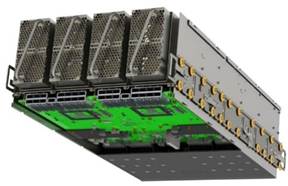
Chassis front and bottom | |
|
| |
|
| |
|
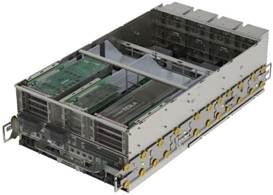
Chassis back and top | |
|
| |
|
| |
|
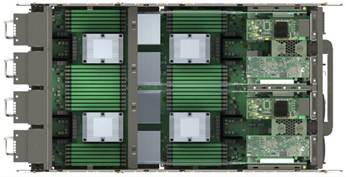
Chassis top view |
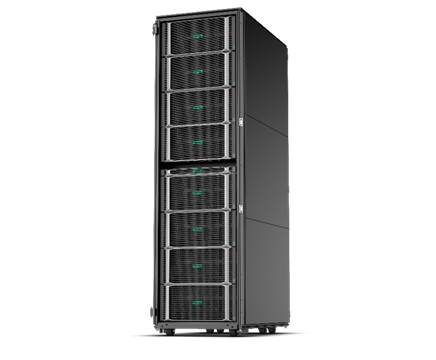
Full Rack |
|
| |
|
| |
|
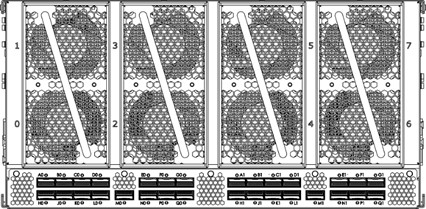
Chassis front view | |
|
8x Superdome Flex fans 30x Superdome Flex ports | |
|
| |
|
|
|
|
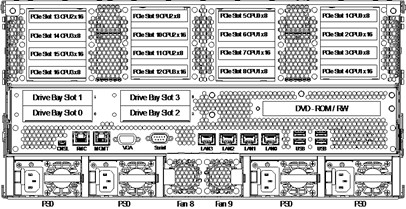
Base Chassis rear view (16-slot) |
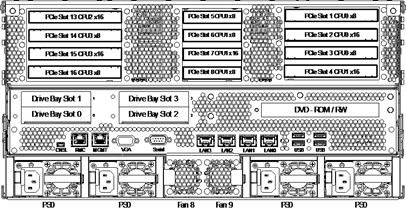
Base Chassis rear view (12-slot) |
|
16x LP PCIe IO slots |
12x FH/LP PCIe IO slots |
|
4x HDD/SSD bays |
4x HDD/SSD bays |
|
1x DVD-R/DVD-RW bay |
1x DVD-R/DVD-RW bay |
|
4x Ethernet ports |
4x Ethernet ports |
|
4x Power supplies |
4x Power supplies |
|
2x Superdome Flex ASIC fans |
2x Superdome Flex ASIC fans |
|
| |
|
| |
|
General The Superdome Flex system is built using 4-socket, 5U chassis that are cabled together to create systems from 4-sockets (1 chassis) to 32 sockets (8 chassis). Each chassis supports 8 fans, 4 power supplies (1600W each), associated power cords, and connecting Grid cables. | ||||||||||||||||||||||||
|
| ||||||||||||||||||||||||
|
Power Supply (1600W)
| ||||||||||||||||||||||||
| ||||||||||||||||||||||||
|
Notes: - Absolute minimum efficiency at 50% of load = 96% - System configuration defaults to a kit of that contains 4 power supplies. - Optional 2130W Premium Power Supply is available | ||||||||||||||||||||||||
|
| ||||||||||||||||||||||||
|
Power Supply (2130W) Optional
| ||||||||||||||||||||||||
| ||||||||||||||||||||||||
|
| ||||||||||||||||||||||||
|
System The system can support up to eight (8) chassis. | ||||||||||||||||||||||||
|
| ||||||||||||||||||||||||
|
Chassis Each chassis has the following specifications: - Support for four (4) Intel Xeon Scalable processors - Supports 48 DDR4 DIMM slots (12 DIMMs per processor) - Supports up to 16 PCIe Gen 3 slots - Supports additional IO capability in a Base IO chassis | ||||||||||||||||||||||||
|
| ||||||||||||||||||||||||
|
Base and expansion chassis Every Superdome Flex system starts with one 4-socket Base Chassis (with boot support). Up to seven (7) Expansion/Partition Chassis can be added to expand the system from 4-sockets to 32-sockets. |
|
|
|
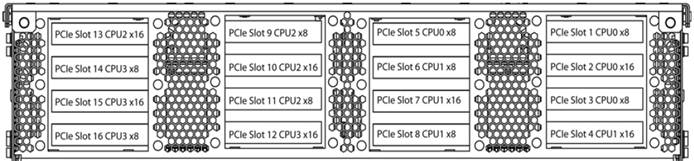
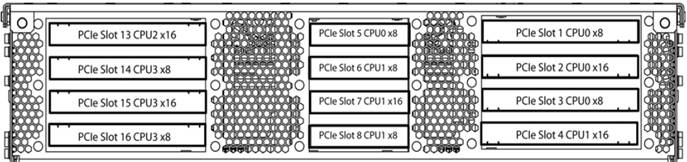
I/O slots Chassis support either 16 half-height PCIe slots (7 x16 slots and 9 x8 slots); 12 slots with eight-full height slots (4 x16 slots and 4 x8 slots) + 4 half-height slots (1 x16 slot and 3 x8 slots); or a compute-only configuration (no PCIe slots). The compute-only configuration is only supported with the Expansion Chassis.
|
|
|
|
16-slot configuration |
|
|
|
|
|
12-slot configuration
|
|
|
|
|
|
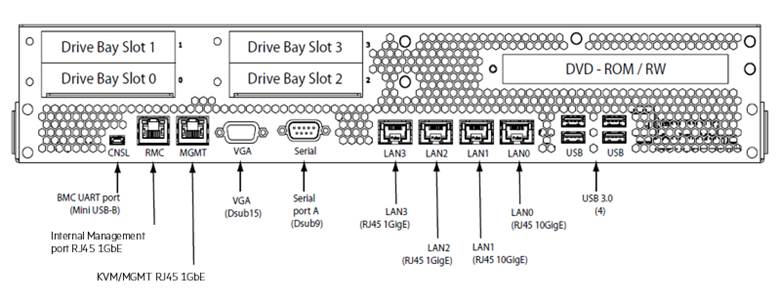
Base I/O
Base Chassis The Base IO includes the board management controller (BMC), a DVD bay, four drives bays, two 10GbE + two 1GbE NIC ports, serial console, VGA and four USB ports. A Management LAN port and 1GbE Rack management controller port is also included. The 2 x 10GbE ports will clock down to 1GbE if needed. |
|
|
|
|
|
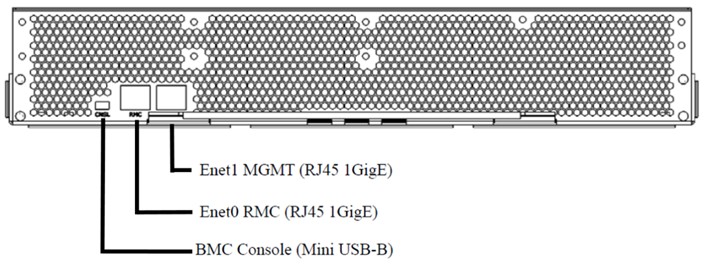
Expansion Chassis The Base IO includes the board management controller (BMC), a Management LAN port, and 1GbE Rack management controller port.
|
|
|
|
|
|
I/O Options - 1Gb, 10Gb, 25Gb NIC, 16Gb/32Gb FC Internal and External SAS controllers - InfiniBand EDR/Ethernet 100Gb; Infiniband HDR - IO Accelerators - GPU Options |
|
|
|
Processors Each server chassis supports - Intel Xeon-Gold 6226 (2.7GHz/12-core/125W) Processor Kit - Intel Xeon-Gold 6230 (2.1GHz/20-core/150W) Processor Kit - Intel Xeon-Gold 6240 (2.6GHz/18-core/150W) Processor Kit - Intel Xeon-Gold 6240L (2.6GHz/18-core/150W) Processor Kit - Intel Xeon-Gold 6242 (2.8GHz/16-core/150W) Processor Kit - Intel Xeon-Gold 6244 (3.6GHz/8-core/150W) Processor Kit - Intel Xeon-Gold 6246 (3.3GHz/12-core/165W) Processor Kit - Intel Xeon-Gold 6248 (2.6GHz/20-core/150W) Processor Kit - Intel Xeon-Gold 6252 (2.1GHz/24-core/150W) Processor Kit - Intel Xeon-Gold 6254 (3.1GHz/18-core/200W) Processor Kit - Intel Xeon-Platinum 8253 (2.2GHz/16-core/125W) Processor Kit - Intel Xeon-Platinum 8256 (3.8GHz/4-core/105W) Processor Kit - Intel Xeon-Platinum 8260 (2.4GHz/24-core/165W) Processor Kit - Intel Xeon-Platinum 8260L (2.4GHz/24-core/165W) Processor Kit - Intel Xeon-Platinum 8268 (2.9GHz/24-core/205W) Processor Kit - Intel Xeon-Platinum 8270 (2.7GHz/26-core/205W) Processor Kit - Intel Xeon-Platinum 8276 (2.2GHz/28-core/165W) Processor Kit - Intel Xeon-Platinum 8276L (2.2GHz/28-core/165W) Processor Kit - Intel Xeon-Platinum 8280 (2.7GHz/28-core/205W) Processor Kit - Intel Xeon-Platinum 8280L (2.7GHz/28-core/205W) Processor Kit
Notes: - All processors can be used to scale to 32 sockets - All processors must be identical within a partition, system and chassis. No mixing is allowed between Intel Xeon® Scalable processor families
|
|
|
|
Chipset HPE Superdome Flex ASIC |
|
|
|
Upgradability and scalability Scalable from 4-socket configurations to 32-socket configurations in 4-socket increments |
|
|
|
Memory type Registered - 32GB (1x32GB) Dual Rank x4 DDR4-2933 Registered Memory Kit - 64GB (1x64GB) Quad Rank x4 DDR4-2933 Load Reduced Memory Kit - 128GB (1x128GB) Quad Rank x4 DDR4-2933 Load Reduced Memory Kit |
|
|
|
Memory protection Error checking and correcting (ECC) on memory and caches; ADDDC is supported. |
|
|
|
Operating System - Red Hat Enterprise Linux (RHEL) including KVM support - SUSE Linux Enterprise Server (SLES) including KVM support - Oracle Linux/Oracle UEK - Oracle VM - VMware - Microsoft Windows Server 2016 Standard and Datacenter includes Hyper-V support - Microsoft Windows Server 2019 Standard and Datacenter (for 62XX and 82XX processors) includes Hyper-V support - Microsoft Windows Server 2022 Standard and Datacenter (for 62XX and 82XX processors) includes Hyper-V support - Microsoft Windows Server 2025 Standard and Datacenter (for 62XX and 82XX processors) includes Hyper-V support
Notes: - HPE Foundation Software is required for all Linux O/S environments - SLES, RHEL, and Oracle Linux certifications include KVM certification - Minimum OS levels may be required for certain features and hardware options - HPE Superdome Flex I/O VMware Support: I/O configurations with VMware must adhere to the "vSphere Configuration Maximums" as documented by VMware per controller type and manufacturer. - For more information on the HPE Certified and Supported Hewlett Packard Enterprise servers for OS and Virtualization Software and latest listing of software drivers available for your server, please visit our Support Matrix at: http://www.hpe.com/info/ossupport
|
|
|
|
For I/O support by Operating System see below table: | ||||||||||||||||||||||||||||||||||||||||||
|
Product SKU |
Description |
Win |
Win |
Win |
RHEL 8 |
RHEL 9 |
RHEL 10 |
SLES 12 |
SLES 15/16 |
VM |
Oracle/ |
Oracle OVM | ||||||||||||||||||||||||||||||
|
P06250-H21 |
HPE InfiniBand HDR100/Ethernet 100Gb 1-port QSFP56 PCIe3 x16 MCX653105A-ECAT Adapter |
- |
E |
E |
X |
X |
X |
X |
X |
- |
- |
- | ||||||||||||||||||||||||||||||
|
P06251-H21 |
HPE InfiniBand HDR100/Ethernet 100Gb 2-port QSFP56 PCIe3 x16 MCX653106A-ECAT Adapter |
- |
E |
E |
X |
X |
X |
X |
X |
- |
- |
- | ||||||||||||||||||||||||||||||
|
829335-B21 |
HPE 100Gb 1-port OP101 QSFP28 x16 PCIe Gen3 with Intel Omni-Path Architecture Adapter |
- |
- |
|
X |
X |
X |
X |
X |
- |
- |
- | ||||||||||||||||||||||||||||||
|
P26262-B21 |
Broadcom BCM57414 Ethernet 10/25Gb 2-port SFP28 Adapter for HPE |
X |
X |
X |
X |
X |
X |
X |
X |
X |
X |
X | ||||||||||||||||||||||||||||||
|
874253-B21 |
HPE Ethernet 100Gb 1-port QSFP28 MCX515A-CCAT Adapter |
X |
X |
X |
X |
X |
X |
X |
X |
X |
- |
- | ||||||||||||||||||||||||||||||
|
P9D94A |
HPE SN1100Q 16Gb Dual Port Fibre Channel Host Bus Adapter |
X |
X |
X |
X |
X |
X |
X |
X |
X |
X |
X | ||||||||||||||||||||||||||||||
|
Q0L14A |
HPE SN1200E 16Gb Dual Port Fibre Channel Host Bus Adapter |
X |
X |
X |
X |
X |
X |
X |
X |
X |
X |
X | ||||||||||||||||||||||||||||||
|
Q0L12A |
HPE SN1600E 32Gb Dual Port Fibre Channel Host Bus Adapter |
X |
X |
X |
X |
X |
X |
X |
X |
X |
X |
X | ||||||||||||||||||||||||||||||
|
|
R2J63A |
HPE SN1610E 32Gb 2-port Fibre Channel Host Bus Adapter |
X |
X |
X |
X |
X |
X |
X |
X |
X |
X |
X |
| ||||||||||||||||||||||||||||
|
|
R7N77A |
HPE SN1700E 64Gb 1-port Fibre Channel Host Bus Adapter |
X |
X |
X |
X |
X |
X |
X |
X |
X |
X |
X |
| ||||||||||||||||||||||||||||
|
|
R7N86A |
HPE SN1700Q 64Gb 1-port Fibre Channel Host Bus Adapter |
X |
X |
X |
X |
X |
X |
X |
X |
X |
X |
X |
| ||||||||||||||||||||||||||||
|
|
R2E09A |
HPE SN1610Q 32Gb 2-port Fibre Channel Host Bus Adapter |
X |
X |
X |
X |
X |
X |
X |
X |
X |
X |
X |
| ||||||||||||||||||||||||||||
|
|
Q2N11A |
HPE Superdome Flex 9361-4i Internal RAID Controller |
X |
X |
X |
X |
X |
X |
X |
X |
X |
X |
X |
| ||||||||||||||||||||||||||||
|
|
Q6M15A |
HPE 3154-8e 8-port External RAID Controller |
X |
X |
X |
X |
X |
X |
X |
X |
X |
X |
X |
| ||||||||||||||||||||||||||||
|
|
R0Y99A |
HPE 3162-8i Encryption Option 8-port RAID Controller |
X |
X |
X |
X |
X |
X |
X |
X |
X |
X |
X |
| ||||||||||||||||||||||||||||
|
|
S0K90C |
NVIDIA L40 48GB PCIe Accelerator for HPE |
- |
X |
- |
- |
X |
X |
- |
X |
- |
- |
- |
| ||||||||||||||||||||||||||||
|
|
S0K89C |
NVIDIA L4 24GB PCIe Accelerator for HPE |
- |
X |
- |
- |
X |
X |
- |
X |
X |
- |
- |
| ||||||||||||||||||||||||||||
|
|
S2D86C |
NVIDIA H100 NVL 94GB PCIe Accelerator for HPE |
- |
X |
- |
- |
X |
X |
- |
X |
X |
- |
- |
| ||||||||||||||||||||||||||||
|
|
Notes: - X = Supported - E = Ethernet Mode Only - Minimum OS levels are required for support of some processors and options - HPE Superdome Flex I/O Oracle Linux Support: Hewlett Packard Enterprise only supports the use of in distribution drivers with Oracle Linux, Oracle VM and UEK update releases. All controllers tested above used the driver located on the source media for their respective Oracle product. Out of distribution drivers are not supported with Oracle Linux, Oracle VM or UEK.
|
| ||||||||||||||||||||||||||||||||||||||||
|
|
|
| ||||||||||||||||||||||||||||||||||||||||
|
Partitioning Multiple 4, 8, 12 or 16-socket electrically isolated HPE nPartitions (HPE nPars) supported per rack. Please refer to the table below for HPE nPars Partition Options.
All Processors and Memory must be the same within a Partition.
DVD is required per Base Chassis and per Partition Expansion Chassis
Repartitioning does not require recabling |
| |||||||||||||||||||||||||||||||||||||||||
|
|
| |||||||||||||||||||||||||||||||||||||||||
|
Solution ID |
48 partitioning combinations |
| ||||||||||||||||||||||||||||||||||||||||
|
1 Chassis (4s) |
| |||||||||||||||||||||||||||||||||||||||||
|
1 |
4s |
| ||||||||||||||||||||||||||||||||||||||||
|
2 Chassis (8s) |
| |||||||||||||||||||||||||||||||||||||||||
|
2 |
4s |
4s |
| |||||||||||||||||||||||||||||||||||||||
|
3 |
8s |
| ||||||||||||||||||||||||||||||||||||||||
|
3 Chassis (12s) |
| |||||||||||||||||||||||||||||||||||||||||
|
4 |
4s |
4s |
4s |
| ||||||||||||||||||||||||||||||||||||||
|
5 |
8s |
4s |
| |||||||||||||||||||||||||||||||||||||||
|
6 |
12s |
| ||||||||||||||||||||||||||||||||||||||||
|
4 Chassis (16s) |
| |||||||||||||||||||||||||||||||||||||||||
|
7 |
4s |
4s |
4s |
4s |
| |||||||||||||||||||||||||||||||||||||
|
8 |
8s |
4s |
4s |
| ||||||||||||||||||||||||||||||||||||||
|
9 |
8s |
8s |
| |||||||||||||||||||||||||||||||||||||||
|
10 |
12s |
4s |
| |||||||||||||||||||||||||||||||||||||||
|
11 |
16s |
| ||||||||||||||||||||||||||||||||||||||||
|
5 Chassis (20s) |
| |||||||||||||||||||||||||||||||||||||||||
|
12 |
4s |
4s |
4s |
4s |
4s |
| ||||||||||||||||||||||||||||||||||||
|
13 |
8s |
4s |
4s |
4s |
| |||||||||||||||||||||||||||||||||||||
|
14 |
8s |
8s |
4s |
| ||||||||||||||||||||||||||||||||||||||
|
15 |
12s |
4s |
4s |
| ||||||||||||||||||||||||||||||||||||||
|
16 |
16s |
4s |
| |||||||||||||||||||||||||||||||||||||||
|
6 Chassis (24s) |
| |||||||||||||||||||||||||||||||||||||||||
|
17 |
4s |
4s |
4s |
4s |
4s |
4s |
| |||||||||||||||||||||||||||||||||||
|
18 |
8s |
4s |
4s |
4s |
4s |
| ||||||||||||||||||||||||||||||||||||
|
19 |
8s |
8s |
4s |
4s |
| |||||||||||||||||||||||||||||||||||||
|
20 |
8s |
8s |
8s |
| ||||||||||||||||||||||||||||||||||||||
|
21 |
12s |
4s |
4s |
4s |
| |||||||||||||||||||||||||||||||||||||
|
22 |
12s |
4s |
8s |
| ||||||||||||||||||||||||||||||||||||||
|
23 |
16s |
4s |
4s |
| ||||||||||||||||||||||||||||||||||||||
|
24 |
16s |
8s |
| |||||||||||||||||||||||||||||||||||||||
|
7 Chassis (28s) |
| |||||||||||||||||||||||||||||||||||||||||
|
25 |
4s |
4s |
4s |
4s |
4s |
4s |
4s |
| ||||||||||||||||||||||||||||||||||
|
26 |
8s |
4s |
4s |
4s |
4s |
4s |
| |||||||||||||||||||||||||||||||||||
|
27 |
8s |
8s |
4s |
4s |
4s |
| ||||||||||||||||||||||||||||||||||||
|
28 |
8s |
8s |
8s |
4s |
| |||||||||||||||||||||||||||||||||||||
|
29 |
12s |
4s |
4s |
4s |
4s |
| ||||||||||||||||||||||||||||||||||||
|
30 |
12s |
4s |
8s |
4s |
| |||||||||||||||||||||||||||||||||||||
|
31 |
12s |
4s |
12s |
| ||||||||||||||||||||||||||||||||||||||
|
32 |
16s |
4s |
4s |
4s |
| |||||||||||||||||||||||||||||||||||||
|
33 |
16s |
8s |
4s |
| ||||||||||||||||||||||||||||||||||||||
|
34 |
16s |
12s |
| |||||||||||||||||||||||||||||||||||||||
|
8 Chassis (32s) |
| |||||||||||||||||||||||||||||||||||||||||
|
35 |
4s |
4s |
4s |
4s |
4s |
4s |
4s |
4s |
| |||||||||||||||||||||||||||||||||
|
36 |
8s |
4s |
4s |
4s |
4s |
4s |
4s |
| ||||||||||||||||||||||||||||||||||
|
37 |
8s |
8s |
4s |
4s |
4s |
4s |
| |||||||||||||||||||||||||||||||||||
|
38 |
8s |
8s |
8s |
4s |
4s |
| ||||||||||||||||||||||||||||||||||||
|
39 |
8s |
8s |
8s |
8s |
| |||||||||||||||||||||||||||||||||||||
|
40 |
12s |
4s |
4s |
4s |
4s |
4s |
| |||||||||||||||||||||||||||||||||||
|
41 |
12s |
4s |
8s |
4s |
4s |
| ||||||||||||||||||||||||||||||||||||
|
42 |
12s |
4s |
8s |
8s |
| |||||||||||||||||||||||||||||||||||||
|
43 |
12s |
4s |
12s |
4s |
| |||||||||||||||||||||||||||||||||||||
|
Solution ID |
48 partitioning combinations | ||||||||||||
|
1 Chassis (4s) | |||||||||||||
|
1 |
4s |
||||||||||||
|
2 Chassis (8s) | |||||||||||||
|
2 |
4s |
4s |
|||||||||||
|
3 |
8s |
||||||||||||
|
3 Chassis (12s) | |||||||||||||
|
4 |
4s |
4s |
4s |
||||||||||
|
5 |
8s |
4s |
|||||||||||
|
6 |
12s |
||||||||||||
|
4 Chassis (16s) | |||||||||||||
|
7 |
4s |
4s |
4s |
4s |
|||||||||
|
8 |
8s |
4s |
4s |
||||||||||
|
9 |
8s |
8s |
|||||||||||
|
10 |
12s |
4s |
|||||||||||
|
11 |
16s |
||||||||||||
|
5 Chassis (20s) | |||||||||||||
|
12 |
4s |
4s |
4s |
4s |
4s |
||||||||
|
13 |
8s |
4s |
4s |
4s |
|||||||||
|
14 |
8s |
8s |
4s |
||||||||||
|
15 |
12s |
4s |
4s |
||||||||||
|
16 |
16s |
4s |
|||||||||||
|
6 Chassis (24s) | |||||||||||||
|
17 |
4s |
4s |
4s |
4s |
4s |
4s |
|||||||
|
18 |
8s |
4s |
4s |
4s |
4s |
||||||||
|
19 |
8s |
8s |
4s |
4s |
|||||||||
|
20 |
8s |
8s |
8s |
||||||||||
|
21 |
12s |
4s |
4s |
4s |
|||||||||
|
22 |
12s |
4s |
8s |
||||||||||
|
23 |
16s |
4s |
4s |
||||||||||
|
24 |
16s |
8s |
|||||||||||
|
7 Chassis (28s) | |||||||||||||
|
25 |
4s |
4s |
4s |
4s |
4s |
4s |
4s |
||||||
|
26 |
8s |
4s |
4s |
4s |
4s |
4s |
|||||||
|
27 |
8s |
8s |
4s |
4s |
4s |
||||||||
|
28 |
8s |
8s |
8s |
4s |
|||||||||
|
29 |
12s |
4s |
4s |
4s |
4s |
||||||||
|
30 |
12s |
4s |
8s |
4s |
|||||||||
|
31 |
12s |
4s |
12s |
||||||||||
|
32 |
16s |
4s |
4s |
4s |
|||||||||
|
33 |
16s |
8s |
4s |
||||||||||
|
34 |
16s |
12s |
|||||||||||
|
8 Chassis (32s) | |||||||||||||
|
35 |
4s |
4s |
4s |
4s |
4s |
4s |
4s |
4s | |||||
|
36 |
8s |
4s |
4s |
4s |
4s |
4s |
4s | ||||||
|
37 |
8s |
8s |
4s |
4s |
4s |
4s | |||||||
|
38 |
8s |
8s |
8s |
4s |
4s | ||||||||
|
39 |
8s |
8s |
8s |
8s | |||||||||
|
40 |
12s |
4s |
4s |
4s |
4s |
4s | |||||||
|
41 |
12s |
4s |
8s |
4s |
4s | ||||||||
|
42 |
12s |
4s |
8s |
8s | |||||||||
|
43 |
12s |
4s |
12s |
4s | |||||||||
|
Solution ID |
48 partitioning combinations | ||||||||||||
|
1 Chassis (4s) | |||||||||||||
|
1 |
4s |
||||||||||||
|
2 Chassis (8s) | |||||||||||||
|
2 |
4s |
4s |
|||||||||||
|
3 |
8s |
||||||||||||
|
3 Chassis (12s) | |||||||||||||
|
4 |
4s |
4s |
4s |
||||||||||
|
5 |
8s |
4s |
|||||||||||
|
6 |
12s |
||||||||||||
|
4 Chassis (16s) | |||||||||||||
|
7 |
4s |
4s |
4s |
4s |
|||||||||
|
8 |
8s |
4s |
4s |
||||||||||
|
9 |
8s |
8s |
|||||||||||
|
10 |
12s |
4s |
|||||||||||
|
11 |
16s |
||||||||||||
|
5 Chassis (20s) | |||||||||||||
|
12 |
4s |
4s |
4s |
4s |
4s |
||||||||
|
13 |
8s |
4s |
4s |
4s |
|||||||||
|
14 |
8s |
8s |
4s |
||||||||||
|
15 |
12s |
4s |
4s |
||||||||||
|
16 |
16s |
4s |
|||||||||||
|
6 Chassis (24s) | |||||||||||||
|
17 |
4s |
4s |
4s |
4s |
4s |
4s |
|||||||
|
18 |
8s |
4s |
4s |
4s |
4s |
||||||||
|
19 |
8s |
8s |
4s |
4s |
|||||||||
|
20 |
8s |
8s |
8s |
||||||||||
|
21 |
12s |
4s |
4s |
4s |
|||||||||
|
22 |
12s |
4s |
8s |
||||||||||
|
23 |
16s |
4s |
4s |
||||||||||
|
24 |
16s |
8s |
|||||||||||
|
7 Chassis (28s) | |||||||||||||
|
25 |
4s |
4s |
4s |
4s |
4s |
4s |
4s |
||||||
|
26 |
8s |
4s |
4s |
4s |
4s |
4s |
|||||||
|
27 |
8s |
8s |
4s |
4s |
4s |
||||||||
|
28 |
8s |
8s |
8s |
4s |
|||||||||
|
29 |
12s |
4s |
4s |
4s |
4s |
||||||||
|
30 |
12s |
4s |
8s |
4s |
|||||||||
|
31 |
12s |
4s |
12s |
||||||||||
|
32 |
16s |
4s |
4s |
4s |
|||||||||
|
33 |
16s |
8s |
4s |
||||||||||
|
34 |
16s |
12s |
|||||||||||
|
8 Chassis (32s) | |||||||||||||
|
35 |
4s |
4s |
4s |
4s |
4s |
4s |
4s |
4s | |||||
|
36 |
8s |
4s |
4s |
4s |
4s |
4s |
4s | ||||||
|
37 |
8s |
8s |
4s |
4s |
4s |
4s | |||||||
|
38 |
8s |
8s |
8s |
4s |
4s | ||||||||
|
39 |
8s |
8s |
8s |
8s | |||||||||
|
40 |
12s |
4s |
4s |
4s |
4s |
4s | |||||||
|
41 |
12s |
4s |
8s |
4s |
4s | ||||||||
|
42 |
12s |
4s |
8s |
8s | |||||||||
|
43 |
12s |
4s |
12s |
4s | |||||||||
|
Solution ID |
48 partitioning combinations | |||||
|
44 |
16s |
4s |
4s |
4s |
4s | |
|
45 |
16s |
8s |
4s |
4s | ||
|
46 |
16s |
8s |
8s | |||
|
47 |
16s |
12s |
4s | |||
|
48 |
16s |
16s | ||||
|
Notes: - No partitions over 16-sockets - No partitions to span bottom half and top half of rack | ||||||
|
| ||||||
|
Form Factor - 5U Base Chassis or Expansion Chassis - 1U external Rack Management Controller (RMC)
Notes: - An embedded RMC (eRMC) option is available for 4s and 8s systems which means the 1U RMC is not required when the embedded RMC is used. It is recommended to configure 4s or 8s systems with the 1U external RMC if customers might scale to greater than 8s at a later date. - The 1U RMC is required for Partitioned systems regardless of socket count | ||||||
|
| ||||||
|
High availability-standard server features 2N (N+N) redundant (1600W) power supplies reduced to N+1 when GPUs are included Notes: When using the 2130W Premium power supply N+N with GPU is available - N+1 fans (or greater depending on the load) - Hot-Swappable and redundant fans, power supplies - Fault Tolerant Fabric built on dynamic multi-pathing and end-to-end retry technology - Enhanced MCA Gen2 recovery - ADDDC memory options - SATA RAID 5 support - ECC, re-tries, and Link Width Reduction on data paths - Automatic de-configuration of DIMMs. Processor de-configuration in subsequent releases - I/O Advanced Error Recovery, and Live Error Recovery - Redundant network paths - Redundant Fibre Channel paths
For complete RAS Feature discussion: https://www.hpe.com/psnow/doc/a50003250enw
|
| ||||||||||||||||||||||||
|
|
| ||||||||||||||||||||||||
|
Standard Warranty Three-year parts, 3 Year Labor and 3 Year on-site limited global warranty. Protected by HPE Services operational services and a worldwide network of Hewlett Packard Enterprise Authorized Channel Partners. Hewlett Packard Enterprise branded hardware and options qualified for the HPE Superdome Flex Server are covered by a global limited warranty and supported by HPE Services and a worldwide network of HPE Authorized Channel Partners. The HPE branded hardware and options diagnostic support and repair is available for three years from date of purchase, or the warranty length of the server they are attached to, whichever is greater. Additional support may be covered under the warranty or available through additional support packages. Enhancements to warranty services are available through HPE Services operational services or customized service agreements.
Additional information regarding worldwide limited warranty and technical support is available at: https://support.hpe.com/hpsc/doc/public/display?docId=c01865770 | |||||||||||||||||||||||||
|
| |||||||||||||||||||||||||
|
Physical and Environmental Information Systems are comprised of the following components: Base chassis plus Expansion/Partition chassis. Enclosure The system can be field racked. However, it is strongly recommended that customers order the systems racked from the factory. This provides the customer the benefit of extensive system testing and avoids possible premium service charges for field racking service. Field racking requires the use of an appropriate material lift capable of lifting 80+ lbs.
Systems are supported in the HPE 600mm wide and 800mm wide racks, and the HPE D-rack. Rack availability is dependent on size of system complex.
Other products may be placed in the same rack as the system. Placement of these other products must not result in moving the server chassis.
All racks in the same order must be the same height and width. |
| ||||||||||||||||||||||||
|
|
| ||||||||||||||||||||||||
| |||||||||||||||||||||||||
|
- The system is supported in the HPE 600mm and 800mm series racks and the HPE D-rack with a standard rack door. - Each chassis is populated with two Flex ASICs. - General rules are as follows: - Boot devices should be in slot 5 - Alternate boot devices should be in slot 3 | |||||||||||||||||||||||||
|
| |||||||||||||||||||||||||
|
Configuration Rules The chassis is the basic building block.
A single system can be supported in 1-Chassis to 8-Chassis configurations. Two options exist for management - an embedded Rack Management Controller (eRMC) or an external Rack Management Controller (RMC). The eRMC is not expandable beyond two chassis. When nPars is required the RMC is also always required regardless of the number of chassis in the complex.
Each system starts with one (1) Base Chassis. Up to seven (7) Expansion Chassis can be added to scale the system.
All chassis are populated with four processor module - same processors within chassis. A system can have one to eight chassis and one external RMC (optional for 1 and 2 chassis configurations except for partitioned systems)
There are single phase and three phase power distribution options. Notes: All processors within a system must be of the same processor family (i.e. 61XX, 81XX, 62XX OR 82XX). No mixing is allowed | |||||||||
|
| |||||||||
|
Racking Choices Superdome Flex can be racked in many of the HPE G2 Enterprise Series and Advanced Series racks, and the HPE D-Rack. If the Superdome Flex will be configured as 16-sockets (4-chassis) or more the HPE 800mm wide racks or D-Rack are required. Complete ordering rules can be found in the Superdome Flex server menu and in the ordering & configuration tools.
The Superdome Flex can also be rack mounted in 3rd party rack. Specific rules and guidelines for this are available here: https://support.hpe.com/hpsc/doc/public/display?docId=emr_na-a00043156en_us&docLocale=en_US
The following racks are supported with Superdome Flex-refer to the server menu for ordering & configuration rules. - HPE 22U 600x1075mm Adv G2 Shck Rack - HPE 36U 600x1075mm Adv G2 Kit Shock Rack - HPE 42U 600x1200mm Adv G2 Kit Shock Rack - HPE 42U 600x1075mm Adv G2 Kit Shck Rack - HPE 42U 600x1075 Ent G2 Shock Rack - HPE 42U 600x1200 Ent G2 Shock Rack - HPE 42U 800x1075 Ent G2 Shock Rack - HPE 42U 800x1200 Ent G2 Shock Rack - HPE 48U 600x1075 Ent G2 Shock Rack - HPE 48U 600x1200 Ent G2 Shock Rack - HPE 48U 800x1075 Ent G2 Shock Rack - HPE 48U 800x1200 Ent G2 Shock Rack - HPE 42U 610mm x 1156mm D-Rack - HPE D-Rack 42U 610mm x 1156mm Extended The default assumption is that chassis are loaded in the rack at the bottom. It is recommended that 1U is left below the bottom of the compute enclosure in the 42U rack to provide PDU and cabling exit space. Supported configurations have the system located at the bottom of the rack with peripherals located above all chassis HPE G2 Enterprise Series Racks QuickSpecs: https://www.hpe.com/h20195/v2/GetDocument.aspx?docname=a00002907enw
HPE G2 Advanced Series Racks QuickSpecs: https://www.hpe.com/h20195/v2/GetDocument.aspx?docname=c05324689 | |||||||||
|
PDU Model |
Region |
Power Phase |
Input Voltage Range |
Input Current |
Circuit Breakers |
Input Plug Type |
Input Cord Length |
Outlet |
Dimensions |
|
H7C28A |
NA/JP |
Three |
200 - 240V |
48A derated |
9 x 20A |
IEC 60309/ 460P9W |
12' |
21 x IEC320 C13 |
32.5"H x 2.5"W x 6.25"D |
|
H7C29A |
INTL |
Three |
380 - 420V |
32A |
9 x 20A |
IEC 60309/ 532C6W |
12' |
21 x IEC320 C13 |
32.5"H x 2.5"W x 6.25"D |
|
H7C30A |
NA/JP |
Single |
200 - 240V |
24A derated |
2 x 20A |
NEMA L6-30 |
12' |
8 x IEC320 C13 |
15"H x 1.75"W x 2.5"D |
|
H7C31A |
INTL |
Single |
200 - 240V |
32A |
2 x 20A |
IEC 60309/ 332C6W |
12' |
8 x IEC320 C13 |
15"H x 1.75"W x 2.5"D |
|
H7C32A |
AUS |
Single |
200 - 240V |
32A |
2 x 20A |
56PA332 |
12' |
8 x IEC320 C13 |
15"H x 1.75"W x 2.5"D |
|
| ||||||||||||||||||||||
|
HPE D-Rack The HPE D-Rack is available for Superdome Flex in two models: - HPE 42U 610mm x 1156mm D-Rack (H7C27A) - HPE D-Rack 42U 610mm x 1156mm Extended (Q2T97A) The extended rack includes a 2U extension for a total of 44 rack units (44U)
The following PDUs are supported with the HPE D-Rack - HPE D-Rack 21 x 3-Phase 240V NA/JP PDU (H7C28A) Order 2 PDUs for 1-4 SD Flex chassis in rack; Order 4 PDUs for 5-8 SD Flex chassis in rack - HPE D-Rack 21 x 3-Phase 400V INTL PDU (H7C29A) Order 2 PDUs for 1-4 SD Flex chassis in rack; Order 4 PDUs for 5-8 SD Flex chassis in rack - HPE D-Rack 8 x Single-Phase 240V NA PDU (H7C30A) Order 2 PDUs per chassis for 1-4 SD Flex chassis in rack; Order 1 PDU per chassis for 5-8 SD Flex chassis in rack - HPE D-Rack 8 x Single-Phase 240V INTL PDU (H7C31A) Order 2 PDUs per chassis for 1-4 SD Flex chassis in rack; Order 1 PDU per chassis for 5-8 SD Flex chassis in rack - HPE D-Rack 8 x Single-Phase 240V AU PDU (H7C32A) Order 2 PDUs per chassis for 1-4 SD Flex chassis in rack; Order 1 PDU per chassis for 5-8 SD Flex chassis in rack - HPE G2 Basic 3Ph 8.6kVA/5-20R NA/JP PDU (P9Q55A), configuration specific rules apply - HPE G2 Basic Mdlr 3Ph 17.3kVA/NA/JP PDU (P9Q60A), configuration specific rules apply - HPE G2 Basic Mdlr 3Ph 22kVA/C19 INTL PDU (P9Q63A), configuration specific rules apply - HPE G2 Basic Mdlr 14.4kVA/C19 INTL PDU (P9Q51A), configuration specific rules apply | ||||||||||||||||||||||
| ||||||||||||||||||||||
|
| ||||||||||||||||||||||
|
HPE Power Advisor The HPE Power Advisor is a tool provided by Hewlett-Packard to assist in the estimation of power consumption at a system, rack, and multi-rack level. Available at: https://poweradvisorext.it.hpe.com | ||||||||||||||||||||||
|
| ||||||||||||||||||||||
|
Processor Support Superdome Flex systems support Intel® Xeon® Notes: Minimum OS levels are required for support of some processors and options
| ||||||||||||||||||||||
|
Supported Processor Matrix | ||||||||||||||||||||||||||||||||||||||||||||||||||||||||||||||||||||||||||||||||||||||||||||||||||||||||||||||
| ||||||||||||||||||||||||||||||||||||||||||||||||||||||||||||||||||||||||||||||||||||||||||||||||||||||||||||||
|
| ||||||||||||||||||||||||||||||||||||||||||||||||||||||||||||||||||||||||||||||||||||||||||||||||||||||||||||||
|
Processor Mixing Support Governing rules for mixing processors are as follows: - No mixing of processor types within the same chassis or HPE nPar - No support for processors running at different frequencies or different cache sizes within the same chassis or HPE nPar - Processor modules on a chassis must be the same revision, frequency, & cache size Notes: It is highly recommended that all processors within all nPars within a complex be identical in order to maximize repartitioning options | ||||||||||||||||||||||||||||||||||||||||||||||||||||||||||||||||||||||||||||||||||||||||||||||||||||||||||||||
|
| ||||||||||||||||||||||||||||||||||||||||||||||||||||||||||||||||||||||||||||||||||||||||||||||||||||||||||||||
|
DDR4 Memory Support |
|
Systems will use DDR4 DIMM technology. The following DIMMs are supported in the chassis for systems with 62XX and 82XX processors:: - 32GB (1x32GB) Dual Rank x4 DDR4-2933 Registered Memory Kit - 64GB (1x64GB) Quad Rank x4 DDR4-2933 Load Reduced Memory Kit - 128GB (1x128GB) Quad Rank x4 DDR4-2933 Load Reduced Memory Kit Only DIMMs that Hewlett Packard Enterprise has qualified are supported.
Each chassis supports up to 48 DIMMs. This breaks down to twelve DIMMs per socket.
|
|
General memory configuration rules: - For best performance, the amount of memory on each chassis within the partition should be the same. - Use the same amount of memory on each processor module within a partition. - Either a full chassis of 48 DIMMs or a half populated chassis with 24 DIMMs is supported.
|
|
|
|
Persistent Memory Support HPE Persistent Memory support is available only on systems that have Intel Xeon 2nd Generation 62XX and 82XX processors The following HPE Persistent Memory DIMMs are supported:: - HPE 128GB 2666 Persistent Memory Kit featuring Intel® OptaneTM DC persistent memory - HPE 256GB 2666 Persistent Memory Kit featuring Intel® OptaneTM DC persistent memory - HPE 512GB 2666 Persistent Memory Kit featuring Intel® OptaneTM DC persistent memory
Notes: - Chassis must be ½ populated with DDR4 DIMMs before HPE Persistent Memory can be added - No mixing of DDR4 memory sizes is supported when HPE Persistent Memory is utilized - HPE Persistent Memory quantity and type must be consistent across system complex or partitions. If partitions have different memory configurations, repartitioning is not supported - HPE Persistent Memory DIMMS must be equally populated across each socket as either 1, 2 or 6 per socket. - HPE Persistent Memory may only be used in a system/complex of 16 sockets or less. - OS Supported: RedHat, SUSE, Oracle Linux, Windows 2019 and VMware. Minimum OS levels are required for support of HPE Persistent Memory - Superdome Flex supports only App-direct Mode with HPE Persistent Memory |
|
|
|
Superdome Flex Storage Support For
HPE Storage solutions, please see: |
|
|
|
Networking - HPE Ethernet 10/25Gb 2-port SFP28 MCX4121A-ACUT Adapter (requires transceivers or DAC) - HPE Ethernet 10Gb 2-port BASE-T X550-AT2 Adapter - HPE Ethernet 10Gb 2-port SFP+ X710-DA2 Adapter (requires transceivers or DAC) - HPE Ethernet 1Gb 4-port BASE-T BCM5719 Adapter - HPE Ethernet 1Gb 2-port BASE-T I350-T2V2 Adapter - HPE Ethernet 10/25Gb 2-port SFP28 BCM57414 Adapter - HPE Ethernet 100Gb 1-port QSFP28 MCX515A-CCAT Adapter (requires transceivers or DAC) - HPE Ethernet 10/25Gb 2-port SFP28 QL41401-A2G Adapter (requires transceivers or DAC)
Notes: Server networking transceiver and cable compatibility matrix can be found here |
|
|
|
Storage and boot support - HPE SN1100Q 16Gb Dual Port Fibre Channel Host Bus Adapter - HPE SN1200E 16Gb Dual Port Fibre Channel Host Bus Adapter - HPE SN1600E 32Gb Dual Port Fibre Channel Host Bus Adapter - HPE SN1600Q 32Gb Dual Port Fibre Channel Host Bus Adapter - HPE SN1610E 32Gb Dual Port Fibre Channel Host Bus Adapter - HPE SN1610Q 32Gb Dual Port Fibre Channel Host Bus Adapter - HPE SN1700E 64Gb 1-port Fibre Channel Host Bus Adapter - HPE SN1700Q 64Gb 1-port Fibre Channel Host Bus Adapter - HPE 9361-4i RAID Controller (internal) - HPE 3154-8e RAID Controller (external) - HPE 3162-8i Encryption RAID Cntlr (internal encryption) |
|
|
|
RAID Options
|
|
Embedded Base IO The Base IO includes the embedded Intel RSTe SATA controller with 6Gb SATA support for two (2) or four (4) 2.5" SATA solid state drives (SSDs). The RSTe SATA controller is directly connected to the internal drive carriers located in the rear of the Superdome Flex Base Chassis.
|
|
The internal drive backplane can support either SAS or SATAHDDs/SSDs when connected to the optional HPE 9361-4i RAID controller or HPE 3162-8i encryption RAID controller. Storage options are limited to only SATA HDDs/SSDs when connected to the embedded Intel RSTe SATA controller.
Embedded Intel RSTe SATA Controller The drives can be used as physical disks (HBA mode) or can be configured as RAID 0, 1, 10, 5 using SW RAID; RAID 1 is the default setting from the factory. Boot support is available for both physical/HBA mode and RAID mode. The internal SATA BIOS assisted RAID mirroring is not supported with VMware.
HPE 9361-4i RAID Controller The HPE 9361-4i RAID controller is one of the options for RAID support when Superdome Flex is configured with two (2) or four (4) 2.5" SAS/SATA solid state drives (SSDs) or hard disk drives (HDDs). The HPE 9361-4i provides 12Gb SAS and 6Gb SATA connectivity directly to the internal drive carriers located in the rear of the Superdome Flex Base Chassis. Supports hardware RAID 0, 1, 10, 5, 6; RAID 1 is the default setting from the factory. The HPE 9361-4i provides boot support. The HPE 9361-4i consumes two (2) PCIe slots; one (1) for the RAID controller and one (1) for the SuperCap. HPE 3154-8e RAID Controller The HPE 3154-8e provides 12Gb SAS connectivity to external SAS devices like the HPE D3000 Disk Enclosures. The drives can be used as physical disks (HBA mode) or hardware RAID 0, 1, 10, 5, 50, 6, 60. The HPE 3154-8e provides boot support for both physical/HBA mode and RAID mode. The HPE 3154-8e consumes two (2) PCIe slots; one (1) for the RAID controller and one (1) for the SuperCap.
|
|
HPE 3162-8i Encryption RAID Controller The HPE 3162-8i Encryption RAID controller is one of three options when RAID support is required on Superdome Flex when configured with two (2) or four (4) 2.5" SAS/SATA solid state drives (SSDs) or hard disk drives (HDDs). The HPE 3162-8i provides 12Gb SAS and 6Gb SATA connectivity directly to the internal drive carriers located in the rear of the Superdome Flex Base Chassis. Supports hardware RAID 0, 1, 10, 5, 6; RAID 1 is the default setting from the factory. The HPE 3162-8i provides boot support. The HPE 3162-8i consumes one (1) PCIe slots and comes with onboard SuperCap for cache protection. The HPE 3162-8i provides optional controller-based encryption which encrypts data on RAID arrays and single drive RAID 0 with AES 256 encryption. It works at line speed, accelerated by silicon engines, with all SAS and SATA devices that are supported in RAID (SSDs and HDDs) and supports local encryption key management. |
|
|
|
Platform Management The HPE Superdome Flex delivers system administration, control, and platform management both via a programmable Redfish API and also in a comprehensive and concise command-line interface. The Redfish® API can be used in many ways including: - Directly in simple scripts to obtain inventory and monitoring information - With HPE OneView* for a graphical user interface, as well as to manage many HPE systems in the datacenter at once - With Openstack Ironic for Provisioning the OS |
|
The Rack Management Controller (RMC) in Superdome Flex is available either in a standalone, 1U rack-mount component or as an embedded option (the "eRMC") running within the Base Chassis. The standalone RMC is capable of managing a Superdome Flex system from one chassis up to the maximum supported configuration available for Superdome Flex. The embedded version, eRMC, is capable of managing a Superdome Flex system of one or two chassis (4 or 8 processor sockets). The 1U RMC is required for Partitioned systems regardless of socket/chassis count.
The HPE Superdome Flex has a built-in and always available platform management system. By integrating the management into the server platform, Hewlett Packard Enterprise ensures that every Superdome Flex comes with the full set of management features, and simplifies the task of integrating Superdome Flex into the data center. The purpose of the HPE Superdome Flex management system is to: - Provide built-in tools to manage hardware and provide mission-critical system availability (inventory, monitor, diagnose, configure, maintain, and self-healing) - Make it easier for users and applications to manage the system (inventory, start, stop, connect console, and so on)
|
|
The HPE Superdome Flex manageability system provides a very powerful control point for the system, and the RMC makes managing the HPE Superdome Flex much easier by centralizing the control and building the management into the hardware and firmware of the system. It provides the following features: - CLI for easy access to all RMC functions, providing potential scripting and power user convenience - Console, and console logs - Available remotely connected virtual media or virtual KVM - Built-in Error Analysis Engine constantly monitors all system hardware, analyzes log and telemetry data, and determines corrective actions for highest system uptime (often performing corrective actions automatically) - HPE Superdome Flex RMC will interface directly with the HPE Remote Support software for data center wide fault management visibility and tie-in to HPE support services, such as the Insight Online portal
Notes:. Superdome Flex is supported starting with HPE OneView release v4.1.
|
|
|
|
Security - Firmware update protected by RMC Admin - Air-Gapped Manageability - Secure Out-of-Box - Secure Protocols - UEFI Secure Boot - Directory access control (LDAP/Active Directory) - Alternatives to PXE (Directed LAN Boot, HTTP Boot) - Tamper-free updates - components digitally signed and verified - Multiple local accounts - Ability to rollback firmware
|
|
|
|
|
Ordering and Configuration | |||
This section lists some of the steps required to configure a Factory Integrated Model. To ensure only valid configurations are ordered, Hewlett Packard Enterprise recommends the use of an HPE approved configurator. Contact your local sales representative for information on CTO product offerings and requirements. - Configure-to-order servers must start with a CTO Chassis - FIO indicates that this option is a Factory Installable Option. - The Partition Expansion chassis are required for nPar support
| |||
|
| |||
|
Rack choice |
| ||
|
Some options below are specific to the processor family you are choosing. Options are noted or titled accordingly.
| |||
|
Description |
SKU | ||
|
HPE Virtual Rack |
M0S66A | ||
|
|
| ||
|
| |||
|
All Superdome Flex Systems |
| ||
|
Management |
| ||
|
Description |
SKU | ||
|
HPE Superdome Flex Rack Management Controller |
Q2N07A | ||
|
|
| ||
|
Notes: The rack management controller (RMC) is optional for configurations up to 8-sockets (2-chassis). Systems 12-sockets (3-chassis) and greater require Min 1/Max 1 RMC. RMC is mandatory for any size Partitioned system |
| ||
|
|
| ||
|
Scale Activation Kits |
| ||
|
Description |
SKU | ||
|
HPE Superdome Flex 4-socket Activation Kit |
R0X10A | ||
|
HPE Superdome Flex 8-socket Interconnect and Scale Activation Kit |
Q2N14A | ||
|
HPE Superdome Flex 12-socket Interconnect and Scale Activation Kit |
Q2N15A | ||
|
HPE Superdome Flex 16-socket Interconnect and Scale Activation Kit |
Q2N16A | ||
|
HPE Superdome Flex 20-socket Interconnect and Scale Activation Kit |
Q2N17A | ||
|
HPE Superdome Flex 24-socket Interconnect and Scale Activation Kit |
Q2N18A | ||
|
HPE Superdome Flex 28-socket Interconnect and Scale Activation Kit |
Q2N19A | ||
|
HPE Superdome Flex 32-socket Interconnect and Scale Activation Kit |
Q2N20A | ||
|
HPE Superdome Flex 8-socket Interconnect and Partition Activation Kit |
Q9Z03A | ||
|
HPE Superdome Flex 12-socket Interconnect and Partition Activation Kit |
Q9Z04A | ||
|
HPE Superdome Flex 16-socket Interconnect and Partition Activation Kit |
Q9Z05A | ||
|
HPE Superdome Flex 20-socket Interconnect and Partition Activation Kit |
Q9Z06A | ||
|
HPE Superdome Flex 24-socket Interconnect and Partition Activation Kit |
Q9Z07A | ||
|
HPE Superdome Flex 28-socket Interconnect and Partition Activation Kit |
Q9Z08A | ||
|
HPE Superdome Flex 32-socket Interconnect and Partition Activation Kit |
Q9Z09A | ||
|
Notes: The Superdome Flex scale activation kits are required for configurations all systems a System/Complex size (i.e. number of sockets) will determine which kit is required. | |||
|
| |||
|
Optical Drives | |||
|
Description |
SKU | ||
|
HPE Superdome Flex DVD-RW Drive |
Q2N41A | ||
|
HPE Superdome Flex DVD-R Drive |
Q2N42A | ||
|
Notes: The Base Chassis and Partition Expansion Chassis requires one (1) DVD drive | |||
|
Internal SATA Solid State Drives | |||
|
Notes: - A total of 0, 2, or 4 internal drives supported per Base Chassis or Partition Expansion Chassis - SATA SSDs use the embedded controller - RAID 1 is configured by default - No mixing of drive types or capacities | |||
|
HPE Superdome Flex 480GB SATA 6G Mixed Use SFF RW Multi Vendor SSD |
R9H09A | ||
|
HPE Superdome Flex 960GB SATA 6G Mixed Use SFF RW Multi Vendor SSD |
R9H10A | ||
|
HPE Superdome Flex 1.92TB SATA 6G Mixed Use SFF RW Multi Vendor SSD |
R9H11A | ||
|
HPE Superdome Flex 3.84TB SATA 6G Mixed Use SFF RW Multi Vendor SSD |
R9H12A | ||
|
Internal SATA Hard Disk Drives | |||
|
Notes: - A total of 0, 2, or 4 internal drives supported per Base Chassis or Partition Expansion Chassis - SATA HDDs use the embedded controllerRAID 1 is configured by default - No mixing of drive types or capacities | |||
|
HPE 1TB SATA 6G Midline 7.2K SFF (2.5in) RW 1yr Wty Digitally Signed Firmware HDD |
R3K79A | ||
|
HPE 2TB SATA 6G Midline 7.2K SFF (2.5in) RW 1yr Wty 512e Digitally Signed Firmware HDD |
R3K80A | ||
|
Internal SAS Hard Disk Drives | |||
|
Notes: - A total of 0, 2, or 4 internal drives supported per Base Chassis or Partition Expansion Chassis - SAS HDDs require one (1) HPE 9361-4i RAID Controller (Q2N11A) or one (1) HPE 3162-8i Encryption RAID Controller (R0Y99A) - RAID 1 is configured by default - No mixing of drive types or capacities | |||
|
HPE 600GB SAS 12G Mission Critical 15K SFF RW 3-year Warranty Multi Vendor HDD |
S0M02A | ||
|
HPE 1.8TB SAS 12G Mission Critical 10K SFF BC 3-year Warranty 512e Multi Vendor HDD |
S0M04A | ||
|
HPE 300GB SAS 12G Enterprise 15K SFF (2.5in) RW 3yr Wty Digitally Signed Firmware HDD |
Q6L99A | ||
|
HPE 600GB SAS 12G Enterprise 15K SFF (2.5in) RW 3yr Wty Digitally Signed Firmware HDD |
R0Z00A | ||
|
HPE 900GB SAS 12G Enterprise 15K SFF (2.5in) RW 3yr Wty Digitally Signed Firmware HDD |
R0Z01A | ||
|
HPE 300GB SAS 12G Enterprise 10K SFF (2.5in) RW 3yr Wty Digitally Signed Firmware HDD |
Q6M02A | ||
|
HPE 600GB SAS 12G Enterprise 10K SFF (2.5in) RW 3yr Wty Digitally Signed Firmware HDD |
Q6M03A | ||
|
HPE 1.2TB SAS 12G Enterprise 10K SFF (2.5in) RW 3yr Wty Digitally Signed Firmware HDD |
Q6M04A | ||
|
HPE 1.8TB SAS 12G Enterprise 10K SFF (2.5in) RW 3yr Wty 521e Digitally Signed Firmware HDD |
Q6M05A | ||
|
HPE 2.4TB SAS 12G Enterprise 10K SFF (2.5in) RW 3yr Wty Digitally Signed Firmware HDD |
Q9R86A | ||
|
|
| ||
|
| |||
|
Internal SAS Solid State Drives |
| ||
|
Notes: - A total of 0, 2, or 4 internal drives supported per Base Chassis or Partition Expansion Chassis - SAS SSDs require one (1) HPE 9361-4i RAID Controller (Q2N11A) or one (1) HPE 3162-8i Encryption RAID Controller (R0Y99A) - RAID 1 is configured by default - No mixing of drive types or capacities |
| ||
|
Description |
SKU |
| |
|
HPE Superdome Flex 1.6TB SAS 24G Mixed Use SFF RW PM1655 SSD |
R9H03A |
| |
|
HPE Superdome Flex 3.2TB SAS 24G Mixed Use SFF RW PM1655 SSD |
R9H04A |
| |
|
HPE Superdome Flex 800GB SAS 24G Mixed Use SFF RW Multi Vendor SSD |
R9H05A |
| |
|
HPE Superdome Flex 1.6TB SAS 24G Mixed Use SFF RW Multi Vendor SSD |
R9H06A |
| |
|
HPE Superdome Flex 3.2TB SAS 24G Mixed Use SFF RW Multi Vendor SSD |
R9H07A |
| |
|
HPE Superdome Flex 6.4TB SAS 24G Mixed Use SFF RW Multi Vendor SSD |
R9H08A |
| |
|
HPE Superdome Flex 7.68TB SAS 24G Read Intensive SFF RW Multi Vendor SSD |
R9H84A |
| |
|
HPE Superdome Flex 15.36TB SAS 24G Read Intensive SFF RW Multi Vendor SSD |
R9H85A |
| |
|
|
|
| |
|
PCIe Infrastructure |
| ||
|
Notes: - Each chassis requires exactly one (1) PCIe option below - The Base Chassis and Partition Expansion Chassis requires either Q2N08A or Q2N09A |
|
| |
|
HPE Superdome Flex PCIe Full Height 12-slot 3 Riser Configuration Kit |
Q2N08A |
| |
|
HPE Superdome Flex PCIe Low Profile 16-slot 4 Riser Configuration Kit |
Q2N09A |
| |
|
HPE Superdome Flex PCIe 0-slot Compute Only Configuration Kit |
Q2N10A |
| |
|
|
|
| |
|
Notes: - Q2N08A includes (4) Full Height x16, (4) Full Height x8, (2) Low Profile x16, (2) Low Profile x8. Maximum Length of PCIe card when installed in 12-slot Bulkhead Outside Riser = 10.5"; Center Riser Maximum = 6.6" - Q2N09A includes (8) Low Profile x16 and (8) Low Profile x8. Maximum length of PCIe card when installed in 16-slt Bulkhead = 6.6" - Q2N10A bulkhead has no PCIe slots |
| ||
|
|
| ||
|
RAID Controllers | |||
|
HPE Superdome Flex 9361-4i Internal RAID Controller |
Q2N11A | ||
|
Notes: - Supports SAS and SATA drives - Max one (1) per Base Chassis - Occupies (2) PCIe slots; (1) for the card, (1) for the SuperCap |
| ||
|
HPE 3154-8e 8-port External RAID Controller |
Q6M15A | ||
|
Notes: - Supports SAS and SATA drives - Max one (1) per Base Chassis - Occupies (2) PCIe slots; (1) for the card, (1) for the SuperCap - Q6M15A is equivalent to HPE P408e-p (804405-B21) |
| ||
|
HPE 3162-8i Encryption Option 8-port RAID Controller |
R0Y99A | ||
|
|
| ||
|
| |||
|
Fibre Channel HBAs | |||
|
Description |
SKU | ||
|
HPE SN1100Q 16Gb Dual Port Fibre Channel Host Bus Adapter |
P9D94A | ||
|
HPE SN1200E 16Gb Dual Port Fibre Channel Host Bus Adapter |
Q0L14A | ||
|
HPE SN1600E 32Gb Dual Port Fibre Channel Host Bus Adapter |
Q0L12A | ||
|
HPE SN1610E 32Gb 2-port Fibre Channel Host Bus Adapter |
R2J63A | ||
|
HPE SN1610Q 32Gb 2-port Fibre Channel Host Bus Adapter |
R2E09A | ||
|
HPE SN1700E 64Gb 1-port Fibre Channel Host Bus Adapter |
R7N77A | ||
|
HPE SN1700Q 64Gb 1-port Fibre Channel Host Bus Adapter |
R7N86A | ||
|
Notes: Max eight (8) per chassis/ Max 16 per system/partition | |||
|
| |||
|
Networking cards | |||
|
HPE Ethernet 100Gb 1-port QSFP28 MCX515A-CCAT Adapter |
874253-B21 | ||
|
Notes: - Max eight (8) per chassis/Max 16 per system/partition, see exceptions below:
- Server networking transceiver and cable compatibility matrix can be found here |
|||
|
| |||
|
InfiniBand cards | |||
|
HPE 100Gb 1-port OP101 QSFP28 x16 PCIe Gen3 with Intel Omni-Path Architecture Adapter |
829335-B21 | ||
|
Notes: Max two (2) 829335-B21 per chassis/Max 4 per system/partition. |
| ||
|
HPE InfiniBand HDR100/Ethernet 100Gb 1-port QSFP56 PCIe3 x16 MCX653105A-ECAT Adapter |
P06250-H21 | ||
|
HPE InfiniBand HDR100/Ethernet 100Gb 2-port QSFP56 PCIe3 x16 MCX653106A-ECAT Adapter |
P06251-H21 | ||
|
|
| ||
|
Notes: - Max four (4) P06250-H21 or P06251-H21 per chassis/Max 16 per system - P06251-H21 is supported with VMWare in Ethernet Only mode - No mixing of InfiniBand card types in the same system - Intel's MPI stack allows only 4 cards so if repartitioning creates more than 4 cards per partition, the additional cards will need to be removed | |||
|
| |||
|
GPU Accelerators | |||
|
HPE Superdome Flex 8 Pin GPU Cable Kit |
Q6M17A | ||
|
HPE Superdome Flex 6+2 Pin GPU Cable Kit |
Q6M16A | ||
|
HPE Superdome Flex/280 PCIe 8-pin/16-pin 310W Accelerator Cable Kit |
S2A41A | ||
|
NVIDIA L4 24GB PCIe Accelerator for HPE |
S0K89C | ||
|
NVIDIA H100 NVL 94GB PCIe Accelerator for HPE |
S2D86C | ||
|
|
| ||
|
- Notes: - A30 GPU Accelerators require one Q6M17A cable kit for each Accelerator - No mixing of GPU controller types in the same chassis, system or partition - GPU Accelerators require the Q2N08A (12-slot PCIe riser) to be in the same Chassis - GPU Accelerators are 'double-wide' and therefore utilize two adjacent PCIe slots (eg. Slots 1/2; Slots ¾, Slots 13/14; Slots 15/16). - Inner node peer-to-peer communication is not supported with Superdome Flex - H100, H100 NVL and L40 GPU Accelerator requires one S2A41A cable Kit for each Accelerator. - H100, H100 NVL max operation power is limited to 310 Watts - For H100 NVL Max four (4) per chassis/Max 8 per system - NVIDIA L4 Accelerator is supported with both Q2N08A (12-slot PCIe riser) and Q2N09A (16-slot PCIe riser). For L4, Max five (5) per chassis/Max 10 per partition/system. Recommended max 2 per riser | |||
|
| |||
|
Foundation Software | |||
|
Description |
SKU | ||
|
HPE Foundation Software 2 for Red Hat Enterprise Linux Media FIO LTU |
Q7N13A | ||
|
HPE Foundation Software 2 for SUSE Linux Enterprise Server Media FIO LTU |
Q7N14A | ||
|
HPE Foundation Software 2 for Red Hat Enterprise Linux Media |
Q7Y82A | ||
|
HPE Foundation Software 2 for SUSE Linux Enterprise Server Media |
Q7Y83A | ||
|
HPE Foundation Software 2 for Oracle Linux Media |
Q7Y84A | ||
|
HPE Foundation Software 2 for Red Hat Enterprise Linux Media License RTU |
Q7N11A | ||
|
HPE Foundation Software 2 for SUSE Linux Enterprise Server Media License RTU |
Q7N12A | ||
|
HPE Foundation Software 2 for Oracle License RTU |
Q7N16A | ||
|
|
| ||
|
Notes: - Exactly one (1) RTU is required per system with a Linux O/S distribution - Minimum one (1) Foundation SW FIO or Media is required per system with a Linux O/S distribution - Selected RTU must match selected FIO and/or Media option | |||
|
| |||
|
System Expansion and Upgrades | |||
|
System Expansion Kits are utilized when scaling up a Superdome Flex. When adding either Expansion chassis or additional Partition chassis, select the appropriate beginning and ending size of your system. (all Superdome Flex Systems) | |||
|
Description |
SKU | ||
|
HPE Superdome Flex 4s-8s Upgrade Interconnect and Scale Activation Kit |
Q2N57A #001 | ||
|
HPE Superdome Flex 4s-12s Upgrade Interconnect and Scale Activation Kit |
Q2N57A #002 | ||
|
HPE Superdome Flex 4s-16s Upgrade Interconnect and Scale Activation Kit |
Q2N57A #003 | ||
|
HPE Superdome Flex 4s-20s Upgrade Interconnect and Scale Activation Kit |
Q2N57A #004 | ||
|
HPE Superdome Flex 4s-24s Upgrade Interconnect and Scale Activation Kit |
Q2N57A #005 | ||
|
HPE Superdome Flex 4s-28s Upgrade Interconnect and Scale Activation Kit |
Q2N57A #006 | ||
|
HPE Superdome Flex 4s-32s Upgrade Interconnect and Scale Activation Kit |
Q2N57A #007 | ||
|
HPE Superdome Flex 8s-12s Upgrade Interconnect and Scale Activation Kit |
Q2N57A #008 | ||
|
HPE Superdome Flex 8s-16s Upgrade Interconnect and Scale Activation Kit |
Q2N57A #009 | ||
|
HPE Superdome Flex 8s-20s Upgrade Interconnect and Scale Activation Kit |
Q2N57A #010 | ||
|
HPE Superdome Flex 8s-24s Upgrade Interconnect and Scale Activation Kit |
Q2N57A #011 | ||
|
HPE Superdome Flex 8s-28s Upgrade Interconnect and Scale Activation Kit |
Q2N57A #012 | ||
|
HPE Superdome Flex 8s-32s Upgrade Interconnect and Scale Activation Kit |
Q2N57A #013 | ||
|
HPE Superdome Flex 12s-16s Upgrade Interconnect and Scale Activation Kit |
Q2N57A #014 | ||
|
HPE Superdome Flex 12s-20s Upgrade Interconnect and Scale Activation Kit |
Q2N57A #015 | ||
|
HPE Superdome Flex 12s-24s Upgrade Interconnect and Scale Activation Kit |
Q2N57A #016 | ||
|
HPE Superdome Flex 12s-28s Upgrade Interconnect and Scale Activation Kit |
Q2N57A #017 | ||
|
HPE Superdome Flex 12s-32s Upgrade Interconnect and Scale Activation Kit |
Q2N57A #018 | ||
|
HPE Superdome Flex 16s-20s Upgrade Interconnect and Scale Activation Kit |
Q2N57A #019 | ||
|
HPE Superdome Flex 16s-24s Upgrade Interconnect and Scale Activation Kit |
Q2N57A #020 | ||
|
HPE Superdome Flex 16s-28s Upgrade Interconnect and Scale Activation Kit |
Q2N57A #021 | ||
|
HPE Superdome Flex 16s-32s Upgrade Interconnect and Scale Activation Kit |
Q2N57A #022 | ||
|
HPE Superdome Flex 20s-24s Upgrade Interconnect and Scale Activation Kit |
Q2N57A #023 | ||
|
HPE Superdome Flex 20s-28s Upgrade Interconnect and Scale Activation Kit |
Q2N57A #024 | ||
|
HPE Superdome Flex 20s-32s Upgrade Interconnect and Scale Activation Kit |
Q2N57A #025 | ||
|
HPE Superdome Flex 24s-28s Upgrade Interconnect and Scale Activation Kit |
Q2N57A #026 | ||
|
HPE Superdome Flex 24s-32s Upgrade Interconnect and Scale Activation Kit |
Q2N57A #027 | ||
|
HPE Superdome Flex 28s-32s Upgrade Interconnect and Scale Activation Kit |
Q2N57A #028 | ||
|
HPE Superdome Flex 4s-8s Upgrade Interconnect and Partition Activation Kit |
Q2N57A #101 | ||
|
HPE Superdome Flex 4s-12s Upgrade Interconnect and Partition Activation Kit |
Q2N57A #102 | ||
|
HPE Superdome Flex 4s-16s Upgrade Interconnect and Partition Activation Kit |
Q2N57A #103 | ||
|
HPE Superdome Flex 4s-20s Upgrade Interconnect and Partition Activation Kit |
Q2N57A #104 | ||
|
HPE Superdome Flex 4s-24s Upgrade Interconnect and Partition Activation Kit |
Q2N57A #105 | ||
|
HPE Superdome Flex 4s-28s Upgrade Interconnect and Partition Activation Kit |
Q2N57A #106 | ||
|
HPE Superdome Flex 4s-32s Upgrade Interconnect and Partition Activation Kit |
Q2N57A #107 | ||
|
HPE Superdome Flex 8s-12s Upgrade Interconnect and Partition Activation Kit |
Q2N57A #108 | ||
|
HPE Superdome Flex 8s-16s Upgrade Interconnect and Partition Activation Kit |
Q2N57A #109 | ||
|
HPE Superdome Flex 8s-20s Upgrade Interconnect and Partition Activation Kit |
Q2N57A #110 | ||
|
HPE Superdome Flex 8s-24s Upgrade Interconnect and Partition Activation Kit |
Q2N57A #111 | ||
|
HPE Superdome Flex 8s-28s Upgrade Interconnect and Partition Activation Kit |
Q2N57A #112 | ||
|
HPE Superdome Flex 8s-32s Upgrade Interconnect and Partition Activation Kit |
Q2N57A #113 | ||
|
HPE Superdome Flex 12s-16s Upgrade Interconnect and Partition Activation Kit |
Q2N57A #114 | ||
|
HPE Superdome Flex 12s-20s Upgrade Interconnect and Partition Activation Kit |
Q2N57A #115 | ||
|
HPE Superdome Flex 12s-24s Upgrade Interconnect and Partition Activation Kit |
Q2N57A #116 | ||
|
HPE Superdome Flex 12s-28s Upgrade Interconnect and Partition Activation Kit |
Q2N57A #117 | ||
|
HPE Superdome Flex 12s-32s Upgrade Interconnect and Partition Activation Kit |
Q2N57A #118 | ||
|
HPE Superdome Flex 16s-20s Upgrade Interconnect and Partition Activation Kit |
Q2N57A #119 | ||
|
HPE Superdome Flex 16s-24s Upgrade Interconnect and Partition Activation Kit |
Q2N57A #120 | ||
|
HPE Superdome Flex 16s-28s Upgrade Interconnect and Partition Activation Kit |
Q2N57A #121 | ||
|
HPE Superdome Flex 16s-32s Upgrade Interconnect and Partition Activation Kit |
Q2N57A #122 | ||
|
HPE Superdome Flex 20s-24s Upgrade Interconnect and Partition Activation Kit |
Q2N57A #123 | ||
|
HPE Superdome Flex 20s-28s Upgrade Interconnect and Partition Activation Kit |
Q2N57A #124 | ||
|
HPE Superdome Flex 20s-32s Upgrade Interconnect and Partition Activation Kit |
Q2N57A #125 | ||
|
HPE Superdome Flex 24s-28s Upgrade Interconnect and Partition Activation Kit |
Q2N57A #126 | ||
|
HPE Superdome Flex 24s-32s Upgrade Interconnect and Partition Activation Kit |
Q2N57A #127 | ||
|
HPE Superdome Flex 28s-32s Upgrade Interconnect and Partition Activation Kit |
Q2N57A #128 | ||
|
| |||
|
Base Chassis | |
|
For Intel Xeon 62XX and 82XX processors |
|
|
Description |
SKU |
|
HPE Superdome Flex 4-socket Base Chassis |
Q2N05C |
|
|
|
|
Notes: - Every Superdome Flex system must have min 1/max 1 Base Chassis - Adding Option code "#0D1" to the chassis will integrate the chassis into the rack (which must be on the same order) - Power supplies are separate sku and are mandatory to ordered. Configuration tools will automatically pull in proper sku(s) | |
|
HPE Superdome Flex for SAP HANA TDI/Base Configuration 4-socket Base Chassis |
Q7G51C |
|
Notes: - Use the HPE SD Flex SAP HANA 4s Base Chassis for SAP HANA workloads - Every Superdome Flex system must have min 1/max 1 Base Chassis - Adding Option code "#0D1" to the chassis will integrate the chassis into the rack (which must be on the same order) - Power supplies are separate sku and are mandatory to ordered. Configuration tools will automatically pull in proper sku(s)
| |
|
Expansion Chassis Options | |
|
HPE Superdome Flex 4-socket Expansion Chassis |
Q2N06C |
|
Notes: - Adding Option code "#0D1" to the chassis will integrate the chassis into the rack (which must be on the same order) - Power supplies are separate sku and are mandatory to ordered. Configuration tools will automatically pull in proper sku(s) | |
|
HPE Superdome Flex for SAP HANA TDI/Base Configuration 4-socket Expansion Chassis |
Q7G52C |
|
Notes: - Adding Option code "#0D1" to the chassis will integrate the chassis into the rack (which must be on the same order) - Power supplies are separate sku and are mandatory to ordered. Configuration tools will automatically pull in proper sku(s) | |
|
HPE Superdome Flex 4-socket Partition Expansion Chassis |
Q6L89C |
|
Notes: - Adding Option code "#0D1" to the chassis will integrate the chassis into the rack (which must be on the same order) - Power supplies are separate sku and are mandatory to ordered. | |
|
HPE Superdome Flex for SAP HANA TDI/Base Configuration 4-socket Partition Expansion Chassis |
Q7G53C | |||||||||
|
Notes: - Adding Option code "#0D1" to the chassis will integrate the chassis into the rack (which must be on the same order) - Mixing of standard and partition expansion chassis within a single complex/system is not supported - Power supplies are separate sku and are mandatory to ordered. Configuration tools will automatically pull in proper sku(s) | ||||||||||
|
| ||||||||||
|
Power Supply Options for Base and Expansion Chassis
| ||||||||||
|
Notes: - S0A85A and S0A86A is a kit of four (4) power supplies and four (4) power cords - For Titanium power supply, each chassis requires 1 x S0A85A or S0A86A.
| ||||||||||
|
SAP HANA Tracking | ||||||||||
|
Description |
SKU | |||||||||
|
HPE Superdome Flex for SAP HANA Scale-up Solution Tracking |
R1C96A |
| ||||||||
|
HPE Superdome Flex for SAP HANA Scale-out Solution Tracking |
R1C97A |
| ||||||||
|
Notes: One of the SAP HANA tracking SKUs must be ordered with the SAP HANA chassis
|
| |||||||||
|
Processors |
| |||||||||
|
Notes: Each chassis requires exactly four (4) processors |
| |||||||||
|
Intel Xeon-Platinum 8280L (2.7GHz/28-core/205W) Processor Kit for HPE Superdome Flex |
R0X01A |
| ||||||||
|
Intel Xeon-Platinum 8280 (2.7GHz/28-core/205W) Processor Kit for HPE Superdome Flex |
R0W99A |
| ||||||||
|
Intel Xeon-Platinum 8276L (2.2GHz/28-core/165W) Processor Kit for HPE Superdome Flex |
R0W98A |
| ||||||||
|
Intel Xeon-Platinum 8276 (2.2GHz/28-core/165W) Processor Kit for HPE Superdome Flex |
R0W96A |
| ||||||||
|
Intel Xeon-Platinum 8270 (2.7GHz/26-core/205W) Processor Kit for HPE Superdome Flex |
R0W95A |
| ||||||||
|
Intel Xeon-Platinum 8268 (2.9GHz/24-core/205W) Processor Kit for HPE Superdome Flex |
R0W94A |
| ||||||||
|
Intel Xeon-Platinum 8260L (2.4GHz/24-core/165W) Processor Kit for HPE Superdome Flex |
R0W93A |
| ||||||||
|
Intel Xeon-Platinum 8260 (2.4GHz/24-core/165W) Processor Kit for HPE Superdome Flex |
R0W91A |
| ||||||||
|
Intel Xeon-Platinum 8256 (3.8GHz/4-core/105W) Processor Kit for HPE Superdome Flex |
R0W88A |
| ||||||||
|
Intel Xeon-Platinum 8253 (2.2GHz/16-core/125W) Processor Kit for HPE Superdome Flex |
R0W89A |
| ||||||||
|
Intel Xeon-Gold 6254 (3.1GHz/18-core/200W) Processor Kit for HPE Superdome Flex |
R0W87A |
| ||||||||
|
Intel Xeon-Gold 6252 (2.1GHz/24-core/150W) Processor Kit for HPE Superdome Flex |
R0W86A |
| ||||||||
|
Intel Xeon-Gold 6248 (2.5GHz/20-core/150W) Processor Kit for HPE Superdome Flex |
R0W85A |
| ||||||||
|
Intel Xeon-Gold 6246 (3.3GHz/12-core/165W) Processor Kit for HPE Superdome Flex |
R3T68A |
| ||||||||
|
Intel Xeon-Gold 6244 (3.6GHz/8-core/150W) Processor Kit for HPE Superdome Flex |
R0W84A |
| ||||||||
|
Intel Xeon-Gold 6242 (2.8GHz/16-core/150W) Processor Kit for HPE Superdome Flex |
R0W81A |
| ||||||||
|
Intel Xeon-Gold 6240 (2.6GHz/18-core/150W) Processor Kit for HPE Superdome Flex |
R0W80A |
| ||||||||
|
Intel Xeon-Gold 6240L (2.6GHz/18-core/150W) Processor Kit for HPE Superdome Flex |
R0W83A |
| ||||||||
|
Intel Xeon-Gold 6230 (2.1GHz/20-core/125W) Processor Kit for HPE Superdome Flex |
R0W79A |
| ||||||||
|
Intel Xeon-Gold 6226 (2.7GHz/12-core/125W) Processor Kit for HPE Superdome Flex |
R0Y98A |
| ||||||||
|
Notes: No mixing of processors types within a single chassis or partition |
| |||||||||
|
DDR4 Memory |
| |||||||||
|
Intel Xeon |
| |||||||||
|
Notes: Each chassis requires twenty-four (24) or forty-eight (48) memory kits |
| |||||||||
|
HPE Superdome Flex 32GB (1x32GB) Dual Rank x4 DDR4-2933 Registered Memory Kit |
R0X05A |
| ||||||||
|
|
| |||||||||
|
Persistent Memory | ||||||||||
|
- HPE Persistent Memory quantity and type must be consistent across system complex or partitions. If partitions have different memory configurations, repartitioning is not supported - HPE Persistent Memory DIMMS must be equally populated across each socket as either 1, 2 or 6 per socket - HPE Persistent Memory may only be used in a system/complex of 16 sockets or less. Future release will increase socket counts - Minimum OS levels are required for support of HPE Persistent Memory - Superdome Flex supports only App-direct Mode on HPE Persistent Memory | ||||||||||
|
| ||||||||||
|
Power Distribution Options | |
|
The following PDUs are supported with Superdome Flex-refer to the server menu for ordering & configuration rules. |
|
|
Description |
SKU |
|
HPE G2 IEC C20 Input/(8) C13 Expansion Outlets/PDU Extension Bar Kit |
P9Q66A |
|
Notes: Two are required. | |
|
| |
|
HPE Standard Series G2 Basic Power Distribution Units (PDU) QuickSpecs: https://h20195.www2.hpe.com/v2/GetDocument.aspx?docname=c05324691 | |
|
| |
|
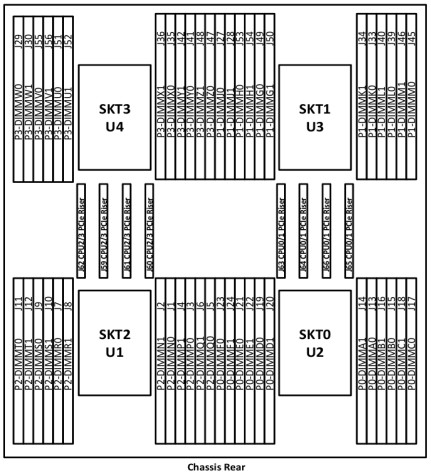
Superdome Flex DDR4 DIMM loading rules and numbering (top-down view of chassis) |
|
Loading Rules |
|
|
|
Superdome Flex DIMM Arrangement |
|
- Half populated: - Fully populated add:
|
|
DDR4 DIMMs Numbering The following table shows the supported configurations as shipped from the factory. Notes: DDR4 Memory Mixing of 64GB DDR4 and 128GB DDR4 is allowed. Populate with ½ each type. See Note on mixing rules when HPE Persistent Memory is utilized. No other mixing is supported within the same chassis or HPE nPar .
| |||||||||||||||||||||||||||||||||||||||
| |||||||||||||||||||||||||||||||||||||||
|
| |||||||||||||||||||||||||||||||||||||||
|
Superdome Flex DDR4 DIMM configurations shipped from the factory . | |||||||||||||||||||||||||||||||||||||||
|
| |||||||||||||||||||||||||||||||||||||||
|
This section describes the physical and environmental information for a chassis. | ||||||||||||||||||||||||||||||||||||||||||||||||
| ||||||||||||||||||||||||||||||||||||||||||||||||
|
Notes: - The Recommended Operating Range is recommended for continuous operation. Operating within the Allowable Operating Range is supported but may result in a decrease in system performance. - All temperature ratings shown are for sea level. An altitude de-rating of 1°C per 300 m above 1524 m is applicable. No direct sunlight allowed. Upper operating limit is 3,048 m (10,000 ft). | ||||||||||||||||||||||||||||||||||||||||||||||||
|
| ||||||||||||||||||||||||||||||||||||||||||||||||
|
This section describes the physical and environmental information for an RMC.
| ||||||||||||||||||||||||||||||||||||||||||||||||||
| ||||||||||||||||||||||||||||||||||||||||||||||||||
|
| ||||||||||||||||||||||||||||||||||||||||||||||||||
|
Environmental Info Regulatory model numbers: - Chassis (Q2N05A, Q2N06A, Q7G51A, Q7G52A, Q6L89A, Q7G53A, Q2N05B, Q2N06B, Q7G51B, Q7G52B, Q6L89B, Q7G53B), RMN: CHPF-067 - Rack Management Controller (Q2N07A), RMN: RSVLA-02
|
|
|
|
Additional Power Data The maximum power figures given were developed with the maximum configuration running applications designed to draw the maximum power possible. It is highly unlikely that any real-world application will result in this amount of power use for any significant time period. |
|
|
|
Date |
Version History |
Action |
Description of Change |
|
15-Dec-2025 |
Version 43 |
Changed |
QuickSpecs was updated and rebranded, GPU Accelerators note added. |
|
23-Jun-2025 |
Version 42 |
Changed |
Standard Features and Configuration Information sections were updated - Changes in these sections reflects 727055-B21 Ethernet SKU removal. |
|
Removed |
Obsolete SKUs were removed - 727055-B21, R0X06A, R0X07A, P9Q60A, P9Q63A, P9Q39A, P9Q41A | ||
|
13-Jan-2025 |
Version 41 |
Changed |
Standard Features section was updated |
|
02-Dec-2024 |
Version 40 |
Changed |
Standard Features section was updated |
|
05-Aug-2024 |
Version 39 |
Changed |
Standard Features and Configuration Information sections were updated |
|
08-Apr-2024 |
Version 38 |
Changed |
Standard Features section was updated |
|
01-Apr-2024 |
Version 37 |
Changed |
Standard Features and Configuration Information sections were updated |
|
26-Feb-2024 |
Version 36 |
Changed |
Overview, Standard Features, Service and Support, and Configuration Information sections were updated. |
|
03-Apr-2023 |
Version 35 |
Changed |
Configuration Information section was updated. |
|
19-Dec-2022 |
Version 34 |
Changed |
Configuration Information section was updated |
|
05-Dec-2022 |
Version 33 |
Changed |
Overview and Configuration Information sections were updated |
|
18-Jul-2022 |
Version 32 |
Changed |
Standard Features and Configuration Information sections were updated Obsolete SKU - 878038-H21 was removed |
|
06-Jun-2022 |
Version 31 |
Changed |
Standard Features and Configuration Information sections were updated SKU - R6B53A was removed |
|
14-Mar-2022 |
Version 30 |
Changed |
Standard Features and Configuration Information sections were updated SKU - R8T79A was removed |
|
07-Mar-2022 |
Version 29 |
Changed |
Standard Features and Configuration Information sections were updated |
|
06-Dec-2021 |
Version 28 |
Changed |
Standard Features and Configuration Information sections were updated |
|
04-Oct-2021 |
Version 27 |
Changed |
Overview, Standard Features, Additional, Configuration Information and Memory sections were updated Service and Support Pointnext Tech Care and Complete Care information updated |
|
15-Mar-2021 |
Version 26 |
Changed |
Standard Features, Configuration Information and Technical Specifications sections were updated |
|
01-Feb-2021 |
Version 25 |
Changed |
Overview, Standard Features, and Configuration Information sections were updated. Some SKUs were added and deleted in Configuration Information section. |
|
07-Dec-2020 |
Version 24 |
Changed |
Overview, Configuration Information, and Technical Specifications sections were updated |
|
05-Oct-2020 |
Version 23 |
Changed |
Standard Features section was updated. |
|
08-Sep-2020 |
Version 22 |
Changed |
Overview, Standard Features, Configuration Information, and Additional Options sections were updated. |
|
10-Aug-2020 |
Version 21 |
Changed |
Configuration Information section was updated. |
|
06-Jul-2020 |
Version 20 |
Changed |
Overview, Standard Features, Configuration Information, and Additional Options sections were updated. |
|
20-Apr-2020 |
Version 19 |
Changed |
Overview, Standard Features, Configuration Information, and Additional Options sections were updated. |
|
Date |
Version History |
Action |
Description of Change |
|
06-Jan-2020 |
Version 18 |
Changed |
Overview, Configuration Information and Technical Specifications sections were updated. |
|
02-Dec-2019 |
Version 17 |
Changed |
QuickSpecs was updated. |
|
04-Nov-2019 |
Version 16 |
Changed |
Standard Features and Configuration Information sections were updated. |
|
Added |
SKUs added in Configuration Information section: R0W89A, R0Y98A, Q2N41A, R0W29A, R0Z45A, R1F97A | ||
|
Removed |
Obsolete SKUs were deleted: Q2N68A, Q0V76A. | ||
|
07-Oct-2019 |
Version 15 |
Changed |
Standard Features and Configuration Information sections were updated. |
|
05-Aug-2019 |
Version 14 |
Changed |
Standard Features, Physical and Environmental Information, and Ordering and Configuration sections were updated. |
|
Added |
SKUs added in Ordering and Configuration section: R3T68A, R0W82A, R0W83A. | ||
|
Removed |
Obsolete SKU was deleted: Q0E21A | ||
|
06-May-2019 |
Version 13 |
Changed |
Overview, Standard Features and Ordering and configuration sections were updated |
|
Added |
SKUS added in Ordering and Configuration section: R0X02A, R0X03A, R0X04A. | ||
|
02-Apr-2019 |
Version 12 |
Changed |
Overview, Standard Features, Physical and Environmental Information, and Technical Specifications sections were updated. |
|
Added |
SKUs added in Ordering and Configuration section: Q2N05B, Q7G51B, Q2N06B, Q7G52B, Q6L89B, Q7G53B, R0X10A, R1C96A, R1C97A, R0X01A, ROX00A, R0W99A, R0W98A, R0W97A, R0W96A, R0W95A, R0W94A, R0W93A, R0W92A, R0W91A, R0W88A, R0W87A, R0W86A, R0W85A, R0W84A, R0W81A, R0W80A, R0W79A, R0X05A, R0X06A, R0X07A, R0X02A, R0X03A, R0X04A, R0Z00A, R0Z01A, R0Y99A, H7B70A, 817718-B21, 874253-B21, 867328-B21, Q9U36A, P10264-H21, P10266-H21, P10268-H21. | ||
|
Removed |
SKUs were deleted: 877825-H21, 877827-H21, 877829-B21. | ||
|
04-Feb-2019 |
Version 11 |
Changed |
Standard Features, Physical and Environmental Information, and Ordering and Configuration sections were updated. |
|
Added |
SKUs were added in Ordering and Configuration section: R2A72A, R2A73A, R2A74A, R2A69A, R2A70A, R2A71A, R2A65A, R2A66A, R2A67A, R2A68A. | ||
|
Removed |
Skus were deleted in Ordering and Configuration section: Q2N43A, Q2N44A, Q6L95A, Q6L96A, Q6L97A, Q6L98A, Q6MO7A, Q6M13A, Q6M14A. | ||
|
05-Nov-2018 |
Version 10 |
Changed |
Standard Features, Physical and Environmental Information, Ordering and Configuration, and Technical Specifications sections were updated. |
|
01-Oct-2018 |
Version 9 |
Changed |
Updates applied in QuickSpecs |
|
06-Aug-2018 |
Version 8 |
Changed |
Standard Features, Physical and Environmental Information, and Ordering and Configuration sections were updated. |
|
Added |
SKUs added: M0S66A, Q6L93A, Q2N33A, Q0L12A, P9M76A, 878038-H21. | ||
|
Removed |
SKUS deleted: Q6M00A, Q6M01A. | ||
|
02-Jul-2018 |
Version 7 |
Changed |
QuickSpecs was updated. |
|
Date |
Version History |
Action |
Description of Change |
|
04-Jun-2018 |
Version 6 |
Changed |
Overview, Standard Features, Physical and Environmental Information, Ordering and Configuration, and Technical specifications sections were updated. |
|
Added |
SKUs added in Ordering and Configuration section: Q6L89A, Q7G53A, Q2N18A, Q2N19A, Q9Z03A, Q9Z04A, Q9Z05A, Q9Z06A, Q9Z07A, Q9Z08A, Q9Z09A, Q9V69A, Q9V70A, Q9V71A, Q9V72A, Q9V73A, Q9V74A, Q9V75A, Q9R86A, Q0V76A, Q6M16A, Q2N57A#001, Q2N57A#002, Q2N57A#003, Q2N57A#004, Q2N57A#005, Q2N57A#006, Q2N57A#007, Q2N57A#008, Q2N57A#009, Q2N57A#010, Q2N57A#011, Q2N57A#012, Q2N57A#013, Q2N57A#014, Q2N57A#015, Q2N57A#016, Q2N57A#017, Q2N57A#018, Q2N57A#019, Q2N57A#020, Q2N57A#021, Q2N57A#022, Q2N57A#023, Q2N57A#024, Q2N57A#025, Q2N57A#026, Q2N57A#027, Q2N57A#028, Q2N57A#101, Q2N57A#102, Q2N57A#103, Q2N57A#104, Q2N57A#105, Q2N57A#106, Q2N57A#107, Q2N57A#108, Q2N57A#109, Q2N57A#110, Q2N57A#111, Q2N57A#112, Q2N57A#113, Q2N57A#114, Q2N57A#115, Q2N57A#116, Q2N57A#117, Q2N57A#118, Q2N57A#119, Q2N57A#120, Q2N57A#121, Q2N57A#122, Q2N57A#123, Q2N57A#124, Q2N57A#125, Q2N57A#126, Q2N57A#127, Q2N57A#128. | ||
|
02-Apr-2018 |
Version 5 |
Changed |
Standard Features and Ordering and Configuration sections were updated. |
|
Added |
SKUS added: 829335-B21, 872726-H21, Q6M17A, 817738-B21, 727055-B21, 647594-B21, Q0L14A, P9D94A, Q2N11A, Q6M15A. | ||
|
05-Mar-2018 |
Version 4 |
Changed |
Oracle Linux was added |
|
Removed |
SKUs Q2N18A and Q2N19A were deleted. | ||
|
05-Feb-2018 |
Version 3 |
Changed |
Overview, Standard Features, Physical and Environmental Information, Ordering and Configuration, and Technical Specifications sections were updated. |
|
Added |
SKUs added in Ordering and Configuration section: Q2N15A, Q2N16A, Q2N17A, Q2N18A, Q2N19A, Q2N20A, Q2N27A, Q2N28A, Q2N31A, Q6L92A, Q2N34A, Q9R29A, Q9R28A, Q2N35A, Q2N40A, 817738-B21, 829335-B21, 872726-H21, 877825-H21 , 877827-H21, 877829-B21. | ||
|
04-Dec-2017 |
Version 2 |
Changed |
Overview, Standard Features, Physical and Environmental Information, Ordering and Configuration, and Technical Specifications sections were updated. |
|
Removed |
SKU deleted in Ordering and Configuration section | ||
|
06-Nov-2017 |
Version 1 |
Created |
New QuickSpecs |
|
|
|
Shape the Future of QuickSpecs - Your Input Matters | |
|
|
|
| |
|
|
|
Chat now | |
|
|
|
© Copyright 2025 Hewlett Packard Enterprise Development LP. The information contained herein is subject to change without notice. The only warranties for Hewlett Packard Enterprise products and services are set forth in the express warranty statements accompanying such products and services. Nothing herein should be construed as constituting an additional warranty. Hewlett Packard Enterprise shall not be liable for technical or editorial errors or omissions contained herein.
Intel and Xeon are US registered trademarks of Intel Corporation.
| |
|
|
|
HEWLETT PACKARD ENTERPRISE Hpe.com |
|