HPE OpsRamp Software: технические характеристики и документация
|
Have feedback on QuickSpecs? We're listening | |
|
HPE OpsRamp Software QuickSpecs
The most comprehensive, flexible, and scalable IT Operations Management (ITOM) solution available HPE OpsRamp is a SaaS-based ITOM solution that delivers total visibility across on-premises, cloud, and cloud-native environments, centralizes infrastructure monitoring and event management of business-critical services, and optimizes operations through AIOps-driven automation and integration with existing ITOM and ITSM toolsets. |
|
|
HPE OpsRamp Software Centralize and modernize IT operations so you can respond faster to incidents across the hybrid infrastructure ecosystem and automate procedures to help reduce operating costs and keep applications performing to expectations. By improving operational efficiencies and governance of IT operations, customers will be more efficient and productive in supporting strategic business objectives. It will also leverage the GreenLake cloud platform. - Hybrid Discovery & Observability delivers one unified view of system health across your on-premises and cloud environments - Event & Incident Management with AIOps and machine learning enables your team to take the right action faster - Automation & Remediation saves your team time and improves operational governance and productivity
|
|
|
|
|
|
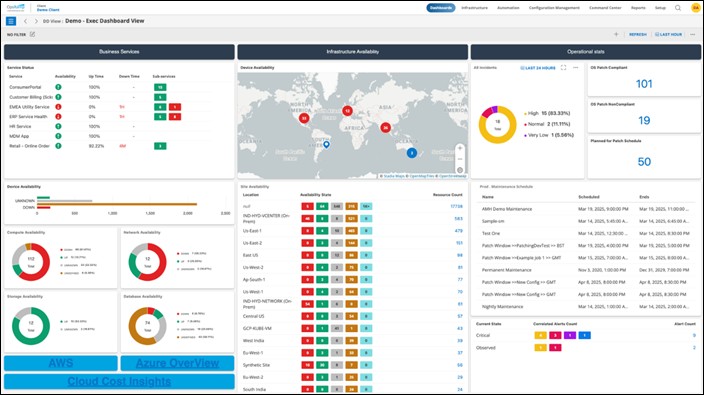
HPE OpsRamp centralizes IT operations within one central command center - from discovery to resolution - to help keep business services performing to expectation. |
|
|
|
HPE OpsRamp Software
HPE OpsRamp is a modern IT Operations Management (ITOM), SaaS-based platform providing IT monitoring and observability, intelligent automation, and AI-driven event and incident resolution to provide end-to-end visibility and control across distributed, hybrid IT environments.
Key Capabilities include (but not limited to): Hybrid Discovery and Monitoring - Hybrid Infrastructure Discovery
- Hybrid Infrastructure Monitoring
- ITSM Tool Integration & Bi-directional Collaboration
Event and Incident Management - Event Correlation, Deduplication, and Suppression - Intelligent Incident Routing - Open Integration Framework [Email, SNMP Trap, Webhook, and API] - Multi-tier, multi-tenancy - resource grouping - Role-based Consoles & Real-Time Reporting - Service Desk - incident management, problem/change management, service requests and tasks - Customizable Knowledge Base
Remediation and Automation - Policy-based Workflow Automation - Run Book Automation [PowerShell, Python and Shell] - Ad-Hoc, scheduled scripts, annotation-based script execution - Patch Management for Windows and Linux - Process Definition [Workflow Automation] - Remote Console Access [RDP, SSH, Telnet] - Remote Session Recording - Network Configuration Backup [Running and Startup Configuration] |
|
Core Solution Features - SaaS-Based - Multi-Tenant Ready - Role-Based Access Control - Single Sign-On - Multi-Factor Authentication - Custom Branding |
|
|
|
Subscription HPE OpsRamp is offered as a term license and offered in 1-year, 3-year, and 5-year terms.
When purchasing, the customer will need to choose from the following attributes: - Tiers: Standard, Enterprise - Term: 1, 3, or 5 years Platform: GreenLake Cloud Platform Billing Model: Upfront, Monthly, Quarterly, Annually Billing Frequency: Upfront, Monthly, Quarterly, Annually |
|
|
|
Supported Devices With more than 2,500 out-of-the-box supported integrations, HPE OpsRamp is the easiest and most flexible way to monitor and manage all your tools and technologies from a single, digital command center.
As of August 1st, 2023, a selection of the most frequently utilized integrations:
Monitoring: - Stackdriver - AppDynamics - Pingdom - Micro Focus (HPE) Operations Manager i - Datadog - Neustar - New Relic - SolarWinds Orion - System Center Operations Manager (SCOM) - Zabbix - Email Alerts - integrate via Email from any monitoring tool - Dynatrace - Logz.io - Splunk - Prometheus
Cloud Hyperscalers - AWS - Google Cloud Platform (GCP) - Microsoft Azure |
|
Service Management (ITSM) - ConnectWise - Freshservice - JIRA - Manage Engine Service Desk Plus - ServiceNow - Cherwell - ZenDesk - Autotask - BMC Remedy - Email Requests |
|
|
|
ChatOps - Slack
Authentication - Active Directory Federation Services - Azure Active Directory - Okta - OneLogin - PingOne
Password Vault - CyberArk - ManageEngine Password Manager Pro |
|
|
|
HPE Support
|
|
HPE Support for SaaS includes: - General technical guidance and troubleshooting of the cloud and/or on-premise components of the Service for:
- Tech tips knowledge library - Expert forum response - Expert on-line chat |
|
Notes: HPE Support for SaaS is available 24 hours per day, 7 days per week including HPE holidays.
|
|
General technical guidance |
|
HPE endeavors to provide general technical guidance for Customer questions and inquiries specific to the topic areas outlined in the following regarding the operation and management of the Customer's Services covered under this subscription. General technical guidance is available through the telephone, web, and chat communication channels and is subject to the service coverage window of the service agreement and will be treated as a severity 3 incident. When related to the topics detailed/described in the following, HPE identifies knowledge documents, videos, and knowledge base articles to assist with topics raised. In addition to any limitations or exclusions set forth in these Terms and Conditions, any HPE general technical guidance shall be provided specifically for the topics detailed in the following and only for the Services covered under the service: - Correct usage or procedures to use the Services' features - Assistance with identifying relevant documentation or knowledge base articles - HPE best practice advice to help you manage and maintain your Services - Basic navigation to use the Service management interface - Advice on capacity management options based on Service usage trends (where available) - Guidance with the general configuration of the Service that may include recommendations for best practice based on HPE operational experience - Guidance on the potential steps to help bring the Service into a supported configuration |
|
Notes: General technical guidance topics mentioned previously may not be applicable to all hardware and/or software Services covered by this service.
|
|
Tech tips knowledge library |
|
HPE provides access to enhanced tech tips videos delivered by experts offering technical best practices and functional know-how. The tech tips videos help Customers understand how to best manage and operate their HPE Service and provide information regarding emerging support trends and capabilities.
Tech tips videos are available via HPE Support Center. Subject of content varies based on HPE operational experience with Services and best practices in supporting and maintaining these Services. |
|
Expert forum response |
|
Customers can post questions, issues, or discuss usage of Services within the HPE community forums. HPE product specialists respond within two business days to any unsolved questions raised within the official HPE community forum for Services covered by HPE Support services. Where posts raise topics that should be addressed through standard support processes, HPE requests that a formal support incident is created and follows the standard HPE incident management processes. The specialist technical resource response is limited to English language only and requires that the user be registered with HPE Support Center and has linked service agreements. |
|
|
|
Expert online chat |
|
Customers can initiate an online chat with a specialist technical resource to ask questions, get help, or general technical guidance. Expert online chat is provided so Customers can obtain quick answers to technical questions about their HPE Service. Complex questions that require detailed responses may be elevated to support incidents on an as-needed basis. Expert online chat is limited to English language only and available during the service coverage window. Availability may vary for certain Services. Refer to HPE.com/services/expert chat for details or contact your local HPE Sales representative |
|
|
|
Accessing HPE Support |
|
Support can be accessed by: - Telephone: using numbers published here. The Customer must telephone HPE Support to establish a Severity 1 case. - Online: using the 'Help' button in the SaaS Software Console application - Online: using the ( ? ) icon in the GreenLake Edge to Cloud Platform - Online: HPE Support Center |
|
Notes: HPE or its designated support partners will provide support twenty-four hours a day, seven days a week. Such support will be provided solely to Customer or the Service account holder. HPE will have no obligation to accept calls or messages directly from, or otherwise interact directly with, personnel other than Customer or the Service account holder. |
|
|
|
Maintenance |
|
HPE will use reasonable efforts to provide Customer with prior notice of any scheduled maintenance (except for emergency maintenance) and, Customer agrees to use reasonable efforts to comply with any maintenance requirements that HPE notifies Customer about. |
|
|
|
Requirements for Support |
|
As a condition to all of HPE's obligations to provide support, Customer will comply with HPE's instructions regarding the use of the Service and provide at HPE request, reasonable access to appropriate personnel, records, network resources, and maintenance logs. HPE support is limited to the Service. HPE is not responsible for the operation and general maintenance of Customer's computing environment. Customer is responsible for Customer's data backup. HPE is not responsible for any losses or liabilities arising in connection with any failure of data backup processes. |
|
|
|
Support Exclusions |
|
HPE support obligations do not apply to any unavailability, suspension or termination of the Service, or performance issues: (i) resulting from a suspension of the Service, and/or support as described in this Service Description and the GreenLake Terms; (ii) caused by factors outside of HPE reasonable control, including any force majeure event, Internet access or related problems outside the Service; (iii) resulting from any actions or inactions of Customer or any third party; (iv) resulting from Customer equipment, software or other technology and/or third party equipment, software or other technology (other than third party equipment within HPE direct control); or (v) arising from our suspension and termination of Customer's right to use the Service in accordance with this Service Description and GreenLake Terms (collectively, the Support Exclusions). |
|
|
|
Response times |
|
HPE Support service level remote response is a 15-minute response for severity 1 incidents and a 1 hour response for all other incidents. HPE acknowledges a support incident by logging a support case, communicating the case ID to the Customer, and confirming the Customer's incident severity and time requirements for commencement of remedial action. Incident severity levels are defined as follows: - Severity 1-critical business impact: For example, production environment down: production system or production application down/critically impacted; data corruption/loss or risk; business severely affected; safety and security issues - Severity 2-limited business impact or business risk: For example, production environment available but some functions limited or degraded; severely restricted use; critical nonproduction environment or system issue - Severity 3-no business impact: For example, nonproduction system (such as test system) or noncritical issue; work around in place, installations, questions, or requests for information or guidance HPE has established formal escalation procedures to facilitate the resolution of complex incidents. As determined by HPE, local HPE management coordinates incident escalation, enlisting the skills of appropriate HPE resources to assist you with problem solving |
|
|
|
Optional Support Services
|
|
HPE Services No matter where you are in your digital transformation journey, you can count on HPE Services to deliver the expertise you need when, where and how you need it. From planning to deployment, ongoing operations and beyond, our experts can help you realize your digital ambitions. https://www.HPE.com/services |
|
|
|
Consulting Services No matter where you are in your journey to hybrid cloud, experts can help you map out your next steps. From determining what workloads should live where, to handling governance and compliance, to managing costs, our experts can help you optimize your operations. https://www.HPE.com/services/consulting |
|
|
|
HPE Managed Services HPE runs your IT operations, providing services that monitor, operate, and optimize your infrastructure and applications, delivered consistently and globally to give you unified control and let you focus on innovation. HPE Managed Services | HPE |
|
|
|
Operational Services Optimize your entire IT environment and drive innovation. Manage day-to-day IT operational tasks while freeing up valuable time and resources. Meet service-level targets and business objectives with features designed to drive better business outcomes. https://www.HPE.com/services/operational |
|
|
|
HPE Lifecycle Services HPE Lifecycle Services provide a variety of options to help maintain your HPE systems and solutions at all stages of the product lifecycle. A few popular examples include: - Lifecycle Install and Startup Services: Various levels for physical installation and power on, remote access setup, installation and startup, and enhanced installation services with the operating system. - HPE Firmware Update Analysis Service: Recommendations for firmware revision levels for selected HPE products, taking into account the relevant revision dependencies within your IT environment. - HPE Firmware Update Implementation Service: Implementation of firmware updates for selected HPE server, storage, and solution products, taking into account the relevant revision dependencies within your IT environment. - Implementation assistance services: Highly trained technical service specialists to assist you with a variety of activities, ranging from design, implementation, and platform deployment to consolidation, migration, project management, and onsite technical forums. - HPE Service Credits: Access to prepaid services for flexibility to choose from a variety of specialized service activities, including assessments, performance maintenance reviews, firmware management, professional services, and operational best practices. Notes: To review the list of Lifecycle Services available for your product go to https://www.HPE.com/services/lifecycle
For a list of the most frequently purchased services using service credits, see the HPE Service Credits Menu |
|
|
|
Other Related Services from HPE Services
HPE Education Services Training and certification designed for IT and business professionals across all industries. Broad catalogue of course offerings to expand skills and proficiencies in topics ranging from cloud and cybersecurity to AI and DevOps. Create learning paths to expand proficiency in a specific subject. Schedule training in a way that works best for your business with flexible continuous learning options. https://www.HPE.com/services/training |
|
|
|
Consume IT On Your Terms GreenLake edge-to-cloud platform brings the cloud experience directly to your apps and data wherever they are-the edge, colocations, or your data center. It delivers cloud services for on-premises IT infrastructure specifically tailored to your most demanding workloads. With a pay-per-use, scalable, point-and-click self-service experience that is managed for you, GreenLake edge-to-cloud platform accelerates digital transformation in a distributed, edge-to-cloud world. - Get faster time to market - Save on TCO, align costs to business - Scale quickly, meet unpredictable demand - Simplify IT operations across your data centers and clouds To learn more about HPE Services, please contact your Hewlett Packard Enterprise sales representative or Hewlett Packard Enterprise Authorized Channel Partner. Contact information for a representative in your area can be found at "Contact HPE" https://www.HPE.com/us/en/contact-HPE.html
For more information http://www.HPE.com/services |
|
|
|
For more information on HPE OpsRamp support - https://www.HPE.com/us/en/solutions/opsramp.html - https://www.opsramp.com/ - https://docs.opsramp.com/ - https://docs.opsramp.com/guides/getting-started/
Terms and conditions for HPE OpsRamp Please go to: HPE Base Agreement
To learn more on HPE OpsRamp, please contact your Hewlett Packard Enterprise sales representative or Hewlett Packard Enterprise Authorized Channel Partner. Contact information for a representative in your area can be found at "Contact HPE". https://www.HPE.com/us/en/contact-HPE.html
HPE Support Services are sold by Hewlett Packard Enterprise and Hewlett Packard Enterprise Authorized Service Partners: - Services for customers purchasing from HPE or an enterprise reseller are quoted using HPE order configuration tools. - Customers purchasing from a commercial reseller can find HPE Support Services at https://ssc.HPE.com/portal/site/ssc/ |
|
|
|
Startup and Configuration Follow these steps to get your HPE OpsRamp solution ready to discover, monitor, and manage events across your hybrid IT infrastructure environment.
Set up your GreenLake account: 1. Create your free account in GreenLake cloud platform (Users with existing GreenLake accounts may use that account) 2. You will receive an email with details about your request.
|
|
Auto-populate username and password The user can provide username and password in the URL in order to auto-populate the login page. 1.
For
example, the following URL, 2. will auto-populate the fields as follows: - Username - RC& - Password - !@!@ 3. Click LOG IN. |
|
Notes: - Consider the security implications of sharing the login credentials publicly. You should only share credentials of users with read-only access, and with profile and password change disabled. - Visit the My Profile section to learn about the disable profile and password change options. |
|
|
|
Log in |
|
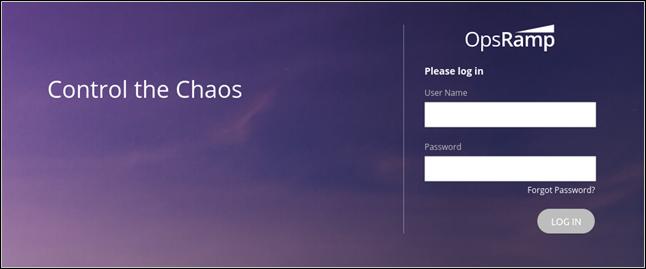
1. In your browser, navigate to: https://{my-organization}.app.opsramp.com 2. Enter your login credentials for an account provisioned with Partner Administrator role: |
|
|
|
|
|
3. Click LOG IN |
|
|
|
Create a client |
|
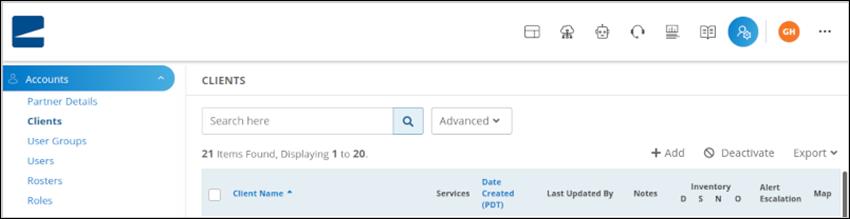
1. Go to Setup > Accounts > Clients |
|
|
|
2. Click +Add to create a client. 3. Enter the required client information: a. Client Name b. Address c. Country d. Time Zone 4. In the Auto Monitoring Resources section, make sure No is selected to disable auto-monitoring. Leave all other settings to the default selection. 5. Click the Next button. 6. Click Finish, keeping the default selection for Product Package entries.
The CLIENT DETAILS page displays basic information and configuration settings for your newly created client. |
|
|
|
Install the agent |
|
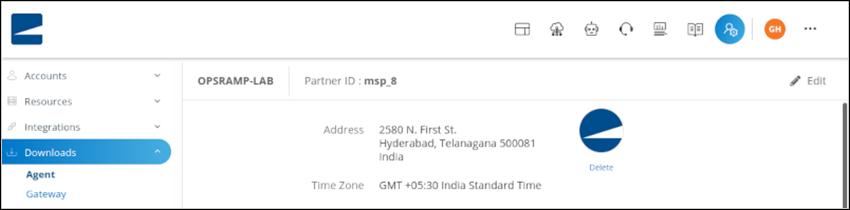
1. Go to Setup > Downloads > Agent: |
|
|
|
2. In the tile for the target operating system, click Instructions, as shown in this example for the Amazon Linux agent: |
|
|
|
3. Follow the instructions to install the agent as a root user or non-root user. In a command window, you need to copy and run the commands provided in the instructions. The strings are already populated with the authentication keys for your organization. 4. Go to Infrastructure > Resources > Server to verify that the agent is installed. The server availability status is undefined because an availability monitor is not yet assigned for your server. |
|
|

|
Set up monitors |
|
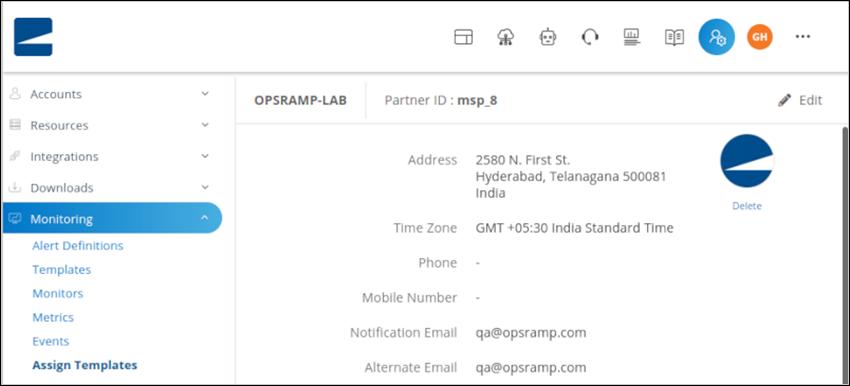
1. Go to Setup > Monitoring > Assign Templates: |
|
|
|
2. In the drop-down menus, Select the client you created, if not already selected, Assign Templates to resources, and Cloud: |
|
|
|
3. In the Select Resources section, select your server. 4. In the Select Monitoring Templates section, select HPE OpsRamp Agent Status Template. 5. Go to Infrastructure > Resources > Server. Your server availability status should indicate Up. |
|
|

|
View the dashboard |
|
1. In Dashboards, choose Classic Dashboard: |
|
|
|
2. The default dashboard for your client shows the inventory and availability widgets for your server. |
|
|
|
View alerts |
|
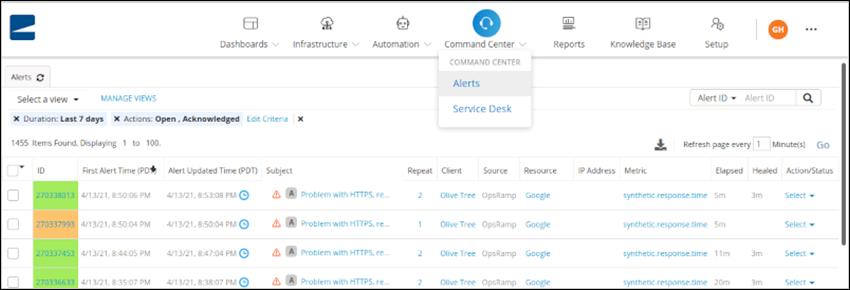
1. Power off your server instance to simulate an alert condition and wait about five minutes. 2. Go to Alerts to view the alert list: |
|
|
|
3. An alert with status Critical and subject HPE OpsRamp agent is offline indicates monitoring of your server availability. Click 'Refresh' to update the alert list. 4. Power on your server instance. The alert status for your server should change from Critical to OK. |
|
|

|
Next steps | |||||||||||||||
|
- Visit the Monitoring section to learn about other resources you can monitor. - In the Administrator Guide you can find more detailed information about setting up accounts, creating and authenticating users, and defining various management and event escalation and remediation policies. - View the API Getting Started documentation to learn more about how you can automate your enterprise operations. - Visit the following links within the OpsRamp Software Docs site for detailed instruction on setting up the full capabilities of your OpsRamp Software solution.
|
|||||||||||||||
|
| |||||||||||||||
|
HPE OpsRamp Software SKUs
OpsRamp Evaluation
| |||||||||||||||
|
OpsRamp Standalone SaaS SKUs via GreenLake aaS | |||||||||||||||
| |||||||||||||||
|
| |||||||||||||||
|
| |||||||||||||||
|
OpsRamp Standalone SaaS SKUs via HPE Buy | |||||||||||||||
| |||||||||||||||
|
|
|
Date |
Version History |
Action |
Description of Change |
|
06-Apr-2026 |
Version 6 |
Changed |
Minor updates on format and wording. |
|
01-Dec-2025 |
Version 5 |
Added |
Expanded "HPE OpsRamp Software SKUs" section to include new standalone SaaS offerings, evaluation options, and SKUs via GreenLake and HPE Buy.
Enhanced "Standard Features" section with new subscription attributes including term options and billing frequencies. |
|
Removed |
Deprecated legacy content from "Startup and Configuration" section. | ||
|
06-Oct-2025 |
Version 4 |
Changed |
Standard Features section was updated - Subscription features were updated. Configuration Information section was updated - Updated SKUs information. |
|
02-Sep-2025 |
Version 3 |
Changed |
Standard Features and Configuration Information sections were updated - Term License information was added. |
|
02-Jun-2025 |
Version 2 |
Changed |
Overview, Standard Features, Service and Support and Configuration Information sections were updated Rebranding updates |
|
05-Sep-2023 |
Version 1 |
New |
New QuickSpecs |
|
|
|
Have feedback on QuickSpecs? We're listening | |
|
|
|
| |
|
|
|
Chat now | |
|
|
|
© Copyright 2026 Hewlett Packard Enterprise Development LP. The information contained herein is subject to change without notice. The only warranties for Hewlett Packard Enterprise products and services are set forth in the express warranty statements accompanying such products and services. Nothing herein should be construed as constituting an additional warranty. Hewlett Packard Enterprise shall not be liable for technical or editorial errors or omissions contained herein.
Microsoft and Windows are registered trademarks or trademarks of Microsoft Corporation in the U.S. and/or other countries.
VMware is a registered trademark of VMware, Inc. in the United States and/or other jurisdictions.
a50007014enw - 17124 - Worldwide - V6 - 06-April-2026 | |
|
|
|
HEWLETT PACKARD ENTERPRISE HPE.com |
|