HPE GreenLake for Backup and Recovery: технические характеристики и документация
В архивеOverview
|
From 1st November 2024, HPE GreenLake for Backup and Recovery is no longer available for purchase. These QuickSpecs are maintained for existing subscribers.
|
|
HPE GreenLake for Backup and Recovery |
|
At a Glance HPE GreenLake for Backup and Recovery is designed for Application, Storage and Backup Administrators responsible for the protection of their organization's data. It provides assurance that in the event of an unintended deletion, data loss, through an infrastructure outage or a ransomware, attack data can be efficiently recovered to a known good point in time, in line with the recovery service level commitment to the organization.
IT Administrators, Storage Administrators and Cloud Administrators will appreciate the storage efficiency and low management requirements of HPE GreenLake for Backup and Recovery. The service is highly storage efficient and uses HPE Catalyst technology to significantly reduce the storage space required for backup data. The simple to operate cloud console, automatic updates to the service and integrated backup storage mean the time spent on management is significantly lower than is required for managing traditional data protection solutions. |
|
|
|
|
|
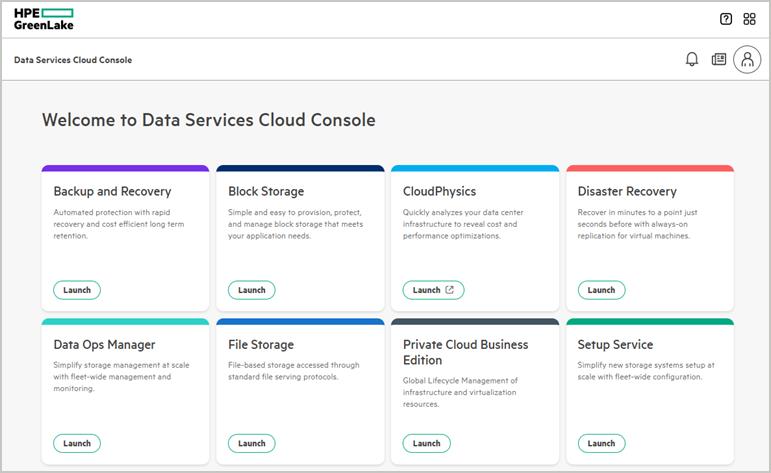
HPE data services Data is at the heart of every organization and for most organizations it is their key asset. How this data is managed and protected determines how well an organization serves its customers, how well the organization performs and how resilient it is to data loss, data corruption and malware attacks. HPE data services are delivered as a suite of services through the GreenLake Data Services cloud console, on the HPE GreenLake Portal (https://console.greenlake.hpe.com) and remove the barriers between data and infrastructure management. HPE GreenLake for Backup and Recovery is part of this suite of cloud services and provides protection for data on the GreenLake managed storage and on other HPE or third-party storage. |
|
|
|
|
|
Figure 1 The HPE GreenLake Cloud Portal offers a suite of data services |
|
|
Standard Features
|
Key Features and Benefits
Hybrid protection with SaaS simplicity HPE GreenLake for Backup and Recovery is built for efficient and automated hybrid cloud protection. All capabilities are delivered as-a-service so there is no backup software or backup infrastructure to separately manage or maintain. The components that need to be run in the protected environment are service managed and installed. New features are made available through automatic and non-disruptive updates to the service. Data protection can be managed from anywhere using a cloud console which is securely accessed from the HPE GreenLake Portal.
Automated protection using Protection Policies and Protection Groups
Tiered protection and integrated management of backup storage Three tiers of protection are built into HPE GreenLake for Backup and Recovery: snapshots, on-premises backups and cloud backups. The On-Premises Protection Store and Cloud Protection Store backup destinations are service defined and remove the challenge of maintaining version compatibility between the backup targets and backup software. All updates to the On-Premises Protection Store and Cloud Protection Store are executed automatically and non-disruptively. The service can also use HPE StoreOnce appliances as on-premises backup destinations. Efficient protection of your data The service provides application-integrated protection of on-premises VMware and Microsoft SQL Server. As well as application-integrated protection, the service can configure protection at the storage volume level to protect any application or data using that volume. For all backups and replicas, the space used to store the recovery points and the network bandwidth requirements are reduced with HPE Catalyst deduplication technology. Integrated security All recovery points created from backups are encrypted using the AES 256 algorithm and all backup data in-flight is protected with SSL encryption. Recovery points can be configured as immutable which prevents modification or deletion before the end of the retention duration. The encryption keys for the recovery points are service-generated and accessed from an encrypted vault in the HPE GreenLake Platform. Dual Authorization can be configured to prevent backup deletion by a single user.
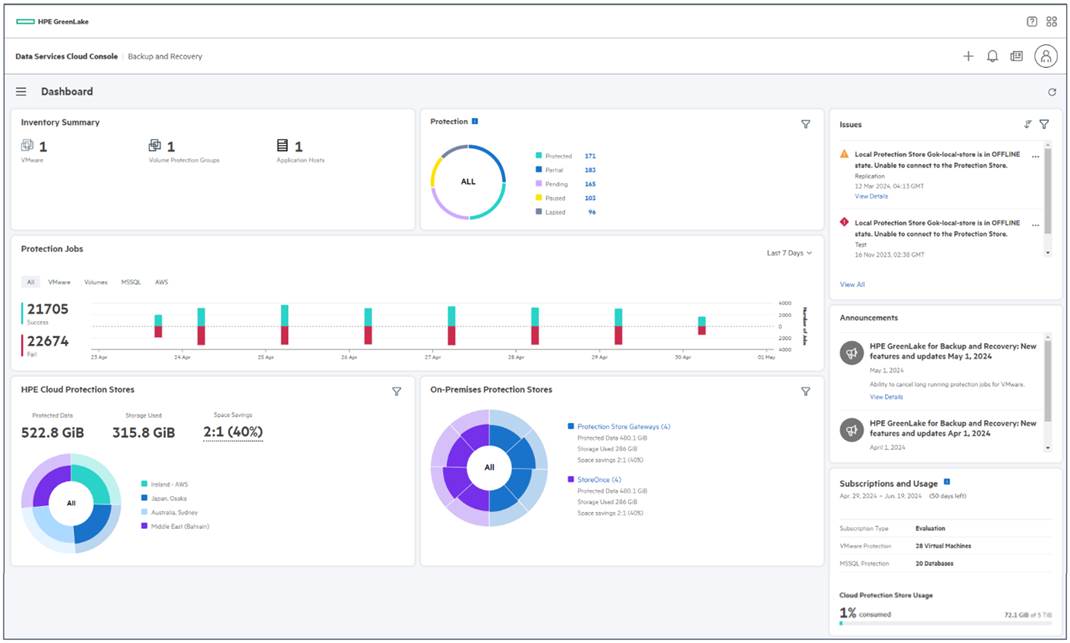
Reporting and notifications The service dashboard provides a consolidated view of protection status, backup storage usage, subscription status and any issues. For more detailed information, reports are available over selectable date ranges. To have service status updates sent to you, email notifications are easily set up.
Simple to predict required resources and budget HPE Partners have access to the HPE GreenLake for Backup and Recovery Ninja Sizer to generate detailed estimates of the resources required for on-premises protection and the subscription required.
Straightforward pricing based on use HPE GreenLake for Backup and Recovery can be purchased upfront or paid for monthly in-arrears. If you choose in-arrears payment, this can be on a pay-as-you-go basis with no minimum commitment, or you can commit to monthly consumption to benefit from lower unit prices. |
|
|
Service and Support
|
To make sure all users get the full benefit of HPE GreenLake for Backup and Recovery, the entitlement to use the service also includes entitlement to the following enterprise-level support:
- Setup of HPE GreenLake for Backup and Recovery. - Installation of the on-premises Data Orchestrator virtual machine and the on-premises Protection Store Gateway virtual machine. - Operation of the HPE GreenLake for Backup and Recovery. - Connectivity between the on-premises and/or cloud environment, the HPE Cloud Protection Store(s) and the HPE GreenLake for Backup and Recovery cloud console.
- Use of this service does not offer or guarantee expertise or assistance on components, systems, servers or software not directly related to HPE GreenLake for Backup and Recovery. - Use of this product does not include HPE support on behalf of equipment and software that is not provided by HPE, except as it directly relates to the necessary function of HPE GreenLake for Backup and Recovery. HPE does not provide support for third party software, services, or solutions, except in a commercially reasonable effort related to how they interact with HPE GreenLake for Backup and Recovery.
|
|
|
Configuration Information
|
Cloud management console HPE GreenLake for Backup and Recovery and other data services are accessed through the HPE GreenLake Portal. It is easy to move between HPE GreenLake for Backup and Recovery and other services and use the HPE GreenLake Portal as a single location for data infrastructure management and data protection management. The cloud console enables data protection to be managed from anywhere - simplifying operations and consolidating management of data protection at multiple locations. Internet connectivity is required to access the Backup and Recovery cloud console. No backup data is stored in or transmitted through the cloud console.
|
|
|
|
Figure 2 HPE GreenLake for Backup and Recovery dashboard in the cloud console |
|
Notes: The interface for the HPE GreenLake for Backup and Recovery cloud console is English language only. |
|
|
|
|
|
Application Programming Interface (API) To enable programmatic control and access to HPE GreenLake for Backup and Recovery, the REST APIs for the service are made available. Alpha and beta APIs are currently available for a large subset of the functionality available through the cloud console. These APIs are downloadable following the OpenAPI 3.1 spec as a YAML file from the HPE GreenLake Developer Portal (https://developer.greenlake.hpe.com/docs/greenlake/services/backup-recovery/public/) alongside the APIs for the other HPE GreenLake services.
|
|
|
|
Configuration and interoperability for on-premises VMware protection
VMware ESXi versions Virtual machines hosted on the following VMware ESXi versions can be protected. It is required that the ESXi hosts be managed by VMware vCenter - standalone ESXi hosts are not supported. The backups are independent of the guest operating system, file system or application running in the virtual machine.
Notes: - Reference to VMware versions above applies to Standard Edition and Enterprise Plus Edition only. Essentials Kit is not supported. - VMware template virtual machines and vCLS cluster virtual machines cannot be selected for protection. These virtual machine types can be protected if the datastore they use is protected with a datastore snapshot or datastore backup.
|
|||||||||
|
VMware vCenter configurations and features HPE GreenLake for Backup and Recovery is compatible for use with the following VMware vCenter configurations and features: | |||||||||
|
| |||||||||
|
|||||||||
|
VMware storage types Virtual machines using the following storage types can be protected:
|
|||||||||
|
| |||||||||
| |||||||||
|
Table 1 Recovery points created for backup of virtual machines with RDM storage | |||||||||
|
|
|
Array-optimized protection and VMware CBT protection HPE GreenLake for Backup and Recovery has two backup modes for protecting VMware virtual machines. The service automatically selects the most appropriate backup mode and the same simple protection workflows are used for both modes.
1. VMware CBT backup mode is applicable to all virtual machines in the Inventory and is independent of the storage used by those virtual machines. This uses integration with the VMware vSphere Storage APIs for Data Protection to leverage Changed Block Tracking (CBT). This mode allows protection with on-premises backups and cloud backups. 2. Array-optimized backup mode is based on deep integration between the Backup and Recovery service and storage systems managed using the GreenLake Cloud Portal. This mode uses storage system snapshots to minimize the backup impact on the protected virtual machines and to execute very fast backups. This mode allows protection with snapshots, on-premises backups and cloud backups. It is the default backup mode for datastore and vVol backups and can be selected for VM and VM Protection Group backup where the storage system is managed using the GreenLake Cloud Portal. |
|
|
|
Storage System support for array-optimized protection Virtual machines using capacity from the following, HPE GreenLake Portal managed, storage systems can be protected using array-optimized backups, or VMware CBT backups.
For storage systems that support NVMe storage and where the NVMe volumes are presented over FC, the minimum required operating systems versions are:
Notes: - An iSCSI connection is required between the Protection Store Gateway and the storage system(s) for the array-optimized backup mode. Backup over Fibre Channel is supported to StoreOnce appliances. - Array optimized protection is not available for virtual machines, datastores, SQL Server databases and storage volumes when the storage volume is using NVMe over TCP storage. - Recovery from an on-premises backup or a cloud backup requires the target ESXi host to be configured with an ISCSI software adapter. - Using array-optimized protection, all virtual machines on the storage volume, including any not selected for protection, are copied to the backup location. For backups, this means the recovery points may include virtual machines that were not selected for protection. For cloud backups, the capacity consumed in the Cloud Protection Store by these non-selected virtual machines is included in the billed capacity. |
|
|
|
Storage System support for VMware CBT protection Virtual machines using HPE storage systems or other vendor storage systems can be protected using VMware CBT backups. For users of HPE Storage, this includes the following storage systems:
|
The VMware Compatibility Guide should be checked for firmware versions and other details. |
|
|
|
Backup transport mode support for VMware CBT protection
Notes: - To use the HotAdd backup mode, the datastore(s) of the virtual machines being protected must be accessible to the ESXi host where the Protection Store Gateway is running. When the Protection Store Gateway does have direct access to the required datastore(s) the HotAdd backup mode will be automatically selected. - The HotAdd backup mode is not available for backup to HPE StoreOnce Systems.
|
|
VMware granular recovery Individual files and folders can be selected for recovery.
Supported recovery points:
|
|
Supported file systems and volume managers:
Notes: - File and folder recovery from the XFS file system on Linux kernel versions 4.9+ with ref-links enabled is not supported. - File and folder recovery from recovery points on HPE StoreOnce appliances requires StoreOnce software 4.3.6 or newer.
VMware bulk recovery To reduce the time to configure the recovery of multiple virtual machines, some or all of the virtual machines in a VMware Protection Group can be recovered in a single operation.
|
|
|
|
Configuration and interoperability for on-premises Microsoft SQL Server protection
Microsoft SQL Server versions and operating systems Databases on the following versions and editions can be protected:
|
|
These are supported with the following operating systems:
|
|
File Systems Databases on the following file systems can be protected:
Protection is supported when these file systems are used with the following disk partition types:
Notes: Databases configured on dynamic disks are not supported for protection.
|
|
Microsoft SQL Server configurations and features HPE GreenLake for Backup and Recovery is compatible for use with the following configurations and features:
|
|
Virtualized and physical Microsoft SQL Server protection HPE GreenLake for Backup and Recovery provides protection for Microsoft SQL Server databases hosted in VMware virtual machines and Microsoft SQL Server databases hosted on physical servers; in the environments described below.
|
|
Interoperability with Microsoft SQL Server on VMware
VMware versions Databases hosted in virtual machines running the VMware ESXi versions listed in the 'Configuration and interoperability for on-premises VMware protection' section above are supported for protection.
VMware vSphere configurations and features Databases hosted in virtual machine running in the VMware configurations listed in the 'Configuration and interoperability for on-premises VMware protection' section above are supported for protection.
VMware storage types Databases hosted in virtual machines using the following storage types can be protected:
|
|
Storage System support for array-optimized database protection The same storage systems as listed in the 'Storage System support for array-optimized protection' section above are supported for array-optimized protection of Microsoft SQL server databases hosted in VMware virtual machines. Databases hosted in virtual machines using other storage systems are protected with VMware CBT backups. The notes in the above 'Array-optimized protection and VMware CBT protection' section above also apply to the protection of Microsoft SQL Server instances hosted in VMware virtual machines. |
|
Interoperability with Microsoft SQL Server on physical servers Microsoft SQL Server instances running on physical hosts and using storage from a DSCC-managed storage system listed in the 'Storage System support for array-optimized protection' section above are supported for protection. Databases on physical hosts using non-DSCC managed storage are not supported for protection.
| |||||||||||||||||||||||||||||||||||||||||||||||||||||||||||||||||||||||||||||||||||||||||||||||||||||||||||||||||||||||||||||||||||||||||||||||
|
| |||||||||||||||||||||||||||||||||||||||||||||||||||||||||||||||||||||||||||||||||||||||||||||||||||||||||||||||||||||||||||||||||||||||||||||||
|
Configuration and interoperability for on-premises storage volume protection The same storage systems as listed in the 'Storage System support for high performance array-optimized protection' section above are supported for volume protection.
Volume protection can be integrated with applications by adding pre- and post-scripts into the Protection Policy. This extends recovery consistent protection to applications for which there is not a HPE GreenLake for Backup and Recovery integration. For these applications, externally created and hosted scripts are run to put the application into a 'backup ready' state before the backup process and then 'release' the application after the backup process. Integrating scripts into the storage volume protection process allows recovery-consistent, automated snapshots and backups of any application using the storage volume.
| |||||||||||||||||||||||||||||||||||||||||||||||||||||||||||||||||||||||||||||||||||||||||||||||||||||||||||||||||||||||||||||||||||||||||||||||
|
| |||||||||||||||||||||||||||||||||||||||||||||||||||||||||||||||||||||||||||||||||||||||||||||||||||||||||||||||||||||||||||||||||||||||||||||||
|
Protection Policy Configuration and Recovery Options Information Table 2 shows the options available within a Protection Policy for the types of assets that can be protected by HPE GreenLake for Backup and Recovery. Table 2 also shows the recovery options available from the recovery points created. | |||||||||||||||||||||||||||||||||||||||||||||||||||||||||||||||||||||||||||||||||||||||||||||||||||||||||||||||||||||||||||||||||||||||||||||||
|
| |||||||||||||||||||||||||||||||||||||||||||||||||||||||||||||||||||||||||||||||||||||||||||||||||||||||||||||||||||||||||||||||||||||||||||||||
| |||||||||||||||||||||||||||||||||||||||||||||||||||||||||||||||||||||||||||||||||||||||||||||||||||||||||||||||||||||||||||||||||||||||||||||||
|
Table 2 Recovery point and recovery options for protected data types | |||||||||||||||||||||||||||||||||||||||||||||||||||||||||||||||||||||||||||||||||||||||||||||||||||||||||||||||||||||||||||||||||||||||||||||||
|
| |||||||||||||||||||||||||||||||||||||||||||||||||||||||||||||||||||||||||||||||||||||||||||||||||||||||||||||||||||||||||||||||||||||||||||||||
|
Notes: (to Table 2) - 1Requires storage arrays to be configured with synchronous replication. For HPE Primera, HPE Alletra 9000 and HPE Alletra Storage MP, this is only supported with replication over Fibre Channel (RCFC), not with IP-based replication (RCIP). - 2Granular recovery supported from snapshots for virtual machines using vVOL storage. - 3Granular recovery supported from array-optimized backups for virtual machines using vVol storage. - 4Granular recovery supported from CBT backups for virtual machines using VMFS storage and vVOL storage. - 5Only supported for replication to Cloud Protection Store, not for replication to another on-premises destination. - 6When database virtual machine is using a RDM disk, parent recovery is only supported when RDM disk is not part of the VMware snapshot. - 7Backup of transaction logs is not supported to the Cloud Protection Store. - 8An individual volume can be recovered from a Volume Protection Group recovery point. Recovery Point Maximum Retention Durations The
retention ('Retain for') settings in a Protection Policy define how
long the recovery points created by each protection schedule will remain
available before being automatically removed. The maximum retention
is listed below. For the highest frequency protection schedules, the
maximum retention will be lower that the values below:
If the immutability option is selected in the Protection Policy, the recovery points created by the protection schedule are protected from early deletion or modification until the end of the configured retention. |
|||||||||||||||||||||||||||||||||||||||||||||||||||||||||||||||||||||||||||||||||||||||||||||||||||||||||||||||||||||||||||||||||||||||||||||||
|
| |||||||||||||||||||||||||||||||||||||||||||||||||||||||||||||||||||||||||||||||||||||||||||||||||||||||||||||||||||||||||||||||||||||||||||||||
|
Components for On-Premises Protection To enable on-premises protection two virtual machines are installed into users' VMware environments: The Data Orchestrator and the Protection Store Gateway. The Data Orchestrator provides a secure connection from the on-premises environment to the GreenLake Portal. The Protection Store Gateway manages the On-Premises Protection Store(s) and the Cloud Protection Store(s) and processes backup/recovery data.
All software updates to the Data Orchestrator and Protection Store Gateway are managed and updated automatically by the Backup and Recovery Service.
Data Orchestrator The Data Orchestrator can be installed on a VMware vCenter Server managed virtual machine with the following hypervisor versions:
|
|||||||||||||||||||||||||||||||||||||||||||||||||||||||||||||||||||||||||||||||||||||||||||||||||||||||||||||||||||||||||||||||||||||||||||||||
|
The Data Orchestrator virtual machine can use the following storage types:
|
|
The following resources are required to run the Data Orchestrator
|
|
|
|
Internet connectivity is required from the Data Orchestrator to the cloud console. Network connectivity is required from the Data Orchestrator to the Protection Store Gateway.
Notes: If the Internet connection between the Data Orchestrator and the cloud console is lost there is a process to recover from on-premises recovery points. This process is not available during regular operation of HPE GreenLake for Backup and Recovery, it is only available when there is no connection between the Data Orchestrator and the HPE GreenLake cloud console.
Network time protocol servers (NTP) must be configured on the Data Orchestrator and must be in sync with global time services. DNS name resolution must be configured and be allowed to resolve global Internet names and domains. The Data Orchestrator will periodically transmit health and statistical telemetry over HTTPS/TLS.
A single Data Orchestrator virtual machine or multiple Data Orchestrator virtual machines can be deployed. Multiple Data Orchestrator virtual machines are useful when there is limited connectivity between registered VMware vCenter Servers and/or for registered vCenter Servers in multiple locations. |
|
|
|
Protection Store Gateway The Protection Store Gateway can be installed on a VMware vCenter Server managed virtual machine with the following hypervisor versions. The virtual machine can be deployed using resources from a cluster, VM host or a resource pool:
The Protection Store Gateway virtual machine can use the following storage types:
It is recommended that the Protection Store Gateway is deployed on one or more dedicated datastore(s). A dedicated datastore is recommended because the Protection Store Gateway will use the datastore(s) capacity for the On-Premises Protection Store which will contain the on-premises recovery points. These should be stored separately from the assets these recovery points are protecting.
A datastore used by the Protection Store Gateway virtual machine cannot be protected with datastore backups.
The following resources are required to run the Protection Store Gateway:
- An additional 100 MB vRAM is required per incremental 1 TB of configured On-Premises Protection Store capacity
- 256 GB (min) is required for the operating system volume |
|
|
|
More resources can be allocated to the Protection Store Gateway to support larger On-Premises Protection Stores, larger Cloud Protection Stores and to deliver higher performance. The resources allocated to the Protection Store Gateway can be modified as required. Revising the resource allocation requires that the Protection Store Gateway is rebooted which should be done while no backup or recovery jobs are in progress.
|
|
For array-optimized backup, iSCSI connectivity is required from the Protection Store Gateway to the protected storage array(s). Network connectivity is required to the registered vCenter Server(s) and the Data Orchestrator virtual machine(s). Ping and Trace Route functions are available from the Protection Store Gateway management page to test connectivity.
|
|
Network time protocol servers (NTP) must be configured on the Protection Store Gateway and must be in sync with global time services. DNS name resolution must be configured on the Protection Storage Gateway and be allowed to resolve global Internet names and domains. The Protection Store Gateway will periodically transmit health and statistical telemetry over HTTPS/TLS.
|
|
Each Protection Store Gateway can host a single On-Premises Protection Store and one Cloud Protection Store per available cloud location. One or more Protection Store Gateways can be installed to host On-Premises Protection Stores to provide backup storage targets. |
|
|
|
On-Premises Protection Store The On-Premises Protection Stores can be service-defined on a Protection Store Gateway and on a HPE StoreOnce appliance.
When the On-Premises Protection Store is configured on a Protection Store Gateway it uses resources from the VMware environment as defined above. Storage resources required for the On-Premises Protection Store are dependent on the size of On-Premises Protection Store configured. Resources will be allocated as part of the setup. The capacity of a service-defined On-Premises Protection Store is:
|
|
|
|
Recovery of On-Premises Components The Data Orchestrator and Protection Store Gateway can be recovered following a deletion, malfunction, hypervisor error or a site outage. The recovery is guided from the HPE GreenLake for Backup and Recovery cloud console and enables the user to recover the Data Orchestrator and/or the Protection Store Gateway to the same hypervisor, a different hypervisor, to the same site or to a different site. Recovery of the Protection Store Gateway and Data Orchestrator virtual machines is managed by the service. These infrastructure virtual machines cannot be included in user configured protection jobs. HPE StoreOnce Appliances HPE StoreOnce appliances can be connected to HPE GreenLake for Backup and Recovery to provide on-premises backup storage as an alternative to a Protection Store Gateway hosted On-Premises Protection Store. When the On-Premises Protection Store is configured on a StoreOnce appliance no additional resources are required from the VMware environment and the backup location is physically separate from the protected environment. When using a StoreOnce appliance for the On-Premises Protection store, note the following:
|
|
|
|
|
|
HPE GreenLake for Backup and Recovery Cloud Protection Store The HPE GreenLake for Backup and Recovery Cloud Protection Store can be configured as a backup target for on-premises and cloud data. The Cloud Protection Store uses capacity from either Amazon Web Services (AWS) or Microsoft Azure (Azure). In both cases the AWS and Azure account is owned by Hewlett Packard Enterprise and not accessible by the user. The Cloud Protection Store is fully managed within HPE GreenLake for Backup and Recovery and available in the following locations:
| ||||||||||||||||||||||||||||||||||||||||||||||||||||
|
|
|
|
|
Subscribe to HPE GreenLake for Backup and Recovery HPE GreenLake for Backup and Recovery is available fully flexible and fixed subscriptions. Your HPE Partner or HPE representative can assist you to choose whether flexibility to pay for the service as you use it or to lock in lower unit prices by committing to use the service for 1, 3, or 5 years. When you commit to use the service, you can pay upfront or each month in arrears. There are more details on the 'Service Details' tab of the HPE GreenLake for Backup and Recovery web page. HPE Partners can receive subscription quoting assistance from their Partner Account Operations Manager (PAOM) and/or log a support ticket using the "Get Support" button on the HPE Partner Ready Portal. |
|
|
|
Billing Calculations
| ||||||||
|
Billing is based on service consumption and the fixed commitment quantities. Service consumption is measured using the number of protected assets and the used capacity of the Cloud Protection Store(s). The fixed commitment quantities are defined in the subscription. There is no additional billing for software updates, service support or the consumption of any other service features. The number of protected assets is the sum of all the protected asset types shown in Table 3, except storage volumes that are not counted for per protected asset billing. The units counted are different for each protected asset type and shown in Table 3. For billing purposes, a protected asset is defined as an asset that has one or more available recovery points. The used capacity of the Cloud Protection Stores is the physical capacity, after data reduction, to store all the cloud recovery points, including storage volume recovery points, and associated data. Both the number of protected assets (assets with one or more available recovery points) and the used capacity of the Cloud Protection Stores are recorded each 15 minutes and the average (mean) used to calculate consumption for the billing month. For users running the service in multiple regions, the total protected assets and Cloud Protection Stores used capacity in all regions in the workspace is used for billing.
| ||||||||
| ||||||||
|
Table 3 - Measures used to count each Protected Asset type for billing | ||||||||
|
|
|
|
Summary of Changes
|
Date |
Version History |
Action |
Description of Change |
|
21-Oct-2024 |
Version 32 |
Changed |
Overview and Configuration Information sections were updated. QuickSpecs moved to 'Retired' status. Added note about the service no longer available for new subscribers. Removed ordering information. Updated Table 2 with more detail on recovery options from virtual machine and datastore protection on HPE GreenLake managed storage. |
|
16-Sep-2024 |
Version 31 |
Changed |
Standard Features and Configuration Information sections were updated. Updated Note 1 for Table 2 on supported synchronous replication types. Removed reference to Cost Estimator. |
|
15-Jul-2024 |
Version 30 |
Changed |
Overview, Standard Features and Configuration Information sections were updated. Removed content on Amazon and Microsoft 365 protection. Removed content on 90-day evaluation. Removed interoperability with VMware ESXi 6.7. |
|
06-May-2024 |
Version 29 |
Changed |
Overview and Configuration Information sections were updated. Updated section on Microsoft SQL Server to delineate between virtual and physical hosts and updated virtual host storage support. Tidied up use of VMware terminology. Added Granular recovery from Amazon EC2 recovery points to the What is New section. |
|
15-Apr-2024 |
Version 28 |
Changed |
Overview, Standard Features and Configuration Information sections were updated. Added 'Simplified Protection Policies' to 'What's new' section and updated 'Key Features and Benefits' section with a description. Added content on security to 'Key Features and Benefits' section. Added content on array OS versions needed with NVMe-oF storage. Added notes on deprecation of support for VMware ESXi 6.7. |
|
01-Apr-2024 |
Version 27 |
Changed |
Overview and Configuration Information sections were updated. Added note on end of interoperability with VMware ESXi 6.7. Removed 2- and 4-year options for configurable SKU (R7A23AAE). Updated Protection Store Gateway with reduced minimum processor and memory resource requirements. Added new Cloud Protection Store regions. Removed the restriction that array optimized backup is not available when the storage volume is using NVMe storage. Added content on HPE GreenLake for Backup and Recovery API availability. |
|
19-Feb-2024 |
Version 26 |
Changed |
Overview, Standard Features and Configuration Information sections were updated. Updated with multiple added features: email notifications, HPE Alletra MP support, recovery without a cloud console connection, VMware bulk recovery, pre- and post-scripting for volume protection, PSG deployment options and connectivity checks, extended retention of recovery points, protection for physical MSSQL. Minor updates for consistent terminology. |
|
18-Dec-2023 |
Version 25 |
Changed |
Overview, Standard Features and Configuration Information sections were updated. Update compatibility to include VMware ESXi 8.0 U2. Added content about max recovery point retention. Used correct name for HPE Alletra Storage MP. |
|
16-Oct-2023 |
Version 24 |
Changed |
Overview, Standard Features and Configuration Information sections were updated. New content for Amazon EKS protection and billing calculations. |
|
Date |
Version History |
Action |
Description of Change |
|
18-Sep-2023 |
Version 23 |
Changed |
Overview, Standard Features and Configuration Information sections were updated. Reduced service feature description content, added granular recovery for AWS, added detail on VMware granular recovery, added table on recovery point and recovery options for supported data types, removed Fault Tolerance as a supported VMware configuration, added content on recovery of On-Prem Protection Store, added fixed configuration part numbers. |
|
21-Aug-2023 |
Version 22 |
Changed |
Overview, Standard Features and Configuration Information sections were updated. Added content on Amazon RDS protection. Added note protection of NVMe volumes. |
|
07-Aug-2023 |
Version 21 |
Changed |
Overview, Standard Features and Configuration Information sections were updated. Removed notes that MS SQL Server protection is in beta. Added content on backup copy (replicate) feature. Added note on upfront payment option. |
|
24-Jul-2023 |
Version 20 |
Changed |
Overview, Standard Features and Configuration Information sections were updated. Added content on protection of storage volumes. Removed restriction of not configuring Dual Authorization on HPE StoreOnce. |
|
10-Jul-2023 |
Version 19 |
Changed |
Overview, Standard Features and Configuration Information sections were updated. Added support for VMware HotAdd, support for MS SQL Server AGs, search added to file and folder recovery, prevent of user configured protection of on-premises infrastructure and special virtual machines. |
|
05-Jun-2023 |
Version 18 |
Changed |
Overview, Standard Features and Configuration Information sections were updated. Support for HPE GreenLake for Block Storage. More details of Microsoft SQL Server protection (in beta). Additional detail on AWS protection. |
|
15-May-2023 |
Version 17 |
Changed |
Overview, Standard Features and Configuration Information sections were updated. Added file level recovery and import of existing AWS snapshots as 'new'. Added detail on file recovery, import of AWS snapshots and use of tags. Updated information for Protection Store Gateway and Data Orchestrator. |
|
01-May-2023 |
Version 16 |
Changed |
Overview and Configuration Information sections were updated. Updated regional availability for Cloud Protection Store. Added support for AWS tag management. |
|
06-Mar-2023 |
Version 15 |
Changed |
Overview, Standard Features and Configuration Information sections were updated. Added content on new features: Protection of Microsoft SQL Server databases (beta), guided recovery of on-premises components, improved subscription and usage visibility in the Service dashboard. Revision to Copyright text to point to this Summary of Changes. Minor updates. |
|
06-Feb-2023 |
Version 14 |
Changed |
Overview, Standard Features and Configuration Information sections were updated. Service name updated to HPE GreenLake for Backup and Recovery Updates to HPE storage systems that can be used with VMware CBT backup Minor updates |
|
10-Jan-2023 |
Version 13 |
Changed |
Overview, Standard Features and Configuration Information sections were updated. Added HPE StoreOnce appliance support. Added backup from replicated snapshots. Added granular recovery of VMware virtual disks. Added direct backup from on-premises to the Cloud Protection Store. |
|
Date |
Version History |
Action |
Description of Change |
|
05-Dec-2022 |
Version 12 |
Changed |
Overview, Standard Features, Service and Support and Configuration Information sections were updated. Added details on the AWS protection and other minor updates |
|
06-Sep-2022 |
Version 11 |
Changed |
Overview section was updated. Updated AWS protection beta date |
|
05-Jul-2022 |
Version 10 |
Changed |
Overview, Standard Features and Configuration Information sections were updated. |
|
06-Jun-2022 |
Version 9 |
Changed |
Added content on Dual Authorization for backup deletion, NFS support and the AWS protection beta. Removed some older items from the 'What' new' section. |
|
16-May-2022 |
Version 8 |
Changed |
Updated PSG resource requirements with IOPS guidance. |
|
28-Apr-2022 |
Version 7 |
Changed |
Added content on VMware vSphere Storage API for Data Protection integration, Added content on backup data immutability. Added integration with HPE Nimble G5 dHCI and HPE Alletra 6000 dHCI systems. Revised content on Support entitlement. |
|
04-Apr-2022 |
Version 6 |
Changed |
Added new SKU and removed EOL ones |
|
07-Mar-2022 |
Version 5 |
Changed |
Added integration with HPE Nimble G5 systems Added more detail on VMware vSphere configuration support Added content on the free trial. |
|
07-Feb-2022 |
Version 4 |
Changed |
Added integration with HPE Primera systems |
|
10-Jan-2022 |
Version 3 |
Changed |
Overview section was updated |
|
06-Dec-2021 |
Version 2 |
Changed |
QS name was updated, and Configuration Information section was updated. |
|
18-Oct-2021 |
Version 1 |
New |
New QuickSpecs |
Copyright
|
|
| |||||
|
|
|
© Copyright 2024 Hewlett Packard Enterprise Development LP. The information contained herein is subject to change without notice however changes will be tracked in the 'Summary of Changes' section with their effective dates. The only warranties for Hewlett Packard Enterprise products and services are set forth in the express warranty statements accompanying such products and services. Nothing herein should be construed as constituting an additional warranty.
Microsoft and Windows are registered trademarks or trademarks of Microsoft Corporation in the U.S. and/or other countries.
VMware is a registered trademark of VMware, Inc. in the United States and/or other jurisdictions.
a50004269enw - 16873 - Worldwide - V32 - 21-October-2024 |