HPE Ethernet 10Gb SFP+ Adapters: технические характеристики и документация
|
Shape the Future of QuickSpecs - Your Input Matters | |
|
Compute 10Gb Ethernet Adapters for HPE QuickSpecs
HPE Compute 10Gb Ethernet Adapters
HPE Compute 10Gb Ethernet Adapters are ideal for high performance computing, server virtualization, security, server consolidation, and other applications requiring power efficiency and high throughput. |
|
|
|
| |||||
|
| ||||||
|
|
|
| ||||
|
Models |
|
| ||||
|
Generation Support: |
Gen10+ |
Gen11 |
Gen12 |
| ||
|
Broadcom BCM57412 Ethernet 10Gb 2-port SFP+ Adapter for HPE |
P26259-B21 |
X |
X |
X |
| |
|
Broadcom BCM57412 Ethernet 10Gb 2-port SFP+ OCP3 Adapter for HPE |
P26256-B21 |
X |
X |
X |
| |
|
Broadcom BCM57416 Ethernet 10Gb 2-port BASE-T Adapter for HPE |
P26253-B21 |
X |
X |
X |
| |
|
Broadcom BCM57416 Ethernet 10Gb 2-port BASE-T OCP3 Adapter for HPE |
P10097-B21 |
X |
X |
X |
| |
|
Intel X710-DA2 Ethernet 10Gb 2-port SFP+ Adapter for HPE |
P28787-B21 |
X |
|
|
| |
|
Intel X710-DA2 Ethernet 10Gb 2-port SFP+ OCP3 Adapter for HPE |
P28778-B21 |
X |
|
|
| |
|
Notes: Please go to Service and Support Section to visit the hyperlinks. |
| |||||
|
|
| |||||
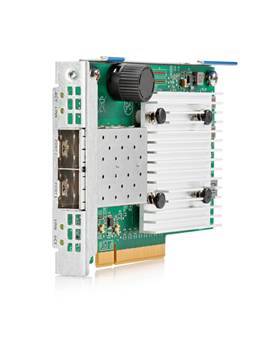
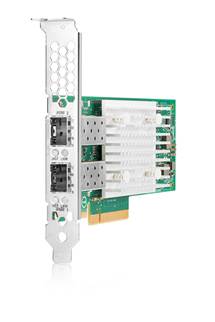
|
Kit Contents |
|
|
|
PCIe Ethernet Adapter Option Kits include: |
|
- HPE Ethernet Adapter (with Full-Height bracket installed) - Quick install card - Product warranty statement - Low Profile Bracket |
|
|
|
OCP Ethernet Adapter Option Kits include: |
|
- HPE Ethernet Adapter - Quick install card - Product warranty statement |
|
|
|
|
|
Server Support |
|
|
|
Network Adapters below are supported on select HPE ProLiant DL110/320/325/340/345/360/365/380/385/560/580 & Alletra 2000/4100/4200/6500 Servers |
|
|
|
Broadcom BCM57412 Ethernet 10Gb 2-port SFP+ Adapter for HPE |
|
Broadcom BCM57412 Ethernet 10Gb 2-port SFP+ OCP3 Adapter for HPE |
|
Broadcom BCM57416 Ethernet 10Gb 2-port BASE-T Adapter for HPE |
|
Broadcom BCM57416 Ethernet 10Gb 2-port BASE-T OCP3 Adapter for HPE |
|
Intel X710-DA2 Ethernet 10Gb 2-port SFP+ Adapter for HPE |
|
Intel X710-DA2 Ethernet 10Gb 2-port SFP+ OCP3 Adapter for HPE |
|
|
|
Please consult Server Platform QuickSpecs for details on supported SKUs and configurations |
|
|
|
Table 1 | ||||
|
SKU |
P26256-B21 |
P26259-B21 |
P10097-B21 |
P26253-B21 |
|
Description |
Broadcom BCM57412 Ethernet 10Gb 2-port SFP+ OCP3 Adapter for HPE |
Broadcom BCM57412 Ethernet 10Gb 2-port SFP+ Adapter for HPE |
Broadcom BCM57416 Ethernet 10Gb 2-port BASE-T OCP3 Adapter for HPE |
Broadcom BCM57416 Ethernet 10Gb 2-port BASE-T Adapter for HPE |
|
Card Type/Profile |
OCP 3.0 |
Stand up |
OCP 3.0 |
Stand up |
|
ASIC/Chip |
Broadcom BCM57412 |
Broadcom BCM57412 |
Broadcom BCM57416 |
Broadcom BCM57416 |
|
PCIe Version |
PCIe 3.0 x8 |
PCIe 3.0 x8 |
PCIe 3.0 x8 |
PCIe 3.0 x8 |
|
Power Requirement |
Typical: 11.6 W |
Typical: 7.9 W Max: 9.1 W |
Typical: 14.6 W Max: 16.1 W |
Typical: 16.4 W Max: 16.1 W |
|
UEFI PXE Boot |
|
|
|
|
|
Legacy BIOS PXE Boot |
|
|
|
|
|
Wake-on-LAN (WOL) |
|
|
|
|
|
Internet Protocol (IP) IPv4, IPv6 |
|
|
|
|
|
Auto Negotiation |
1Gb, 10Gb |
1Gb, 10Gb |
1Gb, 10Gb |
1Gb, 10Gb |
|
iSCSI Remote Boot |
UEFI |
UEFI |
UEFI |
UEFI |
|
Tunnel Offload |
VXLAN, NVGRE, |
VXLAN, NVGRE, |
VXLAN, NVGRE, GENEVE |
VXLAN, NVGRE, GENEVE |
|
RDMA1 |
RoCEv1, RoCEv2 |
RoCEv1, RoCEv2 |
RoCEv1, RoCEv2 |
RoCEv1, RoCEv2 |
|
Receive Side Scaling (RSS) |
|
|
|
|
|
VMware NetQueue and Microsoft Virtual Machine Queue (VMQ) |
|
|
|
|
|
NPAR |
8PFs or 16PFs |
8PFs or 16PFs |
8PFs or 16PFs |
8PFs or 16PFs |
|
Single Root I/O Virtualization (SR-IOV) |
128VF (total per chip) |
128VF (total per chip) |
128VF (total per chip) |
128VF (total per chip) |
|
Data Plane Development Kit (DPDK) |
|
|
|
|
|
Root of Trust |
Hardware |
Hardware |
Hardware |
Hardware |
|
Authenticated Updates |
|
|
|
|
|
Secure Boot |
|
|
|
|
|
Audit Log |
|
|
|
|
|
Sanitization |
|
|
|
|
|
Notes: 1HPE recommends using identical network adapters on both ends of the RoCE connection to avoid interoperability issue | ||||

|
Table 2 | ||
|
SKU |
P28787-B21 |
P28778-B21 |
|
Description |
Intel X710-DA2 Ethernet 10Gb 2-port SFP+ Adapter for HPE |
Intel X710-DA2 Ethernet 10Gb 2-port SFP+ OCP3 Adapter for HPE |
|
Card Type/Profile |
Stand up |
OCP 3.0 |
|
ASIC/Chip |
Intel® Ethernet Controller X710-BM2 |
Intel® Ethernet Controller X710-BM2 |
|
PCIe Version |
PCIe 3.0 x8 |
PCIe 3.0 x8 |
|
Power Requirement |
Typical: 3.3 W Max: 3.7 W |
Typical: 2.9 W Max: 4.6 W |
|
UEFI PXE Boot |
|
|
|
Legacy BIOS PXE Boot |
|
|
|
Wake-on-LAN (WOL) |
|
|
|
Internet Protocol (IP) IPv4, IPv6 |
|
|
|
Auto Negotiation |
|
|
|
iSCSI Remote Boot |
UEFI |
UEFI |
|
Tunnel Offload |
VXLAN, GENEVE, NVGRE |
VXLAN, GENEVE, NVGRE |
|
RDMA1 |
|
|
|
Receive Side Scaling (RSS) |
|
|
|
VMware NetQueue and Microsoft Virtual Machine Queue (VMQ) |
|
|
|
NPAR |
|
|
|
Single Root I/O Virtualization (SR-IOV) |
128 VF's total |
128 VF's total |
|
Data Plane Development Kit (DPDK) |
|
|
|
Root of Trust |
|
|
|
Authenticated Updates |
|
|
|
Secure Boot |
|
|
|
Audit Log |
|
|
|
Sanitization |
|
|
|
Notes: 1HPE recommends using Identical network adapters on both ends of the RoCE connection to avoid interoperability issue | ||
|
Audit Logs Audit Logs are a forensics capability that provides traceability into authenticated firmware updates by capturing changes in standard system logs.
|
|
|
|
Authenticated Updates Authenticated Updates brings cryptographic keys onto the NIC (for HW Authentication) to protect user and configuration data from unauthorized access and verify digitally signed firmware.
|
|
|
|
Auto-negotiation Automatically senses the speed of the device to which it is attached. It also automatically configures for half or full duplex, depending on the duplex mode of the switch, hub, or router connected to the adapter. |
|
|
|
Checksum & Segmentation Offload Normally the TCP Checksum is computed by the protocol stack. Segmentation Offload is a technique for increasing outbound throughput of high-bandwidth network connections by reducing CPU overhead. The technique is also called TCP segmentation offload (TSO) when applied to TCP, or generic segmentation offload (GSO).
|
|
|
|
Configuration Utilities The adapter ships with a suite of operating system-tailored configuration utilities that allow the user to enable initial diagnostics and configure adapter teaming. This includes a patented teaming GUI for Microsoft Windows operating systems. Additionally, support for scripted installations of teams in a Microsoft Windows environment allows for unattended OS installations. |
|
|
|
Device-level Firewall Device-level Firewall blocks any unmanaged access to memory or storage. This ensures that on-device firmware and configuration data can only be accessed by authorized agents. |
|
|
|
DMA Coalescing Supports DMA Coalescing, the incoming data packets and interrupts associated with these DMA calls are intelligently batched to keep the system devices in lower power states. |
|
|
|
DPDK DPDK with benefit for packet processing acceleration and use in NFV deployments.
|
|
|
|
HPE Sea of Sensors3D Support for the HPE Sea of Sensors which is a collection of 32 sensors that automatically track thermal activity - heat - across the server. When temperatures get too high, sensors can initiate fans and make other adjustments to reduce energy usage. A significant improvement lies in the ability to apply fan speed increases only to the portion of the system that is rising in temperature, rather than all six fans in unison, which reduces the amount of energy used for cooling. |
|
|
|
HW Root of Trust Root of Trust enables a chain of trust for Authenticating updates to firmware via signature validation. This blocks installation of rogue or corrupted firmware and ensures that the executing firmware is trusted. |
|
|
|
Interrupt Coalescing Interrupt coalescing (interrupt moderation) groups multiple packets, thereby reducing the number of interrupts sent to the host. This process optimizes host efficiency, leaving the CPU available for other duties. |
|
|
|
IPv6 IPv6 uses 128-bit addressing allowing for more devices and users on the internet. IPv4 supported 32-bit addressing.
|
|
|
|
iWARP RDMA Delivers RDMA on top of the pervasive TCP/IP protocol. iWARP RDMA runs over standard network and transport layers and works with all Ethernet network infrastructure. TCP provides flow control and congestion management and does not require a lossless Ethernet network. iWARP is a highly routable and scalable RDMA implementation.
|
|
|
|
Jumbo Frames Jumbo Frames (also known as extended frames), permitting up to a 9,600-byte (KB) transmission unit (MTU) when running Ethernet I/O traffic. This is over five times the size of a standard 1500-byte Ethernet frame. With Jumbo Frames, networks can achieve higher throughput performance and greater CPU utilization. These attributes are particularly useful for database transfer and tape backup operations. |
|
|
|
LED Indicators LED indicators show link integrity and network activity for easy troubleshooting. |
|
|
|
Load Balancing Transmit Load Balancing (TLB) and Switch-assisted Load Balancing (SLB) are two advanced features that customers can use to build a bigger pipe for improved networking bandwidth. These port-bonding techniques enable users to install up to four dual-port HPE 361T adapters (total of 8 ports) in a HPE ProLiant server and aggregate their throughput up to a theoretical maximum of 16 Gigabits per second full-duplex transmissions. |
|
|
|
Message Signaled Interrupt (MSI-X) Message Signaled Interrupt provides performance benefits for multi-core servers by load balancing interrupts between CPUs/cores. |
|
|
|
Network Adapter Teaming NIC teaming helps IT administrators increase network fault tolerance and increased network bandwidth, the team of adapters can work together as a single virtual adapter, providing support for several different types of teaming enabling IT administrators to optimize availability, improve performance and help reduce costs. |
|
|
|
Network Fault Tolerance (NFT) Network Fault Tolerance, sometimes called "failover" or "NIC Redundancy," allows for the installation of multiple server adapters so that the active device can be backed up by a redundant adapter to improve availability. The Hewlett Packard Enterprise teaming utility also allows users to specify that when a failed adapter is fixed and replaced, the original adapter resumes its function as the primary network connection. |
|
|
|
Network Partitioning (NPAR) Network Partitioning (NPAR) allows administrators to configure a 10 Gb port as four separate partitions or physical functions. Each PCI function is associated with a different virtual NIC. To the OS and the network, each physical function appears as a separate NIC port.
|
|
|
|
Optimized for Virtualization I/O Virtualization support for VMware NetQueue and Microsoft VMQ helps meet the performance demands of consolidated virtual workloads. |
|
|
|
Preboot eXecution Environment (PXE) Support for PXE enables automatic deployment of computing resources remotely from anywhere. It allows a new or existing server to boot over the network and download software, including the operating system, from a management/ deployment server at another location on the network.
Additionally, PXE enables decentralized software distribution and remote troubleshooting and repairs. |
|
|
|
Precision Time Protocol (IEEE 1588 PTP) Synchronization of system clocks throughout a network, achieving clock accuracy in the sub-microsecond range, making it suitable for measurement and control systems. |
|
|
|
RDMA Remote Direct memory Access (RDMA) is an accelerated I/O delivery mechanism that allows data to be transferred directly from the user memory of the source server to the user memory of the destination server bypassing the operating system (OS) kernel. Because the RDMA data transfer is performed by the DMA engine on the adapter's network processor, the CPU is not used for the data movement, freeing it to perform other tasks such as hosting more virtual workloads (increased VM density).RDMA protocols include RoCEv1, RoCEv2 and iWARP. All of these protocols reduce overall latency to deliver accelerated performance for applications such as Microsoft Hyper-V Live Migration, Microsoft SQL and Microsoft SharePoint with SMB Direct.
|
|
|
|
Receive Flow Steering (RFS) Receive Flow Steering (RFS) acceleration improves processing efficiency by steering received packets to the CPU core that is running the application that consumes those packets. Aligning I/O processing to the CPU core running the application improves cache efficiency, CPU utilization, throughput, and latency.
|
|
|
|
Receive Side Scaling (RSS) RSS resolves the single-processor bottleneck by allowing the receive side network load from a network adapter to be shared across multiple processors. RSS enables packet receive-processing to scale with the number of available processors. |
|
|
|
Sanitization Sanitization (Secure User Data Erase) renders User and configuration data on the NIC irretrievable so that NICs can be safely repurposed or disposed.
|
|
|
|
Secure Boot Secure Boot safeguards the system and ensures no rogue drivers are being executed on start-up.
|
|
|
|
Server Integration This adapter is a validated, tested, and qualified solution that is optimized for HPE ProLiant servers. Hewlett Packard Enterprise validates a wide variety of major operating systems drivers with the full suite of web-based enterprise management utilities including HPE Intelligent Provisioning and HPE Systems Insight Manager that simplify network management. This approach provides a more robust and reliable networking solution than offerings from other vendors and provides users with a single point of contact for both their servers and their network adapters. |
|
|
|
Single-Root I/O Virtualization Single-Root I/O Virtualization (SR-IOV) provides a mechanism to bypass the host system hypervisor in virtual environments providing near metal performance and server efficiency. SR-IOV provides a mechanism to create multiple Virtual Functions (VFs) to share single PCIe resources. The device is capable of SR-IOV, and requires Server BIOS support, controller firmware, and OS support.
|
|
|
|
TCP/UDP/IP For overall improved system response, this adapter supports standard TCP/IP offloading techniques including TCP/IP, UDP checksum offload (TCO) moves the TCP and IP checksum offloading from the CPU to the network adapter. Large send offload (LSO) or TCP segmentation offload (TSO) allows the TCP segmentation to be handled by the adapter rather than the CPU. |
|
|
|
Tunnel Offload Minimize the impact of overlay networking on host performance with tunnel offload support for VXLAN, NVGRE and GENEVE. By offloading packet processing to adapters, customers can use overlay networking to increase VM migration flexibility and virtualized overlay networks with minimal impact to performance. HPE Tunnel Offloading increases I/O throughput, reduces CPU utilization, and lowers power consumption. Tunnel Offload supports VMware's VXLAN, Microsoft's NVGRE solutions and Generic Network Virtualization Encapsulation (GENEVE) solutions.
|
|
|
|
VMware NetQueue and Microsoft Virtual Machine Queue (VMQ) VMware NetQueue is technology that significantly improves performance of 10 Gigabit Ethernet network adapters in virtualized environments. Windows Hyper-V VMQ (VMQ) is a feature available on servers running Windows Server 2008 R2 with VMQ-enabled Ethernet adapters. VMQ uses hardware packet filtering to deliver packet data from an external virtual machine network directly to virtual machines, which reduces the overhead of routing packets and copying them from the management operating system to the virtual machine. |
|
|
|
Wake-on-LAN A system that supports Wake-on-LAN can remain available to the systems administrator during its normal downtime. Once the machine is awakened, the systems administrator can remotely control, audit, debug, or manage the machine. |
|
|
|
HPE Services No matter where you are in your digital transformation journey, you can count on HPE Services to deliver the expertise you need when, where and how you need it. From planning to deployment, ongoing operations and beyond, our experts can help you realize your digital ambitions. https://www.hpe.com/services |
|
|
|
Consulting Services No matter where you are in your journey to hybrid cloud, experts can help you map out your next steps. From determining what workloads should live where, to handling governance and compliance, to managing costs, our experts can help you optimize your operations. https://www.hpe.com/services/consulting |
|
|
|
HPE Managed Services HPE runs your IT operations, providing services that monitor, operate, and optimize your infrastructure and applications, delivered consistently and globally to give you unified control and let you focus on innovation. HPE Managed Services | HPE
|
|
|
|
Operational Services Optimize your entire IT environment and drive innovation. Manage day-to-day IT operational tasks while freeing up valuable time and resources. Meet service-level targets and business objectives with features designed to drive better business outcomes. https://www.hpe.com/services/operational |
|
|
|
HPE Complete Care Service HPE Complete Care Service is a modular, edge-to-cloud IT environment service designed to help optimize your entire IT environment and achieve agreed upon IT outcomes and business goals through a personalized experience. All delivered by an assigned team of HPE Services experts. HPE Complete Care Service provides: - A complete coverage approach -- edge to cloud - An assigned HPE team - Modular and fully personalized engagement - Enhanced Incident Management experience with priority access - Digitally enabled and AI driven customer experience https://www.hpe.com/services/completecare |
|
|
|
HPE Tech Care Service HPE Tech Care Service is the operational support service experience for HPE products. The service goes beyond traditional support by providing access to product specific experts, an AI driven digital experience, and general technical guidance to not only reduce risk but constantly search for ways to do things better. HPE Tech Care Service delivers a customer-centric, AI driven, and digitally enabled customer experience to move your business forward. HPE Tech Care Service is available in three response levels. Basic, which provides 9x5 business hour availability and a 2-hour response time. Essential which provides a 15-minute response time 24x7 for most enterprise level customers, and Critical which includes a 6-hour repair commitment where available and outage management response for severity 1 incidents. https://www.hpe.com/services/techcare |
|
|
|
HPE Lifecycle Services HPE Lifecycle Services provide a variety of options to help maintain your HPE systems and solutions at all stages of the product lifecycle. A few popular examples include: - Lifecycle Install and Startup Services: Various levels for physical installation and power on, remote access setup, installation and startup, and enhanced installation services with the operating system. - HPE Firmware Update Analysis Service: Recommendations for firmware revision levels for selected HPE products, taking into account the relevant revision dependencies within your IT environment. - HPE Firmware Update Implementation Service: Implementation of firmware updates for selected HPE server, storage, and solution products, taking into account the relevant revision dependencies within your IT environment. - Implementation assistance services: Highly trained technical service specialists to assist you with a variety of activities, ranging from design, implementation, and platform deployment to consolidation, migration, project management, and onsite technical forums. - HPE Service Credits: Access to prepaid services for flexibility to choose from a variety of specialized service activities, including assessments, performance maintenance reviews, firmware management, professional services, and operational best practices. Notes: To review the list of Lifecycle Services available for your product go to:
For a list of the most frequently purchased services using service credits, see the HPE Service Credits Menu |
|
|
|
Other Related Services from HPE Services:
HPE Education Services Training and certification designed for IT and business professionals across all industries. Broad catalogue of course offerings to expand skills and proficiencies in topics ranging from cloud and cybersecurity to AI and DevOps. Create learning paths to expand proficiency in a specific subject. Schedule training in a way that works best for your business with flexible continuous learning options. https://www.hpe.com/services/training |
|
|
|
Defective Media Retention An option available with HPE Complete Care Service and HPE Tech Care Service and applies only to Disk or eligible SSD/Flash Drives replaced by HPE due to malfunction.
Consult your HPE Sales Representative or Authorized Channel Partner of choice for any additional questions and services options. |
|
|
|
Parts and Materials HPE will provide HPE-supported replacement parts and materials necessary to maintain the covered hardware product in operating condition, including parts and materials for available and recommended engineering improvements.
Parts and components that have reached their maximum supported lifetime and/or the maximum usage limitations as set forth in the manufacturer's operating manual, product quick-specs, or the technical product data sheet will not be provided, repaired, or replaced as part of these services. |
|
|
|
How to Purchase Services Services are sold by Hewlett Packard Enterprise and Hewlett Packard Enterprise Authorized Service Partners: - Services for customers purchasing from HPE or an enterprise reseller are quoted using HPE order configuration tools. - Customers purchasing from a commercial reseller can find services at https://ssc.hpe.com/portal/site/ssc/ |
|
|
|
AI Powered and Digitally Enabled Support Experience Achieve faster time to resolution with access to product-specific resources and expertise through a digital and data driven customer experience. Sign into the HPE Support Center experience, featuring streamlined self-serve case creation and management capabilities with inline knowledge recommendations. You will also find personalized task alerts and powerful troubleshooting support through an intelligent virtual agent with seamless transition when needed to a live support agent. https://support.hpe.com/hpesc/public/home/signin |
|
|
|
Consume IT On Your Terms HPE GreenLake edge-to-cloud platform brings the cloud experience directly to your apps and data wherever they are-the edge, colocations, or your data center. It delivers cloud services for on-premises IT infrastructure specifically tailored to your most demanding workloads. With a pay-per-use, scalable, point-and-click self-service experience that is managed for you, HPE GreenLake edge-to-cloud platform accelerates digital transformation in a distributed, edge-to-cloud world. - Get faster time to market - Save on TCO, align costs to business - Scale quickly, meet unpredictable demand - Simplify IT operations across your data centers and clouds
To learn more about HPE Services, please contact your Hewlett Packard Enterprise sales representative or Hewlett Packard Enterprise Authorized Channel Partner. Contact information for a representative in your area can be found at "Contact HPE" https://www.hpe.com/us/en/contact-hpe.html
For more information http://www.hpe.com/services | |
|
| |
|
Operating System and Virtualization Support The Operating Systems supported by this adapter are based on the server OS support. Please refer to the OS Support Matrix at https://www.hpe.com/us/en/servers/server-operating-systems.html
Drivers and Software Download (Please use hyperlinks below) - Broadcom BCM57416 Ethernet 10Gb 2-port BASE-T Adapter for HPE - Broadcom BCM57416 Ethernet 10Gb 2-port BASE-T OCP3 Adapter for HPE - Broadcom BCM57412 Ethernet 10Gb 2-port SFP+ Adapter for HPE - Broadcom BCM57412 Ethernet 10Gb 2-port SFP+ OCP3 Adapter for HPE - Intel X710-DA2 Ethernet 10Gb 2-port SFP+ Adapter for HPE - Intel X710-DA2 Ethernet 10Gb 2-port SFP+ OCP3 Adapter for HPE To access Vendor Technical Specifications, please visit the following hyperlinks: - Broadcom BCM57416 Ethernet 10Gb 2-port BASE-T Adapter for HPE - Broadcom BCM57416 Ethernet 10Gb 2-port BASE-T OCP3 Adapter for HPE - Broadcom BCM57412 Ethernet 10Gb 2-port SFP+ Adapter for HPE - Broadcom BCM57412 Ethernet 10Gb 2-port SFP+ OCP3 Adapter for HPE - Intel X710-DA2 Ethernet 10Gb 2-port SFP+ Adapter for HPE - Intel X710-DA2 Ethernet 10Gb 2-port SFP+ OCP3 Adapter for HPE |
|
|
|
|
|
Transceiver and Cable Options Please refer to Compute Transceiver and Cable Compatibility Matrix: https://psnow.ext.hpe.com/doc/a00002507enw |
|
|
|
|
|
Environment-friendly Products and Approach - End-of-life Management and Recycling Hewlett Packard Enterprise offers end-of-life product return, trade-in, and recycling programs, in many geographic areas, for our products. Products returned to Hewlett Packard Enterprise will be recycled, recovered, or disposed of in a responsible manner.
The EU WEEE Directive (2012/19/EU) requires manufacturers to provide treatment information for each product type for use by treatment facilities. This information (product disassembly instructions) is posted on the Hewlett Packard Enterprise web site. These instructions may be used by recyclers and other WEEE treatment facilities as well as Hewlett Packard Enterprise OEM customers who integrate and re-sell Hewlett Packard Enterprise equipment.
|
|
|
|
|
|
Date |
Version History |
Action |
Description of Change |
|
02-Feb-2026 |
Version 19 |
Changed |
New branding applied to document. |
|
03-Mar-2025 |
Version 18 |
Changed |
Removed OBS SKUs and QuickSpecs Name was updated |
|
19-Feb-2024 |
Version 17 |
Changed |
Networking product names were updated |
|
04-Dec-2023 |
Version 16 |
Changed |
Service and Support Section was updated |
|
15-Nov-2021 |
Version 15 |
Changed |
Service and Support Section was updated |
|
17-Aug-2020 |
Version 14 |
Changed |
SKUs Names were updated |
|
01-Jun-2020 |
Version 13 |
Changed |
Update power on 524SFP+, 530SFP |
|
16-Mar-2020 |
Version 12 |
Changed |
Technical Specification section was updated |
|
17-Feb-2020 |
Version 11 |
Changed |
Standard Features Section was updated |
|
03-Feb-2020 |
Version 10 |
Changed |
Standard Features, Service and Support Sections were updated |
|
02-Dec-2019 |
Version 9 |
Changed |
Standard Features Section was updated |
|
05-Aug-2019 |
Version 8 |
Changed |
Remove WOL support on 548SFP+ and 524SFP+ |
|
01-Jul-2019 |
Version 7 |
Changed |
Service and Support Section was updated |
|
10-Jun-2019 |
Version 6 |
Changed |
Technical Specifications Tables were updated |
|
03-Jun-2019 |
Version 5 |
Changed |
Added 548SFP+, 524SFP+, updates table format and glossary |
|
05-Nov-2018 |
Version 4 |
Changed |
Technical Specifications Section was updated |
|
15-Oct-2018 |
Version 3 |
Changed |
Recommended- Extended labels were removed |
|
01-Oct-2018 |
Version 2 |
Changed |
Platform Information & Standard Features sections were updated |
|
13-Aug-2018 |
Version 1 |
New |
New QuickSpecs |
|
|
|
Shape the Future of QuickSpecs - Your Input Matters | |
|
|
|
| |
|
|
|
Chat now | |
|
|
© Copyright 2026 Hewlett Packard Enterprise Development L.P. The information contained herein is subject to change without notice. The only warranties for Hewlett Packard Enterprise products and services are set forth in the express warranty statements accompanying such products and services. Nothing herein should be construed as constituting an additional warranty. Hewlett Packard Enterprise shall not be liable for technical or editorial errors or omissions contained herein.
a00047734enw - 16271 - Worldwide - V19 - 02-February-2026 | ||
|
|
|
HEWLETT PACKARD ENTERPRISE HPE.com |
|