




























Chassis dimensions
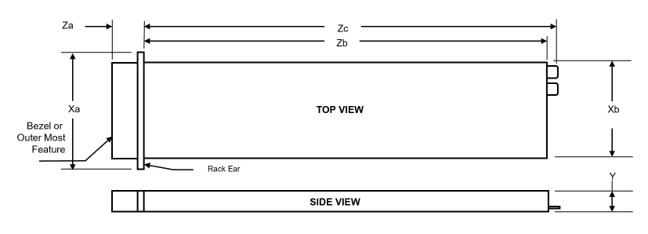
| Drives | Xa | Xb | Y | Za | Zb | Zc |
|---|---|---|---|---|---|---|
| 4 x 2.5-inch NVMe drives configuration | 482 mm (18.97 inches) | 444 mm (17.48 inches) | 86.8 mm (3.41 inches) | 35.77 mm (1.4 inches)With bezel
22.0 mm (0.87 inches Without bezel | 850 mm (33.46 inches) Ear to rear wall | 890.8 mm (35.07 inches) Ear to PSU handle |
System weight
| System configuration | Maximum weight (with all drives/SSDs) |
|---|---|
| XE9640 system with Intel GPUs | 43.2 kg (95.23 pounds) |
| XE9640 system with NVIDIA GPUs | 46.3 kg (102.07 pounds) |
| Chassis weight | Description |
|---|---|
| 40 pounds - 70 pounds | Recommend two person to lift |
| 70 pounds- 120 pounds | Recommend three person to lift |
| ≥ 121 pounds | Recommend to use a server-lift |
Processor specifications
| Supported processor | Number of processors supported |
|---|---|
| Two 5th Generation Intel Xeon Scalable Processors with up to 64 cores per processor or 4th Generation Intel Xeon Scalable processors with up to 56 cores per processor | Two |
PSU specifications
- The wattage capacities of any two PSUs that are present during POST are compared. The larger of the two PSUs is activated if the PSU wattages don't match. A PSU mismatch alert is also visible in the BIOS, iDRAC, or on the system LCD.
- If a second PSU is installed during runtime, its wattage capacity must match that of the first PSU in order for it to be enabled. If not, the second PSU won't be activated and the PSU will be marked as mismatched in iDRAC.
| PSU | Class | Heat dissipation (maximum) (BTU/hr) | Frequency (Hz) | Voltage | High line 240 VDC | Low line 100–120 V | DC Current (A) | AC Current (A) |
|---|---|---|---|---|---|---|---|---|
| 2800 W AC | Titanium | 10165 BTU/hr | 50/60 | 200-240 V AC | 2800 W | NA | NA | 15.6 - 12.7 A |
| 2800 W HVDC | NA | 10220 BTU/hr | NA | 240 V DC | 2800 W | NA | 13.6 A | NA |
| Efficiency Targets by Load PSU Efficiency Levels | ||||||
|---|---|---|---|---|---|---|
| Form Factor | Output | Class | 10% | 20% | 50% | 100% |
| Redundant 86 mm | 2800 W (Input 230 AC) | Titanium | 90.00% | 94.00% | 96.00% | 94.00% |
Cooling fan specifications
The PowerEdgeXE9640system supports up to four sets of high-performance gold (HPR) hot-swappable cooling fans.
| Fan type | Abbreviation | Also known as | Label color | Label image |
|---|---|---|---|---|
| High Performance Gold fan | HPR | Very High Performance | High Performance Gold Grade | 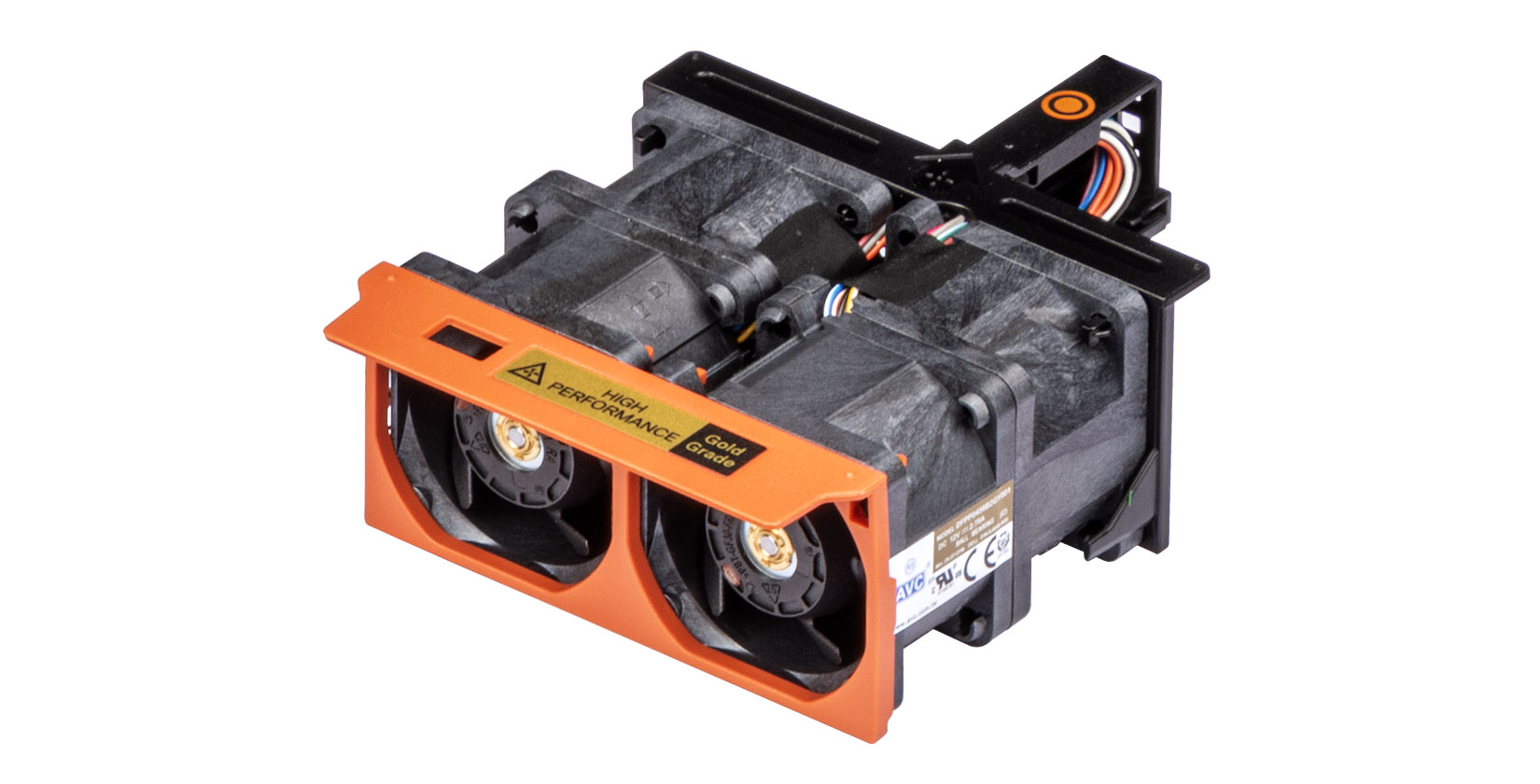 |
Supported operating systems
- Canonical Ubuntu Server LTS
- Red Hat Enterprise Linux
System battery specifications
The PowerEdge XE9640 system uses one CR 2032 3.0-V lithium coin cell battery.
Expansion card riser specifications
| Expansion card riser | PCIe slot | Processor Connection | PCIe slot height | PCIe slot length | PCIe slot width |
|---|---|---|---|---|---|
| Riser 1A (R1A) for Intel GPU configurations | 1 | Processor 1 | Full height | Half length | x16 |
| 2 | Processor 1 | Low Profile | Half length | x16 | |
| Riser 4A (R4A) for Intel GPU configurations | 3 | Processor 2 | Low Profile | Half length | x16 |
| 4 | Processor 2 | Full height | Half length | x16 | |
| Riser 1B (R1B) for NVIDIA GPU configurations | 1 | Processor 1 | Full height | Half length | x16 |
| 2 | Processor 1 | Low Profile | Half length | x16 | |
| Riser 4B (R4B) for NVIDIA GPU configurations | 3 | Processor 2 | Low Profile | Half length | x16 |
| 4 | Processor 2 | Full height | Half length | x16 |
Memory specifications
| DIMM capacity | 64 GB |
|---|---|
| 16 x DIMM sockets population | Total memory: 1 TB |
| DIMM capacity | 16 GB | 32 GB | 64 GB | ||||||
|---|---|---|---|---|---|---|---|---|---|
| DIMM's population | Total memory | 80 GB GPU | 94 GB GPU | Total memory | 80 GB GPU | 94 GB GPU | Total memory | 80 GB GPU | 94 GB GPU |
| 8 x DIMM sockets population | 64 GB | Not supported | Not supported | 256 GB | Not supported | Not supported | 512 TB | Support | Support |
| 16 x DIMM sockets population | 256 GB | Not supported | Not supported | 512 GB | Support | Support | 1 TB | Support | Support |
| 32 x DIMM sockets population | 512 GB | Support | Support | 1 TB | Support | Support | 2 TB | Support | Support |
| System memory size restriction | 80 GB | 94 GB |
|---|---|---|
| Minimum system memory size | 480 GB | 564 GB |
| Recommended memory size | 640 GB | 752 GB |
| Memory module sockets | Speed |
|---|---|
|
5600 MT/s (1 DIMM Per Channel)4800 MT/s (1 DIMM Per Channel), 4400 MT/s (2 DIMMs Per Channel) |
Storage controller specifications
| Supported storage controller card | |
|---|---|
Internal Boot
|
|
Software RAID
|
Drives
- Up to 4 x 2.5-inch NVMe SSDs for XE9640 Intel GPU and NVIDIA GPU supported systems.
GPU Specifications
- NVIDIA H100 SXM 700W NVLINK GPUs
- Intel Data Center Max GPU Series 1550 OAM 600W Xelink GPUs
Leakage behavior specifications
- Processor leakage behavior spec - system report leakage event. Recommend customers to power off the system, unplug that system's cooling hose from the rack manifold immediately. Then call Tech support
- GPU leakage behavior spec – system reports leakage event and server shuts down automatically. Recommend customers to power off the system, unplug that system’s cooling hose from the rack manifold immediately. Then call Tech support.
USB ports specifications
| Front | Rear | ||
|---|---|---|---|
| USB port type | No. of ports | USB port type | No. of ports |
| USB 2.0-compliant port | One | USB 3.0-compliant port | One |
| iDRAC Direct port (Micro-AB USB 2.0-compliant port) | One | USB 2.0-compliant ports | One |
Optional LOM and OCP NIC 3.0 specifications
VGA ports specifications
The PowerEdge XE9640 system supports One DB-15 VGA port on the front panel.
iDRAC9 port specifications
Video specifications
| Resolution | Refresh rate (Hz) | Color depth (bits) |
|---|---|---|
| 1024 x 768 | 60 | 8, 16, 32 |
| 1280 x 800 | 60 | 8, 16, 32 |
| 1280 x 1024 | 60 | 8, 16, 32 |
| 1360 x 768 | 60 | 8, 16, 32 |
| 1440 x 900 | 60 | 8, 16, 32 |
| 1600 x 900 | 60 | 8, 16, 32 |
| 1600 x 1200 | 60 | 8, 16, 32 |
| 1680 x 1050 | 60 | 8, 16, 32 |
| 1920 x 1080 | 60 *(RB) | 8, 16, 32 |
| 1920 x 1200 | 60 *(RB) | 8, 16, 32 |
Environmental specifications
| Temperature | Specifications |
|---|---|
| Allowable continuous operations | |
| Temperature ranges for altitudes <= 900 m (<= 2953 ft) | 10–35°C (50–95°F) with no direct sunlight on the equipment |
| Humidity percent ranges (non-condensing at all times) | 8% RH with -12°C minimum dew point to 80% RH with 21°C (69.8°F) maximum dew point |
| Operational altitude de-rating | Maximum temperature is reduced by 1°C/300 m (33.8°F/984 Ft) above 900 m (2953 Ft) |
| Temperature | Specifications |
|---|---|
| Allowable continuous operations | |
| Maximum temperature gradient (applies to both operation and non-operation) | 20°C in an hour* (36°F in an hour) and 5°C in 15 minutes (41°F in 15 minutes), 5°C in an hour* (41°F in an hour) for tape
NOTE:* - Per ASHRAE thermal guidelines for tape hardware, these are not instantaneous rates of temperature change.
|
| Non-operational temperature limits | -40 to 65°C (-104 to 149°F) |
| Non-operational humidity limits | 5% to 95% RH with 27°C (80.6°F) maximum dew point |
| Maximum non-operational altitude | 12,000 meters (39,370 feet) |
| Maximum operational altitude | 3,048 meters (10,000 feet) |
| Maximum vibration | Specifications |
|---|---|
| Operating | 0.21 Grms at 5 Hz to 500 Hz (all operation orientations) |
| Storage | 1.88 Grms at 10 Hz to 500 Hz for 15 minutes (all six sides tested) |
| Maximum shock pulse | Specifications |
|---|---|
| Operating | Six consecutively executed shock pulses in the positive and negative x, y, and z axis of 6 G for up to 11 ms. |
| Storage | Six consecutiveky executed shock pulses in the positive and negative x, y, and z axis (one pulse on each side o f the system) of 71 G for up to 2 ms. |
Particulate and gaseous contamination specifications
The following table defines the limitations that help avoid any equipment damage or failure from particulates and gaseous contamination. If the levels of particulates or gaseous pollution exceed the specified limitations and result in equipment damage or failure, you must rectify the environmental conditions. Remediation of environmental conditions is the responsibility of the customer.
| Particulate contamination | Specifications |
|---|---|
| Air filtration: Conventional Data Center only | Data center air filtration as defined by ISO Class 8 per ISO 14644-1 with a 95% upper confidence limit
NOTE: Filtering room air with a MERV8 filter, as specified in ANSI/ASHRAE Standard 127, is a recommended method for achieving the necessary environmental conditions.
NOTE:Air entering the data center must have MERV11 or MERV13 filtration.
NOTE:This condition applies to data center environments only. Air filtration requirements do not apply to IT equipment designed to be used outside a data center, in environments such as an office or factory floor.
|
| Walk-Up Edge Data Center or Cabinet (sealed, closed loop environment) | Filtration is not required for cabinets that are anticipated to be opened six times or less per year. Class 8 per ISO 1466-1 filtration as defined above is required otherwise.
NOTE: In environments commonly above ISA-71 Class G1 or that may have known challenges, special filters may be required.
|
| Conductive dust: data center and non-data center environments | Air must be free of conductive dust, zinc whiskers, or other conductive particles.
NOTE: Conductive dust, which can interfere with equipment operation, can originate from various sources, including manufacturing processes and zinc whiskers that may develop on the plating of raised floor tiles.
NOTE:This condition applies to data center and non-data center environments.
|
| Corrosive dust: data center and non-data center environments |
NOTE:This condition applies to data center and non-data center environments.
|
| Gaseous contamination | Specifications | Notes |
|---|---|---|
| Copper coupon corrosion rate | ISA-71 Class G1: <300 Å/month | Per ANSI/ISA71.04 |
| Silver coupon corrosion rate | ISA-71 Class G1: <200 Å/month | Per ANSI/ISA71.04 |
Thermal restriction matrix
Restriction for OCP and PCIe adapter Card for NVIDIA H100 GPU chassis
| Commodities | Configuration | 2 x NVMe | 4 x NVMe | 8 x E.3 | |
|---|---|---|---|---|---|
| Components | GPUs | Intel Max 1550 GPU | Nvidia H100 GPU chassis | Nvidia H100 GPU chassis | |
| Processors | 8468 | 350 W | 35° C | 35° C | 35° C |
| 8480+ | 350 W | N/A | 35° C | 35° C | |
| 8470Q | 350 W | N/A | 35° C | 35° C | |
| 8470 | 350 W | N/A | 35° C | 35° C | |
| 8460+ | 300 W | N/A | 35° C | 35° C | |
| 8452Y | 300 W | N/A | 35° C | 35° C | |
| 6458Q | 350 W | N/A | 35° C | 35° C | |
| 8462Y+ | 300 W | N/A | 35° C | 35° C | |
| 6448Y | 225 W | N/A | 35° C | 35° C | |
| 6442Y | 225 W | N/A | 35° C | 35° C | |
| 5418Y | 185 W | N/A | 35° C | 35° C | |
| 8592+ | 350 W | N/A | 35° C | 35° C | |
| 8580 | 350 W | N/A | 35° C | 35° C | |
| 8568+ | 350 W | N/A | 35° C | 35° C | |
| 8562Y+ | 250 W | N/A | 35° C | 35° C | |
| 6548Y+ | 250 W | N/A | 35° C | 35° C | |
| 6542Y | 250 W | N/A | 35° C | 35° C | |
| Memory | 128 GB RDIMM 5600 MT/s / 64 GB RDIMM 4800 MT/s | 1 DPC/ 2 DPC | 35° C | 35° C | 35° C |
| BOSS | 35° C | 35° C | 35° C | ||
| PCIe | 35° C | 35° C | 35° C | ||
| OCP | 35° C | 35° C | 35° C | ||
- 85C optical transceiver is required for below cards:
- Mellanox Starlord CX6 100G
- Mellanox Mantis HDR100
- Mellanox Gale 100G OCP card