




























Chassis dimensions
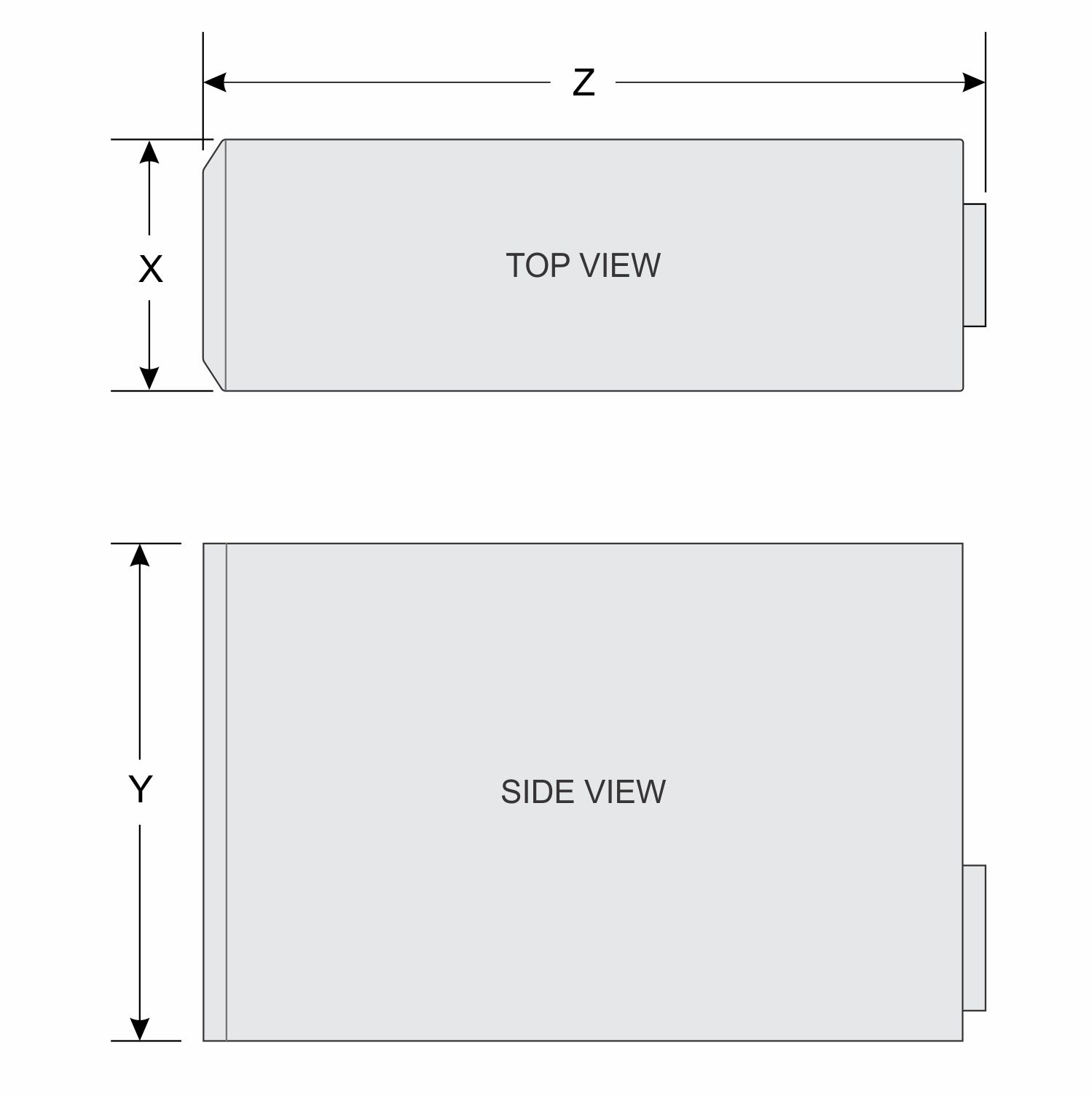
| X | Y | Z |
|---|---|---|
175.00 mm (6.88 inches) | 360.00 mm (14.17 inches) | 454.00 mm (17.87 inches) |
Chassis weight
| System | Maximum weight (with all hard drives/SSDs) |
|---|---|
| PowerEdge T30 | 11.70 kg (25.70 lb) |
Processor specifications
- Intel Xeon E3-1200 v5 processor
- Intel Core i3 series processor
- Intel Pentium processor
PSU specifications
The PowerEdge T30 system supports a single 290 W AC cabled power supply unit (PSU).
| PSU | Heat dissipation (maximum) | Frequency | Voltage |
|---|---|---|---|
| 290 W AC | 989.00 BTU/hr | 50 – 60 Hz | 100 – 240 V AC, 5.4 A, autoranging |
NOTE: Heat dissipation is calculated by using the PSU wattage rating.
NOTE: The PowerEdge T30 system is also designed to connect to the IT power systems with a phase-to-phase voltage not exceeding 230 V.
System battery specification
Expansion bus specifications
| PCIe slot | Height | Length | Link |
|---|---|---|---|
| 1 | Full height | Half length | x16 |
| 3 | Full height | Half length | x4 |
| 4 | Full height | Half length | x4 |
NOTE: Slot 2 is a full-height, half-length PCI 32/33 card slot connected to PCIe and PCI Bridge.
Memory specifications
CAUTION: Dell recommends you to use ECC DIMMs to minimize the risk of uncorrectable system error, data loss and/or silent data corruption. Non-ECC DIMM is not used for mission-critical applications.
NOTE: Non-ECC DIMMs are supported only in selected countries, for more information contact your sales representative.
| Memory module sockets | Memory capacity | Minimum RAM | Maximum RAM |
|---|---|---|---|
| Four 288-pin | 4 GB, 8 GB, and 16 GB | 4 GB | 64 GB |
Storage Controller card specifications
The Dell EMC PowerEdgeT30 supports Intel Rapid Storage Controller 12.X software RAID, and hardware RAID from optional storage controller card.
NOTE: The Dell EMC PowerEdge T30 supports only one P-Card (Non_DELL- Two ports SATA 6 Gbps PCI Express SATA controller card) which supports upto four SATA devices.
NOTE: The software RAID modes supported on the onboard Intel Rapid Storage Controller are RAID 0 and 1 only.
Hard drives
The PowerEdge T30 system supports one of the following hard drive configurations:
| Number of hard drives | Configuration |
|---|---|
| Six hard drives | Up to four 3.5-inch hard drive, internal, cabled SATA or SATA SSD drives and two 2.5-inch hard drive (optional), internal, cabled SATA, or SATA SSD drives. |
| Three hard drives | Up to three 3.5-inch hard drive, internal, cabled SATA or SATA SSD drives and one optical drive (optional), internal, cabled SATA, or SATA SSD drives. |
| Four hard drives | Up to four 3.5-inch hard drive, internal, cabled SATA or SATA SSD drives. |
NOTE: If you install more than four hard drives, you need to get an additional SATA controller card, SATA cables (minimum 1.6 ft) and power extension cables.
Optical drive
NOTE: External optical drives can be connected through the USB ports.
USB ports
- Six USB 2.0-compliant ports
- Six USB 3.0-complaint ports
| Front panel | Back panel | Internal |
|---|---|---|
| Two 4-pin USB 2.0-compliant | Two 4-pin USB 2.0-compliant | Two 4-pin USB 2.0-compliant |
| Two 4-pin USB 3.0-compliant | Four 4-pin USB 3.0-compliant | - |
NIC port
Video specification
- Intel® HD Graphics P530 for Intel Xeon E3-1200 v5 processor
- Intel® HD Graphics 510 for Intel Pentium processor
- Intel® HD Graphics 530 for Intel Core i3 series processor
Environmental specifications
NOTE: For additional information about environmental measurements for specific system configurations, see Dell.com/environmental_datasheets.
| Type | Condition | Temperature or Specification |
|---|---|---|
| Temperature | ||
| Maximum Temperature Gradient (Operating and Storage) | 20 °C/h (36 °F/h) | |
| Storage Temperature Limits | –40 °C to 65 °C (–40 °F to 149 °F) | |
| Continuous operation (for altitude less than 950 m or 3117 ft) | 5 °C to 35 °C (41 °F to 95 °F) with no direct sunlight on the equipment. | |
| Relative Humidity | ||
| Storage | 5% to 95% RH with 33 °C (91 °F) maximum dew point. Atmosphere must be non-condensing at all times. | |
| Operating | 10% to 80% Relative Humidity with 29 °C (84.2 °F) maximum dew point. | |
| Maximum Vibration | ||
| Operating | 0.26 Grms at 5 Hz to 350 Hz (operating orientation). | |
| Storage | 1.37 Grms at 5 Hz to 200 Hz for 15 minutes (all six sides tested). | |
| Maximum Shock | ||
| Operating | Six consecutively executed shock pulses in the positive and negative x, y, and z axes of 6 G for up to 11 ms. | |
| Storage | Six consecutively executed shock pulses in the positive and negative x, y, and z axes (one pulse on each side of the system) of 105 G for up to 2 ms. | |
| Maximum Altitude | ||
| Operating | 3,048 m (10,000 ft) | |
| Storage | 35,000 m (10,688 ft) | |
| Operating Altitude De-rating | ||
| Up to 35 °C (95 °F) | Maximum temperature is reduced by 1 °C/300 m (1 °F/547 ft) above 950 m (3,117 ft). | |
| 35 °C to 40 °C (95 °F to 104 °F) | Maximum temperature is reduced by 1 °C/175 m (1 °F/319 ft) above 950 m (3,117 ft). | |
| 40 °C to 45 °C (104 °F to 113 °F) | Maximum temperature is reduced by 1 °C/125 m (1 °F/228 ft) above 950 m (3,117 ft). |
Particulate and gaseous contamination specifications
NOTE: This section defines the limits to help avoid IT equipment damage and/or failure from particulates and gaseous contamination. If it is determined that levels of particulates or gaseous pollution are beyond the limits specified in the following table and are the reason for the damage and/or failures to your equipment, it may be necessary for you to re-mediate the environmental conditions that are causing the damage and/or failures. Re-mediation of environmental conditions will be the responsibility of the customer.
| Particulate contamination | Specifications |
|---|---|
| Air Filtration NOTE: Applies to data center environments only. Air filtration requirements do not apply to IT equipment designed to be used outside a data center, in environments such as an office or factory floor. |
Data center air filtration as defined
by ISO Class 8 per ISO 14644-1 with a 95% upper confidence limit. NOTE: Air entering the data center must have MERV11 or MERV13 filtration. |
| Conductive Dust NOTE: Applies to data center and non-data center environments. |
Air must be free of conductive dust, zinc whiskers, or other conductive particles. |
| Corrosive
Dust NOTE: Applies to data center and non-data center environments. |
|
| Gaseous contamination | Specifications |
|---|---|
| Copper Coupon Corrosion Rate | <300 Å/month per Class G1 as defined by ANSI/ISA71.04-1985. |
| Silver Coupon Corrosion Rate | <200 Å/month as defined by AHSRAE TC9.9. |