




























Dimensions and weight
The following table lists the height, width, depth, and weight of your Precision 7875 Tower.
| Description | Values | |
|---|---|---|
| Height |
|
|
| Width |
|
|
| Depth |
|
|
| Weight NOTE:The weight of your
computer depends on the configuration that is ordered and
manufacturing variability.
|
|
|
Processor
The following table lists the details of the processors supported by your Precision 7875 Tower.
| Description | Option one | Option two | Option three | Option four | Option five | Option six |
|---|---|---|---|---|---|---|
| Processor type | AMD Ryzen Threadripper Pro 9995WX | AMD Ryzen Threadripper Pro 9985WX | AMD Ryzen Threadripper Pro 9975WX | AMD Ryzen Threadripper Pro 9965WX | AMD Ryzen Threadripper Pro 9955WX | AMD Ryzen Threadripper Pro 9945WX |
| Processor wattage | 350 W | 350 W | 350 W | 350 W | 350 W | 350 W |
| Processor core count | 96 cores | 64 cores | 32 cores | 24 cores | 16 cores | 12 cores |
| Processor thread count | 192 | 128 | 64 | 48 | 32 | 24 |
| Processor speed | 2.50 GHz to 5.40 GHz | 3.20 GHz to 5.40 GHz | 4.0 GHz to 5.40 GHz | 4.20 GHz to 5.40 GHz | 4.50 GHz to 5.40 GHz | 4.70 GHz to 5.40 GHz |
| Processor cache | 488 MB total cache | 325 MB total cache | 163 MB total cache | 154 MB total cache | 81 MB total cache | 77 MB total cache |
| Description | Option seven | Option eight | Option nine | Option ten | Option eleven | Option twelve |
|---|---|---|---|---|---|---|
| Processor type |
AMD Ryzen Threadripper Pro 7995WX |
AMD Ryzen Threadripper Pro 7985WX |
AMD Ryzen Threadripper Pro 7975WX |
AMD Ryzen Threadripper Pro 7965WX |
AMD Ryzen Threadripper Pro 7955WX |
AMD Ryzen Threadripper Pro 7945WX |
| Processor wattage |
350 W |
350 W |
350 W |
350 W |
350 W |
350 W |
| Processor core count |
96 cores |
64 cores |
32 cores |
24 cores |
16 cores |
12 cores |
| Processor thread count |
192 |
128 |
64 |
48 |
32 |
24 |
| Processor speed |
2.50 GHz to 5.10 GHz |
3.20 GHz to 5.10 GHz |
4.0 GHz to 5.30 GHz |
4.20 GHz to 5.30 GHz |
4.50 GHz to 5.30 GHz |
4.70 GHz to 5.30 GHz |
| Processor cache |
480 MB total cache |
320 MB total cache |
160 MB total cache |
152 MB total cache |
80 MB total cache |
76 MB total cache |
Chipset
The following table lists the details of the chipset supported by your Precision 7875 Tower.
| Description | Values |
|---|---|
| Chipset |
AMD PROM21 |
| Processor |
PRO 695 |
| DRAM bus width |
64-bit |
| Flash EPROM |
32 MB + 4 MB |
| PCIe bus |
Up to Gen 5.0 |
| Non-volatile memory | Yes |
| BIOS configuration Serial Peripheral Interface (SPI) | 256 Mbit (32 MB) located at SPI_FLASH |
| Trusted Platform Module (TPM) 2.0 (Discrete TPM Enabled) | 24 KB located at TPM 2.0 on chipset |
| Firmware-TPM (Discrete TPM disabled) | By default the Platform Trust Technology feature is visible to the operating system. |
| NIC EEPROM | LOM configuration contained within SPI flash ROM instead of LOM e-fuse |
Operating system
Your Precision 7875 Tower supports the following operating systems:
- Windows 10 22H2
- Windows 11 SV1
- Windows 11 SV2
- Ubuntu 22.04 LTS, 64-bit
- Ubuntu 24.04 LTS, 64-bit
- Red Hat Enterprise Linux 9.6
Memory
The following table lists the memory specifications that are supported by your Precision 7875 Tower.
| Description | Values |
|---|---|
| Memory slots |
Eight DIMM slots |
| Memory type |
DDR5 RDIMM |
| Memory speed |
|
| Maximum memory configuration |
2 TB |
| Minimum memory configuration |
16 GB |
| Memory size per slot |
16 GB, 32 GB, 64 GB, 128 GB, 256 GB |
| Memory configurations supported |
AMD Ryzen Threadripper Pro 7000 series:
|
|
NOTE:ACPI S3 is disabled by default in
high-capacity memory configurations (2 TB in all speeds, 1.5 TB in
5600 MT/s v2) due to the risk of DIMM thermal protection activation
under elevated ambient, extended S3 conditions.
|
|
Memory matrix
The following table lists the memory configurations supported on your Precision 7875 Tower.
| Configuration | Slot | |||||||
|---|---|---|---|---|---|---|---|---|
| Memory | DIMM1 | DIMM2 | DIMM3 | DIMM4 | DIMM5 | DIMM6 | DIMM7 | DIMM8 |
| 16 GB DDR5 | 16 GB | None | None | None | None | None | None | None |
| 32 GB DDR5 | 16 GB | 16 GB | None | None | None | None | None | None |
| 64 GB DDR5 | 16 GB | 16 GB | 16 GB | 16 GB | None | None | None | None |
| 64 GB DDR5 | 32 GB | 32 GB | None | None | None | None | None | None |
| 128 GB DDR5 | 16 GB | 16 GB | 16 GB | 16 GB | 16 GB | 16 GB | 16 GB | 16 GB |
| 128 GB DDR5 | 32 GB | 32 GB | 32 GB | 32 GB | None | None | None | None |
| 256 GB DDR5 | 32 GB | 32 GB | 32 GB | 32 GB | 32 GB | 32 GB | 32 GB | 32 GB |
| 256 GB DDR5 | 64 GB | 64 GB | 64 GB | 64 GB | None | None | None | None |
| 512 GB DDR5 | 64 GB | 64 GB | 64 GB | 64 GB | 64 GB | 64 GB | 64 GB | 64 GB |
| 512 GB DDR5 | 128 GB | 128 GB | 128 GB | 128 GB | None | None | None | None |
| 768 GB DDR5 | 128 GB | 128 GB | 128 GB | 128 GB | 128 GB | 128 GB | None | None |
| 1024 GB DDR5 | 128 GB | 128 GB | 128 GB | 128 GB | 128 GB | 128 GB | 128 GB | 128 GB |
| 1024 GB DDR5 | 256 GB | 256 GB | 256 GB | 256 GB | None | None | None | None |
| 1536 GB DDR5 | 256 GB | 256 GB | 256 GB | 256 GB | 256 GB | 256 GB | None | None |
| 2048 GB DDR5 | 256 GB | 256 GB | 256 GB | 256 GB | 256 GB | 256 GB | 256 GB | 256 GB |
External ports and slots
The following table lists the external ports and slots on your Precision 7875 Tower.
| Description | Values |
|---|---|
| Network port |
|
| USB ports |
Front:
NOTE: All USB Type-C ports do not support the display mode in Precision 7875 Tower.
|
| Audio port |
|
| Video port(s) |
Using Discrete GPU |
| Media-card reader |
One SD-card 6.0 slot (front) |
| Power-adapter port |
Not supported |
| Security-cable slot |
N/A |
Internal slots
The following table lists the internal slots of your Precision 7875 Tower.
| Description | Values |
|---|---|
| Expansion slots |
|
| SATA/SAS |
|
| M.2 |
NOTE:To learn more about the features of different types of M.2 cards, search in the Knowledge Base Resource at
Dell Support Site.
|
Ethernet
The following table lists the wired ethernet Local Area Network (LAN) specifications of your Precision 7875 Tower.
| Description | Values |
|---|---|
| Model |
|
| Transfer rate |
|
Wireless module
The following table lists the Wireless Local Area Network (WLAN) module that is supported on your Precision 7875 Tower.
| Description | Values |
|---|---|
| Model number |
Qualcomm WCN6856-DBS |
| Transfer rate |
3571 Mbps |
| Frequency bands supported |
2.4 GHz/5 GHz/6 GHz
NOTE:The 6 GHz frequency is supported on computers installed with Windows 11 operating system only.
|
| Wireless standards |
|
| Encryption |
|
| Bluetooth wireless card NOTE:The functionality of
the Bluetooth wireless card may vary based on the operating
system. |
5.3 wireless card |
Audio
The following table lists the audio specifications of your Precision 7875 Tower.
| Description | Values |
|---|---|
| Audio type |
Realtek Audio Controller ALC3246 |
| Audio controller |
24-bit Digital-to-Analog (DAC) and Analog-to-Digital (ADC) |
| Internal audio interface |
HDA |
| External audio interface |
|
Storage
This section lists the storage options on your Precision 7875 Tower.
- Two 2.5-inch hard drives/two 3.5-inch hard drives
- Two M.2 solid state drives
- Two 2.5-inch hard drives/two 3.5-inch hard drives
- Two M.2 solid state drives
| Storage type | Interface type | Capacity |
|---|---|---|
|
3.5-inch, 7200 RPM, HDD |
SATA 3.0, up to 6 Gbps |
Up to 12 TB |
| M.2 2280 solid state drive | PCIe Gen4 NVMe | Up to 2 TB |
|
M.2 2280 solid state drive, SED Ready |
PCIe Gen4 x4 NVMe |
Up to 4 TB |
|
M.2 2230 solid state drive, SED Ready |
PCIe Gen4 x4 NVMe |
256 GB |
|
8x DVD-ROM, slimline |
SATA 1, up to 1.5 Gbps |
N/A |
|
8x DVD±RW, slimline |
SATA 1, up to 1.5 Gbps |
N/A |
Storage Matrix
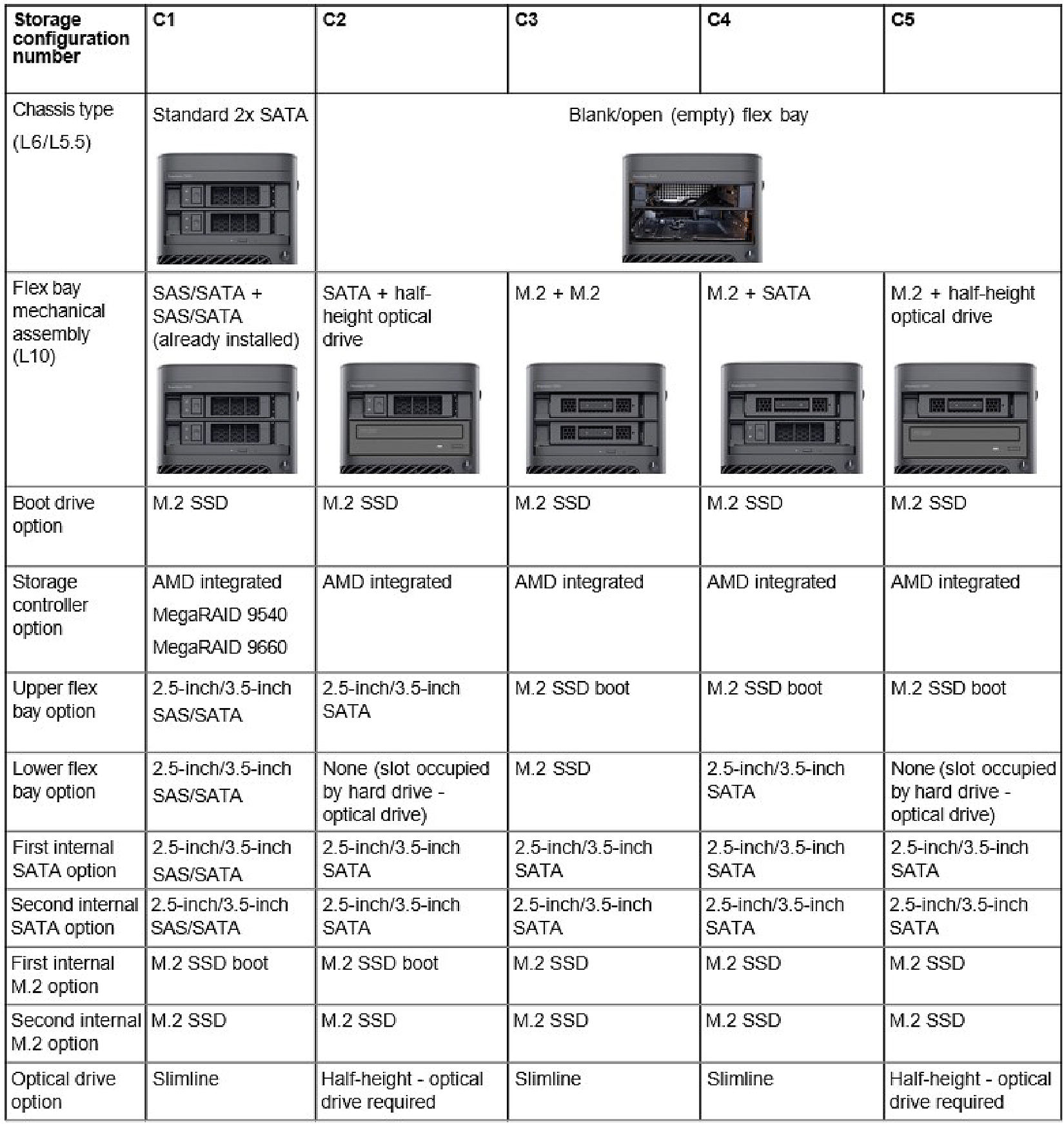
Redundant Array of Independent Disks (RAID)
For optimal performance when configuring drives as a RAID volume, Dell Technologies recommends drive models that are identical.
RAID 0 (Striped, Performance) volumes benefit from higher performance when drives are matched because the data is split across multiple drives: any IO operations with block sizes larger than the stripe size will split the I/O and become constrained by the slowest of the drives. For RAID 0 I/O operations where block sizes are smaller than the stripe size, whichever drive the I/O operation targets will determine the performance, which increases variability and results in inconsistent latencies. This variability is particularly pronounced for write operations and it can be problematic for applications that are latency sensitive. One such example of this is any application that performs thousands of random writes per second in very small block sizes.
RAID 1 (Mirrored, Data Protection) volumes benefit from higher performance when drives are matched because the data is mirrored across multiple drives: all I/O operations must be performed identically to both drives, thus variations in drive performance when the models are different, results in the I/O operations completing only as fast as the slowest drive. While this does not suffer the variable latency issue in small random I/O operations as with RAID 0 across heterogeneous drives, the impact is nonetheless large because the higher performing drive becomes limited in all I/O types. One of the worst examples of constrained performance here is when using unbuffered I/O. To ensure writes are fully committed to nonvolatile regions of the RAID volume, unbuffered I/O bypasses cache (for example by using the Force Unit Access bit in the NVMe protocol) and the I/O operation will not complete until all the drives in the RAID volume have completed the request to commit the data. This kind of I/O operation completely negates any advantage of a higher performing drive in the volume.
- Requires at least three drives.
- Data is available even if one of the drives present in the volume fails. The failed drive must be replaced, and the volume must be rebuilt for the data to be accessible.
- The total capacity is N-1, where N is the total capacity of the drives in the array. For example, if you use three 1 TB drives in a RAID 5 array, the total volume size is 2 TB.
- Requires a minimum of four drives. Only an even number of drives can be used, and an odd number of drives are not possible.
- The total volume capacity is half the sum of individual drive capacity. For example, when you use four drives of 1 TB, you get a RAID 10 volume of 2 TB.
Care must be taken to match not only the drive vendor, capacity, and class, but also the specific model. Drives from the same vendor, with the same capacity, and even within the same class, can have very different performance characteristics for certain types of I/O operations. Thus, matching by model ensures that the RAID volume is comprised of a homogeneous array of drives that will deliver all the benefits of a RAID volume without incurring the additional penalties when one or more drives in the volume are lower performing.
Precision 7875 Tower supports RAID with more than one hard drive configuration.
Media-card reader
The following table provides the specification of media cards that are supported by your Precision 7875 Tower.
| Description | Values |
|---|---|
| Media-card slot type |
One SD-card 6.0 slot |
| Media-cards supported |
|
|
NOTE:The maximum
capacity of the media-card reader varies depending on the standard
of the media card that is inserted in your computer.
|
|
Power ratings
The following table lists the power rating specifications of Precision 7875 Tower.
| Description | Option one | Option two | |
|---|---|---|---|
| Type |
1350 W Platinum internal power supply (C20 inlet) |
1000 W Platinum internal power supply (C14 inlet) |
|
| Input voltage |
90 VAC–264 VAC |
90 VAC–264 VAC |
|
| Input frequency |
47 Hz–63 Hz |
47 Hz–63 Hz |
|
| Input current (maximum) |
16 A |
13.60 A |
|
| Output current (continuous) |
Operating:
|
Operating:
|
|
| Rated output voltage |
|
|
|
| Temperature range | |||
| Operating |
5°C (41°F) to 45°C (113°F) |
5°C (41°F) to 45°C (113°F) |
|
| Storage |
-40°C to 70°C (-40°F to 158°F) |
-40°C to 70°C (-40°F to 158°F) |
|
Power supply connector
The following table lists the Power supply connector specifications of your Precision 7875 Tower.
| Description | Values |
|---|---|
| 1350 W (Platinum) |
|
| 1000 W (Platinum) |
|
GPU—Discrete
The following table lists the specifications of the discrete Graphics Processing Unit (GPU) supported by your Precision 7875 Tower.
| Controller | Memory size | Memory type |
|---|---|---|
| A400 | 4 GB | GDDR6 |
| A1000 | 8 GB | GDDR6 |
| NVIDIA A800 | 40 GB | HBM2 |
| NVIDIA RTX 2000 Ada | 16 GB | GDDR6 with ECC |
| NVIDIA RTX 4000 Ada | 20 GB | GDDR6 with ECC |
| NVIDIA RTX 4500 Ada | 24 GB | GDDR6 with ECC |
| NVIDIA RTX 5000 Ada | 32 GB | GDDR6 with ECC |
| NVIDIA RTX 6000 Ada Generation | 48 GB | GDDR6 with ECC |
| NVIDIA RTX Pro 2000 Blackwell | 16 GB | GDDR7 with ECC |
| NVIDIA RTX Pro 4000 Blackwell | 24 GB | GDDR7 with ECC |
| NVIDIA RTX Pro 4500 Blackwell | 32 GB | GDDR7 with ECC |
| NVIDIA RTX Pro 5000 Blackwell | 48 GB | GDDR7 with ECC |
| NVIDIA RTX Pro 6000 Blackwell Max-Q | 96 GB | GDDR7 with ECC |
| NVIDIA RTX A6000 | 48 GB | GDDR6 with ECC |
| NVIDIA RTX A4000 | 16 GB | GDDR6 with ECC |
| NVIDIA RTX A2000 | 12 GB | GDDR6 with ECC |
| NVIDIA T1000 | 8 GB | GDDR6 |
| NVIDIA T400 | 4 GB | GDDR6 |
| NVIDIA GeForce RTX 4090 | 24 GB | GDDR6X |
| NVIDIA GeForce RTX 5080 | 16 GB | GDDR7 |
| AMD Radeon Pro W6300 | 2 GB | GDDR6 |
| AMD Radeon Pro W6400 | 4 GB | GDDR6 |
| AMD Radeon Pro W7400 | 8 GB | GDDR6 |
| AMD Radeon Pro W7500 | 8 GB | GDDR6 |
| AMD Radeon Pro W7600 | 8 GB | GDDR6 |
| AMD Radeon Pro W7700 | 16 GB | GDDR6 with ECC |
| AMD Radeon Pro W7900 | 48 GB | GDDR6 with ECC |
Video port resolution
The following table lists the video port resolution for your Precision 7875 Tower.
| Graphics card | Video ports | Maximum supported resolution |
|---|---|---|
| A400 | Four mini-DisplayPort 1.4a | 7680 x 4320 @ 24 bpp at 120 Hz. NOTE:Requires two
DisplayPort 1.4a ports and DSC. |
| A1000 | Four mini-DisplayPort 1.4a | |
| NVIDIA A800 NOTE: The NVIDIA A800 40GB
does not come equipped with display ports, so it has no video
outputs.
|
N/A | N/A |
| NVIDIA RTX 2000 Ada | Four DisplayPort 1.4a | 7680 x 4320 @ 24 bpp at 120 Hz. NOTE:Requires two
DisplayPort 1.4a ports and DSC.
|
| NVIDIA RTX 4000 Ada | Four DisplayPort 1.4a | |
| NVIDIA RTX 4500 Ada | Four DisplayPort 1.4a | |
| NVIDIA RTX 5000 Ada | Four DisplayPort 1.4a | |
| NVIDIA RTX 6000 Ada Generation | Four DisplayPort ports | |
| NVIDIA RTX Pro 2000 Blackwell | Four mini-DisplayPort 2.1b | 7680 x4320 @ 24 bpp at 165 Hz. NOTE:Requires
DisplayPort 2.1b with UHBR20 and DSC.
|
| NVIDIA RTX Pro 4000 Blackwell | Four DisplayPort 2.1b ports | |
| NVIDIA RTX Pro 4500 Blackwell | Four DisplayPort 2.1b ports | |
| NVIDIA RTX Pro 5000 Blackwell | Four DisplayPort 2.1b ports | |
| NVIDIA RTX Pro 6000 Blackwell Max-Q | Four DisplayPort 2.1b ports | |
| NVIDIA RTX A6000 | Four DisplayPort 1.4a ports | 7680 x 4320 @ 24 bpp at 120 Hz. NOTE:Requires two DisplayPort 1.4a ports and
DSC. |
| NVIDIA RTX A4000 | Four DisplayPort 1.4a ports | |
| NVIDIA RTX A2000 | Four mini-DisplayPort 1.4a ports | |
| NVIDIA T1000 | Four mini-DisplayPort 1.4a ports | |
| NVIDIA T400 | Three mini-DisplayPort 1.4a ports | |
| NVIDIA GeForce RTX 4090 |
|
7680 x 4320 @ 60 Hz. NOTE:Requires two DP links
with no compression or a single DP link with DSC
compression. |
| NVIDIA GeForce RTX 5080 |
|
7680 x 4320 @ 60 Hz. |
| AMD Radeon Pro W6300 | Two DisplayPort 1.4 ports | 7680 x 4320 @ 60 Hz. |
| AMD Radeon Pro W6400 | Two DisplayPort 1.4 ports | 7680 x 4320 @ 60 Hz. |
| AMD Radeon Pro W7400 | Four mini-DisplayPort 1.4 | 7680 x 4320 @ 24 bpp at 120 Hz. NOTE:Requires two DisplayPort 1.4a ports and
DSC. |
| AMD Radeon Pro W7500 | Two DisplayPort 1.4 ports | 7680 x 4320 @ 60 Hz. |
| AMD Radeon Pro W7600 | Two DisplayPort 1.4 ports | 7680 x 4320 @ 60 Hz. |
| AMD Radeon Pro W7700 | Four DisplayPort 2.1 ports | 7680 x 4320 @ 24 bpp at 120 Hz. NOTE:Requires two DisplayPort 1.4a ports and
DSC. |
| AMD Radeon Pro W7900 |
|
Hardware security
The following table lists the hardware security of your Precision 7875 Tower.
| Hardware security |
|---|
| TPM 2.0 Discrete Hardware |
| TPM localization |
| TPM OS dependency |
| Factory Test Image with third-party solutions. (McAffe/Symantec) |
Environmental
The following table lists the environmental specifications of your Precision 7875 Tower.
| Feature | Values |
|---|---|
| Recyclable packaging | Yes |
| BFR/PVC—free chassis | No |
| Vertical orientation packaging support | Yes |
| Multi-Pack packaging | No |
| Energy-Efficient Power Supply | Standard |
| ENV0424 compliant | Yes |
Regulatory compliance
The following table lists the regulatory compliance of your Precision 7875 Tower.
| Regulatory compliance |
|---|
| EPEAT registered configurations are available |
| ENERGY STAR-compliant configurations available |
| TCO 9.0 certified configurations available |
| US CEC MEPS-compliant configurations available |
| WEEE |
| Japan Energy Law |
| EU RoHS |
| China RoHS |
Operating and storage environment
This table lists the operating and storage specifications of your Precision 7875 Tower.
Airborne contaminant level: G1 as defined by ISA-S71.04-1985
| Description | Operating | Storage |
|---|---|---|
| Temperature range |
10°C to 35°C (50°F to 95°F) |
-40°C to 65°C (-40°F to 149°F) |
| Relative humidity (maximum) |
20% to 80% (non-condensing, Max dew point temperature = 26°C) |
5% to 95% (non-condensing, Max dew point temperature = 33°C) |
| Vibration (maximum)* |
0.52 GRMS random at 5 Hz to 350 Hz |
2.00 GRMS random at 5 Hz to 350 Hz |
| Shock (maximum) |
Bottom half-sine pulse with a change in velocity of 40G, 2.5ms G† |
105G half-sine pulse with a change in velocity of 105G, 2.5 ms G† |
| Altitude range |
-15.2 m to 3048 m (-49.87 ft to 10000 ft) |
-15.2 m to 10668 m (-49.87 ft to 35000 ft) |
|
CAUTION:Operating and storage temperature ranges may differ among components, so operating or storing the device outside these ranges may impact the performance of specific components.
|
||
* Measured using a random vibration spectrum that simulates the user environment.
† Measured using a 2 ms half-sine pulse.
Dell support policy
For information about Dell support policy, search Dell Support Site.
Dell Optimizer
This section details the Dell Optimizer specifications of your Precision 7875 Tower.
Dell Optimizer is a software application that intelligently optimizes the performance of your system by using artificial intelligence and machine learning. Dell Optimizer dynamically configures your system settings to optimize the performance of your applications. It improves the productivity, performance, and user experience through system usage analysis and learning.
- Improves user experience through computer usage analysis and learning
- Faster application launch and seamless application transition
- Intelligent battery run-time extension
- Optimized Audio for best meeting experience
- Locks computer when walks away for enhanced security
- Intelligently shows alerts
- Updates automatically to minimize disruption
For more information about configuring and using these features, search for the Dell Optimizer User Guide at Dell Support Site.
Dell low blue light display
Blue light is a color in the light spectrum which has a short wavelength and high energy. Chronic exposure to blue light, particularly from digital sources, may disrupt sleep patterns and cause long-term effects such as eye strain, eye fatigue, or damage to the eyes.
The display on this computer is designed to minimize blue light and complies with TÜV Rheinland's requirement for low blue light displays.
Low blue light mode is enabled at the factory, so no further configuration is necessary.
To reduce the risk of eye strain, it is also recommended that you:
- Position the display at a comfortable viewing distance between 20 and 28 inches (50 and 70 cm) from your eyes.
- Blink frequently to moisten your eyes, wet your eyes with water, or apply suitable eye drops.
- Look away from your display, and gaze at a distant object at 20 ft (609.60 cm) away for at least 20 seconds during each break.
- Take an extended break for 20 minutes every two hours.