




























Dimensions and weight
The following table lists the height, width, depth, and weight of your Dell Pro 13 Plus/Dell Pro 13 Plus 2-in-1.
| Description |
300 nits touch and non-touch screen 400 nits non-touch screen |
400 nits thin and light non-touchscreen | 300 nits FHD+ touchscreen 2-in-1 | |
|---|---|---|---|---|
| Height: | ||||
| Front height | 19.79 mm (0.78 in.) | 19.78 mm (0.78 in.) | 19.76 mm (0.78 in.) | |
| Rear height | 19.79 mm (0.78 in.) | 19.78 mm (0.78 in.) | 20.43 mm (0.80 in.) | |
| Width | 300.00 mm (11.81 in.) | 300.00 mm (11.81 in.) | 300.00 mm (11.81 in.) | |
| Depth | 215.00 mm (8.46 in.) | 215.00 mm (8.46 in.) | 215.00 mm (8.46 in.) | |
| Starting weight NOTE:The weight of your computer depends on the
configuration that is offered.
|
1.37 kg (3.02 lb) | 1.26 kg (2.78 lb) | 1.46 kg (3.22 lb) | |
Processor
The following table lists the details of the processors that are supported in your Dell Pro 13 Plus/Dell Pro 13 Plus 2-in-1.
| Description | Option one | Option two | Option three |
|---|---|---|---|
| Processor type | AMD Ryzen AI 5 PRO 340 | AMD Ryzen AI 7 PRO 350 | AMD Ryzen AI 9 HX PRO 370 |
| Configurable Thermal Design Power (cTDP) | 15 W–54 W | 15 W–54 W | 15 W–54 W |
| Thermal Mode/Thermal Design Power (TDP) | |||
| Optimized | 17 W | 17 W | 17 W |
| Performance | 19 W | 19 W | 19 W |
| Processor core count | 6 | 8 | 12 |
| Processor thread count | 12 | 16 | 24 |
| Processor speed | Up to 4.8 GHz | Up to 5.0 GHz | Up to 5.1 GHz |
| Processor cache L2 | 6 MB | 8 MB | 12 MB |
| Processor cache L3 | 16 MB | 16 MB | 24 MB |
| Integrated graphics | AMD Radeon 840M Graphics | AMD Radeon 860M Graphics | AMD Radeon 890M Graphics |
| Neural Processing Units (NPU) Performance | Up to 50 TOPS | Up to 50 TOPS | Up to 50 TOPS |
| Description | Option one | Option two | Option three | Option four | Option five | Option six |
|---|---|---|---|---|---|---|
| Processor type | AMD Ryzen 3 210 | AMD Ryzen 5 220 | AMD Ryzen 5 PRO 215 | AMD Ryzen 5 PRO 220 | AMD Ryzen 5 PRO 230 | AMD Ryzen 7 PRO 250 |
| Configurable Thermal Design Power (cTDP) | 15 W–30 W | 15 W–30 W | 15 W–30 W | 15 W–30 W | 15 W–30 W | 15 W–30 W |
| Thermal Mode/Thermal Design Power (TDP) | ||||||
| Optimized | 17 W | 17 W | 17 W | 17 W | 17 W | 17 W |
| Performance | 19 W | 19 W | 19 W | 19 W | 19 W | 19 W |
| Processor core count | 4 | 6 | 6 | 6 | 6 | 8 |
| Processor thread count | 8 | 12 | 12 | 12 | 12 | 16 |
| Processor speed | Up to 4.7 GHz | Up to 4.9 GHz | Up to 4.7 GHz | Up to 4.9 GHz | Up to 4.9 GHz | Up to 5.1 GHz |
| Processor cache L2 | 4 MB | 6 MB | 6 MB | 6 MB | 6 MB | 8 MB |
| Processor cache L3 | 8 MB | 16 MB | 16 MB | 16 MB | 16 MB | 16 MB |
| Integrated graphics | AMD Radeon 740M Graphics | AMD Radeon 740M Graphics | AMD Radeon 740M Graphics | AMD Radeon 740M Graphics | AMD Radeon 760M Graphics | AMD Radeon 780M Graphics |
| Neural Processing Units (NPU) Performance | Not applicable | Not applicable | Not applicable | Not applicable | Up to 16 TOPS | Up to 16 TOPS |
Chipset
The following table lists the details of the chipset that is supported by your Dell Pro 13 Plus/Dell Pro 13 Plus 2-in-1.
| Description | Values |
|---|---|
| Chipset |
Integrated in the processor |
| Processor |
|
| DRAM bus width |
LPDDR5X Quad 32-bit channel |
| Flash EPROM |
64 MB |
| PCIe bus |
Up to Gen4 |
Operating system
Your Dell Pro 13 Plus/Dell Pro 13 Plus 2-in-1 supports the following operating systems:
- Windows 11 Home
- Windows 11 Pro
- Windows 10 Home
- Windows 10 Pro
- Ubuntu Linux 24.04 LTSNOTE:Ubuntu is supported only on Dell Pro 13 Plus.NOTE:If you downgrade your computer from Windows 11 to Windows 10 22H2, Dell Technologies support follows the Microsoft Windows 10 End of Support plan.NOTE:Windows 10 Home and Windows 10 Pro is supported only on computers shipped with AMD Ryzen 200 series processors.
Memory
The following table lists the memory specifications of your Dell Pro 13 Plus/Dell Pro 13 Plus 2-in-1.
| Description | Values | |
|---|---|---|
| Memory slots |
On-board memory
NOTE:The memory
is integrated on the system board and is not upgradeable.
|
|
| Memory type |
LPDDR5X |
|
| Memory speed |
7500 MT/s |
|
| Maximum memory configuration |
64 GB |
|
| Minimum memory configuration |
16 GB |
|
| Memory configurations supported |
|
|
External ports and slots
The following table lists the external ports and slots on your Dell Pro 13 Plus/Dell Pro 13 Plus 2-in-1.
| Description | Values |
|---|---|
| USB ports |
|
| Audio port | One Global headset jack |
| Video port | One HDMI 2.1 TMDS port |
| Media-card reader | One smart card reader slot (optional) |
| Power-adapter port | USB Type-C power input |
| Security-cable slot | One security-cable slot (wedge-shaped) |
| Sim-card Slot | Nano SIM-card slot (optional) |
Internal slots
The following table lists the internal slots of your Dell Pro 13 Plus/Dell Pro 13 Plus 2-in-1.
| Description | Values |
|---|---|
| M.2 |
NOTE:To learn more about the features of
different types of M.2 cards, search Dell Support Site.
|
Wireless module
The following table lists the Wireless Local Area Network (WLAN) module that is supported on your Dell Pro 13 Plus/Dell Pro 13 Plus 2-in-1.
| Description | Values |
|---|---|
| Model number |
MediaTek MT7925
NOTE: The WLAN module is integrated
into the system board. |
| Transfer rate |
Up to 2882 Mbps |
| Frequency bands supported |
2.4 GHz/5 GHz/6 GHz |
| Wireless standards |
|
| Encryption |
|
| Bluetooth wireless card NOTE:The functionality of
the Bluetooth wireless card may vary based on the operating
system. |
Bluetooth 5.4 wireless card |
WWAN module
The following table lists the Wireless Wide Area Network (WWAN) module that is supported in your Dell Pro 13 Plus/Dell Pro 13 Plus 2-in-1.
| Description | Values |
|---|---|
| Model number | DW5826e, Qualcomm Snapdragon SDX12 Global LTE-Advanced, CAT12 |
| Form factor | M.2 3042 Key-B |
| Host interface | USB 3.0/2.0 |
| Network standard |
|
| Transfer data rate |
|
| Operating frequency bands |
|
| Power supply | DC 3.135 V to 4.4 V, Typical 3.3 V |
| SIM card | Supported through external SIM slot |
| eSIM with dual SIM (DSSA) | Supported NOTE:The availability of
eSIM functionality embedded on the module is dependent on the
region and specific carrier requirements. |
| Antenna diversity | Supported |
| Radio on/off | Supported |
| Wake On Wireless | Supported |
| Temperature |
|
| Antenna connector |
|
|
NOTE:For instructions to find your computer's International Mobile Equipment Identity (IMEI) number, search in the Knowledge Base Resource at
Dell Support Site.
|
|
Audio
The following table lists the audio specifications of your Dell Pro 13 Plus/Dell Pro 13 Plus 2-in-1.
| Description | Values | |
|---|---|---|
| Audio controller |
Realtek ALC3329 |
|
| Stereo conversion |
Supported |
|
| Internal audio interface |
Soundwire interface |
|
| External audio interface |
Global headset jack |
|
| Number of speakers |
Two |
|
| Internal-speaker amplifier |
Supported (audio codec integrated) |
|
| External volume controls |
Keyboard shortcut controls |
|
| Speaker output: | ||
| Average |
2 W |
|
| Peak |
2.5 W |
|
| Microphone |
Dual-array microphones |
|
Storage
This section lists the storage options on your Dell Pro 13 Plus/Dell Pro 13 Plus 2-in-1.
Your computer supports one of the following solid state drives.
| Storage type | Interface type | Capacity |
|---|---|---|
|
M.2 2230 solid state drive, self-encrypting drive |
PCIe Gen4 NVMe, up to 64 Gbps |
512 GB |
|
M.2 2230 solid state drive |
PCIe Gen4 NVMe, up to 64 Gbps |
Up to 1 TB |
Keyboard
The following table lists the keyboard specifications of your Dell Pro 13 Plus/Dell Pro 13 Plus 2-in-1.
| Description | Values |
|---|---|
| Keyboard type |
|
| Keyboard layout |
QWERTY |
| Number of keys |
|
| Key pitch |
X=18.05 mm key pitch Y=18.05 mm key pitch |
| Keyboard shortcuts |
Some keys on your keyboard have two symbols on them. These keys can be used to type alternate
characters or to perform secondary functions.
NOTE:You can
define the primary behavior of the function keys (F1–F12) by
changing Function Key Behavior in the
BIOS Setup program.
NOTE:If Copilot in
Windows is not available on your computer, pressing the Copilot
key launches Windows search. For more information about Copilot
in Windows, see the Knowledge Base Resource at the Dell Support site.
|
Keyboard function keys of Dell Pro 16 Plus
The F1-F12 keys at the top of the keyboard are function keys. By default, these keys are used to perform specific functions defined by the software application in use.
| Function key | Primary behavior |
|---|---|
| F1 | Mute audio |
| F2 | Decrease volume |
| F3 | Increase volume |
| F4 | Mute microphone |
| F5 | Turn on or turn off backlit keyboard
(optional). NOTE:Non-backlit keyboards have the F10 function key without the
backlit icon and do not support the toggle backlit keyboard
function. NOTE:Toggle the backlit
keyboard status through off, low, and high.
|
| F6 | Decrease brightness |
| F7 | Increase brightness |
| F8 | Switch to external display |
| F10 | Print screen |
| F11 | Home |
| F12 | End |
| Copilot | Launch Copilot in Windows
NOTE:If Copilot in Windows is not available on your computer, the Copilot key launches Windows Search. For more information about Copilot in Windows, search in the Knowledge Base Resource at
Dell Support Site.
|
You can run the secondary tasks that are indicated by the symbols on the function keys by pressing the function key with fn, for example, fn and F1. See the table below for the list of secondary tasks and the key combinations to run them.
| Key combination for task | What the task does |
|---|---|
| fn and F1 | Operating system and application-specific F1 behavior |
| fn and F2 | Operating system and application-specific F2 behavior |
| fn and F3 | Operating system and application-specific F3 behavior |
| fn and F4 | Operating system and application-specific F4 behavior |
| fn and F5 | Operating system and application-specific F5 behavior |
| fn and F6 | Operating system and application-specific F6 behavior |
| fn and F7 | Operating system and application-specific F7 behavior |
| fn and F8 | Operating system and application-specific F8 behavior |
| fn and F10 | Operating system and application-specific F10 behavior |
| fn and F11 | Operating system and application-specific F11 behavior |
| fn and F12 | Operating system and application-specific F12 behavior |
| fn and Copilot | Context menu behavior |
| fn and esc | Toggle Function key lock |
| fn and PgUp (cursor up) | Scroll up the document or page |
| fn and PgDn (cursor down) | Scroll down the document or page |
Keys with alternate characters
There are other keys on your keyboard with alternate characters. The symbols that are shown at the bottom of these keys are the main characters that are displayed when the key is pressed; the symbols that are shown at the top of these keys are displayed when the key is pressed with the shift key. For example, if you press 2, 2 is displayed; if you press Shift and 2, @ is displayed.
Camera
The following table lists the camera specifications of your Dell Pro 13 Plus/Dell Pro 13 Plus 2-in-1.
| Description | Option 1 | Option 2 | ||
|---|---|---|---|---|
| Number of cameras | One | Two | ||
| Camera type | RGB camera | RGB + IR camera | ||
| Camera location | Front camera | Front camera | ||
| Camera sensor type | CMOS sensor technology | CMOS sensor technology | ||
| Camera resolution: | ||||
| Still image | 2.07 megapixels | 2.07 megapixels | ||
| Video | 1920 x 1080 at 30 fps | 1920 x 1080 at 30 fps | ||
| Infrared camera resolution: | ||||
| Still image | Not applicable | 0.23 megapixels | ||
| Video | Not applicable | 640 x 360 at 15 fps | ||
| Diagonal viewing angle: | ||||
| Camera | 80.20 degrees | 80.20 degrees | ||
| Infrared camera | Not applicable | 86.60 degrees | ||
Touchpad
The following table lists the touchpad specifications of your Dell Pro 13 Plus/Dell Pro 13 Plus 2-in-1.
| Description | Values | |
|---|---|---|
| Touchpad resolution: |
>=300dpi |
|
| Touchpad dimensions: | ||
| Horizontal |
125 mm (4.92 in.) |
|
| Vertical |
71 mm (2.80 in.) |
|
| Touchpad gestures | For more information about the touchpad gestures that are available on:
|
|
Fingerprint reader (optional)
The following table lists the specifications of the optional fingerprint-reader of your Dell Pro 13 Plus/Dell Pro 13 Plus 2-in-1.
| Description | Values |
|---|---|
| Sensor technology |
Capacitive sensing |
| Sensor resolution |
500 dpi |
| Sensor pixel size |
108 mm x 88 mm |
Power adapter
The following table lists the power adapter specifications of your Dell Pro 13 Plus/Dell Pro 13 Plus 2-in-1.
| Description | Option one | Option two | Option three | Option four | |
|---|---|---|---|---|---|
| Type |
60 W adapter, USB-C |
65 W adapter, USB-C |
100 W adapter, USB-C |
60 W AC adapter, USB Type-C, 2-pin (Japan) |
|
| Power-adapter dimensions: | |||||
| Height |
22 mm (0.86 in.) |
28 mm (1.10 in.) |
26.50 mm (1.04 in.) |
22 mm (0.86 in.) |
|
| Width |
55 mm (2.16 in.) |
51 mm (2.01 in.) |
60 mm (2.36 in.) |
55 mm (2.16 in.) |
|
| Depth |
66 mm (2.60 in.) |
112 mm (4.41 in.) |
122 mm (4.80 in.) |
66 mm (2.60 in.) |
|
| Input voltage |
100 VAC to 240 VAC |
100 VAC to 240 VAC |
100 VAC to 240 VAC |
100 VAC to 240 VAC |
|
| Input frequency |
50 Hz to 60 Hz |
50 Hz to 60 Hz |
50 Hz to 60 Hz |
50 Hz to 60 Hz |
|
| Input current (maximum) |
1.70 A |
1.70 A |
1.70 A |
1.70 A |
|
| Output current (continuous) |
|
|
|
|
|
| Rated output voltage |
|
|
|
|
|
| Temperature range: | |||||
| Operating |
0°C to 40°C (32°F to 104°F) |
0°C to 40°C (32°F to 104°F) |
0°C to 35°C (32°F to 95°F) |
0°C to 40°C (32°F to 104°F) |
|
| Storage |
–20°C to 70°C (–4°F to 158°F) |
–40°C to 70°C (–40°F to 158°F) |
–40°C to 70°C (–40°F to 158°F) |
–20°C to 70°C (–4°F to 158°F) |
|
|
CAUTION:Operating and storage temperature ranges may differ among components, so operating or storing the device outside these ranges may impact the performance of specific components.
|
|||||
Power adapter requirements (for computers that are shipped with a 3-cell, 45 Wh battery)
The following table lists the power adapter requirements for your Dell Pro 13 Plus/Dell Pro 13 Plus 2-in-1.
| Description | Value |
|---|---|
| Power that is required from a power adapter to achieve optimal performance. | 65 W |
| Power that charges the computer at
a slower speed. NOTE:A warning message may appear
informing you about the use of a lower-powered adapter
and slower charging speed.
|
Less than 60 W |
| Minimum power that is required
from a power adapter to operate the computer and charge the
battery. NOTE:A warning message appears
informing you about the use of a lower-powered adapter and
slower charging speed.
|
45 W |
| USB Power Delivery (PD) fast charging | Supported |
| ExpressCharge mode | Supported NOTE:Ensure that the computer with a 45 Wh
battery is connected to a 65 W power adapter for this
feature to be supported.
NOTE:ExpressCharge mode must also be
enabled in the BIOS Setup screen. Select Power >
Battery Configuration > ExpressCharge,
then press Enter.
|
Power adapter requirements (for computers that are shipped with a 3-cell, 55 Wh battery)
The following table lists the power adapter requirements for your Dell Pro 13 Plus/Dell Pro 13 Plus 2-in-1.
| Description | Value |
|---|---|
| Power that is required from a power adapter to achieve optimal performance. | 65 W |
| Power that charges the computer at a slower speed. NOTE:A
warning message may appear informing you about the use
of a lower-powered adapter and slower charging speed.
|
Less than 60 W |
| Minimum power that is required from a power adapter to
operate the computer and charge the battery. NOTE:A warning
message appears informing you about the use of a
lower-powered adapter and slower charging speed.
|
45 W |
| USB Power Delivery (PD) fast charging | Supported |
| ExpressCharge mode | Supported NOTE:Ensure that
the computer with 55 Wh battery is connected to a 100 W
power adapter for this feature to be supported.
NOTE:ExpressCharge mode must also be enabled in the BIOS Setup
screen. Select Power > Battery
Configuration > ExpressCharge, then press
Enter.
|
Battery
The following table lists the battery specifications of your Dell Pro 13 Plus/Dell Pro 13 Plus 2-in-1.
| Description | Option one | Option two | Option three | Option four | |
|---|---|---|---|---|---|
| Battery type |
3-cell, 45 Wh, ExpressCharge, ExpressCharge Boost |
3-cell, 55 Wh, ExpressCharge, ExpressCharge Boost |
3-cell, 45 Wh, Long Life Cycle, ExpressCharge, ExpressCharge Boost |
3-cell, 55 Wh, Long Cycle Life, ExpressCharge, ExpressCharge Boost |
|
| Battery voltage |
11.25 VDC |
11.70 VDC |
11.25 VDC |
11.70 VDC |
|
| Battery weight (minimum) |
0.20 kg (0.44 lb) |
0.22 kg (0.48 lb) |
0.20 kg (0.44 lb) |
0.22 kg (0.48 lb) |
|
| Battery dimensions: | |||||
| Height |
72.80 mm (2.83 in.) |
72.80 mm (2.83 in.) |
72.80 mm (2.83 in.) |
72.80 mm (2.83 in.) |
|
| Width |
254.80 mm (10.03 in.) |
254.80 mm (10.03 in.) |
254.80 mm (10.03 in.) |
254.80 mm (10.03 in.) |
|
| Depth |
6.30 mm (0.25 in.) |
6.30 mm (0.25 in.) |
6.30 mm (0.25 in.) |
6.30 mm (0.25 in.) |
|
| Temperature range: | |||||
| Operating |
|
|
|
|
|
| Storage |
–20°C to 65°C (–4°F to 149°F) |
–20°C to 65°C (–4°F to 149°F) |
–20°C to 60°C (–4°F to 140°F) |
–20°C to 60°C (–4°F to 140°F) |
|
| Battery operating time | Varies depending on operating conditions and can significantly reduce under certain power-intensive conditions. | Varies depending on operating conditions and can significantly reduce under certain power-intensive conditions. | Varies depending on operating conditions and can significantly reduce under certain power-intensive conditions. | Varies depending on operating conditions and can significantly reduce under certain power-intensive conditions. | |
| Battery charging time (approximate) NOTE:Control the charging
time, duration, start and end time, and so on using the Dell Power
Manager application. For more information about Dell Power Manager,
search in the Knowledge Base Resource at Dell Support Site.
|
Standard charge/Predominately AC User
Charge Method:
|
Standard charge/Predominately AC User
Charge Method:
|
Standard charge/Predominately AC
User Charge Method:
|
Standard charge/Predominately AC
User Charge Method:
|
|
| Coin-cell battery |
No |
No |
No |
No |
|
|
CAUTION:Operating and storage temperature ranges may differ among components, so operating or storing the device outside these ranges may impact the performance of specific components.
CAUTION:Dell recommends that you charge the battery regularly for optimal power consumption. If your battery charge is completely depleted, connect the power adapter, turn on your computer, and then restart your computer to reduce the power consumption.
|
|||||
Power requirements (for computers that are shipped with a 3-cell, 45 Wh battery)
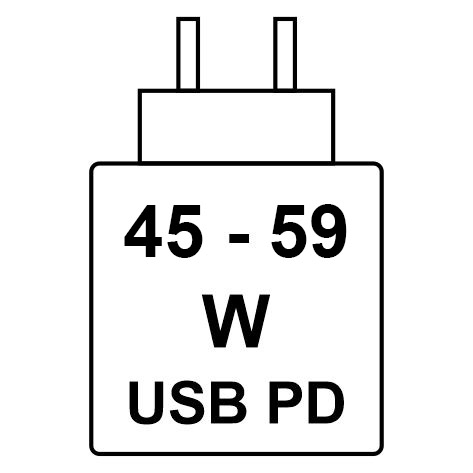
The power that is delivered by the charger must be between a minimum of 45 Watts that is required by the radio equipment, and a maximum of 59 Watts in order to achieve the maximum charging speed.
This computer supports USB Power Delivery (PD) fast charging.
Power requirements (for computers that are shipped with a 3-cell, 55 Wh battery)
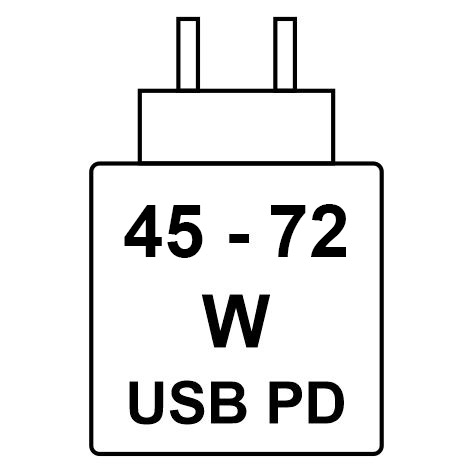
The power that is delivered by the charger must be between a minimum of 45 Watts that is required by the radio equipment, and a maximum of 72 Watts in order to achieve the maximum charging speed.
This computer supports USB Power Delivery (PD) fast charging.
Display
The following table lists the display specifications of your Dell Pro 13 Plus/Dell Pro 13 Plus 2-in-1.
| Description | Option one | Option two | Option three | Option four | Option five | |
|---|---|---|---|---|---|---|
| Display type |
13.3-inch Full High Definition Plus (FHD+) |
13.3-inch Full High Definition Plus (FHD+) | 13.3-inch Full High Definition Plus (FHD+), ComfortView Plus | 13.3-inch Full High Definition Plus (FHD+) | 13.3-inch Full High Definition Plus (FHD+) | |
| Display-panel technology |
In-Plane Switching (IPS), White Light Emitting Diode (WLED) |
13.3-inch Full High Definition Plus (FHD+), ComfortView Plus | In-Plane Switching (IPS), White Light Emitting Diode (WLED) | In-Plane Switching (IPS), White Light Emitting Diode (WLED) | In-Plane Switching (IPS), Wide-viewing angle (WVA) | |
| Display-panel dimensions (active area): | ||||||
| Height | 178.78 mm (7.04 in.) | 178.78 mm (7.04 in.) | 178.78 mm (7.04 in.) | 178.78 mm (7.04 in.) | 178.78 mm (7.04 in.) | |
| Width | 286.04 mm (11.26 in.) | 286.04 mm (11.26 in.) | 286.04 mm (11.26 in.) | 286.04 mm (11.26 in.) | 286.04 mm (11.26 in.) | |
| Diagonal | 337.31 mm (13.20 in.) | 337.31 mm (13.20 in.) | 337.31 mm (13.20 in.) | 337.31 mm (13.20 in.) | 337.31 mm (13.20 in.) | |
| Display-panel native resolution | 1920 x 1200 | 1920 x 1200 | 1920 x 1200 | 1920 x 1200 | 1920 x 1200 | |
| Luminance (typical) | 300 nits | 300 nits | 400 nits | 300 nits | 400 nits | |
| Megapixels | 2.304 | 2.304 | 2.304 | 2.304 | 2.304 | |
| Color gamut | 45% NTSC | 100% sRGB | 100% sRGB | 100% sRGB | 45% NTSC | |
| Pixels Per Inch (PPI) | 170 ppi | 170 ppi | 170 ppi | 170 ppi | 170 ppi | |
| Contrast ratio (typical) | 800:1 | 900:1 | 1200:1 | 1000:1 | 800:1 | |
| Response time (maximum) | 35 ms | 35 ms | 35 ms | 35 ms | 35 ms | |
| Refresh rate | 60 Hz | 60 Hz | 60 Hz | 60 Hz | 60 Hz | |
| Horizontal view angle | +/- 80 degrees (min) | +/- 80 degrees (min) | +/- 80 degrees (min) | +/- 80 degrees (min) | +/- 80 degrees (min) | |
| Vertical view angle | +/- 80 degrees (min) | +/- 80 degrees (min) | +/- 80 degrees (min) | +/- 80 degrees (min) | +/- 80 degrees (min) | |
| Pixel pitch |
0.149 mm x 0.149 mm |
0.149 mm x 0.149 mm |
0.149 mm x 0.149 mm |
0.090 mm x 0.090 mm |
0.149 mm x 0.149 mm |
|
| Power consumption (maximum) | 3.77 W |
3.50 W |
2.45 W | 4.20 W | 4.81 W | |
| Anti-glare vs glossy finish | Anti-glare | Anti-glare | Anti-glare | Glossy | Anti-glare | |
| Touch options | No | Yes | No | Yes | No | |
GPU—Integrated
The following table lists the specifications of the integrated Graphics Processing Unit (GPU) supported by your Dell Pro 13 Plus/Dell Pro 13 Plus 2-in-1.
| Controller | Memory size | Processor |
|---|---|---|
| AMD Radeon 740M Graphics | Shared system memory | AMD Ryzen 3 210 |
| AMD Radeon 740M Graphics | Shared system memory | AMD Ryzen 3 220 |
| AMD Radeon 740M Graphics | Shared system memory | AMD Ryzen 5 PRO 220 |
| AMD Radeon 740M Graphics | Shared system memory | AMD Ryzen 5 PRO 215 |
| AMD Radeon 760M Graphics | Shared system memory | AMD Ryzen 5 PRO 230 |
| AMD Radeon 780M Graphics | Shared system memory | AMD Ryzen 7 PRO 250 |
| AMD Radeon 840M Graphics | Shared system memory | AMD Ryzen AI 5 PRO 340 |
| AMD Radeon 860M Graphics | Shared system memory | AMD Ryzen AI 7 PRO 350 |
| AMD Radeon 890M Graphics | Shared system memory | AMD Ryzen AI 9 HX PRO 370 |
Hardware security
The following table lists the hardware security of your Dell Pro 13 Plus/Dell Pro 13 Plus 2-in-1.
| Hardware security |
|---|
| Trusted Platform Module (TPM) 2.0 discrete |
| FIPS 140-2 certification for TPM |
| TCG Certification for TPM (Trusted Computing Group) |
| Fingerprint reader in powerbutton with ControlVault 3+ |
| Contacted Smart card and ControlVault 3+ |
| Contactless Smart card, NFC, and ControlVault 3+ |
| SED SSD NVMe, SSD and HDD (Opal and non-Opal) per SDL |
| Chassis Intrusion Detection |
| BIOS - TPM clear and/or system boot lock after chassis intrusion detection |
Contactless smart card reader
This section lists the contactless smart card reader specifications of your Dell Pro 13 Plus/Dell Pro 13 Plus 2-in-1. This module is only available in computers that are shipped with smart card readers.
| Title | Description | Dell ControlVault 3 Plus Contactless smart card reader with NFC |
|---|---|---|
| FeliCa Card Support | Reader and software capable of supporting FeliCa contactless cards | Yes |
| Prox (Proximity) (125 KHz) Card support | Reader and software capable of supporting Prox /Proximity/125 KHz contactless cards | No |
| ISO 14443 Type A Card Support | Reader and software capable of supporting ISO 14443 Type A contactless cards | Yes |
| ISO 14443 Type B Card Support | Reader and software capable of supporting ISO 14443 Type B contactless cards | Yes |
| ISO/IEC 21481 | Reader and software capable of supporting ISO/IEC 21481 compliant contactless cards and tokens | Yes |
| ISO/IEC 18092 | Reader and software capable of supporting ISO/IEC 18092 compliant contactless cards and tokens | Yes |
| ISO 15693 Card Support | Reader and software capable of supporting ISO15693 contactless cards | Yes |
| NFC Tag Support | Supports reading and processing of NFC compliant tag information | Yes |
| NFC Reader Mode | Support for NFC Forum Defined Reader mode | Yes |
| NFC Writer Mode | Support for NFC Forum Defined Writer mode | Yes |
| NFC Peer-to-Peer Mode | Support for NFC Forum Defined Peer to Peer mode | Yes |
| NFC Proximity OS Interface | Enumerates NFP (Near Field Proximity) device for operating system to utilize | Yes |
| PC/SC operating system interface | Personal Computer/Smart Card specification for integration of hardware readers into personal computer environments | Yes |
| CCID driver compliance | Common driver support for Integrated Circuit Card Interface Device for operating system level drivers | Yes |
| Dell ControlVault support | The device connects to Dell ControlVault for usage and processing | Yes |
| Interface | Card type | Supported functionality |
|---|---|---|
| NFC Forum (Microsoft Proximity Device) | Type 1 tag | Read/Write NDEF |
| Type 2 tag | Read/Write NDEF | |
| Type 3 tag | Read/Write NDEF | |
| Type 4 tag | Read/Write NDEF | |
| Type 5 tag | Read/Write NDEF | |
| P2P | Exchange NDEF | |
| RFID (Microsoft Smartcard Device) | ISO14443A | Read UUID and APDU Exchange (ISO7816) |
| ISO14443B | Read UUID and APDU Exchange (ISO7816) | |
| Sony FeliCa | Read UUID only | |
| Legacy iClass (ISO15693) | Read UUID only | |
| MIFARE Classic | Read UUID only | |
| Low Frequency (125 KHz ) | Not supported |
| Manufacturer | Card |
|---|---|
| HID | jCOP readertest3 A card (14443a) |
| 1430 1L | |
| DESFire D8H | |
| DESFIRE 4K Standard - 1450NGGNN | |
| iClass 16K/16 - 2002PGGMN | |
| iClass SR 16K/16 - 2002HPGGMN | |
| iCLASS 2K tag | |
| iCLASS GP - 2003 PGGMN | |
| iClass Clamshell - 2080PMSMV | |
| iClass Prox 16K/16 - 2022BGGMNN | |
| MIFARE M1P 1430 NGGNN | |
| iclass Prox 2020BGGMNM | |
| DesFire D8P 1456CSGMN | |
| iCLASS MIFARE Px GM49Y 2623BNPGGBNAB | |
| iCLASS MIFARE Px 8M1L | |
| iClass SEOS JW 5006PGGMN | |
| Crescendo iCLASS Px G8H | |
| iCLASS Seos IY | |
| SEOS JMC4 J1Y 5806VNG1NNN4 | |
| SEOS Key FOB 5266PNNA | |
| SEOS Clamshell 5656PMSAV | |
| SEOS + Prox 5106RGGMNN | |
| SEOS + DESFire 5906PNG1ANN7 | |
| SEOS iClass 5006PGGMN7 | |
| Seos Essential + Prox 551PPGGANN | |
| iCLASS 2K 2000PGGMN | |
| iCLASS 2K 3000PGGMN | |
| MIFARE DESFire 3700CPGGAN | |
| iCLASS DP | |
| DESFire 1Y | |
| NXP/MIFARE | MIFARE DESFire 8K White PVC card |
| MIFARE Classic 1K White PVC card | |
| NXP MIFARE Classic S50 ISO card | |
| MIFARE DESFire 2K | |
| MIFARE Plus S 2K/4K | |
| MIFARE Plus X 4K | |
| G&D | idOnDemand - SCE3.2 144K |
| SCE6.0 FIPS 80K Dual + 1K MIFARE | |
| SCE6.0 nonFIPS 80K Dual + 1K MIFARE | |
| SCE6.0 FIPS 144K Dual + 1K MIFARE | |
| SCE6.0 nonFIPS 144K Dual + 1K MIFARE | |
| SCE7.0 FIPS 144K | |
| Oberthur | idOnDemand - OCS5.2 80K |
| ID-One Cosmo 64 RSA D V5.4 T = 0 card | |
| ID-One Cosmo 128K V5.5 card | |
| Gemalto | TOP DL GX4 144K card |
| Sony | FeliCa RC-S962 |
| FeliCa RC-S965 | |
| FeliCa RC-S966 | |
| PIVKey | C910 PKI |
| NIST | PIV1 |
| IDENTIV | PIV programmed cards |
| uTrust | |
| Transport cards | Oyster (London) MIFARE DESFire |
| T-Money (Korea) | |
| Octopus Card (Hong Kong) | |
| SUICA (Japan) |
| NFC tag | Supported |
|---|---|
| Tap and do - NFC Forum Type 1 Tag - Topaz 512 (BCM920203) | Yes |
| Tap and do - NFC Forum Type 1 Tag - Topaz 512 (BCM20203T512) | Yes |
| Tap and do - NFC Forum Type 1 Tag - Topaz (BCM20203T96) | Yes |
| Tap and do - NFC Forum Type 2 Tag - MIFARE UltraLight | Yes |
| Tap and do - NFC Forum Type 2 Tag - MIFARE UltraLight C | Yes |
| Tap and do - NFC Forum Type 2 Tag - NTAG203 | Yes |
| Tap and do - NFC Forum Type 3 Tag - FeliCa Lite RC-S965 | Yes |
| Tap and do - NFC Forum Type 3 Tag - FeliCa RC-S962 | Yes |
| Tap and do - NFC Forum Type 4 Tag - MIFARE DESFire EV1Card 2K | Yes |
| Tap and do - NFC Forum Type 4 Tag - MIFARE DESFire EV1Card 4K | Yes |
| Tap and do - NFC Forum Type 4 Tag - MIFARE DESFire EV1Card 8K | Yes |
| Tap and do - ISO 15693 - Tag-it Plus | Yes |
| HID I-code ISO card | Yes |
Contacted smart card reader
The following table lists the contacted smart card reader specifications of your Dell Pro 13 Plus/Dell Pro 13 Plus 2-in-1.
| Title | Description | Dell ControlVault 3 Plus Contacted smart card reader |
|---|---|---|
| ISO 7816-3 Class A Card Support | Reader capable of reading 5 V powered smart card | Yes |
| ISO 7816-3 Class B Card Support | Reader capable of reading 3 V powered smart card | Yes |
| ISO 7816-3 Class C Card support | Reader capable of reading 1.8 V powered smart card | Yes |
| T = 0 support | Cards support character level transmission | Yes |
| T = 1 support | Cards support block level transmission | Yes |
| EMVCo Certified | Formally certified based on EMVCo smart card standards | Yes |
| PC/SC operating system interface | Personal Computer/Smart Card specification for integration of hardware readers into personal computer environments | Yes |
| CCID driver compliance | Common driver support for Integrated Circuit Card Interface Device for operating system level drivers | Yes |
| Windows Certified | Certified by the Windows Hardware Certification program | Yes |
| FIPS 201 (PIV/HSPD-12) Compliant | Device compliant with FIPS 201/PIV/HSPD-12 requirements | Yes |
| ISO 7816-1 Compliant | Specification for the physical characteristics of integrated circuit cards with contacts | Yes |
| ISO 7816-2 Compliant | Specification for the dimensions and location of the contacts | Yes |
| ISO 7816-3 Compliant | Specification for electrical interface and transmission protocols | Yes |
| ISO 7816-4 Compliant | Specification for organization, security and commands for interchange | Yes |
| Dell ControlVault support | Device connects to Dell ControlVault for usage and processing | Yes |
Operating and storage environment
This table lists the operating and storage specifications of your Dell Pro 13 Plus/Dell Pro 13 Plus 2-in-1.
Airborne contaminant level: G1 as defined by ISA-S71.04-1985
| Description | Operating | Storage |
|---|---|---|
| Temperature range |
0°C to 35°C (32°F to 95°F) |
-40°C to 65°C (-40°F to 149°F) |
| Relative humidity (maximum) |
10% to 90% (non-condensing) |
0% to 95% (non-condensing) |
| Vibration (maximum)* |
0.66 GRMS |
1.30 GRMS |
| Shock (maximum) |
110 G† |
160 G† |
| Altitude range |
-15.20 m to 3048 m (-49.87 ft to 10000 ft) |
-15.20 m to 10668 m (-49.87 ft to 35000 ft) |
|
CAUTION:Operating and storage temperature ranges may differ among components, so operating or storing the device outside these ranges may impact the performance of specific components.
|
||
* Measured using a random vibration spectrum that simulates the user environment.
† Measured using a 2 ms half-sine pulse.
ComfortView Plus
Blue light is a color in the light spectrum which has a short wavelength and high energy. Chronic exposure to blue light, particularly from digital sources may disrupt sleep patterns and cause long-term effects such as eye strain, eye fatigue, or damage to the eyes.
The display on this computer is designed to minimize blue light and complies with TÜV Rheinland's requirement for low blue light displays.
Low blue light mode is enabled at the factory, so no further configuration is necessary.
To reduce the risk of eye strain, it is also recommended that you:
- Position the display at a comfortable viewing distance between 20 and 28 inches (50 cm and 70 cm) from your eyes.
- Blink frequently to moisten your eyes, wet your eyes with water, or apply suitable eye drops.
- Take an extended break for 20 minutes every two hours.
- Look away from your display, and gaze at a distant object at 20 ft (609.60 cm) away for at least 20 seconds during each break.