




























Dimensions and weight
|
Height: |
||
|
Front |
20.75 mm (0.81 in) | |
|
Rear |
20.75 mm (0.81 in) | |
|
Width |
303.30 mm (11.94 in) | |
|
Depth |
206 mm (8.11 in) | |
|
Weight (maximum) |
1.40 kg (3.08 lb)
|
|
Processors
|
Processor |
Intel Celeron Processor N3060 |
|
Wattage |
6 W |
|
Core count/Thread count |
2/2 |
|
Speed |
Up to 1.6 GHz, 2.48 GHz Boost |
|
L2 cache |
2 MB |
|
L3 cache |
Not supported |
|
Integrated graphics |
Intel HD Graphics 400 GPU |
Chipset
|
Chipset |
Integrated on the processor |
|
DRAM bus width |
64 bits |
|
Flash EPROM |
8 MB |
|
PCIe bus |
Up to Gen2 |
|
External bus frequency |
Up to 5 GT per second |
Memory
|
Slots |
On board RAM | |
|
Type |
LPDDR3 | |
|
Speed |
1600 MHz | |
|
Maximum memory |
4 GB | |
Ports and connectors
|
External: |
|
|
USB |
Two USB 3.1 Gen 1 ports |
|
Audio |
Two Microphone/headphone/headset Combo ports |
|
Video |
One HDMI-out 1.4 port |
|
Memory card reader |
One MicroSD-card slot |
|
Power adapter port |
One power-adapter port |
|
Security |
Noble lock |
Communications
Ethernet
|
Model number |
Not supported |
|
Transfer rate |
Not supported |
Wireless module
|
Model number |
Intel Dual Band Wireless-AC 7265 |
|
Transfer rate |
867 Mbps |
|
Frequency bands supported |
2.4 GHz/5 GHz |
|
Wireless standards |
Wi-Fi 802.11ac |
|
Encryption |
|
|
Bluetooth |
Bluetooth 4.2 |
Audio
|
Type |
High-Definition-Audio | |
|
Controller |
Realtek ALC3256 | |
|
Stereo conversion |
Supported | |
|
Internal interface |
12S | |
|
External interface |
Headset combo jack (stereo headphones/microphone-in) |
|
|
Speakers |
Supported | |
|
Internal speaker amplifier |
Supported | |
|
External volume controls |
Supported | |
|
Speaker output: |
||
|
Average |
2 W | |
|
Peak |
2.5 W | |
|
Subwoofer output |
Not supported | |
|
Microphone |
Supported | |
Storage
|
Storage type |
Interface type |
Capacity |
|---|---|---|
| One embedded multimedia card (eMMC) | eMMC |
|
Media-card reader
|
Type |
One MicroSD-card slot |
|
Cards supported |
MicroSD |
Keyboard
|
Type |
Standard non-backlit keyboard |
|
Layout |
QWERTY |
|
Number of keys |
|
|
Size |
|
Keyboard
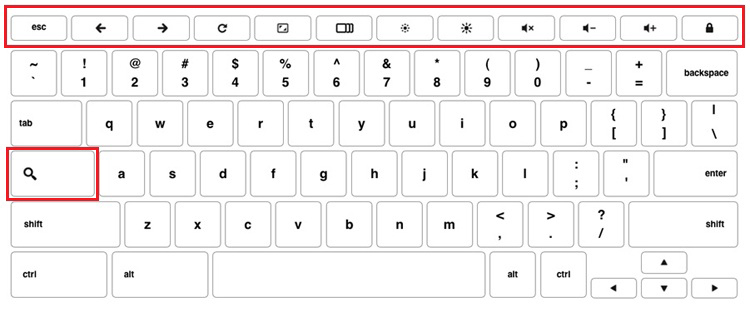
Dell Chromebook keyboards have a few extra features to
help you browse the web effortlessly and efficiently. The keyboard
contains a dedicated search key and a new row of web shortcut keys.
A standard USB Windows keyboard can also be used with the Chromebook,
using the same keyboard shortcuts. The image below shows the keyboard
layout.
Keyboard keys function
The Chrome device keyboard is designed to help you get to the things you need the most. The table below is an overview of the special keys on the top row of the keyboard:
| Special keys | |
|---|---|
 | Go to the previous page in browser history |
 | Go to the next page in browser history |
| Reload current page |
 | Enter Immersive mode, which hides the tabs and launcher |
 | Enter Overview mode, which shows all windows |
 | Decrease screen brightness |
| Increase screen brightness |
 | Mute |
| Decrease the volume |
| Increase the volume |
| Search applications and the web at the same time. On a Chromebook, this key is on the side, where the Caps Lock key is normally located. |
Keyboard shortcut keys
| Shortcut keys | |
|---|---|
| Function | Combination keys |
| Page up | Press Alt and the up arrow |
| Page down | Press Alt and the down arrow |
| Home | Press Ctrl+Alt, and the up arrow |
| End | Press, Ctrl+Alt and the down arrow |
| Delete | Press Alt+Backspace |
| Toggle the bookmark bar | Ctrl+Shift+B |
| Search current webpage | Ctrl+F |
| Open a new tab | Ctrl+T |
| Open a new window | Ctrl+N |
| Open the link you clicked in a new background tab | Press Alt and click a link |
| Switch to next tab | Ctrl+Tab |
| Switch to next window | Switch to next window |
| Sign out of Google Account | Ctrl+Shift+Q |
| Close current tab | Ctrl+W |
To see more shortcuts, simply press Ctrl+Alt+? To open the keyboard viewer on your screen.
Camera
|
Number of cameras |
One | ||
|
Type |
One HD fixed focus | ||
|
Location |
Front | ||
|
Sensor type |
CMOS sensor technology | ||
|
Resolution: |
|||
|
Still image |
1280 x 720 (HD) | ||
|
Video |
1280 x 720 (HD) at 30 fps | ||
|
Diagonal viewing angle: |
75.2 degrees | ||
Touchpad
| Resolution | ||
|
Horizontal |
3061 | |
|
Vertical |
1637 | |
|
Dimensions: |
||
|
Horizontal |
100 mm (3.93 in) | |
|
Vertical |
55 mm (2.16 in) | |
Touchpad
This page contains information for Dell Chromebook touchpad gestures.
The following table lists some gestures and actions supported by the Chromebook touchpad:
| Touchpad gestures | |
|---|---|
| Gestures | Explanation |
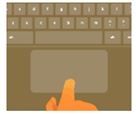 | Simply move your finger across the touchpad. |
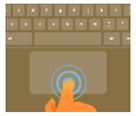 | Press down on the lower half of the touchpad. Since tap-to-click is enabled by default, you can quickly tap the touchpad to click. |
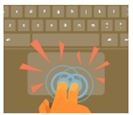 | Click the touchpad with two fingers. |
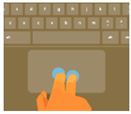 | Place two fingers on the touchpad and move them up and down to scroll vertically, left and right to scroll horizontally. If you have Australian scrolling enabled, move two fingers up to scroll down. (It works in the same way as say, your smartphone or tablet.) If you have multiple browser tabs open, you can also swipe left and right with three fingers to quickly move between tabs. |
| Swipe | Quickly move two fingers left or right to go backward or forward on web pages or while using apps. |
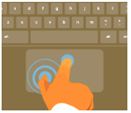 | Click the item you want to move with one finger. With a second finger, move the item. Release both fingers to drop the item at its new location. |
Power adapter
|
Type |
65 W | |
|
Diameter (connector) |
7.4 mm | |
|
Input voltage |
100 VAC-240 VAC | |
|
Input frequency |
50 Hz-60 Hz | |
|
Input current (maximum) |
1.5 A | |
|
Output current (continuous) |
3.34 A | |
|
Rated output voltage |
19.50 VDC | |
|
Temperature range: |
||
|
Operating |
0°C to 40°C (32°F to 104°F) | |
|
Storage |
–40°C to 70°C (–40°F to 158°F) | |
Battery
|
Type |
3-cell “smart” lithium-ion (42 WHr) | ||
|
Voltage |
11.40 VDC | ||
|
Weight (maximum) |
0.2 kg (0.44 lb) | ||
|
Dimensions: |
|||
|
Height |
5.90 mm (0.23 in) | ||
|
Width |
97.15 mm (3.82 in) | ||
|
Depth |
184.15 mm (7.25 in) | ||
|
Temperature range: |
|||
|
Operating |
0°C to 35°C (32°F to 95°F) | ||
|
Storage |
–20°C to 65°C (–40°F to 149°F) | ||
|
Operating time |
Varies depending on operating conditions and can significantly reduce under certain power-intensive conditions. | ||
|
Charging time (approximate) |
|
||
|
Life span (approximate) |
1 year warranty for 300 cycles discharge/charge cycles | ||
|
Coin-cell battery |
CR-2032 | ||
Display
|
Type |
11.6-inch HD non touch |
|
|
Panel technology |
HD Anti-Glare |
|
|
Luminance (typical) |
220 nits |
|
|
Dimensions (active area): |
||
|
Height |
144 mm (5.70 in) | |
|
Width |
256.12 mm (10.08 in) | |
|
Diagonal |
293.83 mm (11.60 in) | |
|
Native resolution |
1366 x 768 | |
|
Pixels Per Inch (PPI) |
135 | |
|
Contrast ratio (minimum) |
16:9 | |
|
Response time (maximum) |
20 msec rise/fall | |
|
Refresh rate |
60 Hz | |
|
Horizontal view angle |
+/-40 degrees |
|
|
Vertical view angle |
+10/-30 degrees |
|
|
Pixel pitch |
0.1875 mm | |
|
Power consumption (maximum) |
2.8 W |
|
|
Anti-glare vs glossy finish |
Anti-glare |
|
|
Touch options |
No |
|
Video
|
The following table provides the detailed integrated graphics specifications of Inspiron 3181 . |
|||
|---|---|---|---|
|
Controller |
External display support |
Memory size |
Memory type |
| Intel HD Graphics | One HDMI port | Shared system memory | System memory |
Computer environment
Airborne contaminant level: G1 as defined by ISA-S71.04-1985
|
Operating |
Storage |
|
|---|---|---|
|
Temperature range |
0°C to 35°C (32°F to 95°F) | –40°C to 65°C (–40°F to 149°F) |
|
Relative humidity (maximum) |
10% to 90% (non-condensing) | 0% to 95% (non-condensing) |
|
Vibration (maximum) |
0.66 GRMS | 1.30 GRMS |
|
Shock (maximum) |
110 G† | 160 G‡ |
|
Altitude (maximum) |
–15.2 m to 3,048 m (–50 ft to 10,000 ft) | –15.2 m to 10,668 m (–50 ft to 35,000 ft) |
* Measured using a random vibration spectrum that simulates user environment.
† Measured using a 2 ms half-sine pulse when the hard drive is in use.
‡ Measured using a 2 ms half-sine pulse when the hard-drive head is in parked position.