




























Dimensions and weight
The following table provides the dimensions and weight of your Inspiron 24 5410 All-in-One without stand.
| Description | Values | |
|---|---|---|
| Height | ||
| Front |
353.80 mm (13.93 in.) NOTE:The height of your computer varies depending on the stand installed.
|
|
| Rear |
358.50 mm (14.11 in.) NOTE:The height of your computer varies depending on the stand installed.
|
|
| Width |
542.70 mm (21.37 in.) |
|
| Depth |
40.20 mm (1.58 in.) |
|
| Weight |
NOTE:The weight of your computer varies depending on the configuration ordered and the manufacturing variability.
|
|
Stand
The following table provides the height, width, depth, and weight of the stand supported by your Inspiron 24 5410 All-in-One.
| Description | Y stand | Isosceles stand |
|---|---|---|
| Height | 96.81 mm (3.81 in.) | 97.56 mm (3.84 in.) |
| Width | 72.25 mm (2.84 in.) | 66.95 mm (2.63 in.) |
| Depth | 199.55 mm (7.85 in.) | 200.77 mm (7.90 in.) |
| Weight | 0.24 kg (0.53 lb) | 0.32 kg (0.71 lb) |
Y stand
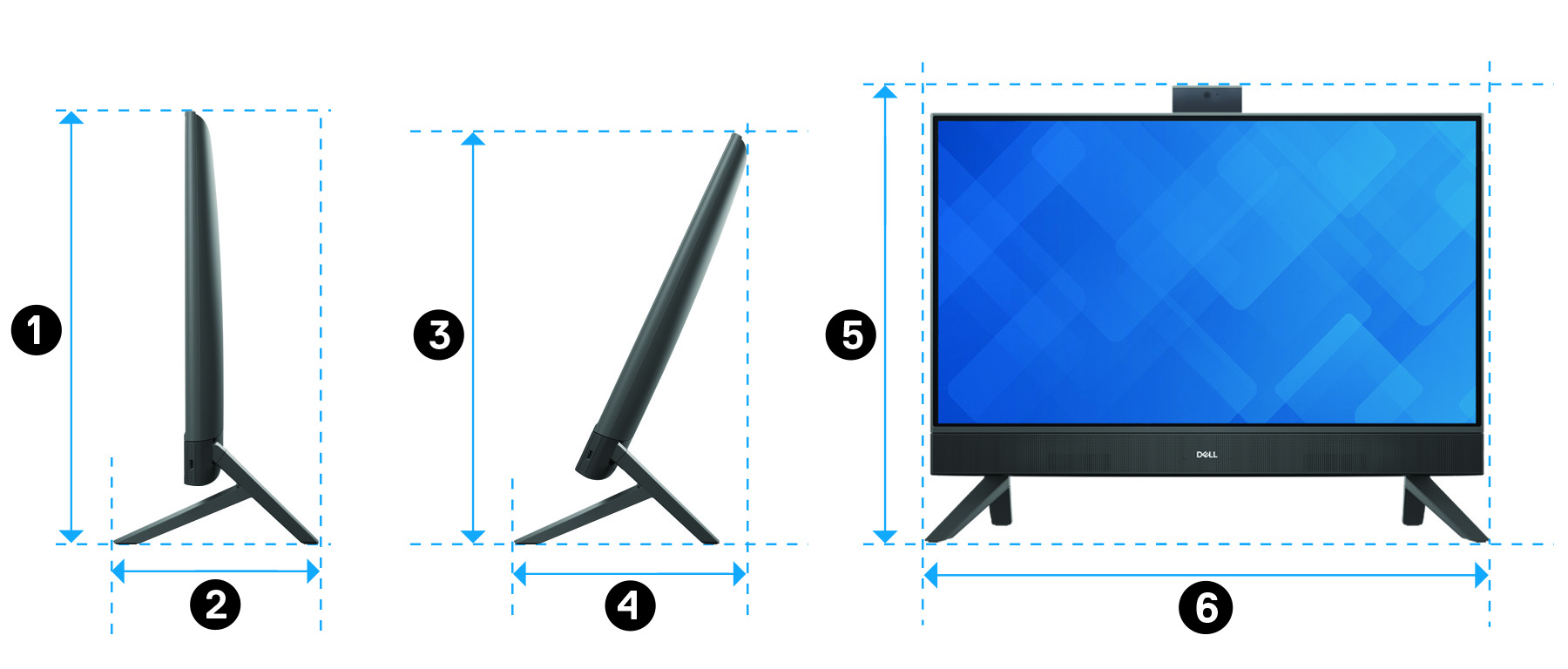
The following table provides the dimensions of the computer with Y stand installed.
| Description | Dimensions |
|---|---|
 | 412.32 mm (16.24 in.) |
| 199.55 mm (7.86 in.) |
 | 390.71 mm (15.38 in.) |
 | 228.19 mm (8.98 in.) |
| 440.30 mm (17.34 in.) |
| 542.70 mm (21.37 in.) |
Isosceles stand
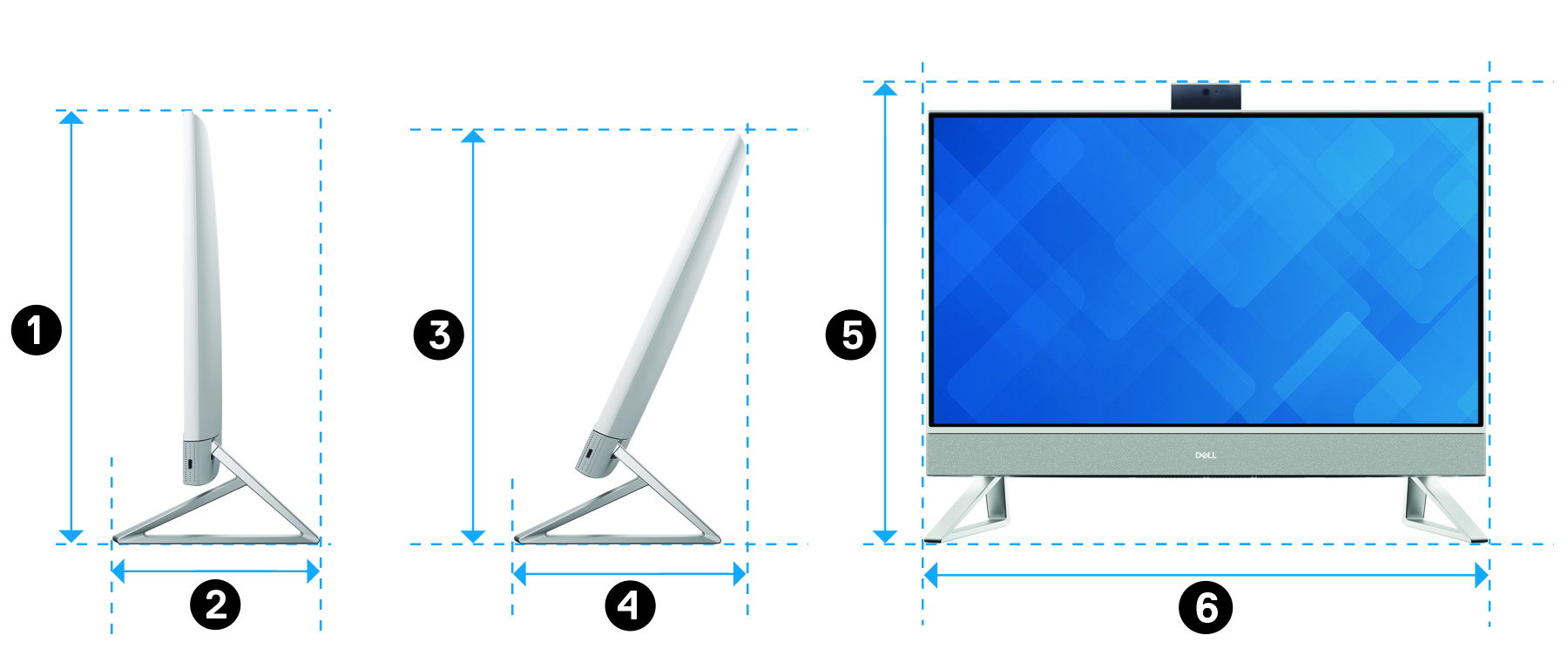
The following table provides the dimensions of the computer with Isosceles stand installed.
| Description | Dimensions |
|---|---|
| 412.32 mm (16.24 in.) |
| 200.77 mm (7.90 in.) |
| 390.71 mm (15.38 in.) |
| 228.87 mm (9.01 in.) |
| 440.30 mm (17.34 in.) |
| 542.70 mm (21.37 in.) |
Processor
The following table lists the details of the processors supported by your Inspiron 24 5410 All-in-One.
| Description | Option one | Option two | Option three | Option four | Option five |
|---|---|---|---|---|---|
| Processor type | Intel Pentium 7305 | Intel Pentium 8505 | 12th Generation Intel Core i3-1215U | 12th Generation Intel Core i5-1235U | 12th Generation Intel Core i7-1255U |
| Processor wattage | 15 W | 15 W | 15 W | 15 W | 15 W |
| Processor core count | 5 | 5 | 6 | 10 | 10 |
| Processor speed | Up to 1.10 GHz | Up to 4.40 GHz | Up to 4.40 GHz | Up to 4.40 GHz | Up to 4.70 GHz |
| Processor cache | 8 MB | 8 MB | 10 MB | 12 MB | 12 MB |
| Integrated graphics | Intel UHD Graphics | Intel UHD Graphics | Intel UHD Graphics |
|
|
Chipset
The following table lists the details of the chipset supported by your Inspiron 24 5410 All-in-One.
| Description | Values |
|---|---|
| Chipset |
Integrated in the processor |
| Processor |
|
| DRAM bus width |
64-bit |
| Flash EPROM |
32 MB |
| PCIe bus |
Up to Gen4.0 |
Operating system
Your Inspiron 24 5410 All-in-One supports the following operating systems:
- Windows 11 Pro, 64-bit
- Windows 11 Home, 64-bit
Memory
The following table lists the memory specifications of your Inspiron 24 5410 All-in-One.
| Description | Values |
|---|---|
| Memory slots |
Two SODIMM slots |
| Memory type |
DDR4 |
| Memory speed |
3200 MHz |
| Maximum memory configuration |
32 GB |
| Minimum memory configuration |
4 GB |
| Memory size per slot |
4 GB, 8 GB, 16 GB, 32 GB |
| Memory configurations supported |
|
Ports and connectors
The following table lists the external and internal ports available on your Inspiron 24 5410 All-in-One.
| Description | Values |
|---|---|
| External: | |
| Network |
One RJ-45 port |
| USB |
NOTE:You can connect a Dell Docking Station to this port. For more information, see the knowledge base article
000124295 at
Dell Support Site.
|
| Audio |
One universal audio jack |
| Video |
|
| Media-card reader |
One SD-card slot |
| Power port |
One 4.5 mm x 2.9 mm DC-in |
| Security |
Not supported |
| Internal: | |
| SATA | One SATA slot for 2.5-inch hard drive |
| M.2 |
NOTE:To learn more about the features of different types of M.2 cards, search in the Knowledge Base Resource at
Dell Support Site.
|
Ethernet
The following table lists the wired Ethernet Local Area Network (LAN) specifications of your Inspiron 24 5410 All-in-One.
| Description | Values |
|---|---|
| Model number |
RTL8111HSD-CG |
| Transfer rate |
10/100/1000 Mbps |
Wireless module
The following table lists the Wireless Local Area Network (WLAN) modules that are supported on your Inspiron 24 5410 All-in-One.
| Description | Option one | Option two |
|---|---|---|
| Model number |
Intel AX201 |
Intel AX211 |
| Transfer rate |
Up to 2400 Mbps |
Up to 2400 Mbps |
| Frequency bands supported |
2.4 GHz/5 GHz |
2.4 GHz/5 GHz/6 GHz |
| Wireless standards |
|
|
| Encryption |
|
|
| Bluetooth wireless card |
Bluetooth 5.2 |
Bluetooth 5.2 |
|
NOTE:The version of the Bluetooth wireless card may vary depending on the operating system that is installed on your computer.
|
||
Audio
The following table lists the audio specifications of your Inspiron 24 5410 All-in-One.
| Description | Values | |
|---|---|---|
| Audio controller |
Realtek ALC3289 |
|
| Stereo conversion |
Supported |
|
| Internal audio interface |
High definition audio |
|
| External audio interface |
Universal audio jack |
|
| Number of speakers |
2 |
|
| Internal-speaker amplifier |
Supported |
|
| External volume controls |
Not supported |
|
| Speaker output: | ||
| Average speaker output |
5 W |
|
| Peak speaker output |
6 W |
|
| Subwoofer output |
Not supported |
|
| Microphone |
Digital-array microphones |
|
Storage
This section lists the storage options on your Inspiron 24 5410 All-in-One.
- One 2.5-inch hard-drive
- One M.2 2230/2280 solid-state drive
- One 2.5-inch hard-drive and one M.2 2230/2280 solid-state drive
- with an M.2 drive, the M.2 drive is the primary drive.
- without an M.2 drive, the 2.5-inch hard drive is the primary drive.
- with both M.2 drive and 2.5-inch hard drive, the M.2 drive is the primary drive.
| Storage type | Interface type | Capacity |
|---|---|---|
|
2.5-inch hard-drive |
SATA AHCI, up to 6 Gbps |
Up to 2 TB |
|
M.2 2230 solid-state drive |
PCIe Gen3 x4 NVMe, up to 32 Gbps |
Up to 1 TB |
|
M.2 2230 solid-state drive |
PCIe Gen4 x4 NVMe, up to 64 Gbps |
Up to 1 TB |
|
M.2 2280, QLC solid-state drive |
PCIe Gen3 x4 NVMe, up to 32 Gbps |
Up to 1 TB |
Media-card reader
The following table lists the media cards supported by your Inspiron 24 5410 All-in-One.
| Description | Values |
|---|---|
| Media-card type |
One SD-card slot |
| Media-cards supported |
|
|
NOTE:The maximum capacity supported by the media-card reader varies depending on the standard of the media card installed in your computer.
|
|
Camera
The following table lists the camera specifications of your Inspiron 24 5410 All-in-One.
| Description | Values | ||
|---|---|---|---|
| Number of cameras |
One |
||
| Camera type |
|
||
| Camera location |
Front camera |
||
| Camera sensor type |
CMOS sensor technology |
||
| Camera resolution: | |||
| Still image |
2.07 megapixel |
||
| Video |
1920 x 1080 (FHD) at 30 fps |
||
| Infrared camera resolution: | |||
| Still image |
0.31 megapixel |
||
| Video |
640 x 480 (VGA) at 30 fps |
||
| Diagonal viewing angle: | |||
| Camera |
82 degrees |
||
| Infrared camera |
77.3 degrees |
||
Display
The following table lists the display specifications of your Inspiron 24 5410 All-in-One.
| Description | Option one | Option two | |
|---|---|---|---|
| Display type |
Full High Definition (FHD) |
Full High Definition (FHD) |
|
| Touch options |
Touch support with 10 touch points |
No |
|
| Display-panel technology |
In-Plane Switching (IPS) |
In-Plane Switching (IPS) |
|
| Display-panel dimensions (active area): | |||
| Height |
296.46 mm (11.67 in.) |
296.46 mm (11.67 in.) |
|
| Width |
527.04 mm (20.75 in.) |
527.04 mm (20.75 in.) |
|
| Diagonal |
604.70 mm (23.80 in.) |
604.70 mm (23.80 in.) |
|
| Display-panel native resolution |
1920 x 1080 |
1920 x 1080 |
|
| Luminance (typical) |
300 nits |
250 nits |
|
| Megapixels |
2.07 |
2.07 |
|
| Color gamut |
99% (sRGB) - typical |
99% (sRGB) - typical |
|
| Pixels Per Inch (PPI) |
92 |
92 |
|
| Contrast ratio (min.) |
700:1 |
700:1 |
|
| Response time (max.) |
25 ms |
25 ms |
|
| Refresh rate |
60 Hz |
60 Hz |
|
| Horizontal view angle |
85 +/- degrees - minimum |
85 +/- degrees - minimum |
|
| Vertical view angle |
85 +/- degrees - minimum |
85 +/- degrees - minimum |
|
| Pixel pitch |
0.2745 mm x 0.2745 mm |
0.2745 mm x 0.2745 mm |
|
| Power consumption (maximum) |
17.24 W |
12.70 W |
|
| Anti-glare vs glossy finish |
Anti-glare |
Anti-glare |
|
Power adapter
The following table lists the power adapter specifications of your Inspiron 24 5410 All-in-One.
| Description | Option one | Option two | |
|---|---|---|---|
| Type |
90 W |
130 W |
|
| Connector dimensions: | |||
| External diameter |
4.50 mm |
4.50 mm |
|
| Internal diameter |
2.90 mm |
2.90 mm |
|
| Power-adapter dimensions: | |||
| Height |
1.30 mm (0.05 in.) |
1.00 mm (0.04 in.) |
|
| Width |
2 mm (0.08 in.) |
3 mm (0.12 in.) |
|
| Depth |
5 mm (0.20 in.) |
6.1 mm (0.24 in.) |
|
| Input voltage |
100 VAC–240 VAC |
100 VAC–240 VAC |
|
| Input frequency |
50 Hz–60 Hz |
50 Hz–60 Hz |
|
| Input current (maximum) |
1.50 A |
2.50 A |
|
| Output current (continuous) |
4.62 A |
6.70 A |
|
| Rated output voltage |
19.50 VDC |
19.50 VDC |
|
| Temperature range: | |||
| Operating |
0°C to 40°C (32°F to 104°F) |
0°C to 40°C (32°F to 104°F) |
|
| Storage |
-40°C to 70°C (-40°F to 158°F) |
-40°C to 70°C (-40°F to 158°F) |
|
|
CAUTION:Operating and storage temperature ranges may differ among components, so operating or storing the device outside these ranges may impact the performance of specific components.
|
|||
GPU—Integrated
The following table lists the specifications of the integrated Graphics Processing Unit (GPU) supported by your Inspiron 24 5410 All-in-One.
| Controller | Memory size | Processor |
|---|---|---|
|
Intel Iris Xe Graphics |
Shared system memory |
12th Generation Intel Core i5/i7
NOTE:If the computer is shipped with
single-memory module, Intel UHD Graphics controller is
used. |
|
Intel UHD Graphics |
Shared system memory |
12th Generation Intel Core i3, Intel Pentium 8505/7305 |
GPU—Discrete
The following table lists the specifications of the discrete Graphics Processing Unit (GPU) supported by your Inspiron 24 5410 All-in-One.
| Controller | Memory size | Memory type |
|---|---|---|
|
NVIDIA GeForce MX550 |
2 GB |
GDDR6 |
Operating and storage environment
This table lists the operating and storage specifications of your Inspiron 24 5410 All-in-One.
Airborne contaminant level: G1 as defined by ISA-S71.04-1985
| Description | Operating | Storage |
|---|---|---|
| Temperature range |
0°C to 35°C (32°F to 95°F) |
-40°C to 65°C (-40°F to 149°F) |
| Relative humidity (maximum) |
10% to 90% (non-condensing) |
0% to 95% (non-condensing) |
| Vibration (maximum)* |
0.66 GRMS |
1.30 GRMS |
| Shock (maximum) |
110 G† |
160 G† |
| Altitude range |
-15.2 m to 3048 m (-49.87 ft to 10000 ft) |
-15.2 m to 10668 m (-49.87 ft to 35000 ft) |
|
CAUTION:Operating and storage temperature ranges may differ among components, so operating or storing the device outside these ranges may impact the performance of specific components.
|
||
* Measured using a random vibration spectrum that simulates user environment.
† Measured using a 2 ms half-sine pulse.